AWS Well-Architected Framework: Guide to High-Performing Cloud Architectures
Learn the AWS Well-Architected Framework, its six pillars, architecture best practices, Well-Architected Reviews, and cloud design strategies.
Building applications in the cloud is easier than ever, but building them correctly is a different challenge altogether. As organizations accelerate cloud adoption, they often focus on speed and innovation while overlooking architecture decisions that affect security, reliability, performance, operational efficiency, sustainability, and long-term costs.
An application may launch successfully but still suffer from recurring downtime, inconsistent performance, escalating AWS bills, security vulnerabilities, or operational complexity. These issues rarely stem from AWS itself, they are usually the result of architectural decisions made during design and deployment.
To help organizations design and operate cloud workloads using proven best practices, Amazon Web Services introduced the AWS Well-Architected Framework. Rather than being a collection of rigid rules, it is a comprehensive decision-making framework that helps architects, engineers, and business leaders evaluate cloud workloads against industry-recognized best practices.
The framework provides structured guidance for designing secure, resilient, scalable, high-performing, cost-efficient, and sustainable architectures across every stage of the cloud lifecycle.
Whether you're migrating enterprise applications, building cloud-native microservices, deploying Kubernetes clusters, developing AI platforms, or modernizing legacy systems, the AWS Well-Architected Framework helps ensure your architecture supports both current business requirements and future growth.
What This Guide Covers
- What the AWS Well-Architected Framework is
- Why AWS created it
- The six architectural pillars
- Core design principles
- The AWS Well-Architected Tool
- Architecture review methodology
- Best practices for enterprise cloud environments
- Common architecture mistakes
- How EaseCloud helps organizations implement AWS best practices
By the end of this guide, you'll understand how the framework serves as the foundation for designing production-ready AWS environments that balance performance, resilience, governance, security, and cost optimization.
What Is the AWS Well-Architected Framework?
The AWS Well-Architected Framework is a collection of architectural best practices, design principles, operational guidance, and review methodologies developed by Amazon Web Services to help organizations build high-quality cloud workloads.
It provides a structured approach for evaluating existing and planned AWS environments across six critical architectural areas known as pillars.
Rather than prescribing a single architecture, the framework helps organizations make informed design decisions based on workload requirements, business objectives, risk tolerance, compliance obligations, and operational priorities.
It is applicable to organizations of all sizes, including:
- Startups
- SaaS companies
- Healthcare providers
- Financial institutions
- Government agencies
- Manufacturing companies
- E-commerce businesses
- Enterprise IT departments
Whether deploying a single application or managing thousands of AWS accounts, the framework provides guidance for continuous architectural improvement.
Why AWS Created the Well-Architected Framework
Cloud computing introduces new design opportunities that differ significantly from traditional on-premises infrastructure.
Organizations can provision resources in minutes, scale globally, automate deployments, and adopt managed services without purchasing physical hardware.
While these capabilities accelerate innovation, they also increase architectural complexity.
Without clear design guidance, organizations often encounter challenges such as:
- Overprovisioned infrastructure
- Poor security configurations
- Weak identity management
- Single points of failure
- Uncontrolled cloud costs
- Limited observability
- Manual operational processes
- Compliance gaps
- Inefficient disaster recovery strategies
AWS developed the Well-Architected Framework to help customers avoid these issues by providing consistent architectural guidance based on years of operating one of the world's largest cloud platforms.
The framework reflects lessons learned from millions of customer workloads across industries and serves as a blueprint for designing reliable and scalable cloud environments.
Why the AWS Well-Architected Framework Matters
Many organizations believe cloud success depends primarily on choosing the right AWS services.
In reality, long-term success depends on how those services are designed, integrated, secured, and operated.
The Well-Architected Framework helps organizations move beyond simply deploying infrastructure to building cloud environments that support business objectives.
Key benefits include:
- Improved application reliability
- Stronger cloud security
- Better operational efficiency
- Lower infrastructure costs
- Faster innovation
- Simplified governance
- Increased resilience
- Better compliance readiness
- Sustainable cloud operations
- Continuous architectural improvement
Rather than reacting to problems after deployment, organizations can proactively identify architectural weaknesses before they affect production systems.
Who Should Use the AWS Well-Architected Framework?
Although originally created for cloud architects, the framework benefits many stakeholders involved in cloud adoption and operations.
Solution Architects
Use the framework to design scalable, resilient, and secure cloud solutions aligned with AWS best practices.
Cloud Architects
Evaluate infrastructure decisions, improve workload resilience, and standardize architecture across multiple teams.
DevOps Engineers
Implement automation, Infrastructure as Code (IaC), CI/CD pipelines, monitoring, and operational excellence practices.
Security Teams
Assess identity management, encryption, logging, threat detection, compliance, and governance controls.
Platform Engineering Teams
Build standardized cloud platforms that promote consistency, automation, and operational efficiency.
Engineering Leadership
Ensure cloud architecture aligns with business objectives, operational goals, and long-term scalability.
Executive Leadership
Gain confidence that cloud investments support business growth while minimizing operational risk.
Benefits of Implementing the AWS Well-Architected Framework
Organizations that regularly perform Well-Architected Reviews often experience measurable improvements across multiple areas.
Better Reliability
Applications become more resilient through:
- Multi-AZ deployments
- Auto Scaling
- Redundancy
- Automated recovery
- Fault isolation
- Disaster recovery planning
This reduces downtime and improves customer experience.
Stronger Security
The framework promotes modern security practices such as:
- Least privilege access
- Encryption
- Identity management
- Continuous monitoring
- Security automation
- Incident response planning
Security becomes integrated into architecture rather than added afterward.
Improved Performance
Architectures are optimized using:
- Elastic scaling
- Appropriate compute selection
- Caching
- Content delivery networks
- Performance monitoring
- Workload optimization
Applications remain responsive even during periods of rapid growth.
Lower Cloud Costs
Architectural improvements often reduce unnecessary spending through:
- Rightsizing resources
- Auto Scaling
- Storage optimization
- Efficient networking
- Managed services
- Consumption-based design
Cost optimization becomes part of architecture rather than an isolated financial exercise.
Operational Excellence
Automation reduces manual effort while improving consistency.
Organizations benefit from:
- Infrastructure as Code
- Automated deployments
- Continuous monitoring
- Automated testing
- Operational runbooks
- Incident management
This enables engineering teams to focus on innovation rather than repetitive maintenance.
Sustainability
Modern cloud architectures can reduce environmental impact by improving resource efficiency.
Organizations can:
- Eliminate idle resources
- Improve utilization
- Optimize storage
- Reduce unnecessary compute consumption
- Design energy-efficient workloads
Sustainability has become an increasingly important architectural consideration for enterprises.
Core Design Principles of the AWS Well-Architected Framework
The framework is built on several foundational design principles that influence every architectural decision.
Stop Guessing Capacity Requirements
Traditional infrastructure planning often requires purchasing hardware months before it is needed.
AWS encourages organizations to use elastic infrastructure that scales automatically based on demand.
Benefits include:
- Improved utilization
- Lower costs
- Better scalability
- Faster deployment
Test Systems at Production Scale
Cloud infrastructure makes it practical to simulate production workloads before applications go live.
Organizations can:
- Perform load testing
- Validate resilience
- Test disaster recovery
- Measure application performance
Testing reduces deployment risk and improves operational confidence.
Automate Everything Possible
Automation is a core principle of cloud architecture.
Examples include:
- Infrastructure provisioning
- Configuration management
- Software deployment
- Monitoring
- Security remediation
- Backup scheduling
Automation improves consistency while reducing human error.
Embrace Evolution
Cloud architectures should continuously evolve.
Organizations should regularly review workloads to:
- Adopt new AWS services
- Improve performance
- Reduce costs
- Strengthen security
- Simplify operations
Continuous improvement is a key characteristic of mature cloud environments.
Build for Failure
Instead of assuming infrastructure will never fail, AWS encourages architects to design systems that continue operating during failures.
Common techniques include:
- Multi-AZ deployments
- Health checks
- Auto Scaling
- Load balancing
- Redundant networking
- Automated failover
This principle significantly improves application resilience.
The Six Pillars of the AWS Well-Architected Framework
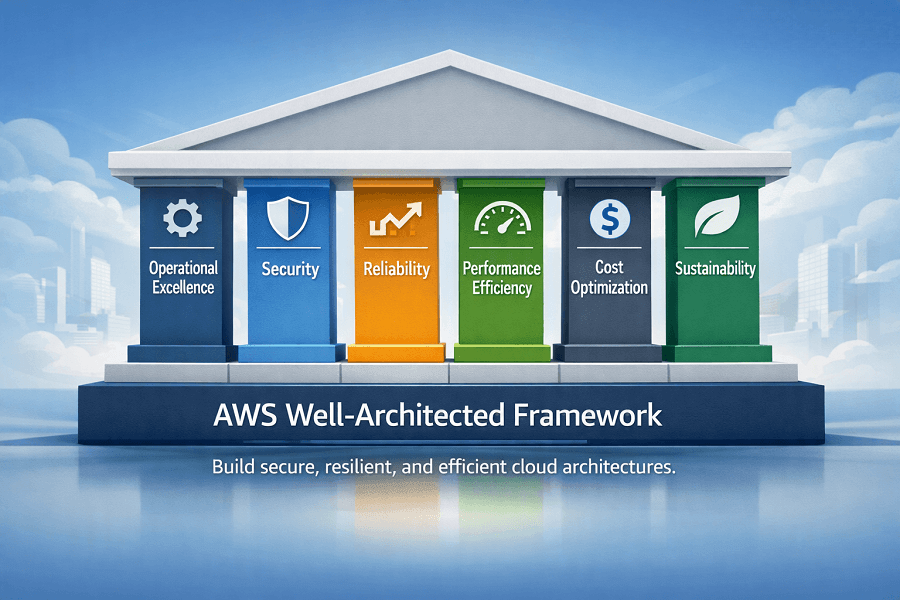
The framework organizes architectural best practices into six interconnected pillars.
Each pillar addresses a different aspect of cloud architecture while complementing the others.
Together, they provide a comprehensive approach to designing production-ready AWS workloads.
The six pillars are:
- Operational Excellence
- Security
- Reliability
- Performance Efficiency
- Cost Optimization
- Sustainability
Rather than optimizing one pillar in isolation, organizations should strive to balance all six according to workload requirements and business priorities.
Overview of Each Pillar
Operational Excellence
Focuses on running and monitoring workloads effectively while continuously improving operational processes.
Key topics include:
- Automation
- Infrastructure as Code
- CI/CD
- Monitoring
- Incident response
- Operational readiness
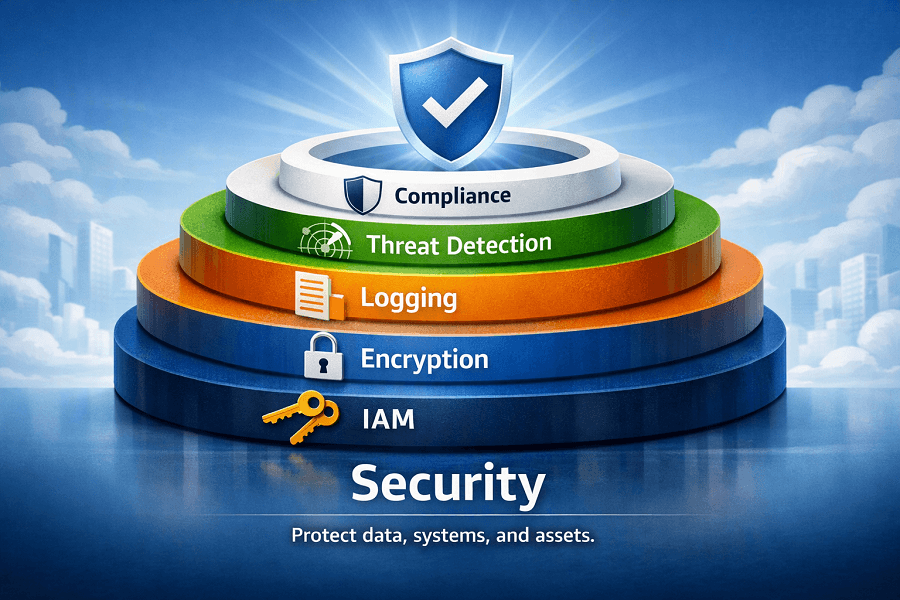
Security
Protects systems, applications, and data through identity management, encryption, monitoring, and governance.
Topics include:
- IAM
- Encryption
- Logging
- Threat detection
- Incident response
- Compliance
Reliability
Ensures workloads continue operating despite failures.
Topics include:
- High Availability
- Auto Scaling
- Disaster Recovery
- Fault Tolerance
- Backup
- Resilience
Performance Efficiency
Optimizes resource utilization while maintaining application performance.
Topics include:
- Compute selection
- Storage optimization
- Networking
- Caching
- Serverless
- Containers
Cost Optimization
Helps organizations maximize business value while minimizing unnecessary infrastructure spending.
Topics include:
- Resource rightsizing
- Savings Plans
- Reserved Instances
- Cost monitoring
- FinOps
- Governance
Sustainability
Encourages environmentally responsible cloud architecture by improving resource efficiency and reducing waste.
Topics include:
- Energy efficiency
- Resource utilization
- Storage lifecycle
- Efficient architecture
- Workload optimization
Introducing the AWS Well-Architected Tool
To help organizations apply the framework consistently, AWS provides the AWS Well-Architected Tool.
The tool enables architects and engineering teams to:
- Review cloud workloads
- Answer structured assessment questions
- Identify architectural risks
- Receive improvement recommendations
- Track remediation progress
- Monitor workload maturity over time
Rather than replacing architectural expertise, the tool provides a standardized review process based on AWS best practices.
For organizations managing multiple workloads, it helps establish consistency and supports continuous improvement across cloud environments.
Pillar 1: Operational Excellence
Operational Excellence focuses on the ability to run workloads efficiently, monitor operations continuously, automate repetitive tasks, and improve processes over time.
Organizations that excel operationally recover faster from incidents, deploy software more frequently, and reduce operational risk through automation and standardization.
The Operational Excellence pillar encourages teams to treat operations as a continuous improvement process rather than a one-time setup.
Design Principles
AWS recommends several key principles for Operational Excellence:
- Perform operations as code
- Make frequent, small, reversible changes
- Continuously refine operational procedures
- Anticipate failures before they occur
- Learn from operational events
- Automate repetitive operational tasks
These principles reduce manual effort while improving consistency and reliability.
AWS Services Supporting Operational Excellence
Several AWS services contribute to operational maturity:
AWS CloudFormation
Automates infrastructure deployment using Infrastructure as Code (IaC).
Benefits include:
- Version-controlled infrastructure
- Repeatable deployments
- Reduced configuration drift
- Faster provisioning
AWS Systems Manager
Provides centralized operational management.
Capabilities include:
- Patch management
- Configuration management
- Remote access
- Inventory management
- Automation runbooks
Amazon CloudWatch
Supports operational visibility through:
- Metrics
- Dashboards
- Alarms
- Logs
- Application monitoring
- Custom metrics
CloudWatch enables engineering teams to detect issues before they impact users.
AWS CloudTrail
Records API activity across AWS accounts.
CloudTrail helps organizations:
- Audit changes
- Investigate incidents
- Meet compliance requirements
- Monitor administrative activity
AWS CodePipeline
Supports Continuous Integration and Continuous Deployment (CI/CD).
Benefits include:
- Automated releases
- Faster software delivery
- Reduced deployment risk
- Standardized release processes
Operational Excellence Best Practices
Organizations should:
- Automate infrastructure provisioning
- Use Infrastructure as Code
- Build CI/CD pipelines
- Monitor workloads continuously
- Create operational runbooks
- Define incident response procedures
- Review architecture regularly
- Document operational processes
Common Operational Excellence Mistakes
Many organizations struggle because they:
- Configure infrastructure manually
- Skip monitoring implementation
- Lack deployment automation
- Fail to document operational procedures
- Ignore post-incident reviews
- Perform production changes without testing
These issues increase operational complexity and reduce deployment confidence.
Enterprise Example
A SaaS company deploying hundreds of releases each month uses:
- AWS CloudFormation
- AWS CodePipeline
- Amazon CloudWatch
- AWS Systems Manager
Automated deployments reduce release time from hours to minutes while improving consistency and minimizing human error.
Pillar 2: Security
Security is one of the most critical pillars of the AWS Well-Architected Framework.
Rather than treating security as an afterthought, AWS encourages organizations to embed security into every layer of their cloud architecture.
The Security pillar focuses on protecting systems, applications, workloads, and data while enabling business agility.
Design Principles
Core security principles include:
- Implement strong identity foundations
- Enable traceability
- Apply security at every layer
- Automate security best practices
- Protect data in transit and at rest
- Prepare for security incidents
Security should be integrated throughout the software development lifecycle.
AWS Services Supporting Security
AWS Identity and Access Management (IAM)
IAM controls authentication and authorization.
Best practices include:
- Least privilege access
- Role-based permissions
- Multi-Factor Authentication (MFA)
- Temporary credentials
- Identity federation
AWS Key Management Service (KMS)
KMS simplifies encryption key management.
Organizations use KMS for:
- Data encryption
- Key rotation
- Compliance
- Secure storage
AWS Secrets Manager
Stores and manages:
- Database credentials
- API keys
- Authentication tokens
- Third-party secrets
Automatic rotation improves security posture.
Amazon GuardDuty
Provides intelligent threat detection.
GuardDuty analyzes:
- AWS account activity
- Network traffic
- DNS logs
- API behavior
Security teams receive alerts when suspicious activity is detected.
AWS Security Hub
Aggregates security findings across multiple AWS services.
It helps organizations monitor compliance and prioritize remediation efforts.
AWS Config
Tracks resource configuration changes.
Organizations use Config to:
- Monitor compliance
- Detect configuration drift
- Audit infrastructure
- Enforce governance policies
AWS CloudTrail
Provides complete visibility into administrative actions.
Every API call becomes part of an auditable security record.
Security Best Practices
Organizations should:
- Enable MFA
- Rotate credentials regularly
- Encrypt sensitive data
- Centralize logging
- Implement least privilege access
- Monitor security continuously
- Patch systems automatically
- Review IAM permissions regularly
Common Security Mistakes
Examples include:
- Overly permissive IAM roles
- Hardcoded credentials
- Unencrypted storage
- Disabled logging
- Publicly accessible databases
- Poor key management
These issues significantly increase organizational risk.
Enterprise Example
A financial services company secures customer workloads using:
- IAM
- KMS
- Secrets Manager
- GuardDuty
- Security Hub
- CloudTrail
Together, these services provide layered security aligned with regulatory requirements.
Pillar 3: Reliability
Reliability ensures workloads continue operating despite failures.
Because failures are inevitable, AWS encourages architects to design systems that recover automatically with minimal disruption.
Reliable systems maintain availability while adapting to changing demand.
Design Principles
AWS recommends:
- Automatically recover from failures
- Test recovery procedures
- Scale horizontally
- Stop guessing infrastructure capacity
- Manage changes through automation
These principles improve resilience and reduce downtime.
AWS Services Supporting Reliability
Amazon EC2 Auto Scaling
Automatically adjusts compute capacity based on demand.
Benefits include:
- Improved availability
- Cost efficiency
- Better performance during traffic spikes
Elastic Load Balancing (ELB)
Distributes traffic across multiple instances.
Supports:
- High availability
- Fault isolation
- Automatic health checks
Amazon Route 53
Provides highly available DNS with:
- Health checks
- Failover routing
- Latency-based routing
- Geolocation routin
Amazon S3
Offers industry-leading durability for object storage.
Common reliability features include:
- Versioning
- Cross-Region Replication
- Lifecycle policies
AWS Backup
Centralizes backup management across AWS services.
Supports:
- Automated backup schedules
- Cross-account backups
- Compliance reporting
Reliability Best Practices
Architects should:
- Deploy across multiple Availability Zones
- Design stateless applications
- Implement health checks
- Automate recovery procedures
- Test disaster recovery regularly
- Monitor application health continuously
Common Reliability Mistakes
Examples include:
- Single EC2 deployments
- No backup strategy
- Missing health checks
- Manual recovery procedures
- Single-region dependency
These weaknesses increase outage risk.
Enterprise Example
An online retail platform uses:
- Multi-AZ Amazon RDS
- Auto Scaling
- Elastic Load Balancer
- Amazon Route 53 Failover
As a result, hardware failures have minimal impact on customer availability.
Pillar 4: Performance Efficiency
Performance Efficiency focuses on selecting the right AWS resources and continuously optimizing workloads.
As applications evolve, architectures should adapt to changing usage patterns and new AWS technologies.
Design Principles
AWS recommends:
- Democratize advanced technologies
- Use serverless architectures
- Experiment frequently
- Scale globally within minutes
- Continuously monitor performance
AWS Services Supporting Performance
Amazon EC2
Choose instance families based on workload characteristics.
Examples include:
- General Purpose
- Compute Optimized
- Memory Optimized
- Storage Optimized
AWS Lambda
Supports event-driven workloads without server management.
Ideal for:
- APIs
- Automation
- Event processing
- Backend services
Amazon ECS & Amazon EKS
Enable container orchestration for scalable cloud-native applications.
Amazon CloudFront
Improves application performance through global content delivery.
Benefits include:
- Lower latency
- Faster content delivery
- Reduced origin traffic
Amazon ElastiCache
Accelerates application performance using in-memory caching.
Supports:
- Redis
- Memcached
Performance Best Practices
Organizations should:
- Benchmark workloads regularly
- Select appropriate compute resources
- Use caching where appropriate
- Optimize database queries
- Minimize latency
- Scale automatically
Common Performance Mistakes
Examples include:
- Oversized databases
- Incorrect instance families
- Missing CDN implementation
- Poor caching strategies
- Ignoring application metrics
Enterprise Example
A streaming platform combines:
- CloudFront
- ElastiCache
- Auto Scaling
- Amazon ECS
This architecture delivers consistent performance for millions of concurrent users.
Pillar 5: Cost Optimization
Although we've already explored AWS Cost Optimization extensively in the previous content cluster, the Well-Architected Framework approaches cost optimization from an architectural perspective.
The goal is to maximize business value while eliminating unnecessary infrastructure expenses.
Design Principles
AWS recommends:
- Adopt cloud financial management
- Measure overall efficiency
- Eliminate unused resources
- Use managed services
- Select the appropriate pricing model
AWS Services Supporting Cost Optimization
Key services include:
- AWS Cost Explorer
- AWS Budgets
- AWS Cost and Usage Report (CUR)
- AWS Compute Optimizer
- AWS Trusted Advisor
- AWS Pricing Calculator
- AWS Organizations
- AWS Billing Dashboard
Architectural Best Practices
Organizations should:
- Design for elasticity
- Implement Auto Scaling
- Rightsize compute resources
- Optimize storage classes
- Purchase Savings Plans
- Review architecture regularly
Common Mistakes
Examples include:
- Idle EC2 instances
- Unused EBS volumes
- Missing Auto Scaling
- Poor storage lifecycle management
- Overprovisioned databases
Pillar 6: Sustainability
The Sustainability pillar is the newest addition to the AWS Well-Architected Framework.
It focuses on reducing the environmental impact of cloud workloads while maintaining business performance.
Sustainability often aligns naturally with cost optimization because efficient resource utilization reduces both energy consumption and cloud spending.
Design Principles
Organizations should:
- Maximize resource utilization
- Eliminate unnecessary workloads
- Select efficient services
- Reduce data movement
- Optimize storage lifecycle
- Measure environmental impact
AWS Services Supporting Sustainability
Examples include:
- AWS Compute Optimizer
- Amazon S3 Lifecycle Policies
- AWS Auto Scaling
- AWS Lambda
- Amazon ECS
- Amazon EKS
- AWS Graviton-based EC2 instances
Sustainability Best Practices
Architects should:
- Use serverless technologies where appropriate
- Shut down idle development environments
- Implement storage lifecycle policies
- Choose energy-efficient instance families
- Optimize data retention policies
Common Sustainability Mistakes
Examples include:
- Running idle infrastructure continuously
- Storing unnecessary data indefinitely
- Using oversized compute resources
- Failing to automate workload scheduling
Organizations that optimize for sustainability often achieve lower operational costs while supporting corporate environmental goals.
What Is an AWS Well-Architected Review?
An AWS Well-Architected Review (WAR) is a structured assessment process that evaluates cloud workloads against AWS best practices.
Rather than acting as a compliance audit, the review helps organizations identify architectural risks, prioritize improvements, and create a roadmap for continuous optimization.
The review examines workloads across all six pillars:
- Operational Excellence
- Security
- Reliability
- Performance Efficiency
- Cost Optimization
- Sustainability
The goal is to answer a simple but important question:
"Is this workload designed according to AWS best practices?"
Organizations typically conduct Well-Architected Reviews:
- Before production deployments
- During cloud migration projects
- After major architectural changes
- Following mergers or acquisitions
- As part of annual cloud governance initiatives
- Before compliance or security audits
Regular reviews help ensure cloud environments remain aligned with evolving business requirements and AWS innovations.
Understanding the AWS Well-Architected Tool
AWS provides the AWS Well-Architected Tool, a free service available through the AWS Management Console.
The tool guides teams through structured questionnaires based on the six pillars and generates actionable recommendations.
Key capabilities include:
- Creating workload assessments
- Reviewing architecture against AWS best practices
- Identifying High Risk Issues (HRIs)
- Tracking remediation progress
- Comparing assessment history
- Collaborating across engineering teams
- Sharing review results with stakeholders
The tool standardizes architecture reviews and provides measurable insights into workload maturity.
How the Review Process Works
Although each organization tailors reviews to its needs, a typical AWS Well-Architected Review follows six stages.
Step 1: Define the Workload
The first step is selecting the workload to assess.
Examples include:
- Customer-facing web applications
- SaaS platforms
- Data analytics pipelines
- Kubernetes environments
- AI and machine learning platforms
- Enterprise ERP systems
- Serverless applications
Clearly defining workload boundaries ensures the review remains focused and actionable.
Step 2: Gather Stakeholders
A successful review involves representatives from multiple disciplines, including:
- Cloud Architects
- Solution Architects
- DevOps Engineers
- Security Teams
- Platform Engineers
- Operations Teams
- Product Owners
- Finance (for cost optimization)
Cross-functional participation provides a complete understanding of technical and business requirements.
Step 3: Complete the Assessment
Teams answer a series of structured questions covering each pillar.
Typical topics include:
| Pillar | Key Topics |
|---|---|
| Operational Excellence | Deployment automation, Monitoring, Incident response, Operational readiness |
| Security | IAM, Encryption, Logging, Network security, Identity management |
| Reliability | Backup strategy, Disaster recovery, High availability, Auto Scaling |
| Performance Efficiency | Compute selection, Storage optimization, Networking, Monitoring |
| Cost Optimization | Rightsizing, Savings Plans, Resource utilization, FinOps practices |
| Sustainability | Resource efficiency, Workload optimization, Storage lifecycle, Energy-conscious design |
Step 4: Identify High Risk Issues (HRIs)
One of the most valuable outcomes of a Well-Architected Review is identifying High Risk Issues (HRIs).
HRIs represent architectural weaknesses that could significantly affect security, reliability, performance, operational efficiency, or cost.
Examples include:
- Single Availability Zone deployments
- Missing backups
- Overly permissive IAM policies
- Publicly accessible databases
- Manual deployment processes
- Lack of monitoring
- Missing encryption
- No disaster recovery plan
Addressing HRIs should be a priority before expanding or modernizing workloads.
Step 5: Prioritize Improvements
Not every recommendation requires immediate action.
Organizations typically prioritize improvements based on:
- Business impact
- Security risk
- Operational complexity
- Cost
- Customer experience
- Compliance requirements
This creates a practical roadmap rather than an overwhelming list of changes.
Step 6: Continuous Improvement
The AWS Well-Architected Framework is not a one-time project.
Organizations should regularly reassess workloads to:
- Adopt new AWS services
- Improve resilience
- Reduce costs
- Strengthen security
- Simplify operations
- Improve sustainability
Continuous reviews help architectures evolve alongside business growth.
Building Enterprise Cloud Governance
Well-architected workloads depend on strong governance.
Governance ensures cloud environments remain secure, consistent, and aligned with organizational policies.
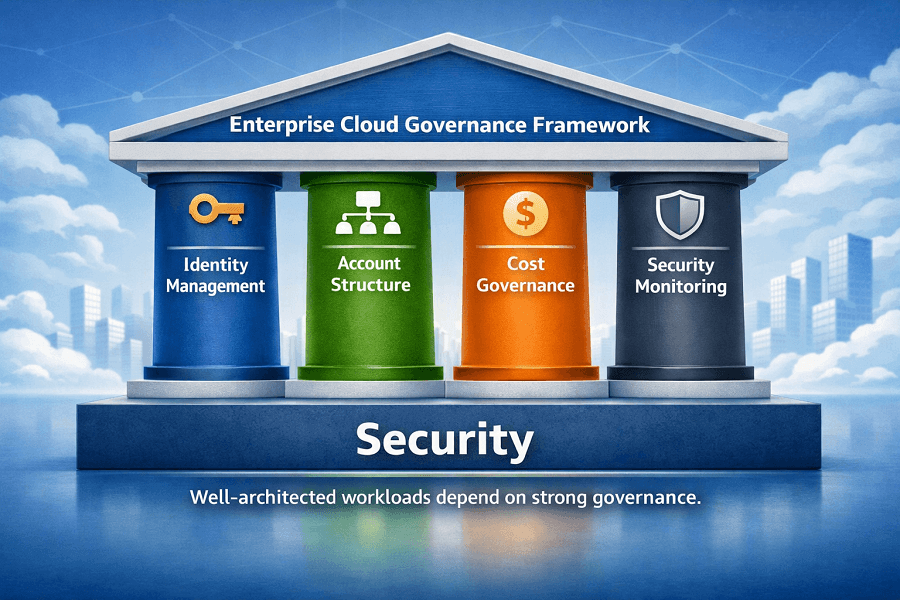
Key governance areas include:
- Identity management
- Resource ownership
- Account structure
- Cost governance
- Compliance
- Security monitoring
- Operational standards
- Architecture reviews
Governance enables organizations to scale cloud adoption without sacrificing control.
AWS Organizations
AWS Organizations provides centralized management for multiple AWS accounts.
Benefits include:
- Consolidated billing
- Organizational Units (OUs)
- Service Control Policies (SCPs)
- Account isolation
- Centralized governance
Large enterprises commonly organize accounts by:
- Business unit
- Environment
- Geography
- Application
- Compliance requirements
AWS Control Tower
AWS Control Tower automates the setup of secure multi-account environments.
Capabilities include:
- Landing Zone deployment
- Account provisioning
- Guardrails
- Identity integration
- Compliance monitoring
It accelerates enterprise cloud adoption while enforcing governance standards.
AWS Landing Zone
A Landing Zone provides a standardized foundation for enterprise AWS environments.
Typical components include:
- Multi-account architecture
- Identity management
- Logging
- Security services
- Networking
- Shared services
- Governance controls
Landing Zones improve consistency across cloud environments.
Automation and Infrastructure as Code
Modern cloud architecture depends heavily on automation.
Manual configuration becomes increasingly difficult as environments grow.
Infrastructure as Code (IaC) enables repeatable, version-controlled deployments.
Popular tools include:
- AWS CloudFormation
- AWS CDK
- Terraform
Benefits include:
- Faster deployments
- Consistent environments
- Reduced configuration drift
- Easier disaster recovery
- Improved auditability
Automation should extend beyond infrastructure to include:
- Security controls
- Compliance checks
- Backup scheduling
- Monitoring
- Patch management
- Scaling policies
Common Architecture Mistakes
Even experienced engineering teams make architectural mistakes.
Recognizing these issues early helps organizations improve workload quality.
Designing for Current Capacity Only
Architectures should anticipate future growth rather than today's traffic.
Ignoring High Availability
Single-instance deployments create unnecessary business risk.
Use Multi-AZ architectures, Auto Scaling, and Load Balancers where appropriate.
Weak Identity Management
Overly broad IAM permissions increase the attack surface.
Adopt least-privilege access and regularly review policies.
Lack of Monitoring
Without comprehensive monitoring, operational issues remain undetected until customers report them.
Implement CloudWatch dashboards, alarms, centralized logging, and tracing.
Manual Infrastructure Management
Manual changes introduce inconsistency and increase operational risk.
Adopt Infrastructure as Code and automated deployment pipelines.
Poor Cost Visibility
Ignoring cost governance during architecture design often results in budget overruns.
Integrate AWS Cost Explorer, Budgets, CUR, and FinOps practices into architectural decisions.
Real-World Example: Applying the Framework
Consider an e-commerce company preparing for seasonal traffic growth.
The company performs a Well-Architected Review and discovers:
Operational Excellence
- Manual deployments
- Limited monitoring
Recommendation:
Implement CloudFormation, CodePipeline, and CloudWatch dashboards.
Security
- Overly permissive IAM roles
- Missing encryption for backups
Recommendation:
Adopt least-privilege access, enable AWS KMS encryption, and use Secrets Manager.
Reliability
- Single-AZ database deployment
Recommendation:
Migrate to Amazon RDS Multi-AZ with automated backups and Route 53 health checks.
Performance Efficiency
- Static EC2 fleet
Recommendation:
Implement Auto Scaling Groups and CloudFront for global content delivery.
Cost Optimization
- Idle development instances
- Unused EBS volumes
Recommendation:
Use AWS Compute Optimizer, Savings Plans, and lifecycle policies.
Sustainability
- Development servers running 24/7
Recommendation:
Automate shutdown schedules for non-production environments.
Following the review, the organization improves resilience, reduces cloud costs, strengthens security, and prepares the platform for future growth.
Conclusion
The AWS Well-Architected Framework is more than a collection of best practices, it is a strategic framework for building cloud environments that deliver long-term business value.
By evaluating workloads across Operational Excellence, Security, Reliability, Performance Efficiency, Cost Optimization, and Sustainability, organizations can identify architectural risks early, improve operational maturity, and support continuous innovation.
Regular Well-Architected Reviews, combined with strong governance, automation, Infrastructure as Code, and FinOps practices, enable organizations to build cloud platforms that are resilient, efficient, and ready to scale.
Whether you're planning your first migration to AWS or modernizing a global enterprise environment, adopting the AWS Well-Architected Framework helps ensure your cloud architecture remains aligned with evolving business and technology requirements.
If you're looking to assess or improve your AWS architecture, EaseCloud's cloud consultants can help you implement AWS best practices, remediate architectural risks, and build a secure, high-performing cloud foundation for future growth.
Frequently Asked Questions
Is the AWS Well-Architected Framework only for enterprises?
No.
Organizations of all sizes, from startups to global enterprises, can benefit from applying the framework.
Smaller teams often use it to establish best practices early, while larger organizations use it to standardize architecture across multiple business units.
How often should a Well-Architected Review be performed?
AWS recommends conducting reviews:
- Before major production launches
- After significant architectural changes
- During migration projects
- At least annually for production workloads
High-change environments may benefit from more frequent assessments.
Does the framework apply only to AWS-native applications?
No.
It can also be applied to hybrid cloud, containerized, serverless, and migrated workloads running on AWS.
The principles remain relevant regardless of application architecture.
Is the AWS Well-Architected Tool free?
Yes.
The AWS Well-Architected Tool is available at no additional cost through the AWS Management Console.
Organizations may choose to work with an AWS Partner, such as EaseCloud, for expert-led assessments and implementation support.
How EaseCloud Helps Organizations Build Well-Architected AWS Environments
At EaseCloud, we help businesses design, assess, and optimize AWS environments using the AWS Well-Architected Framework as the foundation for cloud architecture.
Our consultants work with engineering, security, operations, and leadership teams to ensure cloud environments are scalable, secure, resilient, and aligned with business objectives.
Summarize this post with:
