AWS Compute Optimizer: The Complete Guide to Rightsizing AWS Resources and Reducing Cloud Costs
Learn how AWS Compute Optimizer helps rightsize EC2, EBS, Lambda, and ECS resources to improve performance and reduce AWS cloud costs.

One of the biggest reasons organizations overspend on AWS isn't that they're using too many services but they're using the wrong size resources.
A virtual machine with four times the CPU and memory your application actually needs will continue generating unnecessary costs every hour it runs. Multiply that across dozens or hundreds of workloads, and cloud waste quickly becomes one of the largest contributors to your AWS bill.
This is exactly why AWS introduced AWS Compute Optimizer.
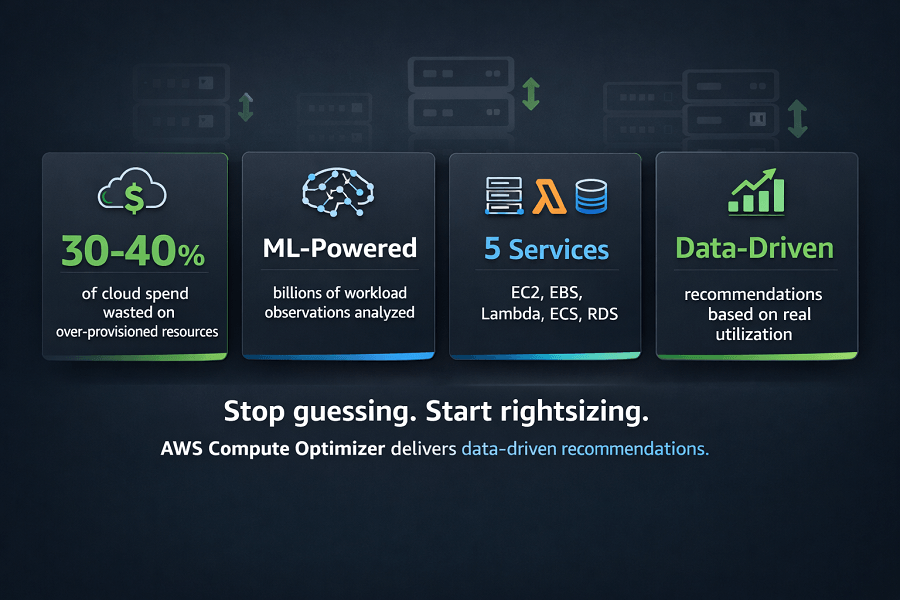
AWS Compute Optimizer analyzes your cloud workloads using machine learning and historical utilization metrics to recommend more efficient AWS resources. Instead of relying on assumptions, organizations receive data-driven recommendations that improve both infrastructure performance and cloud cost efficiency.
Whether you're trying to rightsize Amazon EC2 instances, optimize Amazon EBS volumes, improve AWS Lambda memory allocation, or reduce Amazon ECS infrastructure costs, Compute Optimizer helps engineering teams make informed decisions based on actual workload behavior.
What This Guide Covers:
- What AWS Compute Optimizer is
- How it works
- Which AWS services it supports
- How rightsizing recommendations are generated
- Best practices for implementing recommendations
- Common mistakes to avoid
- How Compute Optimizer fits into a broader AWS Cost Optimization strategy
What Is AWS Compute Optimizer?
AWS Compute Optimizer is a native AWS service that helps organizations identify over-provisioned and under-provisioned cloud resources.
It uses machine learning models trained on billions of workload observations across AWS to analyze resource utilization and recommend configurations that improve both performance and cost efficiency.
Instead of guessing whether an EC2 instance is too large or too small, Compute Optimizer evaluates real usage patterns and suggests more appropriate resource configurations.
Its recommendations are based on metrics such as:
- CPU utilization
- Memory utilization
- Disk throughput
- Disk IOPS
- Network traffic
- Resource usage patterns
- Historical workload behavior
The goal is straightforward:
Run the right infrastructure for your workload, nothing more, nothing less.
Why AWS Compute Optimizer Matters
Cloud environments evolve continuously.
Applications grow.
Traffic changes.
Databases expand.
Engineering teams deploy new services.
Infrastructure that was appropriately sized six months ago may now be significantly oversized or, in some cases, undersized.
Without continuous monitoring, organizations often:
- Pay for unused CPU capacity
- Allocate excessive memory
- Purchase larger instances "just in case"
- Forget to resize development environments
- Continue running old infrastructure long after workloads change
These inefficiencies directly impact monthly AWS costs.
AWS Compute Optimizer helps eliminate this waste by identifying opportunities to improve resource utilization while maintaining application performance.
Instead of manually reviewing hundreds of instances, engineering teams receive automated recommendations backed by historical utilization data.
How AWS Compute Optimizer Works
AWS Compute Optimizer continuously analyzes performance metrics collected from your AWS environment.
It integrates with Amazon CloudWatch, which provides utilization data for supported resources.
The optimization process typically follows these steps:
Step 1: Resource Monitoring
CloudWatch collects operational metrics including:
- CPU utilization
- Memory utilization
- Network throughput
- Disk operations
- Storage activity
These metrics reflect how workloads behave over time rather than during a single point in time.
Step 2: Machine Learning Analysis
AWS Compute Optimizer applies machine learning models to evaluate historical usage patterns.
Rather than recommending resources based on theoretical capacity, recommendations are generated using observed workload behavior.
This approach helps reduce both overprovisioning and underprovisioning.
Step 3: Recommendation Generation
Compute Optimizer compares your current infrastructure with AWS instance families and resource configurations.
Recommendations typically include:
- Recommended instance type
- Estimated performance impact
- Projected cost savings
- Performance risk assessment
Each recommendation is accompanied by a confidence score based on available utilization data.
Step 4: Engineering Review
Recommendations should not be implemented automatically.
Engineering teams should review:
- Application requirements
- Traffic patterns
- Business-critical workloads
- Compliance requirements
- Performance expectations
Rightsizing decisions should always balance cost optimization with operational reliability.
AWS Services Supported by Compute Optimizer
AWS Compute Optimizer supports several core compute and storage services.
Understanding which services are eligible helps organizations prioritize optimization efforts.
Amazon EC2
Amazon EC2 is the most widely optimized service.
Recommendations include:
- Instance family changes
- Instance size adjustments
- CPU optimization
- Memory optimization
- Performance improvements
- Cost savings estimates
For example:
| Field | Value |
|---|---|
| Current Instance | m6i.2xlarge |
| Recommendation | m6i.large |
| Condition | if utilization data indicates excess capacity |
For many organizations, EC2 optimization delivers the largest reduction in monthly AWS spending.
Amazon EBS
Amazon Elastic Block Store (Amazon EBS) provides persistent block storage for EC2 workloads.
Compute Optimizer analyzes:
- Provisioned IOPS
- Storage throughput
- Volume utilization
- Capacity requirements
Recommendations help organizations avoid paying for storage performance they don't actually use.
Storage optimization is particularly valuable for large enterprise environments running hundreds of EBS volumes.
AWS Lambda
Serverless applications can also become inefficient.
Compute Optimizer evaluates AWS Lambda functions by analyzing:
- Memory allocation
- Execution duration
- Invocation patterns
If a Lambda function consistently uses only a fraction of its allocated memory, Compute Optimizer may recommend a lower memory configuration.
Because AWS Lambda pricing depends partly on allocated memory, these adjustments can reduce serverless costs without affecting functionality.
Amazon ECS on AWS Fargate
Organizations running containerized applications on Amazon ECS using AWS Fargate can also receive optimization recommendations.
The service evaluates:
- CPU allocation
- Memory allocation
- Container utilization
- Task sizing
Container workloads frequently become overprovisioned as applications evolve, making periodic optimization essential.
Understanding Rightsizing
One of the most important concepts behind AWS Compute Optimizer is rightsizing.
Rightsizing means selecting cloud resources that match actual workload requirements rather than estimated future demand.
There are three common scenarios.
Over-Provisioned Resources
The infrastructure is significantly larger than necessary.
Examples include:
- CPU utilization below 15%
- Low memory usage
- Idle development servers
- Oversized databases
Result:
Higher AWS costs with little operational benefit.
Under-Provisioned Resources
The infrastructure cannot adequately support application demand.
Common indicators include:
- High CPU utilization
- Memory exhaustion
- Slow application response
- Performance bottlenecks
Result:
Reduced application reliability and poor user experience.
Optimally Sized Resources
Resources closely match workload requirements.
Benefits include:
- Lower infrastructure costs
- Better application performance
- Improved scalability
- Efficient cloud utilization
Rightsizing aims to keep workloads in this optimal state as applications evolve.
Benefits of AWS Compute Optimizer
Organizations using Compute Optimizer consistently report improvements in both operational efficiency and cloud financial management.
Key benefits include:
Lower AWS Costs
Rightsizing eliminates unnecessary infrastructure spending by matching resources to actual demand.
Improved Resource Utilization
Applications make better use of allocated CPU, memory, and storage.
Better Performance Planning
Recommendations help teams proactively address infrastructure bottlenecks before they affect production workloads.
Data-Driven Decisions
Instead of relying on assumptions, engineers receive recommendations backed by real utilization data.
Simplified Cloud Governance
Compute Optimizer supports ongoing infrastructure reviews as part of a broader AWS Cost Optimization and FinOps strategy.
Understanding Finding Categories
AWS Compute Optimizer generally classifies resources into several optimization categories.
Over-Provisioned
The resource has significantly more capacity than required.
Common indicators include:
- Low CPU utilization
- Low memory utilization
- Minimal disk activity
- Low network traffic
| Aspect | Description |
|---|---|
| Business impact | Higher AWS costs with little operational benefit. |
| Typical recommendation | Move to a smaller instance family or instance size. |
Under-Provisioned
The workload requires more resources than currently allocated.
Symptoms include:
- High CPU utilization
- Memory exhaustion
- Application latency
- Performance degradation
Business impact:
Poor customer experience and reduced application reliability.
Typical recommendation:
Upgrade to a larger instance or higher-performance configuration.
Optimized
The workload is appropriately sized.
No immediate action is required.
Organizations should continue monitoring utilization as workloads evolve.
Amazon EC2 Rightsizing
Amazon EC2 typically represents one of the largest components of AWS infrastructure spending.
As a result, EC2 optimization often provides the greatest financial return.
Compute Optimizer evaluates numerous factors before recommending instance changes.
These include:
- CPU utilization
- Memory utilization
- Network throughput
- Storage throughput
- Historical workload trends
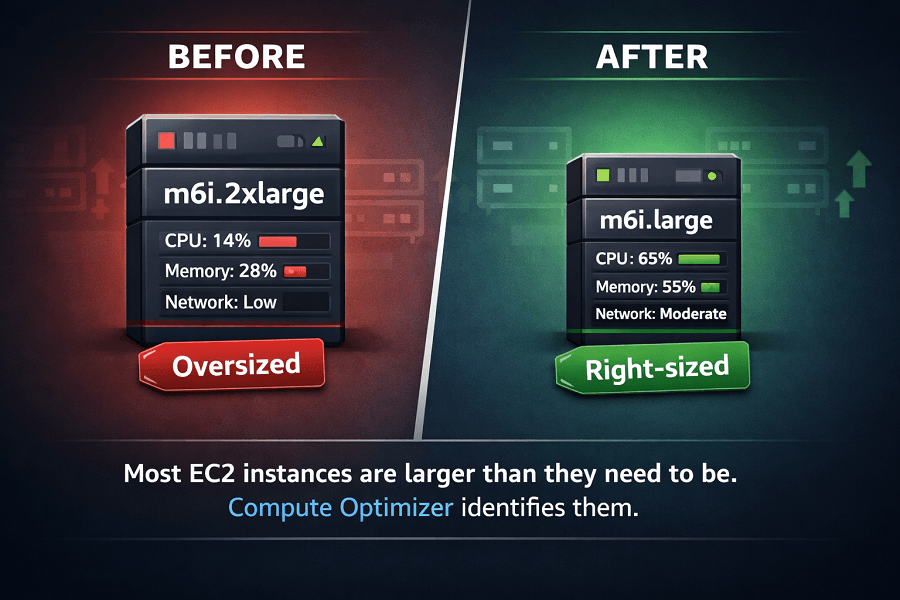
Example EC2 Recommendation
Current infrastructure:
- Instance Type: m6i.2xlarge
- Average CPU Utilization: 14%
- Average Memory Utilization: 28%
Recommendation:
Move to:
m6i.large
Potential benefits:
- Lower monthly compute costs
- Similar application performance
- Improved infrastructure efficiency
This type of optimization is extremely common because many production workloads are initially over-sized to accommodate future growth.
Understanding Instance Families
AWS Compute Optimizer may also recommend changing instance families rather than simply resizing within the same family.
Examples include:
| Category | Series |
|---|---|
| General Purpose | M Series |
| Compute Optimized | C Series |
| Memory Optimized | R Series |
| Storage Optimized | I Series |
| Burstable | T Series |
For example:
A workload running on a Memory Optimized instance with minimal memory utilization may receive a recommendation to migrate to a General Purpose instance.
Selecting the correct instance family often produces larger savings than simply selecting a smaller size.
Amazon EBS Optimization
Storage costs increase steadily over time.
Many organizations provision larger Amazon EBS volumes than necessary or purchase unnecessary IOPS capacity.
Compute Optimizer analyzes:
- Provisioned storage
- Read throughput
- Write throughput
- Disk IOPS
- Storage utilization
Common recommendations include:
- Reduce provisioned IOPS
- Select another EBS volume type
- Resize storage capacity
- Improve storage efficiency
Optimizing storage is particularly valuable for enterprise environments running hundreds or thousands of EBS volumes.
AWS Lambda Optimization
Serverless architecture workloads are frequently assumed to be automatically optimized.
However, Lambda memory allocation directly influences pricing.
Many functions receive far more memory than they actually require.
Compute Optimizer analyzes:
- Memory allocation
- Execution duration
- Invocation frequency
- Historical execution metrics
Example:
| Metric | Value |
|---|---|
| Current Memory | 2048 MB |
| Actual Average Usage | 512 MB |
| Recommendation | Reduce allocated memory. |
Benefits:
- Lower Lambda costs
- Similar execution performance
- Improved serverless efficiency
Organizations operating hundreds of Lambda functions often discover significant optimization opportunities.
Amazon ECS Optimization
Containerized applications frequently become oversized as engineering teams prepare for future traffic growth.
Compute Optimizer evaluates:
- CPU allocation
- Memory allocation
- Task utilization
- Container resource consumption
Recommendations may include:
- Smaller task sizes
- Reduced CPU allocation
- Lower memory allocation
- Better workload distribution
Optimizing Amazon ECS workloads helps improve container density while reducing infrastructure costs.
Using CloudWatch Metrics with Compute Optimizer
AWS Compute Optimizer depends heavily on Amazon CloudWatch.
CloudWatch provides utilization data including:
- CPU usage
- Memory metrics
- Disk operations
- Network activity
Without sufficient monitoring data, recommendations become less accurate.
Best practices include:
- Enable detailed monitoring where appropriate.
- Collect memory metrics for EC2 workloads.
- Review CloudWatch dashboards regularly.
- Monitor trends rather than isolated spikes.
CloudWatch provides the operational visibility required for effective rightsizing decisions.
Compute Optimizer vs AWS Cost Explorer
Although these services support cloud cost optimization, they solve different problems.
A typical workflow looks like this:
- AWS Cost Explorer identifies expensive EC2 workloads
- AWS Compute Optimizer recommends smaller instance sizes
- Engineering implements changes
- AWS Cost Explorer validates savings
These tools complement one another rather than compete.
Compute Optimizer vs AWS Trusted Advisor
AWS Trusted Advisor identifies general optimization opportunities.
Examples include:
- Idle Elastic IPs
- Idle Load Balancers
- Underutilized EC2 instances
- Security recommendations
- Service limits
AWS Compute Optimizer provides deeper infrastructure analysis.
Instead of simply identifying underutilized resources, it recommends:
- Specific EC2 instance types
- Storage configurations
- Lambda memory settings
- ECS task sizing
Trusted Advisor tells you where problems exist.
Compute Optimizer tells you how to fix them.
Common Rightsizing Mistakes
Organizations sometimes misunderstand optimization recommendations.
Avoid these common mistakes.
Automatically Accepting Every Recommendation
Recommendations should always be reviewed by engineering teams.
Critical production applications may require additional capacity for business continuity.
Optimizing Based on Short-Term Metrics
One unusually quiet week doesn't necessarily justify downsizing production infrastructure.
Always evaluate historical workload behavior.
Ignoring Seasonal Demand
Retail, education, travel, and media companies often experience seasonal traffic spikes.
Rightsizing decisions should consider annual workload patterns.
Focusing Only on Cost
Optimization should balance:
- Cost
- Performance
- Reliability
- Availability
- Scalability
Reducing infrastructure costs should never compromise business-critical applications.
Real-World Rightsizing Example
Imagine a SaaS company operating:
- 120 Amazon EC2 instances
- 40 Amazon RDS databases
- 250 Amazon EBS volumes
After enabling AWS Compute Optimizer, engineers discover:
- 35 EC2 instances are oversized.
- 18 EBS volumes have excessive provisioned IOPS.
- 12 Lambda functions use unnecessary memory.
- Several ECS services allocate twice the required CPU.
Rather than making changes immediately, the engineering team reviews each recommendation, tests modifications in staging, and gradually implements updates in production.
Within a few months, the company significantly improves infrastructure efficiency while maintaining application performance.
Best Practices for Implementing AWS Compute Optimizer Recommendations
AWS Compute Optimizer provides valuable recommendations, but achieving long-term cost savings requires a structured implementation process. Applying recommendations without proper validation can introduce performance risks, while ignoring them leaves unnecessary costs on the table.
The following best practices help organizations balance cost efficiency with operational reliability.
1. Review Recommendations Before Making Changes
AWS Compute Optimizer recommendations should be treated as informed guidance rather than automatic instructions.
Before changing production infrastructure, engineering teams should evaluate:
- Business-critical workloads
- Performance requirements
- Peak traffic periods
- Compliance requirements
- Service Level Agreements (SLAs)
- Disaster recovery considerations
For example, an EC2 instance with consistently low CPU utilization may still require additional capacity to handle unpredictable traffic spikes or scheduled batch processing.
2. Test Changes in Non-Production Environments
Whenever possible, implement rightsizing recommendations in a development or staging environment before deploying them to production.
Testing allows teams to:
- Validate application performance
- Measure response times
- Monitor CPU and memory usage
- Identify compatibility issues
- Detect unexpected behavior
A phased rollout minimizes operational risk and provides confidence before broader implementation.
3. Monitor Performance After Rightsizing
Optimization doesn't end after changing an instance type or reducing Lambda memory.
After implementation, monitor:
- CPU utilization
- Memory usage
- Network throughput
- Application latency
- Error rates
- Customer experience metrics
Amazon CloudWatch dashboards and alarms can help teams quickly identify any performance degradation following infrastructure changes.
4. Combine Rightsizing with Auto Scaling
Rightsizing and Auto Scaling complement one another.
Rightsizing ensures that each instance is appropriately sized.
Auto Scaling ensures that the correct number of instances is running based on demand.
Together they provide:
- Better resource utilization
- Improved application availability
- Lower infrastructure costs
- Greater scalability
Organizations that rely solely on Auto Scaling often continue paying for oversized instances, while organizations that only rightsize may struggle during periods of high demand.
5. Schedule Regular Optimization Reviews
Cloud environments change constantly.
Applications evolve.
Traffic fluctuates.
New features are deployed.
Infrastructure that is appropriately sized today may become inefficient six months from now.
A quarterly review of AWS Compute Optimizer recommendations helps ensure resources continue matching actual workload requirements.
Integrating AWS Compute Optimizer into a FinOps Strategy
FinOps is an operational framework that brings together engineering, finance, and business teams to manage cloud spending collaboratively.
AWS Compute Optimizer supports several key FinOps principles.
Visibility
Teams gain insight into resource utilization rather than relying on assumptions.
Optimization
Recommendations identify opportunities to reduce waste while maintaining performance.
Accountability
Engineering teams can measure the financial impact of infrastructure decisions.
Continuous Improvement
Regular reviews encourage ongoing optimization rather than one-time cost reduction initiatives.
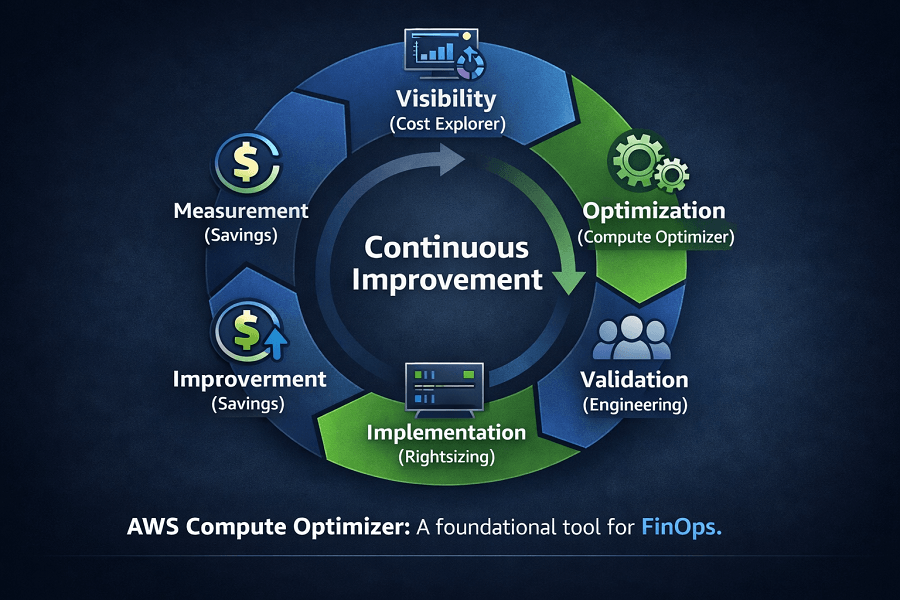
A typical FinOps workflow might look like this:
- Review AWS Cost Explorer to identify high-cost services.
- Use AWS Compute Optimizer to analyze those workloads.
- Validate recommendations with engineering teams.
- Implement changes during scheduled maintenance windows.
- Measure savings using AWS Cost Explorer.
- Repeat the process monthly or quarterly.
This iterative approach helps organizations continuously improve infrastructure efficiency as cloud environments evolve.
Common Limitations of AWS Compute Optimizer
While AWS Compute Optimizer is a powerful service, it's important to understand its limitations.
Recommendations Depend on Historical Data
Compute Optimizer analyzes historical usage patterns.
If a workload has only recently been deployed or experiences infrequent spikes in demand, recommendations may not fully reflect future resource needs.
Business Context Isn't Considered
The service evaluates technical utilization, not business priorities.
For example:
- Upcoming product launches
- Marketing campaigns
- Seasonal demand
- Regulatory requirements
should all be considered before implementing recommendations.
Human judgment remains essential.
Not Every AWS Service Is Supported
Compute Optimizer currently focuses on supported compute and storage services such as:
- Amazon EC2
- Amazon EBS
- AWS Lambda
- Amazon ECS on AWS Fargate
Organizations should use additional AWS tools to optimize services like:
- Amazon RDS
- Amazon S3
- Amazon CloudFront
- Amazon DynamoDB
- Amazon Redshift
Recommendations Require Monitoring Data
Accurate recommendations depend on sufficient Amazon CloudWatch metrics.
Without adequate monitoring, Compute Optimizer has limited visibility into workload behavior.
Organizations should ensure CloudWatch monitoring is properly configured across supported resources.
How AWS Compute Optimizer Fits into AWS Cost Optimization
AWS Compute Optimizer is one component of a broader cloud cost optimization strategy.
A mature optimization workflow often looks like this:
Step 1: Identify Spending
Use AWS Cost Explorer to understand where cloud costs are increasing.
Step 2: Detect Waste
Use AWS Trusted Advisor to identify idle resources, unused Elastic IPs, and other inefficiencies.
Step 3: Rightsize Infrastructure
Use AWS Compute Optimizer to resize EC2 instances, EBS volumes, Lambda functions, and ECS tasks.
Step 4: Optimize Pricing
Review Savings Plans, Reserved Instances, and Spot Instances for eligible workloads.
Step 5: Monitor Continuously
Track results using:
- AWS Cost Explorer
- AWS Budgets
- Amazon CloudWatch
- AWS Cost and Usage Report (CUR)
This layered approach delivers both immediate savings and long-term financial governance.
Real-World Example: Rightsizing an E-Commerce Platform
Imagine an online retailer running its application on AWS.
The environment includes:
- 60 Amazon EC2 instances
- 120 Amazon EBS volumes
- 40 AWS Lambda functions
- 20 Amazon ECS services
As traffic patterns changed over time, many resources became oversized.
After enabling AWS Compute Optimizer, the engineering team discovered:
- Several EC2 instances consistently operating below 20% CPU utilization.
- Multiple EBS volumes provisioned with more IOPS than required.
- Lambda functions allocated double the necessary memory.
- ECS tasks configured with excess CPU and memory.
Instead of implementing every recommendation immediately, the team:
- Validated recommendations in staging.
- Tested performance under realistic workloads.
- Rolled out changes incrementally.
- Monitored CloudWatch metrics after deployment.
The result was improved infrastructure efficiency, lower cloud costs, and stable application performance without disrupting customer experience.
This example illustrates that successful rightsizing is a disciplined, data-driven process rather than a simple cost-cutting exercise.
Conclusion
AWS Compute Optimizer is one of the most valuable native services for improving cloud efficiency. By analyzing historical resource utilization and providing data-driven recommendations, it enables organizations to eliminate overprovisioning, address performance bottlenecks, and make smarter infrastructure decisions.
However, successful rightsizing requires more than accepting automated recommendations. Organizations should combine Compute Optimizer with services such as AWS Cost Explorer, AWS Trusted Advisor, AWS Budgets, Amazon CloudWatch, and the AWS Well-Architected Framework to create a continuous optimization process.
Whether you're managing a startup environment with a handful of workloads or an enterprise-scale AWS deployment, AWS Compute Optimizer can help ensure your infrastructure delivers the performance your applications need without paying for resources you don't use.
If you're looking to improve AWS performance while reducing cloud costs, EaseCloud's AWS experts can help you implement a structured rightsizing strategy tailored to your workloads and business goals.
Frequently Asked Questions
Is AWS Compute Optimizer free?
AWS Compute Optimizer is available at no additional charge for supported recommendation features. Some advanced infrastructure metrics, such as enhanced Amazon CloudWatch monitoring, may generate separate AWS charges depending on your configuration.
How often does AWS Compute Optimizer update recommendations?
Recommendations are updated periodically as new utilization data becomes available. Reviewing recommendations monthly or quarterly helps ensure optimization decisions reflect current workload behavior.
Can AWS Compute Optimizer automatically resize resources?
No.
The service provides recommendations, but engineering teams must review and implement changes manually or through approved automation workflows.
Does AWS Compute Optimizer improve application performance?
It can.
By identifying under-provisioned resources, Compute Optimizer helps organizations improve application responsiveness while also reducing unnecessary overprovisioning.
Should every recommendation be implemented?
No.
Recommendations should always be evaluated alongside application requirements, expected traffic growth, compliance obligations, and business objectives.
How EaseCloud Helps Organizations Optimize AWS Infrastructure
We’ll review your EC2 instances, EBS volumes, Lambda functions, and container workloads to pinpoint over-provisioning, performance gaps, and savings opportunities. You’ll receive a clear, actionable roadmap for a more efficient and scalable AWS environment no commitment, no guesswork.
Start with a Free Infrastructure Optimization Assessment