AWS Lambda Cost Optimization Best Practices
Apply AWS Lambda cost optimization tactics like memory right-sizing, ARM Graviton, Provisioned Concurrency tuning, and cold start reduction to halve your 2026 bill.
TLDR;
- Use AWS Lambda Power Tuning to find the sweet spot between memory and duration, often saving 20 to 40 percent per function.
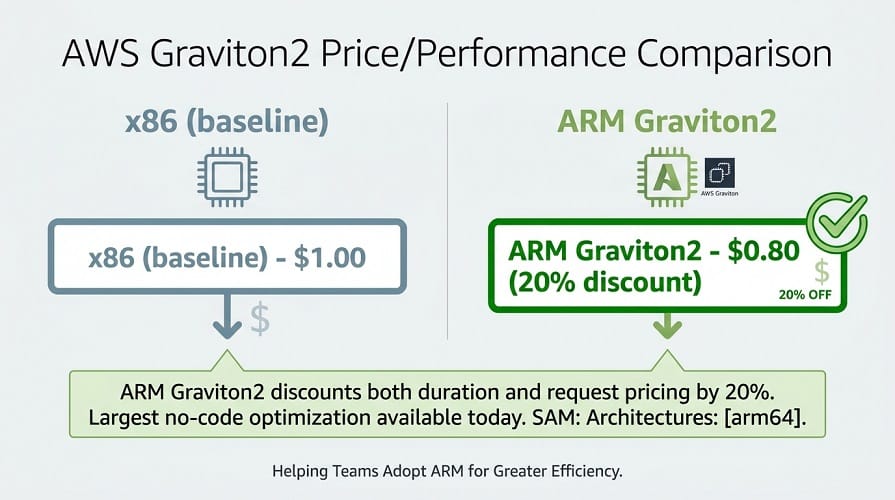
- Migrate compatible workloads to ARM Graviton2 for a 20 percent price cut with equal or better performance.
- Eliminate cold starts with SnapStart for Java or tuned Provisioned Concurrency during business hours in eu-west-1.
- Replace polling triggers with event-driven invocation to avoid paying for idle request cycles.
AWS Lambda cost optimization means aligning memory, architecture, concurrency, and invocation patterns so each function delivers required performance at the lowest possible price. Lambda bills three dimensions: request count, GB-seconds of duration, and provisioned concurrency when enabled.
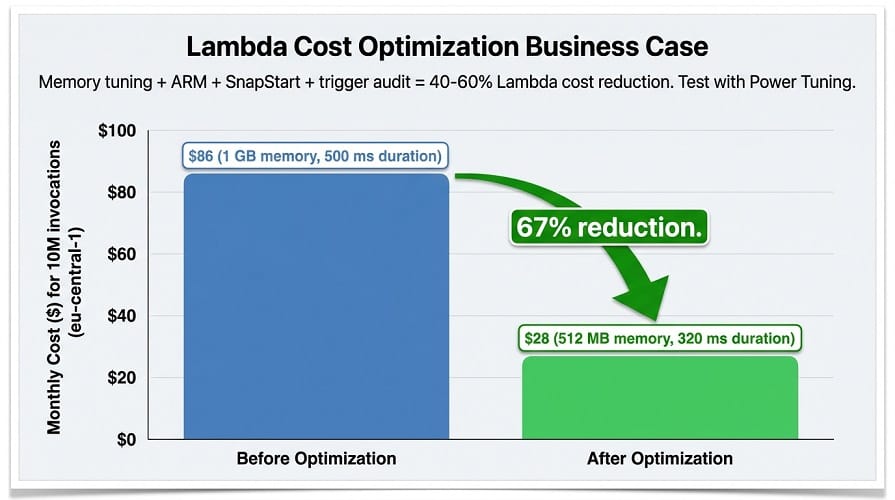
Cost savings example:
| Configuration | Memory | Duration (10M invocations) | Monthly Cost (eu-central-1) |
|---|---|---|---|
| Before optimization | 1 GB | 500 ms | ~$86 |
| After optimization | 512 MB | 320 ms | ~$28 |
| Savings | — | — | 67% reduction |
According to the AWS Lambda pricing documentation, duration rounds to the nearest millisecond and memory is configurable from 128 MB to 10,240 MB in 1 MB increments, giving teams fine-grained control.
This cluster guide walks through the five optimization levers that deliver the biggest savings in 2026, with working configuration snippets for SAM and CDK.
How Lambda Pricing Shapes Optimization Priorities
Every optimization decision traces back to the three pricing axes. Requests cost USD 0.20 per million in eu-west-1 and rarely drive spend unless you invoke on a tight polling loop. Duration charges, billed per GB-second, are the dominant lever for most teams.
Provisioned Concurrency adds a standing fee of USD 0.0000041667 per GB-second whether or not traffic arrives, so it only pays off when steady load exceeds roughly 60 percent utilisation.
| Action | Effect |
|---|---|
| Double memory (512 MB → 1,024 MB) | vCPU scales linearly |
| Result on CPU-bound code | Duration cuts 30-50% |
| Result on GB-second bill | Roughly flat (memory increases, duration decreases) |
| Result on latency | Drops sharply |
Memory is a CPU dial, not just RAM allocation. Source: AWS Well-Architected Serverless Lens
Leaving the GB-second bill roughly flat while latency drops sharply. The ARM Graviton2 architecture further discounts both duration and request pricing by 20 percent, which is the single largest no-code optimization available today.
Step-by-Step Lambda Optimization
Start with Power Tuning to find each function's optimal memory setting, then layer in architecture and concurrency tuning.
# 1. Deploy the AWS Lambda Power Tuning state machine from SAR
sam deploy --template-file template.yaml \
  --stack-name power-tuning --region eu-west-1 \
  --parameter-overrides lambdaResource=arn:aws:lambda:eu-west-1:111:function:checkout-api

# 2. Launch a tuning run across candidate memory sizes
aws stepfunctions start-execution \
  --state-machine-arn arn:aws:states:eu-west-1:111:stateMachine:powerTuningStateMachine \
  --input '{"lambdaARN":"arn:aws:lambda:eu-west-1:111:function:checkout-api",
            "powerValues":[256,512,1024,1792,3008],
            "num":100,"strategy":"balanced"}'
According to the Lambda Power Tuning project, the balanced strategy returns the memory size that minimises the product of cost and duration, ideal for APIs where both matter.
After applying the recommended memory, switch the function to ARM and enable SnapStart where supported.
# template.yaml (AWS SAM) - ARM + SnapStart + tuned memory
Resources:
  CheckoutApi:
    Type: AWS::Serverless::Function
    Properties:
      FunctionName: checkout-api
      Runtime: java21
      Architectures: [arm64]
      MemorySize: 1024
      Timeout: 15
      SnapStart:
        ApplyOn: PublishedVersions
      Environment:
        Variables:
          REGION: eu-west-1
          ORDERS_TABLE: !Ref OrdersTable
      Tracing: Active
      Tags:
        Environment: prod
        Team: checkout
According to the Lambda SnapStart documentation, SnapStart reduces Java cold starts by up to 90 percent at no extra charge, making Provisioned Concurrency unnecessary for many spring-based APIs. For Node.js and Python, keep cold starts in check by minifying deployment packages and moving SDK clients to module scope so container reuse amortises initialisation.
// handler.mjs - initialise heavy clients outside the handler
import { DynamoDBClient } from "@aws-sdk/client-dynamodb";
import { DynamoDBDocumentClient, GetCommand } from "@aws-sdk/lib-dynamodb";

const ddb = DynamoDBDocumentClient.from(new DynamoDBClient({ region: "eu-west-1" }));

export const handler = async (event) => {
  const { Item } = await ddb.send(new GetCommand({
    TableName: process.env.ORDERS_TABLE,
    Key: { id: event.pathParameters.id }
  }));
  return { statusCode: 200, body: JSON.stringify(Item ?? {}) };
};
Finally, audit triggers. A CloudWatch Events rule firing every minute to poll a queue generates 43,200 invocations per month per function; replacing it with an SQS event source mapping cuts that to whatever the real workload demands and halves billed requests on average.
Power Tuning finds optimal memory. ARM saves 20%. SnapStart eliminates Java cold starts. We implement all three.
Power Tuning runs your function at 5-10 memory settings (256MB-3008MB) and returns the cost-optimal configuration. ARM (Graviton2) cuts duration AND request pricing by 20%. SnapStart reduces Java init by up to 90% for free.
Our cloud cost optimization experts help you:
- Run AWS Lambda Power Tuning – Find optimal memory for each function (balanced strategy for APIs)
- Migrate to ARM (Graviton2) – 20% discount, available in eu-west-1, eu-central-1, eu-west-2, eu-west-3
- Enable SnapStart for Java – Free, reduces cold starts up to 90%
- Audit and remove wasteful triggers – Replace polling loops with event source mappings
Optimization Best Practices
Tag every function with CostCenter, Environment, and Team so Cost Explorer groupings work. Set ReservedConcurrency on low-priority jobs to cap runaway spend. Keep deployment packages under 10 MB to shave tens of milliseconds off init.
According to the Datadog State of Serverless 2024 report, the median Lambda cold start dropped 22 percent year over year as teams adopted ARM and container image layering. European teams should also pin functions to eu-central-1 or eu-west-1 to stay within GDPR boundaries and avoid inter-region data transfer at USD 0.02 per GB.
Monitoring and Troubleshooting
Track Duration p95, InitDuration, and ProvisionedConcurrencyUtilization weekly. If utilisation stays under 40 percent, reduce provisioned capacity or move to on-demand.
Use CloudWatch Logs Insights query stats avg(@billedDuration), max(@maxMemoryUsed) to spot functions that allocate 1 GB but use 180 MB, the classic overprovisioning pattern. Pair this with anomaly alarms that trigger when duration regresses more than 25 percent in a 24-hour window.
Add synthetic canaries against production endpoints in eu-west-1 and eu-central-1 so latency regressions after a dependency upgrade surface before real customer traffic notices. Cross-reference canary duration with the weekly Power Tuning report; if duration climbs while memory stays constant, investigate code paths, not hardware.
Finally, retain Lambda Insights logs for 14 days in staging and 60 days in production so you keep enough history for quarter-over-quarter comparisons without paying for stale data.
Conclusion
AWS Lambda cost optimization is a repeatable loop: tune memory with Power Tuning, migrate to ARM, apply SnapStart or selective Provisioned Concurrency, and remove wasteful triggers. Teams applying the full playbook typically cut Lambda spend by 40 to 60 percent within one sprint without changing business logic.
European platform teams gain an additional lever by choosing eu-central-1 for data-heavy workloads where GDPR residency matters. EaseCloud helps European SaaS companies implement this loop as a repeatable FinOps practice, complete with Terraform modules, dashboards, and quarterly review rituals.
Frequently Asked Questions
When should I enable Provisioned Concurrency versus SnapStart?
| Feature | SnapStart | Provisioned Concurrency |
|---|---|---|
| Supported runtimes | Java, .NET | Node.js, Python, Java, .NET |
| Cost | Free | Adds standing fee ($0.0000041667 per GB-second) |
| Init reduction | Up to 90% | Eliminates cold starts entirely |
| Best for | Java/.NET APIs where supported | Node.js/Python APIs with strict p99 latency SLAs and predictable traffic |
| Sizing recommendation | N/A (free) | Size to 60% of peak to keep utilisation economic |
Decision rule: Use SnapStart for Java/.NET (free, 90% reduction). Use Provisioned Concurrency for Node.js/Python with strict SLAs and predictable traffic.
Is ARM Graviton2 safe for production Lambda workloads in the EU?
Yes. Graviton2 is available in eu-west-1, eu-central-1, eu-west-2, and eu-west-3.
| Check | Requirement |
|---|---|
| Runtime compatibility | Node.js, Python, Java, Go – works unchanged |
| Native dependencies | Rebuild for linux/arm64 architecture |
| Testing | Run parity tests before cutting traffic |
| Benefit | 20% price discount |
Conclusion: Graviton2 is safe for production Lambda workloads in the EU.
How often should I rerun AWS Lambda Power Tuning?
Retune after any runtime upgrade, significant code change, or dependency swap. Many teams bake it into CI so every merged pull request produces a recommendation, keeping each function at its cost-optimal memory setting over time.
Summarize this post with:
