AWS CDK Guide: Build Infrastructure with Python & TypeScript
Learn AWS CDK using Python and TypeScript. Explore constructs, stacks, apps, CI/CD, best practices, and enterprise deployment strategies.
As organizations accelerate cloud adoption, managing infrastructure through manual configuration becomes increasingly difficult. Modern applications often span dozens, or even hundreds, of AWS services, including Amazon EC2, Amazon S3, Amazon VPC, AWS Lambda, Amazon ECS, Amazon EKS, Amazon RDS, IAM, Amazon CloudWatch, Route 53, and API Gateway. Provisioning and maintaining these resources manually introduces operational complexity, configuration drift, and inconsistent deployments across environments.
Infrastructure as Code (IaC) has transformed how cloud infrastructure is managed by enabling engineers to define cloud resources using version-controlled code. AWS CloudFormation established this approach by allowing infrastructure to be described declaratively using YAML or JSON templates. However, as cloud architectures became more sophisticated, many development teams wanted a way to leverage familiar programming languages instead of writing increasingly complex template files.
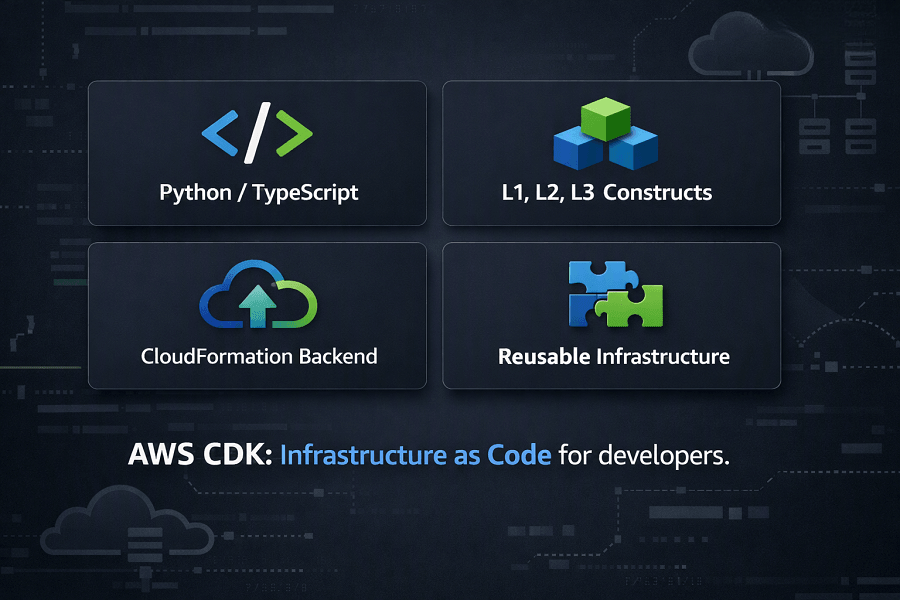
To address this need, Amazon Web Services introduced the AWS Cloud Development Kit (AWS CDK), an open-source software development framework that allows developers to define cloud infrastructure using modern programming languages such as Python, TypeScript, Java, C#, and Go. Instead of manually writing CloudFormation templates, developers write infrastructure using reusable code constructs. The AWS CDK then synthesizes that code into standard AWS CloudFormation templates, combining the flexibility of software engineering with the reliability of CloudFormation.
AWS CDK has become one of the most popular tools for platform engineering, DevOps, cloud-native application development, serverless architectures, containerized workloads, and enterprise cloud automation. It supports software engineering best practices such as object-oriented programming, reusable components, unit testing, code reviews, continuous integration, and continuous deployment (CI/CD), making infrastructure development more scalable and maintainable.
Whether you're deploying a simple web application, building a serverless API, managing Kubernetes clusters with Amazon EKS, or automating infrastructure across multiple AWS accounts, AWS CDK provides a powerful and developer-friendly approach to Infrastructure as Code.
What This Guide Covers
- What AWS CDK is and how it works
- Why AWS created the Cloud Development Kit
- AWS CDK architecture and workflow
- Core concepts including Apps, Stacks, Stages, and Constructs
- Understanding L1, L2, and L3 Constructs
- Supported programming languages
- AWS CDK CLI commands
- Project structure and organization
- Building reusable infrastructure components
- AWS CDK vs CloudFormation
- AWS CDK vs Terraform
- CI/CD integration and GitOps workflows
- Security and governance best practices
- Enterprise implementation strategies
- Common mistakes to avoid
- How EaseCloud helps organizations adopt AWS CDK successfully
By the end of this guide, you'll understand how AWS CDK enables development teams to build secure, scalable, and maintainable cloud infrastructure while accelerating software delivery.
What Is AWS CDK?
The AWS Cloud Development Kit (AWS CDK) is an open-source Infrastructure as Code framework developed by Amazon Web Services that enables developers to define, provision, and manage AWS infrastructure using familiar programming languages instead of writing raw CloudFormation templates.
Unlike traditional Infrastructure as Code tools that rely primarily on declarative configuration files, AWS CDK introduces a software development approach to infrastructure management.
With AWS CDK, engineers write code using languages such as:
- Python
- TypeScript
- Java
- C#
- Go
That code is then converted into AWS CloudFormation templates, which are deployed through the CloudFormation service.
This means AWS CDK does not replace CloudFormation, it builds on top of it.
The deployment workflow looks like this:
Developer Writes CDK Code
│
▼
AWS CDK Synthesizes Code
│
▼
CloudFormation Template Generated
│
▼
CloudFormation Creates AWS Resources
│
▼
Infrastructure Deployed
This architecture gives developers the flexibility of programming languages while retaining the reliability, rollback capabilities, dependency management, and governance features of AWS CloudFormation.
Why AWS Created the Cloud Development Kit
AWS CloudFormation remains one of the most powerful Infrastructure as Code services available. However, writing large CloudFormation templates presents several challenges as cloud environments become more complex.
Development teams frequently encountered issues such as:
- Large YAML files that were difficult to maintain
- Repeated infrastructure definitions
- Limited opportunities for code reuse
- Complex nested templates
- Minimal abstraction capabilities
- Lack of loops and conditional programming logic
- Difficulty testing infrastructure before deployment
For software engineers accustomed to building applications with reusable classes, functions, packages, and libraries, maintaining large declarative templates often felt restrictive.
AWS created the Cloud Development Kit to bridge the gap between software engineering and cloud infrastructure management.
Instead of describing infrastructure using static templates, developers can now use familiar programming concepts such as:
- Classes
- Objects
- Functions
- Loops
- Variables
- Interfaces
- Inheritance
- Packages
- Modules
This makes infrastructure easier to organize, reuse, and maintain, particularly in large enterprise environments.
How AWS CDK Works
Although AWS CDK introduces a programming model, CloudFormation remains the deployment engine underneath.
The overall workflow follows these stages:
Step 1: Write Infrastructure Code
Developers define infrastructure using supported programming languages and AWS CDK libraries.
Step 2: Build the CDK Application
The AWS CDK application compiles the infrastructure code into an intermediate representation.
Step 3: Synthesize Templates
Using the cdk synth command, AWS CDK generates standard CloudFormation templates.
These templates can be inspected, version-controlled, or reviewed before deployment.
Step 4: Deploy Infrastructure
The cdk deploy command submits the synthesized CloudFormation templates to AWS.
CloudFormation provisions resources while automatically managing dependencies.
Step 5: Monitor the Deployment
CloudFormation tracks deployment status, rollback events, resource creation, and updates.
Engineers can monitor deployments using:
- AWS CloudFormation Console
- Amazon CloudWatch
- AWS CloudTrail
- AWS CLI
AWS CDK Architecture
AWS CDK is built on several core architectural components that work together to model cloud infrastructure.
Understanding these concepts is essential before building production-ready applications.
The primary components include:
- App
- Stack
- Stage
- Constructs
- Assets
- Context
- Environment
Together, these components form the foundation of every AWS CDK project.
AWS CDK App
An App is the root of every AWS CDK application.
It acts as the entry point that contains one or more stacks.
Think of an App as the top-level container responsible for organizing your infrastructure.
Example:
Application
│
├── Development Stack
├── Testing Stack
├── Staging Stack
└── Production Stack
Large enterprises often use a single App to manage infrastructure across multiple environments while maintaining a consistent architecture.
AWS CDK Stack
A Stack represents a deployable unit of infrastructure.
Each Stack synthesizes into an individual CloudFormation Stack.
For example:
| Stack Name |
|---|
| Networking Stack |
| Application Stack |
| Monitoring Stack |
| Database Stack |
| Security Stack |
Each Stack can be deployed independently, allowing teams to update one part of the infrastructure without affecting others.
This modular approach improves maintainability and reduces deployment risk.
AWS CDK Stage
A Stage groups multiple Stacks into a logical deployment environment.
Common stages include:
- Development
- Testing
- QA
- Staging
- Production
Stages simplify promoting infrastructure through deployment pipelines while ensuring consistency across environments.
For example, the same Stacks can be deployed to different AWS accounts or Regions with environment-specific configuration.
AWS CDK Constructs
Constructs are the most important concept in AWS CDK.
A Construct is a reusable building block that represents one or more AWS resources.
Instead of manually defining every configuration property, developers compose infrastructure using constructs.
Examples include constructs for:
- Amazon S3 Buckets
- Amazon EC2 Instances
- Amazon VPCs
- AWS Lambda Functions
- Amazon DynamoDB Tables
- Amazon ECS Services
- Amazon EKS Clusters
- IAM Roles
- Amazon SNS Topics
- Amazon SQS Queues
- API Gateway APIs
Constructs significantly reduce the amount of code required to build production-ready infrastructure.
Benefits of Using AWS CDK
Organizations are increasingly adopting AWS CDK because it combines the strengths of Infrastructure as Code with modern software engineering practices.
Some of the most significant advantages include:
Familiar Programming Languages
Developers can define infrastructure using Python, TypeScript, Java, C#, or Go instead of learning a new declarative syntax.
Reusable Components
Infrastructure can be packaged into reusable constructs, reducing duplication and promoting consistency across projects.
Improved Maintainability
Object-oriented design makes large infrastructure projects easier to organize and maintain than extensive YAML or JSON templates.
Better Collaboration
Infrastructure definitions can be managed using standard software development workflows, including Git, pull requests, peer reviews, and automated testing.
Native AWS Integration
Because AWS CDK synthesizes CloudFormation templates, organizations continue to benefit from CloudFormation features such as dependency management, rollback, Change Sets, and Drift Detection.
Understanding AWS CDK Constructs
Constructs are the foundation of every AWS CDK application.
A Construct is an object that represents one or more cloud resources. Instead of manually defining every configuration property for an AWS service, developers use constructs to create reusable, higher-level building blocks.
Think of constructs as similar to reusable classes or components in software development. They encapsulate infrastructure logic, making applications easier to build, maintain, and scale.
AWS CDK organizes constructs into three abstraction levels.
- L1 Constructs
- L2 Constructs
- L3 Constructs
Each level serves a different purpose and provides a different balance between flexibility and simplicity.
L1 Constructs (CloudFormation Resources)
L1 Constructs are the lowest-level constructs in AWS CDK.
They map directly to AWS CloudFormation resource types.
For example:
| AWS Service | CloudFormation Resource |
|---|---|
| Amazon S3 | AWS::S3::Bucket |
| Amazon EC2 | AWS::EC2::Instance |
| Amazon RDS | AWS::RDS::DBInstance |
| AWS Lambda | AWS::Lambda::Function |
| Amazon VPC | AWS::EC2::VPC |
L1 constructs expose nearly every configuration property supported by CloudFormation.
Advantages
- Maximum control
- Immediate support for newly released AWS services
- Exact CloudFormation compatibility
Limitations
- Verbose configuration
- More code
- Requires deeper AWS knowledge
L1 constructs are ideal when you need complete control over infrastructure or when using newly released AWS features that have not yet been abstracted into higher-level constructs.
L2 Constructs
L2 Constructs are the most commonly used constructs in AWS CDK.
They provide intelligent abstractions over CloudFormation resources.
Instead of configuring every resource property manually, L2 constructs automatically apply recommended defaults and simplify common tasks.
For example, creating an Amazon S3 bucket using an L2 construct automatically supports options such as:
- Versioning
- Encryption
- Lifecycle policies
- Public access blocking
- Bucket removal policies
without requiring developers to define every individual CloudFormation property.
Benefits
- Less code
- Easier maintenance
- Secure defaults
- Cleaner syntax
- Improved readability
Most enterprise AWS CDK applications rely heavily on L2 constructs.
L3 Constructs (Patterns)
L3 Constructs, also called Patterns, combine multiple AWS services into reusable architectural solutions.
Instead of creating individual services one by one, developers deploy complete cloud architectures with minimal code.
Examples include:
| Architecture Pattern | Components |
|---|---|
| Serverless REST API | API Gateway, Lambda, IAM, CloudWatch Logs |
| Static Website | Amazon S3, CloudFront, Route 53, AWS Certificate Manager |
| Containerized Web Application | Amazon ECS, Application Load Balancer, Auto Scaling, IAM Roles, CloudWatch |
| Event-Driven Processing | Amazon SQS, AWS Lambda, Amazon SNS, EventBridge |
L3 constructs dramatically accelerate infrastructure development by packaging AWS best practices into reusable components.
AWS Construct Library
AWS provides an extensive Construct Library that supports nearly every AWS service.
Popular construct categories include:
| Category | Constructs |
|---|---|
| Compute | Amazon EC2, AWS Lambda, Amazon ECS, Amazon EKS, AWS Batch |
| Storage | Amazon S3, Amazon EFS, Amazon FSx |
| Databases | Amazon RDS, Amazon DynamoDB, Amazon Aurora, Amazon ElastiCache |
| Networking | Amazon VPC, Route 53, Elastic Load Balancer, CloudFront |
| Security | IAM, AWS KMS, AWS Secrets Manager, AWS WAF, AWS Shield |
| Integration | Amazon SNS, Amazon SQS, EventBridge, Step Functions |
| Monitoring | Amazon CloudWatch, AWS X-Ray, CloudTrail |
The Construct Library allows developers to create sophisticated AWS architectures without starting from scratch.
AWS CDK CLI
The AWS CDK Command Line Interface (CLI) is the primary tool used to build, validate, deploy, and manage infrastructure.
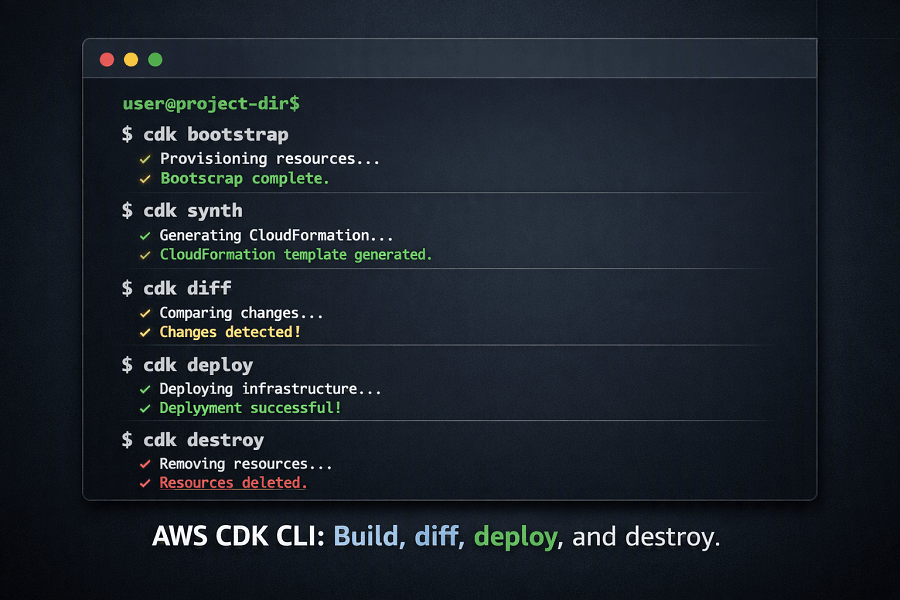
Several commands form the standard CDK workflow.
cdk bootstrap
Before deploying applications, AWS CDK requires bootstrapping.
Bootstrapping provisions resources that CDK uses during deployments.
Examples include:
- S3 Asset Bucket
- IAM Deployment Roles
- ECR Repository
- CloudFormation Execution Roles
Bootstrapping only needs to be performed once per AWS account and Region.
cdk synth
The cdk synth command converts CDK code into CloudFormation templates.
This allows developers to:
- Review generated infrastructure
- Validate templates
- Understand deployment output
Many teams include cdk synth in their CI pipelines.
cdk diff
Before deploying changes, cdk diff compares the current infrastructure with the proposed updates.
It highlights:
- New resources
- Deleted resources
- Configuration changes
- Resource replacements
Using cdk diff reduces deployment risk by allowing teams to review infrastructure changes before execution.
cdk deploy
The cdk deploy command provisions infrastructure through CloudFormation.
During deployment, CDK:
- Packages assets.
- Uploads deployment artifacts.
- Generates CloudFormation templates.
- Creates CloudFormation Change Sets.
- Deploys infrastructure.
This automation simplifies complex deployments.
cdk destroy
The cdk destroy command removes deployed infrastructure.
It deletes CloudFormation stacks while respecting resource dependencies.
This command is particularly useful for:
- Development environments
- Temporary testing
- Proof-of-concept projects
Production environments should always use controlled deletion procedures.
Typical AWS CDK Workflow
A standard development workflow looks like this:
Write Infrastructure Code
│
▼
cdk synth
│
▼
Review CloudFormation Template
│
▼
cdk diff
│
▼
Review Infrastructure Changes
│
▼
cdk deploy
│
▼
CloudFormation Deployment
│
▼
Application Running
This workflow promotes consistency, visibility, and repeatable deployments.
AWS CDK Project Structure
A well-organized CDK project improves collaboration and long-term maintainability.
A typical project structure might look like:
my-cdk-app/
│
├── bin/
│ └── app.py
│
├── lib/
│ ├── networking_stack.py
│ ├── application_stack.py
│ ├── database_stack.py
│ ├── monitoring_stack.py
│ └── security_stack.py
│
├── test/
│
├── assets/
│
├── cdk.json
│
├── requirements.txt
│
└── README.md
As projects grow, separating infrastructure into domain-specific stacks improves readability and allows multiple teams to work independently.
Managing Multiple Environments
Enterprise applications rarely deploy to a single environment.
AWS CDK supports deployments across:
- Development
- QA
- Testing
- Staging
- Production
Each environment can use different:
- AWS Accounts
- Regions
- Instance sizes
- Database configurations
- Networking settings
Rather than duplicating code, developers can parameterize environment-specific values while reusing the same infrastructure definitions.
Building Reusable Infrastructure Components
One of AWS CDK's greatest strengths is reusability.
Organizations often create internal construct libraries for frequently used infrastructure patterns.
Examples include:
- Standard VPC architecture
- Logging framework
- Secure S3 bucket configuration
- ECS deployment pattern
- Lambda API template
- Monitoring dashboard
- Security baseline
These reusable constructs help enforce organizational standards and reduce development time.
AWS CDK vs CloudFormation
Although AWS CDK generates CloudFormation templates, the developer experience is significantly different.
| Feature | AWS CDK | AWS CloudFormation |
|---|---|---|
| Infrastructure Language | Python, TypeScript, Java, C#, Go | YAML / JSON |
| Code Reuse | Excellent | Limited |
| Object-Oriented Programming | Yes | No |
| Loops & Functions | Yes | Limited |
| Learning Curve | Moderate | Moderate |
| Generated Templates | Yes | Manual |
| Deployment Engine | CloudFormation | CloudFormation |
For development teams, AWS CDK often provides greater flexibility and maintainability while preserving CloudFormation's deployment reliability.
AWS CDK vs Terraform
Many organizations also evaluate AWS CDK against Terraform.
| Feature | AWS CDK | Terraform |
|---|---|---|
| Primary Focus | AWS | Multi-cloud |
| Programming Languages | Python, TypeScript, Java, C#, Go | HCL |
| CloudFormation Integration | Native | No |
| Multi-cloud Support | No | Yes |
| AWS Service Coverage | Excellent | Excellent |
| Vendor Neutral | No | Yes |
AWS CDK is an excellent choice for AWS-focused organizations, while Terraform is often preferred when managing infrastructure across multiple cloud providers.
AWS CDK Pipelines
As organizations scale, manually deploying infrastructure becomes inefficient and increases operational risk. AWS CDK Pipelines automate the deployment lifecycle, allowing infrastructure changes to move safely from development to production.
CDK Pipelines are built on AWS CodePipeline and integrate seamlessly with the AWS CDK framework.
A typical deployment flow looks like this:
Developer Updates CDK Code
│
▼
Git Repository (GitHub / GitLab / CodeCommit)
│
▼
CI Pipeline (CodeBuild / GitHub Actions)
│
▼
cdk synth
│
▼
Automated Tests
│
▼
cdk diff
│
▼
Approval (Optional)
│
▼
cdk deploy
│
▼
CloudFormation
│
▼
AWS Infrastructure Updated
This pipeline ensures infrastructure changes are version-controlled, tested, reviewed, and deployed consistently across all environments.
Integrating AWS CDK with CI/CD
Modern DevOps teams treat infrastructure exactly like application code. Every change should pass through automated validation before reaching production.
Common CI/CD platforms include:
AWS CodePipeline
AWS CodePipeline provides a fully managed service for automating infrastructure deployments.
Typical stages include:
- Source
- Build
- Test
- Approval
- Deploy
- Validation
For AWS-centric organizations, CodePipeline integrates naturally with CloudFormation, IAM, CloudWatch, and AWS Organizations.
GitHub Actions
GitHub Actions has become one of the most popular CI/CD solutions for AWS CDK projects.
Typical workflows include:
- Running unit tests
- Executing cdk synth
- Performing cdk diff
- Running security scans
- Deploying stacks
- Sending deployment notifications
This approach works particularly well for development teams already using GitHub for source control.
GitLab CI/CD
Organizations using GitLab can automate:
- Infrastructure validation
- Multi-environment deployments
- Security scanning
- Rollbacks
- Artifact management
GitLab integrates well with enterprise DevOps workflows.
Jenkins
Many large enterprises continue using Jenkins for highly customized deployment pipelines.
Jenkins enables:
- Multi-account deployments
- Parallel builds
- Advanced approval workflows
- Integration with internal tooling
Testing AWS CDK Applications
Infrastructure should be tested just as thoroughly as application code.
AWS CDK supports several testing approaches.
Unit Testing
Unit tests verify that constructs generate the expected CloudFormation resources.
Examples include validating:
- IAM policies
- S3 bucket encryption
- Lambda configurations
- VPC settings
- Security group rules
Unit testing helps identify issues early in the development lifecycle.
Snapshot Testing
Snapshot testing compares generated CloudFormation templates with known-good versions.
This ensures infrastructure changes are intentional and reduces unexpected modifications.
Integration Testing
After deployment, integration tests verify that deployed resources work together correctly.
Examples include:
- API Gateway invoking Lambda
- ECS services communicating with RDS
- EC2 instances accessing S3
- Route 53 routing traffic correctly
- Auto Scaling responding to load
Security Testing
Infrastructure should undergo automated security validation before deployment.
Typical checks include:
- Public S3 buckets
- Open Security Groups
- Overly permissive IAM roles
- Missing encryption
- Logging configuration
- Compliance violations
Security testing should be integrated into every deployment pipeline.
Security Best Practices
Infrastructure automation should strengthen an organization's security posture.
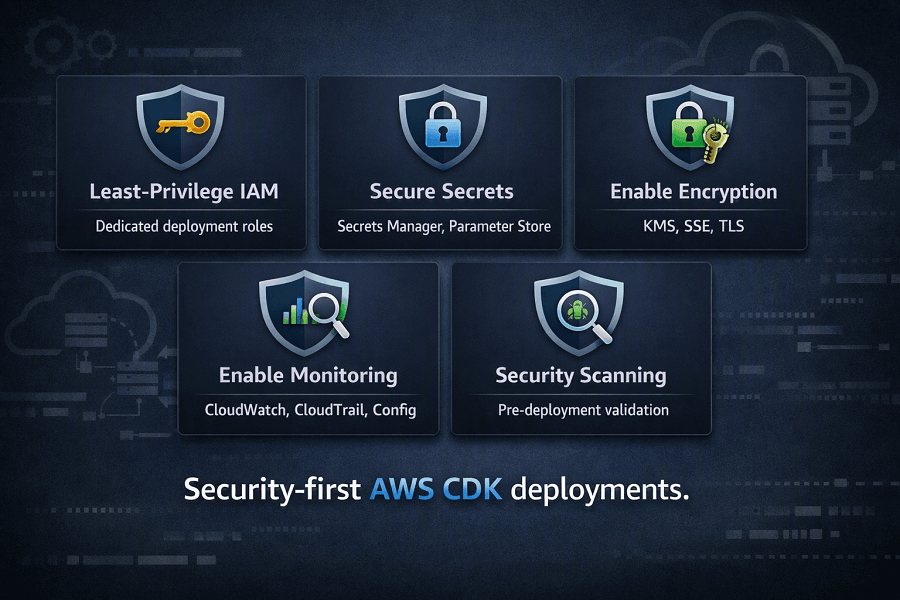
Follow the Principle of Least Privilege
Deployment roles should have only the permissions necessary to provision infrastructure.
Avoid granting AdministratorAccess to deployment pipelines.
Instead:
- Create dedicated IAM roles
- Separate production and development permissions
- Use temporary credentials through IAM roles
Store Secrets Outside Source Code
Never hardcode:
- AWS credentials
- Database passwords
- API keys
- Certificates
- Encryption keys
Instead use:
- AWS Secrets Manager
- AWS Systems Manager Parameter Store
- AWS Key Management Service (KMS)
Enable Encryption by Default
Infrastructure constructs should automatically enable encryption for:
- Amazon S3
- Amazon RDS
- Amazon EBS
- Amazon EFS
- Amazon DynamoDB
- AWS Backup
Embedding encryption into reusable constructs ensures consistent security across deployments.
Enable Monitoring
Production infrastructure should automatically configure:
- Amazon CloudWatch
- AWS CloudTrail
- AWS Config
- AWS X-Ray
- Amazon SNS alerts
Monitoring should be treated as a core part of infrastructure rather than an optional feature.
Enterprise CDK Best Practices
Organizations that successfully scale AWS CDK generally adopt several engineering principles.
Build Small, Focused Stacks
Rather than creating one large deployment, organize infrastructure into logical domains.
Examples include:
- Networking
- Compute
- Security
- Databases
- Monitoring
- Shared Services
Create Reusable Construct Libraries
Platform engineering teams should maintain standardized constructs for commonly deployed infrastructure.
Examples include:
- Secure S3 buckets
- Standard VPCs
- ECS clusters
- Logging frameworks
- Monitoring dashboards
- Security baselines
Reusable constructs improve consistency while reducing development effort.
Keep Infrastructure in Version Control
All CDK projects should reside in Git repositories.
Benefits include:
- Code reviews
- Rollback capability
- Collaboration
- Audit history
- Branching strategies
Separate Environments
Production infrastructure should never share AWS accounts with development workloads.
Use separate:
- AWS Accounts
- Regions
- IAM Roles
- Deployment pipelines
This improves security and operational isolation.
Automate Everything
Infrastructure deployments should always occur through CI/CD pipelines rather than manual execution.
Automation reduces operational risk and improves repeatability.
Common AWS CDK Mistakes
Even experienced teams encounter challenges when adopting AWS CDK.
Building Large Monolithic Stacks
Large stacks become difficult to maintain and slow to deploy.
Break infrastructure into smaller, reusable stacks.
Ignoring Construct Reuse
Duplicating infrastructure code across projects leads to maintenance problems.
Instead, build reusable construct libraries.
Skipping Code Reviews
Infrastructure changes should undergo the same peer review process as application code.
Reviewing pull requests reduces deployment errors.
Mixing Application and Infrastructure Logic
Keep infrastructure definitions separate from business application code whenever possible.
This improves maintainability and allows independent lifecycle management.
Manual Production Changes
Avoid modifying production resources directly through the AWS Management Console.
Manual changes create configuration drift and reduce the reliability of future deployments.
Real-World Enterprise Example
A SaaS provider serving customers across North America, Europe, and Asia managed more than 150 AWS accounts supporting containerized applications, serverless APIs, and data processing workloads.
Initially, the engineering teams relied on large CloudFormation templates. As the platform expanded, deployments became difficult to maintain, infrastructure code was duplicated across projects, and development velocity slowed.
To modernize its platform engineering practices, the company adopted AWS CDK.
The implementation included:
| Implementation Area | Components |
|---|---|
| Infrastructure | - AWS CDK with TypeScript - Reusable Construct Libraries - Modular Stacks - Environment-specific Stages |
| Automation | - GitHub Actions - AWS CodePipeline - AWS CodeBuild |
| Governance | - AWS Organizations - AWS Control Tower - IAM Permission Boundaries |
| Security | - AWS KMS - Secrets Manager - CloudTrail - AWS Config |
After implementation, the organization achieved:
- 75% reduction in duplicated infrastructure code
- Faster onboarding for new engineering teams
- Standardized deployments across all AWS accounts
- Reduced deployment failures
- Improved compliance reporting
- Accelerated feature delivery
AWS CDK became the organization's preferred Infrastructure as Code framework for application-focused AWS development.
Conclusion
AWS CDK brings modern software engineering practices to Infrastructure as Code by enabling developers to define AWS resources using familiar programming languages while leveraging the proven deployment capabilities of AWS CloudFormation.
By combining reusable constructs, object-oriented design, automated testing, and CI/CD integration, AWS CDK simplifies infrastructure management and improves developer productivity. It is particularly well suited for organizations building cloud-native applications, serverless architectures, and enterprise AWS platforms.
When implemented alongside strong governance, security controls, and platform engineering practices, AWS CDK becomes a powerful foundation for scalable and reliable AWS infrastructure.
Frequently Asked Questions
What is AWS CDK?
AWS CDK (Cloud Development Kit) is an open-source Infrastructure as Code framework that allows developers to define AWS infrastructure using programming languages such as Python, TypeScript, Java, C#, and Go. CDK synthesizes this code into AWS CloudFormation templates for deployment.
Does AWS CDK replace CloudFormation?
No. AWS CDK builds on top of CloudFormation. It generates CloudFormation templates, which are then used to provision and manage AWS resources.
Which programming language is best for AWS CDK?
TypeScript and Python are the most widely adopted languages due to strong community support, documentation, and extensive examples. The best choice often depends on your team's existing expertise.
Is AWS CDK better than Terraform?
AWS CDK is ideal for AWS-focused organizations that want to leverage software engineering practices. Terraform is often preferred when managing infrastructure across multiple cloud providers.
Can AWS CDK be used for enterprise deployments?
Yes. AWS CDK is widely used in enterprise environments to manage multi-account AWS infrastructure, automate deployments through CI/CD pipelines, and implement reusable infrastructure components.
How EaseCloud Helps Organizations with AWS CDK
At EaseCloud, we help organizations adopt AWS CDK to modernize infrastructure management, accelerate cloud-native development, and standardize AWS deployments.
Whether you're building serverless applications, Kubernetes platforms, microservices, or enterprise cloud environments, our consultants help you implement scalable, secure, and maintainable Infrastructure as Code using AWS CDK.
Summarize this post with:
