AWS CloudFormation Complete Guide: Best Practices For Enterprise Deployment
Master AWS CloudFormation with templates, stacks, StackSets, Change Sets, Drift Detection, CI/CD integration, and enterprise deployment best practices.
TL;DR
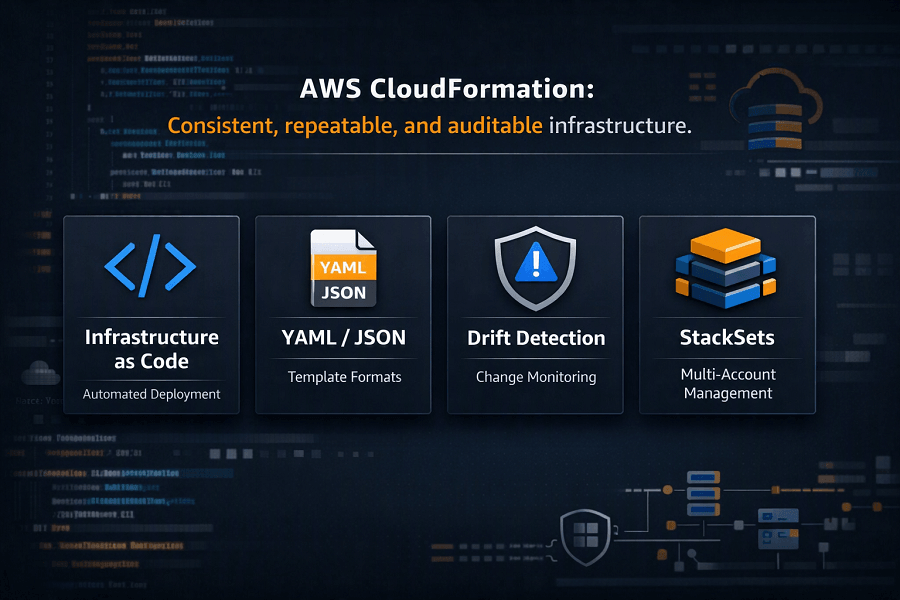
- CloudFormation is AWS-native Infrastructure as Code – define resources in YAML/JSON templates. Deploy consistent, version-controlled infrastructure across environments.
- Nested Stacks break large templates into reusable modules (Networking, Security, Database). Each module deploys independently.
- StackSets deploy templates across multiple AWS accounts and regions – essential for enterprise multi-account governance.
- Change Sets preview updates before deployment – shows what will be created, modified, or replaced. Prevents surprises.
- Drift Detection catches manual configuration changes – flags deviations from the template. Maintains infrastructure integrity.
- Best practices: modular templates, use parameters (not hardcoded), store in Git, validate with cfn-lint, enable encryption and logging, use least-privilege IAM for deployments.
Building Modular Infrastructure with Nested Stacks
As cloud environments expand, maintaining a single CloudFormation template containing hundreds of resources quickly becomes difficult.
Large templates become:
- Hard to maintain
- Difficult to troubleshoot
- Challenging to reuse
- Slow to update
- Complex to review
AWS addresses this problem with Nested Stacks.
Nested Stacks allow engineers to divide infrastructure into smaller reusable templates.
Instead of one massive template, organizations build infrastructure as independent modules.
Example:
Enterprise Infrastructure
│
├── Networking Stack
│ ├── VPC
│ ├── Public Subnets
│ ├── Private Subnets
│ ├── Route Tables
│ └── NAT Gateway
│
├── Security Stack
│ ├── IAM Roles
│ ├── Security Groups
│ ├── KMS Keys
│ └── WAF
│
├── Database Stack
│ ├── Amazon RDS
│ ├── ElastiCache
│ └── Secrets Manager
│
├── Monitoring Stack
│ ├── CloudWatch
│ ├── CloudTrail
│ ├── Config
│ └── SNS
│
└── Application Stack
├── ECS
├── Lambda
├── ALB
└── Auto Scaling
Each module can be developed, tested, deployed, and updated independently.
Benefits of Nested Stacks
Organizations commonly adopt Nested Stacks because they provide:
Better Reusability
Networking templates can be reused across multiple applications.
Simplified Maintenance
Smaller templates are easier to understand and troubleshoot.
Team Ownership
Different engineering teams can own different infrastructure components.
Examples:
- Networking Team
- Security Team
- Platform Engineering Team
- DevOps Team
- Database Team
Faster Updates
Only affected child stacks need updating.
This minimizes deployment time and operational risk.
Cross-Stack References
Enterprise environments frequently require one stack to share resources with another.
Examples include:
- VPC IDs
- Security Group IDs
- IAM Role ARNs
- Load Balancer DNS names
- Route 53 Hosted Zones
- KMS Key IDs
CloudFormation supports Cross-Stack References using Outputs and ImportValue.
Example architecture:
Networking Stack
│
▼
Exports VPC ID
│
▼
Application Stack
Imports VPC ID
│
▼
Deploys ECS Cluster
Cross-stack references improve modularity while reducing duplicate resource creation.
StackSets: Enterprise Multi-Account Deployment
Most enterprises operate multiple AWS accounts.
A typical organization may separate workloads into:
- Production
- Development
- Testing
- Security
- Shared Services
- Networking
- Logging
- Sandbox
Deploying identical infrastructure manually across every account quickly becomes unmanageable.
CloudFormation StackSets solve this challenge.
What Are StackSets?
StackSets allow CloudFormation templates to be deployed automatically across:
- Multiple AWS Accounts
- Multiple AWS Regions
- AWS Organizations Organizational Units (OUs)
Instead of maintaining separate deployments, engineers manage one template centrally.
Common StackSet Use Cases
Organizations frequently deploy StackSets for:
Security Baselines
- IAM Roles
- Security Policies
- KMS Keys
Logging
- CloudTrail
- CloudWatch
- Config Rules
Governance
- Organizational IAM Roles
- SCP-related resources
- Compliance templates
Networking
- Transit Gateway attachments
- Shared networking resources
Monitoring
- CloudWatch Dashboards
- SNS Topics
- EventBridge Rules
Advantages of StackSets
StackSets provide:
- Centralized deployment
- Consistent governance
- Reduced operational effort
- Faster global rollouts
- Simplified compliance
They are particularly valuable for enterprises using AWS Organizations and AWS Control Tower.
Change Sets: Reviewing Changes Before Deployment
Updating production infrastructure always carries some level of risk.
CloudFormation addresses this with Change Sets.
A Change Set previews exactly what will happen before resources are modified.
Possible actions include:
- Resource creation
- Resource replacement
- Property updates
- Resource deletion
Rather than deploying blindly, engineers can review changes and confirm they align with expectations.
Why Change Sets Matter
Consider an update that modifies an Amazon RDS instance.
Without reviewing the impact, the change could trigger resource replacement and lead to downtime.
Change Sets highlight these risks before deployment.
Benefits include:
- Safer production deployments
- Reduced downtime
- Better change management
- Improved operational confidence
Rollback Mechanisms
CloudFormation automatically handles deployment failures.
If resource creation fails, CloudFormation attempts to return the infrastructure to its previous working state.
Rollback prevents partially deployed environments from remaining in production.
Example:
Deployment Starts
│
▼
Resource Creation
│
▼
Failure Detected
│
▼
Automatic Rollback
│
▼
Previous Stable State Restored
Automatic rollback significantly improves deployment reliability.
Drift Detection
One of CloudFormation's most valuable enterprise capabilities is Drift Detection.
Configuration drift occurs when deployed infrastructure no longer matches the CloudFormation template.
This commonly happens when administrators make manual changes through the AWS Management Console.
Examples include:
- Opening additional Security Group ports
- Deleting resources manually
- Changing IAM permissions
- Updating Load Balancer settings
- Modifying EC2 instances
- Altering Auto Scaling Groups
These changes reduce infrastructure consistency and complicate future deployments.
How Drift Detection Works
CloudFormation compares:
Expected State
The infrastructure defined in the template.
versus
Actual State
The resources currently deployed within AWS.
If differences exist, CloudFormation reports the affected resources.
Organizations can then determine whether the changes should be incorporated into the template or reverted.
Benefits of Drift Detection
Drift Detection helps organizations:
- Maintain infrastructure consistency
- Detect unauthorized changes
- Simplify compliance audits
- Improve disaster recovery
- Reduce deployment failures
It is especially valuable in regulated industries where configuration integrity is essential.
CloudFormation Registry
The CloudFormation Registry expands CloudFormation beyond native AWS resources.
It allows organizations to manage:
- Third-party resources
- Partner integrations
- Custom resource types
- Internal resource providers
Examples include:
- SaaS integrations
- Security appliances
- Networking solutions
- Monitoring platforms
This enables CloudFormation to manage a broader ecosystem while maintaining a consistent deployment model.
CloudFormation Macros
CloudFormation templates can become repetitive when similar resources must be defined multiple times.
Macros allow engineers to transform templates before deployment.
Macros support:
- Code generation
- Template simplification
- Custom logic
- Reusable infrastructure patterns
Large organizations often use Macros to enforce organizational standards and reduce template duplication.
Custom Resources
Not every AWS operation is directly supported by CloudFormation.
Custom Resources extend CloudFormation by invoking AWS Lambda functions during stack operations.
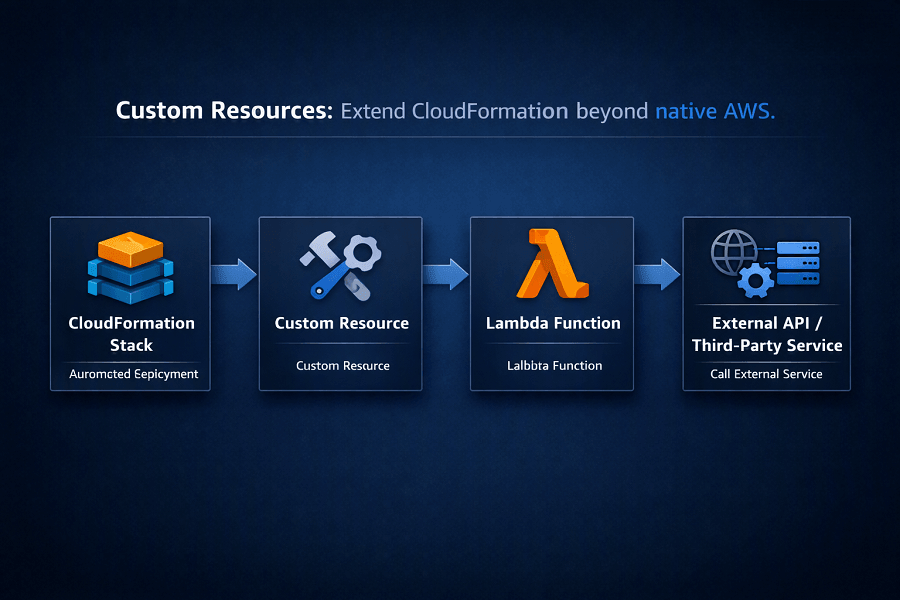
Common use cases include:
- Custom application configuration
- Integration with external APIs
- Third-party software installation
- Database initialization
- License activation
- DNS automation
Custom Resources enable CloudFormation to orchestrate workflows beyond native resource provisioning.
CloudFormation Designer
AWS provides CloudFormation Designer, a visual tool for creating and editing templates.
It enables engineers to:
- Visualize infrastructure
- Build templates graphically
- Understand resource relationships
- Validate architecture
Although many experienced engineers prefer writing YAML directly, Designer can be useful for onboarding new team members and documenting complex architectures.
Enterprise Deployment Patterns
Successful enterprise CloudFormation implementations typically follow standardized deployment models.
Environment Separation
Organizations maintain independent stacks for:
- Development
- Testing
- QA
- Staging
- Production
This minimizes risk and supports controlled release processes.
Shared Infrastructure
Common infrastructure is deployed once and reused.
Examples include:
- Shared VPCs
- Transit Gateways
- IAM Roles
- Monitoring services
- Logging infrastructure
Modular Architecture
Infrastructure components are organized into reusable templates rather than monolithic deployments.
Automated Pipelines
CloudFormation deployments are triggered through CI/CD pipelines instead of manual execution.
This improves consistency and supports continuous delivery.
Governance
CloudFormation integrates with:
- AWS Organizations
- AWS Control Tower
- IAM
- CloudTrail
- AWS Config
Together, these services provide centralized governance across enterprise AWS environments.
Integrating AWS CloudFormation with CI/CD Pipelines
Infrastructure should evolve alongside application code rather than being managed independently.
Modern DevOps teams integrate CloudFormation into Continuous Integration and Continuous Deployment (CI/CD) pipelines to ensure infrastructure changes are automated, tested, reviewed, and deployed consistently.
A typical CloudFormation deployment pipeline looks like this:
Developer Updates Template
│
▼
Git Repository (GitHub / GitLab / CodeCommit)
│
▼
Pull Request & Code Review
│
▼
Automated Validation
│
▼
CloudFormation Change Set
│
▼
Approval
│
▼
Deploy Stack
│
▼
Post Deployment Validation
│
▼
Monitoring & Logging
This workflow ensures infrastructure changes follow the same quality controls as software releases.
CI/CD Services Commonly Used with CloudFormation
CloudFormation integrates with several automation platforms.
AWS CodePipeline
AWS CodePipeline orchestrates the complete deployment lifecycle by connecting source repositories, build processes, testing stages, approvals, and CloudFormation deployments.
AWS CodeBuild
CodeBuild validates templates, executes automated tests, runs linting tools, and performs security checks before infrastructure reaches production.
AWS CodeDeploy
Although primarily focused on application deployments, CodeDeploy complements CloudFormation by automating application rollout after infrastructure provisioning.
GitHub Actions
Many organizations use GitHub Actions to:
- Validate CloudFormation templates
- Execute cfn-lint
- Deploy CloudFormation stacks
- Trigger Change Sets
- Notify engineering teams
Jenkins
Large enterprises with established DevOps environments often integrate Jenkins with CloudFormation to manage complex deployment pipelines across multiple environments.
CloudFormation Security Best Practices
Infrastructure automation should improve security, not introduce additional risks.
The following best practices help organizations build secure CloudFormation deployments.
Apply Least-Privilege IAM Permissions
CloudFormation deployment roles should have only the permissions necessary to provision approved resources.
Avoid using AdministratorAccess for deployment pipelines.
Instead:
- Create dedicated CloudFormation execution roles.
- Restrict access using IAM policies.
- Separate deployment permissions by environment.
Store Secrets Securely
Templates should never contain:
- AWS Access Keys
- Database Passwords
- API Tokens
- Private Certificates
- Encryption Keys
Instead, integrate with:
- AWS Secrets Manager
- AWS Systems Manager Parameter Store
- AWS Key Management Service (KMS)
This reduces the risk of exposing sensitive information through source code repositories.
Encrypt Sensitive Resources
Enable encryption wherever supported.
Examples include:
- Amazon S3 Server-Side Encryption
- Amazon RDS Encryption
- Amazon EBS Encryption
- Amazon EFS Encryption
- KMS-managed encryption keys
- TLS certificates using AWS Certificate Manager (ACM)
Encryption should be incorporated directly into CloudFormation templates to ensure consistency across environments.
Enable Audit Logging
Track infrastructure changes using:
- AWS CloudTrail
- AWS Config
- Amazon CloudWatch Logs
Every stack creation, update, and deletion should be logged to support operational visibility and compliance.
Validate Templates Before Deployment
Infrastructure templates should undergo automated validation before deployment.
Recommended validation steps include:
- YAML syntax validation
- CloudFormation template validation
- Resource dependency checks
- Security policy checks
- Compliance validation
- Naming convention verification
Automated validation reduces deployment failures and improves infrastructure quality.
Testing CloudFormation Templates
Treat infrastructure with the same engineering discipline as application code.
Testing should occur before any production deployment.
Syntax Validation
Use CloudFormation's validation tools to confirm template correctness.
Linting
Tools such as cfn-lint help detect:
- Invalid resource properties
- Unsupported parameters
- Missing required fields
- Template inconsistencies
Security Scanning
Integrate infrastructure security scanners into CI/CD pipelines to identify:
- Public S3 buckets
- Overly permissive Security Groups
- Weak IAM policies
- Missing encryption
- Compliance violations
Integration Testing
After deployment, verify:
- Network connectivity
- IAM permissions
- Database accessibility
- Load Balancer functionality
- Monitoring configuration
Infrastructure testing should become a standard part of every deployment pipeline.
Governance with CloudFormation
As AWS environments expand across multiple accounts and Regions, governance becomes increasingly important.
CloudFormation supports governance through integration with several AWS services.
AWS Organizations
CloudFormation works seamlessly with AWS Organizations to manage infrastructure across multiple AWS accounts while enforcing organizational policies.
AWS Control Tower
AWS Control Tower enables standardized landing zones and account provisioning, while CloudFormation automates the deployment of approved infrastructure within those environments.
AWS Config
AWS Config continuously evaluates deployed resources against expected configurations.
When combined with CloudFormation, it helps identify infrastructure drift and policy violations.
AWS CloudTrail
CloudTrail records every CloudFormation API call, providing a complete audit trail for stack operations.
This is particularly valuable for security investigations and compliance reporting.
CloudFormation Best Practices
Organizations that successfully scale CloudFormation typically follow several key principles.
Design Modular Templates
Divide infrastructure into reusable components rather than maintaining one large template.
Use Parameters
Allow environment-specific values such as:
- Instance types
- CIDR ranges
- Environment names
- Database sizes
This improves template flexibility and reduces duplication.
Keep Templates in Version Control
Every infrastructure definition should be stored in Git.
Benefits include:
- Collaboration
- Code reviews
- Rollbacks
- Audit history
Prefer YAML
YAML is generally easier to read and maintain than JSON for large CloudFormation templates.
Use Change Sets
Never deploy production updates without reviewing the proposed infrastructure changes.
Enable Drift Detection
Regularly scan production environments for manual changes to maintain infrastructure consistency.
Standardize Naming Conventions
Adopt consistent naming patterns for:
- Stacks
- Resources
- Tags
- Parameters
- Outputs
Standardization improves operational efficiency and governance.
Common CloudFormation Mistakes
Even experienced teams can introduce operational risks if CloudFormation is not managed carefully.
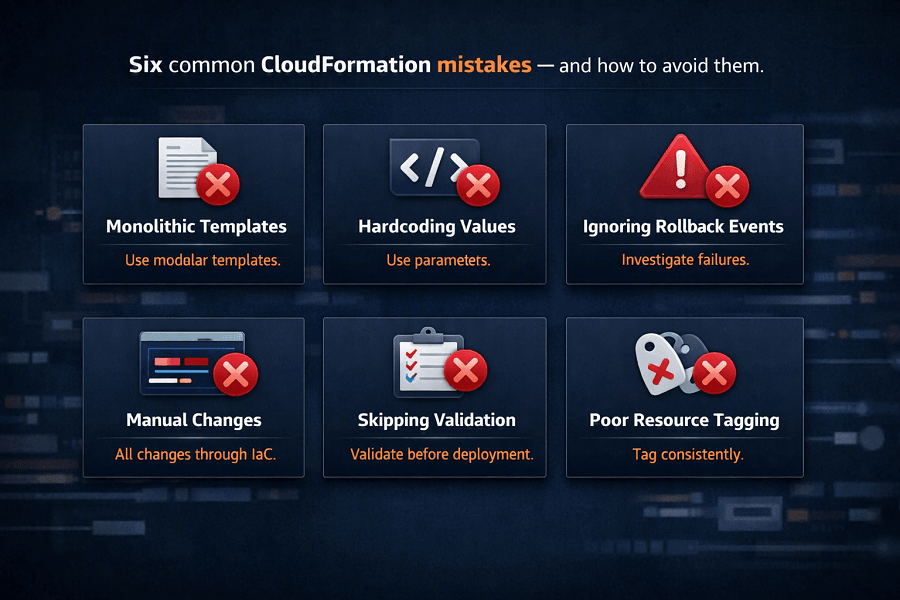
Building Monolithic Templates
Large templates become difficult to understand and maintain.
Break infrastructure into logical modules.
Hardcoding Configuration Values
Avoid embedding environment-specific settings directly into templates.
Use Parameters, Mappings, or Systems Manager Parameter Store instead.
Ignoring Rollback Events
Rollback failures often reveal underlying architectural or dependency issues.
Always investigate failed deployments rather than simply redeploying.
Manual Infrastructure Changes
Changes made directly through the AWS Management Console create configuration drift.
All production infrastructure modifications should originate from CloudFormation templates.
Skipping Template Validation
Deploying unvalidated templates increases the likelihood of failed deployments and production outages.
Automated validation should be mandatory.
Poor Resource Tagging
Without consistent tagging, organizations struggle with:
- Cost allocation
- Resource ownership
- Governance
- Automation
- Compliance
Tagging standards should be embedded into every template.
Real-World Enterprise Example
A global software company operating across North America, Europe, and Asia managed infrastructure manually for years. As the business expanded, deployments became inconsistent, compliance audits grew more difficult, and engineering teams spent excessive time provisioning resources.
To modernize operations, the organization implemented CloudFormation across its AWS estate.
The new architecture included:
| Category | Components |
|---|---|
| Infrastructure | - Modular CloudFormation templates - Nested Stacks - StackSets for global governance |
| Automation | - AWS CodePipeline - AWS CodeBuild - GitHub Enterprise |
| Governance | - AWS Organizations - AWS Control Tower - AWS Config - CloudTrail |
| Security | - IAM Roles - KMS - Secrets Manager |
Within the first year, the company achieved:
- 85% faster infrastructure provisioning
- Significant reduction in manual configuration errors
- Improved compliance readiness
- Standardized deployments across multiple AWS accounts
- Faster disaster recovery
- Better collaboration between development and operations teams
CloudFormation became the foundation of the organization's Infrastructure as Code strategy.
Conclusion
AWS CloudFormation is a foundational service for Infrastructure as Code on AWS. It enables organizations to automate infrastructure provisioning, enforce consistency, improve governance, and support scalable cloud operations.
By adopting modular templates, integrating CloudFormation with CI/CD pipelines, implementing robust security controls, and leveraging enterprise features such as Nested Stacks, StackSets, Change Sets, and Drift Detection, engineering teams can reduce operational complexity while increasing deployment reliability.
For organizations committed to the AWS Well-Architected Framework and Operational Excellence, CloudFormation provides the automation and governance needed to build resilient, repeatable, and enterprise-ready cloud environments.
Frequently Asked Questions
What is AWS CloudFormation used for?
AWS CloudFormation automates the provisioning and management of AWS infrastructure using declarative templates, enabling consistent, repeatable, and version-controlled deployments.
Is CloudFormation better than Terraform?
Neither tool is universally better.
- CloudFormation is ideal for AWS-native environments requiring deep integration with AWS services.
- Terraform is better suited for organizations managing multiple cloud providers or hybrid infrastructure.
What is the difference between a template and a stack?
A template defines the desired infrastructure, while a stack is a deployed instance of that template.
One template can create multiple stacks for different environments, such as development, staging, and production.
What is Drift Detection?
Drift Detection compares deployed AWS resources with the original CloudFormation template and identifies differences caused by manual changes or configuration drift.
Can CloudFormation manage multiple AWS accounts?
Yes. Using StackSets, CloudFormation can deploy and manage infrastructure across multiple AWS accounts and Regions from a centralized location.
How EaseCloud Helps Organizations with AWS CloudFormation
At EaseCloud, we help organizations implement enterprise-grade Infrastructure as Code using AWS CloudFormation as part of a broader cloud automation and DevOps strategy.
Whether you're migrating from manual deployments, modernizing legacy infrastructure, or building cloud-native platforms, our consultants help create scalable, secure, and maintainable CloudFormation solutions.
Summarize this post with:
