AWS Cost Optimization: How to Cut Your Cloud Bill by 30–40%
Reduce AWS costs by 30-40% with rightsizing, Reserved Instances/Savings Plans, Spot Instances, zombie resource cleanup, S3 lifecycle policies, and cost governance.
Cloud computing provides flexibility, scalability, and speed, but without proper governance, AWS costs can quickly spiral out of control. Organizations often discover that a significant portion of their cloud spend comes from underutilized resources, inefficient storage strategies, and a lack of cost visibility.
The good news is that with a structured AWS cost optimization strategy, businesses can reduce their cloud expenses by 30–40% while maintaining performance and reliability. This guide explores the most effective methods for optimizing AWS costs, including rightsizing resources, leveraging Reserved Instances and Spot Instances, eliminating zombie resources, and implementing ongoing cost governance.
TL;DR
- Start with visibility – use AWS Cost Explorer to find waste. Review weekly.
- Rightsize EC2 – downgrade over-provisioned instances (20-40% savings). Use Compute Optimizer.
- Commit to predictable workloads – Savings Plans (flexible, up to 72% off) or Reserved Instances (stable workloads).
- Use Spot Instances – up to 90% off for fault-tolerant workloads (batch, CI/CD, ML training).
- Eliminate zombies – unattached EBS volumes, idle load balancers, orphaned snapshots. Monthly audits.
- Optimize S3 – lifecycle policies move cold data to cheaper tiers (Glacier, Deep Archive).
- Reduce data transfer – use CloudFront, keep workloads in same region.
- Set budget alerts – at 50%, 75%, 90%, 100% thresholds.
- Tag everything – environment, team, app. Enables chargebacks.
- Build cost culture – monthly reviews with engineering + finance. FinOps mindset. Optimization is continuous.
Why AWS Cost Optimization Matters
AWS follows a pay-as-you-go model, which offers tremendous flexibility. However, this same flexibility can lead to:
- Overprovisioned compute resources
- Idle or unused infrastructure
- Inefficient storage usage
- Excessive data transfer charges
- Lack of accountability across teams
By implementing cost optimization practices, organizations can:
- Reduce operational expenses
- Improve resource utilization
- Increase cloud ROI
- Strengthen financial governance
- Support sustainable cloud growth
1. Start with AWS Cost Visibility
Before reducing costs, you need to understand where your money is going.
Use AWS Cost Explorer
AWS Cost Explorer provides detailed insights into spending patterns, helping teams identify:
- High-cost services
- Cost spikes and anomalies
- Usage trends
- Opportunities for savings
Key metrics to monitor include:
- Monthly spend by service
- Cost by account or business unit
- Resource-level expenses
- Forecasted cloud costs
Best Practice:
Review Cost Explorer reports weekly and establish a monthly cloud cost review process.
2. Rightsize EC2 Instances
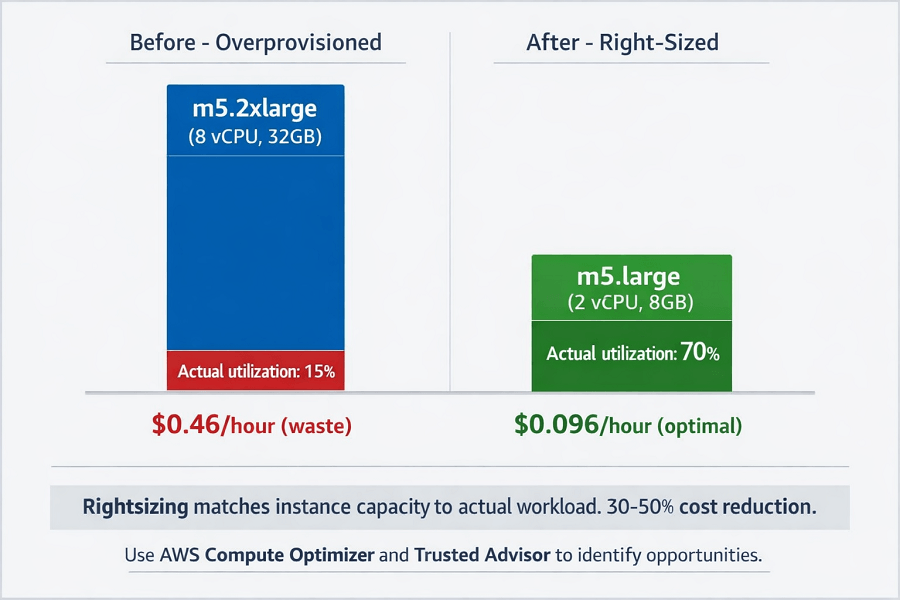
One of the most common causes of overspending is overprovisioned EC2 instances.
Many workloads run on larger instances than necessary because organizations provision resources for peak demand and never revisit sizing decisions.
How Rightsizing Works
Analyze metrics such as:
- CPU utilization
- Memory consumption
- Network throughput
- Disk I/O
If utilization remains consistently low, downgrade to a smaller instance type.
Example:
A workload running on an m5.2xlarge instance with average CPU utilization below 15% may operate efficiently on an m5.large or m5.xlarge.
Benefits:
- Immediate cost reduction
- Improved resource efficiency
- Lower operational waste
Use:
- AWS Compute Optimizer
- AWS Trusted Advisor
- CloudWatch metrics
to identify rightsizing opportunities.
3. Choose Reserved Instances or Savings Plans
For predictable workloads, on-demand pricing is rarely the most cost-effective option.
Reserved Instances (RIs)
Reserved Instances provide discounts in exchange for a one- or three-year commitment.
Advantages:
- Up to 72% savings compared to On-Demand pricing
- Suitable for stable workloads
- Ideal for production systems
Best Use Cases:
- Databases
- Enterprise applications
- Long-running production servers
AWS Savings Plans
AWS Savings Plans offer similar discounts but with greater flexibility.
Benefits:
- Flexible across instance families
- Automatic optimization
- Simpler management
Recommended For:
Organizations with evolving workloads that require flexibility.
Reserved Instances vs Savings Plans:
| Feature | Reserved Instances | Savings Plans |
|---|---|---|
| Flexibility | Limited | High |
| Savings Potential | High | High |
| Ease of Management | Moderate | Easy |
| Best For | Stable workloads | Dynamic environments |
For most organizations, Savings Plans provide the best balance between flexibility and savings.
4. Leverage Spot Instances
Spot Instances allow businesses to use AWS's unused compute capacity at substantial discounts.
Potential Savings
Organizations can save up to 90% compared to On-Demand pricing.
Ideal Workloads
- Batch processing
- CI/CD pipelines
- Big data analytics
- Machine learning training
- Containerized applications
Important Consideration
Spot Instances can be interrupted by AWS when capacity is needed elsewhere.
Therefore, they should only be used for fault-tolerant workloads.
Best Practice:
Combine Spot Instances with Auto Scaling Groups and On-Demand capacity for resilience.
5. Identify and Remove Zombie Resources
Zombie resources are assets that continue generating costs despite providing no business value.
These are often the easiest savings opportunities.
Common Zombie Resources
Unattached EBS Volumes:
Storage volumes left behind after instance termination.
Idle Load Balancers:
Load balancers without active traffic.
Orphaned Snapshots:
Old backups that no longer serve recovery requirements.
Unused Elastic IPs:
AWS charges for idle public IP addresses.
Inactive Databases:
Test or development databases left running continuously.
Audit Checklist
Conduct monthly reviews for:
- Detached storage volumes
- Unused snapshots
- Idle compute instances
- Unattached Elastic IPs
- Dormant RDS databases
Automating these audits can generate significant long-term savings.
Zombie resources: unattached EBS volumes, idle load balancers, orphaned snapshots – we find and eliminate them.
Monthly audits of detached storage, unused IPs, dormant databases, and idle load balancers. Many organizations discover 10-15% of their spend is pure waste.
We help you:
- Run comprehensive resource audits – EBS volumes, snapshots, Elastic IPs, load balancers, RDS
- Automate zombie resource detection – Monthly scheduled audits, no manual hunting
- Eliminate waste safely – Validate resources before termination
- Implement cleanup automation – Lifecycle policies, auto-deletion of stale resources
6. Optimize S3 Storage Costs
Storage costs often increase quietly over time.
Organizations frequently store large amounts of data in expensive storage classes without considering access patterns.
Use S3 Lifecycle Policies
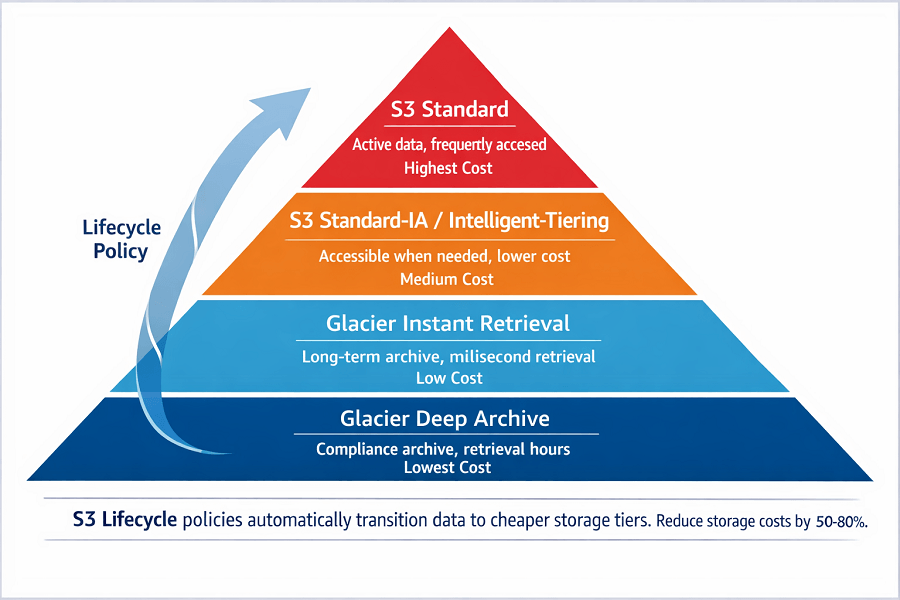
Lifecycle policies automatically move data to cheaper storage tiers.
Recommended Storage Strategy:
| Data Type | Storage Class |
|---|---|
| Frequently accessed | S3 Standard |
| Occasional access | S3 Standard-IA |
| Long-term archive | Glacier Instant Retrieval |
| Compliance archive | Glacier Deep Archive |
Benefits:
- Lower storage costs
- Automated management
- Improved storage efficiency
7. Reduce Data Transfer Costs
Data transfer fees are commonly overlooked but can become a major expense.
Common Sources
- Cross-region traffic
- Internet egress charges
- Multi-AZ communication
- Excessive API requests
Optimization Strategies
Use CloudFront:
AWS CloudFront caches content closer to users, reducing origin traffic costs.
Minimize Cross-Region Transfers:
Keep workloads and data in the same region whenever possible.
Optimize Application Architecture:
Reduce unnecessary communication between services.
8. Set Up AWS Budgets and Alerts
Cost optimization is not a one-time activity.
Organizations should establish proactive controls.
AWS Budgets
AWS Budgets enables teams to:
- Set spending thresholds
- Track forecasts
- Receive alerts
- Prevent budget overruns
Recommended Alerts:
| Threshold | Action |
|---|---|
| 50% | Early warning |
| 75% | Investigation |
| 90% | Immediate review |
| 100% | Escalation |
Budget alerts help identify issues before costs become problematic.
9. Implement Multi-Account Cost Allocation
As organizations scale, cost attribution becomes increasingly difficult.
Using AWS Organizations and tagging strategies enables clear accountability.
Essential Cost Allocation Tags
- Environment (Production, Development, Test)
- Department
- Application
- Project
- Business Unit
- Owner
Benefits:
- Better reporting
- Accurate chargebacks
- Improved governance
- Enhanced budgeting
10. Use AWS Trusted Advisor
AWS Trusted Advisor continuously evaluates your environment and identifies optimization opportunities.
Cost Optimization Recommendations Include
- Idle resources
- Underutilized EC2 instances
- Reserved Instance opportunities
- Storage optimization
- Service limits
Regularly reviewing Trusted Advisor recommendations can uncover significant savings opportunities.
Build a Culture of Cloud Cost Governance
Technology alone will not solve cloud spending issues.
Successful organizations establish governance frameworks that include:
Regular Cost Reviews:
Monthly cloud cost meetings involving engineering, operations, and finance teams.
FinOps Practices:
Adopt Financial Operations (FinOps) principles to align cloud spending with business objectives.
Continuous Optimization:
Cloud environments change constantly. Cost optimization should be an ongoing process rather than a one-time project.
Conclusion
AWS cost optimization is not about cutting corners, it is about maximizing efficiency. By combining rightsizing, Savings Plans, Spot Instances, storage optimization, and strong governance practices, organizations can realistically reduce their cloud expenses by 30–40%.
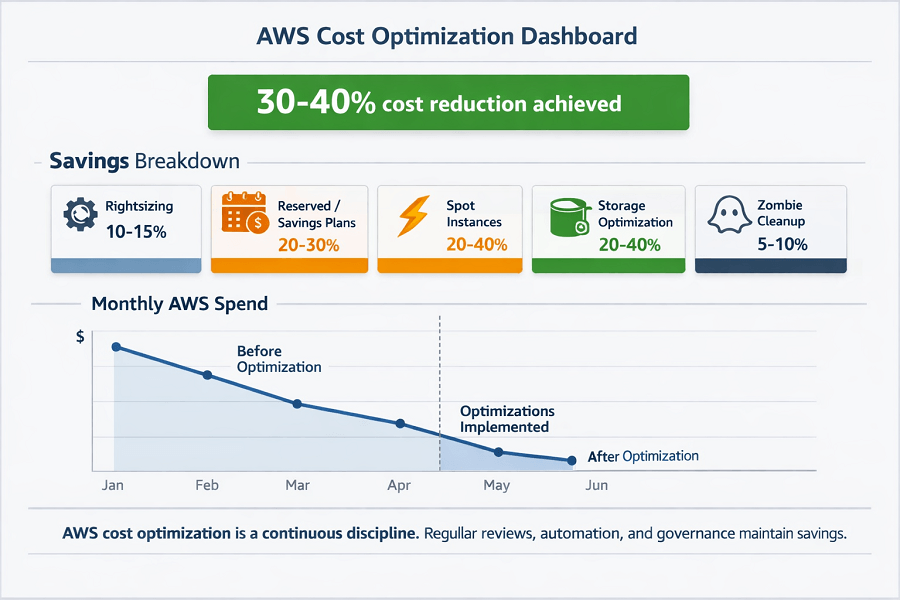
The most successful cloud teams treat cost management as a continuous discipline. With proper visibility, automation, and accountability, AWS becomes not only scalable and reliable but also highly cost-efficient.
Invest in ongoing cloud cost governance today, and your AWS environment will deliver greater value while keeping spending under control.
FAQs
1. Reserved Instances vs Savings Plans – which should I choose?
Savings Plans for most organizations – they offer similar discounts (up to 72%) with greater flexibility across instance families and regions.
Reserved Instances are better when you have highly stable, specific instance types (e.g., databases, fixed production workloads). Savings Plans are simpler to manage and adapt as your environment evolves.
2. How do I find zombie resources?
Use AWS Trusted Advisor (idle resources, unattached volumes), AWS Config (resource compliance rules), and custom scripts.
Common zombies: unattached EBS volumes (still costing storage), idle load balancers, orphaned snapshots, unused Elastic IPs, and RDS instances running 24/7 for dev/testing. Run monthly audits.
3. Can I use Spot Instances for production?
Yes, but only for fault-tolerant, stateless workloads that can handle interruptions. Examples: batch processing, CI/CD runners, containerized microservices with multiple replicas. Use Spot with Auto Scaling Groups and On-Demand fallback.
Never use Spot for stateful databases or single-point-of-failure services. Interruption rates are low for many instance types (<5-10%), but design for resilience.
Summarize this post with:
