GPU Autoscaling for LLM Inference on AWS: Karpenter, EKS & vLLM
Learn how to autoscale LLM GPU inference on AWS with EKS, Karpenter, vLLM and KEDA while reducing idle GPU capacity, latency and cost.

TL;DR
- GPU autoscaling = add capacity when demand spikes, remove it when traffic drops. Prevents paying for idle GPUs. Critical for LLMs because GPUs are expensive and traffic is often bursty.
- Don't scale on CPU or memory – LLMs need inference-aware metrics: waiting requests, Time to First Token (TTFT), KV-cache utilization, and GPU memory. vLLM exposes these via Prometheus.
- Two-layer scaling: KEDA scales inference replicas (pods) based on queue depth. Karpenter provisions GPU nodes when pods are pending. They work together.
- Warm capacity matters – scale-to-zero saves money but model loading can take minutes. Keep minimum replicas (1-2) for interactive workloads (coding assistants, chat). Scale-to-zero works for batch jobs.
- Scale up quickly, scale down slowly – use cooldown periods and stabilization windows to avoid thrashing. vLLM's KEDA integration supports configurable polling and scale-down behavior.
- On AWS: EKS + Karpenter + vLLM + KEDA. Separate GPU node pools by workload (small models, H100, H200, spot for batch). Use NVIDIA DRA or device plugin for GPU exposure.
- The goal: deliver required latency and reliability at the lowest sustainable infrastructure cost – not maximum GPU utilization at any cost.
What Is GPU Autoscaling?
GPU autoscaling means automatically adjusting the amount of GPU infrastructure available to an AI workload based on demand.
For LLM inference, this can mean:
- Adding GPU nodes when requests increase
- Removing unused nodes when traffic falls
- Scaling model replicas
- Increasing or reducing serving capacity
- Keeping a small warm capacity for interactive workloads
The objective is simple:
Have enough GPU capacity to maintain the required performance without paying for unnecessary idle capacity.
This matters because GPUs are usually much more expensive than ordinary CPU infrastructure.
Why LLM GPU Autoscaling Is Different
Traditional web applications often scale based on:
- CPU utilization
- Memory utilization
- Request count
LLM inference behaves differently.
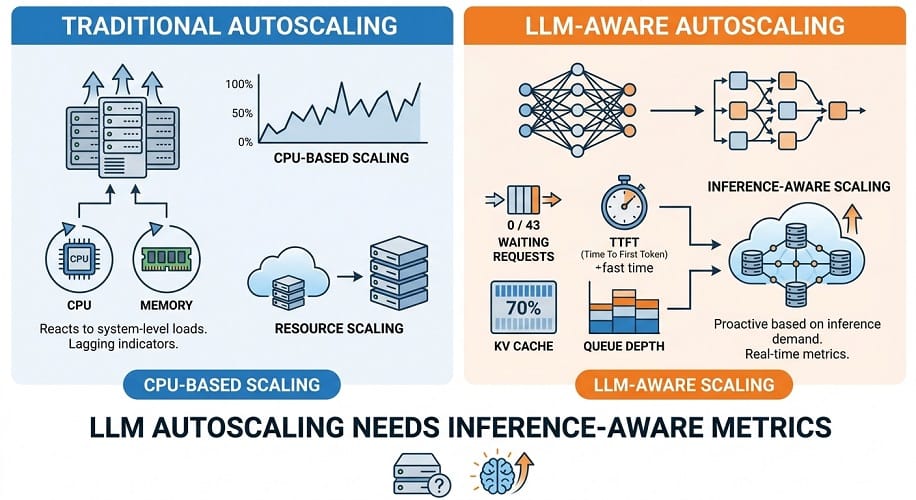
A model can have:
CPU utilization: 25%
while simultaneously having:
GPU memory utilization: 95%
and:
20 requests waiting
The application is clearly under pressure even though CPU usage looks low.
For LLM workloads, autoscaling needs to understand the behavior of the inference engine.
Why GPU Utilization Alone Is Not Enough
GPU utilization is useful, but it is not always a good scaling signal by itself.
A GPU may show high utilization because it is processing a long prompt efficiently, while user requests remain within acceptable latency.
Another deployment may show moderate utilization while request queues are growing.
This is why production autoscaling should combine several metrics.
Useful signals include:
- Waiting requests
- Running requests
- Time to first token
- KV-cache utilization
- Tokens per second
- GPU utilization
- Request latency
vLLM exposes metrics for running and waiting requests, token processing, latency, and KV-cache usage, which makes these metrics useful for inference-aware scaling.
Why Queue Depth Matters
Suppose your model currently has:
2 requests waiting
and:
2 requests running
The system may be healthy.
Now imagine:
40 requests waiting
while GPU capacity remains near saturation.
Even if the GPU utilization percentage looks acceptable, users will experience increasing latency.
Queue depth can therefore be a better autoscaling signal for interactive workloads.
Time to First Token
TTFT is another important signal.
A user may not care that the model eventually generated 1,000 tokens quickly if they had to wait several seconds before seeing the first response.
For:
- Coding assistants
- Chat systems
- RAG applications
- AI agents
TTFT can have a direct impact on perceived performance.
A scaling system can therefore use rising TTFT as an indication that additional inference capacity may be required.
KV Cache as a Scaling Signal
KV cache becomes particularly important for:
- Long context
- Coding agents
- RAG
- Multi-turn conversations
- High concurrency
When KV-cache utilization gets close to capacity, adding requests can become difficult even when raw compute is not completely saturated.
For that reason, KV-cache usage can be an important signal for memory-bound LLM workloads.
Scale the Model or Scale the Nodes?
There are actually two different scaling problems.
Replica scaling
Increase the number of inference replicas.
For example:
2 vLLM pods → 4 vLLM pods
Node scaling
Increase the number of GPU machines available to Kubernetes.
For example:
2 GPU nodes → 4 GPU nodes
These two layers often work together.
A Kubernetes deployment may request additional model replicas, while Karpenter provisions the GPU nodes needed to schedule them.
KEDA vs Karpenter
These tools solve different problems.
KEDA
KEDA can scale Kubernetes workloads based on metrics and events.
For LLM serving, that can mean increasing the number of vLLM replicas when waiting requests increase.
Karpenter
Karpenter provisions infrastructure capacity when Kubernetes cannot schedule workloads on the existing nodes.
This can mean creating a new GPU-backed EC2 instance when another inference replica needs capacity.
So:
KEDA can scale the workload.
Karpenter can scale the infrastructure.
They can be used together.
Amazon EKS for GPU Autoscaling
Amazon EKS provides a strong foundation for enterprise GPU inference because it separates application scheduling from the underlying EC2 infrastructure.
An EKS environment can contain:
- CPU nodes
- GPU nodes
- Inference services
- Gateways
- Monitoring
- Internal APIs
GPU workloads can then be assigned to dedicated GPU node pools.
GPU Node Pools
Separating GPU nodes from ordinary Kubernetes nodes is important.
A typical enterprise environment may have:
| Node Pool | Primary Workload |
|---|---|
| General CPU | APIs and platform services |
| Small GPU | Lightweight inference |
| Large GPU | Large‑model inference |
| Specialized GPU | High‑performance workloads |
This prevents expensive GPU resources from being consumed by unrelated workloads.
GPU Scheduling
Kubernetes scheduling should ensure that AI workloads are placed on suitable GPU nodes.
Useful controls include:
- Labels
- Taints
- Tolerations
- Node affinity
- Resource requests
- Resource limits
- Infrastructure as Code
For example, a large DeepSeek deployment should not accidentally land on a node intended for smaller models.
Karpenter for GPU Capacity
Karpenter can provision new EC2 nodes when unscheduled pods require additional capacity.
For AI infrastructure, the selection can consider:
- GPU type
- GPU memory
- Availability
- Instance family
- Architecture
- Capacity constraints
- Cost
This is important because not every GPU is suitable for every model.
A workload requiring 140 GB of GPU memory should not be scheduled onto a 32 GB accelerator simply because that instance is cheaper.
Why Karpenter Matters for LLMs
GPU demand can vary significantly.
For example:
Normal traffic: 2 GPU nodes
Peak traffic: 8 GPU nodes
Without autoscaling, the organization must keep the larger capacity available all the time.
That creates expensive idle capacity.
Karpenter can help make GPU infrastructure more dynamic.
Warm GPUs vs Scale-to-Zero
Scale-to-zero sounds attractive because it minimizes idle infrastructure.
For LLMs, however, there is a major problem:
model startup time
A large model may require:
- GPU provisioning
- Node startup
- Container startup
- Model download
- Model loading into memory
- Initialization
That can create a large delay before the system is ready.
For interactive applications, this may be unacceptable.
Warm Capacity
A practical production strategy is often to maintain a minimum warm capacity.
For example:
2 warm replicas
during normal operation.
Additional capacity can then be added during demand spikes.
This balances:
- Latency
- Availability
- Cost
Scale-to-Zero Makes More Sense for Batch AI
Scale-to-zero can be much more attractive for workloads such as:
- Overnight document processing
- Offline evaluation
- Large batch inference
- Scheduled analysis
- Model benchmarking
For these tasks, users are not waiting for an immediate response.
The system can tolerate:
- GPU startup
- Model loading
- Queueing
That makes aggressive cost optimization possible.
Model Startup Time Matters
GPU autoscaling is not instantaneous.
A scale-up event may involve:
- Detecting demand
- Scheduling a pod
- Provisioning the GPU node
- Starting the container
- Loading the model
- Passing readiness checks
For very large models, model-loading time can become a major part of the scaling experience.
Model Caching
Model loading can be improved by caching model artifacts.
Common approaches include:
- Local node cache
- Persistent storage
- Preloaded model images in specialized environments
- Fast model storage
- Controlled model artifact repositories
The goal is to avoid downloading hundreds of gigabytes whenever a new GPU node starts.
S3 for Model Storage
For AWS environments, Amazon S3 can act as a centralized location for model artifacts.
This allows organizations to manage:
- Model versions
- Access
- Storage
- Lifecycle policies
But S3 should not be treated as a replacement for a fast local model cache when startup time is critical.
Autoscaling Qwen
Qwen workloads can range from lightweight chat to large coding agents.
For smaller models, replica-based scaling may be sufficient.
For large Qwen models, GPU node scaling becomes more important because each replica may require substantial GPU capacity.
The scaling signal should depend on the workload.
For a coding assistant:
- Waiting requests
- TTFT
- Active sessions
may be particularly useful.
For batch inference:
- Queue length
- Pending jobs
may be more appropriate.
Autoscaling DeepSeek
DeepSeek workloads can be especially demanding for large reasoning and MoE models.
Important signals include:
- GPU memory
- KV cache
- Waiting requests
- Generation rate
- Multi-GPU capacity
For large DeepSeek deployments, scale-up time can also become significant because each new replica may require multiple GPUs.
Autoscaling GLM
GLM workloads can similarly range from relatively small models to very large agentic systems.
For enterprise agents, scaling can be driven by:
- Number of active sessions
- Waiting requests
- Tool-heavy execution
- Context size
Large GLM deployments should also consider whether a new replica requires a complete multi-GPU configuration.
Autoscaling for Coding Agents
Coding agents and coding assistants behave differently from normal chat applications.
One user task may produce many model calls.
A single task might contain:
- Planning
- File inspection
- Code generation
- Tool calling
- Test execution
- Error correction
That means traffic can increase suddenly even when the number of active users does not change.
For coding agents, monitor:
- Active agent sessions
- Waiting inference requests
- Request rate
- TTFT
- GPU utilization
- Task completion time
Autoscaling for RAG
RAG traffic can also be bursty.
For example, hundreds of employees may query an internal knowledge assistant at the start of the workday.
Scaling needs to account for both:
- Retrieval capacity
- LLM generation capacity
Increasing GPU nodes won't fix a database bottleneck.
That is why the complete RAG system should be monitored.
Autoscaling for Long-Context Workloads
Long-context requests consume substantially more memory and processing.
A sudden increase in average context size can therefore create GPU pressure even when request volume remains stable.
This means autoscaling should monitor more than request count or vector database performance.
Track:
- Average prompt tokens
- KV-cache usage
- TTFT
- GPU memory
- Queue depth
Why Traditional HPA Isn't Enough
Horizontal Pod Autoscaler can be useful for ordinary Kubernetes services.
But scaling an LLM based only on CPU or memory can miss the real bottleneck.
An inference service may be:
CPU-light + GPU-saturated
or:
CPU-light + memory-bound
or:
GPU-available + queue-constrained
LLM-specific metrics provide a much more useful picture.
vLLM Autoscaling with KEDA
For LLM inference, one of the most useful approaches is to scale the inference deployment based on requests waiting for service rather than CPU utilization.
The current vLLM Production Stack provides KEDA integration using Prometheus metrics. Its documented example uses vllm:num_requests_waiting as the scaling signal and allows minimum and maximum replica limits, polling intervals, cooldown periods, and scale-down behavior to be configured.
A simple policy might be:
| Setting | Example |
|---|---|
| Minimum replicas | 1 |
| Maximum replicas | 5 |
| Queue threshold | 5 waiting requests |
| Polling interval | 15 sec |
| Scale‑down cooldown | 6 min |
These values should be treated as starting points, not universal recommendations.
A coding assistant may need a lower queue threshold because users expect immediate responses.
A batch system can tolerate a much larger queue.
Why Queue-Based Scaling Works Well
Consider two situations.
Situation A
GPU utilization is high, but there are no waiting requests.
The system may be performing well.
Situation B
GPU utilization is moderately high, but 30 requests are waiting.
Users are likely experiencing increasing latency.
A request-queue metric makes the difference visible.
KEDA and vLLM
KEDA handles the workload replica scaling.
A typical configuration can allow:
1 vLLM replica during normal traffic
and:
up to 5 replicas during peak demand
The vLLM Production Stack documentation currently demonstrates exactly this type of Prometheus-driven scaling and also provides options for scale-to-zero, custom HPA behavior, and fallback replicas when metrics become unavailable.
Scale-to-Zero with vLLM
Scale-to-zero can reduce idle cost, but it should be used carefully for LLMs.
A model may require:
- New GPU capacity
- Container startup
- Model loading
- Readiness checks
For interactive workloads, those delays can be unacceptable.
For batch inference, evaluation, or infrequent internal workloads, scale-to-zero can make more sense.
Preventing Scale-Up Delays
Keep a minimum number of warm replicas for latency-sensitive applications.
For example:
| Workload | Possible Minimum |
|---|---|
| Interactive coding | 1–2 |
| Enterprise RAG | 1–2 |
| Customer‑facing AI | 2+ |
| Batch processing | 0 or 1 |
| Evaluation | 0 |
The correct baseline depends on SLA and traffic.
Karpenter for GPU Node Provisioning
KEDA can create additional inference replicas, but those replicas still need somewhere to run.
This is where Karpenter becomes useful.
Karpenter can provision EC2 nodes when Kubernetes cannot schedule a pending workload.
AWS's EKS guidance provides Karpenter examples using GPU instance requirements and GPU taints for dedicated AI capacity.
The separation is important:
KEDA scales pods.
Karpenter provisions nodes.
Karpenter GPU NodePools
A GPU NodePool should define which infrastructure is acceptable.
Useful constraints include:
- Instance type
- GPU family
- Architecture
- Operating system
- Capacity type
- Availability requirements
For example, one NodePool might target H100-class instances while another targets less expensive GPU capacity.
This allows different models to use different infrastructure.
GPU NodePool Strategy
A production cluster can separate GPU capacity by workload:
| GPU Pool | Example Workload |
|---|---|
| Small GPU | Lightweight models |
| H100 | Large‑model inference |
| H200 | Memory‑heavy inference |
| Blackwell | Very large models |
| Spot GPU | Batch workloads |
This prevents one model from consuming capacity intended for another.
NVIDIA GPU Management on EKS
AWS currently supports two mechanisms for exposing NVIDIA GPUs to EKS workloads:
- NVIDIA Dynamic Resource Allocation
- NVIDIA Kubernetes device plugin
For new Kubernetes 1.34+ deployments using static GPU capacity with Karpenter, managed node groups, or self-managed nodes, AWS recommends the NVIDIA DRA driver. EKS Auto Mode currently uses the NVIDIA device plugin instead.
The exact choice therefore depends on:
- Kubernetes version
- EKS operating mode
- Karpenter configuration
- Static or dynamic capacity provisioning
DRA vs NVIDIA Device Plugin
| Capability | NVIDIA DRA | NVIDIA Device Plugin |
|---|---|---|
| Modern GPU allocation | Strong | Strong |
| Resource attributes | Rich | Basic |
| GPU model selection | More flexible | More limited |
| Topology awareness | Strong | Supported in specific EKS configurations |
| Kubernetes 1.34+ | Recommended for suitable static deployments | Supported |
| EKS Auto Mode | Not currently supported | Supported |
AWS also warns not to run both mechanisms for the same GPU devices on the same node because this can lead to device oversubscription.
GPU Scheduling
After GPUs are exposed to Kubernetes, workloads need to be directed to suitable nodes.
Useful Kubernetes controls include:
- Node labels
- Node affinity
- Taints
- Tolerations
- Resource requests
- Resource limits
This is particularly important for mixed Qwen, DeepSeek, and GLM environments.
A large model should not accidentally consume a GPU intended for a lightweight service.
Choosing GPU Capacity
Autoscaling is useful only when the cluster can select appropriate capacity.
For example:
Smaller model
Use a lower-cost GPU.
Large model
Use H100 or H200.
Extremely large model
Use Blackwell or multi-GPU capacity.
The autoscaler should therefore understand infrastructure constraints rather than simply adding any available GPU.
H100, H200 and Blackwell Autoscaling
Different GPUs can serve different workload tiers.
| GPU | Typical Scaling Role |
|---|---|
| H100 | General large‑model inference |
| H200 | Memory‑heavy models |
| B200 | New high‑performance deployments |
| B300 | Very large memory‑intensive models |
This can be implemented with separate NodePools and workload scheduling rules.
Scaling Large Models Is Different
Suppose a small model needs:
1 GPU per replica
but a large DeepSeek model needs:
8 GPUs per replica
Scaling from:
1 replica to 2 replicas
may therefore require:
8 additional GPUs
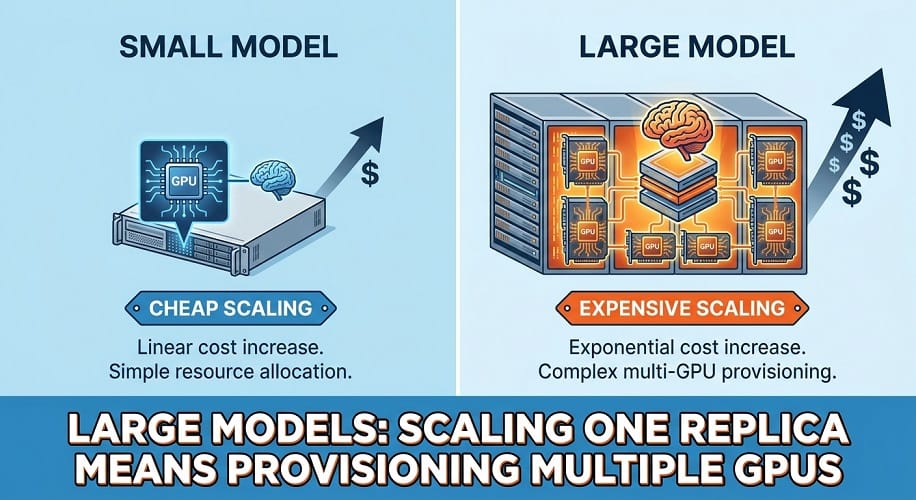
This makes autoscaling much more expensive and slower for large models.
Large-model deployments should therefore use higher minimum capacity and more conservative scaling policies when latency matters.
Scale-Up Delay
A new GPU replica may require several stages:
- Pod becomes pending
- Karpenter detects insufficient capacity
- EC2 instance launches
- Node joins EKS
- GPU becomes available
- Inference container starts
- Model loads
- Readiness check passes
This can take significantly longer than scaling a normal web application.
The scaling policy should account for this delay.
Warm Capacity vs Aggressive Scaling
For interactive LLM applications, a useful strategy is:
Keep a small warm baseline
and:
scale additional capacity during sustained demand
This avoids paying for a large idle cluster while still keeping response times reasonable.
Avoiding Scaling Thrashing
Scaling too aggressively can create an unstable system.
For example:
Traffic increases → scale up → traffic briefly falls → scale down → traffic increases again
This can cause repeated:
- GPU provisioning
- Model loading
- Pod startup
- GPU termination
and waste money.
Use:
- Scale-up thresholds
- Cooldown periods
- Stabilization windows
- Minimum replicas
- Maximum replicas
The current vLLM KEDA integration supports configurable polling, cooldown, and custom scale-down behavior.
Scale-Up Quickly, Scale-Down Slowly
For interactive workloads, a useful general policy is:
Scale up relatively quickly
and:
scale down more conservatively
This avoids removing capacity during short traffic fluctuations.
The exact policy should come from observed traffic patterns.
Monitoring Autoscaling
Monitor the relationship between:
- Waiting requests
- Replicas
- GPU nodes
- GPU utilization
- TTFT
- Queue time
A useful dashboard should make it possible to answer:
Did the platform add capacity before users experienced excessive latency?
and:
Did it remove capacity soon enough to avoid unnecessary GPU spend?
Autoscaling Metrics
At minimum, monitor:
| Metric | Purpose |
|---|---|
| Waiting requests | Demand |
| Running requests | Active load |
| TTFT | User responsiveness |
| GPU utilization | Compute pressure |
| VRAM utilization | Memory pressure |
| KV‑cache usage | Request‑state pressure |
| Replicas | Serving capacity |
| GPU nodes | Infrastructure capacity |
| Pending pods | Scaling delay |
| Node startup time | Provisioning performance |
Prometheus and KEDA
The vLLM Production Stack currently supports Prometheus-based KEDA scaling and can integrate monitoring components directly through its Helm deployment.
This makes it possible to build an inference-aware scaling system without creating custom metrics infrastructure from scratch.
Autoscaling Qwen
For Qwen workloads, use:
- Waiting requests
- TTFT
- KV-cache usage
- GPU utilization
For coding agents, also monitor session counts and request bursts.
For large Qwen models, make sure the scaling policy understands that each replica may require multiple GPUs.
Autoscaling DeepSeek
For DeepSeek, memory pressure can be particularly important for large models and long contexts.
Monitor:
- KV cache
- GPU memory
- Waiting requests
- Generation throughput
- Multi-GPU capacity
A model requiring a large GPU footprint should generally use more conservative scale-down behavior.
Autoscaling GLM
For GLM, evaluate scaling against:
- Model size
- Context
- Agent activity
- Tool calls
- GPU memory
Large agentic workloads can create sudden demand increases that are not captured well by ordinary request counts.
GPU Autoscaling and Cost Optimization
The main reason to autoscale GPU infrastructure is simple:
Don't pay for GPU capacity that you don't need.
But cost reduction should never come at the expense of the required latency or availability.
A production autoscaling policy should balance:
- GPU utilization
- Queue depth
- TTFT
- Availability
- Startup time
- Model-loading time
- Peak traffic
- Infrastructure cost
On-Demand vs Spot GPUs
AWS Spot Instances can reduce compute costs for workloads that can tolerate interruption.
They are particularly suitable for:
- Batch inference
- Offline document processing
- Model evaluation
- Benchmarking
- Development
- Non-critical workloads
They are less suitable as the only capacity for:
- Customer-facing AI
- Interactive coding assistants
- Strict latency SLAs
- Critical internal systems
A mixed strategy can work well:
| Workload | Recommended Capacity |
|---|---|
| Critical production inference | On‑Demand |
| Batch inference | Spot |
| Evaluation | Spot |
| Development | Spot / flexible capacity |
| High‑priority baseline | On‑Demand |
| Bursty non‑critical workloads | Spot where appropriate |
GPU Autoscaling and Capacity Diversity
Don't rely on one GPU instance type when the workload can use several alternatives.
For example, a platform might support:
- H100
- H200
- B200
depending on model requirements and availability.
This can improve the chances of finding capacity during demand spikes.
However, different GPUs must not be treated as interchangeable.
A model requiring 140 GB of memory cannot simply move to a 32 GB GPU because it is cheaper.
Autoscaling Large Models
Large models create a special problem.
Suppose a small model requires one GPU per replica.
A large model may require eight GPUs per replica.
Scaling one replica therefore means provisioning a complete multi-GPU environment.
This makes large-model autoscaling:
- More expensive
- Slower
- More difficult to optimize
For such models, maintaining a larger warm baseline can sometimes provide a better user experience than frequent scale-up and scale-down operations.
Scale-Up Policies
Scale-up should happen before the service becomes unusable.
Useful triggers can include:
- Waiting requests above threshold
- Increasing TTFT
- KV-cache pressure
- Sustained GPU saturation
- Pending GPU pods
Avoid scaling immediately from a single short-lived spike.
Use a sustained threshold or stabilization window.
Scale-Down Policies
Scale-down should generally be more conservative.
Removing a GPU can trigger:
- Model termination
- Request redistribution
- Cache loss
- Model reload later
- Additional startup latency
Use cooldown periods to prevent unnecessary capacity changes.
Avoid Autoscaling on a Single Metric
A better policy considers several signals.
For example:
| Signal | Interpretation |
|---|---|
| Waiting requests rising | Demand exceeds current capacity |
| TTFT rising | Users are waiting longer |
| KV cache near limit | Memory pressure |
| GPU utilization high | Compute pressure |
| Pending pods | Infrastructure capacity insufficient |
This gives a much more complete view of the system.
Multi-AZ GPU Autoscaling
For critical enterprise systems, infrastructure may be distributed across multiple Availability Zones.
This can improve resilience against:
- Instance failures
- AZ problems
- Capacity shortages
- Maintenance events
However, very large multi-GPU models can have topology requirements that make arbitrary cross-AZ distribution impractical.
For tightly coupled model serving, keeping the model's GPUs within the same server or appropriate hardware topology can be more important than spreading a single replica across Availability Zones.
High Availability for LLM APIs
A production LLM service should consider:
- Multiple inference replicas
- Load balancing
- Health checks
- Pod disruption budgets
- Rolling updates
- GPU failure recovery
A single GPU failure should not necessarily make the entire enterprise AI service unavailable.
For smaller models, maintaining multiple replicas is relatively straightforward.
For very large models, redundancy becomes much more expensive.
Monitoring Autoscaling Performance
The autoscaler itself needs monitoring.
Track:
- Desired replicas
- Actual replicas
- Pending pods
- GPU nodes
- Node startup time
- Model startup time
- Scale-up duration
- Scale-down duration
- Queue depth
- TTFT
- GPU utilization
One of the most useful metrics is:
time from scaling decision to usable inference capacity
If that number is three minutes, scaling must happen well before users reach severe latency.
Autoscaling and Model Loading
Model-loading time can dominate GPU startup.
A newly created GPU node may still need to:
- Pull the container
- Download model artifacts
- Initialize the runtime
- Load weights
- Allocate KV-cache memory
- Run readiness checks
For large models, model loading can be the slowest part.
This is why fast model storage and local caching can be as important as the autoscaler.
Reducing Model Startup Time
Useful techniques include:
- Keeping a warm model cache
- Using fast local storage
- Maintaining minimum replicas
- Avoiding unnecessary model downloads
- Versioning model artifacts
- Using optimized container images
For frequently used production models, a warm baseline can often provide better economics than repeatedly creating and destroying large GPU nodes.
GPU Autoscaling for Qwen
For smaller Qwen models:
- Replica scaling can be relatively flexible.
- Scale-to-zero may be practical for non-interactive workloads.
- Lower-cost GPU pools can reduce infrastructure expense.
For large Qwen models:
- GPU memory becomes more important.
- Multi-GPU placement may be required.
- Scale-up can be expensive.
- Warm capacity becomes more important.
For Qwen coding agents, also consider sudden bursts caused by multiple concurrent developer sessions.
GPU Autoscaling for DeepSeek
Large DeepSeek models can require substantial GPU capacity.
For these workloads:
- Use memory-aware node selection.
- Monitor KV-cache usage.
- Monitor pending inference requests.
- Keep sufficient warm capacity.
- Avoid frequent scale-down events.
For smaller DeepSeek workloads, more aggressive autoscaling may be practical.
GPU Autoscaling for GLM
GLM workloads can also vary significantly by model size.
Smaller GLM models can use more flexible autoscaling.
Large GLM deployments may require multi-GPU replicas, making each scaling event significantly more expensive.
In those cases, stable warm capacity can be preferable to aggressive scale-to-zero behavior.
GPU Autoscaling for RAG
RAG often creates predictable traffic patterns.
For example, an enterprise knowledge assistant might experience:
- Morning traffic spikes
- Lunch-time reduction
- Afternoon activity
- Lower nighttime usage
Autoscaling can take advantage of these patterns.
But remember that the RAG system includes more than the LLM.
Also monitor:
- Retrieval latency
- Vector database load
- Reranking latency
- Embedding service capacity
Scaling the LLM alone won't solve a retrieval bottleneck.
GPU Autoscaling for Coding Agents
Coding agents can create bursty workloads because several developers may start large tasks at approximately the same time.
Useful scaling signals include:
- Active sessions
- Waiting requests
- TTFT
- Average context size
- GPU memory
- Agent task duration
For interactive developer tooling, keep enough warm capacity to avoid making developers wait for GPU provisioning.
Cost Per Successful Task
Autoscaling should ultimately be judged by economics.
Use:
Total GPU and infrastructure cost ÷ successfully completed tasks
Compare that before and after implementing autoscaling.
For example:
| Deployment | Monthly Cost | Successful Tasks | Cost / Task |
|---|---|---|---|
| Fixed GPU capacity | $20,000 | 100,000 | $0.20 |
| Autoscaled | $14,000 | 98,000 | $0.143 |
Even though autoscaling handled slightly fewer tasks, the lower cost per successful task makes it more efficient.
These values are illustrative.
Autoscaling and GPU Utilization
A useful autoscaling program should improve:
useful GPU utilization
rather than simply maximize the utilization percentage.
If an autoscaler pushes GPU usage to 99% but causes:
- Long queues
- High TTFT
- Timeouts
- Failed tasks
then the system is not actually optimized.
Performance and cost must be balanced.
Common GPU Autoscaling Mistakes
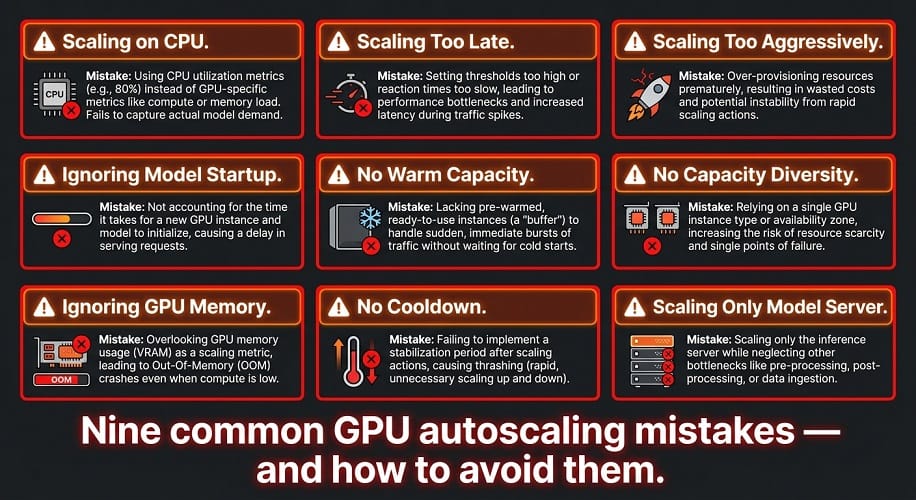
Scaling on CPU
CPU utilization may remain low while the GPU is saturated.
Scaling too late
Provisioning large GPU nodes can take time.
Scaling too aggressively
This can create infrastructure thrashing.
Ignoring model startup
A new GPU isn't immediately a ready inference replica.
No warm capacity
Scale-to-zero can create unacceptable delays for interactive systems.
No capacity diversity
One unavailable GPU type can block scaling.
Ignoring GPU memory
The cheapest GPU may not be capable of running the model.
No cooldown
Frequent scale-up and scale-down events can waste resources.
Scaling only the model server
RAG, databases, gateways, and other services can become the real bottleneck.
Recommended Production Architecture
For many enterprise AWS deployments, a practical starting stack is:
| Layer | Technology |
|---|---|
| Cloud | AWS |
| Kubernetes | Amazon EKS |
| GPU provisioning | Karpenter |
| Workload scaling | KEDA / Kubernetes autoscaling |
| Inference | vLLM or SGLang |
| GPU management | NVIDIA‑supported EKS GPU stack |
| Metrics | Prometheus |
| Dashboards | Grafana / CloudWatch |
| Model storage | Amazon S3 + local cache |
| Network | Amazon VPC |
| Security | IAM, security groups, private networking |
The exact components should be selected based on cluster architecture and Kubernetes version.
When Autoscaling Is Not Necessary
Not every LLM deployment needs sophisticated autoscaling.
A fixed GPU configuration may be better when:
- Traffic is highly predictable
- GPU utilization is already high
- The team is small
- The deployment contains one model
- Scale-up time is longer than the business can tolerate
- The cost savings are negligible
Don't add operational complexity unless it solves a real capacity problem.
When Autoscaling Is Highly Valuable
Autoscaling becomes much more attractive when:
- Traffic is highly variable
- GPU costs are significant
- Multiple workloads share infrastructure
- Peak demand is much larger than average demand
- Batch workloads can tolerate delays
- Multiple model replicas are deployed
EaseCloud Recommendation
At EaseCloud, GPU autoscaling should be designed around the complete AI workload rather than treated as a simple Kubernetes feature.
The key areas include:
- AWS GPU selection
- Amazon EKS
- Karpenter
- KEDA
- vLLM
- SGLang
- GPU scheduling
- Model caching
- Cost monitoring
- LLMOps
- MLOps
- Observability
- Capacity planning
The goal is to keep enough warm GPU capacity for the user experience while automatically expanding when demand requires it.
For large Qwen, DeepSeek, or GLM models, the most important optimization may be better capacity planning, because each replica can require multiple expensive GPUs.
Frequently Asked Questions
What is GPU autoscaling?
GPU autoscaling automatically increases or decreases GPU-backed inference capacity based on workload demand.
Can Kubernetes autoscale GPUs?
Yes. Kubernetes can scale model workloads while tools such as Karpenter can provision additional GPU-backed infrastructure on AWS.
What is KEDA used for with LLMs?
KEDA can scale inference replicas based on metrics such as waiting requests. The current vLLM Production Stack provides a documented KEDA integration for this purpose.
What is Karpenter used for with GPU workloads?
Karpenter provisions EC2 nodes when Kubernetes workloads require additional infrastructure capacity.
Should I use KEDA and Karpenter together?
They solve different scaling layers and can work together: KEDA can scale inference replicas while Karpenter provides the GPU nodes required to run them.
Should LLMs scale to zero?
It depends on the workload. Scale-to-zero can work well for batch and infrequent workloads but may introduce unacceptable startup delays for interactive applications.
What should trigger LLM GPU autoscaling?
Useful signals include waiting requests, TTFT, KV-cache utilization, GPU utilization, and pending workloads.
Is GPU utilization enough for autoscaling?
Usually not. GPU utilization should be combined with inference-specific metrics.
How do I reduce GPU costs while autoscaling?
Use appropriate minimum capacity, conservative scale-down policies, workload-aware scaling, GPU right-sizing, caching, and suitable Spot capacity for interruptible workloads.
Final Verdict
GPU autoscaling for LLM inference is not simply:
more traffic = more GPUs
A production system must consider:
traffic + model size + GPU memory + context + concurrency + startup time + latency + cost
For AWS deployments, Amazon EKS + Karpenter + inference-aware scaling provides a strong foundation.
For vLLM workloads, metrics such as waiting requests, TTFT, and KV-cache usage can provide much better scaling signals than CPU utilization alone.
For smaller or predictable workloads, simpler fixed GPU capacity may be better.
For large and variable enterprise workloads, autoscaling can significantly reduce idle GPU costs while maintaining performance.
At EaseCloud, the focus should be on building the right balance between GPU utilization, user latency, reliability, and infrastructure cost, rather than maximizing or minimizing any single metric.