Load Balancing Techniques for High-Traffic SaaS Applications
Master load balancing for SaaS with round robin, least connections, Layer 4 vs Layer 7, health checks, session persistence, and cloud options (ALB, NLB, Google Cloud LB, Azure LB).

TL;DR
- Single servers fail – load balancers distribute traffic across multiple servers, enabling scalability, redundancy, and zero-downtime maintenance.
- Layer 4 (IP/port) is faster; Layer 7 (HTTP) enables content-based routing using URLs, headers, or cookies.
- Externalize session storage (Redis) instead of sticky sessions for true stateless scaling.
- Health checks enable automatic failover – configure active probes with appropriate depth and intervals.
- Cloud managed LBs (ALB, NLB, Google Cloud LB, Azure LB) reduce operational overhead.
Single servers fail. They hit capacity limits. They require maintenance. They create single points of failure. Load balancing distributes traffic across multiple servers, enabling scalability, redundancy, and maintainability. For SaaS applications serving significant traffic, load balancing is essential infrastructure.
Load Balancing Fundamentals
Load balancers sit between clients and server pools. They receive incoming requests and forward them to healthy backend servers. This simple concept enables powerful capabilities.
Scalability comes from adding servers. When traffic exceeds current capacity, add more servers to the pool. Load balancers automatically distribute traffic to new servers. Horizontal scaling becomes straightforward.
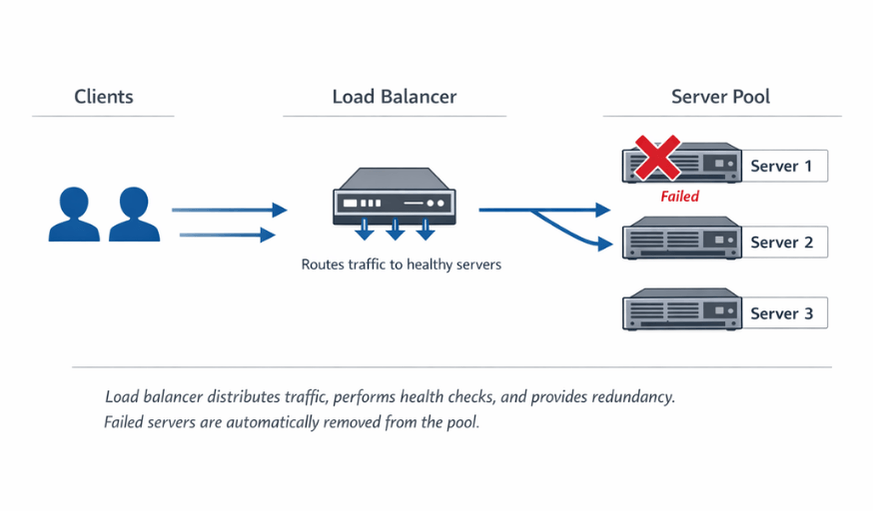
Redundancy eliminates single points of failure. When one server fails, load balancers route traffic to remaining healthy servers. Users experience no interruption. This resilience is impossible with single-server architectures.
SSL termination offloads cryptographic work. Load balancers can handle SSL/TLS encryption, reducing load on application servers. Centralized certificate management simplifies operations.
| Benefit | Description |
|---|---|
| Scalability | Add more servers to pool when traffic exceeds capacity |
| Redundancy | Failed servers automatically removed; users see no interruption |
| Maintainability | Remove servers for updates while traffic routes to remaining servers |
| Geographic distribution | Route users to nearby clusters for lower latency |
Modern SaaS architectures typically have multiple load balancing layers. External load balancers handle internet traffic. Internal load balancers distribute traffic between services. This layered approach provides flexibility and security.
Load Balancing Algorithms
Different algorithms suit different workloads. The choice affects how evenly traffic distributes and how efficiently servers are utilized.
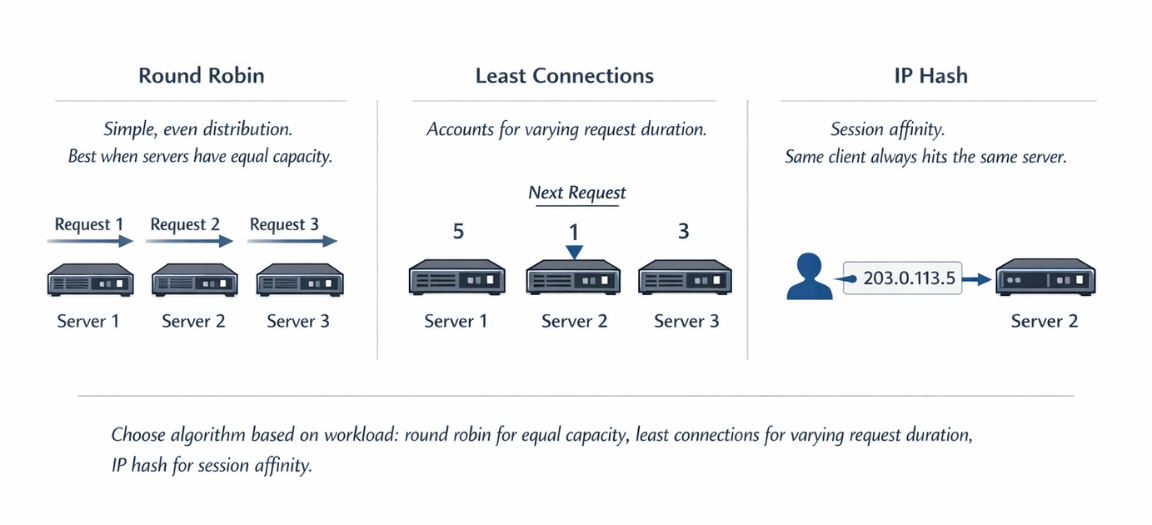
Round robin distributes requests sequentially. Each server receives requests in turn. Simple and predictable, this algorithm works well when servers have equal capacity and requests have similar cost.
Weighted round robin accounts for different server capacities. Servers receive traffic proportionally to assigned weights. A server with weight 2 receives twice the traffic of a server with weight 1.
Least connections sends traffic to the server with fewest active connections. This approach accounts for varying request duration. Long-running requests don't cause a server to be overloaded by round robin distribution.
Weighted least connections combines connection-based routing with capacity weights. Useful when servers differ in capability and request durations vary.
IP hash routes requests from the same client IP to the same server. This provides session affinity without explicit session tracking. However, it can create uneven distribution if traffic comes from a few large NAT gateways.
Random selection picks servers randomly. Statistically, this provides good distribution. It's simple to implement and avoids coordination overhead in distributed load balancer setups.
Least response time routes to the server responding fastest. This approach automatically favors healthy, lightly loaded servers. It requires measuring response times, adding some complexity.
Resource-based algorithms consider server CPU, memory, or custom metrics. Traffic routes to servers with available capacity. This approach requires agent deployment for metric collection.
Layer 4 vs Layer 7 Load Balancing
Load balancers operate at different network layers. The layer determines what information is available for routing decisions.
Layer 4 (transport layer) load balancers route based on IP addresses and ports. They're fast because they don't inspect packet contents. TCP and UDP traffic routes without understanding the application protocol.
# Nginx layer 7 routing example
upstream api_servers {
    server api1:8080;
    server api2:8080;
}

upstream web_servers {
    server web1:80;
    server web2:80;
}

server {
    location /api/ {
        proxy_pass http://api_servers;
    }

    location / {
        proxy_pass http://web_servers;
    }
}
Layer 7 enables header manipulation. Load balancers can add, modify, or remove headers. Common uses include adding client IP headers and routing information.
Layer 4 is faster for high-throughput scenarios. Without content inspection, Layer 4 load balancers process packets with minimal overhead. For performance-critical paths, Layer 4 may be preferred.
| Aspect | Layer 4 (Transport) | Layer 7 (Application) |
|---|---|---|
| Routing basis | IP addresses and ports | URLs, headers, cookies, request content |
| Speed | Faster (no packet inspection) | Slower (content inspection) |
| Protocol understanding | TCP/UDP only | HTTP/HTTPS |
| Capabilities | Basic routing | Content-based routing, header manipulation |
| Best for | Maximum throughput, simple distribution | Sophisticated traffic management |
Choose based on your needs. If you need content-based routing, use Layer 7. If you need maximum throughput with simple distribution, Layer 4 suffices.
Health Checks and Failover
Health checks verify server availability. Load balancers periodically test servers and route traffic only to healthy ones. This mechanism enables automatic failover.
| Type | How It Works | Overhead | Detection Speed |
|---|---|---|---|
| Passive | Detects failures from real traffic | Zero | Problems detected only when traffic reaches failing servers |
| Active | Periodic probe requests to health endpoints | Some load | Problems detected before affecting users |
# Flask health check endpoint
@app.route('/health')
def health_check():
    # Check critical dependencies
    try:
        db.session.execute('SELECT 1')
        redis_client.ping()
        return jsonify({'status': 'healthy'}), 200
    except Exception as e:
        return jsonify({'status': 'unhealthy', 'error': str(e)}), 503
Configure appropriate check intervals. Frequent checks detect failures quickly but add load. Infrequent checks reduce overhead but slow failure detection. Balance based on your availability requirements.
Set failure thresholds. Requiring multiple consecutive failures before marking servers unhealthy prevents false positives from transient issues.
Configure recovery thresholds. Servers returning to health should prove stability before receiving full traffic. Requiring several successful health checks before full recovery prevents flapping.
Health check depth matters. Simple TCP checks verify connectivity. HTTP checks verify application response. Deep checks verify database connectivity and other dependencies. Choose depth appropriate for your reliability needs.
Health checks prevent user interruption. We implement depth-appropriate verification.
Basic TCP checks miss application-level failures. Deep dependency checks add load. The right balance depends on your reliability requirements.
We help you:
- Design comprehensive health endpoints – Database, cache, and dependency checks
- Set appropriate intervals & thresholds – Detect failures quickly without false positives
- Implement readiness vs. liveness probes – Different patterns for startup vs. runtime
- Build graceful degradation – Applications that fail partially, not completely
Session Persistence Strategies
Many applications require requests from the same user to reach the same server. Shopping carts, authentication states, and in-progress forms may need session persistence.
Sticky sessions (session affinity) route clients to the same backend. Cookies or IP-based affinity maintain the relationship. This approach works but reduces load balancing flexibility.
Externalized session storage eliminates the need for affinity. Storing sessions in Redis or databases allows any server to serve any request. This approach enables true stateless scaling.
# Flask with Redis session storage
from flask_session import Session
import redis

app.config['SESSION_TYPE'] = 'redis'
app.config['SESSION_REDIS'] = redis.Redis(host='redis', port=6379)
Session(app)
JWT tokens encode state in the token itself. Servers validate tokens without session lookup. This approach eliminates both affinity requirements and external session storage.
Consider the trade-offs. Sticky sessions are simple but create uneven load distribution and require special handling for server failures. External session storage adds infrastructure but enables cleaner scaling.
Server failures affect sticky sessions. When an affinity-bound server fails, affected users may lose session state. Design applications to handle session loss gracefully or externalize sessions.
Cloud Load Balancing Options
Cloud providers offer managed load balancing. These services reduce operational burden compared to self-managed solutions.
| Provider | Layer 4 Option | Layer 7 Option | Global Option |
|---|---|---|---|
| AWS | Network Load Balancer (NLB) | Application Load Balancer (ALB) | Route53 (DNS) |
| Google Cloud | Network Load Balancing | HTTP(S) Load Balancing | Global anycast IP |
| Azure | Azure Load Balancer | Application Gateway | Azure Front Door |
Managed services handle health checks, scaling, and availability. You configure rules; the provider manages infrastructure. This reduction in operational burden often justifies costs.
Consider hybrid scenarios. External load balancers from cloud providers may front internal load balancers like nginx or HAProxy. This combination leverages cloud scale with internal control.
Pricing models vary. Cloud load balancers charge for data processed, rules configured, or connection hours. Understand pricing to avoid surprises at scale.
Advanced Patterns
Global server load balancing routes between geographic regions. DNS-based routing directs users to nearby regions. Health-aware DNS removes unhealthy regions from rotation.
| Pattern | Description | Use Case |
|---|---|---|
| Blue-green deployments | Two parallel environments; switch traffic | Zero-downtime updates |
| Canary deployments | Route small % to new version; gradually increase | Safe rollouts with limited blast radius |
| Circuit breakers | Short-circuit requests when backend fails | Prevent cascading failures |
| Rate limiting | Enforce request limits per client | Protect backend capacity, public APIs |
# Nginx rate limiting
http {
    limit_req_zone $binary_remote_addr zone=api:10m rate=10r/s;

    server {
        location /api/ {
            limit_req zone=api burst=20 nodelay;
            proxy_pass http://api_servers;
        }
    }
}
A/B testing routes users to different versions. Load balancers with cookie or header-based routing enable controlled experiments. User assignment persists across requests for consistent experience.
Conclusion
Load balancing is the backbone of scalable, reliable SaaS infrastructure. It transforms fragile single-server architectures into resilient, horizontally scaling systems. Start with simple round robin distribution and basic health checks.
As your traffic grows, adopt Layer 7 routing for API granularity, externalize session storage to eliminate sticky session constraints, and leverage cloud managed load balancers for reduced operational overhead.
For global scale, implement DNS-based geo-routing. For safe deployments, use blue-green and canary patterns. The principles are proven and the tools are mature implement them early, before traffic forces your hand.
FAQs
1. Should I use sticky sessions or externalize session storage?
Externalize session storage (Redis, Memcached, or database).
Problems with sticky sessions:
- Uneven load distribution (some servers get many long-lived sessions)
- Complex failover handling (users lose session when their server dies)
- Limits horizontal scaling
Benefits of externalized sessions:
- Servers become truly stateless—any server can handle any request
- JWT tokens eliminate storage entirely by encoding session data directly
2. What health check depth should I configure?
Health Check Depth Recommendations:
- Match depth to criticality
- Simple TCP checks (2-second intervals) – suffice for load balancer health (confirm port open)
- HTTP checks – call dedicated
/healthendpoint verifying database and dependencies - For critical services – implement full dependency checks; set failure thresholds (e.g., 3 consecutive failures)
- Avoid overly deep checks (e.g., scanning entire tables) that add unnecessary load
3. How do I handle failover during multi-region failover?
Multi-Region Failover Configuration:
| Component | Configuration | Purpose |
|---|---|---|
| DNS TTL | 60 seconds (low) | Fast failover |
| Primary region | Lower routing weight | Normal traffic target |
| Failover region | Higher weight (active only when primary fails) | Backup traffic target |
| Health probes | Active checks on primary region | Detect failure |
| DNS failover | Remove primary from rotation when probes fail | Automatic traffic redirection |
Summarize this post with:
