AWS Well-Architected Review: What It Is, What Happens, and Is It Free?
A plain-English guide to the AWS Well-Architected Framework review, the six pillars it assesses, exactly what happens during a review, what the findings report looks like, and why EaseCloud offers it at no charge with no commitment required.
- Quick answers: A Well-Architected Review (WAR) is a structured assessment of your AWS environment against Amazon's six-pillar framework. EaseCloud offers it completely free, no engagement required afterward.
- What you get: A prioritized findings report across security, cost, reliability, performance, operational excellence, and sustainability, with specific remediation steps for each finding.
- Who needs it: Any team running production workloads on AWS that hasn't had a formal review in the past 12 months. First-time reviews surface an average of 5–12 high-risk findings the team was unaware of.
1. What Is the AWS Well-Architected Framework?
The AWS Well-Architected Framework is Amazon's official set of best practices for designing and operating cloud workloads on AWS. It was built from over a decade of AWS Solution Architects reviewing thousands of real customer environments distilling what works and cataloguing the mistakes that recur across industries and company sizes.
The framework is organized into six pillars, each measuring a distinct quality dimension of your cloud native architecture. Together they give a complete picture of whether your AWS environment is secure, reliable, cost-efficient, high-performing, operationally sound, and environmentally responsible.
The framework itself is free public documentation. What most teams lack is the structured process for applying it to their own specific environment, which is exactly what a Well-Architected Review delivers.
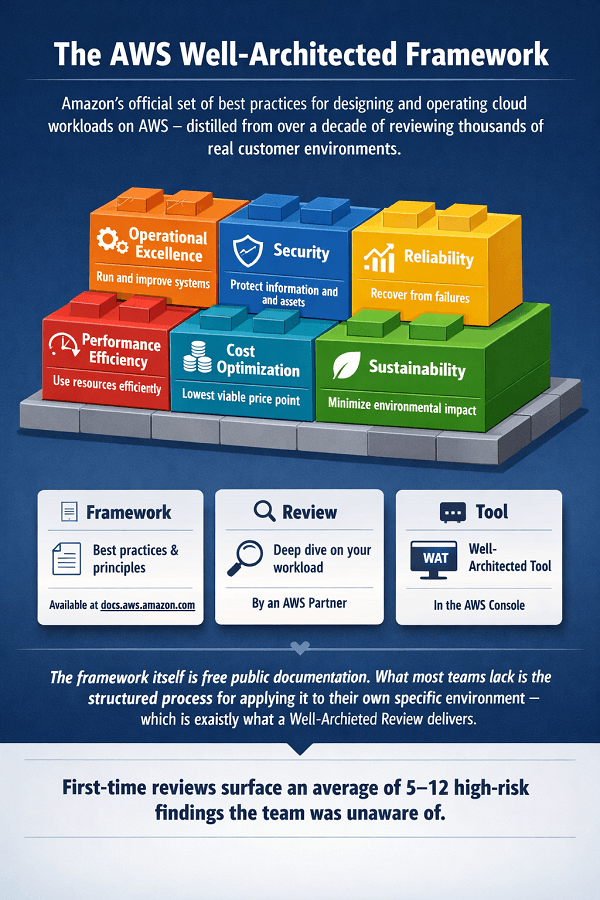
Framework vs. Review vs. Tool, the three terms explained
| Term | What It Means |
| Well-Architected Framework (WAF) | The published best-practice standard, six pillars, design principles, and questions. Available free at docs.aws.amazon.com. The reference. |
| Well-Architected Review (WAR) | The process of applying the framework to your specific workload, structured conversation, AWS tool session, expert analysis, and a prioritized findings report. Done by an AWS Partner. |
| Well-Architected Tool (WAT) | The AWS console application that stores review questions and answers, generates an initial risk report, and tracks remediation progress. Used by EaseCloud during the review. |
2. The Six Pillars: What Each One Assesses
A WAR examines your architecture against all six pillars. Most teams have invested heavily in one or two and have real gaps in the others, this is the most common pattern EaseCloud finds.
| Pillar | Actions |
|---|---|
| Operational Excellence | Can you run and continually improve your systems in production? - Infrastructure defined as code, Terraform or CloudFormation, not manual console configuration - Frequent, small, reversible deployments, not large infrequent releases - Runbooks exist, are tested, and are kept current - Post-mortems with root cause analysis and tracked remediation |
| Security | How well do you protect information, systems, and assets? - IAM least-privilege, no shared credentials, no long-lived access keys, MFA enforced - CloudTrail logging active on all API activity with integrity validation - Encryption at rest and in transit for all sensitive data stores - Threat detection via GuardDuty, compliance scanning via Security Hub |
| Reliability | Can your workload recover from failures and meet demand? - Multi-AZ deployment for all production workloads, no single-AZ customer-facing services - Automated backups tested end-to-end, restore procedure validated, not just documented - Auto-scaling configured based on actual demand signals, not manual capacity guessing - RTO and RPO defined, documented, and validated through DR testing |
| Performance Efficiency | Are you using resources efficiently as demand changes? - Right instance families selected, CPU-optimized, memory-optimized, or Graviton where appropriate - Auto-scaling policies calibrated to actual traffic patterns, not theoretical peaks - CloudWatch metrics, X-Ray tracing, and regular load testing in place - Managed services used where they reduce operational burden (RDS over self-managed MySQL) |
| Cost Optimization | Are you running at the lowest viable price point? - Cost attribution via consistent tagging, every dollar attributed to a team and environment - Reserved Instances or Savings Plans covering stable baseline workloads - Cost Anomaly Detection active with alerts to engineering leads - Monthly cost review cadence, not a quarterly billing surprise |
| Sustainability | Are you minimizing the environmental impact of your workloads? - Graviton (ARM) instances adopted for eligible workloads, 60% more energy-efficient than x86 - Dev/staging environments scale to zero outside business hours - AWS Customer Carbon Footprint Tool baseline established - Managed services preferred over self-managed, AWS optimizes hardware efficiency at scale |
3. What Happens During a Well-Architected Review?
A WAR is not a surprise audit. It is a structured, collaborative process between your engineering team and EaseCloud's AWS-certified engineers. Here is the exact sequence.
| Step & Time | Actions |
|---|---|
| 1 Scoping Call (30–45 min) |
EaseCloud meets with your engineering lead to understand your workload, AWS services in use, business criticality, and any known pain points. We agree on review scope, typically your primary production environment. |
| 2 Pre-Review Questionnaire (30–60 min, your team) |
A short async questionnaire covering your current architecture basics. Completed by your team before the session so we use review time for analysis, not basic fact-gathering. |
| 3 Architecture Walkthrough (60–90 min) |
Your engineers walk EaseCloud through the environment in detail: services used, configurations, deployment process, incident handling, monitoring setup, and security controls. EaseCloud asks clarifying questions throughout. |
| 4 AWS Well-Architected Tool Session (60–90 min) |
EaseCloud works through ~50–70 questions in the AWS WAT live, entering answers based on the walkthrough. The tool generates an initial risk rating in real time across all six pillars. |
| 5 Findings Analysis (2–3 days, EaseCloud) |
EaseCloud reviews tool output, validates findings against your specific context, adds environment-specific remediation steps, and prioritizes findings by business risk impact, not just generic severity. |
| 6 Report Delivery & Readout (60–90 min) |
EaseCloud presents every high and medium-risk finding, in plain language, what it means, why it matters, and exactly what to change. You receive the full written report. No findings are withheld. |
4. What Does the Findings Report Look Like?
The WAR report is not a vague summary. It is a structured, prioritized list of specific findings with specific remediation steps, organized by pillar and severity.
The three finding risk levels
| Risk & Timeline | Actions |
|---|---|
| HIGH RISK · Immediate action | - Root account used as primary account with no MFA (security breach risk) - Production database with no automated backups or tested restore procedure - Single-AZ deployment for customer-facing services (outage risk) - S3 public access not blocked at account level (data exposure risk) |
| MEDIUM RISK · Address within 90 days | - EC2 instances with <15% average CPU, rightsizing candidates - No Reserved Instances or Savings Plans despite stable workload (cost waste) - Manual deployment process with no documented rollback procedure - CloudWatch alerting configured but no SLOs defined per service |
| LOW RISK · Next planning cycle | - Graviton instances not adopted despite eligible Linux workloads - gp2 EBS volumes not migrated to gp3 (20% cheaper, same performance) - No carbon footprint baseline established via AWS Carbon Footprint Tool - Static assets served directly from EC2 rather than CloudFront |
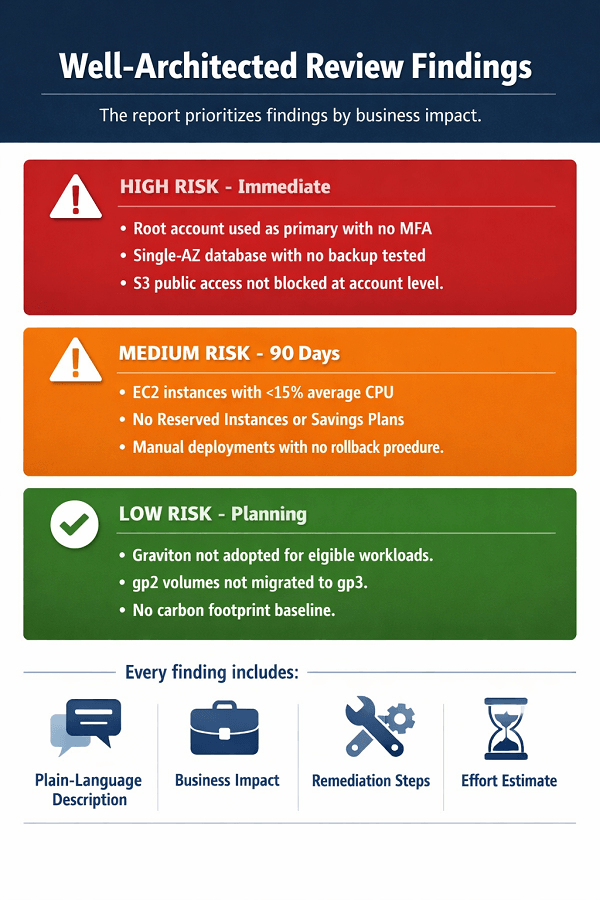
What each finding includes
A quality WAR report gives you more than a list of problems. Every finding contains:
- Plain-language title and description - no unexplained AWS jargon
- Pillar and risk level - so you know where it sits in the priority order
- Current state - what was observed in your specific environment
- Business impact - the concrete consequence of leaving it unaddressed
- Remediation steps - specific, ordered steps for your AWS environment
- Effort estimate - Low / Medium / High, so you can plan sprints realistically
Example finding
| Finding | Details |
|---|---|
| EXAMPLE | Title: Production RDS database not deployed in Multi-AZ configuration Pillar: Reliability - Risk: HIGH - Effort: Low (single config change) Current state: Your primary RDS PostgreSQL instance (us-east-1) is deployed in a single Availability Zone with no standby replica. Business impact: An AZ-level failure causes 15–30 minutes of database unavailability, a high-severity customer-facing outage and likely SLA breach. Fix: RDS Console → Modify → Multi-AZ: Yes → apply during next maintenance window. Cost: ~2× current RDS instance cost for the standby replica. |
5. Is the AWS Well-Architected Review Free?
The AWS Well-Architected Tool itself, the console where questions are stored and answers recorded is free for any AWS account holder. You can work through it independently.
But a self-administered review has significant limits: the tool generates automated findings but cannot contextualize them to your specific architecture, prioritize them by actual business impact, write tailored remediation steps, or provide the external perspective that makes the review genuinely useful.
For a partner-conducted review, pricing depends on the firm:
| Item | EaseCloud | Other AWS Partners (varies) |
| Item | EaseCloud | Other AWS Partners (varies) |
| Review conducted by engineers | Free, no charge | Some charge $2,000–$5,000 |
| Full findings report | Free, delivered in full | Sometimes withheld until engagement signed |
| Remediation roadmap | Free, included | Usually a separate paid scope |
| Obligation afterward | None, completely optional | Varies, some expect sign-up |
| Remediation execution | Separate quote if desired | Separate quote if desired |
What happens after the review?
After receiving your findings report, you have three paths, all valid:
- Remediate internally - use the report as a self-service roadmap. It's yours, no strings attached.
- Engage EaseCloud for specific findings - project-scoped remediation for high-risk items. Quoted separately.
- Engage EaseCloud for managed services - if the review surfaces systemic gaps warranting ongoing management. Quoted separately with no pressure.
The WAR is free. The roadmap is actionable. The remediation is where the value compounds.
A Well-Architected Review gives you clarity. Cloud-native development gives you the architecture that makes future reviews trivial.
We help you:
- Turn WAR findings into engineering tasks – Prioritized backlog, effort estimates, clear owners
- Build cloud-native applications from the start – Security, reliability, and cost optimization built in
- Modernize legacy systems – Refactor applications that consistently generate WAR findings
- Continuous compliance – Stay audit-ready without crisis-mode remediation
6. What Companies Typically Find and When to Book One
In every WAR EaseCloud has conducted, the team was aware of fewer than half the findings beforehand. High-risk configurations that have never caused an incident are invisible until a review surfaces them or until an incident does.
Common patterns by company stage
| Stage | Most Common Findings |
| Early-stage startup ($1K–$5K/month AWS) | Security and operational gaps dominate: root account in active use, no CloudTrail logging, S3 public access not blocked, SSH open to the world (0.0.0.0/0), single-AZ database with no backup tested. |
| Growth-stage company ($10K–$50K/month AWS) | Governance has not kept pace with growth: IAM over-permissioning, no resource tagging strategy, manual deployments, no distributed tracing, Reserved Instances purchased once and never reviewed. |
| Established SMB ($50K–$200K/month AWS) | Cost and reliability gaps: all workloads in a single AWS account with no blast radius isolation, disaster recovery never tested, data transfer costs 15–20% of bill, no Service Control Policies. |
When to book a review
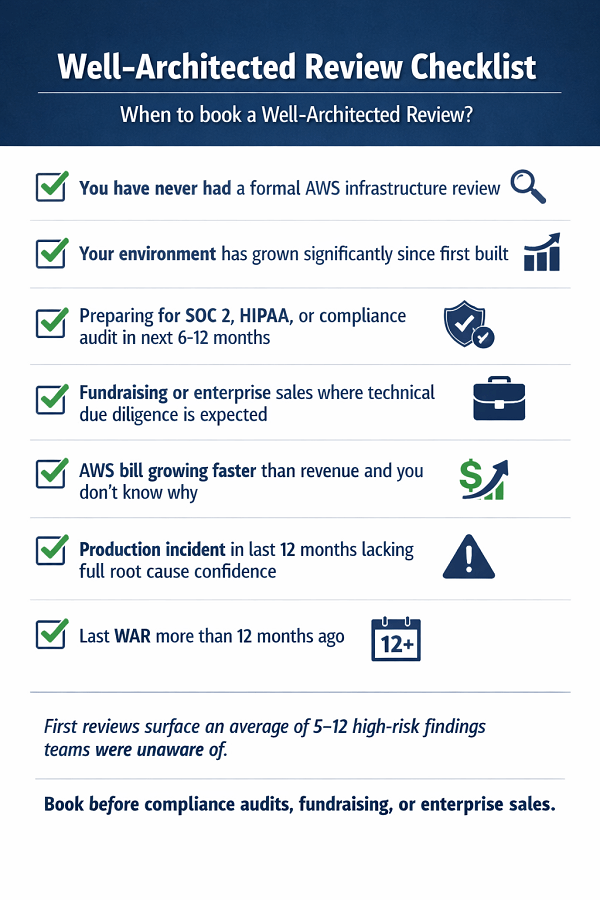
- You have never had a formal AWS infrastructure review
- Your environment has grown significantly since it was first built
- You are preparing for SOC 2, HIPAA, or another compliance audit in the next 6–12 months
- You are in a fundraising or enterprise sales process where technical due diligence is expected
- Your AWS bill is growing faster than your revenue and you don't know exactly why
- You had a production incident in the past 12 months and lack full confidence in root cause
- You last did a WAR more than 12 months ago, environments drift significantly in that time
Conclusion
The AWS Well-Architected Review is the most effective starting point for any infrastructure improvement journey. It provides a clear, prioritized picture of your environment's security, reliability, cost, and operational gaps – with specific remediation steps you can action immediately. The value is not in the report itself, but in the external perspective that surfaces blind spots your team has normalized.
EaseCloud offers the review free because we believe in earning trust through value delivery, not through sales pressure. The report is yours, with no strings attached. Whether you remediate internally or engage us for execution, the review gives you a roadmap to a more secure, reliable, and cost-efficient AWS environment.
Frequently Asked Questions
How long does the full review take from first call to report?
10–14 business days. Scoping call and architecture walkthrough happen in week one. EaseCloud's analysis and report writing takes 2–3 days. Report delivery and readout is scheduled in week two. Your team's total time commitment is approximately 2–3 hours.
Do we need to prepare our environment before the review?
No. The review assesses your environment as it actually exists, not a polished version. EaseCloud sends a short pre-review questionnaire (30–60 minutes) covering what AWS services you use and your basic architecture. No cleanup or remediation before the review is required or expected.
We have multiple AWS accounts. Which one do you review?
The WAR scope is defined per workload. For most startups and SMBs, a single review covering the primary production environment is the right starting point. EaseCloud agrees on scope during the scoping call. Organizations with distinct products or multiple accounts can run targeted reviews for each.
How is EaseCloud's review different from just using the AWS Well-Architected Tool ourselves?
The AWS WAT generates automated findings from your answers. EaseCloud adds what the tool cannot: contextualizing findings to your specific architecture, prioritizing by actual business impact rather than generic severity, writing remediation steps specific to your environment, identifying findings outside the tool's question set, and producing a roadmap with effort estimates you can take directly to sprint planning.
Will the findings embarrass the team?
High-risk findings in a first WAR are nearly universal, they are not a reflection of team incompetence. They reflect the reality that engineering teams optimize for delivery velocity and address infrastructure proactively only when they have dedicated time. The review is a constructive tool, not a performance evaluation.
Can we share the report externally with investors or enterprise customers?
Yes. The report belongs to your organization. The executive summary and remediation roadmap are often shared with investors during due diligence and with enterprise customers as part of security questionnaire responses. Full reports should be treated as confidential given the specificity of findings.
Book Your Free Well-Architected Review
EaseCloud's Well-Architected Reviews are conducted by AWS-certified engineers with hands-on production experience. The review is free, takes 2–3 hours of your team's time, and delivers a prioritized findings report you can act on immediately with no obligation to engage further.
Summarize this post with:
