AWS Savings Plans vs Reserved Instances: Which Pricing Model Is Right for Your AWS Workloads?
Compare AWS Savings Plans and Reserved Instances to choose the best pricing model for your workloads and reduce long-term AWS cloud costs.

For many organizations, reducing AWS costs isn't just about deleting unused resources or rightsizing Amazon EC2 instances. Even after optimizing infrastructure, businesses often continue paying more than necessary simply because they're using the wrong AWS pricing model.
By default, most workloads run on On-Demand pricing, which offers maximum flexibility but is also one of the most expensive ways to consume AWS compute resources over the long term.
To help customers reduce cloud costs, AWS offers several alternative pricing options, including Savings Plans, Reserved Instances (RIs), and Spot Instances. Each pricing model is designed for different workload characteristics, levels of flexibility, and business requirements.
Understanding the differences between these pricing models is essential for building a cost-efficient cloud environment. Choosing the wrong option can lead to unnecessary spending or unused commitments, while selecting the right strategy can significantly reduce monthly AWS compute costs without changing your application architecture.
In this guide, we'll explain how AWS Savings Plans and Reserved Instances work, compare their advantages and limitations, identify when each pricing model makes sense, and show how they fit into a broader AWS Cost Optimization strategy.
TL;DR
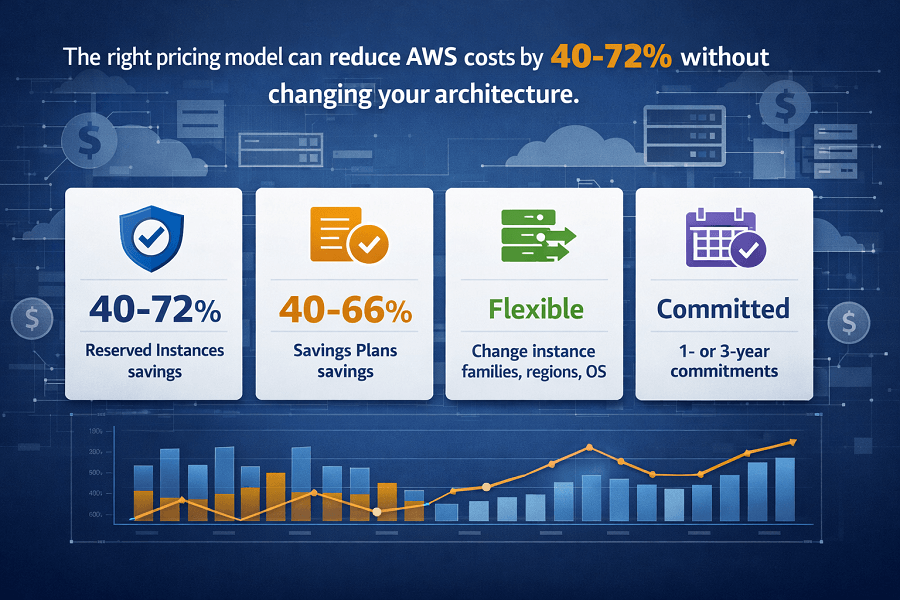
- Savings Plans offer more flexibility – change instance families, sizes, regions, and OS without losing discounts. Cover EC2, Lambda, and Fargate. Compute Savings Plans are the modern default for most cloud-native workloads.
- Reserved Instances offer deeper discounts but less flexibility – commit to specific instance family, region, and OS. Standard RIs provide up to 72% off; Convertible RIs offer ~54% with exchange flexibility. Best for stable, predictable workloads (databases, enterprise apps).
- Both require 1- or 3-year commitments – payment options: No Upfront (lowest discount), Partial Upfront, All Upfront (highest discount). Three-year commitments deliver larger savings.
- Most organizations should use both – Compute Savings Plans for flexible compute (EC2, Lambda, Fargate), RIs for RDS/Aurora/ElastiCache (which Savings Plans don't cover), and Spot for interruptible workloads.
- Golden rule: rightsize first (AWS Compute Optimizer), then commit. Never purchase commitments before analyzing 30–90 days of usage data. Overcommitting wastes money.
Understanding AWS Pricing Models
Before comparing Savings Plans and Reserved Instances, it's important to understand the four primary compute pricing models available on AWS.
They include:
- On-Demand Instances
- Savings Plans
- Reserved Instances (RIs)
- Spot Instances
Each option balances flexibility, predictability, and cost differently.
Rather than asking which pricing model is "best," organizations should determine which model best matches the behavior of each workload.
On-Demand Pricing
On-Demand Instances are the default pricing option for Amazon EC2.
With On-Demand pricing, organizations pay only for the compute resources they use without making any long-term commitment.
This model is ideal for:
- Development environments
- Testing workloads
- Short-term projects
- Proof-of-concept applications
- Temporary infrastructure
- Highly unpredictable workloads
Advantages include:
- No upfront commitment
- Maximum flexibility
- Easy scaling
- Immediate availability
However, because AWS assumes all financial risk, On-Demand pricing is typically the most expensive option for workloads that run continuously.
Organizations often begin with On-Demand Instances and later transition stable workloads to more cost-effective pricing models.
What Are AWS Savings Plans?
AWS Savings Plans are a flexible pricing model that allows organizations to receive discounted compute pricing in exchange for committing to a consistent hourly spend over a one-year or three-year term.
Instead of committing to a specific instance type, customers commit to a fixed amount of compute usage measured in dollars per hour.
For example:
An organization might commit to spending $20 per hour on eligible AWS compute services.
As long as compute usage remains within that commitment, discounted pricing is automatically applied.
If usage exceeds the commitment, additional compute is billed using standard On-Demand pricing.
This approach provides significant flexibility while still delivering substantial cost savings.
How AWS Savings Plans Work
Unlike Reserved Instances, Savings Plans focus on compute usage rather than specific infrastructure.
This means organizations can:
- Change EC2 instance families
- Resize instances
- Switch AWS Regions (depending on plan type)
- Move between operating systems
- Adopt newer AWS instance generations
without losing their pricing discounts in many scenarios.
This flexibility makes Savings Plans particularly attractive for organizations with evolving cloud environments.
Types of AWS Savings Plans
AWS currently offers several types of Savings Plans.
Each provides different levels of flexibility.
Compute Savings Plans
Compute Savings Plans offer the greatest flexibility.
Discounts apply across eligible services including:
- Amazon EC2
- AWS Lambda
- AWS Fargate
Organizations can:
- Change instance family
- Change instance size
- Change Availability Zone
- Change operating system
- Change tenancy
while continuing to receive discounted pricing.
Because of this flexibility, Compute Savings Plans have become the preferred option for many AWS customers.
EC2 Instance Savings Plans
EC2 Instance Savings Plans provide slightly larger discounts but require greater commitment.
Customers commit to:
- One AWS Region
- One EC2 instance family
Within those constraints, they may still change instance sizes inside the same family.
Example:
| Rule | Details |
|---|---|
| m7i.large → m7i.xlarge → m7i.2xlarge | All remain eligible |
| m7i → c7g | It would not qualify because the instance family changes |
What Are Reserved Instances?
Reserved Instances (RIs) are one of AWS's oldest pricing models.
Despite the name, Reserved Instances do not reserve physical servers.
Instead, they provide discounted billing for eligible Amazon EC2 workloads when customers commit to using specific infrastructure over a one-year or three-year period.
Reserved Instances are well suited to predictable workloads that rarely change.
Examples include:
- Enterprise web applications
- Internal business systems
- Long-running databases
- ERP systems
- Legacy enterprise applications
Organizations with highly stable workloads can often achieve substantial savings through Reserved Instances.
How Reserved Instances Work
Reserved Instances require a greater level of commitment than Savings Plans.
Depending on the RI type, organizations may commit to:
- AWS Region
- Instance family
- Operating system
- Tenancy
- Instance size (depending on flexibility)
In return, AWS offers discounted pricing compared to standard On-Demand rates.
Reserved Instances are available with:
- No Upfront payment
- Partial Upfront payment
- All Upfront payment
Generally, larger upfront commitments result in greater discounts.
Standard Reserved Instances
Standard Reserved Instances offer the highest potential savings but provide the least flexibility.
Best suited for:
- Stable production workloads
- Long-running enterprise applications
- Predictable infrastructure
Because these workloads rarely change, organizations can confidently commit for longer periods.
Convertible Reserved Instances
Convertible Reserved Instances provide greater flexibility than Standard Reserved Instances.
Organizations can exchange existing Reserved Instances for different configurations when business requirements change.
This flexibility helps businesses adapt infrastructure without completely losing their Reserved Instance investment.
However, Convertible Reserved Instances generally provide slightly lower discounts than Standard Reserved Instances.
Savings Plans vs Reserved Instances: High-Level Comparison
| Feature | Savings Plans | Reserved Instances |
|---|---|---|
| Flexibility | Very High | Moderate |
| EC2 Family Changes | ✅ Supported (Compute SP) | ❌ Limited |
| Lambda Coverage | ✅ Yes | ❌ No |
| AWS Fargate Coverage | ✅ Yes | ❌ No |
| Instance Resize | ✅ Yes | Limited |
| Modern AWS Recommendation | ✅ Preferred for many workloads | Best for stable workloads |
| Complexity | Lower | Higher |
Both pricing models reduce AWS costs, but they solve different business problems.
Savings Plans prioritize flexibility, while Reserved Instances prioritize commitment and predictability.
Why Pricing Optimization Matters
Rightsizing your infrastructure with AWS Compute Optimizer is only one part of cloud cost optimization.
Even perfectly sized resources can generate unnecessary expenses if they're billed using the wrong pricing model.
For example:
A production application running 24/7 on On-Demand EC2 instances may already be rightsized but switching to a Savings Plan or Reserved Instance could reduce compute costs significantly without requiring any architectural changes.
Pricing optimization and infrastructure optimization should always work together.
AWS Savings Plans vs Reserved Instances: A Detailed Comparison
Although both pricing models reduce AWS compute costs, they are built around different philosophies.
Savings Plans focus on flexibility, allowing organizations to modernize and scale infrastructure without losing discounts.
Reserved Instances, on the other hand, reward long-term predictability by offering discounts for committing to specific infrastructure configurations.
Choosing between them depends on how stable or dynamic your workloads are.
1. Flexibility
Flexibility is the biggest difference between the two pricing models.
AWS Savings Plans
Savings Plans were designed to accommodate modern cloud environments where workloads evolve frequently.
Organizations can typically:
- Upgrade to newer EC2 generations
- Change instance sizes
- Modify operating systems
- Switch between x86 and AWS Graviton processors (depending on plan type)
- Scale applications without constantly reviewing commitments
This flexibility makes Savings Plans well suited for organizations adopting continuous deployment and cloud-native architectures.
Reserved Instances
Reserved Instances are considerably less flexible.
Although some modifications are supported, organizations generally commit to:
- Instance family
- AWS Region
- Operating system
- Tenancy
Changing these characteristics may reduce or eliminate Reserved Instance discounts.
For organizations with highly predictable infrastructure, this limitation is usually acceptable.
2. Supported AWS Services
Another major difference is service coverage.
Savings Plans Cover Multiple Compute Services
Depending on the Savings Plan selected, discounts may apply to:
- Amazon EC2
- AWS Lambda
- AWS Fargate
This broader coverage makes Savings Plans particularly attractive for organizations running microservices, serverless applications, and containerized workloads.
Reserved Instances Focus on EC2
Reserved Instances primarily benefit:
- Amazon EC2 workloads
Separate reservation models also exist for certain AWS services, such as Amazon RDS, Amazon ElastiCache, Amazon Redshift, Amazon OpenSearch Service, and Amazon DynamoDB, but these are managed independently and don't provide the broad compute flexibility offered by Compute Savings Plans.
Organizations using multiple AWS compute services often find Savings Plans easier to manage.
3. Compute Savings Plans vs EC2 Instance Savings Plans
AWS offers two primary Savings Plan options.
Understanding the difference is important.
Compute Savings Plans
These provide the greatest flexibility.
You can change:
- Instance family
- Instance size
- AWS Region
- Availability Zone
- Operating system
- Tenancy
Discounts continue applying automatically across eligible compute services.
This makes Compute Savings Plans the preferred choice for many cloud-native organizations.
EC2 Instance Savings Plans
EC2 Instance Savings Plans offer slightly higher discounts but require a stronger commitment.
Customers commit to:
- A specific EC2 instance family
- A specific AWS Region
Within that family, they can still resize instances.
For example:
| Type | Instances |
|---|---|
| Supported | c7g.large, c7g.xlarge, c7g.2xlarge |
| Not Supported | c7g → m7i (because the instance family changes) |
Organizations seeking maximum savings on stable workloads may choose EC2 Instance Savings Plans.
4. Standard Reserved Instances vs Convertible Reserved Instances
Reserved Instances are also available in two primary forms.
Standard Reserved Instances
These provide the largest discounts.
Ideal for:
- Enterprise production systems
- Stable business applications
- Long-running web servers
- Mission-critical workloads
Advantages include:
- Highest savings
- Predictable billing
- Excellent for mature infrastructure
Disadvantages:
- Limited flexibility
- Difficult to adapt if infrastructure changes significantly
Convertible Reserved Instances
Convertible Reserved Instances allow organizations to exchange existing reservations for different configurations.
Examples include:
- New instance families
- Different operating systems
- Updated instance sizes
Benefits:
- Greater flexibility
- Easier modernization
Trade-off:
Discounts are generally lower than Standard Reserved Instances.
Organizations planning regular infrastructure changes often prefer Convertible Reserved Instances despite the slightly reduced savings.
5. Commitment Periods
Both pricing models offer similar commitment lengths.
Organizations can choose:
One-Year Commitment
Benefits:
- Lower financial commitment
- Greater flexibility
- Easier forecasting
Best suited for:
- Growing businesses
- Startups
- Rapidly changing workloads
Three-Year Commitment
Benefits:
- Larger discounts
- Long-term cost reduction
Best suited for:
- Mature enterprise infrastructure
- Stable production environments
- Predictable application demand
Before selecting a three-year commitment, organizations should consider expected infrastructure changes and technology refresh cycles.
6. Payment Options
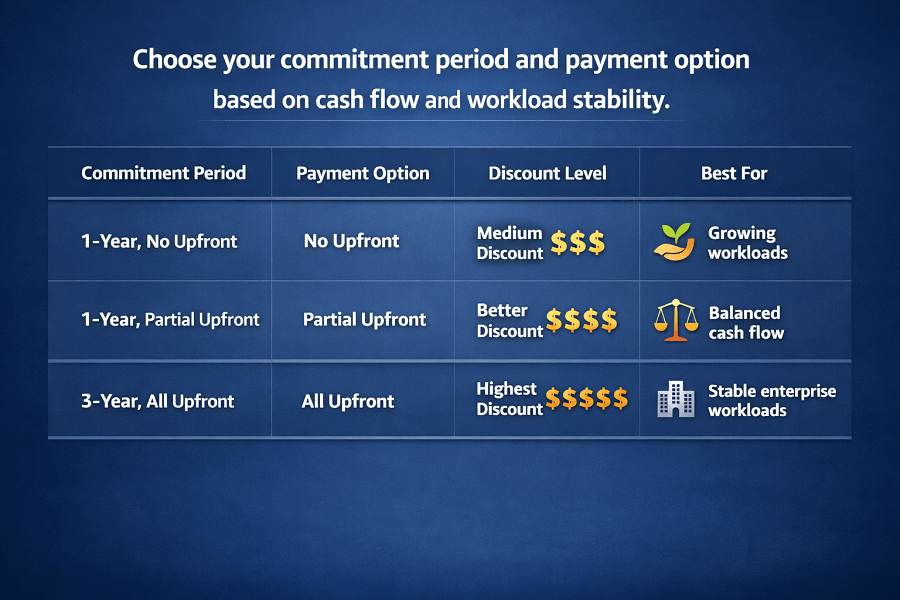
AWS provides three payment structures for both Savings Plans and Reserved Instances.
No Upfront
No initial payment is required.
Advantages:
- Lower capital expenditure
- Easier budgeting
Trade-off:
Lower overall discount.
Partial Upfront
A portion of the commitment is paid initially.
Advantages:
- Better discount than No Upfront
- Lower initial investment than All Upfront
Many organizations consider this a balanced option.
All Upfront
The full commitment is paid at the beginning of the contract.
Advantages:
- Highest available discount
- Predictable long-term costs
Disadvantages:
- Larger initial investment
- Less financial flexibility
Large enterprises frequently choose All Upfront commitments for stable production workloads.
Which Pricing Model Is Best for Different Workloads?
Different workloads benefit from different pricing strategies.
Development Environments
Recommended:
Reason:
Development environments change frequently and don't justify long-term commitments.
Startup Applications
Recommended:
- Compute Savings Plans
Reason:
Startups often modernize infrastructure rapidly.
Savings Plans provide flexibility without sacrificing discounts.
Enterprise Web Applications
Recommended:
- Standard Reserved Instances
- Compute Savings Plans
Depending on workload stability.
Machine Learning Training
Recommended:
Reason:
Training jobs often tolerate interruptions.
Spot pricing can dramatically reduce compute costs.
Serverless Applications
Recommended:
- Compute Savings Plans
Reason:
Discounts apply to AWS Lambda.
Reserved Instances do not.
Containerized Applications
Recommended:
- Compute Savings Plans
Reason:
They support AWS Fargate while allowing infrastructure modernization.
Large Production Databases
Recommended:
- Reserved Instances (where applicable for database services)
Reason:
Databases often operate continuously with predictable demand.
Real-World Pricing Example
Imagine two organizations.
Company A
Runs:
- 120 Amazon EC2 instances
- Multiple AWS Lambda functions
- Amazon ECS on AWS Fargate
Infrastructure changes frequently.
Recommended:
Compute Savings Plans.
Reason:
Flexibility outweighs slightly larger Reserved Instance discounts.
Company B
Runs:
- Stable ERP platform
- Fixed production web servers
- Infrastructure unchanged for several years
Recommended:
Standard Reserved Instances.
Reason:
Long-term predictability maximizes available savings.
Common Mistakes Organizations Make
Even experienced AWS users make mistakes when selecting pricing models.
Some of the most common include:
Purchasing Commitments Too Early
Organizations sometimes commit before understanding workload behavior.
Monitor utilization for several weeks or ideally months before making long-term commitments.
Leaving Stable Workloads on On-Demand Pricing
This is one of the easiest ways to overspend on AWS.
If production infrastructure runs continuously, evaluate whether Savings Plans or Reserved Instances could reduce compute costs.
Overcommitting
Purchasing more committed capacity than needed results in unused discounts.
Forecast workload growth carefully before selecting commitment levels.
Ignoring New AWS Instance Generations
Newer instance families often deliver better price-performance.
Compute Savings Plans make it easier to adopt newer generations without losing pricing benefits.
Optimizing Pricing Without Rightsizing
Organizations sometimes purchase Savings Plans for oversized EC2 instances.
This reduces hourly pricing but doesn't eliminate unnecessary infrastructure costs.
The recommended sequence is:
- Rightsize infrastructure using AWS Compute Optimizer
- Analyze spending with AWS Cost Explorer
- Select the appropriate pricing model
- Monitor utilization continuously
Pricing optimization should always follow infrastructure optimization, not replace it.
How to Estimate Potential AWS Savings
Before purchasing a Savings Plan or Reserved Instance, organizations should understand their current cloud usage patterns.
Making long-term commitments without analyzing historical workloads can lead to underutilized commitments or missed savings opportunities.
AWS provides several tools to help estimate potential savings.
AWS Cost Explorer
AWS Cost Explorer analyzes historical compute usage and provides recommendations for:
- Savings Plans
- Reserved Instance opportunities
- Current On-Demand spending
- Estimated monthly savings
- Commitment utilization
Organizations should review at least 30–90 days of usage trends before making purchasing decisions.
AWS Compute Optimizer
Before committing to long-term pricing, use AWS Compute Optimizer to ensure workloads are appropriately sized.
Purchasing a Savings Plan for an oversized EC2 instance still results in unnecessary spending.
The recommended process is:
- Rightsize workloads.
- Monitor utilization.
- Purchase commitments for optimized resources.
AWS Pricing Calculator
The AWS Pricing Calculator helps estimate infrastructure costs before deploying new workloads.
It can be used to compare:
- On-Demand pricing
- Savings Plans
- Reserved Instances
This is especially useful when planning:
- Cloud migrations
- New application deployments
- Budget forecasting
- Infrastructure redesign
Building a Cost-Optimized AWS Pricing Strategy
There is no single pricing model that works for every workload.
Instead, mature AWS environments often use a combination of pricing options.
A balanced strategy might look like this:
| Workload | Recommended Pricing Model |
|---|---|
| Development | On-Demand |
| Testing | On-Demand |
| Stable Production | Reserved Instances or Compute Savings Plans |
| Container Workloads | Compute Savings Plans |
| AWS Lambda | Compute Savings Plans |
| Batch Processing | Spot Instances |
| Machine Learning Training | Spot Instances |
| Disaster Recovery | On-Demand (or evaluate based on usage) |
This hybrid approach allows organizations to maximize savings while maintaining operational flexibility.
Combining Savings Plans with Other AWS Cost Optimization Services
Savings Plans should never be viewed in isolation.
The greatest savings occur when multiple AWS optimization services work together.
A recommended workflow looks like this:
Step 1: Analyze Spending
Use AWS Cost Explorer to identify high-cost compute services.
Step 2: Optimize Resources
Use AWS Compute Optimizer to rightsize EC2 instances, EBS volumes, Lambda functions, and ECS tasks.
Step 3: Eliminate Waste
Use AWS Trusted Advisor to identify:
- Idle EC2 instances
- Unused Elastic IP addresses
- Idle Load Balancers
- Low-utilization resources
Step 4: Select the Appropriate Pricing Model
Evaluate whether workloads are best suited for:
- On-Demand
- Compute Savings Plans
- EC2 Instance Savings Plans
- Standard Reserved Instances
- Convertible Reserved Instances
- Spot Instances
Step 5: Monitor Ongoing Costs
Use:
- AWS Budgets
- AWS Cost Explorer
- Amazon CloudWatch
- AWS Cost and Usage Report (CUR)
to continuously track savings and identify new optimization opportunities.
This layered approach aligns with AWS best practices and supports continuous cost optimization.
AWS Best Practices for Savings Plans and Reserved Instances
Organizations can maximize the value of their commitments by following these best practices.
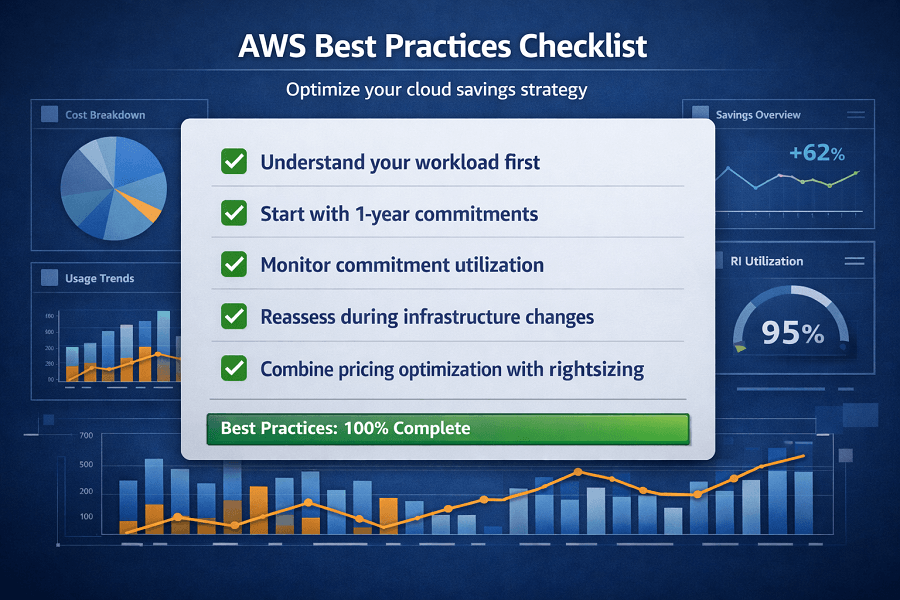
Understand Your Workload First
Avoid purchasing long-term commitments for applications with unpredictable or short-lived usage patterns.
Historical usage should guide commitment decisions.
Start with One-Year Commitments
If workload stability is uncertain, a one-year commitment offers a good balance between savings and flexibility.
Organizations can later evaluate whether a three-year commitment is appropriate.
Monitor Commitment Utilization
Regularly review:
- Savings Plan coverage
- Reserved Instance utilization
- Remaining On-Demand usage
Unused commitments represent missed financial opportunities.
Reassess During Infrastructure Changes
Major events such as:
- Cloud migrations
- Application modernization
- Kubernetes adoption
- Migration to AWS Graviton processors
may change which pricing model provides the best value.
Review commitments whenever infrastructure changes significantly.
Combine Pricing Optimization with Rightsizing
Selecting the right pricing model cannot compensate for oversized infrastructure.
Always optimize resource sizing before making pricing commitments.
Conclusion
Reducing AWS costs isn't simply about paying less it is about paying intelligently.
AWS Savings Plans and Reserved Instances are both powerful pricing models that can significantly reduce compute expenses when aligned with workload characteristics.
Savings Plans provide the flexibility modern cloud environments need, supporting Amazon EC2, AWS Lambda, and AWS Fargate while allowing organizations to evolve their infrastructure without losing pricing benefits.
Reserved Instances continue to play an important role for stable, predictable workloads where long-term commitments can unlock deeper discounts.
The most successful organizations don't rely on a single pricing model. Instead, they combine infrastructure rightsizing, continuous monitoring, cloud governance, and intelligent purchasing decisions to build a sustainable AWS Cost Optimization strategy.
Whether you're managing a startup's first production environment or optimizing a large enterprise cloud platform, selecting the right pricing model can deliver significant long-term savings while maintaining the scalability and resilience that AWS provides.
If you're unsure which pricing model best fits your workloads, EaseCloud's AWS experts can help you analyze usage patterns, evaluate commitment options, and build a cloud financial strategy tailored to your business.
Common Questions About AWS Pricing Models
Are Savings Plans replacing Reserved Instances?
No.
AWS continues to support both pricing models.
However, AWS generally recommends Savings Plans for many modern cloud environments because they provide greater flexibility across eligible compute services.
Reserved Instances remain valuable for predictable, long-running workloads.
Can I use Savings Plans and Reserved Instances together?
Yes.
Many organizations use both.
For example:
- Compute Savings Plans for cloud-native applications.
- Reserved Instances for stable enterprise workloads.
Combining pricing models often produces the best overall financial outcome.
What happens if I exceed my Savings Plan commitment?
Any compute usage beyond your committed hourly spend is billed at standard On-Demand rates.
Your existing discounts continue to apply up to the committed amount.
What happens if my workload decreases?
If your compute usage drops below your commitment, you continue paying for the agreed hourly spend until the commitment period ends.
This is why accurate forecasting is essential before purchasing Savings Plans or Reserved Instances.
Can Savings Plans reduce AWS Lambda costs?
Yes.
Compute Savings Plans apply to eligible AWS Lambda usage, making them an excellent choice for organizations running serverless applications.
Reserved Instances do not provide Lambda discounts.
Should startups purchase Reserved Instances?
It depends.
Early-stage startups often experience rapid infrastructure changes, making Compute Savings Plans a more flexible choice.
As workloads stabilize, Reserved Instances may become more attractive for predictable production systems.
How EaseCloud Helps Organizations Optimize AWS Pricing
Choosing the right AWS pricing model requires more than comparing discounts. Organizations must understand workload behavior, growth projections, infrastructure architecture, and long-term business objectives.
At EaseCloud, our AWS consultants help businesses develop pricing strategies that balance cost savings with operational flexibility.