AWS Pricing Calculator: The Complete Guide to Estimating AWS Cloud Costs Before Deployment
Learn how to use AWS Pricing Calculator to estimate cloud costs, plan migrations, compare pricing models, forecast budgets, and optimize AWS spending.
One of the biggest challenges organizations face when adopting Amazon Web Services (AWS) is understanding how much their cloud infrastructure will cost before deployment. Unlike traditional on-premises infrastructure, where businesses purchase servers, networking equipment, and storage upfront, AWS follows a pay-as-you-go pricing model. While this provides flexibility and scalability, it also makes forecasting cloud expenses more complex.
Questions such as:
- How much will it cost to migrate to AWS?
- What will my monthly cloud bill look like?
- How much should I budget for Amazon EC2, Amazon RDS, and Amazon S3?
- Should I choose On-Demand Instances, Savings Plans, or Reserved Instances?
- How do networking and data transfer charges affect my total bill?
are common among startups, enterprises, and IT teams planning cloud projects.
This is where the AWS Pricing Calculator becomes an essential planning tool.
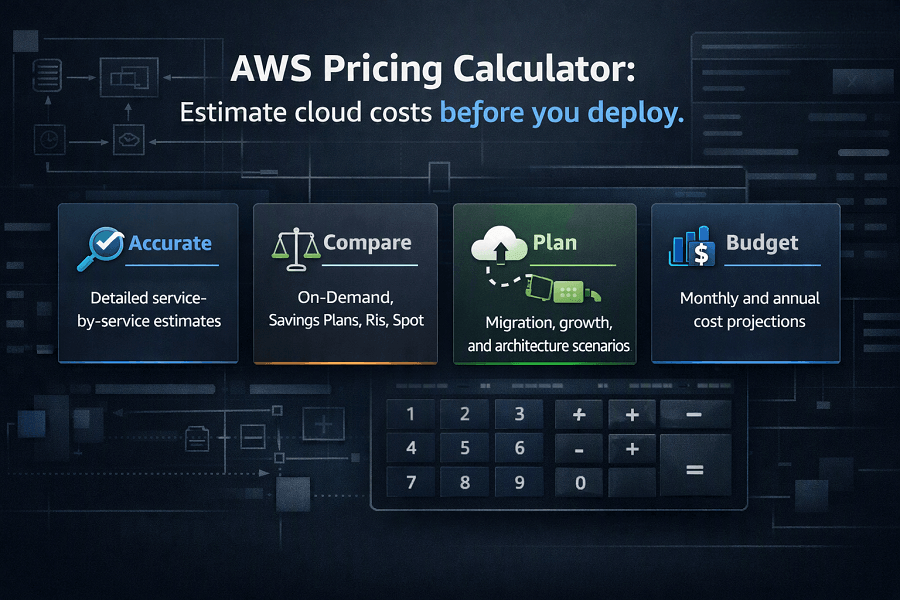
AWS Pricing Calculator enables organizations to estimate the monthly or annual cost of AWS infrastructure before provisioning resources. Whether you're building a new SaaS platform, migrating legacy applications, deploying Kubernetes clusters, implementing AI workloads, or modernizing enterprise infrastructure, the calculator helps create realistic cost estimates based on your expected usage.
More importantly, it supports financial planning by allowing engineering, finance, and procurement teams to evaluate different architecture options, compare pricing models, forecast cloud spending, and align infrastructure investments with business goals.
What This Guide Covers
- What AWS Pricing Calculator is
- How it works
- Why accurate cloud cost estimation matters
- Understanding AWS pricing models
- Creating your first estimate
- Estimating compute, storage, networking, and database costs
- Common estimation mistakes
- Best practices for forecasting AWS cloud spending
- How EaseCloud helps organizations build accurate AWS cost models
By the end of this guide, you'll understand how to use AWS Pricing Calculator as part of a broader cloud financial management strategy rather than simply estimating monthly expenses.
What Is AWS Pricing Calculator?
AWS Pricing Calculator is a web-based cost estimation tool provided by Amazon Web Services that helps organizations estimate the cost of AWS services before deploying workloads.
Rather than relying on rough assumptions or manual spreadsheets, the calculator enables users to build detailed infrastructure configurations using actual AWS pricing data.
Organizations can estimate the cost of services such as:
- Amazon EC2
- Amazon S3
- Amazon RDS
- Amazon Aurora
- Amazon DynamoDB
- AWS Lambda
- Amazon ECS
- Amazon EKS
- AWS Fargate
- Amazon CloudFront
- Amazon VPC
- Elastic Load Balancing (ELB)
- Amazon Route 53
- Amazon Redshift
- Amazon EMR
- Amazon SageMaker
- Amazon Bedrock
- Amazon EBS
- Amazon EFS
- AWS Backup
- AWS Direct Connect
The calculator combines these services into a single infrastructure estimate, allowing organizations to understand the projected monthly and annual cost of running workloads on AWS.
Unlike AWS Cost Explorer, which analyzes existing AWS bills, AWS Pricing Calculator focuses on future infrastructure planning.
Why Cloud Cost Estimation Matters
Cloud computing gives organizations unprecedented flexibility, but flexibility without planning can quickly lead to budget overruns.
Many businesses underestimate cloud costs because they focus only on virtual machines while overlooking expenses such as:
- Storage
- Networking
- Data transfer
- Load balancers
- Managed databases
- Monitoring
- Backup
- Disaster recovery
- Logging
- API requests
- AI inference
- Container orchestration
Even relatively small architectural decisions can significantly affect long-term operational costs.
For example:
An application may initially require:
- Two Amazon EC2 instances
- One Amazon RDS database
- Amazon S3 storage
- Application Load Balancer
- CloudFront CDN
- AWS Backup
- CloudWatch monitoring
While each individual service may appear affordable, the combined monthly infrastructure cost can be several times higher than expected if not modeled correctly.
AWS Pricing Calculator enables organizations to visualize these costs before infrastructure is deployed, reducing financial surprises and improving decision-making.
Benefits of AWS Pricing Calculator
AWS Pricing Calculator offers much more than simple price estimation.
It supports technical planning, financial forecasting, procurement, and business decision-making.
Some of the key benefits include:
Improved Budget Planning
Organizations can estimate infrastructure costs before approving projects.
This helps finance teams:
- Allocate budgets
- Forecast operational expenses
- Compare cloud investments
- Evaluate return on investment (ROI)
Budget planning becomes more accurate when estimates are based on actual infrastructure requirements.
Better Architectural Decisions
Different AWS architectures have different cost implications.
For example:
Should an application use:
- Amazon ECS
- Amazon EKS
- AWS Lambda
Or should it rely on traditional Amazon EC2 instances?
The calculator enables architects to compare multiple deployment models before implementation.
This supports cost-conscious architecture design without compromising performance.
Migration Planning
Organizations migrating from on-premises infrastructure to AWS need realistic cloud cost estimates.
AWS Pricing Calculator supports migration planning by estimating:
- Compute requirements
- Storage capacity
- Database workloads
- Networking costs
- Backup requirements
- Disaster recovery infrastructure
These estimates help organizations prepare migration budgets with greater confidence.
Procurement and Executive Approval
Cloud infrastructure often requires approval from finance teams and executive leadership.
AWS Pricing Calculator generates professional estimates that support:
- Internal business cases
- Procurement discussions
- Budget approvals
- Cloud investment proposals
Rather than presenting rough assumptions, engineering teams can provide structured cost models backed by AWS pricing data.
Comparing Pricing Models
AWS offers multiple purchasing options.
Organizations can compare the financial impact of:
- On-Demand Instances
- Savings Plans
- Reserved Instances
- Spot Instances
This helps determine the most cost-effective pricing strategy for different workloads.
How AWS Pricing Calculator Works
The calculator follows a structured workflow that mirrors the cloud architecture design process.
Instead of asking for a single workload size, it allows users to configure individual AWS services and combine them into a complete infrastructure estimate.
The process typically involves several steps.
Step 1: Define the Workload
The first step is understanding what the application requires.
Questions to consider include:
- How many users will access the application?
- What level of availability is required?
- Which AWS Regions will host the workload?
- How much storage is needed?
- What database engine will be used?
- Is the application containerized?
- Does it require AI or machine learning services?
Clearly defining workload requirements improves estimation accuracy.
Step 2: Select AWS Services
Next, users choose the AWS services needed to support the application.
A typical web application might include:
- Amazon EC2
- Amazon EBS
- Amazon RDS
- Amazon S3
- Elastic Load Balancer
- Amazon CloudFront
- Amazon Route 53
- Amazon CloudWatch
- AWS Backup
Each selected service contributes to the overall cost estimate.
Step 3: Configure Resource Specifications
Each AWS service requires configuration details.
For example, when estimating Amazon EC2 costs, you'll specify:
- Instance family
- Instance size
- Operating system
- Region
- Number of instances
- Usage hours
- Pricing model
- Storage requirements
Similarly, Amazon RDS estimates require:
- Database engine
- Storage size
- Backup retention
- High Availability (Multi-AZ)
- Instance class
Providing accurate specifications results in more realistic estimates.
Step 4: Review Estimated Costs
Once all services are configured, AWS Pricing Calculator generates a detailed estimate.
The estimate includes:
- Monthly costs
- Annual costs
- Service-by-service breakdown
- Pricing assumptions
- Infrastructure summary
This allows organizations to understand where cloud spending will occur before deployment begins.
Understanding AWS Pricing Models
One of the most valuable features of AWS Pricing Calculator is its ability to compare different purchasing options.
Choosing the right pricing model can significantly reduce long-term infrastructure costs.
On-Demand Pricing
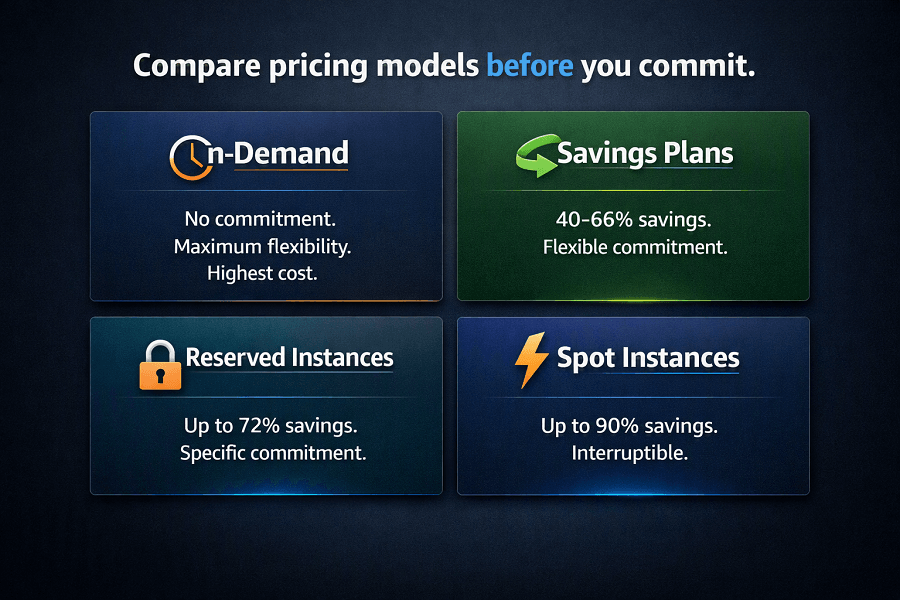
On-Demand pricing is the default AWS pricing model.
Organizations pay only for the compute, storage, or networking resources they consume.
Benefits include:
- No upfront commitment
- Maximum flexibility
- Ideal for unpredictable workloads
- Suitable for development and testing
However, On-Demand pricing is typically the most expensive option for workloads that run continuously.
Savings Plans
Savings Plans provide discounted pricing in exchange for a commitment to a consistent level of cloud usage over a one- or three-year period.
Advantages include:
- Significant cost savings compared to On-Demand pricing
- Flexibility across eligible AWS services
- Automatic application of discounts
- Well suited for steady-state production workloads
Savings Plans are commonly used by organizations with predictable compute usage.
Reserved Instances
Reserved Instances also offer discounted pricing through long-term commitments.
They are particularly beneficial for stable workloads with consistent infrastructure requirements.
Organizations should evaluate:
- One-year vs. three-year terms
- Standard vs. Convertible Reserved Instances
- Payment options
- Expected utilization
Reserved Instances can substantially reduce infrastructure costs when matched to predictable workloads.
Spot Instances
Spot Instances allow organizations to use unused AWS compute capacity at heavily discounted rates.
They are ideal for workloads that can tolerate interruptions, such as:
- Batch processing
- Data analytics
- Machine learning training
- Rendering jobs
- Scientific computing
- CI/CD pipelines
Because Spot capacity can be reclaimed by AWS with short notice, it is generally unsuitable for mission-critical production applications unless combined with resilient architectures.
Creating Your First AWS Pricing Estimate
Creating an accurate estimate requires more than simply adding a few AWS services.
Successful estimates begin with a clear understanding of the application's architecture, expected traffic, storage growth, and performance requirements.
Before opening the AWS Pricing Calculator, gather information such as:
- Expected number of users
- Monthly traffic volume
- Compute requirements
- Database size
- Storage capacity
- Geographic regions
- Availability requirements
- Backup strategy
- Disaster recovery objectives
- Growth projections for the next 12–36 months
These inputs help create realistic estimates that support budgeting, procurement, and long-term infrastructure planning.
Estimating AWS Migration Costs
One of the most valuable uses of AWS Pricing Calculator is preparing for cloud migration.
Before migrating applications from on-premises infrastructure or another cloud provider, organizations need to understand the financial impact of moving workloads to AWS.
A comprehensive migration estimate typically includes:
- Compute infrastructure
- Storage requirements
- Managed databases
- Networking services
- Identity and access management
- Backup and disaster recovery
- Monitoring and logging
- Security services
- Licensing considerations
- Data transfer during migration
Rather than estimating only virtual machines, organizations should model the complete production environment to avoid budget overruns.
Example Migration Scenario
Imagine a manufacturing company migrating its customer portal to AWS.
Current infrastructure includes:
- 8 physical application servers
- 2 Microsoft SQL Server databases
- 12 TB of storage
- VPN connectivity
- Backup infrastructure
- Load balancers
- Active Directory integration
Using AWS Pricing Calculator, architects can model an equivalent AWS environment that includes:
- Amazon EC2
- Amazon RDS for SQL Server
- Amazon S3
- Amazon EBS
- Elastic Load Balancer
- Amazon VPC
- AWS Backup
- AWS Direct Connect or Site-to-Site VPN
- Amazon CloudWatch
This provides stakeholders with a realistic estimate before migration begins.
Understanding Total Cost of Ownership (TCO)
Estimating AWS infrastructure costs is only one part of financial planning.
Organizations should also evaluate the Total Cost of Ownership (TCO) when comparing cloud and on-premises environments.
TCO considers both direct and indirect costs over the lifecycle of the infrastructure.
On-premises costs often include:
- Hardware purchases
- Data center space
- Power and cooling
- Networking equipment
- Maintenance contracts
- Software licensing
- Hardware refresh cycles
- Disaster recovery infrastructure
- IT staffing
AWS introduces a different operating model based on consumption rather than capital expenditure.
When comparing both environments, organizations should consider:
- Monthly operational expenses
- Scalability
- Elasticity
- Availability
- Reduced maintenance
- Faster deployment
- Business agility
- Operational efficiency
Looking beyond monthly infrastructure costs provides a more accurate picture of long-term business value.
Capacity Planning with AWS Pricing Calculator
Cloud infrastructure rarely remains static.
Applications evolve, user bases grow, and workloads become more demanding over time.
AWS Pricing Calculator helps organizations plan for future growth by creating multiple infrastructure scenarios.
For example:
| Metric | Current State | One‑Year Projection | Three‑Year Projection |
|---|---|---|---|
| Monthly Users | 10,000 | 50,000 | 250,000 |
| Compute | 2 EC2 instances | 6 EC2 instances | Kubernetes cluster |
| Database | 500 GB | 2 TB | Multi‑region deployment |
| Storage | 2 TB | 8 TB | Global CDN |
| Additional Notes | — | — | AI recommendation engine, Enterprise backup solution |
Creating multiple projections enables finance and engineering teams to forecast cloud budgets and align infrastructure investments with business growth.
Building Customer Proposals
AWS Pricing Calculator is widely used by AWS consulting partners, solution architects, and cloud consultants when preparing proposals.
Rather than presenting rough estimates, consultants can create transparent infrastructure models that explain:
- Which AWS services will be deployed
- Estimated monthly costs
- Annual operational expenses
- High availability architecture
- Disaster recovery costs
- Licensing assumptions
- Growth projections
- Pricing model comparisons
This improves stakeholder confidence and simplifies procurement discussions.
Comparing Multiple Architecture Options
One of the calculator's most valuable capabilities is comparing different architectural approaches before implementation.
For example:
Option 1: Traditional EC2 Deployment
Components:
- Amazon EC2
- Amazon RDS
- Elastic Load Balancer
Suitable for:
- Legacy applications
- Predictable workloads
- Lift-and-shift migrations
Option 2: Container-Based Deployment
Components:
- Amazon EKS
- Amazon Aurora
- Amazon ECR
- AWS Fargate
Suitable for:
- Microservices
- Kubernetes platforms
- Cloud-native applications
Option 3: Serverless Architecture
Components:
- AWS Lambda
- Amazon API Gateway
- Amazon DynamoDB
- Amazon S3
Suitable for:
- Event-driven applications
- APIs
- Variable traffic workloads
Using AWS Pricing Calculator, organizations can compare the projected costs of each architecture alongside operational complexity and scalability requirements.
Supporting FinOps and Financial Governance
AWS Pricing Calculator is not only a pre-deployment tool, it also supports ongoing financial governance.
Organizations with mature FinOps practices use pricing estimates to:
- Validate project budgets before deployment
- Compare planned versus actual cloud spending
- Improve forecasting accuracy
- Evaluate new business initiatives
- Support annual budget planning
- Model the financial impact of architectural changes
Combined with AWS Cost Explorer and AWS Cost and Usage Report (CUR), Pricing Calculator becomes part of a complete cloud financial management framework.
AWS Pricing Calculator Best Practices
Accurate estimates depend on accurate assumptions.
The following practices help improve estimation quality.
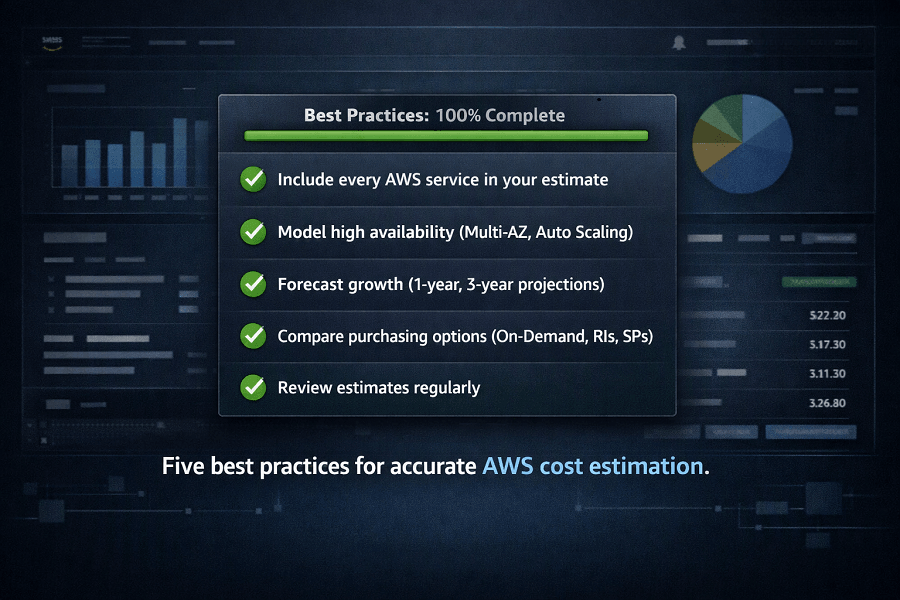
Include Every AWS Service
Don't estimate only compute resources.
Production environments typically include:
- Load balancing
- Monitoring
- Logging
- Security
- Backup
- Networking
- Storage
- DNS
- CDN
- Identity management
Ignoring these services often leads to underestimated budgets.
Model High Availability
Production systems frequently require:
- Multi-AZ databases
- Auto Scaling Groups
- Multiple Availability Zones
- Elastic Load Balancers
- Backup infrastructure
These components should always be reflected in estimates.
Forecast Growth
Estimate future workloads rather than current infrastructure alone.
Consider:
- User growth
- Storage expansion
- API traffic
- AI inference requests
- Database growth
Forecasting helps organizations avoid repeated redesigns and budget surprises.
Compare Purchasing Options
Evaluate:
- On-Demand Instances
- Savings Plans
- Reserved Instances
- Spot Instances
Even modest changes in purchasing strategy can significantly reduce long-term cloud costs.
Review Estimates Regularly
Cloud pricing, application requirements, and business priorities change over time.
Review estimates before major deployments, architectural changes, or budget planning cycles.
Conclusion
AWS Pricing Calculator is much more than a budgeting tool. It is a strategic planning platform that enables organizations to estimate cloud infrastructure costs, compare architectural options, evaluate pricing models, and build realistic financial forecasts before deployment.
By accurately modeling compute, storage, databases, networking, containers, AI services, and disaster recovery infrastructure, organizations can reduce financial uncertainty and make more informed cloud investment decisions.
When used alongside AWS Cost Explorer, AWS Budgets, AWS Cost and Usage Report (CUR), AWS Compute Optimizer, and AWS FinOps, AWS Pricing Calculator becomes an essential component of a comprehensive cloud financial management strategy.
Whether you're planning your first migration to AWS or designing a global enterprise architecture, thoughtful cost estimation helps ensure that your cloud environment remains scalable, resilient, and financially sustainable.
If you're looking to optimize cloud investments or develop a detailed AWS cost model, EaseCloud's AWS consultants can help you build accurate estimates and design architectures that support long-term business growth.
Frequently Asked Questions
Is AWS Pricing Calculator free?
Yes. AWS Pricing Calculator is a free tool that anyone can use to estimate the cost of AWS services before deployment.
Does the calculator guarantee my monthly AWS bill?
No.
The calculator provides estimates based on the assumptions you enter.
Actual costs depend on real-world usage, data transfer, scaling behavior, service consumption, and pricing changes.
Can I estimate multi-region deployments?
Yes.
You can include resources across multiple AWS Regions and estimate global infrastructure costs.
Does AWS Pricing Calculator support AI services?
Yes.
Organizations can estimate services such as:
- Amazon Bedrock
- Amazon SageMaker
- Amazon Rekognition
- Amazon Textract
- Amazon Comprehend
This is particularly useful for planning AI and machine learning workloads.
Can I share estimates with my team?
Yes.
AWS Pricing Calculator allows users to save and share estimates, making collaboration easier between engineering, finance, procurement, and executive stakeholders.
How EaseCloud Helps Organizations Plan AWS Infrastructure
At EaseCloud, we believe successful cloud projects begin with accurate planning, not assumptions. Our AWS consulting team works closely with organizations to design cost-efficient architectures that balance performance, scalability, security, and long-term financial sustainability.
Whether you're launching a new cloud-native application, migrating legacy systems, or expanding an existing AWS environment, EaseCloud helps you make informed investment decisions backed by data-driven cost analysis.
Summarize this post with:
