Infrastructure as Code (IaC) on AWS: CloudFormation vs AWS CDK vs Terraform
Compare AWS CloudFormation, AWS CDK, and Terraform. Learn Infrastructure as Code best practices, GitOps, CI/CD, automation, and enterprise deployment strategies.
Modern cloud infrastructure is no longer managed through manual configuration, spreadsheet documentation, or point-and-click provisioning in the AWS Management Console. As organizations adopt cloud-native architectures, microservices, Kubernetes, serverless computing, and multi-account AWS environments, manual infrastructure management quickly becomes inefficient, inconsistent, and error-prone.
Every new application environment, virtual private cloud (VPC), Amazon EC2 instance, Amazon RDS database, security group, IAM role, load balancer, or Kubernetes cluster introduces additional operational complexity. When these resources are created manually, organizations face increased risks of configuration drift, deployment failures, inconsistent environments, security gaps, and compliance issues.
This challenge has led to the widespread adoption of Infrastructure as Code (IaC) a foundational practice in modern cloud engineering and one of the core recommendations within the AWS Well-Architected Operational Excellence Pillar.
Infrastructure as Code enables engineering teams to define, provision, update, and manage cloud infrastructure using version-controlled code instead of manual processes. Infrastructure becomes repeatable, testable, auditable, and scalable, allowing organizations to automate deployments while reducing operational risk.
Whether you're deploying a single web application or managing thousands of AWS resources across multiple regions and accounts, Infrastructure as Code provides the consistency and automation needed to support enterprise-scale cloud operations.
What This Guide Covers
- What Infrastructure as Code is
- Why Infrastructure as Code is essential for AWS
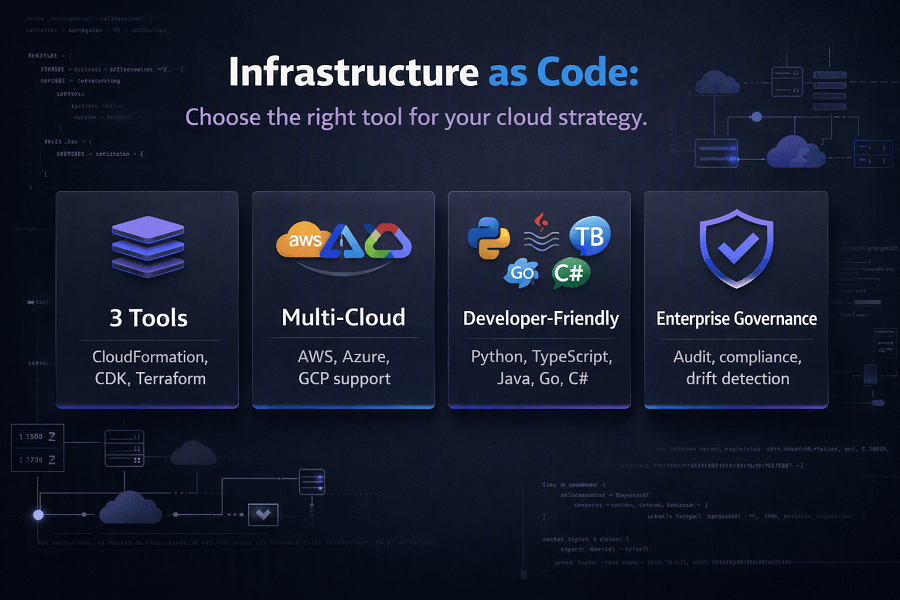
- Infrastructure as Code principles
- Mutable vs Immutable Infrastructure
- Declarative vs Imperative Infrastructure
- Configuration Drift
- AWS CloudFormation
- AWS Cloud Development Kit (CDK)
- Terraform
- GitOps and Infrastructure Automation
- Enterprise deployment strategies
- Infrastructure testing
- Infrastructure governance
- Best practices for choosing the right IaC solution
- How EaseCloud helps organizations implement Infrastructure as Code on AWS
By the end of this guide, you'll understand not only how these technologies work but also when to use each one in real-world enterprise environments.
What Is Infrastructure as Code (IaC)?
Infrastructure as Code (IaC) is the practice of defining and managing cloud infrastructure using machine-readable code rather than manual configuration.
Instead of creating AWS resources through the AWS Management Console, engineers describe the desired infrastructure in code files. Deployment tools then provision and manage those resources automatically.
Infrastructure managed through IaC can include:
- Amazon EC2 instances
- Amazon VPCs
- Subnets
- Route tables
- Internet Gateways
- NAT Gateways
- Amazon RDS databases
- Amazon S3 buckets
- Amazon ECS clusters
- Amazon EKS clusters
- AWS Lambda functions
- Elastic Load Balancers
- Amazon CloudFront distributions
- Amazon Route 53 records
- IAM users, roles, and policies
- Security Groups
- AWS WAF configurations
- Amazon ElastiCache clusters
- Amazon SNS topics
- Amazon SQS queues
- Amazon EventBridge rules
- AWS Secrets Manager secrets
- AWS KMS keys
Rather than documenting infrastructure separately from implementation, the code itself becomes the authoritative source of truth.
Why Infrastructure as Code Matters
Traditional infrastructure management often relies on manual provisioning.
For example, an administrator may:
- Create a VPC manually
- Configure subnets
- Launch EC2 instances
- Attach security groups
- Configure IAM roles
- Create databases
- Configure monitoring
- Deploy applications
Although manageable for small environments, this approach introduces several challenges as organizations grow.
Common problems include:
Human Error
Manual deployments increase the likelihood of inconsistent configurations and accidental misconfigurations.
Configuration Drift
Development, testing, and production environments gradually diverge over time, making troubleshooting and deployments more difficult.
Poor Repeatability
Without Infrastructure as Code, recreating environments after failures or for new projects becomes slow and unreliable.
Limited Collaboration
Manual infrastructure changes are difficult to review, audit, or version control.
Compliance Challenges
Organizations often struggle to prove that cloud infrastructure complies with internal policies or industry regulations.
Infrastructure as Code addresses these challenges by treating infrastructure with the same engineering discipline used for application development.
Core Principles of Infrastructure as Code
Successful Infrastructure as Code implementations are built on several key principles.
Version Control Everything
Infrastructure definitions should be stored in source control systems such as Git.
Benefits include:
- Change history
- Peer reviews
- Rollback capability
- Branching
- Collaboration
- Audit trails
Infrastructure becomes part of the software development lifecycle.
Automation First
Provisioning should occur through automated deployment pipelines rather than manual clicks in the AWS Management Console.
Automation enables:
- Faster deployments
- Consistency
- Reduced operational overhead
- Improved reliability
Idempotency
Infrastructure deployments should produce the same outcome regardless of how many times they are executed.
Idempotent deployments eliminate duplicate resources and unpredictable infrastructure states.
Reusability
Infrastructure components should be modular and reusable.
Examples include:
- Standard VPC modules
- Security baseline templates
- Shared networking stacks
- Database modules
- Monitoring templates
Reusable components improve consistency while accelerating deployment.
Testing Infrastructure
Infrastructure should undergo testing before production deployment.
Examples include:
- Template validation
- Policy testing
- Security scanning
- Compliance validation
- Integration testing
Infrastructure becomes a testable engineering asset rather than static configuration.
Declarative vs Imperative Infrastructure
Infrastructure as Code tools generally follow one of two approaches.
Declarative Infrastructure
Declarative tools define the desired final state.
Example:
"Create three private subnets, an Application Load Balancer, an Auto Scaling Group, and an RDS database."
The deployment engine determines how to achieve that state.
Examples include:
- AWS CloudFormation
- Terraform
- Kubernetes YAML
Advantages include:
- Simpler management
- Easier updates
- Predictable deployments
- Automatic dependency handling
Imperative Infrastructure
Imperative approaches specify every action that should occur.
Example:
- Create VPC
- Create subnet
- Attach route table
- Launch instance
- Configure networking
Examples include:
- Bash scripts
- Python automation
- AWS CLI scripts
- PowerShell
While imperative approaches offer flexibility, they often require more maintenance and are generally less suitable for large-scale infrastructure management.
Mutable vs Immutable Infrastructure
One of the most important concepts in Infrastructure as Code is understanding mutable and immutable infrastructure.
Mutable Infrastructure
Resources are modified after deployment.
For example:
- Install software manually
- Change configurations
- Apply updates directly
- Edit production servers
Problems include:
- Configuration drift
- Inconsistent environments
- Difficult troubleshooting
- Increased operational risk
Immutable Infrastructure
Rather than modifying existing resources, immutable infrastructure replaces them with newly built versions.
For example:
- Build a new Amazon Machine Image (AMI)
- Deploy new EC2 instances
- Redirect traffic using an Application Load Balancer
- Remove old instances
Benefits include:
- Predictable deployments
- Easier rollbacks
- Improved security
- Consistent environments
- Reduced configuration drift
Immutable infrastructure aligns closely with DevOps and cloud-native best practices.
Infrastructure as Code in the AWS Well-Architected Framework
AWS explicitly recommends Infrastructure as Code within the Operational Excellence Pillar because it enables organizations to:
- Perform operations as code
- Make frequent, reversible changes
- Reduce manual operational effort
- Improve deployment consistency
- Support continuous improvement
- Strengthen governance
- Enhance disaster recovery
- Accelerate cloud innovation
Infrastructure as Code is also closely connected to other Well-Architected pillars:
- Security: Standardized IAM policies, encryption, and secure configurations.
- Reliability: Consistent infrastructure and automated recovery.
- Performance Efficiency: Repeatable deployment of optimized architectures.
- Cost Optimization: Automated rightsizing and removal of unused resources.
- Sustainability: Efficient provisioning reduces unnecessary resource consumption.
AWS CloudFormation: Native Infrastructure as Code for AWS
AWS CloudFormation is Amazon Web Services' native Infrastructure as Code service. It enables organizations to define and provision AWS infrastructure using declarative templates written in YAML or JSON.
Instead of manually creating resources, CloudFormation interprets a template and provisions the required AWS services while automatically managing dependencies.
A single CloudFormation template can deploy an entire production-ready environment, including:
- Amazon VPC
- Public and Private Subnets
- Internet Gateway
- NAT Gateway
- Route Tables
- Amazon EC2 Instances
- Auto Scaling Groups
- Elastic Load Balancers
- Amazon RDS Databases
- Amazon S3 Buckets
- IAM Roles and Policies
- Security Groups
- CloudWatch Alarms
- Route 53 DNS Records
- AWS Lambda Functions
- Amazon ECS Services
- Amazon EKS Clusters
This ensures every deployment is consistent across development, staging, testing, and production environments.
Key CloudFormation Concepts
Understanding CloudFormation begins with a few core concepts.
Templates
Templates define the desired AWS infrastructure.
They include:
- Resources
- Parameters
- Outputs
- Mappings
- Conditions
- Metadata
Templates become reusable blueprints for infrastructure deployment.
Stacks
A Stack is an instance of a CloudFormation template.
For example:
A single template can create separate stacks for:
- Development
- Testing
- QA
- Production
Each stack has its own configuration while sharing the same architecture.
Change Sets
Before updating infrastructure, CloudFormation can generate a Change Set.
This allows engineers to preview modifications before applying them.
Benefits include:
- Reduced deployment risk
- Better visibility
- Controlled production changes
Rollback
If deployment fails, CloudFormation automatically rolls infrastructure back to the previous working state.
Rollback significantly improves deployment reliability.
Drift Detection
One of CloudFormation's most valuable enterprise features is Drift Detection.
It compares deployed infrastructure against the original template.
If someone manually changes production infrastructure, CloudFormation detects configuration drift.
Examples include:
- Modified Security Groups
- Deleted Resources
- Changed IAM Policies
- Updated Load Balancers
- Manual EC2 changes
Drift detection helps maintain infrastructure consistency.
Nested Stacks
Large enterprise environments often contain hundreds of AWS resources.
Instead of maintaining one enormous template, CloudFormation supports Nested Stacks.
Example architecture:
| Level | Stack |
|---|---|
| 0 | Root Stack |
| 1 | ├── Networking Stack |
| 1 | ├── IAM Stack |
| 1 | ├── Security Stack |
| 1 | ├── Database Stack |
| 1 | ├── Monitoring Stack |
| 1 | ├── ECS Stack |
| 1 | └── Application Stack |
Benefits include:
- Better maintainability
- Modular architecture
- Team ownership
- Faster updates
- Easier troubleshooting
StackSets
Organizations operating across multiple AWS accounts and Regions commonly use CloudFormation StackSets.
StackSets deploy identical infrastructure automatically across:
- Multiple AWS Accounts
- Multiple Regions
- Entire AWS Organizations
Common use cases include:
- IAM Roles
- Security Baselines
- CloudTrail
- AWS Config
- GuardDuty
- Logging Infrastructure
- Organizational Policies
StackSets simplify enterprise governance.
Advantages of AWS CloudFormation
CloudFormation offers several enterprise benefits.
Native AWS Integration
CloudFormation supports virtually every AWS service.
New AWS services often receive CloudFormation support shortly after release.
Security
CloudFormation integrates directly with:
- IAM
- AWS Organizations
- CloudTrail
- AWS Config
Every infrastructure change becomes auditable.
Consistency
Infrastructure remains identical across all environments.
This eliminates deployment discrepancies.
Compliance
Templates provide documented infrastructure definitions for compliance audits.
Organizations pursuing ISO 27001, SOC 2, HIPAA, or PCI DSS often rely on CloudFormation to standardize deployments.
Limitations of CloudFormation
Although powerful, CloudFormation has some limitations.
Examples include:
- AWS-only
- Verbose YAML templates
- Complex syntax for large environments
- Limited abstraction compared to programming languages
These limitations led AWS to introduce the Cloud Development Kit.
AWS Cloud Development Kit (AWS CDK)
AWS CDK modernizes Infrastructure as Code by allowing developers to define AWS infrastructure using familiar programming languages.
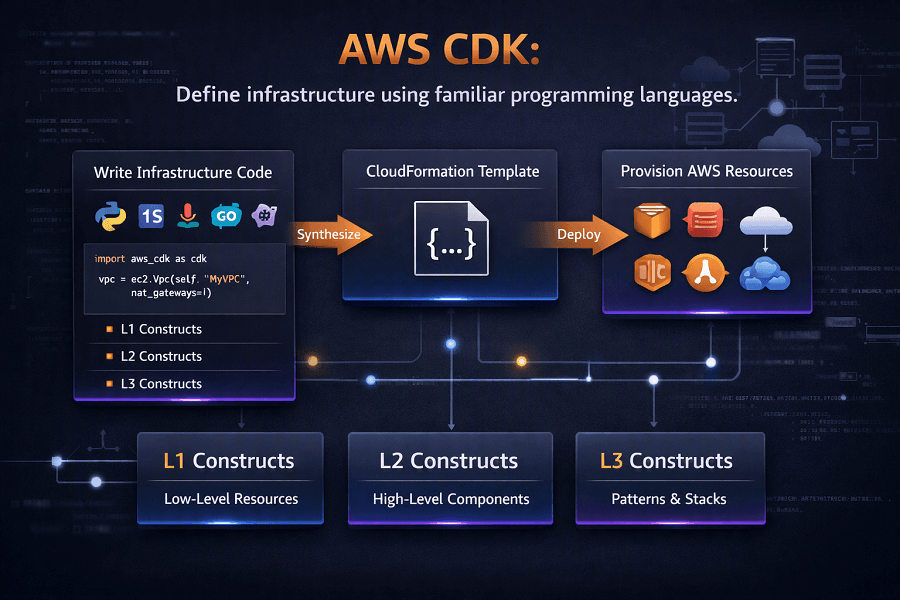
Supported languages include:
- TypeScript
- Python
- Java
- C#
- Go
Instead of manually writing YAML templates, developers use programming constructs.
The CDK then synthesizes those constructs into CloudFormation templates.
Why AWS Created CDK
CloudFormation templates become increasingly difficult to maintain as infrastructure grows.
Developers wanted:
- Loops
- Variables
- Functions
- Classes
- Object-oriented design
- Code reuse
- Testing
CDK provides these capabilities while preserving CloudFormation's deployment engine.
CDK Constructs
CDK infrastructure is built using Constructs.
Constructs represent reusable infrastructure components.
There are three primary construct levels.
L1 Constructs
Direct representations of AWS CloudFormation resources.
Provide maximum control but require detailed configuration.
L2 Constructs
Higher-level abstractions with sensible defaults.
Example:
Instead of configuring every detail of an S3 Bucket manually, an L2 construct automatically applies recommended configurations.
L3 Constructs
Opinionated architectural patterns.
Examples include:
- Complete VPC architectures
- Serverless applications
- Three-tier applications
- Container platforms
L3 constructs significantly accelerate development.
AWS CDK Workflow
A typical CDK deployment follows these steps:
- Write Infrastructure Code
- Build Application
- Synthesize CloudFormation Template
- Review Changes
- Deploy Resources
This workflow closely resembles modern software development practices.
Advantages of AWS CDK
Organizations choose CDK because it enables:
Familiar Programming Languages
Developers work in languages they already know.
Code Reuse
Infrastructure components become reusable libraries.
Testing
Infrastructure can be unit tested before deployment.
Better Maintainability
Object-oriented infrastructure reduces duplication.
Strong AWS Support
Because CDK ultimately generates CloudFormation templates, organizations retain AWS-native capabilities.
Limitations of AWS CDK
CDK also has trade-offs.
Examples include:
- AWS-focused
- Additional learning curve
- Generated CloudFormation templates may become complex
- Less suitable for organizations requiring multi-cloud deployments
Terraform on AWS
Terraform, developed by HashiCorp, is one of the most widely adopted Infrastructure as Code platforms.
Unlike CloudFormation and CDK, Terraform supports multiple cloud providers.
Organizations commonly use Terraform to manage:
- AWS
- Microsoft Azure
- Google Cloud Platform
- Kubernetes
- VMware
- SaaS platforms
- On-premises infrastructure
This makes Terraform especially attractive for hybrid and multi-cloud environments.
Terraform Architecture
Terraform consists of several key components.
Providers
Providers connect Terraform to cloud services.
Examples include:
- AWS Provider
- Azure Provider
- Google Provider
- Kubernetes Provider
The AWS Provider enables Terraform to manage AWS resources.
Resources
Resources define cloud infrastructure.
Examples include:
- EC2
- VPC
- IAM
- S3
- RDS
- Lambda
- ECS
Modules
Modules are reusable collections of infrastructure resources.
Organizations often create standardized modules for:
- Networking
- Security
- Monitoring
- Kubernetes
- Databases
Modules improve consistency across projects.
State File
Terraform maintains a State File that records deployed infrastructure.
The state enables Terraform to calculate infrastructure changes.
Enterprise environments typically store state remotely using:
- Amazon S3
- DynamoDB state locking
- Terraform Cloud
Proper state management is essential for team collaboration.
Terraform Workflow
Terraform deployments generally follow this sequence:
- Write Configuration Files
- Initialize Providers (terraform init)
- Validate Configuration (terraform validate)
- Review Execution Plan (terraform plan)
- Apply Infrastructure (terraform apply)
- Destroy Resources if Needed (terraform destroy)
This workflow gives engineers clear visibility into planned infrastructure changes before deployment.
Benefits of Terraform
Terraform is popular because it offers:
- Multi-cloud support
- Large provider ecosystem
- Reusable modules
- Strong community support
- Declarative syntax
- Flexible workflows
- GitOps compatibility
It is widely used by enterprises managing heterogeneous cloud environments.
CloudFormation vs AWS CDK vs Terraform
| Feature | CloudFormation | AWS CDK | Terraform |
|---|---|---|---|
| AWS Native | ✅ Yes | ✅ Yes | ❌ No (Multi-cloud) |
| Programming Languages | YAML / JSON | Python, TypeScript, Java, Go, C# | HCL |
| Multi-cloud Support | ❌ | ❌ | ✅ |
| Drift Detection | ✅ Built-in | Via CloudFormation | Limited (requires state reconciliation) |
| Learning Curve | Moderate | Moderate to High | Moderate |
| Enterprise Governance | Excellent | Excellent | Excellent |
| AWS Service Coverage | Excellent | Excellent | Excellent |
| Community Modules | Moderate | Growing | Extensive |
| Best For | AWS-only environments | Developer-centric AWS teams | Multi-cloud and hybrid infrastructure |
Choosing the Right Infrastructure as Code Tool
There is no single best IaC solution. The right choice depends on your architecture, team skills, and long-term cloud strategy.
Choose AWS CloudFormation if you:
- Operate exclusively on AWS.
- Need native AWS integration.
- Prioritize governance and compliance.
- Prefer declarative templates.
Choose AWS CDK if you:
- Have software engineers comfortable with programming languages.
- Want reusable infrastructure components.
- Need complex logic in infrastructure definitions.
- Build cloud-native applications on AWS.
Choose Terraform if you:
- Manage AWS alongside Azure, Google Cloud, or on-premises infrastructure.
- Require consistent tooling across multiple cloud providers.
- Rely on a mature module ecosystem.
- Need vendor-neutral Infrastructure as Code.
GitOps: Managing Infrastructure Through Git
As Infrastructure as Code matures, many organizations adopt GitOps, an operational model where Git repositories become the single source of truth for both infrastructure and application deployments.
Instead of engineers making manual changes through the AWS Management Console, every infrastructure modification begins with a code change committed to a version-controlled repository.
A GitOps workflow typically follows these steps:
- An engineer creates a feature branch.
- Infrastructure changes are defined using CloudFormation, AWS CDK, or Terraform.
- A pull request (PR) is submitted for peer review.
- Automated validation and testing pipelines run.
- After approval, the changes are merged into the main branch.
- A CI/CD pipeline automatically deploys the infrastructure.
- Monitoring tools verify the deployment and report its status.
This approach provides transparency, consistency, and a complete audit trail of every infrastructure change.
Benefits of GitOps
Organizations adopting GitOps gain several operational advantages.
Improved Collaboration
Infrastructure changes undergo peer review, reducing the likelihood of configuration errors and promoting knowledge sharing.
Version Control
Every change is tracked, making it easy to identify who made a change, when it occurred, and why it was introduced.
Rollback Capabilities
If a deployment causes issues, teams can revert to a previous Git commit and redeploy the earlier infrastructure configuration.
Automated Deployments
Changes are deployed consistently through automated pipelines, reducing manual intervention.
Compliance and Auditing
Git provides a permanent record of infrastructure changes, which supports governance and regulatory compliance.
Integrating Infrastructure as Code with CI/CD
Infrastructure should evolve alongside application code.
Modern organizations integrate IaC into their Continuous Integration and Continuous Deployment (CI/CD) pipelines to ensure infrastructure updates follow the same engineering standards as software releases.
A typical AWS deployment pipeline includes:
Source Stage
Infrastructure definitions are stored in GitHub, GitLab, Bitbucket, or AWS CodeCommit.
Build Stage
Automated validation checks:
- Syntax validation
- Template linting
- Security scanning
- Dependency analysis
Test Stage
Infrastructure testing includes:
- Unit tests
- Integration tests
- Policy validation
- Compliance checks
Deployment Stage
Infrastructure is deployed using:
- AWS CloudFormation
- AWS CDK
- Terraform
Deployments are typically performed incrementally to minimize operational risk.
Verification Stage
Post-deployment validation ensures that:
- Resources were created successfully
- Monitoring is active
- Security controls are enforced
- Application dependencies are functioning correctly
Infrastructure Testing
Infrastructure should be tested before reaching production.
Testing reduces deployment failures and improves operational confidence.
Common testing techniques include:
Template Validation
Ensures templates are syntactically correct before deployment.
Unit Testing
Developers verify that reusable infrastructure modules behave as expected.
This is especially valuable with AWS CDK, where infrastructure is written in programming languages.
Integration Testing
Validates interactions between infrastructure components, such as:
- VPC connectivity
- IAM permissions
- Database access
- Load balancer routing
Policy Testing
Ensures deployments comply with organizational security and governance standards.
Examples include verifying:
- Encryption is enabled.
- Public S3 buckets are prohibited.
- Security groups do not expose sensitive ports.
- Logging is configured.
End-to-End Validation
After deployment, automated tests confirm that the infrastructure supports the intended application workloads.
Security Best Practices for Infrastructure as Code
Infrastructure automation must not compromise security.
Organizations should integrate security controls throughout the IaC lifecycle.
Apply Least-Privilege Access
Deployment pipelines should use dedicated IAM roles with only the permissions required to provision resources.
Avoid using highly privileged administrator credentials.
Protect Sensitive Data
Never hardcode:
- AWS access keys
- Database passwords
- API tokens
- Encryption keys
Instead, use services such as:
- AWS Secrets Manager
- AWS Systems Manager Parameter Store
- AWS Key Management Service (KMS)
Encrypt Infrastructure Assets
Templates, state files, deployment artifacts, and logs should be encrypted both at rest and in transit.
Enable Logging
Track infrastructure changes using:
- AWS CloudTrail
- AWS Config
- Amazon CloudWatch
Centralized logging improves visibility and supports incident investigations.
Scan Infrastructure Code
Security scanning tools should automatically detect:
- Misconfigured IAM policies
- Open security groups
- Public storage buckets
- Missing encryption
- Compliance violations
Integrating these checks into CI/CD pipelines helps identify issues before deployment.
Governance and Standardization
As organizations scale, maintaining consistency across AWS accounts becomes increasingly important.
Infrastructure as Code enables centralized governance through standardized modules and templates.
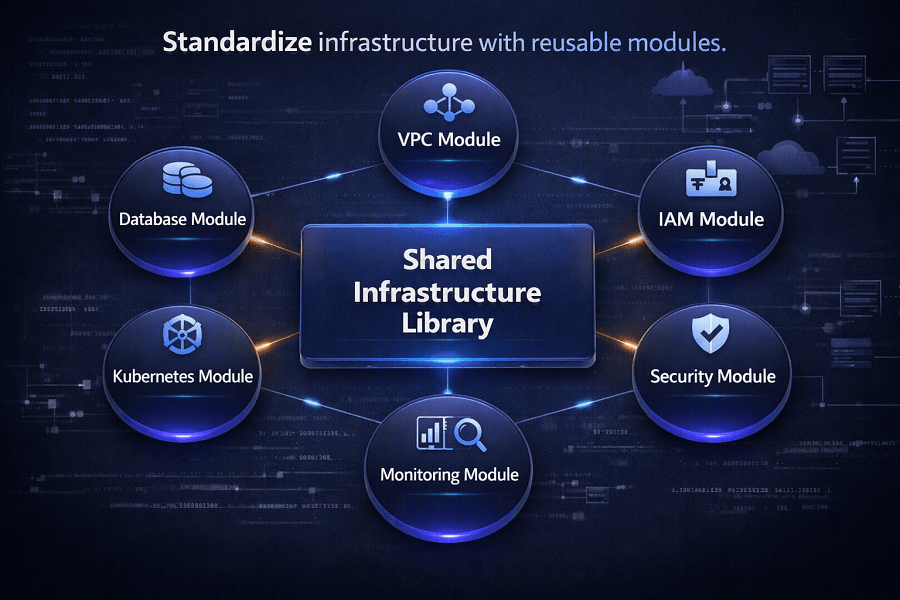
Examples include:
- Standard VPC architectures
- Approved IAM role templates
- Logging configurations
- Security baselines
- Monitoring dashboards
- Networking standards
Using shared modules ensures engineering teams deploy resources consistently across environments.
Multi-Account Infrastructure Management
Enterprise AWS environments often consist of multiple accounts for:
- Production
- Development
- Testing
- Security
- Shared services
- Networking
- Logging
Infrastructure as Code simplifies managing these environments by defining consistent deployment patterns.
Tools such as:
- CloudFormation StackSets
- AWS Organizations
- AWS Control Tower
- Terraform Workspaces
help organizations maintain governance while scaling cloud adoption.
Enterprise Implementation Patterns
Large organizations rarely maintain one massive infrastructure repository.
Instead, they adopt modular architectures.
Example:
Infrastructure Repository
│
├── Networking
├── Security
├── Identity
├── Monitoring
├── Databases
├── Kubernetes
├── Serverless
├── Shared Services
└── Application Infrastructure
This structure allows different engineering teams to manage individual domains while maintaining organizational standards.
Common Infrastructure as Code Mistakes
Even mature engineering teams encounter challenges when adopting IaC.
Treating Infrastructure as One Large Template
Large monolithic templates become difficult to maintain.
Break infrastructure into reusable modules and stacks.
Ignoring Version Control
Infrastructure stored outside Git cannot be effectively reviewed, audited, or rolled back.
Version control should be mandatory.
Making Manual Production Changes
Direct changes through the AWS Management Console create configuration drift and reduce deployment consistency.
All infrastructure modifications should flow through code.
Reusing Administrator Credentials
CI/CD pipelines should use dedicated IAM roles with least-privilege permissions rather than administrator accounts.
Hardcoding Secrets
Sensitive information should never appear in templates or repositories.
Use managed secret storage solutions instead.
Skipping Validation
Deploying untested infrastructure increases the risk of outages and security issues.
Validation and testing should be integrated into every deployment pipeline.
Poor Module Design
Reusable modules should remain focused, well-documented, and easy to maintain.
Avoid overly complex modules that attempt to solve every use case.
Real-World Enterprise Example
A financial technology company manages more than 250 AWS accounts supporting customer-facing applications across North America, Europe, and Asia-Pacific.
Initially, infrastructure was provisioned manually, resulting in inconsistent environments, lengthy deployments, and governance challenges.
To modernize operations, the organization implemented:
| Implementation Area | Components |
|---|---|
| Infrastructure as Code | - AWS CDK for application infrastructure - CloudFormation StackSets for governance - Terraform for shared multi-cloud networking |
| Source Control | - GitHub Enterprise |
| CI/CD | - AWS CodePipeline - AWS CodeBuild - AWS CodeDeploy |
| Security | - IAM Roles - AWS KMS - Secrets Manager - CloudTrail - AWS Config |
| Governance | - AWS Organizations - AWS Control Tower |
Within six months, the company achieved:
- 90% faster infrastructure provisioning
- Consistent deployments across all AWS accounts
- Reduced configuration drift
- Improved compliance reporting
- Lower operational overhead
- Faster disaster recovery
- Enhanced engineering collaboration
This transformation allowed infrastructure teams to focus on innovation rather than repetitive manual tasks.
Conclusion
Infrastructure as Code has become an essential capability for organizations operating on AWS. By replacing manual provisioning with version-controlled automation, businesses can achieve greater consistency, scalability, and operational resilience.
AWS CloudFormation, AWS CDK, and Terraform each offer unique strengths. Choosing the right tool depends on your cloud strategy, team expertise, governance requirements, and long-term architecture goals.
When combined with GitOps, CI/CD, automated testing, security scanning, and strong governance, Infrastructure as Code becomes a key enabler of modern cloud engineering and a core component of the AWS Well-Architected Operational Excellence Pillar.
Organizations that invest in Infrastructure as Code are better positioned to accelerate innovation, reduce operational risk, and build cloud platforms that can scale with confidence.
Frequently Asked Questions
What is Infrastructure as Code?
Infrastructure as Code (IaC) is the practice of provisioning and managing cloud infrastructure using code instead of manual configuration.
Which Infrastructure as Code tool is best for AWS?
The answer depends on organizational requirements:
- AWS CloudFormation is ideal for AWS-native environments and governance.
- AWS CDK is best for development teams that prefer programming languages.
- Terraform is well suited for multi-cloud and hybrid cloud environments.
Can CloudFormation and Terraform be used together?
Yes. Many enterprises combine CloudFormation for AWS-native infrastructure and Terraform for managing resources across multiple cloud providers.
Does Infrastructure as Code improve security?
Yes. IaC enables standardized configurations, automated policy enforcement, version control, and integration with security scanning tools, reducing the likelihood of configuration errors.
Is Infrastructure as Code required for DevOps?
While not strictly required, IaC is considered a foundational DevOps practice because it enables automation, repeatability, and continuous delivery.
How EaseCloud Helps Organizations Implement Infrastructure as Code
At EaseCloud, we help organizations modernize cloud operations by implementing secure, scalable, and automated Infrastructure as Code practices across AWS environments.
Whether you're migrating legacy workloads, standardizing enterprise infrastructure, or building cloud-native platforms, our consultants help design IaC solutions that improve reliability, security, and operational efficiency.
Summarize this post with:
