DevSecOps on AWS: The Complete Enterprise Security Automation Guide
Learn DevSecOps on AWS using IAM, Security Hub, GuardDuty, Terraform, GitOps, CI/CD, and security automation with enterprise best practices.
Cloud adoption has fundamentally changed how organizations build, deploy, and manage applications. Businesses are moving away from traditional monolithic systems and embracing cloud-native architectures, microservices, containers, Kubernetes, serverless computing, and Infrastructure as Code (IaC). While these technologies accelerate innovation, they also expand the attack surface and introduce new security challenges.
In traditional software development, security was often treated as the final stage before deployment. Development teams wrote code, operations teams deployed applications, and security teams reviewed the environment just before production. This sequential approach worked when organizations released software a few times each year. Today, however, modern engineering teams deploy changes multiple times a day through automated CI/CD pipelines, making traditional security reviews too slow and ineffective.
This shift has given rise to DevSecOps, a methodology that embeds security into every stage of the software development lifecycle rather than treating it as a separate phase. Instead of slowing innovation, DevSecOps enables organizations to automate security testing, policy enforcement, compliance validation, and threat detection throughout development, infrastructure provisioning, deployment, and runtime operations.
On AWS, DevSecOps combines cloud-native security services, Infrastructure as Code, automated CI/CD pipelines, identity management, compliance frameworks, and continuous monitoring to create secure, scalable, and resilient cloud environments.
AWS provides a comprehensive ecosystem for implementing DevSecOps, including:
- AWS Identity and Access Management (IAM)
- AWS Secrets Manager
- AWS Key Management Service (AWS KMS)
- Amazon GuardDuty
- Amazon Inspector
- AWS Security Hub
- AWS Config
- AWS CloudTrail
- Amazon Macie
- AWS WAF
- AWS Shield
- Amazon EventBridge
- Amazon CloudWatch
- AWS CodePipeline
- AWS CodeBuild
- AWS CodeDeploy
These services integrate seamlessly with Infrastructure as Code tools such as:
- Terraform
- AWS CloudFormation
- AWS CDK
And with modern DevOps platforms including:
- GitHub Actions
- GitLab CI/CD
- Jenkins
- Argo CD
- Flux CD
- Kubernetes
- Docker
When implemented correctly, DevSecOps helps organizations:
- Detect vulnerabilities earlier
- Automate security testing
- Protect cloud infrastructure
- Enforce compliance policies
- Reduce operational risk
- Improve software quality
- Accelerate secure software delivery
- Strengthen cloud governance
What This Guide Covers
- What DevSecOps is and why it matters
- How DevSecOps differs from traditional DevOps
- The principles of Shift Left Security
- AWS services used in DevSecOps
- How DevSecOps integrates with CI/CD pipelines
- Infrastructure as Code security
- Container and Kubernetes security
- Policy as Code and compliance automation
- Enterprise security best practices
- Common implementation mistakes
- How EaseCloud helps organizations build secure AWS environments
Whether you're modernizing cloud infrastructure, implementing GitOps, or building enterprise deployment pipelines, DevSecOps provides the foundation for secure and scalable cloud operations.
What Is DevSecOps?
DevSecOps stands for Development, Security, and Operations.
It is an approach to software development that integrates security into every phase of the Software Development Lifecycle (SDLC) instead of treating it as a separate activity.
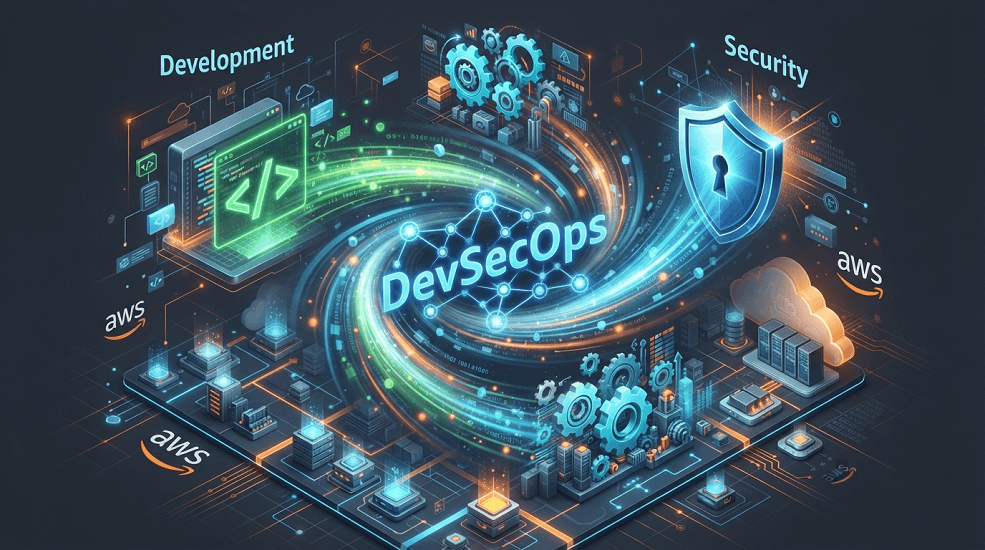
Rather than relying on manual security reviews at the end of a project, DevSecOps automates security controls throughout the entire lifecycle.
The DevSecOps workflow typically includes:
- Plan
- Develop
- Build
- Test
- Security Validation
- Deploy
- Monitor
- Improve
Security becomes a continuous process that evolves alongside the application.
Why Traditional DevOps Is No Longer Enough
DevOps transformed software delivery by breaking down silos between development and operations, enabling faster collaboration, automated deployments, and continuous delivery.
However, early DevOps implementations often overlooked one critical area security.
A traditional DevOps pipeline may automate code integration and deployments, but if security checks occur only at the end, vulnerabilities can remain undetected until late in the release cycle. Fixing these issues after deployment is significantly more expensive and disruptive.
Modern applications also introduce additional complexity through:
- Microservices architectures
- Kubernetes clusters
- Containers
- Serverless computing
- Multi-account AWS environments
- APIs
- Third-party dependencies
- Open-source packages
Each component introduces potential security risks.
Without integrated security, organizations may face:
- Misconfigured IAM permissions
- Exposed secrets
- Vulnerable container images
- Insecure Infrastructure as Code templates
- Unpatched dependencies
- Compliance violations
- Unauthorized infrastructure changes
DevSecOps addresses these challenges by making security an integral part of every engineering workflow.
DevOps vs DevSecOps
Although DevOps and DevSecOps share the goal of delivering software efficiently, DevSecOps expands the DevOps model by embedding automated security practices throughout the development lifecycle.
| Feature | DevOps | DevSecOps |
|---|---|---|
| Primary Focus | Speed and Collaboration | Speed, Security, and Compliance |
| Security Testing | Often Late | Continuous |
| CI/CD | ✔ | ✔ |
| Infrastructure Automation | ✔ | ✔ |
| Compliance Validation | Limited | Automated |
| Secrets Management | Optional | Essential |
| Policy Enforcement | Manual | Automated |
| Security Monitoring | Reactive | Continuous |
DevSecOps doesn't replace DevOps, it enhances it by making security everyone's responsibility.
The Core Principles of DevSecOps
Successful DevSecOps implementations are built on several foundational principles that ensure security is integrated seamlessly into development and operations.
Shift Left Security
One of the most important concepts in DevSecOps is Shift Left Security.
Instead of identifying security issues just before production, Shift Left moves security testing earlier in the development lifecycle.
Rather than waiting until deployment, developers receive immediate feedback while writing code.
This enables teams to:
- Detect vulnerabilities earlier
- Reduce remediation costs
- Improve developer productivity
- Accelerate release cycles
- Build more secure applications
By catching issues early, organizations reduce both technical debt and operational risk.
Security as Code
Just as Infrastructure as Code defines cloud resources through code, Security as Code defines security controls programmatically.
Examples include:
- IAM policies
- Security Groups
- AWS Config Rules
- AWS Organizations Service Control Policies (SCPs)
- Firewall configurations
- Kubernetes Network Policies
These security configurations are version-controlled, reviewed, tested, and deployed automatically.
Benefits include:
- Consistency across environments
- Reduced manual configuration errors
- Easier audits
- Faster recovery
- Improved governance
Automation First
Automation is central to DevSecOps.
Manual security reviews cannot scale with modern cloud-native applications.
Instead, organizations automate:
- Code analysis
- Infrastructure validation
- Vulnerability scanning
- Compliance checks
- Secret detection
- Deployment approvals
- Drift detection
- Runtime monitoring
Automation improves both speed and reliability while reducing human error.
Continuous Monitoring
Security does not end after deployment.
Applications and cloud infrastructure must be continuously monitored for:
- Configuration drift
- Unauthorized access
- Security threats
- Performance anomalies
- Compliance violations
- Runtime vulnerabilities
AWS services such as Amazon CloudWatch, AWS CloudTrail, GuardDuty, Security Hub, and AWS Config provide continuous visibility into cloud environments.
Understanding Shift Left Security
Shift Left Security is one of the defining characteristics of DevSecOps.
Traditionally, security teams reviewed applications after development was complete.
The workflow looked like this:
- Develop
- Build
- Deploy
- Security Testing
- Production
This delayed approach often resulted in:
- Late discovery of vulnerabilities
- Expensive remediation
- Project delays
- Increased operational risk
Shift Left changes the process by introducing automated security checks much earlier.
- Developer Writes Code
- Static Analysis
- Dependency Scanning
- Secret Detection
- Infrastructure Validation
- Build
- Deploy
- Continuous Monitoring
Security becomes an ongoing practice instead of a final checkpoint.
Benefits of Shift Left Security
Organizations adopting Shift Left Security often experience measurable improvements in both security and delivery performance.
Key benefits include:
- Earlier vulnerability detection
- Lower remediation costs
- Faster software releases
- Reduced production incidents
- Improved compliance readiness
- Higher developer awareness of secure coding practices
- Stronger collaboration between development, operations, and security teams
This proactive approach enables organizations to build security into their engineering culture rather than treating it as an external requirement.
The DevSecOps Lifecycle
A mature DevSecOps program spans the entire software delivery process.
Planning
│
▼
Development
│
▼
Code Review
│
▼
Static Security Testing
│
▼
Dependency Analysis
│
▼
Infrastructure Validation
│
▼
Build
│
▼
Container Security
│
▼
Deployment
│
▼
Runtime Monitoring
│
▼
Incident Response
│
▼
Continuous Improvement
Each stage introduces automated controls that reduce risk without slowing delivery.
AWS Services That Power DevSecOps
AWS offers one of the most comprehensive cloud security ecosystems available today. Rather than relying on separate security products for every task, organizations can build an integrated DevSecOps platform using AWS-native services.
Each service addresses a specific layer of the security lifecycle, from identity management and secrets protection to threat detection, compliance monitoring, and incident response.
AWS Identity and Access Management (IAM)
Identity is the foundation of every secure AWS environment.
AWS Identity and Access Management (IAM) controls who can access AWS resources and what actions they are permitted to perform.
Every DevSecOps implementation begins with strong identity management.
IAM enables organizations to manage:
- Users
- Groups
- Roles
- Policies
- Temporary credentials
- Federated identities
- Service-to-service authentication
Instead of granting broad administrative access, organizations should implement Least Privilege Access, ensuring users and workloads receive only the permissions they require.
A secure IAM model typically follows this structure:
Developers
│
▼
IAM Roles
│
▼
Temporary Credentials
│
▼
AWS Resources
This reduces credential exposure and minimizes the blast radius of compromised accounts.
IAM Best Practices
Enterprise AWS environments should follow several IAM best practices.
Use IAM Roles Instead of Long-Term Credentials
Applications running on:
- Amazon EC2
- Amazon ECS
- Amazon EKS
- AWS Lambda
should authenticate using IAM Roles rather than embedded access keys.
Enforce Multi-Factor Authentication (MFA)
Administrative accounts should always require MFA to reduce the risk of credential compromise.
Apply Least Privilege
Review IAM permissions regularly and remove unnecessary access.
Avoid wildcard permissions such as:
Action: "*"
Resource: "*"
Granular permissions significantly improve security.
Use IAM Roles for Service Accounts (IRSA)
For Amazon EKS workloads, IRSA allows Kubernetes pods to assume IAM roles without storing AWS credentials inside containers.
AWS Secrets Manager
Hardcoded credentials remain one of the most common cloud security vulnerabilities.
Applications frequently require:
- Database passwords
- API keys
- OAuth tokens
- Encryption keys
- Third-party credentials
- Service account secrets
These should never be stored in:
- Source code
- Git repositories
- Terraform variables
- Docker images
- Kubernetes manifests
Instead, AWS Secrets Manager securely stores and rotates sensitive information.
Applications retrieve secrets dynamically at runtime using IAM authentication.
Benefits include:
- Automatic secret rotation
- Encryption with AWS KMS
- Fine-grained IAM access
- Audit logging
- Centralized secret management
This significantly reduces credential exposure.
AWS Key Management Service (AWS KMS)
Encryption plays a central role in DevSecOps.
AWS KMS provides centralized key management for encrypting data across AWS services.
KMS supports encryption for:
- Amazon S3
- Amazon EBS
- Amazon RDS
- Amazon DynamoDB
- AWS Secrets Manager
- Amazon EFS
- AWS Backup
- Custom applications
Organizations can create:
- Customer Managed Keys (CMKs)
- AWS Managed Keys
- Multi-Region Keys
Key rotation and access policies further strengthen data protection.
Amazon GuardDuty
Security teams cannot manually analyze billions of cloud events.
Amazon GuardDuty continuously monitors AWS environments for suspicious activity using machine learning and threat intelligence.
GuardDuty detects:
- Unauthorized API calls
- Credential compromise
- Cryptocurrency mining
- Malware activity
- Privilege escalation
- Suspicious network traffic
- Data exfiltration attempts
Unlike traditional intrusion detection systems, GuardDuty requires minimal operational overhead while providing continuous threat detection.
Amazon Inspector
Amazon Inspector automatically scans workloads for security vulnerabilities.
Inspector continuously evaluates:
- Amazon EC2 instances
- Amazon ECR container images
- AWS Lambda functions
Common findings include:
- Critical CVEs
- Outdated software packages
- Operating system vulnerabilities
- Application dependencies
- Container image risks
Continuous vulnerability scanning enables organizations to remediate issues before exploitation.
AWS Security Hub
Enterprise organizations often use dozens of security tools.
AWS Security Hub consolidates findings into a single security dashboard.
Security Hub aggregates alerts from:
- GuardDuty
- Inspector
- Macie
- IAM Access Analyzer
- AWS Firewall Manager
- AWS Partner Solutions
This centralized visibility simplifies security operations and compliance reporting.
AWS Config
Configuration drift is a major security concern.
AWS Config continuously records resource configurations and evaluates them against predefined rules.
Organizations can monitor whether resources comply with requirements such as:
- S3 encryption enabled
- MFA enabled
- Security Groups restricted
- Public access disabled
- IAM policies compliant
AWS Config enables automated compliance monitoring across AWS accounts.
AWS CloudTrail
Every API call in AWS should be auditable.
AWS CloudTrail records:
- User activity
- Console logins
- Resource modifications
- IAM changes
- Deployment actions
- Infrastructure updates
CloudTrail provides:
- Audit trails
- Compliance evidence
- Security investigations
- Incident response data
Most enterprise compliance frameworks require CloudTrail logging.
Amazon Macie
Organizations increasingly store sensitive information in Amazon S3.
Amazon Macie automatically discovers and classifies sensitive data, including:
- Personally Identifiable Information (PII)
- Financial records
- Customer information
- Healthcare data
- Intellectual property
Macie helps organizations identify exposed or improperly secured data.
AWS WAF
Web applications remain a primary target for cyberattacks.
AWS Web Application Firewall (WAF) protects applications from threats such as:
- SQL Injection
- Cross-Site Scripting (XSS)
- Bot traffic
- Layer 7 attacks
- Malicious IP addresses
WAF integrates with:
- Amazon CloudFront
- Application Load Balancer
- Amazon API Gateway
Security policies can be updated automatically as threats evolve.
AWS Shield
Distributed Denial-of-Service (DDoS) attacks can overwhelm public-facing applications.
AWS Shield protects workloads against DDoS attacks.
Two service tiers are available:
- AWS Shield Standard
- AWS Shield Advanced
Shield integrates with:
- Route 53
- CloudFront
- Elastic Load Balancing
- AWS Global Accelerator
This provides always-on protection for internet-facing applications.
DevSecOps in AWS CI/CD Pipelines
Security should be embedded into every deployment pipeline rather than added after development is complete.
A modern AWS DevSecOps pipeline looks like this:
Developer Commit
│
▼
Git Repository
│
▼
Static Code Analysis
│
▼
Dependency Scanning
│
▼
Infrastructure Validation
│
▼
Container Security Scan
│
▼
Build Artifact
│
▼
Policy Validation
│
▼
Deployment Approval
│
▼
Production
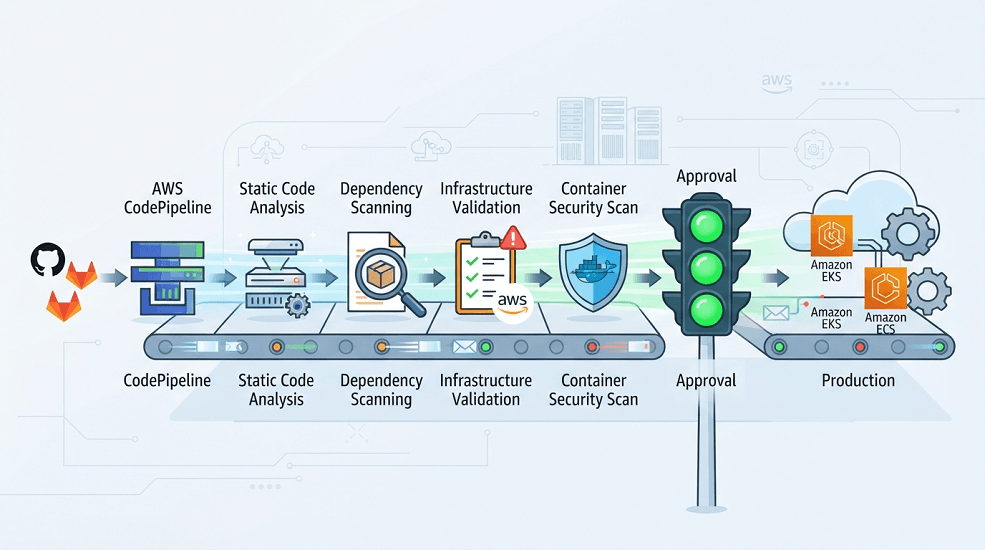
Every stage performs automated security validation before software reaches production.
Infrastructure as Code Security
Infrastructure should follow the same security standards as application code.
Whether using:
- Terraform
- AWS CloudFormation
- AWS CDK
security validation should occur before deployment.
Infrastructure validation typically checks for:
- Public S3 buckets
- Overly permissive IAM policies
- Open Security Groups
- Missing encryption
- Disabled logging
- Unrestricted network access
- Insecure resource configurations
Automated scanning prevents insecure infrastructure from being deployed.
Securing Terraform
Terraform deployments should include multiple validation stages.
Typical workflow:
- terraform fmt
- terraform validate
- Security Scan
- terraform plan
- Approval
- terraform apply
Organizations commonly integrate tools such as:
- Checkov
- TFLint
- tfsec
- Terrascan
These tools identify security issues before infrastructure changes reach AWS.
Securing AWS CDK
AWS CDK applications generate CloudFormation templates, making template validation an essential step.
Security practices include:
- CDK Synth validation
- IAM permission review
- Resource policy analysis
- Encryption verification
- Security scanning before deployment
Automated validation ensures generated infrastructure complies with organizational standards.
Securing AWS CloudFormation
CloudFormation templates should undergo automated checks before stack deployment.
Validation typically includes:
- Template syntax validation
- IAM policy analysis
- Encryption requirements
- Networking validation
- Resource compliance checks
By treating CloudFormation templates as code, organizations achieve consistent and auditable infrastructure deployments.
Container Security
Containers have become a standard deployment model for modern applications, but they introduce unique security considerations.
A secure container pipeline includes:
- Base image validation
- Vulnerability scanning
- Dependency analysis
- Image signing
- Registry access control
- Runtime protection
Amazon ECR supports image scanning, helping teams identify known vulnerabilities before deployment.
Kubernetes Security
Amazon EKS deployments require additional security controls beyond the cluster itself.
Key security areas include:
- Role-Based Access Control (RBAC)
- Kubernetes Network Policies
- Pod Security Standards
- Admission Controllers
- Namespace isolation
- Image verification
- Secret management
- Audit logging
Combining Kubernetes-native controls with AWS security services creates a layered security model.
Policy as Code
As cloud environments grow, manually enforcing security standards becomes impractical. Enterprise organizations may manage thousands of AWS resources across multiple accounts, making automated governance essential.
Policy as Code (PaC) allows organizations to define security, compliance, and operational policies as machine-readable code that can be version-controlled, reviewed, and automatically enforced.
Instead of manually reviewing every deployment, Policy as Code evaluates infrastructure before it reaches production.
Typical workflow:
Developer Commit
│
▼
Infrastructure as Code
│
▼
Policy Validation
│
▼
Compliance Checks
│
▼
Deployment Approval
│
▼
Production
Policy as Code ensures that security requirements are consistently applied regardless of who deploys the infrastructure.
Benefits of Policy as Code
Organizations implementing Policy as Code gain several operational advantages.
- Automated compliance validation
- Consistent governance across environments
- Reduced manual reviews
- Faster deployments
- Lower operational risk
- Improved audit readiness
- Version-controlled security policies
- Easier collaboration between security and engineering teams
By embedding governance into deployment pipelines, organizations reduce security exceptions and configuration drift.
Common Policy as Code Tools
Enterprise DevSecOps platforms frequently use:
- Open Policy Agent (OPA)
- Gatekeeper
- Kyverno
- HashiCorp Sentinel
- AWS Config Rules
- AWS Organizations Service Control Policies (SCPs)
- Checkov
- Terraform Cloud Policy Sets
These tools validate infrastructure before deployment and prevent configurations that violate organizational standards.
Compliance Automation
Meeting regulatory requirements should not depend on manual audits.
DevSecOps automates compliance by continuously evaluating cloud infrastructure against predefined standards.
Common compliance frameworks include:
- ISO 27001
- SOC 2
- PCI DSS
- HIPAA
- GDPR
- CIS AWS Foundations Benchmark
- NIST Cybersecurity Framework
Rather than preparing for annual audits, organizations maintain continuous compliance throughout the year.
AWS Services Supporting Compliance
AWS provides several services that simplify compliance management.
AWS Config
Continuously evaluates AWS resources against compliance rules.
Examples:
- Encryption enabled
- Logging enabled
- Public access blocked
- Approved instance types
- Resource tagging standards
AWS CloudTrail
Provides detailed audit logs of:
- User actions
- API calls
- Infrastructure changes
- Deployment activities
CloudTrail is essential for forensic investigations and regulatory reporting.
AWS Security Hub
Aggregates findings from multiple AWS security services into a unified dashboard.
Security teams gain centralized visibility into:
- Security posture
- Compliance status
- Active findings
- Remediation priorities
AWS Organizations & Service Control Policies
Large enterprises often manage dozens or hundreds of AWS accounts.
Service Control Policies (SCPs) enforce organization-wide guardrails such as:
- Preventing public S3 buckets
- Restricting AWS Regions
- Blocking root account usage
- Enforcing encryption requirements
These controls provide centralized governance while allowing individual teams to manage their workloads.
Multi-Account AWS Security
Enterprise cloud environments are typically organized using AWS Organizations.
A common architecture includes:
AWS Organization
│
├── Security
├── Shared Services
├── Networking
├── Development
├── QA
├── Staging
├── Production
└── Disaster Recovery
Each account has a dedicated purpose while central security teams maintain visibility across the organization.
Benefits include:
- Strong workload isolation
- Centralized governance
- Reduced blast radius
- Simplified compliance
- Standardized security controls
This architecture aligns with AWS best practices for enterprise-scale deployments.
DevSecOps Best Practices
Organizations that successfully adopt DevSecOps share several common practices.
Automate Security Everywhere
Security validation should occur automatically during:
- Code commits
- Pull Requests
- Infrastructure provisioning
- Container builds
- Application deployments
- Runtime operations
Automation enables teams to scale security without slowing development.
Adopt Least Privilege Access
Every workload should receive only the permissions it requires.
Regularly review:
- IAM users
- IAM roles
- IAM policies
- Service permissions
- Cross-account access
Reducing unnecessary permissions limits the impact of compromised credentials.
Protect Secrets Properly
Secrets should never exist in:
- Git repositories
- Docker images
- Terraform variables
- Kubernetes YAML files
- CI/CD configuration files
Instead, centralize secret management using AWS Secrets Manager or Systems Manager Parameter Store with AWS KMS encryption.
Secure Infrastructure as Code
Treat infrastructure with the same discipline as application code.
Every Terraform, CloudFormation, or AWS CDK deployment should undergo:
- Formatting
- Validation
- Policy checks
- Security scanning
- Peer review
- Approval workflows
This prevents insecure infrastructure from reaching production.
Continuously Monitor Cloud Environments
Security doesn't end after deployment.
Monitor continuously using:
- Amazon CloudWatch
- AWS CloudTrail
- AWS Config
- Amazon GuardDuty
- AWS Security Hub
- Amazon Inspector
Continuous monitoring enables faster detection and response to emerging threats.
Standardize Security Across Teams
Organizations should establish reusable standards for:
- IAM policies
- Infrastructure modules
- CI/CD pipelines
- Security baselines
- Logging
- Monitoring
- Encryption
- Resource tagging
Standardization reduces complexity while improving consistency.
Common DevSecOps Mistakes
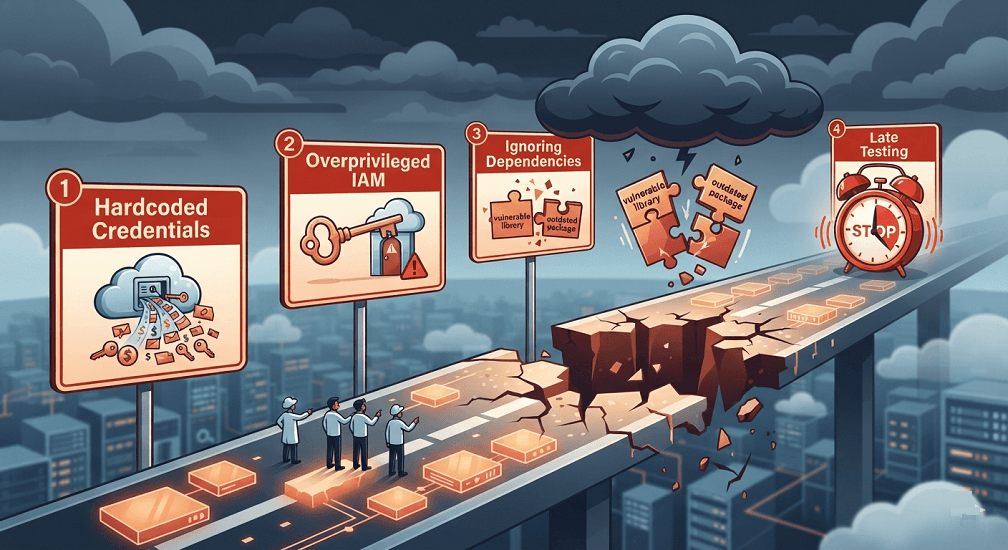
Even mature engineering organizations encounter challenges during DevSecOps adoption.
Treating Security as a Separate Team
Security should be integrated into development and operations rather than operating independently.
Shared responsibility leads to faster remediation and stronger collaboration.
Hardcoding Credentials
Embedding passwords, API keys, or AWS credentials in repositories remains one of the most common cloud security issues.
Always retrieve secrets securely at runtime.
Excessive IAM Permissions
Granting broad administrative permissions increases organizational risk.
Instead:
- Use IAM Roles
- Apply least privilege
- Regularly review access
- Remove unused permissions
Ignoring Dependency Vulnerabilities
Modern applications depend heavily on open-source software.
Organizations should continuously scan dependencies for known vulnerabilities and update packages promptly.
Delaying Security Testing
Waiting until production to identify vulnerabilities increases remediation costs and deployment delays.
Shift Left Security ensures issues are discovered early when they are easier and less expensive to fix.
Real-World Enterprise Example
A multinational financial services company operated workloads across multiple AWS Regions using Amazon EKS, Amazon ECS, AWS Lambda, Amazon RDS, and Amazon S3.
Although the organization had adopted DevOps, security reviews remained largely manual. Infrastructure teams used Terraform, while application teams deployed through GitHub Actions and AWS CodePipeline. As release frequency increased, security reviews became a bottleneck, delaying production deployments and making compliance audits more complex.
To modernize its delivery process, the organization implemented a comprehensive DevSecOps strategy.
| Category | Components |
|---|---|
| Infrastructure | - Terraform - AWS CDK - AWS CloudFormation |
| CI/CD | - AWS CodePipeline - GitHub Actions - AWS CodeBuild |
| Security | - AWS IAM - AWS Secrets Manager - AWS KMS - Amazon GuardDuty - Amazon Inspector - AWS Security Hub - AWS Config - AWS CloudTrail |
| Governance | - Policy as Code - Service Control Policies - Mandatory Pull Requests - Automated Security Validation |
Within the first year, the organization achieved:
- More than 80% reduction in manual security review effort
- Faster software release cycles
- Improved compliance reporting
- Reduced cloud misconfigurations
- Higher deployment confidence
- Standardized security practices across engineering teams
Security became an integrated part of software delivery rather than a deployment bottleneck.
Conclusion
DevSecOps is no longer optional for organizations operating in modern cloud environments. As applications become more distributed and deployment frequency increases, security must evolve from a manual checkpoint into a continuous, automated practice.
By combining AWS security services with Infrastructure as Code, CI/CD pipelines, GitOps, Policy as Code, and continuous monitoring, organizations can reduce risk, strengthen compliance, and accelerate software delivery without sacrificing security.
A mature DevSecOps strategy enables engineering teams to innovate faster while maintaining the governance and resilience required for enterprise-scale cloud operations.
Frequently Asked Questions
What is DevSecOps?
DevSecOps is a software development approach that integrates security into every phase of the development, deployment, and operations lifecycle through automation, continuous monitoring, and shared responsibility.
How is DevSecOps different from DevOps?
DevOps focuses on improving collaboration between development and operations to accelerate software delivery. DevSecOps extends this approach by embedding automated security controls, compliance validation, and governance throughout the delivery pipeline.
Why is Shift Left Security important?
Shift Left Security identifies vulnerabilities earlier in the software development lifecycle, reducing remediation costs, minimizing production risks, and enabling faster, more secure releases.
Which AWS services are essential for DevSecOps?
Common AWS services include:
- AWS IAM
- AWS Secrets Manager
- AWS KMS
- Amazon GuardDuty
- Amazon Inspector
- AWS Security Hub
- AWS Config
- AWS CloudTrail
- AWS CodePipeline
- AWS CodeBuild
These services work together to provide identity management, threat detection, compliance monitoring, and deployment automation.
Can DevSecOps be used with Terraform and GitOps?
Yes. DevSecOps integrates naturally with Terraform, AWS CDK, CloudFormation, GitOps, and CI/CD pipelines by validating infrastructure, enforcing security policies, scanning for vulnerabilities, and monitoring runtime environments.
How EaseCloud Helps Organizations Implement DevSecOps
At EaseCloud, we help organizations design and implement enterprise-grade DevSecOps practices that secure cloud environments without slowing innovation. Whether you're modernizing legacy environments or building cloud-native platforms, EaseCloud helps you integrate security into every stage of the AWS software delivery lifecycle.
Book Your Free DevSecOps AssessmentSummarize this post with:
