AWS CI/CD Pipeline: The Complete Enterprise Deployment Guide
Learn AWS CI/CD pipelines using CodePipeline, CodeBuild, CodeDeploy, GitHub Actions, Jenkins, and DevOps best practices for AWS deployments.
As organizations accelerate their cloud adoption, software delivery has become one of the most critical factors in maintaining a competitive advantage. Customers expect new features, security updates, and performance improvements to be delivered quickly without compromising application reliability or system stability.
Traditional deployment methods often rely on manual processes such as copying files to servers, running deployment scripts, updating infrastructure manually, and performing production releases during scheduled maintenance windows. While these approaches may work for small applications, they quickly become inefficient and error-prone as organizations scale across multiple AWS accounts, Regions, development teams, and production environments.
Modern cloud-native applications require a deployment model that is automated, repeatable, secure, and scalable. This is where Continuous Integration (CI) and Continuous Delivery/Continuous Deployment (CD) become essential.
An AWS CI/CD pipeline automates the entire software delivery lifecycle from source code changes and automated testing to infrastructure provisioning, application deployment, monitoring, and rollback. Instead of manually deploying applications, developers commit code to a Git repository, triggering automated pipelines that validate, build, test, package, and deploy changes across development, staging, and production environments.
AWS provides a comprehensive suite of DevOps services that enable organizations to build enterprise-grade CI/CD pipelines, including:
- AWS CodePipeline
- AWS CodeBuild
- AWS CodeDeploy
- AWS CodeCommit
- Amazon Elastic Container Registry (Amazon ECR)
- Amazon ECS
- Amazon EKS
- AWS Lambda
- AWS CloudFormation
- AWS CDK
- Amazon CloudWatch
- AWS Systems Manager
- Amazon EventBridge
- AWS Identity and Access Management (IAM)
These services also integrate seamlessly with third-party DevOps platforms such as:
- GitHub Actions
- GitLab CI/CD
- Jenkins
- Bitbucket Pipelines
- Terraform
- Argo CD
- Flux CD
- SonarQube
- Docker
- Kubernetes
Combined with Infrastructure as Code, GitOps, and Platform Engineering, CI/CD pipelines enable organizations to deliver software faster while maintaining high standards for security, compliance, and operational excellence.
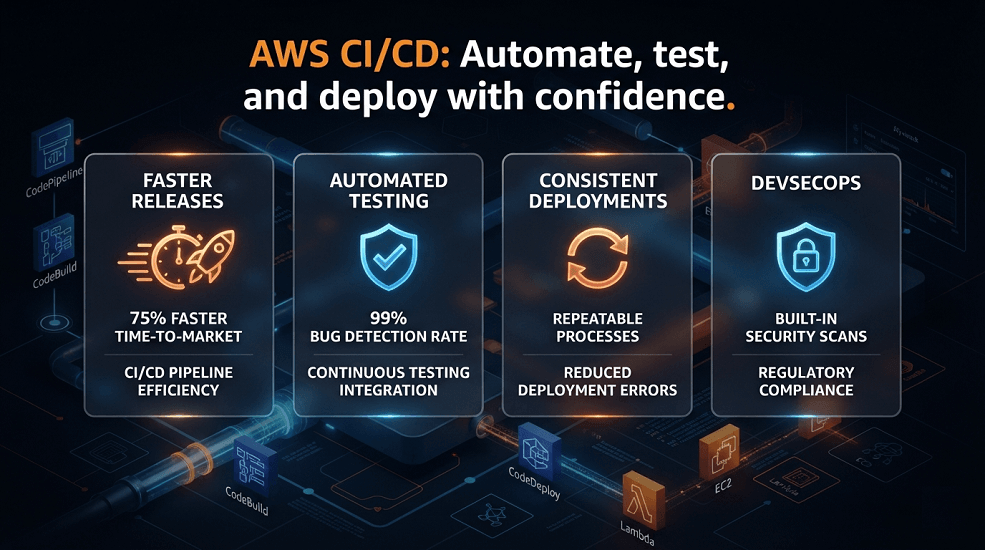
What This Guide Covers
- What CI/CD is and why it matters
- The differences between Continuous Integration, Continuous Delivery, and Continuous Deployment
- How AWS CI/CD pipelines work
- AWS CodePipeline, CodeBuild, CodeDeploy, and CodeCommit
- CI/CD with Terraform, AWS CDK, and CloudFormation
- CI/CD for Amazon ECS, Amazon EKS, and AWS Lambda
- Security and DevSecOps integration
- Deployment strategies such as Blue/Green and Canary
- Enterprise best practices
- Common implementation mistakes
- How EaseCloud helps organizations modernize software delivery on AWS
Whether you're deploying containerized applications, serverless workloads, or enterprise cloud platforms, mastering AWS CI/CD is essential for building reliable and scalable software delivery processes.
What Is CI/CD?
CI/CD stands for Continuous Integration and Continuous Delivery/Continuous Deployment.
It is a modern software engineering practice that automates the process of building, testing, validating, and deploying applications.
Rather than releasing software manually every few weeks or months, CI/CD enables organizations to deliver small, incremental changes safely and frequently.
The CI/CD lifecycle generally consists of:
Developer Writes Code
│
▼
Git Repository
│
▼
Continuous Integration
(Build + Test + Validation)
│
▼
Artifact Creation
│
▼
Continuous Delivery
│
▼
Continuous Deployment
│
▼
Production Environment
│
▼
Monitoring & Feedback
Automation reduces manual effort while improving deployment consistency and reliability.
Why CI/CD Is Essential for Modern AWS Environments
Modern AWS environments are significantly more complex than traditional on-premises infrastructures.
Organizations often manage:
- Multiple AWS accounts
- Multiple Regions
- Hundreds of microservices
- Kubernetes clusters
- Serverless applications
- Container platforms
- APIs
- Databases
- Event-driven architectures
Manually deploying applications across these environments introduces unnecessary risk.
CI/CD addresses these challenges by providing:
Faster Releases
Development teams can deploy software multiple times per day rather than waiting for scheduled release windows.
Improved Software Quality
Every code change automatically undergoes:
- Compilation
- Automated testing
- Static code analysis
- Security scanning
- Validation
Problems are detected much earlier in the development lifecycle.
Consistent Deployments
Every deployment follows the same automated workflow.
This eliminates inconsistencies caused by manual deployment steps.
Reduced Downtime
Modern deployment strategies enable zero-downtime releases while minimizing customer impact.
Faster Rollbacks
If issues occur after deployment, CI/CD pipelines can quickly restore the previous stable version.
Better Collaboration
CI/CD encourages collaboration between:
- Software Developers
- DevOps Engineers
- Cloud Engineers
- Platform Engineers
- Security Teams
- Quality Assurance Engineers
- Site Reliability Engineers (SREs)
Automation creates a standardized workflow that benefits every team.
Continuous Integration (CI)
Continuous Integration focuses on integrating code changes into a shared repository as frequently as possible.
Instead of developers working in isolation for weeks, they merge small changes regularly.
Every code commit automatically triggers a pipeline that validates the new changes.
A typical Continuous Integration process includes:
Developer Commit
│
▼
Source Control
│
▼
Build Application
│
▼
Run Unit Tests
│
▼
Run Static Analysis
│
▼
Security Scanning
│
▼
Create Build Artifact
If any stage fails, developers receive immediate feedback, allowing them to resolve issues before they reach production.
Benefits of Continuous Integration
Organizations implementing Continuous Integration typically experience significant improvements in software quality and development efficiency.
Key benefits include:
- Faster feedback loops
- Early bug detection
- Reduced merge conflicts
- Improved collaboration
- Higher code quality
- Increased developer productivity
- Automated testing
- Faster release cycles
Frequent integration also reduces the complexity of resolving issues because changes are smaller and easier to review.
Continuous Delivery (CD)
Continuous Delivery extends Continuous Integration by ensuring that validated code is always ready for deployment.
After successful testing, the application is packaged and prepared for release.
However, production deployment still requires a manual approval.
The workflow typically looks like this:
Code Commit
│
▼
Build
│
▼
Automated Tests
│
▼
Package Artifact
│
▼
Deploy to Staging
│
▼
Manual Approval
│
▼
Production Deployment
Continuous Delivery provides organizations with greater control over production releases while still automating most of the software delivery process.
This model is commonly used in industries with strict regulatory or compliance requirements, where human approval is mandatory before production changes.
Benefits of Continuous Delivery
Continuous Delivery offers several advantages:
- Reliable release processes
- Reduced deployment risk
- Faster production readiness
- Improved release quality
- Easier rollback
- Better compliance and governance
- Consistent deployment procedures
By keeping software in a deployable state, organizations can release updates whenever business needs require.
Continuous Deployment
Continuous Deployment goes one step further.
Once all validation stages pass successfully, the application is automatically deployed to production without requiring manual approval.
The workflow becomes:
Developer Commit
│
▼
Build
│
▼
Testing
│
▼
Security Validation
│
▼
Production Deployment
│
▼
Monitoring
This approach enables organizations to deliver updates rapidly while minimizing manual intervention.
Continuous Deployment is commonly adopted by technology companies that release software multiple times each day.
Continuous Delivery vs Continuous Deployment
Although these terms are often used interchangeably, they represent different deployment models.
| Feature | Continuous Delivery | Continuous Deployment |
|---|---|---|
| Automated Build | ✔ | ✔ |
| Automated Testing | ✔ | ✔ |
| Production Approval | Manual | Automatic |
| Production Deployment | On Approval | Immediate |
| Best For | Enterprises with governance requirements | High-frequency cloud-native deployments |
Selecting the appropriate model depends on business requirements, regulatory obligations, and organizational risk tolerance.
Core Components of an AWS CI/CD Pipeline
A modern AWS CI/CD pipeline consists of several interconnected stages that automate the software delivery lifecycle.
These stages include:
Source Control
Developers store application and infrastructure code in repositories such as:
- GitHub
- GitLab
- AWS CodeCommit
- Bitbucket
Version control provides collaboration, history, and rollback capabilities.
Build Stage
The build stage compiles source code, resolves dependencies, and creates deployable artifacts.
Artifacts may include:
- Docker images
- JAR files
- ZIP packages
- Lambda deployment packages
- Static website assets
Testing Stage
Automated testing validates the quality of each change before deployment.
Common testing activities include:
- Unit tests
- Integration tests
- API testing
- Security testing
- Performance testing
- Static code analysis
Testing reduces the likelihood of defects reaching production.
Artifact Repository
Validated build outputs are stored in an artifact repository for later deployment.
Examples include:
- Amazon Elastic Container Registry (Amazon ECR)
- AWS CodeArtifact
- Amazon S3
Artifact repositories ensure deployments use trusted and immutable build outputs.
Deployment Stage
Approved artifacts are deployed to target environments such as:
- Amazon ECS
- Amazon EKS
- AWS Lambda
- Amazon EC2
- AWS Elastic Beanstalk
Deployment automation minimizes downtime while ensuring consistency across environments.
AWS CodePipeline
AWS CodePipeline is the orchestration service at the center of AWS DevOps. It automates the end-to-end software delivery process by coordinating every stage of a CI/CD workflow.
Rather than manually triggering builds, tests, or deployments, CodePipeline executes these stages automatically whenever changes are detected in the source repository.
A typical CodePipeline workflow includes:
Source
│
▼
Build
│
▼
Testing
│
▼
Security Validation
│
▼
Approval (Optional)
│
▼
Deployment
│
▼
Production
CodePipeline integrates with:
- AWS CodeCommit
- GitHub
- GitHub Enterprise
- GitLab
- Bitbucket
- AWS CodeBuild
- AWS CodeDeploy
- AWS CloudFormation
- Amazon ECS
- Amazon EKS
- AWS Lambda
- Amazon S3
- Jenkins
- AWS Step Functions
Because it is fully managed, organizations don't need to maintain their own orchestration servers.
Benefits of AWS CodePipeline
Organizations use CodePipeline because it provides:
- Fully managed pipeline orchestration
- Visual workflow management
- Native AWS integrations
- Third-party integrations
- Automatic deployment triggers
- Manual approval stages
- Parallel execution
- Event-driven automation
- Scalable deployment workflows
These capabilities make CodePipeline suitable for organizations ranging from startups to large enterprises.
AWS CodeBuild
AWS CodeBuild is the managed build service responsible for compiling source code, executing automated tests, and producing deployment artifacts.
Unlike traditional build servers, CodeBuild automatically provisions build environments when required and shuts them down after execution.
Typical CodeBuild responsibilities include:
- Compile source code
- Install dependencies
- Run unit tests
- Execute integration tests
- Static code analysis
- Package applications
- Build Docker images
- Publish build artifacts
Supported languages include:
- Java
- Python
- Node.js
- Go
- .NET
- Ruby
- PHP
- Kotlin
- Rust
Because CodeBuild scales automatically, organizations don't need to maintain dedicated build infrastructure.
How CodeBuild Works
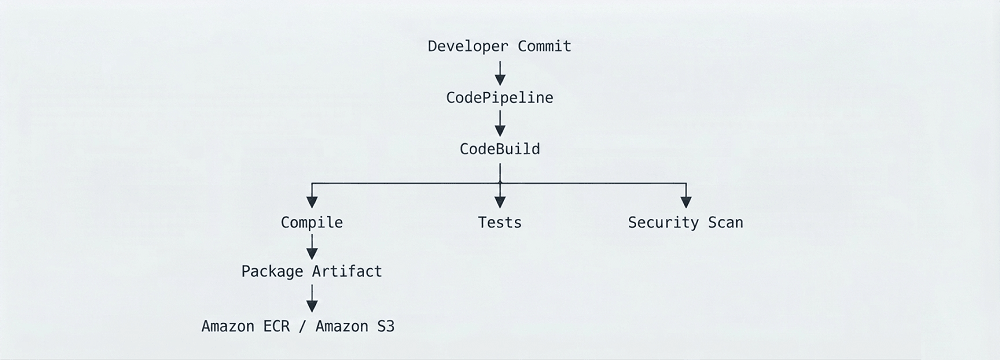
The resulting artifacts are passed to later deployment stages.
AWS CodeDeploy
AWS CodeDeploy automates application deployment across AWS compute services.
It supports deployments to:
- Amazon EC2
- Amazon ECS
- AWS Lambda
- On-premises servers
CodeDeploy minimizes deployment risk by supporting multiple deployment strategies and automatic rollback.
Deployment Strategies in CodeDeploy
In-Place Deployment
Application updates are installed directly onto existing instances.
Advantages:
- Simple
- Fast
Disadvantages:
- Brief service interruption
- Limited rollback flexibility
Blue/Green Deployment
Blue/Green deployments create a new environment before switching traffic.
- Current Environment (Blue)
- Deploy New Version (Green)
- Testing
- Traffic Switch
- Blue Removed
Benefits include:
- Minimal downtime
- Faster rollback
- Safer releases
- Better user experience
Blue/Green deployments are widely adopted for production workloads.
Canary Deployment
Canary deployments release software gradually.
Example:
- 5% Users
- 25%
- 50%
- 100%
This approach allows engineering teams to monitor application health before exposing all users to the new version.
Rolling Deployment
Rolling deployments update infrastructure incrementally.
Example:
- 5% Users
- 25%
- 50%
- 100%
Rolling deployments reduce service disruption while limiting deployment risk.
AWS CodeCommit
Although many organizations use GitHub or GitLab, AWS also provides its own managed Git repository service called AWS CodeCommit.
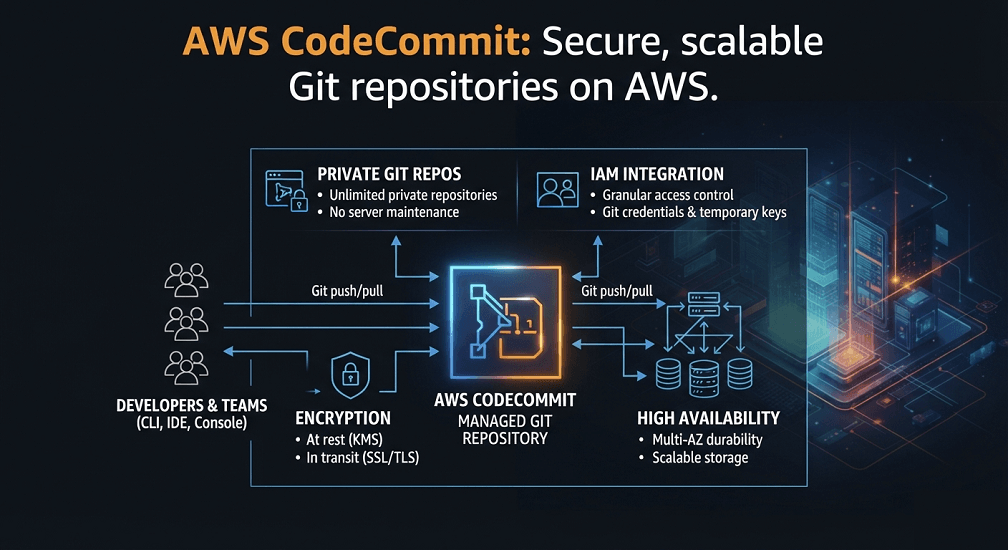
Features include:
- Private Git repositories
- IAM integration
- Encryption at rest
- Fine-grained access control
- EventBridge integration
- High availability
CodeCommit integrates directly with:
- CodePipeline
- CodeBuild
- AWS Lambda
- CloudFormation
- Amazon SNS
Organizations already standardized on AWS often choose CodeCommit for centralized repository management.
Complete AWS CI/CD Architecture
A modern AWS CI/CD architecture combines multiple services into a fully automated software delivery platform.
Developer
│
▼
GitHub / GitLab / CodeCommit
│
▼
AWS CodePipeline
│
▼
AWS CodeBuild
│
▼
Unit Tests
Integration Tests
Security Scans
│
▼
Amazon ECR / Amazon S3
│
▼
AWS CodeDeploy
│
▼
Amazon ECS
Amazon EKS
AWS Lambda
Amazon EC2
│
▼
CloudWatch Monitoring
This architecture supports repeatable deployments while providing visibility throughout the software delivery lifecycle.
GitHub Actions on AWS
Many organizations choose GitHub Actions instead of AWS-native build systems.
GitHub Actions integrates seamlessly with AWS through OpenID Connect (OIDC), allowing secure authentication without storing long-lived AWS credentials.
A common workflow includes:
- Developer Push
- GitHub Actions
- Build
- Testing
- Security Scan
- Terraform/CDK
- Deploy to AWS
- CloudWatch Monitoring
GitHub Actions is commonly used for:
- Infrastructure deployments
- Application deployments
- Container image builds
- Lambda deployments
- Terraform automation
- AWS CDK deployments
GitLab CI/CD on AWS
GitLab provides an integrated DevOps platform with built-in CI/CD capabilities.
Typical GitLab pipeline stages include:
- Build
- Test
- Security Scan
- Package
- Deploy
- Monitor
GitLab integrates with:
- Amazon ECS
- Amazon EKS
- AWS Lambda
- Terraform
- CloudFormation
- AWS CDK
Its integrated security and compliance features make it a popular choice for enterprise teams.
Jenkins on AWS
Despite the rise of cloud-native CI/CD services, Jenkins remains widely used in enterprise environments due to its flexibility and extensive plugin ecosystem.
Common Jenkins use cases include:
- Multi-account deployments
- Legacy application support
- Complex approval workflows
- Hybrid cloud deployments
- Custom automation
Jenkins pipelines can integrate with nearly every AWS service through official plugins and APIs.
CI/CD with Terraform
Terraform integrates naturally with CI/CD pipelines.
A typical Terraform deployment process includes:
- Git Commit
- terraform fmt
- terraform validate
- Security Scan
- terraform plan
- Manual Approval
- terraform apply
- AWS Infrastructure
Automating Terraform through CI/CD ensures infrastructure changes are reviewed, validated, and consistently deployed.
CI/CD with AWS CDK
AWS CDK pipelines automate infrastructure defined in programming languages.
A common AWS CDK workflow includes:
- Source Code
- CDK Synth
- CloudFormation Template
- Validation
- Deployment
- AWS Resources
CI/CD ensures every infrastructure update follows a standardized process.
CI/CD with AWS CloudFormation
CloudFormation templates can also be deployed automatically.
Typical workflow:
- CloudFormation Template
- Validation
- Stack Creation
- Change Set Review
- Deployment
- Monitoring
Automating CloudFormation reduces manual stack management while improving consistency.
CI/CD for Amazon ECS
Amazon ECS deployments commonly include:
- Build Docker image
- Push image to Amazon ECR
- Update ECS Task Definition
- Deploy new Service Revision
- Health checks
- Automatic rollback
Container deployments become fully automated with minimal downtime.
CI/CD for Amazon EKS
Kubernetes deployments often combine CI/CD with GitOps.
Typical workflow:
- Git Commit
- Container Build
- Amazon ECR
- Helm Update
- Argo CD / Flux
- Amazon EKS
This approach separates application delivery from cluster synchronization while supporting continuous reconciliation.
CI/CD for AWS Lambda
Serverless applications also benefit from CI/CD automation.
Typical Lambda pipeline:
- Developer Commit
- Package Function
- Run Tests
- Deploy Lambda
- API Gateway Update
- Monitoring
Lambda deployments are often integrated with API Gateway, EventBridge, DynamoDB, and Amazon SQS, making automated pipelines essential for reliable serverless releases.
DevSecOps and AWS CI/CD
Modern software delivery is no longer just about speed. Every deployment must also be secure, compliant, and auditable.
This has led to the rise of DevSecOps, which integrates security into every phase of the CI/CD lifecycle instead of treating it as a final review before production.
Rather than waiting until deployment to identify vulnerabilities, DevSecOps ensures that security checks occur automatically throughout the pipeline.
A typical DevSecOps workflow looks like this:
Developer Commit
│
▼
Source Control
│
▼
Static Code Analysis
│
▼
Dependency Scanning
│
▼
Infrastructure Validation
│
▼
Container Image Scanning
│
▼
Policy Validation
│
▼
Deployment
│
▼
Continuous Monitoring
This approach reduces security risks while allowing engineering teams to release software more frequently.
Security Best Practices for AWS CI/CD
Enterprise CI/CD pipelines should incorporate multiple layers of security.
Secure IAM Permissions
Every service participating in a deployment pipeline should use dedicated IAM roles with least-privilege permissions.
Examples include:
- CodePipeline Service Role
- CodeBuild Service Role
- CodeDeploy Service Role
- GitHub OIDC Role
- Terraform Deployment Role
- AWS CDK Deployment Role
Avoid using overly permissive IAM policies such as AdministratorAccess for deployment pipelines.
Protect Secrets
Never hardcode credentials inside:
- Source code
- Terraform files
- CloudFormation templates
- Dockerfiles
- Build specifications
- Pipeline definitions
Instead, use:
- AWS Secrets Manager
- AWS Systems Manager Parameter Store
- AWS Key Management Service (KMS)
This keeps credentials secure while allowing applications and pipelines to retrieve them at runtime.
Automate Security Scanning
Every deployment should automatically validate application and infrastructure security.
Typical security stages include:
- Static Application Security Testing (SAST)
- Software Composition Analysis (SCA)
- Infrastructure as Code scanning
- Container image vulnerability scanning
- Secret detection
- Dependency analysis
Automated scanning helps identify vulnerabilities before they reach production.
Enable Artifact Integrity
Only trusted build artifacts should be deployed.
Best practices include:
- Immutable artifacts
- Artifact signing
- Versioned releases
- Secure artifact repositories
- Access controls
Using immutable artifacts ensures that the same tested package is promoted through development, staging, and production.
Deployment Strategies
Modern CI/CD pipelines support multiple deployment models depending on business requirements.
Rolling Deployment
Rolling deployments update instances gradually while the application remains available.
Instance 1 Updated
│
▼
Instance 2 Updated
│
▼
Instance 3 Updated
│
▼
Instance 4 Updated
Advantages:
- Lower infrastructure cost
- Minimal downtime
- Simple implementation
Potential limitation:
- Older and newer application versions may run simultaneously during deployment.
Blue/Green Deployment
Blue/Green deployments create a completely new production environment before switching customer traffic.
- Blue Environment (Current)
- Green Environment (New Version)
- Validation
- Traffic Switch
- Old Environment Removed
Benefits include:
- Near-zero downtime
- Easy rollback
- Reduced deployment risk
- Better production testing
This strategy is widely used for customer-facing applications.
Canary Deployment
Canary deployments expose a new application version to a small percentage of users before expanding the rollout.
Benefits include:
- Early issue detection
- Reduced customer impact
- Safe production validation
- Performance monitoring before full rollout
Immutable Deployment
Rather than modifying existing servers, immutable deployments replace them entirely.
- Old Servers
- Provision New Servers
- Deploy Application
- Testing
- Switch Traffic
- Terminate Old Servers
Immutable deployments eliminate configuration drift and improve deployment consistency.
Monitoring CI/CD Pipelines
Deployment automation is only effective when organizations can monitor pipeline health.
AWS provides several services for observing CI/CD operations.
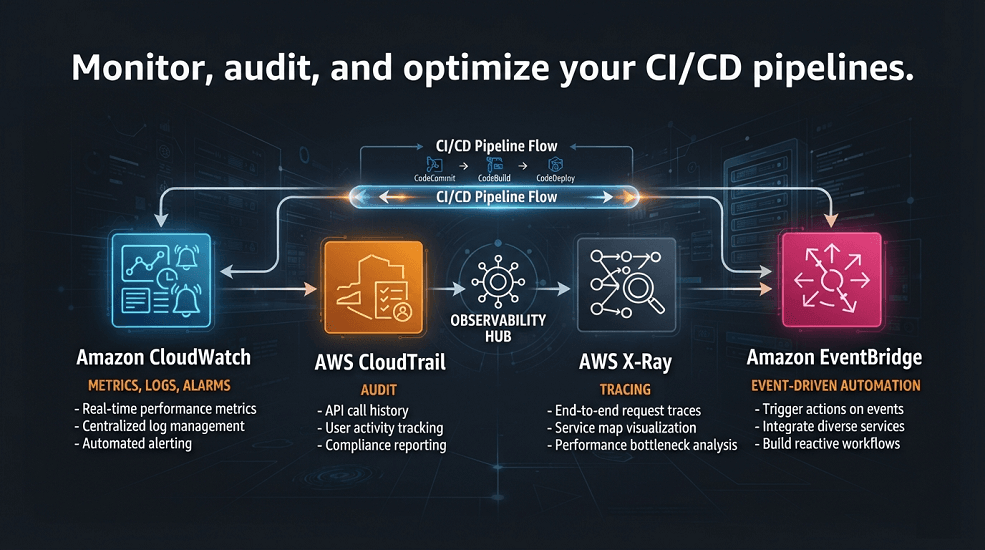
Amazon CloudWatch
CloudWatch monitors:
- Pipeline execution
- Build duration
- Deployment success
- Application metrics
- Infrastructure health
- Custom business metrics
CloudWatch Alarms can notify teams when deployment failures occur.
AWS CloudTrail
CloudTrail records every AWS API action performed during deployments.
Organizations can determine:
- Who initiated deployments
- Which IAM role was used
- When changes occurred
- Which resources were modified
CloudTrail provides a complete audit history for compliance and troubleshooting.
AWS X-Ray
AWS X-Ray helps developers analyze application behavior after deployment.
It provides visibility into:
- API performance
- Distributed tracing
- Service latency
- Dependency mapping
- Performance bottlenecks
Monitoring deployment success extends beyond infrastructure, it also includes application health.
Amazon EventBridge
EventBridge enables event-driven automation throughout the CI/CD lifecycle.
Examples include:
- Triggering deployments
- Sending Slack notifications
- Opening incident tickets
- Starting approval workflows
- Executing Lambda functions
This helps organizations build highly automated operational processes.
Enterprise Governance
Large organizations often manage hundreds of applications and multiple AWS accounts.
Effective governance requires standardized deployment practices.
Typical governance policies include:
- Branch protection
- Pull request approvals
- Automated validation
- Security scanning
- Deployment approvals
- Resource tagging
- Environment isolation
- Audit logging
- Rollback procedures
These standards ensure consistent deployments across engineering teams.
Multi-Account AWS CI/CD
Many enterprises organize workloads using AWS Organizations.
A common account structure includes:
AWS Organization
│
├── Shared Services
├── Networking
├── Security
├── Development
├── QA
├── Staging
├── Production
└── Disaster Recovery
CI/CD pipelines can promote releases through these environments while enforcing environment-specific controls and approvals.
This approach supports:
- Strong isolation
- Centralized governance
- Consistent deployments
- Compliance requirements
Common CI/CD Mistakes
Even experienced teams can encounter challenges when implementing CI/CD.
Skipping Automated Testing
Deploying without sufficient automated testing increases the risk of production failures.
Every pipeline should include:
- Unit tests
- Integration tests
- API tests
- Security validation
Deploying Without Rollback Plans
Every deployment should have a defined rollback strategy.
Whether using Blue/Green, Canary, or Rolling deployments, teams must be able to restore the previous stable version quickly.
Hardcoding Secrets
Credentials should never exist in repositories or pipeline definitions.
Always integrate with secure secret management services.
Ignoring Infrastructure as Code
Infrastructure should evolve alongside application code.
Integrating Terraform, AWS CDK, or CloudFormation into CI/CD pipelines ensures environments remain consistent and repeatable.
Weak Pipeline Permissions
CI/CD pipelines should not operate with unrestricted administrative permissions.
Implement least-privilege IAM roles and regularly review access policies.
Real-World Enterprise Example
A global software company delivered SaaS products across North America, Europe, and Asia using Amazon ECS, Amazon EKS, AWS Lambda, Amazon RDS, and Amazon CloudFront.
Initially, deployments were handled manually by individual teams. Release cycles were slow, deployment failures were common, and production rollbacks required significant manual effort.
The company modernized its software delivery process using an enterprise AWS CI/CD platform.
| Category | Components |
|---|---|
| Source Control | GitHub Enterprise |
| Pipeline Orchestration | AWS CodePipeline |
| Build Service | AWS CodeBuild |
| Infrastructure | Terraform, AWS CDK |
| Deployment Targets | Amazon ECS, Amazon EKS, AWS Lambda |
| Security | AWS Secrets Manager, IAM, Amazon ECR Image Scanning |
| Monitoring | Amazon CloudWatch, AWS CloudTrail, AWS X-Ray |
After implementation, the organization achieved:
- Over 85% reduction in manual deployment tasks
- Multiple production releases per day
- Faster rollback capabilities
- Improved deployment consistency
- Stronger security posture
- Reduced infrastructure drift
- Higher developer productivity
The CI/CD platform became a cornerstone of the organization's cloud modernization strategy.
Conclusion
AWS CI/CD pipelines enable organizations to automate every stage of software delivery, from source code changes and infrastructure provisioning to testing, deployment, monitoring, and rollback. By combining AWS CodePipeline, CodeBuild, CodeDeploy, Infrastructure as Code, GitOps, and DevSecOps practices, organizations can deliver applications more frequently while maintaining strong governance and security.
As cloud environments continue to grow in complexity, automated deployment pipelines are no longer optional, they are a foundational capability for achieving operational excellence, faster innovation, and reliable software delivery on AWS.
Frequently Asked Questions
What is an AWS CI/CD pipeline?
An AWS CI/CD pipeline automates the process of building, testing, validating, and deploying applications or infrastructure using services such as AWS CodePipeline, CodeBuild, and CodeDeploy.
Which AWS service manages CI/CD workflows?
AWS CodePipeline orchestrates CI/CD workflows by coordinating source control, builds, testing, approvals, and deployments.
Can AWS CI/CD deploy Terraform?
Yes. CI/CD pipelines commonly automate Terraform commands such as formatting, validation, planning, approval, and deployment, making Infrastructure as Code more reliable and repeatable.
Does AWS support GitHub Actions?
Yes. GitHub Actions integrates with AWS using OpenID Connect (OIDC), allowing secure deployments without storing long-lived AWS access keys.
What deployment strategy is best for production?
The best strategy depends on application requirements.
- Blue/Green deployments are ideal for minimizing downtime and enabling rapid rollback.
- Canary deployments are well suited for gradually introducing changes while monitoring application health.
- Rolling deployments provide a balance between availability and infrastructure cost.
How EaseCloud Helps Organizations Build AWS CI/CD Pipelines
At EaseCloud, we design and implement enterprise-grade CI/CD solutions that accelerate software delivery while improving security, reliability, and operational efficiency. Whether you're modernizing legacy deployment processes or building cloud-native delivery pipelines from the ground up, EaseCloud helps you implement secure, scalable, and automated CI/CD workflows aligned with AWS best practices.
Book Your Free CI/CD AssessmentSummarize this post with:
