Terraform on AWS: The Complete Enterprise Infrastructure Automation Guide
Learn Terraform on AWS with modules, state management, workspaces, CI/CD, security, and enterprise best practices for Infrastructure as Code.
As organizations expand their cloud environments, managing infrastructure manually becomes increasingly complex. Modern AWS environments often include hundreds or even thousands of resources spanning Amazon EC2, Amazon VPC, Amazon S3, Amazon RDS, Amazon ECS, Amazon EKS, AWS Lambda, IAM, Route 53, Amazon CloudWatch, AWS Organizations, and many other services. Provisioning these resources manually through the AWS Management Console is time-consuming, error-prone, and difficult to scale consistently across multiple environments.
Infrastructure as Code (IaC) has transformed cloud operations by enabling infrastructure to be defined, version-controlled, tested, and deployed using code. Rather than relying on manual configuration, engineering teams can automate infrastructure provisioning, eliminate configuration drift, improve collaboration, and accelerate application delivery.
Among the many Infrastructure as Code tools available today, Terraform has become one of the industry's most widely adopted platforms. Developed by HashiCorp, Terraform enables organizations to provision and manage infrastructure using a simple declarative language called HashiCorp Configuration Language (HCL). Unlike cloud-specific solutions, Terraform supports hundreds of providers, allowing organizations to manage AWS, Microsoft Azure, Google Cloud Platform (GCP), Kubernetes, VMware, GitHub, Datadog, Cloudflare, Snowflake, and many other platforms from a single workflow.
For organizations operating primarily on Amazon Web Services, Terraform provides a powerful and flexible approach to automating cloud infrastructure. Using the AWS Provider, engineers can provision networking, compute, storage, databases, serverless applications, containers, IAM policies, monitoring services, and security resources through reusable, version-controlled code.
Terraform has become a cornerstone of modern DevOps, Platform Engineering, GitOps, and Cloud Engineering practices because it promotes consistency, repeatability, and collaboration while integrating seamlessly with CI/CD pipelines, version control systems, policy enforcement tools, and enterprise governance frameworks.
Whether you're deploying a simple virtual machine, building a multi-account AWS landing zone, automating Kubernetes clusters with Amazon EKS, implementing disaster recovery environments, or managing global enterprise infrastructure, Terraform enables teams to scale infrastructure safely and efficiently.
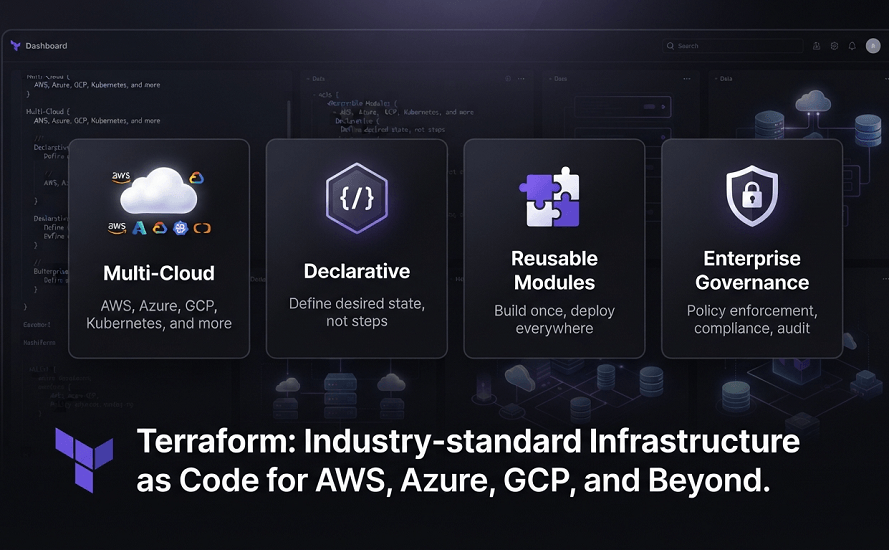
What This Guide Covers
- What Terraform is and why it has become the industry standard for Infrastructure as Code
- How Terraform works with AWS
- Core Terraform concepts including Providers, Resources, Variables, Modules, Outputs, and State
- Understanding Terraform State and Remote Backends
- Terraform Workspaces and multi-environment deployments
- Building reusable Terraform Modules
- AWS Provider configuration and authentication
- Terraform CLI commands and workflows
- Terraform project structure
- Terraform vs AWS CloudFormation
- Terraform vs AWS CDK
- CI/CD integration and GitOps workflows
- Security and governance best practices
- Enterprise deployment strategies
- Common mistakes to avoid
- How EaseCloud helps organizations implement Terraform successfully
By the end of this guide, you'll understand how Terraform enables organizations to build secure, scalable, and automated AWS infrastructure while supporting modern DevOps and cloud-native engineering practices.
What Is Terraform?
Terraform is an open-source Infrastructure as Code (IaC) platform developed by HashiCorp that enables organizations to define, provision, manage, and version cloud infrastructure using declarative configuration files.
Instead of manually creating resources through the AWS Management Console or AWS CLI, engineers describe the desired infrastructure in code. Terraform then analyzes those configurations, determines the required changes, and automatically provisions or updates cloud resources.
Terraform uses HashiCorp Configuration Language (HCL) a human-readable language specifically designed for infrastructure automation. HCL balances simplicity with flexibility, making infrastructure definitions easier to read and maintain than imperative scripting.
One of Terraform's greatest strengths is its provider-based architecture. Providers act as plugins that allow Terraform to communicate with external platforms and APIs.
Some of the most commonly used providers include:
- Amazon Web Services (AWS)
- Microsoft Azure
- Google Cloud Platform (GCP)
- Kubernetes
- VMware
- GitHub
- Cloudflare
- Datadog
- Oracle Cloud Infrastructure
- Snowflake
This multi-provider capability makes Terraform especially valuable for organizations managing hybrid or multi-cloud environments.
For AWS users, the AWS Provider enables Terraform to provision and manage nearly every AWS service, including:
- Amazon EC2
- Amazon VPC
- Amazon S3
- AWS Lambda
- Amazon ECS
- Amazon EKS
- Amazon RDS
- Amazon DynamoDB
- IAM
- AWS KMS
- Route 53
- CloudFront
- CloudWatch
- API Gateway
- Elastic Load Balancing
- Auto Scaling
- Amazon SNS
- Amazon SQS
- EventBridge
- AWS Backup
Rather than replacing AWS-native services, Terraform interacts directly with AWS APIs to provision and maintain infrastructure according to the desired configuration.
Why Terraform Has Become the Industry Standard
Over the last decade, Terraform has become one of the most widely adopted Infrastructure as Code platforms because it solves many of the operational challenges associated with manual cloud management.
Organizations adopt Terraform for several key reasons.
Cloud-Agnostic Architecture
Unlike cloud-specific Infrastructure as Code tools, Terraform supports multiple cloud providers through a consistent workflow.
A single engineering team can manage infrastructure across:
- AWS
- Azure
- Google Cloud
- Kubernetes
- On-premises environments
- SaaS platforms
This flexibility reduces vendor lock-in and simplifies operations for organizations with diverse technology stacks.
Declarative Infrastructure
Terraform focuses on the desired end state rather than individual procedural steps.
Instead of scripting each infrastructure operation, engineers describe what the environment should look like.
Terraform automatically determines:
- Which resources need to be created
- Which resources require updates
- Which resources should be removed
- The correct dependency order
This approach reduces operational complexity and improves deployment reliability.
Infrastructure Version Control
Terraform configurations can be stored in Git repositories alongside application code.
Benefits include:
- Code reviews
- Pull requests
- Version history
- Rollback capability
- Collaboration
- Audit trails
This enables infrastructure to follow the same software development lifecycle as applications.
Automation and CI/CD Integration
Terraform integrates seamlessly with modern DevOps tools such as:
- GitHub Actions
- GitLab CI/CD
- Jenkins
- Azure DevOps
- AWS CodePipeline
- Terraform Cloud
Infrastructure changes can be automatically validated, tested, approved, and deployed through standardized pipelines.
Reusable Modules
Terraform encourages reusable infrastructure through Modules.
Rather than rewriting infrastructure definitions for every project, organizations create standardized modules for common resources such as:
- VPC architectures
- ECS clusters
- EKS platforms
- IAM roles
- S3 buckets
- Monitoring solutions
- Security baselines
This improves consistency while reducing maintenance effort.
Enterprise Governance
Terraform supports enterprise governance through integrations with:
- Terraform Cloud
- HashiCorp Sentinel
- Open Policy Agent (OPA)
- AWS Organizations
- AWS IAM
- AWS Control Tower
These capabilities allow organizations to enforce infrastructure standards, security policies, and compliance requirements across multiple teams and environments.
How Terraform Works
Terraform follows a predictable workflow that compares the desired infrastructure with the current environment before applying changes.
The deployment lifecycle typically consists of five stages:
Step 1: Write Infrastructure Configuration
Engineers define cloud resources using HCL configuration files.
These files specify infrastructure such as:
- Virtual Private Clouds (VPCs)
- EC2 Instances
- Load Balancers
- Databases
- Storage Buckets
- IAM Roles
- Kubernetes Clusters
Step 2: Initialize the Working Directory
Terraform downloads the required provider plugins and initializes the project.
This is performed using the terraform init command.
Initialization prepares the environment for future operations.
Step 3: Create an Execution Plan
Terraform compares the desired configuration with the existing infrastructure.
Using terraform plan, it determines:
- Resources to create
- Resources to modify
- Resources to destroy
This execution plan allows teams to review changes before deployment, reducing the risk of unintended modifications.
Step 4: Apply the Configuration
After reviewing the execution plan, engineers run terraform apply.
Terraform provisions or updates AWS resources while automatically resolving dependencies between them.
Step 5: Update the State File
Once deployment is complete, Terraform records the current infrastructure state.
The state file becomes Terraform's source of truth for future operations.
Terraform Architecture
Terraform consists of several core components that work together to provision and manage infrastructure.
The high-level workflow is shown below:
Developer Writes HCL Configuration
│
▼
Terraform CLI
(terraform init)
│
▼
Downloads AWS Provider
│
▼
terraform plan
│
▼
Compares Configuration
With Current State
│
▼
terraform apply
│
▼
AWS Provider Calls AWS APIs
│
▼
AWS Creates Infrastructure
│
▼
Terraform Updates State File
This architecture ensures deployments are predictable, repeatable, and idempotent, making Terraform suitable for both small projects and large-scale enterprise environments.
Core Components of Terraform
Every Terraform project is built around several foundational concepts. Understanding these components is essential before working with advanced topics such as modules, remote state, and multi-account deployments.
The primary building blocks include:
- Providers
- Resources
- Variables
- Outputs
- Data Sources
- Modules
- State
- Backends
- Workspaces
Together, these components form the foundation of every Terraform deployment.
Terraform Providers
A Provider is a plugin that enables Terraform to communicate with an external platform or cloud service.
For AWS deployments, the AWS Provider authenticates with AWS APIs and manages supported resources.
Examples of services managed through the AWS Provider include:
- Amazon EC2
- Amazon S3
- Amazon VPC
- IAM
- Amazon RDS
- AWS Lambda
- Amazon ECS
- Amazon EKS
- Route 53
- CloudWatch
- AWS Backup
Because providers abstract the underlying APIs, engineers interact with a consistent Terraform workflow regardless of the cloud service being managed.
Understanding Terraform Resources
A Resource is the fundamental building block in Terraform. Every AWS component that Terraform creates or manages is represented as a resource.
Resources define the desired state of infrastructure, including its configuration, relationships, and lifecycle.
Examples of AWS resources include:
- Amazon EC2 Instances
- Amazon S3 Buckets
- Amazon VPCs
- IAM Roles
- Security Groups
- Route Tables
- Amazon ECS Clusters
- Amazon EKS Clusters
- AWS Lambda Functions
- Amazon RDS Databases
- CloudWatch Log Groups
- Application Load Balancers
- Auto Scaling Groups
- Route 53 Hosted Zones
Terraform automatically determines the dependencies between these resources and provisions them in the correct order.
For example:
Amazon VPC
│
▼
Subnets
│
▼
Security Groups
│
▼
Application Load Balancer
│
▼
EC2 Auto Scaling Group
This dependency graph eliminates the need for engineers to manually orchestrate infrastructure deployment.
Variables
Hardcoding configuration values into Terraform projects creates duplication and makes deployments difficult to maintain.
Terraform solves this through Variables.
Variables allow infrastructure to be reused across different environments without modifying the core configuration.
Typical variables include:
- AWS Region
- Environment Name
- Instance Type
- VPC CIDR Block
- Database Size
- Domain Name
- Availability Zones
- Auto Scaling Capacity
- Application Name
Instead of creating separate Terraform projects for Development, Staging, and Production, engineers simply provide different variable values.
Benefits include:
- Better reusability
- Cleaner code
- Easier maintenance
- Reduced duplication
- Environment-specific customization
Outputs
Once infrastructure is deployed, applications and engineers often need access to important resource information.
Terraform Outputs expose useful deployment values.
Examples include:
- EC2 Public IP Address
- Load Balancer DNS Name
- VPC ID
- Security Group ID
- IAM Role ARN
- Route 53 Hosted Zone ID
- RDS Endpoint
- S3 Bucket Name
Outputs also allow one Terraform module to share information with another, improving modular architecture.
Data Sources
Not every AWS resource needs to be created by Terraform.
Many organizations already have existing infrastructure that new deployments must reference.
Examples include:
- Existing VPCs
- Shared IAM Roles
- Existing Route 53 Zones
- Existing KMS Keys
- Shared Security Groups
- Existing S3 Buckets
- Existing Subnets
Terraform Data Sources retrieve information about these existing resources without managing them directly.
This capability is particularly valuable in enterprise environments where multiple teams share foundational infrastructure.
Terraform Modules
As Terraform deployments grow, repeating infrastructure code becomes difficult to maintain.
Terraform addresses this challenge with Modules.
A Module is a reusable collection of Terraform resources that performs a specific function.
Instead of rewriting infrastructure repeatedly, organizations package common deployment patterns into reusable modules.
Examples include:
- VPC Module
- ECS Module
- EKS Module
- RDS Module
- Security Module
- Monitoring Module
- Networking Module
- Logging Module
- IAM Module
- Backup Module
A typical enterprise architecture might look like:
Infrastructure
│
├── Networking Module
├── Security Module
├── Database Module
├── Monitoring Module
├── Compute Module
├── Container Platform Module
└── Shared Services Module
This modular design allows teams to standardize infrastructure while reducing maintenance costs.
Benefits of Terraform Modules
Organizations adopting Terraform Modules typically experience several operational improvements.
Standardization
Every engineering team deploys infrastructure using the same approved templates.
Reusability
Modules can be reused across dozens or even hundreds of projects.
Faster Development
Developers spend less time writing repetitive infrastructure code.
Easier Maintenance
Updating a module automatically improves every deployment that consumes it.
Better Governance
Platform Engineering teams can embed security, monitoring, encryption, and compliance requirements directly into reusable modules.
Understanding Terraform State
One of Terraform's defining features is its State File.
Unlike many Infrastructure as Code tools, Terraform maintains a record of every managed resource.
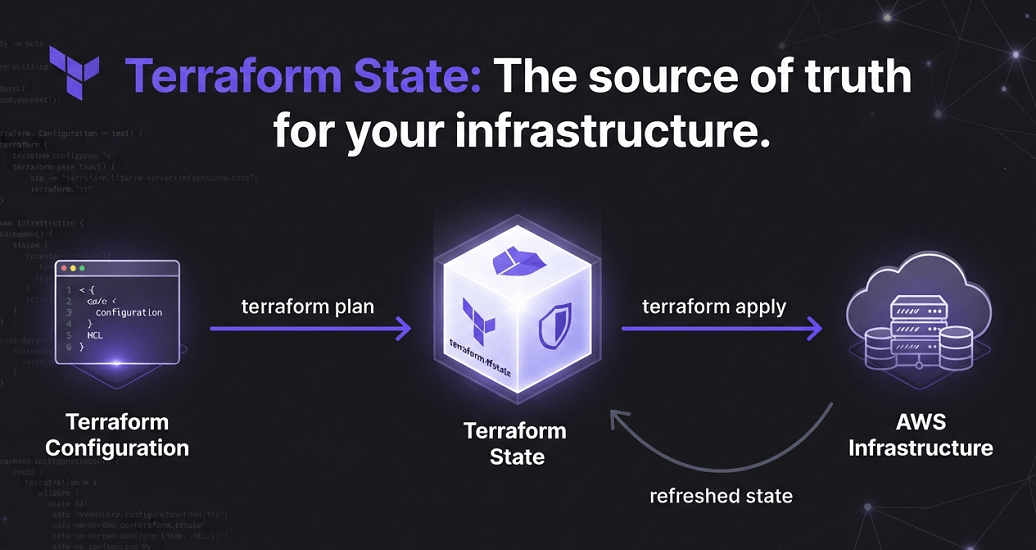
This record is stored inside the Terraform State.
The state file tracks:
- Resource IDs
- Dependencies
- Metadata
- Current Configuration
- Output Values
Terraform compares the desired configuration with the current state to determine what changes are required.
The workflow looks like this:
Terraform Configuration
│
▼
Terraform State
(Current Infrastructure)
│
▼
terraform plan
│
▼
Execution Plan
│
▼
terraform apply
Without an accurate state file, Terraform cannot safely update existing infrastructure.
Local State vs Remote State
Terraform supports multiple methods for storing its state.
Local State
By default, Terraform stores the state file on the local machine.
Advantages:
- Simple setup
- Suitable for learning
- Ideal for small projects
Limitations:
- Difficult team collaboration
- No centralized management
- Increased risk of conflicts
- Not recommended for production
Remote State
Enterprise organizations almost always store state remotely.
Popular backends include:
- Amazon S3
- Terraform Cloud
- Azure Storage
- Google Cloud Storage
- HashiCorp Consul
Remote State enables:
- Team collaboration
- Secure storage
- Centralized management
- Automated backups
- CI/CD integration
For AWS environments, Amazon S3 is the most widely used backend.
Amazon S3 Backend
The Amazon S3 Backend stores Terraform State centrally.
Benefits include:
- High durability
- Versioning
- Encryption
- Access control through IAM
- Cross-account accessibility
- Disaster recovery
Many organizations enable S3 Versioning to recover previous state files if accidental changes occur.
DynamoDB State Locking
When multiple engineers modify infrastructure simultaneously, state corruption can occur.
Terraform addresses this through State Locking.
In AWS, state locking is commonly implemented using Amazon DynamoDB.
The process works like this:
Engineer A
│
▼
Requests State Lock
│
▼
DynamoDB Lock Table
│
▼
Infrastructure Update
│
▼
Lock Released
If another engineer attempts to deploy during this period, Terraform prevents concurrent modifications until the lock is released.
State locking is considered an enterprise best practice for collaborative infrastructure management.
Terraform Workspaces
Organizations rarely manage only one environment.
Typical AWS environments include:
- Development
- QA
- Testing
- Staging
- Production
Terraform Workspaces allow multiple environments to share the same configuration while maintaining separate state files.
For example:
Terraform Project
│
├── Development Workspace
├── Testing Workspace
├── Staging Workspace
└── Production Workspace
This approach minimizes code duplication while supporting environment-specific deployments.
Terraform Project Structure
A clean project structure improves maintainability and team collaboration.
A common enterprise layout is:
terraform-project/
│
├── modules/
│ ├── networking/
│ ├── compute/
│ ├── security/
│ ├── database/
│ └── monitoring/
│
├── environments/
│ ├── dev/
│ ├── qa/
│ ├── staging/
│ └── production/
│
├── main.tf
├── variables.tf
├── outputs.tf
├── providers.tf
├── versions.tf
└── README.md
Separating reusable modules from environment-specific configurations keeps projects organized as infrastructure scales.
Essential Terraform CLI Commands
The Terraform CLI provides the commands needed to initialize, validate, plan, deploy, and manage infrastructure.
terraform init
Initializes the working directory.
It downloads:
- Providers
- Required modules
- Backend configuration
Every Terraform project begins with terraform init.
terraform validate
Checks the configuration for syntax errors and invalid references before deployment.
Running validation as part of CI pipelines helps catch mistakes early.
terraform fmt
Automatically formats Terraform configuration files according to HashiCorp's recommended style.
Consistent formatting improves readability and collaboration.
terraform plan
Generates an execution plan by comparing the desired configuration with the current state.
The plan clearly shows:
- Resources to add
- Resources to change
- Resources to destroy
Reviewing plans before deployment reduces operational risk.
terraform apply
Applies the approved execution plan and provisions or updates AWS infrastructure.
Terraform automatically resolves resource dependencies and executes changes in the correct order.
terraform destroy
Safely removes managed infrastructure.
This command is commonly used for:
- Development environments
- Temporary testing environments
- Proof-of-concept deployments
Production deletions should always follow formal change management procedures.
terraform import
Imports existing AWS resources into Terraform State without recreating them.
This is especially useful when migrating manually created infrastructure into Infrastructure as Code.
terraform output
Displays values defined in Terraform Outputs.
Examples include:
- Load Balancer URLs
- Database Endpoints
- Public IP Addresses
- VPC IDs
terraform graph
Generates a dependency graph showing relationships between Terraform-managed resources.
This visualization helps engineers understand complex infrastructure architectures.
Terraform Cloud
As infrastructure grows, managing Terraform from individual developer laptops becomes increasingly difficult. Teams need centralized state management, collaboration features, policy enforcement, and automated deployments.
Terraform Cloud is HashiCorp's managed platform for running Terraform in a collaborative and secure environment.
It provides:
- Remote State Management
- State Versioning
- Secure Variable Storage
- Team Collaboration
- Remote Execution
- Policy Enforcement
- Cost Estimation
- Private Module Registry
- Audit Logs
- VCS Integration
Instead of every engineer running Terraform locally, deployments are executed through centralized workspaces.
A typical workflow looks like this:
Developer Pushes Code
│
▼
GitHub Repository
│
▼
Terraform Cloud Workspace
│
▼
terraform plan
│
▼
Policy Checks
│
▼
Approval
│
▼
terraform apply
│
▼
AWS Infrastructure Updated
This approach improves governance while reducing operational risk.
CI/CD Integration
Infrastructure should be deployed with the same discipline as application code.
Modern organizations integrate Terraform into Continuous Integration and Continuous Deployment (CI/CD) pipelines.
A typical Terraform deployment pipeline includes:
- Source Control
- Code Review
- Validation
- Formatting
- Security Scanning
- Execution Plan
- Approval
- Deployment
- Post-Deployment Verification
Automation minimizes human error while ensuring every infrastructure change is reviewed before production.
GitHub Actions
GitHub Actions has become one of the most popular CI/CD platforms for Terraform deployments.
A common workflow includes:
- Validate Terraform configuration
- Execute terraform fmt
- Run terraform validate
- Generate terraform plan
- Perform security scanning
- Request manual approval for production
- Execute terraform apply
This integrates seamlessly with pull requests, allowing teams to review infrastructure changes before merging code.
GitLab CI/CD
Organizations using GitLab can automate the entire Terraform lifecycle through GitLab pipelines.
Typical stages include:
- Linting
- Validation
- Plan
- Security Checks
- Apply
- Notifications
GitLab's built-in security and compliance capabilities make it particularly attractive for enterprise teams.
Jenkins
Many enterprises continue to use Jenkins for customized deployment pipelines.
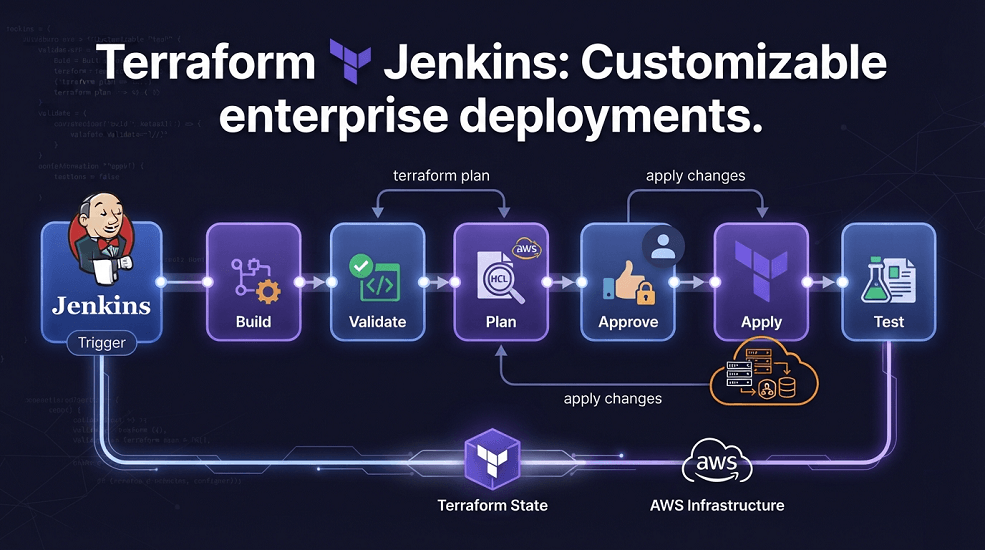
Terraform integrates well with Jenkins for:
- Multi-account AWS deployments
- Environment-specific pipelines
- Parallel infrastructure deployments
- Enterprise approval workflows
- Integration with internal DevOps tools
AWS CodePipeline
AWS CodePipeline provides a fully managed CI/CD service that integrates naturally with Terraform.
Combined with AWS CodeBuild, organizations can automate:
- Source retrieval
- Terraform initialization
- Validation
- Planning
- Deployment
- Monitoring
This is an excellent option for AWS-centric organizations already using native AWS DevOps services.
GitOps with Terraform
GitOps extends Infrastructure as Code by making Git repositories the single source of truth for infrastructure.
Every infrastructure change follows a standardized workflow:
Developer Updates Terraform Code
│
▼
Git Commit
│
▼
Pull Request
│
▼
Peer Review
│
▼
Automated Validation
│
▼
terraform plan
│
▼
Approval
│
▼
terraform apply
│
▼
AWS Infrastructure Updated
Benefits of GitOps include:
- Complete audit history
- Rollback capability
- Improved collaboration
- Automated deployments
- Consistent environments
- Reduced configuration drift
GitOps has become a standard practice for Platform Engineering and modern DevOps teams.
Security Best Practices
Infrastructure automation should improve security rather than introduce additional risk.
Organizations implementing Terraform should follow these best practices.
Use IAM Least Privilege
Terraform execution roles should have only the permissions required to provision approved resources.
Avoid granting broad Administrator permissions to deployment pipelines.
Instead:
- Create dedicated deployment roles
- Separate production and development access
- Use temporary credentials through IAM Roles
Protect Secrets
Never store sensitive information directly inside Terraform configuration files.
Avoid hardcoding:
- AWS Access Keys
- Database Passwords
- API Tokens
- Certificates
- Private Keys
Instead use:
- AWS Secrets Manager
- AWS Systems Manager Parameter Store
- AWS Key Management Service (KMS)
This significantly improves security while simplifying credential management.
Encrypt Terraform State
Terraform State may contain sensitive infrastructure information.
Organizations should:
- Enable Amazon S3 Server-Side Encryption
- Restrict IAM access
- Enable Versioning
- Use DynamoDB State Locking
- Enable CloudTrail logging
Protecting the state file is just as important as protecting application source code.
Enable Continuous Monitoring
Infrastructure should automatically integrate with:
- Amazon CloudWatch
- AWS CloudTrail
- AWS Config
- AWS Security Hub
- Amazon GuardDuty
Continuous monitoring improves operational visibility and supports compliance requirements.
Enterprise Terraform Best Practices
Organizations that successfully scale Terraform generally adopt several engineering principles.
Build Modular Infrastructure
Rather than creating one large Terraform project, divide infrastructure into reusable modules.
Examples include:
- Networking
- Security
- Compute
- Databases
- Monitoring
- Shared Services
This improves maintainability and enables teams to work independently.
Standardize Module Development
Platform Engineering teams should maintain internal Terraform modules for common deployment patterns such as:
- Secure Amazon S3 Buckets
- Enterprise VPCs
- ECS Clusters
- EKS Platforms
- IAM Roles
- Logging Frameworks
- Monitoring Dashboards
Standardized modules reduce duplication and improve consistency across projects.
Store Everything in Git
Infrastructure should always be version-controlled.
Git provides:
- Collaboration
- Code Reviews
- Rollbacks
- Branch Protection
- Audit Trails
Treat infrastructure code with the same discipline as application development.
Separate AWS Accounts
Use independent AWS accounts for:
- Development
- QA
- Staging
- Production
Account isolation improves security and reduces operational risk.
Automate Infrastructure Testing
Before applying infrastructure changes, automate:
- Configuration validation
- Security scanning
- Compliance checks
- Cost estimation
- Policy enforcement
This helps identify issues early in the deployment process.
Common Terraform Mistakes
Even experienced engineering teams can encounter problems if Terraform is not implemented correctly.
Committing State Files to Git
Terraform State files should never be committed to version control.
Instead, use secure remote backends such as Amazon S3 or Terraform Cloud.
Hardcoding Configuration Values
Avoid embedding environment-specific settings into Terraform code.
Use Variables and Workspaces to create reusable infrastructure.
Ignoring Module Reuse
Copying infrastructure between projects increases maintenance effort and introduces inconsistencies.
Reusable Modules should become the standard deployment model.
Skipping terraform plan
Always review the execution plan before deployment.
Unexpected resource replacements or deletions can lead to downtime if changes are applied without verification.
Running Production Deployments Manually
Production infrastructure should always be deployed through controlled CI/CD pipelines rather than from developer workstations.
Real-World Enterprise Example
A global fintech company operated AWS workloads across more than 200 AWS accounts supporting online banking platforms, payment processing systems, analytics platforms, and customer-facing APIs.
Initially, infrastructure was managed using a combination of manual processes and custom scripts. As the organization expanded, inconsistencies between environments increased, deployments became slower, and compliance audits required significant manual effort.
The company standardized on Terraform to modernize its cloud operations.
The implementation included:
| Category | Components |
|---|---|
| Infrastructure | - Modular Terraform architecture - Shared Module Registry - Amazon S3 Remote Backend - DynamoDB State Locking |
| Automation | - GitHub Actions - Terraform Cloud - Automated Policy Validation |
| Governance | - AWS Organizations - IAM Permission Boundaries - AWS Control Tower - CloudTrail |
| Security | - AWS KMS - Secrets Manager - AWS Config - Security Hub |
Within the first year, the organization achieved:
- 80% reduction in manual infrastructure provisioning
- Faster environment creation
- Standardized infrastructure across business units
- Improved compliance reporting
- Reduced deployment failures
- Better collaboration between development, security, and operations teams
Terraform became the foundation of the organization's Infrastructure as Code strategy.
Conclusion
Terraform has become one of the most powerful Infrastructure as Code platforms available for managing AWS environments. Its provider-based architecture, reusable modules, state management capabilities, and seamless integration with CI/CD pipelines enable organizations to automate cloud infrastructure with confidence.
When combined with strong governance, secure state management, reusable modules, and GitOps practices, Terraform provides a scalable foundation for enterprise cloud operations. For organizations adopting DevOps, Platform Engineering, and cloud-native development, Terraform remains a key technology for delivering consistent, reliable, and repeatable infrastructure.
Frequently Asked Questions
What is Terraform used for?
Terraform is an Infrastructure as Code platform used to provision, manage, and automate cloud infrastructure using declarative configuration files.
Is Terraform free?
Terraform is available as an open-source tool. Organizations requiring collaboration, governance, and advanced management capabilities can also use Terraform Cloud or Terraform Enterprise.
Does Terraform support AWS?
Yes. The AWS Provider enables Terraform to manage nearly every AWS service, including compute, networking, storage, databases, identity, monitoring, and serverless resources.
What is Terraform State?
Terraform State is a file that tracks the current infrastructure managed by Terraform. It allows Terraform to compare the desired configuration with the deployed environment and determine what changes are required.
Is Terraform better than CloudFormation?
It depends on organizational requirements.
- Terraform is an excellent choice for organizations managing AWS alongside other cloud providers or external platforms.
- AWS CloudFormation is ideal for organizations that want deep integration with AWS-native services and tooling.
- AWS CDK is often preferred by development teams that want to define AWS infrastructure using programming languages.
How EaseCloud Helps Organizations with Terraform
At EaseCloud, we help organizations implement Terraform to build scalable, secure, and automated AWS infrastructure that aligns with DevOps and Platform Engineering best practices. Whether you're modernizing existing AWS environments or building cloud-native platforms from scratch, our consultants help design Infrastructure as Code solutions that improve operational efficiency, security, and long-term scalability.
Book Your Free Terraform AssessmentSummarize this post with:
