GitOps on AWS: Automate Infrastructure with Git
Learn GitOps on AWS using Git, Terraform, AWS CDK, CloudFormation, Argo CD, Flux, Amazon EKS, and CI/CD with enterprise best practices.
As cloud infrastructure becomes increasingly complex, organizations need reliable ways to manage thousands of infrastructure changes without sacrificing security, consistency, or deployment speed. Modern AWS environments often span multiple AWS accounts, Regions, Kubernetes clusters, serverless applications, container platforms, networking components, and Infrastructure as Code repositories maintained by distributed engineering teams.
Traditional infrastructure management often relies on engineers manually executing deployment commands or making changes through cloud management consoles. While this approach may work for small environments, it becomes difficult to scale as organizations grow. Manual deployments introduce risks such as configuration drift, inconsistent environments, undocumented changes, security vulnerabilities, and failed deployments.
Infrastructure as Code (IaC) tools like Terraform, AWS CloudFormation, and AWS CDK solve part of this challenge by allowing infrastructure to be defined as code. However, organizations still need a standardized process for reviewing, approving, deploying, and continuously managing those infrastructure definitions.
This is where GitOps becomes essential.
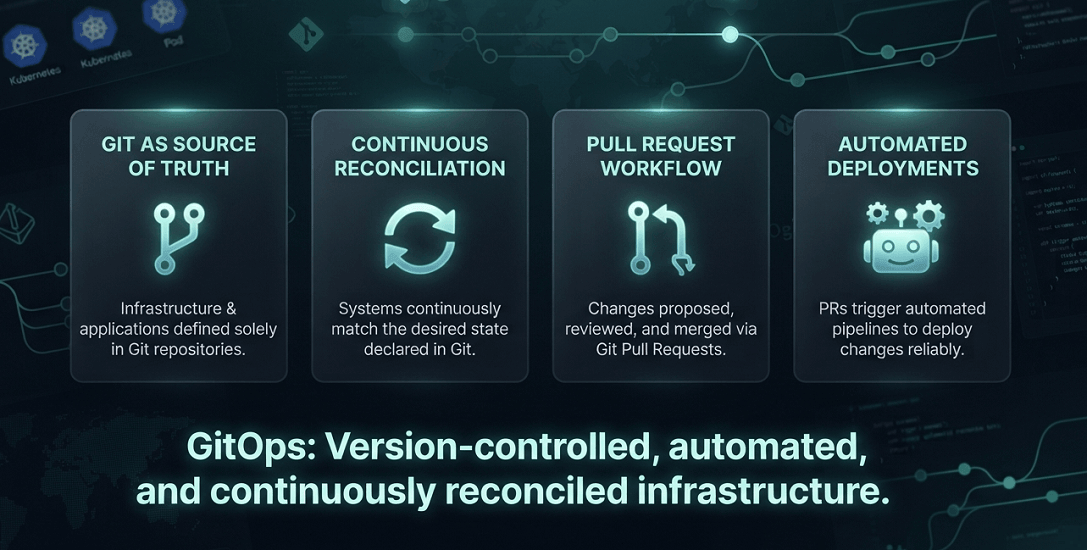
GitOps is an operational model that uses Git repositories as the single source of truth for infrastructure and application deployments. Every infrastructure change is stored in version control, reviewed through pull requests, automatically validated, and synchronized to cloud environments using automation rather than manual intervention.
Instead of engineers directly modifying AWS resources, changes are made to configuration files stored in Git. Automated controllers continuously compare the desired state stored in Git with the actual state running in AWS. Whenever differences are detected, the system automatically reconciles those differences, ensuring environments remain consistent and compliant.
GitOps has become one of the foundational practices for DevOps, Platform Engineering, Cloud Engineering, Site Reliability Engineering (SRE), and Kubernetes Operations because it combines version control, automation, security, and continuous reconciliation into a unified deployment model.
For AWS organizations, GitOps integrates naturally with services and technologies including:
- Amazon EKS
- Amazon ECS
- AWS Lambda
- AWS CloudFormation
- AWS CDK
- Terraform
- AWS CodePipeline
- AWS CodeBuild
- AWS CodeCommit
- IAM
- AWS Organizations
- Amazon CloudWatch
- AWS Systems Manager
- AWS Secrets Manager
GitOps also works seamlessly with popular open-source tools such as Argo CD, Flux CD, Helm, Kustomize, and GitHub Actions, enabling organizations to automate cloud-native deployments while maintaining strong governance and compliance.
What This Guide Covers
- What GitOps is and why it has become the preferred operating model for modern cloud infrastructure
- The core principles that define GitOps
- How GitOps works with AWS
- GitOps architecture and deployment workflows
- GitOps with Terraform, AWS CDK, and CloudFormation
- GitOps for Amazon EKS and Kubernetes
- Popular GitOps tools including Argo CD and Flux CD
- Security and governance best practices
- Enterprise implementation strategies
- Common mistakes to avoid
- How EaseCloud helps organizations implement GitOps successfully
By the end of this guide, you'll understand how GitOps enables organizations to automate infrastructure delivery, reduce operational risk, improve collaboration, and build secure, scalable AWS environments.
What Is GitOps?
GitOps is an operational framework that uses Git as the central source of truth for managing infrastructure and application deployments.
Rather than manually creating or modifying cloud resources, engineers define the desired infrastructure using declarative configuration files stored in a Git repository. Automated systems continuously monitor the repository and ensure the live AWS environment matches the desired configuration.
In a GitOps workflow:
- Infrastructure is defined as code.
- Every change is committed to Git.
- Changes are reviewed through pull requests.
- Automated pipelines validate configurations.
- Approved changes are deployed automatically.
- Continuous reconciliation keeps environments synchronized.
This model eliminates many of the inconsistencies associated with manual deployments and provides a complete audit trail for every infrastructure change.
Why GitOps Has Become an Industry Standard
GitOps has gained widespread adoption because it addresses many of the operational challenges organizations face as cloud environments become larger and more distributed.
Several key factors have driven its popularity.
Git as the Single Source of Truth
Git repositories become the authoritative record of infrastructure.
Instead of asking:
"What is currently running in AWS?"
Teams ask:
"What is defined in Git?"
If a resource exists outside Git, it is considered unmanaged and should either be imported into Infrastructure as Code or removed.
This approach dramatically reduces configuration drift.
Complete Version History
Every infrastructure change is recorded.
Organizations gain:
- Full change history
- Audit trails
- Rollback capability
- Pull request reviews
- Change approvals
- Accountability
This is particularly valuable for regulated industries with strict compliance requirements.
Automated Deployments
GitOps removes the need for engineers to manually execute deployment commands.
Instead:
- A developer updates infrastructure code.
- A pull request is reviewed.
- Automated validation runs.
- Changes are approved.
- Infrastructure is deployed automatically.
Automation reduces human error while improving deployment consistency.
Continuous Reconciliation
Unlike traditional CI/CD systems that deploy infrastructure only when pipelines run, GitOps continuously monitors environments.
If someone manually changes infrastructure in AWS, GitOps detects the drift and automatically restores the desired configuration stored in Git.
This capability is known as continuous reconciliation.
Improved Collaboration
GitOps allows infrastructure teams to use familiar software development workflows.
Engineers collaborate using:
- Git branches
- Pull requests
- Code reviews
- Merge approvals
- Version history
Infrastructure changes become collaborative rather than individual activities.
Core Principles of GitOps
GitOps is built on several foundational principles that ensure infrastructure remains predictable, secure, and repeatable.
Declarative Infrastructure
GitOps relies on declarative configuration rather than imperative scripting.
Instead of writing instructions like:
"Create an EC2 instance, then create a Security Group, then attach the Security Group."
Engineers simply declare the desired end state.
For example:
- One Amazon VPC
- Three private subnets
- One Application Load Balancer
- Two ECS services
- Auto Scaling enabled
- CloudWatch monitoring configured
The deployment system determines how to achieve that state.
Declarative infrastructure simplifies operations while making environments easier to understand and reproduce.
Version Control
Everything should reside inside Git.
This includes:
- Terraform configurations
- AWS CDK projects
- CloudFormation templates
- Kubernetes manifests
- Helm Charts
- Kustomize overlays
- Deployment policies
- Configuration files
Version control provides visibility into every infrastructure change and enables reliable rollback if issues occur.
Pull Request-Based Changes
GitOps replaces manual production changes with peer-reviewed pull requests.
A typical workflow is:
- Developer creates a feature branch.
- Infrastructure code is updated.
- A pull request is opened.
- Automated validation executes.
- Team members review the change.
- The pull request is approved.
- Changes are merged.
- Deployment begins automatically.
This process improves quality and reduces deployment risk.
Automated Reconciliation
GitOps controllers constantly compare:
- Desired State (Git Repository)
- Actual State (AWS Environment)
If differences exist, the controller automatically synchronizes the infrastructure.
For example:
Git Repository (Desired Infrastructure)
│
▼
GitOps Controller (Argo CD / Flux CD)
│
▼
Amazon EKS
Terraform
AWS CDK
CloudFormation
│
▼
AWS Environment
Continuous reconciliation minimizes configuration drift and ensures infrastructure remains aligned with approved configurations.
Observability and Auditability
GitOps naturally improves operational visibility.
Organizations can quickly answer questions such as:
- Who made this infrastructure change?
- When was it deployed?
- Which pull request introduced it?
- Who approved it?
- What changed?
- Can it be rolled back?
This level of traceability is essential for enterprise governance and compliance.
How GitOps Works
Although implementations vary, most GitOps workflows follow the same lifecycle.
Step 1: Update Infrastructure Code
An engineer modifies Infrastructure as Code using:
- Terraform
- AWS CDK
- CloudFormation
- Kubernetes manifests
- Helm Charts
Step 2: Commit Changes to Git
The updated configuration is committed to a feature branch.
Git becomes the authoritative record of the desired infrastructure.
Step 3: Open a Pull Request
The engineer creates a pull request.
Automated systems begin validation by running:
- Formatting checks
- Syntax validation
- Security scanning
- Policy validation
- Infrastructure planning
Peer review ensures the proposed changes meet organizational standards before deployment.
Step 4: Merge Approved Changes
After successful validation and approval, the pull request is merged into the main branch.
This merge acts as the deployment trigger.
Step 5: Continuous Synchronization
A GitOps controller detects the change in the repository and synchronizes the AWS environment to match the desired configuration.
Rather than relying on manual deployment commands, automation continuously ensures infrastructure stays aligned with Git.
GitOps Architecture
A typical enterprise GitOps architecture on AWS looks like this:
Developer
│
▼
Git Repository
(GitHub / GitLab / CodeCommit)
│
▼
Pull Request
│
▼
CI Validation
(fmt, lint, tests, security)
│
▼
Merge to Main
│
▼
GitOps Controller
(Argo CD / Flux CD)
│
▼
Terraform / AWS CDK / CloudFormation
│
▼
AWS Infrastructure
(EKS • ECS • Lambda • VPC • RDS • S3 • IAM)
│
▼
Monitoring & Drift Detection
(CloudWatch • CloudTrail • AWS Config)
This architecture separates code creation, validation, deployment, and continuous reconciliation, resulting in a secure, repeatable, and highly scalable operational model.
Understanding the GitOps Workflow
One of GitOps' greatest strengths is its predictable deployment lifecycle. Every infrastructure or application change follows the same standardized process, making deployments more reliable and easier to audit.
A typical enterprise GitOps workflow consists of the following stages.
Step 1: Infrastructure or Application Changes
An engineer updates one or more declarative configuration files.
These may include:
- Terraform configuration
- AWS CDK application
- CloudFormation template
- Kubernetes manifests
- Helm charts
- Kustomize overlays
Rather than modifying AWS resources directly, every change begins as code.
Step 2: Commit Changes to Git
The updated configuration is committed to a feature branch.
Example:
feature/update-production-vpc
Git immediately records:
- Author
- Timestamp
- Commit history
- File changes
This creates a permanent audit trail.
Step 3: Pull Request
Instead of deploying immediately, engineers submit a Pull Request (PR).
The Pull Request allows:
- Peer review
- Architecture review
- Security review
- Compliance validation
- Infrastructure review
Most enterprise organizations require multiple approvals before production deployments.
Step 4: Automated Validation
After the Pull Request opens, automated pipelines begin validating the proposed changes.
Typical validation includes:
Infrastructure Validation
- Terraform Validate
- CDK Synth
- CloudFormation Validation
Code Quality
- Formatting
- Linting
- Static Analysis
Security
- IAM policy scanning
- Secret detection
- Infrastructure security analysis
Compliance
- Policy as Code
- Naming conventions
- Encryption requirements
- Tag validation
Only validated infrastructure proceeds to deployment.
Step 5: Merge to Main Branch
Once approved, the Pull Request merges into the production branch.
Unlike traditional deployment models, the merge itself becomes the deployment trigger.
Step 6: GitOps Controller Detects Changes
GitOps controllers continuously monitor Git repositories.
Popular controllers include:
- Argo CD
- Flux CD
When changes appear in Git, they automatically synchronize the running infrastructure.
Step 7: Continuous Reconciliation
The GitOps controller compares:
- Desired State (Git)
- Actual State (AWS)
- Differences?
- Synchronize Automatically
This process never stops.
Infrastructure continuously remains aligned with Git.
Complete GitOps Lifecycle
- Developer
- Git Feature Branch
- Pull Request
- Automated Validation
- Approval
- Merge
- GitOps Controller
- AWS Infrastructure
- Continuous Monitoring
- Drift Detection
- Automatic Reconciliation
This repeatable workflow improves deployment reliability while minimizing operational risk.
GitOps vs Traditional DevOps
Although GitOps evolved from DevOps practices, there are important differences.
| Feature | Traditional DevOps | GitOps |
|---|---|---|
| Deployment Trigger | Pipeline Execution | Git Commit |
| Source of Truth | CI/CD Pipeline | Git Repository |
| Infrastructure Updates | Manual or Automated | Fully Git-Driven |
| Rollback | Manual | Git Revert |
| Drift Detection | Limited | Continuous |
| Audit History | Pipeline Logs | Git History |
| Desired State | Optional | Mandatory |
GitOps extends DevOps by treating Git as the authoritative source for all infrastructure and deployment decisions.
GitOps vs CI/CD
GitOps and CI/CD are often confused, but they serve different purposes.
| CI/CD | GitOps |
|---|---|
| Builds software | Manages desired infrastructure state |
| Executes deployment | Continuously reconciles environments |
| Pipeline driven | Git driven |
| Deployment ends after pipeline | Synchronization continues indefinitely |
| Push-based deployment | Pull-based deployment |
A mature cloud platform typically combines both:
- CI/CD builds software artifacts.
- GitOps deploys and maintains infrastructure.
Together, they provide a complete automation strategy.
GitOps with Terraform
Terraform defines AWS infrastructure.
GitOps defines how Terraform is operated.
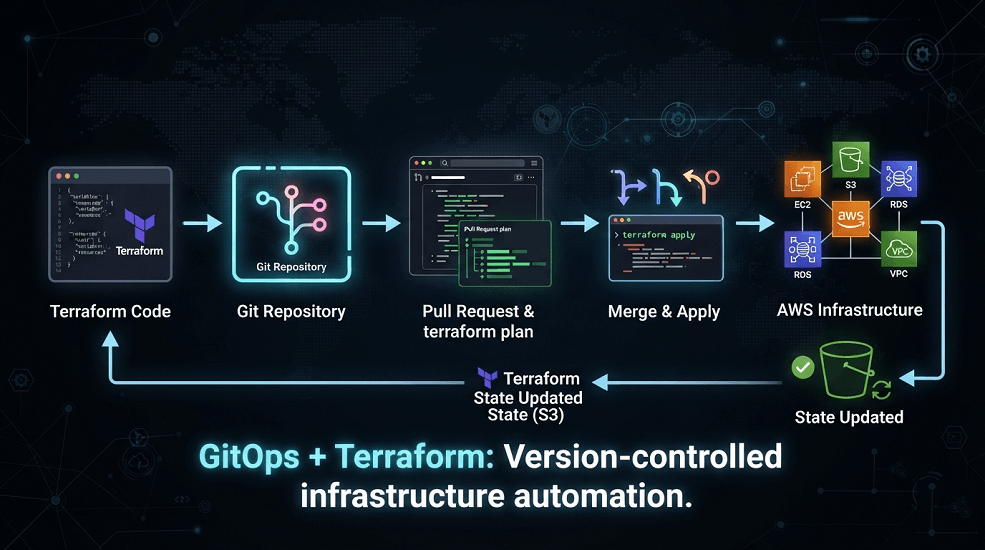
A Terraform GitOps workflow looks like this:
- Terraform Code
- Git Repository
- Pull Request
- Terraform Plan
- Review
- Merge
- Terraform Apply
- AWS Infrastructure
- State Updated
Benefits include:
- Version-controlled infrastructure
- Standardized deployments
- Reduced human error
- Easier rollback
- Team collaboration
- Infrastructure consistency
Organizations using Terraform at scale almost always implement GitOps practices.
GitOps with AWS CDK
AWS CDK allows developers to write infrastructure using programming languages.
GitOps enhances CDK by automating deployment after code changes.
Typical workflow:
- TypeScript / Python
- GitHub
- Pull Request
- cdk synth
- Validation
- Approval
- cdk deploy
- CloudFormation
- AWS Resources
Git remains the authoritative source while AWS CDK generates CloudFormation templates automatically.
GitOps with AWS CloudFormation
CloudFormation templates are naturally suited to GitOps because they are declarative.
Typical workflow:
- CloudFormation YAML
- Git
- Code Review
- Validation
- Deployment Pipeline
- CloudFormation Stack
- AWS Resources
GitOps simplifies CloudFormation governance by ensuring every template modification passes through version control.
GitOps with Amazon EKS
GitOps has become the preferred deployment model for Kubernetes.
Amazon EKS integrates exceptionally well with GitOps tools.
Instead of manually running:
kubectl apply
Developers simply update Kubernetes manifests stored in Git.
GitOps controllers automatically synchronize:
- Deployments
- Services
- ConfigMaps
- Secrets
- Ingress Resources
- Namespaces
- Helm Releases
This dramatically reduces operational complexity.
Why GitOps Is Perfect for Kubernetes
Kubernetes is declarative by design.
GitOps complements Kubernetes because both focus on desired state.
Benefits include:
- Automatic rollback
- Drift correction
- Immutable deployments
- Version history
- Self-healing clusters
- Consistent environments
This is why GitOps adoption has grown alongside Kubernetes adoption.
Argo CD
Argo CD is one of the most widely used GitOps platforms for Kubernetes.
It continuously synchronizes Kubernetes clusters with Git repositories.
Key capabilities include:
- Automatic synchronization
- Drift detection
- Rollback
- Health monitoring
- Multi-cluster management
- RBAC
- Web UI
- Notifications
Typical architecture:
- Git Repository
- Argo CD
- Amazon EKS
- Kubernetes Resources
Large enterprises frequently standardize on Argo CD for Kubernetes deployments.
Flux CD
Flux CD is another CNCF-supported GitOps tool.
Like Argo CD, Flux continuously synchronizes Kubernetes clusters with Git repositories.
Capabilities include:
- Git synchronization
- Helm support
- Kustomize support
- Image automation
- Multi-cluster deployments
- Policy integration
Flux is lightweight and integrates well with cloud-native environments.
Argo CD vs Flux CD
| Feature | Argo CD | Flux CD |
|---|---|---|
| Web UI | Excellent | Minimal |
| CLI | Yes | Yes |
| Helm Support | Yes | Yes |
| Kustomize | Yes | Yes |
| Multi-Cluster | Yes | Yes |
| Drift Detection | Yes | Yes |
| Git Synchronization | Yes | Yes |
Both are excellent GitOps platforms, and the right choice often depends on operational preferences, ecosystem familiarity, and governance requirements.
Helm in GitOps
Helm is the package manager for Kubernetes.
Rather than maintaining hundreds of Kubernetes YAML files manually, Helm packages applications into reusable Charts.
GitOps commonly stores:
- Helm Charts
- Values files
- Environment configurations
GitOps controllers automatically deploy updated Helm releases whenever Git changes.
This simplifies application lifecycle management across multiple environments.
Kustomize in GitOps
Kustomize provides a declarative way to customize Kubernetes configurations without modifying the original manifests.
Organizations often use it to manage differences between:
- Development
- QA
- Staging
- Production
Benefits include:
- No template language required
- Cleaner configuration management
- Reduced duplication
- Better maintainability
When combined with GitOps, Kustomize enables consistent deployments while allowing environment-specific customization.
AWS-Native GitOps Architecture
Many AWS organizations combine native AWS services with open-source GitOps tools.
A typical enterprise architecture includes:
- Developer
- GitHub / GitLab / CodeCommit
- Pull Request
- GitHub Actions / AWS CodeBuild
- Terraform / AWS CDK / CloudFormation
- Argo CD / Flux CD
- Amazon EKS
- AWS Infrastructure
- Monitoring (CloudWatch, CloudTrail, AWS Config)
This architecture provides end-to-end automation, governance, observability, and continuous reconciliation across cloud infrastructure.
Security Best Practices for GitOps
Security is one of GitOps' greatest strengths because every infrastructure and application change follows a controlled, auditable workflow. However, organizations must still implement security best practices to protect repositories, deployment pipelines, and cloud environments.
Protect Git Repositories
Since Git becomes the single source of truth, securing repositories is critical.
Organizations should implement:
- Multi-Factor Authentication (MFA)
- Branch protection rules
- Mandatory pull request approvals
- Signed commits
- Repository encryption
- Least-privilege access controls
Production branches should never allow direct commits.
Instead, every change should pass through peer review and automated validation.
Never Store Secrets in Git
One of the most common GitOps mistakes is committing secrets into repositories.
Never store:
- AWS Access Keys
- Database passwords
- SSH Private Keys
- API Tokens
- Certificates
- Encryption Keys
Instead, integrate GitOps with secure secret management solutions such as:
- AWS Secrets Manager
- AWS Systems Manager Parameter Store
- AWS Key Management Service (KMS)
- External Secrets Operator
- HashiCorp Vault
This keeps repositories safe while allowing applications to retrieve secrets securely during deployment.
Implement Least Privilege IAM
GitOps controllers should only receive permissions required for deployment.
Avoid granting AdministratorAccess.
Instead:
- Create dedicated IAM Roles
- Separate Development and Production permissions
- Use IAM Roles for Service Accounts (IRSA) with Amazon EKS
- Apply permission boundaries where appropriate
Restricting permissions reduces the blast radius of potential security incidents.
Continuous Security Validation
Every infrastructure change should automatically trigger security validation before deployment.
Common validation steps include:
- IAM policy analysis
- Infrastructure security scanning
- Secret detection
- Compliance verification
- Container image scanning
- Kubernetes manifest validation
Security becomes part of the deployment pipeline rather than a manual review after deployment.
Enable Observability
GitOps environments should integrate with AWS monitoring services.
Recommended services include:
- Amazon CloudWatch
- AWS CloudTrail
- AWS Config
- Amazon GuardDuty
- AWS Security Hub
- AWS X-Ray
Together, these services provide visibility into deployments, infrastructure changes, security events, and compliance status.
GitOps Governance
Enterprise organizations often operate hundreds of AWS accounts and multiple engineering teams. GitOps provides a governance model that standardizes deployments while maintaining flexibility.
Effective governance typically includes:
- Standard repository structures
- Branching strategies
- Mandatory code reviews
- Policy as Code
- Naming conventions
- Resource tagging
- Environment isolation
- Deployment approvals
These standards improve consistency and simplify audits.
GitOps in Multi-Account AWS Environments
Large organizations rarely deploy everything into a single AWS account.
A common enterprise architecture separates workloads into accounts such as:
AWS Organization
│
├── Shared Services
├── Networking
├── Security
├── Development
├── QA
├── Staging
├── Production
└── Disaster Recovery
GitOps enables centralized management across these environments.
A single Git repository can manage multiple AWS accounts while applying different configurations through:
- Terraform Workspaces
- AWS CDK Stages
- CloudFormation StackSets
- Environment-specific configuration files
This approach simplifies operations while maintaining strong account isolation.
GitOps and Platform Engineering
Platform Engineering has become one of the fastest-growing disciplines in cloud computing.
Rather than every development team managing infrastructure independently, Platform Engineering teams build reusable internal platforms that provide standardized deployment capabilities.
GitOps serves as a core operational model for these platforms.
Typical Platform Engineering responsibilities include:
- Internal Developer Platforms (IDPs)
- Shared Terraform Modules
- AWS CDK Construct Libraries
- Kubernetes Platform Management
- GitOps Controllers
- CI/CD Templates
- Security Baselines
- Monitoring Standards
GitOps enables platform teams to deliver self-service infrastructure while maintaining governance and consistency.
GitOps and DevSecOps
DevSecOps integrates security into every phase of software delivery.
GitOps naturally supports DevSecOps by ensuring every infrastructure change undergoes automated security validation before deployment.
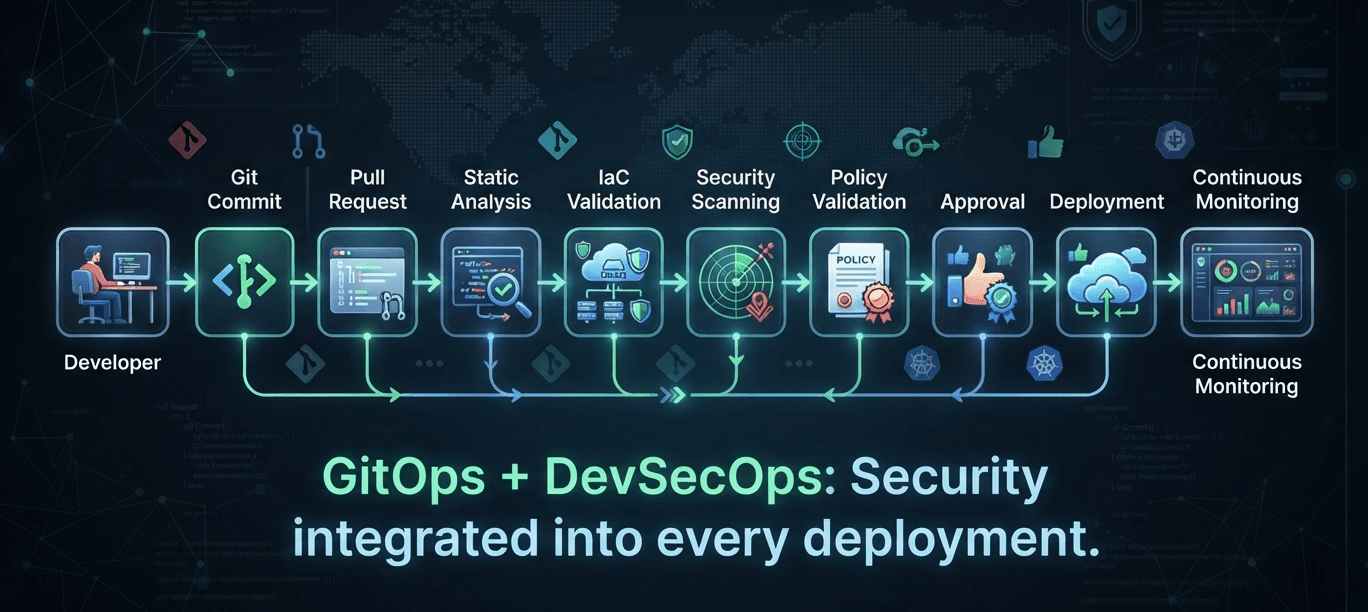
A typical DevSecOps pipeline includes:
- Developer
- Git Commit
- Pull Request
- Static Analysis
- Terraform/CDK Validation
- Security Scanning
- Policy Validation
- Approval
- Deployment
- Continuous Monitoring
Security becomes a continuous process instead of a final checkpoint.
GitOps Enterprise Best Practices
Organizations that successfully implement GitOps generally follow several key practices.
Standardize Repository Structure
Maintain consistent repository layouts across teams.
For example:
gitops-platform/
│
├── terraform/
├── cdk/
├── cloudformation/
├── kubernetes/
├── helm/
├── monitoring/
├── security/
└── environments/
Consistency simplifies onboarding and maintenance.
Automate Everything
Avoid manual deployment steps whenever possible.
Automate:
- Validation
- Testing
- Security Scanning
- Policy Checks
- Deployments
- Drift Detection
- Notifications
Automation reduces operational risk and improves deployment speed.
Use Reusable Infrastructure Components
Create reusable building blocks such as:
- Terraform Modules
- AWS CDK Constructs
- Helm Charts
- Kubernetes Base Configurations
- CloudFormation Nested Stacks
Reusable components improve consistency and reduce maintenance.
Continuously Monitor Drift
Even with GitOps, organizations should monitor for:
- Manual AWS Console changes
- Unauthorized modifications
- Configuration drift
- Failed synchronizations
AWS Config, CloudTrail, and GitOps controllers work together to detect and remediate these issues.
Separate Production Environments
Production deployments should have:
- Dedicated repositories or protected branches
- Approval workflows
- Restricted IAM permissions
- Additional security validation
- Change management processes
Production infrastructure should never be modified directly.
Common GitOps Mistakes
Even mature engineering teams can encounter challenges when adopting GitOps.
Bypassing Git
Making manual changes through the AWS Console creates configuration drift and undermines the GitOps model.
All infrastructure changes should originate from Git.
Mixing Application and Infrastructure Repositories Without Strategy
Some organizations place all code into a single repository without clear boundaries.
As environments grow, this becomes difficult to manage.
Instead, define a repository strategy based on team structure, ownership, and deployment workflows.
Poor Branch Protection
Allowing direct commits to production branches bypasses code review and increases deployment risk.
Enable:
- Protected branches
- Required reviews
- Status checks
- Signed commits
Ignoring Automated Testing
Skipping validation increases the likelihood of deployment failures.
Every Pull Request should execute:
- Formatting
- Validation
- Security Scanning
- Policy Checks
- Infrastructure Planning
Weak Secret Management
Sensitive information should never exist inside Git repositories.
Always integrate with secure secret management services.
Real-World Enterprise Example
A global SaaS company operated customer workloads across North America, Europe, and Asia using Amazon EKS, Amazon ECS, AWS Lambda, Amazon RDS, Amazon S3, and hundreds of supporting AWS services.
Initially, each engineering team managed infrastructure independently. Deployment processes varied between teams, infrastructure drift increased over time, and compliance audits became increasingly difficult.
To modernize operations, the company adopted GitOps as its standard deployment model.
| Category | Components |
|---|---|
| Infrastructure Technologies | - Terraform - AWS CDK - CloudFormation - Amazon EKS |
| GitOps Platform | - GitHub - Argo CD - GitHub Actions |
| AWS Services | - AWS Organizations - IAM - Amazon CloudWatch - AWS Config - CloudTrail - AWS Secrets Manager |
| Governance | - Branch Protection - Policy as Code - Mandatory Pull Requests - Automated Security Validation |
Within twelve months, the organization achieved:
- 90% reduction in manual production deployments
- Significant decrease in configuration drift
- Faster environment provisioning
- Improved compliance reporting
- Standardized deployment workflows across engineering teams
- Higher deployment frequency with fewer failures
GitOps became the operational foundation for the company's cloud platform.
Conclusion
GitOps has become the preferred operational model for organizations adopting cloud-native architectures, Infrastructure as Code, and Platform Engineering. By treating Git as the single source of truth, organizations can automate deployments, reduce configuration drift, improve collaboration, and strengthen governance across AWS environments.
Combined with Terraform, AWS CDK, CloudFormation, Kubernetes, and CI/CD pipelines, GitOps enables repeatable, secure, and scalable cloud operations. As organizations continue to modernize their AWS platforms, GitOps provides the foundation for consistent infrastructure delivery and long-term operational excellence.
Frequently Asked Questions
What is GitOps?
GitOps is an operational model that uses Git repositories as the single source of truth for managing infrastructure and application deployments. Automated controllers continuously synchronize running environments with the desired configuration stored in Git.
Is GitOps only for Kubernetes?
No. While GitOps gained popularity through Kubernetes, it is equally effective for Infrastructure as Code tools such as Terraform, AWS CDK, and AWS CloudFormation, making it valuable across a wide range of AWS environments.
What tools are commonly used for GitOps?
Popular GitOps tools include:
- Argo CD
- Flux CD
- GitHub Actions
- GitLab CI/CD
- AWS CodePipeline
- Helm
- Kustomize
These tools work together to automate validation, deployment, and continuous reconciliation.
What is the difference between GitOps and CI/CD?
CI/CD automates building, testing, and delivering software or infrastructure changes.
GitOps uses Git as the authoritative source of truth and continuously reconciles the running environment with the desired state stored in Git. CI/CD and GitOps complement each other rather than compete.
Can GitOps be used with Terraform and AWS CDK?
Yes. GitOps is commonly implemented with Terraform, AWS CDK, and AWS CloudFormation. Git manages the desired state, while automated pipelines and controllers apply and maintain infrastructure consistently across AWS environments.
How EaseCloud Helps Organizations Implement GitOps
At EaseCloud, we help organizations adopt GitOps to modernize cloud operations, improve deployment reliability, and strengthen governance across AWS environments. Whether you're building cloud-native applications, managing Kubernetes platforms, or standardizing Infrastructure as Code, EaseCloud helps you implement GitOps practices that improve scalability, security, and operational efficiency.
Book Your Free GitOps AssessmentSummarize this post with:
