AWS Consulting Services: The Complete Guide for Startups & SMBs
Everything growing businesses need to know about AWS consulting, what it covers, what it costs, when to hire a partner, and how to get guaranteed ROI from your cloud investment.
Key Takeaways: AWS consulting helps startups and SMBs migrate to AWS, cut cloud costs by 30–40%, achieve compliance (SOC 2, HIPAA, GDPR), and maintain high-performance infrastructure, without building a full in-house infrastructure team.
What This Guide Covers
- What is AWS consulting and what does it include
- The five core service areas: migration, cost, DevOps, security, managed services
- AWS consulting pricing models and cost ranges for 2026
- How to choose the right AWS consulting partner
- AWS consultant vs. hiring in-house: a real cost comparison
- The Well-Architected Framework and why it matters
- Industry-specific AWS consulting: SaaS, healthcare, finance, nonprofits
- How to measure ROI from your AWS engagement
- Common mistakes companies make before hiring a consultant
Why Most Growing Businesses Are Overpaying for AWS
AWS offers more than 200 services. That flexibility is a double-edged sword.
For enterprises with large engineering teams, navigating that complexity is manageable. For startups and small-to-mid-sized businesses, it typically means one of two outcomes: you underuse AWS and miss real performance gains, or you overuse it and pay 30–40% more than you should.
AWS consulting services exist to close that gap. A good AWS consultant brings the architectural expertise, cost governance discipline, and operational depth that most growing businesses cannot justify hiring full-time but absolutely need to compete.
This guide covers everything: what AWS consulting actually includes, the different engagement types, how pricing works, what to look for in a partner, and how to measure ROI. If you are evaluating whether to hire an AWS consultant in 2026, this is the most complete resource available.
1. What Is AWS Consulting? A Clear Definition
AWS consulting is a professional service where certified AWS engineers help businesses plan, build, optimize, and manage their infrastructure on Amazon Web Services.
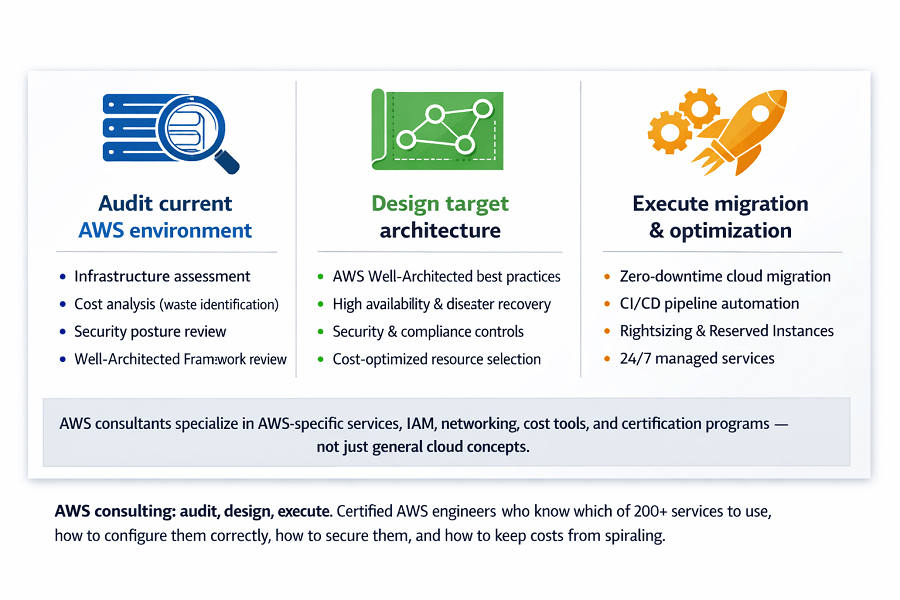
It is distinct from general IT consulting. An AWS consultant has deep, hands-on expertise with the AWS platform specifically, not just cloud concepts in general. They know which of AWS's 200+ services to use for a given problem, how to configure them correctly, how to secure them, and how to keep costs from spiraling.
What AWS consultants actually do
The scope varies by engagement, but typically covers some combination of:
- Auditing your current AWS environment (or your existing infrastructure before migration)
- Designing target-state architectures using AWS best practices
- Executing cloud migrations without downtime or data loss
- Building CI/CD pipelines and DevOps automation
- Reducing your AWS bill through rightsizing, instance purchasing, and waste elimination
- Implementing security controls and preparing for compliance audits (SOC 2, HIPAA, GDPR, PCI-DSS)
- Providing ongoing 24/7 monitoring, incident response, and proactive management
- Modernizing legacy applications through containerization, microservices, and serverless
AWS consulting vs. general cloud consulting
General cloud consultants work across AWS, Azure, and Google Cloud. AWS consultants specialize in the AWS ecosystem, its specific services, its IAM model, its networking primitives, its cost tools, and its certification programs.
If your business is building on AWS (or planning to), AWS-specific expertise matters. A generalist consultant may understand cloud concepts but will lack the muscle memory that comes from deploying hundreds of AWS environments.
2. The Five Core AWS Consulting Service Areas
Most AWS consulting work falls into five major service categories. Understanding each helps you identify exactly what your business needs, rather than buying a bundle of services you won't use.
2.1 Cloud Migration
Cloud migration is the process of moving your existing infrastructure, applications, and data from on-premises data centers (or other cloud providers) to AWS.
It sounds simple. In practice, migrations are the highest-risk phase of any cloud journey. Done poorly, they cause downtime, data loss, and months of post-migration firefighting. Done well, they are invisible to your customers and give you a clean, documented AWS environment to build on.
The six migration strategies (the '6 Rs')
| Strategy | Common Name | When to Use It |
| Rehost | Lift-and-shift | Move as-is; fastest, lowest risk, minimal optimization |
| Replatform | Lift-tinker-shift | Small tweaks (e.g. move DB to RDS); moderate effort, meaningful gain |
| Repurchase | Drop-and-shop | Move to SaaS alternative; e.g. CRM to Salesforce |
| Refactor | Re-architect | Redesign for cloud-native; highest effort, highest long-term value |
| Retire | Eliminate | Identify and decommission services you no longer need |
| Retain | Keep as-is | Leave some workloads on-prem (compliance, latency, or cost reasons) |
Typical migration timelines
| Environment Size | Estimated Timeline |
| Small (5–10 servers, simple apps) | 4–8 weeks |
| Medium complexity (20–50 servers) | 8–16 weeks |
| Complex / enterprise workloads | 3–6 months |
| Database-heavy migrations | Add 2–4 weeks for validation |
2.2 Cost Optimization
The average company overpays for AWS by 30–40%. That figure is not an exaggeration, it is what AWS consulting firms see consistently when they audit new clients' accounts.
Overspending happens for predictable reasons: instances provisioned for peak load that never arrives, storage left behind by deprecated services, licensing that was never right-sized, and a lack of governance that lets costs creep back up after any initial cleanup.
The main levers of AWS cost reduction
- Rightsizing: matching instance types to actual workload needs based on CPU, memory, and I/O patterns
- Reserved Instances: committing to 1- or 3-year terms in exchange for up to 72% savings vs. on-demand
- Savings Plans: flexible alternatives to Reserved Instances that apply across services
- Spot Instances: leveraging spare AWS capacity for interruption-tolerant workloads at up to 90% off
- Storage tiering: moving infrequently accessed S3 data to Glacier or Intelligent-Tiering automatically
- Zombie resource hunting: identifying and terminating idle instances, unattached EBS volumes, and unused load balancers
- Data transfer optimization: reducing cross-AZ, cross-region, and egress charges through architecture decisions
2.3 DevOps Automation
DevOps consulting on AWS is about collapsing the gap between writing code and running it in production. The goal: deploy multiple times per day, with confidence, using automated pipelines that catch errors before they reach customers.
What a mature AWS DevOps setup includes
- CI/CD pipelines using GitHub Actions, GitLab CI, or AWS CodePipeline
- Infrastructure-as-code using Terraform or AWS CloudFormation
- GitOps workflows where infrastructure state is version-controlled and auditable
- Automated testing: unit, integration, and load testing built into the pipeline
- Automated security scanning: dependency checks, SAST, and secrets detection on every commit
- Observability: centralized logging, metrics, and tracing with CloudWatch, Datadog, or Grafana
Benchmark: High-performing DevOps teams deploy on average 208 times per year vs. 6 times for low performers (DORA State of DevOps Report). The infrastructure for that performance is what a good AWS DevOps consultant builds.
2.4 Security & Compliance
Security on AWS is a shared responsibility. AWS secures the physical infrastructure and the hypervisor. You are responsible for everything above that: your OS configurations, your IAM policies, your data encryption, your network controls, and your application security.
Most startups are aware of this in theory. In practice, security is often the first thing deprioritized under shipping pressure until a breach or a compliance audit forces the issue.
Compliance frameworks commonly implemented on AWS
| Framework | What It Covers & Who Needs It |
| SOC 2 Type II | Most common for SaaS companies selling to enterprise customers. Covers security, availability, processing integrity, confidentiality, and privacy. |
| HIPAA | Required for any company handling protected health information (PHI). AWS offers a BAA; configuration is your responsibility. |
| GDPR | Applies to any company processing data from EU residents. Requires data residency controls, deletion capability, and documented processing. |
| PCI-DSS | Required for handling payment card data. Strict network segmentation, logging, and vulnerability management requirements. |
| FedRAMP | Required for selling to US federal agencies. High bar; typically only relevant for govtech. |
2.5 Managed Services
Not every company wants to hand back infrastructure ownership after a migration or optimization project. AWS managed services fill that gap: the consulting firm becomes your de facto infrastructure team.
What a managed services engagement covers
- 24/7 monitoring with intelligent alerting (not just on/off pings)
- Guaranteed incident response SLAs, typically under 15 minutes for critical issues
- Proactive security patching across OS, middleware, and dependencies
- Automated and tested disaster recovery and backup procedures
- Monthly architecture and cost optimization reviews
- Continuous compliance monitoring against your chosen frameworks
- Dedicated engineers who know your system, not rotating contractors reading from scripts
3. AWS Consulting Pricing: What It Actually Costs in 2026
AWS consulting is not commoditized. Pricing varies significantly based on engagement type, complexity, and provider quality. The table below reflects market rates for competent AWS consulting firms serving startups and SMBs in 2026.
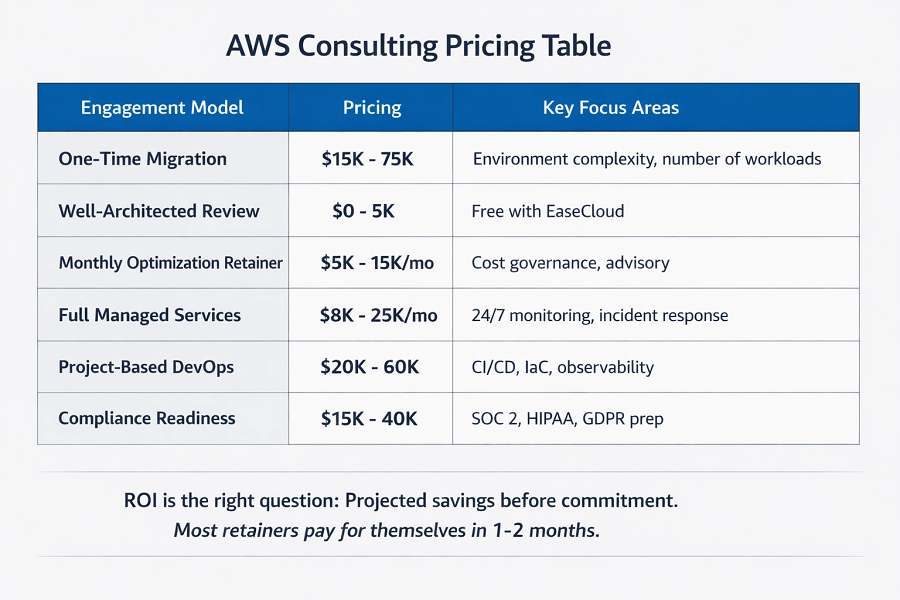
| Engagement Type | Typical Price Range | Notes |
| One-Time Migration | $15,000 – $75,000 | Based on environment complexity, number of workloads, and migration strategy. Simple 5–10 server lift-and-shift at the low end; complex multi-region refactors at the high end. |
| Well-Architected Review | $0 – $5,000 | EaseCloud offers free WAR reviews. Some firms charge $2K–5K. Provides a roadmap of findings and recommendations with no commitment. |
| Monthly Optimization Retainer | $5,000 – $15,000/mo | Ongoing cost governance, regular architecture reviews, and advisory hours. Typically pays for itself within 1–2 months via savings identified. |
| Full Managed Services | $8,000 – $25,000/mo | 24/7 monitoring, incident response, patching, backups, DR. Scales with infrastructure complexity and SLA requirements. |
| Project-Based DevOps | $20,000 – $60,000 | CI/CD pipeline build, IaC implementation, observability setup. Duration 6–16 weeks depending on current state. |
| Compliance Readiness | $15,000 – $40,000 | SOC 2, HIPAA, or GDPR preparation. Includes gap assessment, remediation implementation, and audit-ready documentation. |
How to evaluate price vs. value
A $50,000 migration that prevents six months of firefighting and infrastructure debt is worth 10x what it costs. A $5,000/month managed services retainer that identifies $8,000/month in AWS waste pays for itself immediately.
The right question is not 'what does it cost?' but 'what is the projected ROI?' Any credible AWS consulting firm should be able to show you estimated savings before you commit and you should be able to verify results in your own AWS billing dashboard.
4. The AWS Well-Architected Framework: Your Baseline Benchmark
Before optimizing anything, you need a baseline. The AWS Well-Architected Framework (WAF) is the industry-standard methodology for assessing cloud infrastructure across five pillars.
| Pillar | What It Assesses |
| Operational Excellence | The ability to run and monitor systems, to deliver business value, and to continually improve supporting processes and procedures. |
| Security | The ability to protect information, systems, and assets while delivering business value through risk assessments and mitigation strategies. |
| Reliability | The ability to recover from infrastructure or service disruptions, dynamically acquire computing resources to meet demand, and mitigate disruptions. |
| Performance Efficiency | The efficient use of computing resources to meet system requirements, and maintaining that efficiency as demand changes and technologies evolve. |
| Cost Optimization | The ability to run systems to deliver business value at the lowest price point avoiding unnecessary costs while maintaining required capabilities. |
| Sustainability (6th pillar, added 2021) | Minimizing the environmental impacts of running cloud workloads through shared responsibility, and understanding the impact of cloud services used. |
What a Well-Architected Review produces
A WAR is not a vague report. It produces a prioritized list of findings high, medium, and low risk with specific remediation steps for each. After the review, you know exactly what to fix and in what order.
- High-risk findings: security gaps, single points of failure, compliance exposures
- Medium-risk findings: cost inefficiencies, suboptimal configurations, observability gaps
- Low-risk findings: documentation gaps, missing automation, best-practice deviations
5. AWS Consultant vs. Hiring In-House: The Real Cost Comparison
"AWS consultant vs. hiring in-house" this is the most common decision companies face before their first consulting engagement. The instinct is often to hire, you get full-time coverage, deep product knowledge, and someone 'on your side.' But the math rarely supports that instinct for companies under a certain scale.
| Cost Factor | In-House AWS Engineer | AWS Consulting Firm |
| Base salary | $140,000 – $200,000/yr | Included in retainer |
| Benefits & payroll taxes | $30,000 – $50,000/yr | Included in retainer |
| Recruitment cost | $20,000 – $40,000 (one-time) | None |
| Ramp-up time | 3–6 months to full productivity | Immediate from day one |
| Breadth of expertise | One person's skill set | Full team: architect, DevOps, security, cost |
| Coverage | Business hours (PTO, illness) | 24/7 with SLA guarantees |
| Scalability | Fixed; re-hire to scale up | Scale up/down monthly |
| Total year-1 cost | $190,000 – $290,000 | $96,000 – $300,000 |
The numbers converge at the high end of managed services pricing. But consulting firms deliver breadth of expertise (one engineer cannot cover architecture, security, DevOps, and cost optimization with equal depth), immediate productivity (no ramp-up period), and flexibility (scale up for a migration, scale back after).
For most startups and SMBs, the hybrid model is optimal: use a consulting partner while the business is growing, hire internally once infrastructure patterns are stable and documented, and maintain the consulting relationship for specialized expertise.
6. Industry-Specific AWS Consulting
AWS consulting is not one-size-fits-all. Different industries have different compliance requirements, performance expectations, and architectural patterns. Here is how AWS consulting manifests across key verticals.
SaaS & Software Companies
SaaS companies on AWS need infrastructure that scales automatically with customer growth, deploys code multiple times per day without downtime, and meets the SOC 2 compliance requirements that enterprise buyers now mandate.
- Multi-tenant architecture design (isolation by VPC, account, or namespace)
- Auto-scaling for variable workload patterns
- CI/CD pipelines for rapid, safe deployment
- SOC 2 Type II readiness and ongoing compliance monitoring
- Cost optimization as ARR grows to maintain healthy gross margins
Healthcare
Healthcare companies face strict HIPAA requirements. Every AWS service that touches PHI must be HIPAA-eligible, and the configuration encryption, access logs, audit trails must be verifiably correct.
- HIPAA-eligible service selection and configuration
- Business Associate Agreement (BAA) management with AWS
- PHI data residency and encryption architecture
- Audit trail implementation with AWS CloudTrail
- Breach notification readiness and incident response procedures
Financial Services
Finance companies need the security posture of an enterprise bank with the agility of a startup. Regulatory requirements vary by jurisdiction but typically include PCI-DSS for payment processing, SOC 2 for operational controls, and GDPR for European customers.
- Network segmentation and micro-segmentation for payment workloads
- PCI-DSS scoping and remediation
- Real-time fraud detection architectures on AWS
- High-availability, low-latency infrastructure for trading and financial data
Small & Mid-Sized Businesses
SMBs rarely need the complexity that enterprise consulting firms sell them. They need right-sized, reliable, cost-effective AWS infrastructure with enough support to respond quickly when things go wrong without paying for services they will not use.
- Simple, well-documented AWS environments that in-house staff can understand
- Cost-optimized architectures with predictable monthly spend
- Basic compliance readiness (backup, encryption, access controls)
- Managed services that provide on-call coverage without full-time infrastructure hiring
Nonprofits
Nonprofits qualify for AWS credits through the AWS Nonprofit Credit Program. An AWS consultant can help nonprofits maximize those credits, design cost-efficient architectures, and ensure they are not overpaying for capabilities they do not need.
7. How to Choose the Right AWS Consulting Partner
The AWS Partner Network has thousands of registered partners. Quality varies enormously. Here is how to separate the firms that can actually deliver from those selling credentials they rarely use.
7.1 Demand real-world production experience
Certifications prove someone studied. Production experience proves they can do the job under pressure. When evaluating a consulting firm, ask for:
- Case studies from companies at your stage and in your industry
- Architecture diagrams from real projects (anonymized if needed)
- References you can actually call not just testimonial blurbs
- Specific examples of incidents they resolved and how
7.2 Verify long-term support capability
Many firms do excellent project work and then disappear. If you need ongoing support, verify they have the infrastructure for it:
- 24/7 monitoring and on-call coverage with documented escalation paths
- Financially-backed SLAs for incident response times
- Proactive management (not just reactive support)
- Named engineers who will know your account not a ticket queue
7.3 Check their DevOps maturity
A consulting firm that clicks around the AWS console manually is not ready to manage production infrastructure at scale. Look for:
- Infrastructure-as-code on day one (Terraform or CloudFormation)
- GitOps workflows with version-controlled infrastructure
- Automated security scanning and compliance checks built into pipelines
- Proper observability: centralized logging, metrics, and alerting
7.4 Ask for committed cost savings
Any firm with genuine cost optimization expertise should be willing to project specific savings before engagement. If they cannot commit to a range, they probably cannot deliver one.
7.5 Evaluate communication and culture fit
Technical skills without communication skills equal frustration. In the evaluation process, notice whether the firm:
- Explains technical concepts in plain language without condescension
- Proactively flags risks and trade-offs rather than just saying yes
- Documents everything and makes documentation available to you
- Treats the engagement as a partnership, not a dependency relationship
Production experience, long-term support, DevOps maturity, committed savings, clear communication – we check every box.
Case studies from your stage and industry. 24/7 monitoring with SLA guarantees. Infrastructure-as-code on day one. Projected savings before engagement begins.
What you get with EaseCloud:
- Real-world production experience – Hundreds of AWS environments deployed
- 24/7 coverage with named engineers – Your team knows your system
- Infrastructure-as-code from day one – Documented, reproducible, auditable
- Committed cost savings – We show projections before you commit
8. The EaseCloud AWS Consulting Engagement Model
For full transparency, here is exactly how EaseCloud approaches an AWS consulting engagement from first contact to ongoing optimization.
| Phase | What Happens |
| Step 1: Discovery | We audit your current setup: infrastructure, applications, dependencies, costs, pain points. We run a Well-Architected Framework assessment across all five pillars. We interview your team to understand business goals and technical constraints. Output: a clear picture of where you are and where you need to go. |
| Step 2: Design | Based on the discovery, we design your target architecture. This includes detailed runbooks, risk mitigation plans, cost projections with ROI, security design, and disaster recovery strategy. For migrations, we determine the best approach for each workload. You get a complete plan before we touch anything. |
| Step 3: Proof of Concept | For critical systems, we run a proof of concept first. This validates the architecture works as expected, catches issues early, establishes performance baselines, and builds confidence. We only proceed to production when everyone is comfortable. |
| Step 4: Execute | Phased rollout with rollback plans. Full testing at each stage. Most migrations happen off-hours for zero customer impact. Constant communication throughout. Data integrity checks at every step. By the time we are done, everything works and nothing is lost. |
| Step 5: Optimize | Post-migration, we tune everything. Rightsize based on actual usage, implement cost-saving strategies (Reserved Instances, Spot, Savings Plans), optimize performance from real metrics, harden security, validate compliance. |
| Step 6: Ongoing Support | 24/7 monitoring, incident response, proactive recommendations, security patching, monthly reviews, and continuous architecture evolution. SLA-backed. Your environment stays optimized, secure, and highly available. |
9. Measuring ROI from Your AWS Consulting Engagement
ROI from AWS consulting comes from multiple directions. Understanding each helps you set expectations and measure results correctly.
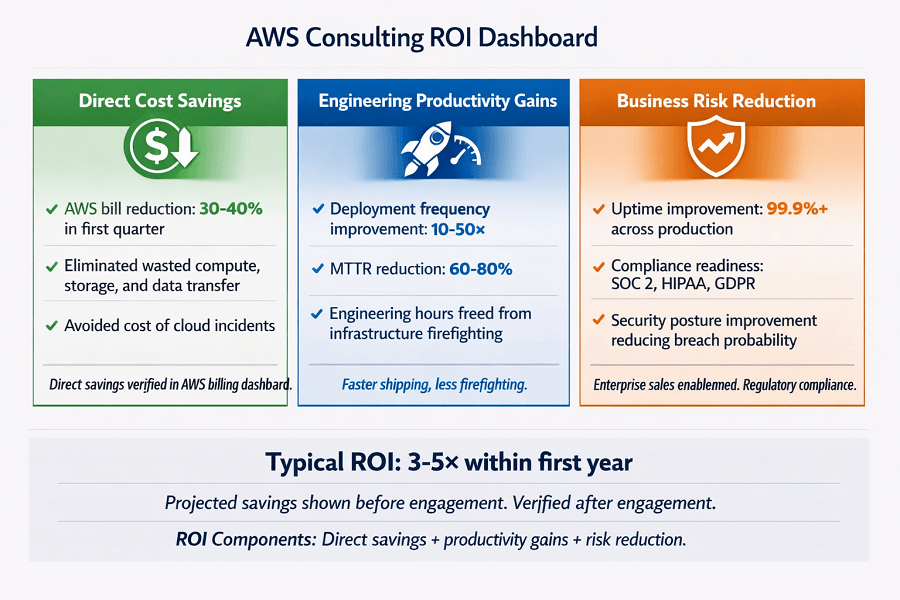
Direct cost savings
- AWS bill reduction (target: 30–40% in the first quarter)
- Eliminated wasted compute, storage, and data transfer spend
- Avoided cost of cloud incidents and performance degradations
Engineering productivity gains
- Deployment frequency improvement (target: 10–50× increase)
- Mean time to recovery (MTTR) reduction (target: 60–80% faster)
- Engineering hours freed from infrastructure firefighting
Business risk reduction
- Uptime improvement (target: 99.9%+ across all production workloads)
- Compliance readiness that unlocks enterprise sales opportunities
- Security posture improvement reducing breach probability and impact
10. Common Mistakes Companies Make Before Hiring an AWS Consultant
After working with hundreds of startups and SMBs, EaseCloud sees the same mistakes repeatedly. Learning from them before you start saves time and money.
- Waiting for a crisis to act. Most companies hire an AWS consultant after an outage, a failed audit, or a billing shock. The same money spent proactively yields far better outcomes and far less disruption.
- Treating cloud migration as purely a technical project. Migration has business dimensions: customer SLAs, team training, documentation, and process change. Treating it as just an infrastructure task is the leading cause of post-migration problems.
- Optimizing once and assuming it sticks. AWS costs are not static. New services get provisioned, traffic grows, and 'temporary' resources become permanent. Ongoing governance is essential.
- Underspecifying compliance requirements at the start. Building security and compliance in from the beginning is 5–10× cheaper than retrofitting it after the fact. Know your compliance obligations before architecture begins.
- Choosing a partner based on price alone. The cheapest AWS consultant is often the most expensive in total cost. Rework, downtime, and technical debt created by poor implementation can cost multiples of the money saved on consulting fees.
- Not asking for infrastructure-as-code from day one. If your consulting firm is configuring AWS manually through the console, you own an environment that is undocumented and impossible to reproduce. Require IaC on every engagement.
Frequently Asked Questions
What is the ROI of AWS consulting services?
Most clients see a 3–5× return within the first year. Typical outcomes include 30–40% reduction in AWS spend, 50–200% improvement in application performance, and 60–80% reduction in deployment time. Projected savings are shown before any engagement begins, and clients verify results in their own AWS billing dashboards.
How long does an AWS migration take?
Small environments (5–10 servers, simple apps) take 4–8 weeks. Medium complexity (20–50 servers) takes 8–16 weeks. Complex enterprise workloads take 3–6 months. An accurate timeline requires a discovery assessment of your specific environment.
Do I need AWS consulting if I already have a cloud engineer?
It depends on what your engineer's skill set covers. A single engineer typically has depth in one or two areas (e.g. backend infrastructure or Kubernetes) but not the full breadth needed for cost optimization, security, compliance, and DevOps simultaneously. AWS consulting firms bring specialized expertise across all domains and can complement an existing engineer effectively.
Can you migrate from Azure or GCP to AWS?
Yes. EaseCloud has migrated from on-premises data centers, Azure, GCP, legacy hosting providers, and every major platform. If it runs somewhere, it can be moved to AWS with proper planning and tooling to manage data transfer costs and service mapping.
What is a Well-Architected Review and is it free?
A Well-Architected Review (WAR) is a structured assessment of your AWS infrastructure against Amazon's five-pillar framework: operational excellence, security, reliability, performance efficiency, and cost optimization. EaseCloud offers a free WAR with no commitment. The review produces a prioritized list of findings with specific remediation steps.
What does managed services actually include?
Managed services typically include 24/7 infrastructure monitoring, incident detection and response with SLA guarantees, proactive security patching, backup and disaster recovery management, monthly optimization reviews, and continuous compliance monitoring. The key differentiator between providers is whether you get dedicated engineers who know your system or a rotating help desk that reads from scripts.
How do I get started with EaseCloud?
Book a free consultation call. We discuss your current situation and goals. If it makes sense, we schedule a free Well-Architected Assessment of your current environment. Then we send a proposal with scope, timeline, and transparent pricing. Most clients see value within the first two weeks of working together.
Ready to Cut Your AWS Costs and Improve Performance?
EaseCloud helps startups and SMBs get guaranteed ROI from AWS through cost optimization, zero-downtime migration, enterprise-grade security, and 24/7 managed support.
Get Your Free Cost AuditSummarize this post with:
