Reserved Instances vs. Spot Instances vs. Savings Plans: Which Saves More?
A practical 2026 decision guide to every AWS compute pricing model, exact discount levels, commitment rules, real workload matching, and the optimal purchasing stack for startups and SMBs.
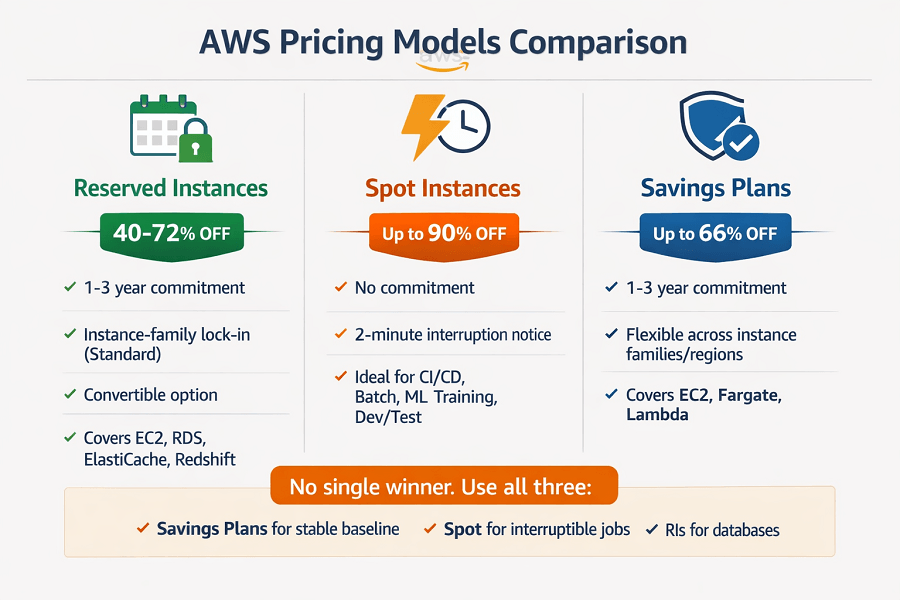
- The short answer: There is no single winner. Reserved Instances, Spot Instances, and Savings Plans each deliver maximum savings for different workload types. Using the wrong model for a workload is one of the most common causes of missed savings.
- The right answer: most AWS accounts should use all three simultaneously - Savings Plans for the stable compute baseline, Spot for interruption-tolerant jobs, and Reserved Instances for specific database or legacy workloads.
- The prerequisite: none of these models should be purchased before 4+ weeks of stable production data. Committing too early, or to the wrong baseline, turns a savings tool into a waste source.
TL;DR
- No single winner – use all three. Savings Plans for stable compute baseline, Spot for interruptible jobs, RIs for databases.
- Savings Plans (up to 66% off): Broadest coverage – EC2, Fargate, Lambda. No instance management. Commit 65-75% of stable baseline, not peak.
- Reserved Instances (up to 72% off): Highest discount, but instance-family locked.
- Critical: Savings Plans don't cover RDS, Aurora, or ElastiCache – those need RIs.
- Spot (up to 90% off): Deepest savings, 2-min interruption notice. Use for CI/CD, batch, ML training, dev/test. Never for production databases or stateful workloads.
- Rule: Wait 4+ weeks of stable data before committing.
- Most overlooked: RDS Reserved Instances – $15K/mo database spend can save $6K-$10K/mo with zero changes.
1. The Problem with On-Demand Pricing
On-Demand is AWS's default pricing model. You provision a resource, you pay the listed hourly rate, you terminate it when you're done. No commitment, no risk, maximum flexibility.
It is also the most expensive way to run stable, predictable workloads on AWS by a significant margin. AWS prices On-Demand to cover the cost of unused capacity that must be available instantly. You pay for that optionality whether you need it or not.
For workloads that run continuously and predictably, your production database, your core API servers, your data pipeline, that optionality has zero value. You are paying 40–72% more than necessary to maintain flexibility you will never use.
The three alternative purchasing models exist to convert that flexibility premium into savings, each optimized for a different workload pattern.
2. The Three Pricing Models: How Each One Works
Reserved Instances (RIs)
| Option | Details |
|---|---|
| Reserved Instances 40–72% vs. On-Demand |
Reserved Instances Commitment to specific instance capacity in exchange for a significant discount ✓ Highest available discount at up to 72% (3-year, all-upfront, Standard RI) ✓ Available for EC2, RDS, ElastiCache, Redshift, OpenSearch, and DynamoDB ✓ Standard RIs: fixed instance family, size, OS, and region, cannot change ✓ Convertible RIs: ~54% discount with ability to change instance family during term ✓ Payment options: All-Upfront (max discount), Partial-Upfront, No-Upfront ✓ Unused RIs can be sold on the AWS Marketplace (Standard only) ✗ Commitment required: 1-year or 3-year term, cannot cancel Standard RIs ✗ Instance-family lock-in: Standard RIs don't transfer if you change instance generations ✗ Requires stable, known workload, wrong if usage patterns are uncertain |
Spot Instances
| Option | Details |
|---|---|
| Spot Instances Up to 90% vs. On-Demand |
Spot Instances Access to spare AWS capacity at deeply discounted rates, with interruption risk ✓ Largest possible discount: up to 90% off On-Demand for the same hardware ✓ No commitment required, use when available, stop when not needed ✓ Spot price fluctuates based on supply/demand but is usually stable within a range ✓ 2-minute interruption notice gives applications time to checkpoint/drain gracefully ✓ Spot Fleet manages mixed instance pools to maintain target capacity despite interruptions ✓ Ideal for: batch jobs, CI/CD runners, ML training, rendering, dev/test environments ✗ Interruptions can occur with only 2 minutes' notice, workloads must tolerate this ✗ Not suitable for customer-facing production apps or stateful workloads ✗ Specific instance types can become temporarily unavailable in a region/AZ |
Savings Plans
| Option | Details |
|---|---|
| Savings Plans Up to 66% vs. On-Demand |
Savings Plans Flexible commitment to a $/hour spend level, applied automatically across eligible usage ✓ Compute Savings Plans: broadest coverage EC2, Fargate, and Lambda across any region, family, or OS ✓ EC2 Instance Savings Plans: higher discount (up to 72%) with specific instance family commitment ✓ SageMaker Savings Plans: for ML training and inference workloads on SageMaker ✓ Flexible: automatically applies to the most discounted eligible usage, no instance-level management ✓ 1-year or 3-year terms; All-Upfront, Partial-Upfront, or No-Upfront payment ✓ Recommended default for most teams, simpler to manage than RIs at similar discount levels ✗ Slightly lower maximum discount than Standard RIs for identical instance commitments ✗ Cannot be sold on Marketplace if unused (unlike Standard RIs) ✗ Still requires commitment, wrong if compute baseline is unstable or rapidly growing |
3. Side-by-Side Comparison: Every Dimension That Matters
| Dimension | Reserved Instances | Spot Instances | Savings Plans | Key Insight |
| Max discount vs. On-Demand | Up to 72% | Up to 90% | Up to 66% | Spot wins on raw discount but only for appropriate workloads |
| Commitment required | 1 or 3 years | None | 1 or 3 years | Spot is commitment-free; RIs/SPs require term commitment |
| Interruption risk | ✓ None | ✗ Yes (2-min) | ✓ None | RIs and SPs: zero interruption. Spot: interrupted when AWS needs capacity back |
| Flexibility | Low (Standard RI) / Medium (Convertible) | ✓ High | ✓ High (Compute SP) | SPs most flexible among commitment models |
| Services covered | EC2, RDS, ElastiCache, Redshift, OpenSearch | EC2 only | EC2, Fargate, Lambda (Compute SP) | SPs cover serverless; RIs cover managed databases |
| Instance family lock-in | Yes (Standard RI) | ✗ No | No (Compute SP) | Compute SPs require no instance-family commitment |
| Suitable for production apps | ✓ Yes | ✗ No | ✓ Yes | Spot not suitable for customer-facing production workloads |
| Suitable for batch / CI-CD | Overkill | ✓ Ideal | Overkill | Spot is purpose-built for interruptible workloads |
| RDS / database discount | ✓ Yes (RDS RIs) | ✗ No | ✗ No | Only RIs apply to RDS, Savings Plans don't cover databases |
| Complexity to manage | High (instance-level) | Medium | Low | Savings Plans require the least management overhead |
| Can sell unused commitment | ✓ Yes (Standard only) | N/A | ✗ No | Unused RI capacity can be listed on AWS Marketplace |
4. Reserved Instances: Standard vs. Convertible vs. Scheduled
Standard Reserved Instances
Standard RIs offer the highest discount, up to 72% for a 3-year, all-upfront commitment on a specific instance family, size, OS, tenancy, and region. The trade-off: zero flexibility. If you change instance family (e.g. from m5 to m6i) or move to a new region, the RI does not follow.
Standard RIs are appropriate for workloads where the instance configuration will not change over the commitment term. A production PostgreSQL RDS instance that has been stable for 12 months is a good Standard RI candidate. A compute fleet that you plan to modernize or migrate in 18 months is not.
Convertible Reserved Instances
Convertible RIs sacrifice some discount (typically ~54% vs. 72% for 3-year Standard) in exchange for the ability to change instance family, OS, and tenancy during the term. You cannot cancel the term, but you can exchange the RI for a different configuration of equal or greater value.
Convertible RIs make sense when you expect to upgrade to newer instance generations (e.g. m6i → m7i) during the commitment term, which is common over a 3-year window as AWS regularly releases new generations that offer better price/performance.
Standard vs. Convertible: the decision rule
| Scenario | RI Type Recommendation |
| Instance family stable for full term | Standard RI - maximize the discount |
| Expect instance generation upgrade in term | Convertible RI - preserve ability to exchange |
| Commitment term 1-year | Standard RI - shorter term means less generation risk; maximize discount |
| Commitment term 3-year | Convertible RI preferred - 3 years is long enough that at least one generation change is likely |
| Database workloads (RDS, Aurora) | Standard RIS - database instance families are stable; generation changes are infrequent |
| Compute workloads on EC2 | Consider Savings Plans first - equal or near-equal discount with less management overhead |
Payment options and their discount impact
| Payment Option | Discount Level | When to Choose It |
| All-Upfront | Highest discount | Pay the full RI cost at purchase. Highest discount within the term. Best if cash flow allows, the additional discount over Partial-Upfront is 1–4% depending on term. |
| Partial-Upfront | Mid discount | Pay a portion at purchase, the rest monthly. Good balance of discount and cash flow management. Most common choice for SMBs. |
| No-Upfront | Lowest discount (still 30–60% off On-Demand) | Monthly payment only. Lowest RI discount but requires no capital outlay. Only available for 1-year term. |
5. Spot Instances: Making Interruptions Work for You
Spot Instances are misunderstood in both directions: some teams avoid them entirely due to interruption fear, while others try to run production workloads on Spot and suffer reliability consequences.
The reality: Spot interruption rates are lower than most teams expect historically under 5% per instance-hour for most instance types and regions. But the 5% that do get interrupted can cause real damage if the workload is not designed for it.
Workloads that are ideal for Spot
| Workload Type | Why It Works on Spot |
| CI/CD build runners | Build jobs are naturally interruptible, a failed build just re-runs. Spot reduces CI/CD infrastructure cost by 70–80%. Most teams run GitHub Actions, GitLab, or Jenkins on Spot Auto Scaling groups. |
| ML and AI training jobs | Training runs can checkpoint progress. An interrupted job resumes from the last checkpoint. For multi-hour or multi-day training runs, Spot savings are dramatic often $10,000s per training campaign. |
| Batch data processing | ETL jobs, log processing, report generation if interrupted, re-run from the last successful step. Spot makes large-scale batch processing economically viable. |
| Video and image rendering | Frame-level parallelism makes rendering naturally interruption-tolerant. Interrupted frames are re-rendered. Used extensively in media production pipelines. |
| Dev and test environments | Engineers don't notice a 2-minute interruption during development. Dev environments on Spot cut non-production infrastructure cost by 60–80%. |
| Stateless microservices (with caution) | Stateless services can be re-launched instantly. Use Spot in a mixed fleet (e.g. 70% Spot / 30% On-Demand or RI) to maintain minimum capacity during interruptions. |
Spot best practices for reliability
- Use Spot Fleet or EC2 Auto Scaling with mixed instances policy: specify multiple instance types and sizes across multiple AZs. If one type is interrupted, AWS launches from the pool.
- Set capacity-optimized allocation strategy: AWS chooses the instance type from your pool with the lowest interruption probability rather than lowest price. Reduces interruption rate significantly.
- Use Spot Instance Advisor before purchasing: shows historical interruption frequency and savings by instance type. Choose types with <5% interruption rate.
- Implement graceful shutdown hooks: use the 2-minute interruption notice (via EC2 metadata or EventBridge) to drain connections, save state, and notify orchestrators before termination.
- Never run Spot without fallback capacity: always maintain a minimum On-Demand or RI baseline for critical capacity. Spot augments the baseline; it does not replace it.
6. Savings Plans: The Recommended Default for Most Teams
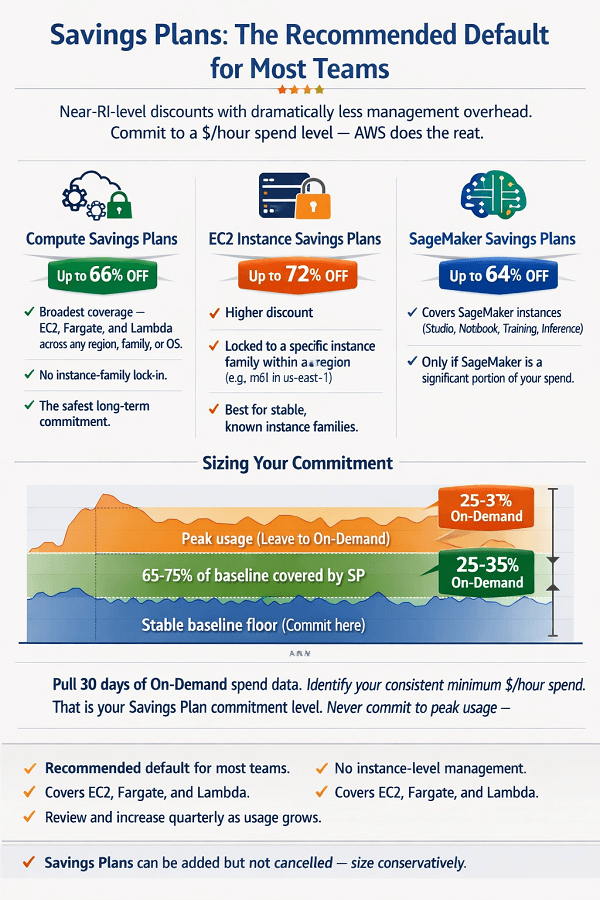
AWS Savings Plans are the most recently introduced commitment model (2019) and have become the recommended default for compute commitments at most startups and SMBs. The reason: they offer near-RI-level discounts with dramatically less management overhead.
Instead of committing to specific instance configurations, you commit to a minimum $/hour spend level. AWS automatically applies the Savings Plan discount to the most expensive eligible usage in your account, no instance-level matching required.
Compute Savings Plans vs. EC2 Instance Savings Plans
| Savings Plan Type | What It Covers & When to Choose It |
| Compute Savings Plans | Broadest coverage - applies to any EC2 instance (any region, family, size, OS), plus AWS Fargate and AWS Lambda. Maximum discount: up to 66% off On-Demand. Best for: most teams. The flexibility to switch instance families, regions, or move workloads to Fargate or Lambda makes this the safest long-term commitment. |
| EC2 Instance Savings Plans | Higher discount - up to 72% off On-Demand but locked to a specific instance family within a region (e.g. m6i in us-east-1). Flexibility within that family: can change size (m6i.large → m6i.4xlarge), OS, and tenancy. Best for: workloads with known, stable instance families where the additional 6% discount over Compute SPs justifies the family commitment. |
| SageMaker Savings Plans | Covers SageMaker instances (Studio, Notebook, Training, Inference). Up to 64% discount. Only relevant if SageMaker is a significant portion of your AWS spend. |
How to size a Savings Plan correctly
This is where most teams make their most expensive Savings Plan mistake: committing too aggressively based on peak usage rather than stable baseline usage.
- Pull 30 days of On-Demand spend data from Cost Explorer, filtered to EC2, Fargate, and Lambda usage only
- Identify your consistent minimum $/hour spend across that period, the floor of your usage, not the average or peak
- That floor is your Savings Plan commitment level, the amount you are confident you will spend every hour for the next 1 or 3 years
- Leave peaks, growth, and variable loads to be covered by On-Demand (which the Savings Plan automatically supplements)
- Target coverage of 65–75% of stable baseline; keep 25–35% On-Demand for flexibility and growth
- Review and potentially increase commitment every quarter as usage grows, Savings Plans can be added but not cancelled
7. The Optimal Purchasing Stack: Using All Three Together
The question in the article title 'which saves more?', has a better answer than picking one: use all three in a structured stack, each covering the workloads it is best suited for.
EaseCloud applies this layered approach in every cost optimization engagement. Here is the model:
| Purchasing Layer | What It Covers | Guidance |
| Layer 1: Compute Savings Plans | 65–75% of stable compute baseline | The foundation. Cover your consistent EC2, Fargate, and Lambda spend. Broadest coverage, least management. Purchase after 4+ weeks of stable production data. Review quarterly. |
| Layer 2: EC2 Instance Savings Plans | Additional coverage for stable, known families | Stack on top of Compute SPs for instance families you are confident will not change. Captures an additional 6% discount on those workloads. |
| Layer 3: RDS Reserved Instances | All stable database instances | Savings Plans don't cover RDS, so commit RIs for every RDS and Aurora instance running stable production workloads. 40–69% savings. Often the most overlooked layer. |
| Layer 4: Spot Instances | All interruption-tolerant workloads | CI/CD runners, batch jobs, ML training, dev/test. No commitment. 70–90% savings on these workloads. Sized to the actual batch/pipeline load, not a fixed commitment. |
| Layer 5: On-Demand | 25–35% of compute + all new workloads | The safety valve. Covers peaks, growth, experiments, and new workloads until enough data exists to commit. Never buy Savings Plans or RIs against workloads running less than 4 weeks. |
8. Workload-by-Workload Decision Guide
Apply this guide to each workload in your AWS account to determine the right purchasing model:
| Your Situation | Recommended Purchasing Model |
|---|---|
| Production EC2 fleet, running 24/7, stable instance family for 3+ months | EC2 Instance Savings Plan (1-year) + Compute Savings Plan top-up |
| Production EC2 fleet, expect to change instance family in next 12 months | Compute Savings Plans only preserve family flexibility |
| RDS / Aurora production database, running continuously | RDS Standard Reserved Instance (1-year, Partial-Upfront) |
| AWS Lambda functions variable, event-driven traffic | Compute Savings Plans (Lambda is covered; no Lambda-specific RI) |
| ECS Fargate services, variable traffic | Compute Savings Plans (Fargate is covered under Compute SPs) |
| CI/CD build runners, batch jobs, ML training | Spot Instances only, no commitment needed, up to 90% savings |
| Dev and test EC2 environments used during business hours only | Spot Instances + scheduled scaling to zero off-hours |
| New workload running less than 4 weeks | On-Demand only, not enough data to commit safely |
| ElastiCache (Redis/Memcached) production cluster | ElastiCache Reserved Nodes (Standard, 1-year), Savings Plans don't cover |
| Amazon Redshift data warehouse, stable cluster | Redshift Reserved Nodes (1-year), Savings Plans don't cover |
| OpenSearch Service cluster, production | OpenSearch Reserved Instances (1-year), Savings Plans don't cover |
14 workload scenarios, one decision guide. Still not sure which model fits your specific workload? We'll run the numbers.
Production EC2 fleet stable for 3+ months? EC2 Instance Savings Plan. Expecting to change instance families? Compute Savings Plans only. RDS production database? RDS Standard RI. CI/CD runners? Spot only. New workload less than 4 weeks old? On-Demand only – wait for data.
We help you:
- Apply the decision guide to every workload in your account – One size doesn't fit all
- Identify your single biggest missed savings opportunity – Often RDS RIs
- Prioritize commitments by ROI – Capture the biggest savings first
- Avoid lock-in – Build flexibility into your commitment strategy
9. The Most Expensive Purchasing Mistakes
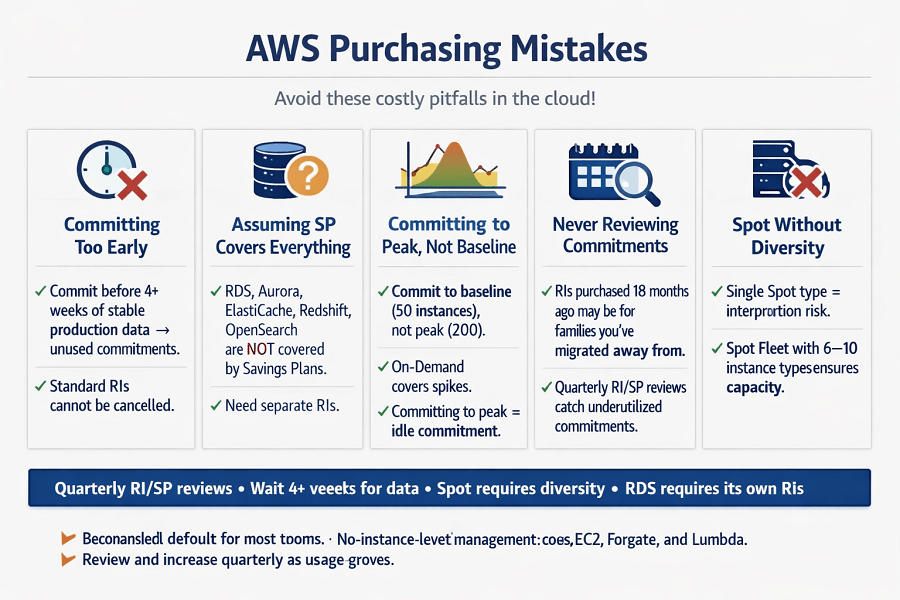
- Committing before establishing a usage baseline. Standard RIs cannot be cancelled and have limited resale value. Committing too early, before production usage patterns are stable, results in unused commitments. Wait 4+ weeks of stable production data.
- Assuming Savings Plans cover everything. RDS, Aurora, ElastiCache, Redshift, and OpenSearch are NOT covered by Savings Plans. These services require their own Reserved Instance commitments. The gap is common and expensive.
- Committing to peak usage rather than stable baseline. If your baseline is 50 instances and you spike to 200 on campaign days, commit to 50. The spike is covered by On-Demand automatically. Committing to 200 means paying for 150 instances of idle commitment on non-spike days.
- Never reviewing existing commitments. RIs purchased 18 months ago may be for instance families you've since migrated away from. Quarterly RI/SP reviews catch underutilized commitments before they become sunk costs. Unused Standard RIs can be listed on the Marketplace.
- Running Spot without instance diversity. Specifying a single Spot instance type means interruption when that type's capacity is exhausted. Spot Fleet with 6–10 diverse instance types maintains capacity even when individual types are interrupted.
- Using Spot for stateful production workloads. Customer-facing applications with session state, database connections, or in-memory caches do not tolerate 2-minute interruptions gracefully. Spot for production is appropriate only for stateless, highly available services with proper instance diversification.
Conclusion
There is no single "best" AWS purchasing model – each is optimized for different workload patterns. Savings Plans are the recommended default for compute commitments due to their flexibility and low management overhead. Reserved Instances deliver the highest discounts but require instance-family lock-in, making them ideal for stable databases and legacy workloads.
Spot Instances provide the deepest savings for interruption-tolerant jobs but require workload design for resilience. The optimal approach for most AWS accounts is a layered stack: Compute Savings Plans for the stable baseline, RDS Reserved Instances for databases, Spot for batch and CI/CD, and On-Demand as a 25-35% safety buffer for peaks and growth.
The single most common missed savings opportunity is assuming Savings Plans cover databases – they do not. RDS RIs on stable database workloads deliver 40-69% savings with no code changes. The foundation of effective commitment purchasing is data: wait 4+ weeks of stable production usage before committing to any model.
Frequently Asked Questions
Can I cancel a Reserved Instance if I don't need it anymore?
Standard RIs cannot be cancelled. However, they can be sold on the AWS Reserved Instance Marketplace, typically at 50–90% of remaining value. Convertible RIs cannot be sold or cancelled but can be exchanged for a different RI configuration of equal or greater value. Savings Plans cannot be cancelled or sold.
What happens if my Savings Plan commitment exceeds my actual usage?
You still pay the committed $/hour amount even if your actual compute usage falls below it. This is the risk of over-committing. The unused commitment is pure waste, which is why committing only 65–75% of stable baseline (rather than 100%) and leaving a buffer is essential. If you over-commit, the lesson is to wait for more usage data before the next purchase.
Do Savings Plans automatically apply, or do I need to configure them?
Savings Plans apply automatically. Once purchased, AWS applies the discount to the most expensive eligible On-Demand usage in your account, no instance-level configuration required. You see the savings reflected in your Cost Explorer as 'Savings Plans covered usage' vs. 'On-Demand usage.' Nothing to configure after purchase.
Should I buy 1-year or 3-year commitments?
For most startups and SMBs, 1-year commitments are the right default. The additional discount on 3-year terms (roughly 10–15% more than 1-year) is attractive but comes with real risk: your usage patterns, instance preferences, and business needs over 3 years are genuinely uncertain. Start with 1-year, establish the pattern, then evaluate 3-year at renewal if the workload is demonstrably stable.
How do I know how much of my bill is currently On-Demand vs. committed?
AWS Cost Explorer shows this directly. Navigate to Cost Explorer → Coverage reports → Savings Plans coverage or Reserved Instance coverage. These reports show what percentage of your eligible usage is covered by commitments, and what percentage is still running On-Demand, the uncovered On-Demand is your savings opportunity.
Get a Free AWS Cost Analysis from EaseCloud
EaseCloud's cost optimization team analyzes your actual AWS usage data and identifies exactly how much you can save through the right mix of Reserved Instances, Savings Plans, and Spot Instances, with specific commitment recommendations before any engagement begins.
Most clients discover $3,000–$25,000/month in recoverable savings from purchasing model optimization alone before touching instance types, storage, or data transfer.
Summarize this post with:
