AWS Cloud Migration: The Zero-Downtime Playbook for Growing Businesses
How to plan, execute, and optimize an AWS cloud migration without a single minute of customer-facing downtime, covering every phase from discovery to post-migration tuning.
- What this guide covers: The complete AWS cloud migration process from discovery audit through post-migration optimization.
- Who it's for: Startups and SMBs on on-premises infrastructure, Azure, GCP, or legacy hosting that are evaluating or planning a move to AWS.
- Bottom line: A well-planned AWS migration eliminates downtime risk, cuts infrastructure costs, and sets up a modern, scalable foundation but only if executed with the right methodology.
Why Most AWS Migrations Go Wrong and How to Avoid It
Most cloud migration failures are not technical failures. The AWS tooling is mature, well-documented, and reliable. What breaks migrations is inadequate discovery, unclear rollback plans, and treating the migration as a pure infrastructure task rather than a business continuity event.
EaseCloud has completed over 100 migrations from simple five-server lift-and-shifts to multi-region, database-heavy refactors. The difference between a clean migration and a painful one is always methodology: how thoroughly you understand what you have before you start moving it.
This guide is the playbook we use internally. Every phase, every decision checkpoint, every risk mitigation technique. Whether you are running the migration yourself or evaluating a consulting partner, this document tells you exactly what a zero-downtime AWS migration looks like.
1. What Is AWS Cloud Migration? Beyond the Basic Definition
AWS cloud migration is the process of moving your organization's data, applications, workloads, and IT infrastructure to Amazon Web Services from wherever they currently live on-premises data centers, colocation facilities, other cloud providers (Azure, GCP), or legacy hosting.
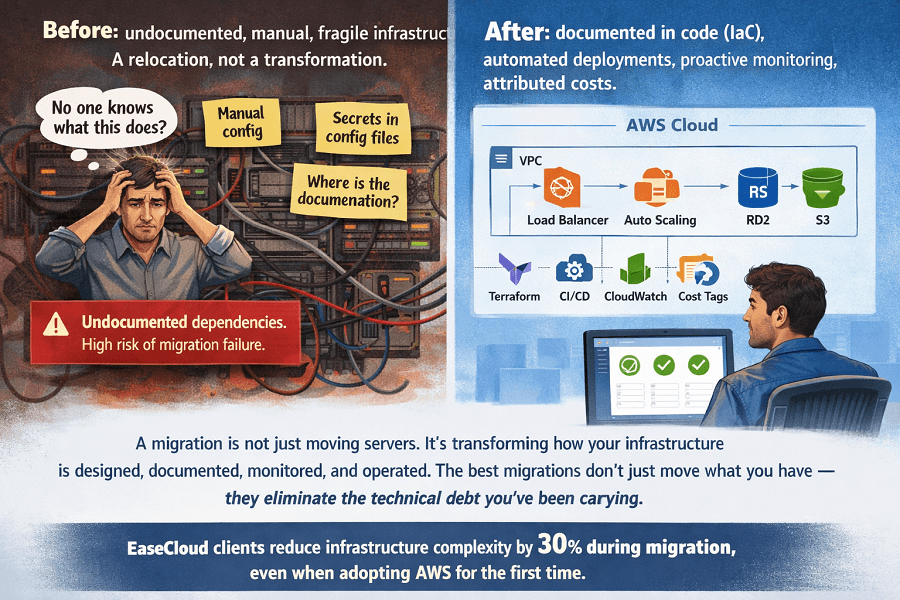
That definition is accurate but incomplete. A migration is not just a technical relocation. It is a transformation of how your infrastructure is designed, documented, monitored, and operated. Done right, you end the migration with a better system than you started with, not just the same system running somewhere else.
What changes after a well-executed migration
- Your infrastructure is documented in code (Terraform/CloudFormation) rather than in someone's memory
- Deployments are automated via CI/CD pipelines instead of manual steps
- Costs are visible, attributed, and governed rather than a monthly surprise
- Monitoring is centralized and proactive rather than reactive and fragmented
- Your team can modify, replicate, and roll back infrastructure in minutes rather than days
On-premises to AWS vs. Cloud-to-cloud migration
These are meaningfully different challenges. On-premises migrations involve physical decommissioning, network topology changes, and often discovering undocumented dependencies that have built up over years. Cloud-to-cloud migrations (Azure to AWS, GCP to AWS) are often cleaner on the dependency side but require careful service mapping, the equivalent service in AWS may have different configuration, pricing, or behavior.
| Migration Type | Key Characteristics & Considerations |
| On-premises to AWS | More discovery work (undocumented dependencies common). Physical asset decommissioning. Network reconfiguration. Often the most impactful: largest cost savings, biggest architecture improvement. |
| Azure to AWS | Clearer dependency map. Service equivalents well-documented. Watch for: Azure AD → AWS IAM differences, Azure Blob → S3 nuances, data egress costs during transfer. |
| GCP to AWS | Similar to Azure. Service mapping is critical. GCP networking model (VPC design) differs from AWS. Kubernetes workloads (GKE → EKS) are usually the smoothest migration path. |
| Legacy hosting to AWS | Often the most undocumented environments. High discovery value. Shared hosting environments may have hidden dependencies. Timeline usually extends at discovery. |
2. The Migration Strategies: 7 Rs Explained with Real Decision Criteria
Amazon defines seven migration strategies popularly called the '7 Rs.' Each represents a different approach to moving a workload, with different effort, cost, risk, and outcome. Choosing the right R for each workload is the most important decision in migration planning.
Most migration projects use multiple strategies simultaneously, different workloads get different treatments based on their characteristics.
| Strategy | Common Name | Decision Guide |
| Rehost | Lift-and-Shift | Move the workload to AWS as-is without code changes. Fastest, lowest risk. Best for: stable apps with no immediate optimization need, tight timelines, or large workload counts. Limitation: you inherit the architectural debt. |
| Replatform | Lift-Tinker-Shift | Move with minor optimizations, e.g. move database from MySQL on EC2 to Amazon RDS. Low-to-medium effort, meaningful reliability and cost gain. Best for: apps where a managed service replaces an ops burden. |
| Repurchase | Drop-and-Shop | Replace with a SaaS product entirely, e.g. replace self-hosted CRM with Salesforce. Good when a SaaS alternative solves the problem better. Requires data migration and process change. |
| Refactor | Re-architect | Redesign the application to be cloud-native, microservices, serverless, containers. Highest effort, highest long-term value. Best for: monoliths limiting growth, scaling problems, developer velocity blockers. |
| Relocate | Hypervisor-level Move | Move VMware virtual machines to AWS using VMware Cloud on AWS. Fastest possible migration for VMware environments. Avoids any OS or application changes. |
| Retire | Eliminate | Identify and decommission workloads that are no longer needed. Discovery often surfaces 10–20% of infrastructure that can simply be turned off. Immediate cost saving. |
| Retain | Keep As-Is | Leave some workloads on-premises intentionally compliance, latency, or cost reasons. Not a failure; a pragmatic choice. Most enterprises retain a small portion of workloads. |
How to choose the right strategy for each workload
The right strategy depends on four factors evaluated per workload:
| Decision Factor | How It Influences Strategy Choice |
| Business criticality | High-criticality workloads (customer-facing, revenue-generating) warrant more conservative strategies (Rehost or Replatform) to minimize risk during migration. Core platform rewrites belong in a separate roadmap. |
| Technical debt level | Workloads with significant technical debt benefit most from Refactor but require more time and budget. Assess honestly whether the refactor will happen soon anyway; if so, doing it during migration saves rework. |
| Dependency complexity | Tightly coupled workloads with many dependencies are higher-risk to refactor. Map dependencies first. If ten services share a database, that database migration deserves its own workstream. |
| Cost optimization upside | Workloads with large compute footprints (and thus large savings opportunity) often justify Replatform to leverage managed services (RDS, ElastiCache) that reduce operational overhead and licensing costs. |
3. Discovery & Assessment: The Phase That Determines Everything
Discovery is the most underinvested phase of cloud migration. It is also the most important. A migration with excellent discovery and average execution outperforms a migration with average discovery and excellent execution every time.
Discovery is where you learn what you actually have, not what your documentation says you have. In every environment we have audited, reality diverges from documentation in ways that would have caused incidents if undiscovered.
What a thorough discovery process produces
- A complete inventory of every server, service, database, and third-party integration in scope
- A dependency map showing which systems communicate with each other and on which ports/protocols
- A current cost baseline - what you are paying now for compute, storage, networking, and licensing
- A risk register - workloads with high complexity, undocumented dependencies, or known fragility
- A compliance inventory - data types processed, regulations that apply, and current control status
- A migration prioritization matrix - which workloads to move first, last, and in what sequence
Discovery tools and techniques
| Tool / Technique | What It Provides |
| AWS Application Discovery Service | Agentless or agent-based discovery of on-premises servers. Collects CPU, memory, network, and disk data. Integrates with AWS Migration Hub for centralized tracking. |
| AWS Migration Evaluator | Provides business case data projected AWS costs vs. current costs, TCO analysis. Essential for justifying migration investment internally. |
| AWS Migration Hub | Central tracking dashboard for migration progress across multiple tools and strategies. Integrates with Migration Service, Database Migration Service, and partner tools. |
| Manual dependency mapping | Network flow analysis, interview-based dependency documentation, and application profiling. Non-negotiable for complex environments where automated tools miss application-layer dependencies. |
| AWS Well-Architected Tool | Structured assessment of current state against the five pillars. Produces findings and recommendations that inform migration design. |
| Third-party: CloudHealth, Apptio | Useful for multi-cloud environments and detailed cost attribution. Provides context before migration for rightsizing recommendations. |
Migration readiness score
Before moving a single workload, EaseCloud scores each environment across six readiness dimensions:
| Dimension | What It Measures |
| Documentation completeness | Score 1–5. Are workloads documented? Architecture diagrams up to date? Runbooks exist? |
| Dependency clarity | Score 1–5. Are all service dependencies mapped? Third-party integrations documented? |
| Team readiness | Score 1–5. Does the team understand AWS fundamentals? Change management plan in place? |
| Rollback plan maturity | Score 1–5. Is there a clear rollback procedure for each workload? Has it been tested? |
| Compliance readiness | Score 1–5. Are data classification, compliance requirements, and security controls identified? |
| Testing coverage | Score 1–5. Is there sufficient automated testing to validate post-migration behavior? |
A score of 4+ across all dimensions before migration begins is the target. Dimensions scoring 2 or below indicate workstreams that need attention before migration starts, not after.
4. Designing the Target AWS Architecture
With discovery complete, the next phase is designing what your AWS environment will look like. This is not a trivial step. The architectural decisions made here will shape your costs, performance, security posture, and operational experience for years.
AWS account structure
The first decision is how to organize your AWS accounts. This is more consequential than it appears.
| Account Model | Tradeoffs & Recommendation |
| Single-account | All workloads in one AWS account. Simple to start. Becomes a liability as the environment grows: blast radius from misconfiguration is high, cost attribution is difficult, and permission boundaries are harder to enforce. Only appropriate for very small environments. |
| Multi-account (recommended) | Separate AWS accounts for production, staging, development, and optionally by team or domain. AWS Organizations provides centralized billing, policy management via SCPs, and cross-account access controls. Recommended for all production workloads beyond initial exploration. |
| Landing Zone | A pre-built multi-account framework with security guardrails, centralized logging, and network topology already configured. AWS Control Tower provides this. Requires upfront investment but eliminates months of configuration work and prevents common governance mistakes. |
Network architecture: VPC design
Every workload on AWS lives inside a Virtual Private Cloud (VPC). VPC design decisions CIDR ranges, subnet layout, connectivity model are very difficult to change after the fact.
- Use non-overlapping CIDR ranges if you will ever connect multiple VPCs or connect to on-premises via Direct Connect or VPN
- Separate public and private subnets: internet-facing resources (load balancers) in public subnets, compute and databases in private subnets
- Deploy across at least two Availability Zones for all production workloads single-AZ architectures are not production-grade
- Use VPC endpoints for AWS service access to avoid data leaving your private network and incurring egress charges
- Plan for VPC peering or Transit Gateway from the start if you anticipate multi-VPC or multi-account architectures
Compute selection
| Compute Service | Guidance | |
| EC2 instances | Best for... | Workloads requiring specific OS configuration, sustained compute, or applications that do not containerize easily. Broad instance family choice (compute, memory, storage, GPU). |
| ECS (containers) | Best for... | Containerized workloads where you want AWS-managed orchestration without Kubernetes complexity. Fargate launch type eliminates server management. |
| EKS (Kubernetes) | Best for... | Teams already using Kubernetes who need portability and ecosystem (Helm charts, operators). More operational overhead than ECS; appropriate when Kubernetes expertise exists. |
| Lambda (serverless) | Best for... | Event-driven, stateless workloads: API backends with variable traffic, data processing pipelines, scheduled jobs. No idle cost; scales to zero. Not suitable for long-running or stateful processes. |
| AWS Fargate | Best for... | Running containers without managing EC2 instances. Works with both ECS and EKS. Higher per-unit cost than EC2 but eliminates patching, capacity management, and node scaling complexity. |
Database migration strategy
Database migrations are the highest-risk component of any cloud migration. Data integrity is non-negotiable. Get this wrong and you may not know it for days.
- Use AWS Database Migration Service (DMS) for homogeneous migrations (MySQL to RDS MySQL, PostgreSQL to Aurora PostgreSQL)
- Use AWS Schema Conversion Tool (SCT) for heterogeneous migrations (Oracle to Aurora PostgreSQL, SQL Server to RDS)
- Always validate row counts, checksums, and sample data comparisons after migration, never assume DMS got it right
- Run source and target in parallel for a validation period before cutting over
- For large databases (1TB+), consider AWS Snowball Edge for physical data transfer to avoid weeks of network transfer
- Cache layers (ElastiCache) should be warmed up before cutover to avoid post-migration cold cache performance degradation
5. The EaseCloud Zero-Downtime Migration Playbook
This is the exact process EaseCloud uses across all 100+ migrations. It is not theoretical, it is the methodology that has produced zero customer-facing downtime incidents across a decade of migrations.
| Step & Time | Actions |
|---|---|
| 1 Discovery & Baseline Weeks 1–2 |
- Deploy AWS Application Discovery Service agents (or agentless collectors) in all target environments - Run automated dependency mapping across all servers and services - Conduct structured interviews with team members about undocumented systems - Audit AWS costs vs. current infrastructure spend, build the migration business case - Produce Migration Readiness Score across all six dimensions - Deliver: full inventory, dependency map, risk register, migration readiness report |
| 2 Target Architecture Design Weeks 2–3 |
- Design AWS account structure and Landing Zone configuration - Design VPC architecture: subnets, AZ layout, routing, security groups - Select compute, database, and storage services per workload using decision framework - Design disaster recovery and backup architecture - Produce infrastructure-as-code templates (Terraform) for entire target state - Cost model the target state, projected AWS spend vs. current spend - Deliver: target architecture document, IaC templates, cost projection, DR plan |
| 3 Proof of Concept & Validation Weeks 3–4 |
- Stand up the target AWS environment using IaC templates - Migrate the lowest-risk, least-critical workload first as a proof of concept - Run full application testing in the AWS environment: functional, load, performance - Identify and resolve configuration issues before they affect production workloads - Establish performance baselines in the AWS environment for comparison post-migration - Brief and train the team on the new environment and operational procedures - Deliver: validated AWS environment, performance baselines, team readiness confirmation |
| 4 Phased Migration Execution Weeks 4–N |
- Migrate workloads in priority order: lowest-risk first, highest-risk last - For each workload: pre-migration checklist → migration execution → validation → sign-off - Run parallel environments (old + new) until each workload is validated and signed off - Execute database migrations using DMS with parallel validation period - Schedule customer-impacting cutovers during lowest-traffic windows (typically 2–5am) - Maintain real-time communication channel with client team throughout all migration windows - Deliver: workload migration status dashboard, daily progress reports |
| 5 Cutover & DNS Management Migration Day |
- Complete all pre-cutover validation checklists, no cutover without 100% sign-off - Use weighted DNS (Route 53) to shift traffic gradually: 10% → 50% → 100% - Monitor error rates, latency, and application metrics at each traffic level - Keep old environment live with instant failback capability for 48–72 hours post-cutover - Execute final data sync immediately before DNS switch to minimize data delta - Document all actions with timestamps for post-migration audit and runbook |
| 6 Post-Migration Optimization Weeks 1–4 (Post-Migration) |
- Rightsize all instances based on actual CloudWatch utilization data (not estimates) - Implement Reserved Instance or Savings Plan commitments after observing actual usage patterns - Tune auto-scaling policies based on real traffic patterns in the AWS environment - Optimize database configurations (parameter groups, read replicas, connection pooling) - Implement cost allocation tags and set up budget alerts by team/project - Decommission old environment only after 30-day validation period with no issues - Deliver: final migration report, optimized cost baseline, post-migration runbook |
6. AWS Migration Timelines and Cost Estimates (2026)
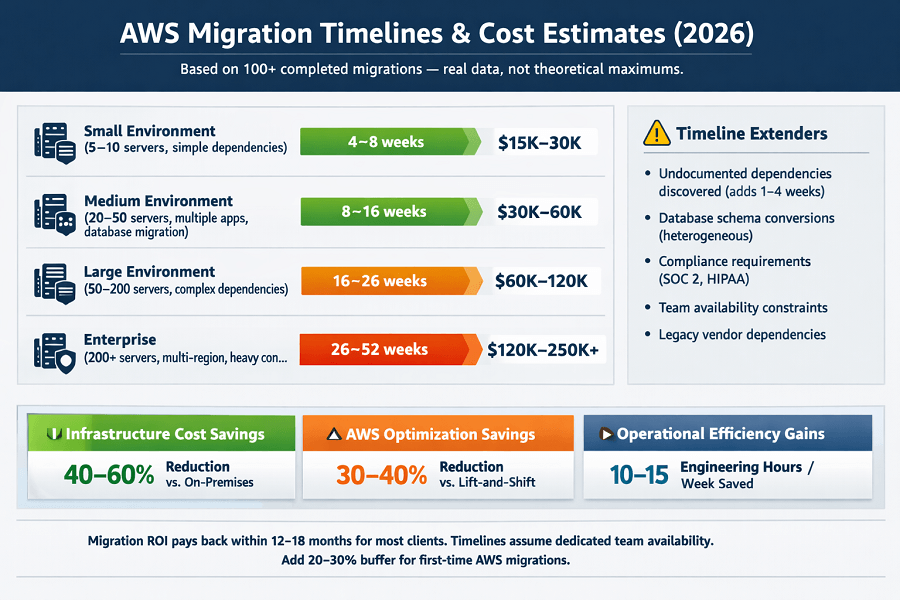
One of the most common questions before a migration engagement: how long will it take, and how much will it cost? The honest answer is 'it depends on your environment' but these ranges from our 100+ completed migrations give you a realistic benchmark.
Migration timeline by environment complexity
What extends timelines
- Undocumented dependencies discovered during discovery (adds 1–4 weeks)
- Database schema conversions (heterogeneous migrations: SQL Server → PostgreSQL etc.)
- Compliance requirements (SOC 2, HIPAA) that require additional controls before cutover
- Team availability constraints migrations stall when client teams cannot dedicate review time
- Legacy software with vendor dependencies that require renegotiation or re-licensing
Migration investment ranges (2026)
| Engagement Scope | Typical Investment Range |
| Small environment (5–10 servers) | $15,000 – $30,000 |
| Medium complexity (20–50 servers) | $30,000 – $60,000 |
| Large/complex environment | $60,000 – $120,000 |
| Enterprise (multi-region, heavy compliance) | $120,000 – $250,000+ |
| Database-only migration | $10,000 – $25,000 (standalone) |
| Lift-and-shift with no refactoring | Lower end of range |
| Migration + DevOps pipeline build | Add $20,000 – $40,000 |
ROI calculation framework
Migration ROI comes from three categories:
| ROI Category | What Drives It |
| Infrastructure cost savings | Eliminating unused on-premises hardware and colocation costs. Average: 40–60% total infrastructure cost reduction when moving from owned hardware. |
| AWS optimization savings | 30–40% reduction in AWS spend from rightsizing, reserved instances, and eliminating waste vs. a naive lift-and-shift. |
| Operational efficiency gains | Reduced time spent on infrastructure management. DevOps automation typically saves 10–15 engineering hours per week. |
7. Zero-Downtime Migration: The Technical Techniques
Zero-downtime migration is not magic, it is a set of specific technical patterns applied consistently. Here are the techniques EaseCloud applies across all migration projects.
7.1 Weighted DNS routing
AWS Route 53 supports weighted record sets that distribute traffic between multiple endpoints at a configurable ratio. During migration, this enables gradual traffic shifting:
- Phase 1: 100% traffic to old environment, 0% to new (monitoring in parallel)
- Phase 2: 10% to new environment - validate error rates and latency
- Phase 3: 50%/50% - extended validation with real production load
- Phase 4: 100% to new environment - monitor for 48 hours before decommissioning old
DNS TTL must be reduced to 60 seconds or less 48 hours before cutover to enable rapid rollback if needed.
7.2 Blue-green deployment
Blue-green keeps a complete copy of the old environment ('blue') running while the new environment ('green') handles traffic. Rollback is immediate, switch DNS back. The cost of running two environments simultaneously is the trade-off; for most migrations, this is justified by the safety.
7.3 Strangler fig pattern (for application modernization)
For monolith-to-microservices migrations, the strangler fig pattern replaces the application incrementally. New functionality is built as standalone AWS services behind a routing layer (API Gateway or an application load balancer rule). Old functionality continues serving until each piece is replaced. No big-bang cutover; continuous small migrations over weeks or months.
7.4 Database replication for zero-downtime cutover
Database migration is usually the hardest part of a zero-downtime migration. The technique:
- Set up continuous replication from source database to target (DMS CDC mode)
- Let replication run until the databases are fully synchronized
- During cutover window, put source database in read-only mode
- Allow final replication batch to complete (minutes, not hours if well-planned)
- Switch application connection strings to target database
- Verify data integrity in target
- Open target database to writes
Total application write downtime: the window between step 3 and step 6 typically 2–10 minutes, scheduled at 3am.
7.5 Feature flags for application cutover
For applications being refactored, feature flags allow specific functionality to be routed to new AWS services without changing the application's external behavior. Old and new code paths coexist; the flag determines which executes. This eliminates big-bang application cutovers entirely.
Strangler fig pattern: replace monoliths incrementally, zero downtime. New functionality as microservices. Old functionality replaced piece by piece.
No big-bang cutover. Continuous small migrations over weeks or months. Each piece replaced independently. Risk eliminated. Business never stops.
We help you:
- Apply strangler fig to monoliths – Incremental replacement, zero downtime
- Build new functionality as microservices – Independently deployable, containerized
- Route traffic with API Gateway or ALB rules – Old and new coexist during transition
- Retire old system incrementally – Only when each piece is fully replaced and validated
8. Migrating from Azure or GCP to AWS: Service Mapping & Data Transfer
Cloud-to-cloud migrations require careful service equivalence mapping. The concepts are the same but the implementations differ sometimes subtly, sometimes significantly. Here is the core service mapping between the three major clouds.
Service equivalence map: Azure → AWS
| Azure Service | AWS Equivalent |
| Azure Virtual Machines | Amazon EC2 |
| Azure Blob Storage | Amazon S3 |
| Azure SQL Database | Amazon RDS (SQL Server) or Aurora |
| Azure Cosmos DB | Amazon DynamoDB (similar paradigm; API differences) |
| Azure Active Directory | AWS IAM Identity Center + AWS IAM |
| Azure Kubernetes Service | Amazon EKS |
| Azure Functions | AWS Lambda |
| Azure DevOps Pipelines | AWS CodePipeline or GitHub Actions |
| Azure Monitor | Amazon CloudWatch |
| Azure Key Vault | AWS Secrets Manager + AWS KMS |
| Azure CDN | Amazon CloudFront |
| Azure Load Balancer | AWS Application Load Balancer (ALB) |
Service equivalence map: GCP → AWS
| GCP Service | AWS Equivalent |
| Google Compute Engine | Amazon EC2 |
| Google Cloud Storage | Amazon S3 |
| Cloud SQL | Amazon RDS |
| BigQuery | Amazon Redshift + Athena |
| Google Kubernetes Engine (GKE) | Amazon EKS (smoothest Kubernetes migration) |
| Cloud Functions | AWS Lambda |
| Cloud Pub/Sub | Amazon SQS + SNS |
| Cloud IAM | AWS IAM |
| Stackdriver / Cloud Monitoring | Amazon CloudWatch |
| Cloud CDN | Amazon CloudFront |
| Cloud Load Balancing | AWS Application Load Balancer |
Data transfer cost planning
Data transfer costs are often the most underestimated element of cloud-to-cloud migration planning.
Egress from GCP: ~$0.08–0.12/GB depending on destination. Similar ballpark.
AWS S3 ingress: free. You pay to get data out of the source cloud, not into AWS.
Mitigation: For large datasets (10TB+), AWS Snowball Edge eliminates egress costs by physically shipping the data. Data leaves the source environment without network egress charges.
9. The Most Expensive AWS Migration Mistakes
These are the mistakes EaseCloud sees repeatedly when inheriting migrations that went wrong at other firms or that clients attempted themselves.
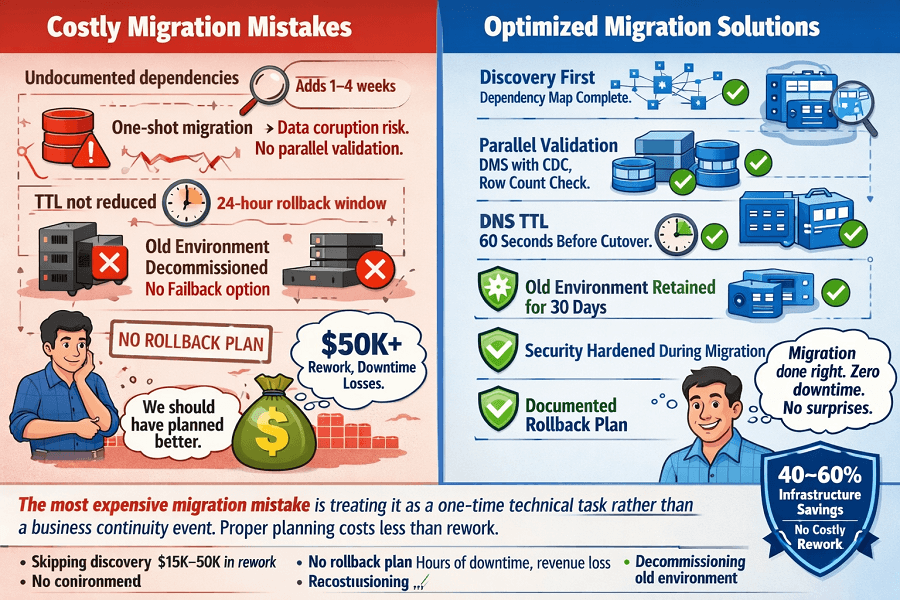
- Skipping discovery and going straight to migration. Discovery feels slow and unglamorous. Moving things feels like progress. But undiscovered dependencies cause outages, and outages during migration erode trust permanently. Never start moving workloads before the dependency map is complete.
- Treating migration as a cloning exercise. Lift-and-shift of an over-provisioned, poorly structured environment produces an over-provisioned, poorly structured AWS environment that costs more than it should. Use migration as the forcing function to eliminate waste and apply best practices.
- One-shot database migration with no parallel validation. Moving a database without a parallel validation period is gambling with your data. DMS is reliable but not infallible. Run source and target in parallel. Compare row counts and checksums. Only cut over when validation passes.
- Underestimating DNS TTL management. Failing to reduce DNS TTLs before cutover day means rollback takes hours instead of minutes because resolvers have cached the old DNS record. Set TTL to 60 seconds at least 48 hours before any planned cutover.
- No rollback plan. Every workload migration should have a documented, tested rollback procedure. Not a conceptual rollback, a specific, step-by-step procedure that has been rehearsed. The question is not whether you will need it, but whether you will be prepared when you do.
- Decommissioning the old environment immediately after cutover. Keep the old environment running for at least 30 days post-migration. Storage is cheap. The peace of mind is invaluable. Decommission only after you have confirmed no issues and no remaining dependencies on the old system.
- Ignoring security hardening during migration. Migration is the best time to implement security controls, because you are touching everything anyway. Security retrofitted post-migration costs 5–10× more in time and disruption than security built in from the start.
10. Post-Migration Optimization: Making It Great
A completed migration is a foundation, not a finish line. The first 30–60 days post-migration are when the most impactful optimization work happens, because you now have real production data on actual usage patterns.
Cost optimization immediately post-migration
- Rightsize all instances based on 2–4 weeks of actual CloudWatch utilization data, never on pre-migration estimates
- Identify and terminate instances that were over-provisioned for the migration itself and are now idle
- Implement Reserved Instances or Savings Plans after 4 weeks of stable production data
- Set up cost allocation tags on all resources so spend is attributable to teams and projects
- Configure AWS Budgets alerts at 80% and 100% of expected monthly spend
Performance tuning post-migration
- Database query performance - always degrades in the first weeks as query plan caches are rebuilt
- Cache hit rate monitoring - ElastiCache/Redis needs warming time post-migration
- Auto-scaling policy calibration based on actual traffic patterns
- CDN cache behavior optimization with real geographic traffic distribution data
Security hardening post-migration
- Run AWS Trusted Advisor security checks and resolve all flagged items
- Audit all security groups - remove any 0.0.0.0/0 ingress rules that were added for convenience during migration
- Enable AWS GuardDuty if not already active intelligent threat detection with no configuration required
- Review IAM policies and remove any overly permissive roles created during migration
- Enable S3 Block Public Access at the account level
Documentation handover
This is where EaseCloud differentiates itself. Every migration ends with:
- Complete infrastructure-as-code (Terraform) for all resources, the actual code, not a diagram
- Architecture decision records explaining why each design choice was made
- Operational runbooks covering: deployment, rollback, incident response, scaling events
- Access documentation: how to access what, with which credentials, stored where
- Team knowledge transfer sessions, not a handover document dropped in a Slack channel
AWS Migration Pre-Flight Checklist
Use this before any migration execution begins. Every item should be checked before the first production workload moves.
Discovery & Planning
- Full server and service inventory complete
- Dependency map documented and reviewed by team
- Migration Readiness Score assessed (target: 4+ across all dimensions)
- Target AWS architecture designed and reviewed
- IaC templates written and tested in non-production environment
- Cost projection completed and approved
Technical Preparation
- AWS account structure created (multi-account recommended)
- VPC, subnets, and security groups configured via IaC
- IAM roles and policies created with least-privilege principles
- Target databases provisioned and replication started (DMS configured)
- Monitoring and alerting configured (CloudWatch dashboards, alarms)
- Backup procedures tested end-to-end
Migration Day Readiness
- DNS TTLs reduced to 60 seconds (done 48 hours before cutover)
- Rollback procedure documented, reviewed, and rehearsed
- Cutover window confirmed: lowest-traffic period, team available
- Communication plan in place (who notifies whom, status channels)
- Old environment confirmed stable and backed up
- Data integrity baseline established for comparison post-migration
Post-Migration Validation
- Application functional testing complete (all critical user flows tested)
- Performance baselines met or exceeded
- No error rate elevation vs. pre-migration baseline
- All data integrity checks passed
- Security group audit complete, no unnecessary open rules
- Cost monitoring active with budget alerts configured
- Old environment maintained (not decommissioned) for 30 days
Conclusion
AWS cloud migration done right is not a technical relocation, it is a transformation of how your infrastructure is designed, documented, and operated.
The methodology that works across 100+ migrations is consistent: thorough discovery first (undocumented dependencies are the #1 failure cause), target architecture design with IaC from day one, phased migration execution (lowest-risk workloads first), zero-downtime techniques (weighted DNS, blue-green, DMS replication), and a dedicated post-migration optimization window (rightsizing, security hardening, cost governance).
Migrations attempted without this discipline carry unnecessary risk. Migrations executed with it eliminate downtime, cut infrastructure costs by 40-60%, and leave you with a modern, documented, scalable AWS environment.
AWS Migration FAQ
Can you really guarantee zero downtime?
For customer-facing applications, yes. The techniques weighted DNS routing, blue-green deployments, database replication with parallel validation, reliably achieve zero customer-facing downtime when executed correctly. There may be a brief application write window (2–10 minutes) during database cutover, scheduled at 3am. EaseCloud has maintained this record across 100+ migrations.
What if we discover more complexity during migration than expected?
This is common. Discovery reduces surprises but doesn't eliminate them. When complexity emerges during execution, the correct response is to pause, assess, and plan, not to push through. EaseCloud builds contingency time into all migration timelines and maintains rollback capability at every phase. Transparency with the client throughout is non-negotiable.
How do we handle regulatory compliance during migration?
Compliance requirements are identified during discovery and incorporated into the target architecture design. For SOC 2, HIPAA, or GDPR, the migration is designed to achieve compliance in the target environment, not just replicate the current state. This means encryption at rest and in transit, IAM controls, logging, and audit trails are built in from the start.
What happens to our on-premises infrastructure after migration?
It depends on what you own vs. lease. For owned hardware, decommissioning after the 30-day validation period is straightforward. For colocation or hosting contracts, migrations are planned around contract end dates where possible to avoid paying for both environments longer than necessary. EaseCloud coordinates decommissioning timing as part of migration planning.
Should we refactor during migration or after?
For most businesses, the answer is 'some during, more after.' Critical paths (customer-facing applications, revenue-generating services) get the most conservative migration strategy (Rehost or Replatform) to minimize risk. Legacy systems identified as candidates for refactoring get Refactored during migration if the timeline allows and the business case supports it. Everything else migrates first, then a refactoring roadmap is built post-migration.
How do you handle SaaS applications embedded in our infrastructure?
SaaS applications themselves are not migrated, they run in the vendor's environment. What changes is the integration: connection strings, API endpoints, network routing, and credential management. These integrations are mapped during discovery and updated as part of the migration. Credential rotation post-migration is a required step.
Planning an AWS Migration? Start With a Free Assessment
EaseCloud's migration team has completed 100+ migrations without a single customer-facing downtime incident. The first step is a free consultation: we review your current environment, assess complexity, and give you an honest scope, timeline, and investment range, before any commitment.
Summarize this post with:
