ECS vs. EKS: Which Container Service Should Your Startup Choose?
A definitive 2026 comparison of Amazon ECS and Amazon EKS, operational complexity, cost, Fargate compatibility, auto-scaling, ecosystem, and the scenario-by-scenario decision guide for startups and SMBs moving to containers on AWS.
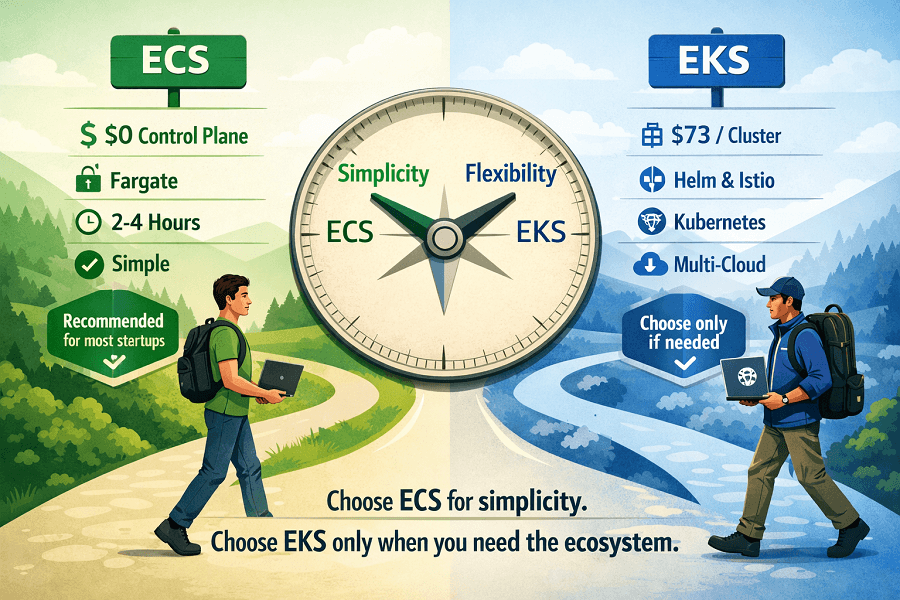
- The short answer: For most startups and SMBs, choose ECS. It is simpler to operate, costs less, deploys faster, and handles the vast majority of container workloads without Kubernetes complexity.
- When EKS is right: If your team has existing Kubernetes expertise, you need specific Kubernetes-ecosystem tooling (Helm operators, Istio, KEDA), or multi-cloud portability is a hard requirement - EKS is the correct choice.
- The most common mistake: choosing EKS because it 'sounds more serious' or 'scales better' - neither is true in practice at startup and SMB scale. The platform choice should follow your team's skills and your actual workload requirements.
What Are ECS and EKS? A Clear Starting Point
Both Amazon ECS (Elastic Container Service) and Amazon EKS (Elastic Kubernetes Service) are AWS container orchestration platforms. They solve the same fundamental problem: running and managing Docker containers at scale on AWS infrastructure.
The difference is the orchestration layer beneath your containers.
ECS is AWS's own proprietary orchestration platform, designed specifically for AWS. It is deeply integrated with every AWS service,IAM, ALB, CloudWatch, CloudMap, AWS Secrets Manager, and exposes that integration through a relatively simple, opinionated API. You describe what you want to run; ECS handles the placement, scheduling, and lifecycle.
EKS is AWS's managed Kubernetes service. Kubernetes is the open-source container orchestration system originally developed at Google and now the CNCF standard. EKS runs a managed Kubernetes control plane on AWS infrastructure, while you manage worker nodes (or use Fargate). The ecosystem of Kubernetes tooling, Helm, operators, service meshes, custom controllers is available in full.
Amazon ECS: What It Is and How It Works
ECS organizes containers into Tasks (the running unit, one or more containers) and Services (the desired-state manager that ensures a specified number of Tasks are always running). You define Tasks in Task Definitions, JSON or Terraform configurations that specify the container image, CPU, memory, environment variables, secrets, and networking.
ECS launch types
| Launch Type | How It Works & When to Use |
|---|---|
| EC2 Launch Type | ECS places Tasks on EC2 instances that you provision and manage. You choose instance types, handle OS patching, and manage cluster capacity. Lower per-unit cost at high sustained utilization. Gives you full control over the underlying compute, useful for GPU workloads, custom networking requirements, or very high-throughput services. |
| Fargate Launch Type | AWS provisions and manages the compute behind each Task. No EC2 instances to manage, patch, or right-size. You pay for the exact CPU and memory your Task requests, per second. Higher per-unit cost than EC2 at sustained high utilization but eliminates all node management overhead. The recommended default for most teams. |
ECS strengths
| Option | Details |
|---|---|
| Amazon ECS | AWS-native orchestration, simple, integrated, production-ready in hours ✓ Native AWS integration: IAM task roles, ALB target groups, CloudWatch Logs, Secrets Manager, Service Discovery, all first-class, no plugins needed ✓ Zero control plane cost: ECS control plane is fully managed and free. No cluster management overhead ✓ Fast to production: a working ECS Fargate service can be deployed in 2–4 hours by a team new to containers ✓ Fargate eliminates node management entirely: no EC2 patching, no cluster node scaling, no AMI updates ✓ Simpler security model: ECS task-level IAM roles are straightforward; no Kubernetes RBAC complexity ✓ Lower learning curve: ECS concepts (Task, Service, Cluster) map naturally to AWS mental models most teams already have ✗ AWS-specific: no portability to Azure or GCP without rewriting deployment configuration ✗ Smaller ecosystem: no Helm, no Kubernetes operators, no standard CRDs ✗ Less flexibility for advanced orchestration patterns: no custom schedulers, no complex admission controllers ✗ Community resources: fewer third-party tutorials and tools compared to Kubernetes ecosystem |
Amazon EKS: What It Is and How It Works
EKS runs a managed Kubernetes control plane, the API server, etcd, controller manager, and scheduler, on AWS-managed infrastructure. You interact with it using standard Kubernetes tooling: kubectl, Helm, and any CNCF-compatible tool.
Worker nodes run your actual workloads. EKS supports three node types: managed node groups (EC2 instances managed by AWS), self-managed nodes (EC2 instances you fully control), and AWS Fargate (serverless, per-pod compute). Most teams use managed node groups or Fargate for production.
EKS strengths
| Option | Details |
|---|---|
| Amazon EKS | Kubernetes on AWS, full ecosystem, portability, advanced orchestration ✓ Full Kubernetes ecosystem: Helm charts, operators (Prometheus, Cert-Manager, External-DNS), service meshes (Istio, Linkerd), and KEDA for event-driven autoscaling ✓ Multi-cloud portability: Kubernetes manifests work on EKS, GKE, AKS, and on-premises clusters with minimal changes ✓ Advanced workload patterns: custom schedulers, admission controllers, CRDs, and namespace-based multi-tenancy ✓ Graviton (ARM) node groups: EKS Graviton managed node groups provide 20–40% cost savings on compute ✓ Strong community: vast Kubernetes community, tutorials, and tooling, if it runs on Kubernetes, it runs on EKS ✓ GitOps ecosystems: ArgoCD, Flux, and Helm-based GitOps workflows are native to Kubernetes ✗ Control plane cost: $0.10/hour per cluster (~$73/month), significant for small teams with multiple environments ✗ Operational complexity: node group management, cluster upgrades, add-on compatibility, RBAC configuration, all your responsibility ✗ Steeper learning curve: Kubernetes has significant conceptual depth (Deployments, StatefulSets, DaemonSets, PodDisruptionBudgets, NetworkPolicies, CRDs) ✗ Slower to production: a working EKS cluster with production-grade configuration takes days to weeks, not hours ✗ Version management: EKS Kubernetes versions must be upgraded regularly, AWS deprecates old versions with approximately 14 months' notice |
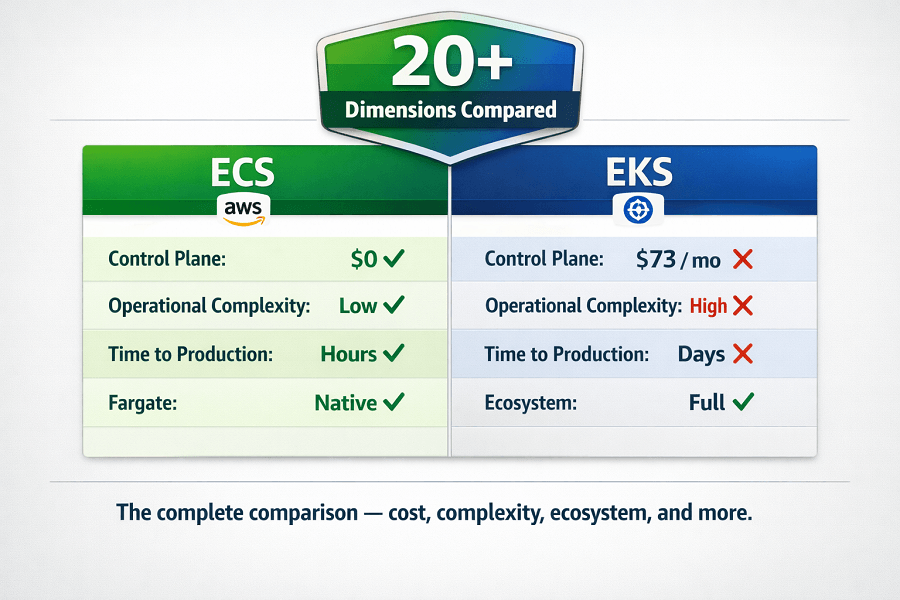
ECS vs. EKS: Complete Side-by-Side Comparison
| Dimension | ECS | EKS |
|---|---|---|
| Control plane cost | ✓ Free | ✗ $0.10/hr (~$73/month per cluster) |
| Operational complexity | ✓ Low, AWS manages everything | ✗ High, node groups, add-ons, upgrades, RBAC |
| Time to first deployment | ✓ 2–4 hours | ~ 1–3 days (prod-grade config) |
| AWS native integration | ✓ First-class, no plugins | ~ Good but via add-ons (load balancer controller, EBS CSI) |
| Fargate support | ✓ Full native support | ~ Supported but more limited than ECS Fargate |
| Kubernetes ecosystem (Helm, operators) | ✗ Not applicable | ✓ Full ecosystem available |
| Multi-cloud portability | ✗ AWS-only | ✓ Kubernetes manifests portable |
| Auto-scaling | ✓ Service Auto Scaling, KEDA | ✓ HPA, KEDA, Cluster Autoscaler, Karpenter |
| Graviton / ARM support | ✓ Yes (Fargate + EC2 launch) | ✓ Yes (managed node groups) |
| Service mesh support | ~ AWS App Mesh | ✓ Istio, Linkerd, Cilium, App Mesh |
| GitOps support | ~ CodePipeline, GitHub Actions | ✓ ArgoCD, Flux natively |
| Multi-tenancy (namespaces) | ✗ Limited (separate clusters) | ✓ Native namespace isolation |
| Security / RBAC | ✓ IAM task roles (simpler) | ~ Kubernetes RBAC + IAM (complex but powerful) |
| Kubernetes version upgrades | ✓ Not applicable | ✗ Manual upgrades required every ~14 months |
| Community resources | ~ AWS-specific community | ✓ Vast Kubernetes community |
| Learning curve | ✓ Low (days to productive) | ✗ High (weeks to months) |
Fargate on ECS vs. Fargate on EKS: Key Differences
AWS Fargate, the serverless container compute layer, is available on both ECS and EKS. But the Fargate experience differs meaningfully between the two platforms.
| Dimension | ECS Fargate vs. EKS Fargate |
|---|---|
| Task / Pod sizing | ECS: Task-level CPU and memory defined in Task Definition. Fargate sizes apply per Task. Straightforward, you specify what you need. EKS: Pod-level resource requests/limits. Fargate Profile selects which pods run on Fargate vs. managed nodes. More granular but requires understanding Kubernetes resource model. |
| Supported workloads | ECS Fargate: all ECS workload types, long-running services, scheduled tasks, one-off jobs. EKS Fargate: stateless workloads work well. DaemonSets do not run on Fargate (no node-level access). StatefulSets with persistent volumes have limitations. Not all add-ons support Fargate. |
| Networking | ECS Fargate: awsvpc networking mode, each Task gets its own ENI and private IP. Straightforward security group assignment. EKS Fargate: VPC CNI plugin assigns pod IPs from VPC. Works well but requires careful IP address planning in large clusters, each Fargate pod consumes a VPC IP. |
| Startup time | ECS Fargate: ~10–30 seconds cold start for a new Task. EKS Fargate: ~45–90 seconds for a new pod, longer due to Kubernetes scheduling overhead plus Fargate provisioning. |
| Cost | ECS Fargate and EKS Fargate use identical Fargate pricing ($0.04048/vCPU-hr, $0.004445/GB-hr as of 2026). The difference: EKS adds $0.10/hr cluster control plane cost on top. |
ECS vs. EKS: Real Cost Comparison
The cost difference between ECS and EKS has two components: the control plane and the compute. The compute (EC2 or Fargate) costs identically regardless of which orchestrator you use. The control plane is where they diverge.
| Cost Component | ECS vs. EKS | Detail |
|---|---|---|
| ECS control plane | $0/month | ECS control plane is fully managed and free. No cluster management charges regardless of workload count or cluster size. |
| EKS control plane | $73/month per cluster | $0.10/hour × 720 hours = ~$73/month per cluster. Multiple environments (prod, staging, dev) mean multiple clusters, $219+/month in control plane costs alone before running a single container. |
| EC2 compute (both) | Identical pricing | EC2 instance costs are the same whether orchestrated by ECS or EKS. Instance type, Savings Plans, and Reserved Instances apply equally. |
| Fargate compute (both) | Identical pricing | Fargate per-vCPU and per-GB pricing is identical on ECS and EKS. EKS adds the $73/month cluster cost on top. |
| Node management overhead | ECS: $0 (Fargate) or low (EC2 launch) | EKS: node group management, cluster add-ons, and Kubernetes version upgrades consume engineering time, estimate 2–4 hours/month minimum for a small cluster. |
| Break-even point | EKS makes sense at ~20+ services | Below ~20 services, ECS Fargate total cost (infrastructure + operational) is almost always lower than EKS. Above that scale, EKS ecosystem benefits may justify the overhead. |
Auto-Scaling: ECS vs. EKS
Both platforms support robust auto-scaling. The mechanisms differ, and EKS has a richer ecosystem for advanced scaling patterns.
| Scaling Dimension | ECS vs. EKS |
|---|---|
| Service/Deployment scaling (horizontal) | ECS: Application Auto Scaling scales ECS Service task count based on CloudWatch metrics (CPU, memory, custom metrics, ALB request count). Simple to configure, tightly integrated with AWS. EKS: Horizontal Pod Autoscaler (HPA) scales pod replicas based on CPU/memory or custom metrics via Metrics Server or KEDA. Same concept, Kubernetes-native implementation. |
| Event-driven scaling | ECS: KEDA (Kubernetes Event-Driven Autoscaling) is available for ECS via open-source integrations, not native but functional. EKS: KEDA is a first-class Kubernetes add-on. Scale from zero based on SQS queue depth, Kafka lag, Prometheus metrics, or any custom event source. Excellent for batch and async workloads. |
| Node / infrastructure scaling | ECS (EC2 launch): Cluster Auto Scaling uses Capacity Providers to add/remove EC2 instances based on Task placement pressure. EKS: Cluster Autoscaler (traditional) or Karpenter (modern, preferred). Karpenter provisions optimally-sized nodes for pending pods in seconds, more efficient than Cluster Autoscaler and Graviton-aware. |
| Scale to zero | ECS Fargate: scales to zero naturally, no tasks running means no charges. EKS Fargate: scales to zero at the pod level. EKS EC2: node groups scale to zero but cold start from zero takes 2–3 minutes (Karpenter), longer than ECS Fargate. |
| Verdict | For most startup workloads: ECS auto-scaling is sufficient and simpler. For advanced event-driven scaling (scale from zero on queue depth), KEDA on EKS is the more mature native implementation. |
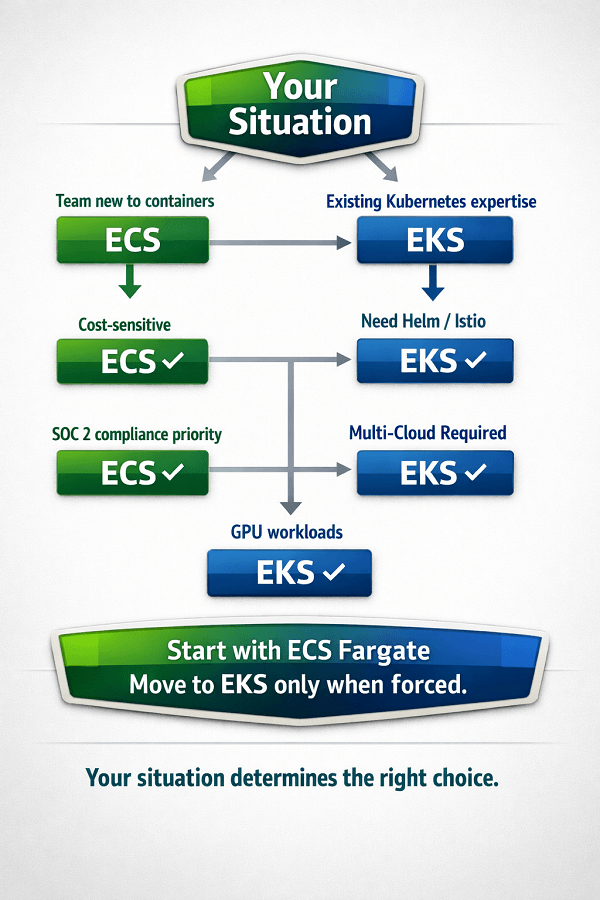
The Scenario-by-Scenario Decision Guide
Apply your situation to the scenarios below for a direct recommendation:
| Your Situation | Choose | Why |
|---|---|---|
| Team new to containers, no Kubernetes experience | ECS | ECS maps to AWS mental models your team already has. Production in days, not weeks. |
| Team has existing Kubernetes expertise from prior roles | EKS | Don't pay the relearning cost. Use skills your team has. ECS would be slower. |
| Greenfield project, AWS-only, < 15 microservices | ECS | No reason to add Kubernetes complexity at this stage. ECS Fargate is production-ready instantly. |
| Need Helm charts for open-source tooling (Prometheus, cert-manager, ArgoCD) | EKS | These tools are Kubernetes-native. Running them on ECS requires workarounds that erode the operational simplicity benefit. |
| Multi-cloud or hybrid cloud strategy in roadmap | EKS | Kubernetes manifests transfer across providers. ECS configuration does not. |
| Event-driven workloads that scale to zero on queue depth (KEDA) | EKS | KEDA is most mature on EKS. ECS KEDA integration is functional but less polished. |
| Running GPU workloads (ML inference, video processing) | EKS | EKS has better GPU scheduling support (Device Plugin, GPU Operator). ECS GPU support exists but is more limited. |
| Cost is the primary constraint, small team | ECS | $73/month per cluster matters when you're running prod + staging + dev. ECS saves $219+/month in control plane costs alone. |
| Need service mesh (Istio, Linkerd) for advanced traffic management | EKS | Service meshes are native Kubernetes tooling. AWS App Mesh on ECS is simpler but less powerful. |
| SOC 2 compliance required, security is top priority | ECS | ECS IAM task roles are simpler to audit than Kubernetes RBAC + IAM. Fewer attack vectors to secure. |
| Stateful workloads with persistent storage | ECS or EKS (EC2) | ECS Fargate has EFS support. EKS with EBS CSI driver handles persistent volumes well. For very stateful workloads, EC2-backed nodes on either platform are preferred over Fargate. |
| Existing team already running EKS in production | EKS | Don't migrate to ECS. The migration cost and relearning cycle exceeds any operational simplicity gain. |
9. Migrating Between ECS and EKS: What It Actually Takes
Teams sometimes start with ECS and later want to move to EKS (or vice versa). Here is an honest assessment of what that involves.
ECS → EKS migration
This is the more common direction. Teams start on ECS, grow their engineering team, hire engineers with Kubernetes experience, and want to adopt the Kubernetes ecosystem. The migration involves:
- Rewriting Task Definitions as Kubernetes Deployments/StatefulSets, conceptually similar, syntactically different
- Replacing ECS Service Discovery with Kubernetes Services and Ingress resources
- Replacing IAM task roles with Kubernetes service accounts + IRSA (IAM Roles for Service Accounts)
- Replacing ALB integration (ECS-native) with AWS Load Balancer Controller on EKS
- Rebuilding CI/CD pipelines to push to EKS rather than ECS
- Training the team on Kubernetes concepts and kubectl workflows
Realistic effort: 6–12 weeks of focused migration work for a medium-sized ECS deployment. Most teams run ECS and EKS in parallel during the migration and shift services one at a time.
EKS → ECS migration
Less common, typically driven by cost reduction or team simplification. Involves the reverse translation. The main challenge is that Kubernetes-native tooling (Helm operators, custom controllers, service mesh) has no direct ECS equivalent and must be replaced with AWS-native alternatives or third-party solutions. Generally more disruptive than ECS → EKS if those ecosystem tools are in active use.
Conclusion
The ECS vs EKS decision is not about scale – both handle tens of thousands of containers in production. It is about team skills, operational model, and ecosystem needs. ECS is AWS-native, simpler, and cheaper for most startups. EKS is the right choice when you need the Kubernetes ecosystem (Helm, operators, service mesh), have existing Kubernetes expertise, or require multi-cloud portability.
The most common mistake is choosing EKS because it feels more "enterprise" – that adds complexity and cost without delivering value at startup scale. Start with ECS Fargate. Move to EKS only when a specific requirement forces it. Your team's time is better spent on product features than managing Kubernetes clusters.
ECS vs. EKS - Frequently Asked Questions
Does EKS 'scale better' than ECS?
No. Both platforms scale to tens of thousands of containers in production, scale is not a differentiator. ECS clusters handle very large workloads at companies like Amazon itself. The choice between them is about operational model, ecosystem, and team skills, not scale ceiling. Any team that hits the scale limits of either platform will have resources to address it.
Is Kubernetes becoming the industry standard that we should adopt proactively?
Kubernetes is the dominant container orchestration standard for large organizations and multi-cloud environments. But 'industry standard' does not mean 'right for every team.' ECS is perfectly capable of running production container workloads at startup and SMB scale. Adopting Kubernetes proactively before your team has the skills or your workloads require the ecosystem is adding complexity without benefit.
Can we use Helm with ECS?
No. Helm is a Kubernetes package manager, it templates and deploys Kubernetes manifests. ECS uses its own resource model (Task Definitions, Services, Clusters) which is not compatible with Helm. If Helm chart availability is a requirement (for deploying open-source tools like Prometheus, cert-manager, or ArgoCD), EKS is the right platform.
What about Amazon ECS Anywhere and EKS Anywhere?
ECS Anywhere and EKS Anywhere extend ECS and EKS orchestration to on-premises or edge infrastructure. ECS Anywhere runs the ECS agent on any Linux machine outside AWS. EKS Anywhere runs Kubernetes on on-premises hardware (VMware, bare metal). Both are relevant for hybrid cloud scenarios where workloads must run both in AWS and on-premises, not typical for pure-cloud startups.
Should we use ECS Fargate or EC2 launch type?
For most startups: start with ECS Fargate. It eliminates all node management, no EC2 instances to patch, scale, or right-size. The higher per-unit cost vs. EC2 is justified by the elimination of operational overhead. Move to EC2 launch type only if you have specific requirements (GPU workloads, specific networking configurations, very high sustained utilization where EC2 Savings Plans significantly reduce cost).
We're already using Docker Compose in development. Is there an easy path to ECS?
Yes. AWS Copilot CLI translates Docker Compose-style service definitions into ECS Task Definitions and deploys them as ECS Services. It is the fastest on-ramp from local Docker development to production ECS. For teams wanting more control, EaseCloud recommends Terraform for ECS deployments, Infrastructure as Code from day one.
Ready to Deploy Containers on AWS? EaseCloud Can Help
EaseCloud designs and deploys production-grade container infrastructure on both ECS and EKS, with infrastructure as code, CI/CD pipelines, observability, and auto-scaling built in from day one. We'll recommend the right platform for your team's skills and workload requirements, not the platform that generates the most consulting hours.
Summarize this post with:
