Why Is My AWS Bill So High? 15 Common Causes and How to Reduce Your AWS Costs
Learn the 15 most common reasons your AWS bill is so high and discover proven strategies to reduce cloud costs using AWS optimization best practices.

Why Is My AWS Bill So High?
Receiving an unexpectedly high AWS bill is a common challenge for organizations of all sizes. Whether you're running a startup, managing enterprise workloads, or migrating applications to the cloud, AWS offers unmatched flexibility but that flexibility can also make cloud costs difficult to control.
Unlike traditional on-premises infrastructure with fixed expenses, AWS follows a pay-as-you-go pricing model. You're billed based on actual consumption of compute, storage, networking, databases, and managed services. This model provides excellent scalability, but it also means that even small inefficiencies can compound over time, leading to significant monthly costs.
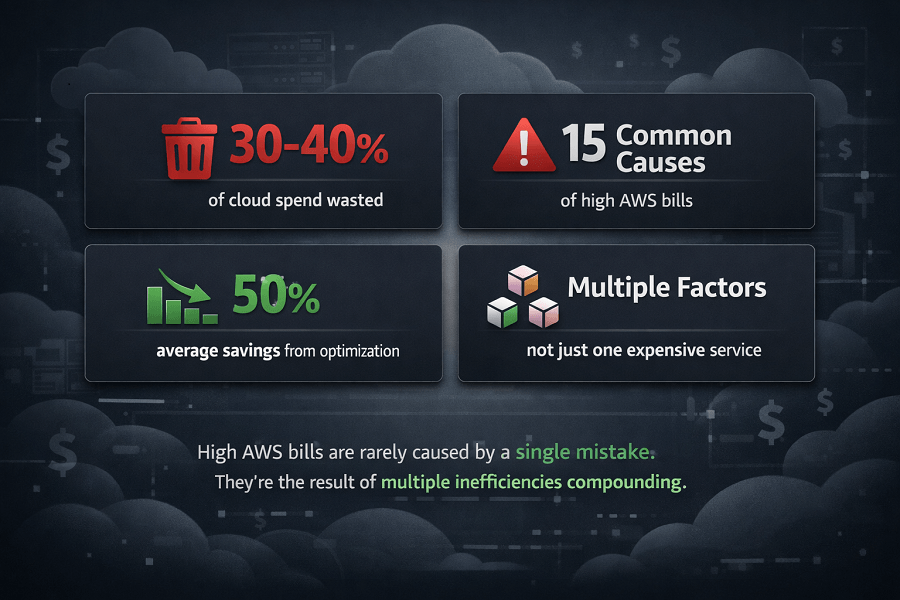
In many cases, high AWS bills aren't caused by a single expensive service. Instead, they're the result of multiple factors working together oversized EC2 instances, idle resources, outdated snapshots, unnecessary data transfers, or storage that's never been cleaned up.
The good news is that most of these issues are preventable. By understanding how AWS pricing works and regularly reviewing your cloud environment, you can identify waste, optimize resource usage, and reduce costs without sacrificing performance or reliability.
In this guide, we'll explore the 15 most common reasons AWS bills become unexpectedly high and outline practical strategies to optimize your cloud spending. If you're looking for a broader framework to improve cloud efficiency, our AWS Cost Optimization Guide covers the complete process, tools, and best practices.
TL;DR
- AWS bills don't spike from one mistake – they grow gradually from multiple inefficiencies: idle EC2 instances, overprovisioned RDS, unattached EBS volumes, old snapshots, unused load balancers, and inefficient S3 storage.
- Oversized compute is the #1 cost driver – instances running at <20% CPU are paying for unused capacity. Use AWS Compute Optimizer to rightsize EC2, RDS, and Lambda.
- Storage waste accumulates silently – unattached EBS volumes, old snapshots, and data in S3 Standard that should be in Glacier. Implement lifecycle policies and regular audits.
- Data transfer is frequently underestimated – cross-region, cross-AZ, and internet egress charges add up. Use CloudFront, keep services in same AZ when possible, and review NAT Gateway usage.
- Missing Savings Plans and Reserved Instances is one of the biggest missed opportunities – stable workloads should not run On-Demand. Savings Plans offer flexibility; RIs offer higher discounts for predictable workloads.
- Tagging and regular reviews are non-negotiable – without tags, you can't attribute costs to teams or projects. Monthly cost reviews catch waste before it compounds.
How AWS Pricing Works
Before looking at the causes of rising cloud costs, it's important to understand how AWS pricing is structured.
AWS charges based on resource consumption rather than fixed infrastructure. Every service has its own pricing model, and costs accumulate across your entire cloud environment.
Typical charges include:
- Amazon EC2 compute hours
- Amazon EBS storage
- Amazon S3 storage and requests
- Amazon RDS database instances
- AWS Lambda invocations and execution time
- Data transfer between services and regions
- Elastic Load Balancers
- NAT Gateways
- CloudWatch logs and monitoring
- Backup storage and snapshots
As applications grow, teams launch new environments, and additional AWS services are adopted, cloud spending naturally increases. Without continuous monitoring and governance, many organizations lose visibility into where their budget is being consumed.
This is why cloud cost optimization should be viewed as an ongoing operational practice rather than a one-time exercise.
You're Running Oversized Amazon EC2 Instances
One of the most common reasons organizations overspend on AWS is deploying EC2 instances that are significantly larger than their workloads require.
It's common for development teams to choose larger instance types "just to be safe." While this approach may reduce the risk of performance issues, it often leads to substantial waste.
For example, an application using only 15–20% of its available CPU and memory doesn't need a large compute instance. Paying for unused capacity every hour quickly adds up over the course of a month.
Common signs of oversized EC2 instances include:
- CPU utilization consistently below 20%
- Memory usage remaining low during peak hours
- Minimal network traffic
- Stable workloads with little variation in demand
AWS Compute Optimizer analyzes historical utilization metrics and recommends better-sized EC2 instances based on actual usage patterns. Rightsizing workloads using these recommendations can significantly reduce monthly infrastructure costs while maintaining application performance.
Best practices include:
- Review utilization metrics monthly
- Choose the smallest instance that meets workload requirements
- Enable Auto Scaling where appropriate
- Reassess instance types as applications evolve
Idle Resources Continue Running
Cloud resources don't automatically shut down when they're no longer needed.
One of the biggest contributors to unnecessary AWS spending is infrastructure that's been forgotten after development, testing, or temporary projects.
Examples include:
- Development environments left running overnight
- Test servers created for short-term projects
- EC2 instances no longer attached to active applications
- Elastic Load Balancers serving no traffic
- NAT Gateways connected to retired environments
Because these resources remain active, AWS continues billing for them until they're stopped or deleted.
Organizations with multiple engineering teams often accumulate idle infrastructure over time, making this one of the easiest areas to reduce cloud costs.
Implementing automated resource scheduling and conducting regular infrastructure audits helps eliminate unnecessary spending while maintaining operational efficiency.
Amazon EBS Volumes Are Still Being Charged
Deleting an EC2 instance doesn't always delete its attached storage.
Amazon Elastic Block Store (EBS) volumes frequently remain allocated after virtual machines are terminated, continuing to generate storage charges every month.
This is especially common during migration projects, infrastructure testing, or application upgrades.
Unused EBS volumes may contain:
- Old operating system disks
- Temporary project storage
- Development environments
- Backup copies no longer required
While individual storage charges may appear small, hundreds of unused volumes across an AWS account can create a significant monthly expense.
Regularly reviewing unattached EBS volumes allows organizations to:
- Remove unnecessary storage
- Archive important data
- Reduce monthly infrastructure costs
- Improve cloud governance
AWS Trusted Advisor and Cost Explorer can help identify these orphaned resources before they become long-term cost issues.
You're Paying for Old Snapshots and Backups
Backups are essential for business continuity, disaster recovery, and compliance. However, organizations often retain snapshots long after they're needed.
Amazon EBS snapshots and Amazon RDS automated backups consume storage and contribute to ongoing AWS costs.
Common issues include:
- Daily snapshots kept indefinitely
- Duplicate backup policies
- Old project snapshots
- Test environment backups
- Database backups no longer required
Without retention policies, storage usage steadily increases month after month.
Instead of deleting all backups, organizations should implement lifecycle management policies that automatically remove outdated snapshots while preserving those required for compliance or recovery objectives.
An effective backup strategy balances resilience with cost efficiency.
Amazon S3 Storage Isn't Optimized
Amazon S3 is one of the most cost-effective storage services available, but only when data is stored in the appropriate storage class.
Many businesses continue paying premium rates for data that is rarely accessed.
Examples include:
- Historical logs
- Archived media files
- Old application assets
- Compliance records
- Completed project documentation
Keeping infrequently accessed data in the S3 Standard storage class results in unnecessary storage costs.
AWS provides multiple storage classes designed for different access patterns, including:
- S3 Intelligent-Tiering
- S3 Standard-Infrequent Access
- S3 Glacier Instant Retrieval
- S3 Glacier Flexible Retrieval
- S3 Deep Archive
Lifecycle policies automatically move data between these storage classes based on access frequency, helping organizations reduce storage costs without manual intervention.
Storage optimization becomes increasingly important as businesses accumulate terabytes or even petabytes of cloud data over time.
Your Amazon RDS Database Is Over-Provisioned
Amazon Relational Database Service (Amazon RDS) simplifies database management by handling backups, patching, high availability, and maintenance. However, it is also one of the most commonly over-provisioned AWS services.
Many organizations deploy large database instances during initial development or migration and never revisit their sizing. As application usage changes, these databases continue running with significantly more CPU, memory, and storage than required.
Common signs of an oversized RDS instance include:
- CPU utilization consistently below 20%
- Low memory consumption
- Minimal read/write operations
- Storage utilization well below allocated capacity
For example, a production database originally configured as db.r6g.2xlarge may only require db.r6g.large after workload optimization. That difference alone can save hundreds or even thousands of dollars annually.
To optimize Amazon RDS costs:
- Monitor CPU, memory, and storage metrics using Amazon CloudWatch.
- Review performance insights regularly.
- Scale database instances according to actual workload requirements.
- Enable storage auto scaling only when necessary.
- Delete unused read replicas and test databases.
Database optimization should always balance performance requirements with cost efficiency. Downsizing without understanding workload characteristics can negatively impact application responsiveness.
Data Transfer Charges Are Higher Than Expected
One of the least understood aspects of AWS billing is data transfer pricing.
While inbound internet traffic is generally free, outbound traffic and traffic between AWS services can generate significant charges depending on your architecture.
Common examples include:
- Cross-region replication
- Inter-Availability Zone communication
- Internet egress traffic
- VPN connectivity
- AWS Direct Connect usage
- NAT Gateway traffic
Many businesses discover that networking costs account for a surprisingly large percentage of their monthly invoice.
For example:
A web application may use:
- Amazon EC2
- Amazon RDS
- Amazon ElastiCache
- Amazon S3
- AWS CloudFront
If these resources are deployed across multiple Availability Zones or Regions without careful planning, inter-service communication can create unexpected networking costs.
Best practices include:
- Keep frequently communicating resources within the same Availability Zone when appropriate.
- Use Amazon CloudFront to reduce internet egress.
- Minimize unnecessary cross-region replication.
- Review AWS Cost Explorer to identify networking expenses.
- Evaluate architecture decisions that increase internal traffic.
Understanding your application's traffic patterns is essential for controlling networking costs.
You're Paying Too Much for NAT Gateways
AWS NAT Gateways provide internet access for private subnets without exposing instances directly to the public internet.
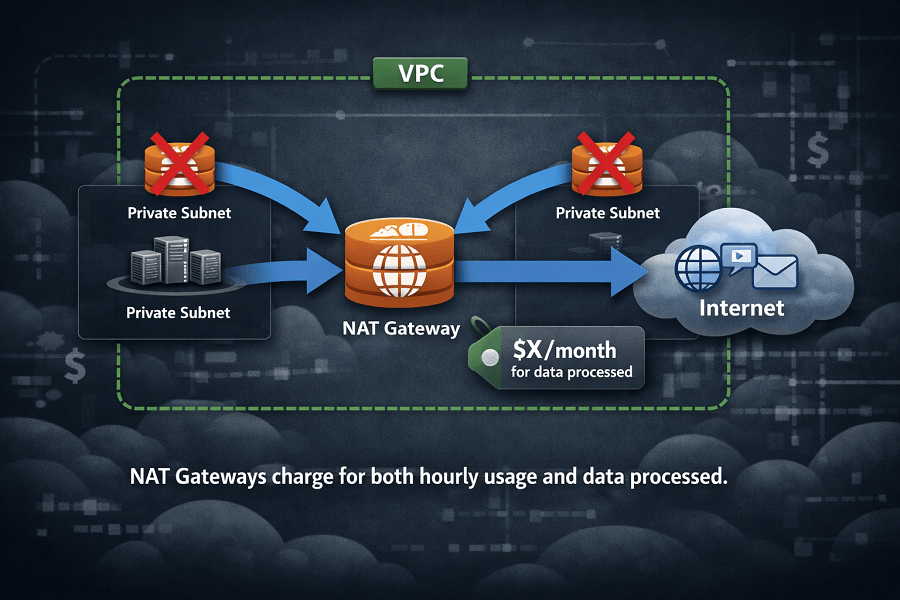
While NAT Gateways improve security, they are also one of the most frequently overlooked cost drivers.
Organizations often:
- Deploy multiple NAT Gateways unnecessarily.
- Route excessive traffic through NAT.
- Transfer large volumes of data between Availability Zones.
Because NAT Gateways charge for both:
- hourly usage
- data processed
costs can increase rapidly for high-traffic applications.
Optimization strategies include:
- Consolidate NAT Gateways where architecture allows.
- Reduce unnecessary outbound traffic.
- Use VPC Endpoints for supported AWS services.
- Review routing tables regularly.
- Monitor processed data using CloudWatch metrics.
In many environments, VPC Endpoints eliminate the need for NAT Gateway traffic when accessing services like Amazon S3 or Amazon DynamoDB.
AWS Lambda Functions Are Running Inefficiently
AWS Lambda is often viewed as an inexpensive compute service because it charges only for execution time and requests.
However, poorly optimized serverless applications can still generate unexpectedly high costs.
Common Lambda inefficiencies include:
- Excessive execution duration
- Overallocated memory
- Recursive invocations
- High request volumes
- Inefficient code execution
- Functions triggered unnecessarily
Remember that Lambda pricing depends on:
- Number of invocations
- Execution duration
- Allocated memory
Increasing memory allocation without improving execution efficiency can substantially increase monthly costs.
Optimization techniques include:
- Reduce function execution time.
- Allocate only the memory required.
- Eliminate duplicate invocations.
- Cache reusable data.
- Monitor execution metrics with Amazon CloudWatch.
- Review high-frequency event sources.
Serverless architectures remain highly cost-effective when workloads are properly optimized.
CloudWatch Logs Continue Growing Without Retention Policies
Amazon CloudWatch is essential for monitoring infrastructure, collecting application logs, and troubleshooting operational issues.
However, organizations frequently overlook CloudWatch log retention.
By default, many log groups retain data indefinitely.
Over months or years, this leads to:
- Growing storage charges
- Increased log ingestion costs
- Large monitoring bills
- Difficult log management
Applications generating large amounts of logs include:
- Kubernetes workloads
- Amazon ECS services
- AWS Lambda
- API Gateway
- Microservices
- CI/CD pipelines
Without lifecycle management, CloudWatch becomes a significant contributor to AWS spending.
Best practices include:
- Define retention policies for every log group.
- Archive logs required for compliance.
- Delete obsolete log groups.
- Reduce unnecessary debug logging in production.
- Export long-term logs to Amazon S3 if appropriate.
Organizations should periodically review logging strategies to ensure observability requirements remain aligned with cost objectives.
You're Missing Savings Plans and Reserved Instances
Many AWS customers continue paying On-Demand pricing even though their workloads rarely change.
This is one of the biggest missed opportunities for cloud cost optimization.
If your production infrastructure runs continuously, committing to long-term usage can significantly reduce compute expenses.
AWS Savings Plans
Savings Plans provide flexible pricing discounts in exchange for a usage commitment over one or three years.
Benefits include:
- Flexible across instance families
- Applies automatically
- Lower costs than On-Demand pricing
- Suitable for changing workloads
Savings Plans are often the preferred option for organizations seeking flexibility while reducing costs.
Reserved Instances (RIs)
Reserved Instances also provide discounted pricing but are designed for predictable workloads.
Ideal use cases include:
- Production databases
- Long-running web servers
- Enterprise applications
- Stable backend services
Reserved Instances generally require more planning than Savings Plans but can deliver substantial savings when matched correctly to workload requirements.
Spot Instances
For interruptible workloads, Spot Instances offer access to unused AWS capacity at significantly reduced prices.
Typical workloads include:
- CI/CD pipelines
- Machine learning training
- Batch processing
- Video rendering
- Large-scale analytics
Because Spot capacity can be interrupted by AWS, it should not be used for applications requiring continuous availability.
Choosing the Right Pricing Model
Organizations should evaluate each workload individually.
Selecting the appropriate pricing model can reduce compute costs dramatically without requiring any architectural changes.
Cloud Costs Increase Gradually, Not Overnight
One important lesson many organizations learn is that AWS bills rarely spike because of a single mistake.
Instead, costs increase gradually as cloud environments evolve.
For example:
- New applications are deployed.
- Development teams launch temporary infrastructure.
- Databases grow larger.
- Monitoring expands.
- Storage accumulates.
- Networking becomes more complex.
Each individual cost appears manageable, but together they create significant monthly spending.
Without regular reviews, organizations lose visibility into cloud resource utilization, making optimization increasingly difficult.
A proactive cloud governance strategy, supported by tools like AWS Cost Explorer, AWS Budgets, and AWS Compute Optimizer helps teams identify inefficiencies before they become expensive problems.
Auto Scaling Is Configured Incorrectly
AWS Auto Scaling is designed to improve application availability while optimizing infrastructure costs. However, when scaling policies are misconfigured, it can have the opposite effect.
Many organizations assume that simply enabling Auto Scaling guarantees cost efficiency. In reality, poorly defined scaling rules often result in unnecessary compute resources running for extended periods.
Common Auto Scaling mistakes include:
- Setting the minimum instance count too high
- Delayed scale-in policies
- Aggressive scale-out thresholds
- Instances remaining active after traffic decreases
- Auto Scaling Groups created for temporary projects but never removed
For example, an application may scale out during a marketing campaign but continue running additional EC2 instances long after traffic returns to normal.
To optimize Auto Scaling:
- Review scaling policies regularly.
- Configure both scale-out and scale-in rules.
- Monitor utilization using Amazon CloudWatch.
- Test scaling behavior during different traffic conditions.
- Use predictive scaling where appropriate.
Well-configured Auto Scaling improves both performance and cloud efficiency.
Untagged Resources Make Cost Tracking Difficult
As AWS environments grow, hundreds or even thousands of cloud resources are created across multiple teams, projects, and business units.
Without proper tagging, organizations lose visibility into where cloud spending is actually occurring.
Examples of useful Cost Allocation Tags include:
- Environment (Production, Staging, Development)
- Department
- Business Unit
- Customer
- Application
- Owner
- Project
- Cost Center
Without consistent tagging, finance teams often struggle to answer questions like:
- Which application generated this month's AWS bill?
- Which team owns these EC2 instances?
- Which project is responsible for storage costs?
AWS Cost Allocation Tags allow organizations to generate detailed spending reports and improve financial accountability across engineering teams.
Tagging is also a foundational practice in modern FinOps.
Multiple AWS Accounts Are Not Centrally Managed
As businesses expand, it's common to create separate AWS accounts for different departments, environments, or customers.
While this improves security and operational isolation, it can also make cloud cost management significantly more complex.
Without centralized governance:
- Duplicate infrastructure is created.
- Reserved capacity isn't shared efficiently.
- Budgets become fragmented.
- Reporting becomes inconsistent.
- Teams optimize independently instead of collaboratively.
AWS Organizations helps businesses centrally manage multiple AWS accounts through:
- Consolidated billing
- Service Control Policies (SCPs)
- Centralized governance
- Shared Reserved Instance benefits
- Shared Savings Plans
Organizations with multiple AWS accounts should regularly review account structure to eliminate duplicated costs and improve financial visibility.
Cloud Costs Are Never Reviewed Regularly
Perhaps the most overlooked reason AWS bills continue increasing is simply the absence of ongoing review.
Many organizations only examine their AWS invoice after it arrives.
By then, unnecessary spending has already occurred.
Cloud environments change continuously:
- New services are deployed.
- Development environments are created.
- Storage grows.
- Applications scale.
- Engineering teams change infrastructure.
Without regular reviews, cloud waste accumulates unnoticed.
Best practice is to establish a monthly cloud cost review process involving engineering, operations, and finance teams.
Monthly reviews should include:
- AWS Cost Explorer analysis
- Trusted Advisor recommendations
- Compute Optimizer findings
- Budget variance reports
- Storage growth trends
- Resource utilization metrics
- Reserved Instance coverage
- Savings Plan utilization
Continuous optimization is significantly more effective than reacting to unexpectedly high invoices.
AWS Tools That Help Reduce Cloud Costs
AWS provides several native services that help organizations monitor and optimize cloud spending.
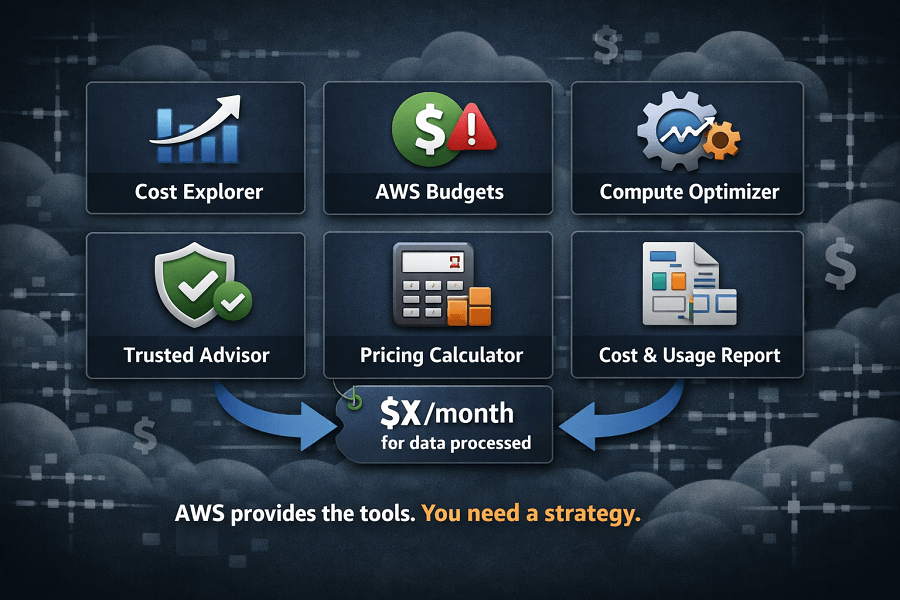
AWS Cost Explorer
AWS Cost Explorer provides visibility into historical spending patterns, service-level costs, forecasts, and usage trends.
Use Cost Explorer to:
- Identify expensive services
- Compare monthly spending
- Analyze usage by account or tag
- Detect unusual cost increases
- Forecast future cloud expenses
AWS Budgets
AWS Budgets helps organizations proactively control spending by defining financial thresholds.
Features include:
- Budget alerts
- Forecast notifications
- Cost tracking
- Usage tracking
- Reserved Instance utilization tracking
Rather than waiting for the monthly invoice, teams receive notifications before budgets are exceeded.
AWS Compute Optimizer
AWS Compute Optimizer analyzes resource utilization and recommends better configurations for:
- Amazon EC2
- Amazon EBS
- AWS Lambda
- Amazon ECS
Its recommendations are based on historical usage rather than assumptions, making rightsizing decisions more accurate.
AWS Trusted Advisor
AWS Trusted Advisor continuously evaluates AWS environments across several categories, including cost optimization.
Common recommendations include:
- Idle Load Balancers
- Underutilized EC2 instances
- Idle Elastic IP addresses
- Unused Reserved Instances
- Low-utilization Amazon Redshift clusters
Trusted Advisor is an excellent starting point for identifying quick cost-saving opportunities.
AWS Pricing Calculator
Before launching new infrastructure, AWS Pricing Calculator helps estimate expected costs.
It's especially valuable during:
- Cloud migration planning
- Infrastructure redesign
- Budget forecasting
- New application development
Accurate forecasting helps organizations avoid unexpected expenses after deployment.
AWS Cost and Usage Report (CUR)
For organizations requiring detailed financial analysis, the Cost and Usage Report (CUR) provides the most comprehensive billing data available.
CUR supports:
- FinOps dashboards
- Custom reporting
- Business intelligence tools
- Chargeback and showback reporting
- Department-level cost allocation
Large enterprises often integrate CUR with Amazon Athena or Amazon QuickSight to build advanced cloud cost analytics.
A Practical AWS Cost Optimization Framework
Reducing AWS costs isn't about deleting resources randomly or purchasing the cheapest instance types. Instead, organizations should adopt a structured optimization process.
Step 1: Gain Visibility
Use AWS Cost Explorer, CUR, and tagging to understand where money is being spent.
Step 2: Identify Waste
Review:
- Idle EC2 instances
- Unattached Amazon EBS volumes
- Old snapshots
- Unused Elastic IPs
- Idle Load Balancers
- Obsolete databases
Step 3: Rightsize Infrastructure
Analyze utilization metrics and resize resources according to actual demand.
Step 4: Optimize Pricing Models
Evaluate whether workloads should use:
- On-Demand Instances
- Savings Plans
- Reserved Instances
- Spot Instances
Step 5: Automate Optimization
Implement:
- Auto Scaling
- Lifecycle policies
- Resource scheduling
- Automated backups
- Cost alerts
Step 6: Continuously Monitor
Cloud optimization is an ongoing process.
Schedule monthly reviews and quarterly architecture assessments to ensure cloud resources remain aligned with business requirements.
Conclusion
High AWS bills are rarely caused by a single issue. More often, they result from a combination of oversized infrastructure, idle resources, inefficient storage, unmanaged networking costs, and the absence of continuous financial governance.
The good news is that most of these inefficiencies are entirely preventable.
By adopting cloud cost optimization best practices, leveraging AWS-native tools, and establishing a regular review process, organizations can significantly reduce unnecessary spending while maintaining high levels of performance, security, and reliability.
Whether you're operating a small startup or managing enterprise-scale cloud infrastructure, proactive cost optimization ensures every AWS resource contributes real business value.
If your organization is struggling with rising cloud expenses or wants an expert review of its AWS environment, EaseCloud's AWS Cost Optimization specialists can help you identify savings opportunities, improve architectural efficiency, and build a sustainable cloud financial management strategy.
Frequently Asked Questions
Why did my AWS bill suddenly increase?
Unexpected increases are often caused by new workloads, oversized infrastructure, increased data transfer, growing storage, or resources that continue running after projects are completed.
How can I identify what's causing high AWS costs?
AWS Cost Explorer, AWS Budgets, AWS Trusted Advisor, and AWS Compute Optimizer provide detailed insights into cloud spending and optimization opportunities.
Can AWS automatically reduce my cloud costs?
AWS provides recommendations and automation tools, but organizations must review, approve, and implement optimization actions. Automated governance combined with regular reviews produces the best long-term results.
How often should I review AWS costs?
Cloud spending should be reviewed monthly, while larger architecture and cost optimization assessments should be performed quarterly or after major infrastructure changes.
Are Savings Plans better than Reserved Instances?
It depends on workload characteristics. Savings Plans offer greater flexibility across compute services, while Reserved Instances are well suited for predictable, long-running workloads. Many organizations use a combination of both.
How EaseCloud Helps Organizations Optimize AWS Costs
Managing cloud costs requires more than monitoring invoices. It demands continuous analysis, architectural expertise, and a proactive optimization strategy.
At EaseCloud, we help organizations transform cloud spending into measurable business value through comprehensive AWS Cost Optimization services.