AWS Serverless Architecture: When Lambda Actually Makes Sense (and When It Doesn't)
A practical 2026 guide to AWS Lambda and serverless architecture - the workload patterns where Lambda delivers transformative results, the situations where it creates problems, cold start optimization, cost modelling at scale, and the decision framework for choosing serverless vs. containers.
- The honest framing: Lambda is not universally good or universally bad. It is the right tool for specific workload patterns, and a genuinely poor choice for others. This guide tells you which is which.
- The common mistake: Teams either avoid Lambda entirely ('too complex, cold starts') or adopt it for everything ('serverless-first') - both miss the real value..
- The practical answer: Most mature AWS architectures use Lambda for event-driven and async workloads alongside ECS/Fargate for sustained, latency-sensitive services. They are complementary, not competing..
1. What 'Serverless' Actually Means on AWS
The term serverless is one of the most misused in cloud computing. It does not mean there are no servers. It means you do not manage servers. AWS runs the underlying compute infrastructure; you provide the code and configuration.
AWS Lambda is the primary serverless compute service. You write a function, define the trigger that invokes it (an API call, an S3 upload, an SQS message, a scheduled event), and specify the runtime (Node.js, Python, Java, Go, .NET, Ruby, or a custom runtime). AWS handles everything else: provisioning capacity, scaling, patching the OS, and billing you for only the compute time your function actually uses - measured in milliseconds.
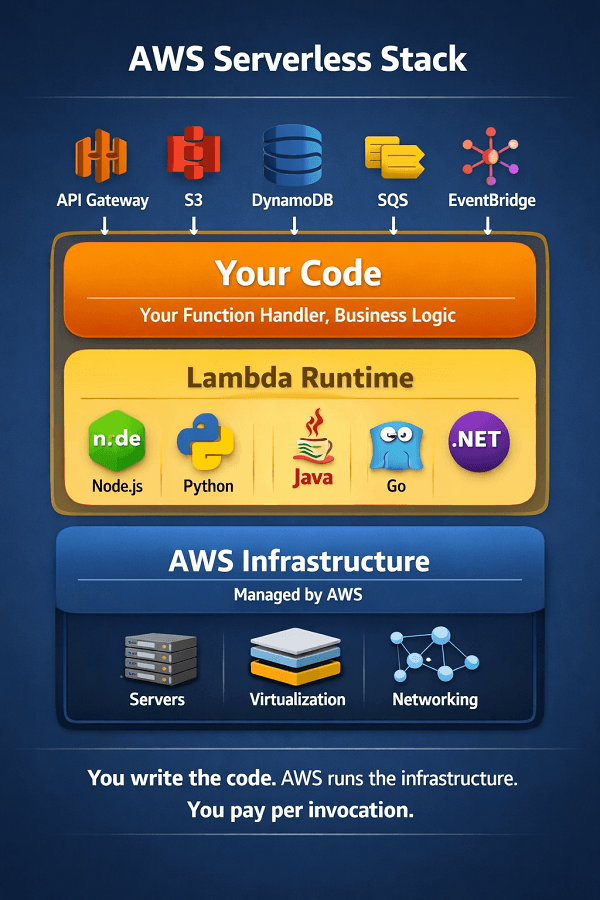
The defining characteristic of Lambda is the billing model: you pay per invocation and per GB-second of execution time. When no functions are running, you pay nothing. There is no idle cost - which is the fundamental economic advantage for variable and bursty workloads.
| Service | Role in Serverless Architecture |
|---|---|
| AWS Lambda | Function-as-a-Service. Your code runs in response to events. No servers to manage. Scales automatically from 0 to 10,000+ concurrent executions. 15-minute maximum execution time. |
| AWS Fargate | Serverless containers. Your container runs on AWS-managed compute - no EC2 nodes to manage. Unlike Lambda, Fargate containers can run indefinitely (no 15-minute limit). Pay for CPU and memory reserved per second. |
| AWS App Runner | Fully managed container service for web applications. Simpler than ECS Fargate. Auto-scales to zero. Good for HTTP workloads that need more than Lambda's constraints but less than ECS configuration. |
| Amazon API Gateway | Managed API layer that triggers Lambda or forwards to other services. Handles authentication, throttling, caching, and request transformation without any infrastructure management. |
| AWS Step Functions | Serverless workflow orchestration. Coordinates Lambda functions and other AWS services into long-running state machines with branching, error handling, and retry logic. |
2. Where Lambda Actually Makes Sense: Eight Winning Patterns
| Option | Details |
|---|---|
| Event-Driven Processing | Lambda was built for this, react instantly to events without always-on infrastructure - S3 triggers: image resizing, PDF processing, virus scanning, data ingestion, fire when a file lands, process it, pay nothing when nothing uploads - DynamoDB Streams: react to database changes, fan out to downstream services, invalidate caches, trigger notifications without polling - SQS / SNS triggers: process queued messages at configurable concurrency; SQS automatically scales Lambda consumers with queue depth - EventBridge rules: respond to cross-service events, scheduled crons, and third-party SaaS webhooks with zero idle cost - Kinesis Data Streams: per-shard Lambda consumers for real-time stream processing; configurable batch size and parallelism |
| Variable Traffic API Backends | When traffic is unpredictable or spans multiple orders of magnitude, Lambda's scale-to-zero model wins on cost - Internal microservice endpoints with bursty, unpredictable invocation patterns, pay for actual calls, not standing capacity - Webhook receivers: Stripe, Twilio, GitHub, Slack, receive third-party callbacks without always-on servers - Mobile and frontend API backends via API Gateway + Lambda: naturally scales to handle traffic spikes without pre-provisioning - GraphQL resolvers: each resolver field invoked independently, parallelism built in - Rate-limited or low-frequency APIs where the traffic pattern makes EC2/Fargate uneconomical |
| Scheduled & Background Jobs | Cron-style tasks with Lambda via EventBridge Scheduler, zero infrastructure cost between runs - Database cleanup, cache warming, report generation, data exports, fire at scheduled times, terminate, pay nothing between runs - Third-party API polling and data sync at low frequency (every 5–60 minutes), eliminates always-on polling infrastructure - Periodic compliance checks, health verifications, and automated remediation jobs - Nightly ETL: fetch, transform, load data between systems on a schedule without dedicated ETL infrastructure - Certification renewal checks, domain expiry monitoring, certificate rotation triggers |
| Data Processing Pipelines | Stateless transformation between data stores, Lambda as the glue between AWS services - CSV / JSON / Parquet transformation between S3 buckets: process each file as it arrives, no queue management needed - Log processing and enrichment before shipping to OpenSearch or Redshift - ML feature engineering: transform raw data into model-ready features triggered by new data arrival - Real-time clickstream processing via Kinesis → Lambda → DynamoDB or OpenSearch - Email and notification delivery: decouple sending from application logic via SQS → Lambda → SES/SNS |
3. Where Lambda Doesn't Work: Six Anti-Patterns
| Option | Details |
|---|---|
| Long-Running Processes | Lambda's 15-minute hard limit is a structural constraint, not a configuration option - Video encoding, large ML model training, bulk database migrations, large file processing, all routinely exceed 15 minutes - Workaround attempts (chaining Lambdas, using Step Functions for long work) add complexity without solving the underlying problem - Better alternative: AWS Fargate tasks, EC2 Spot Instances, or AWS Batch, purpose-built for long-running, resource-intensive work - Rule: if a task has any realistic chance of exceeding 10 minutes, don't use Lambda |
| Latency-Critical Hot Paths | Cold starts add 50ms–2s of unavoidable latency on first invocation, unacceptable for some workloads - Payment processing, real-time fraud detection, trading systems, and gaming backends where every millisecond matters - High-frequency APIs serving synchronous end-user requests where P99 latency is a product requirement - Provisioned Concurrency mitigates cold starts but adds cost, at that point, Fargate may be simpler and cheaper - Better alternative: ECS Fargate or EC2-backed containers with auto-scaling for always-warm, low-latency services |
| Persistent Connections | Lambda is stateless and ephemeral, persistent connections are structurally incompatible - WebSocket servers for real-time chat, collaborative editing, and live dashboards, connections drop on Lambda timeouts - API Gateway WebSocket APIs can be used with Lambda but require external state (DynamoDB) for connection management, significant complexity - Database connection pooling is particularly problematic: Lambda may open thousands of concurrent connections to RDS, overwhelming the database connection limit - Better alternative: RDS Proxy for database connection pooling; ECS containers with WebSocket support for persistent connection workloads |
| High‑Volume Sustained Traffic | At constant high RPS, always-on containers beat Lambda on cost, the scale-to-zero benefit disappears - If your Lambda function receives 500+ RPS continuously, 24/7, you are effectively running always-on infrastructure and paying Lambda pricing for it - At that utilization, ECS Fargate with Compute Savings Plans is typically 30–50% cheaper than equivalent Lambda spend - Break-even: approximately 200–500 million requests/month depending on function duration, above that, model the cost carefully before assuming Lambda is cheaper - Better alternative: ECS Fargate with auto-scaling and Compute Savings Plans for high-throughput, sustained API workloads |
| Large Local State or Files | Lambda's /tmp storage is capped at 10GB; execution environment is ephemeral and not shared across invocations - ML inference requiring large models loaded into memory: a 50GB model does not fit Lambda's memory limit (10GB maximum) - Video processing requiring local disk: Lambda's /tmp filesystem is not persistent across invocations - Applications that depend on shared in-memory state between requests, not possible in Lambda's stateless model - Better alternative: SageMaker for ML inference; ECS Fargate with EFS mounts for large file operations |
4. Cold Starts: What They Are, How Bad They Are, and How to Fix Them
Cold starts are the most cited objection to Lambda adoption. They are real, they are sometimes significant, and they are frequently overstated. Understanding what actually causes cold starts - and what doesn't - is essential for making good serverless architecture decisions.
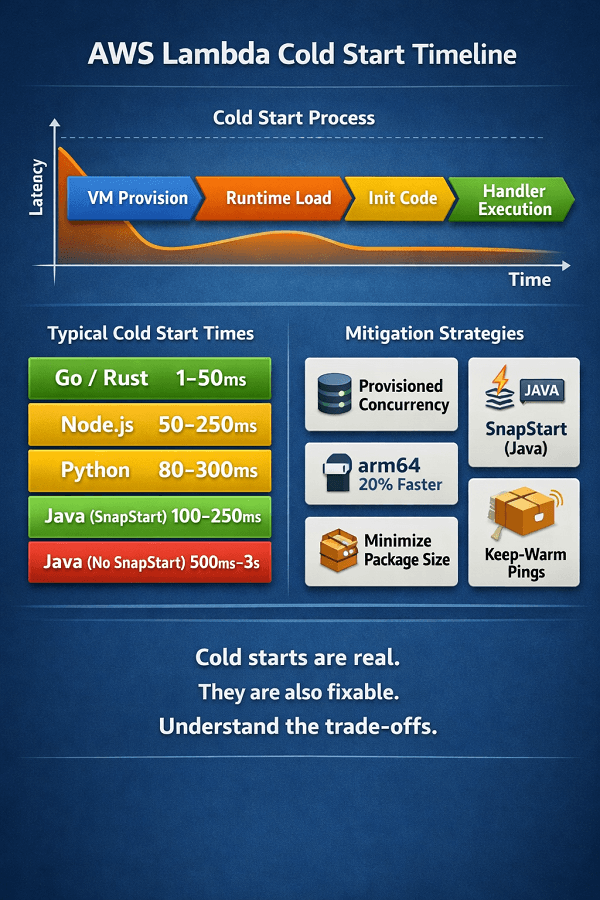
What happens during a cold start
When Lambda needs to serve a request and no warm execution environment is available, it must: (1) provision a new micro-VM, (2) load the Lambda runtime, (3) download and initialize your function code and dependencies, and (4) run your initialization code outside the handler. All of this happens before your handler receives the first request.
The total time depends primarily on runtime choice, package size, and the amount of initialization code you run outside the handler.
| Runtime | Typical Cold Start | Notes |
|---|---|---|
| Go / Rust | 1-50ms | Compiled binaries with minimal runtime. Fastest cold starts available on Lambda. Ideal for latency-sensitive functions. |
| Node.js | 50-250ms | Fast interpreter startup. Most popular Lambda runtime. Keep dependencies minimal; avoid large node_modules. |
| Python | 80-300ms | Fast startup for simple functions. Importing heavy libraries (pandas, numpy) adds significant cold start time. |
| .NET (arm64) | 200-500ms | SnapStart significantly reduces .NET cold starts. Without SnapStart: 500ms-2s for JVM-based functions. |
| Java (SnapStart) | 100-250ms | Lambda SnapStart snapshots the initialized JVM and restores from snapshot - reduces Java cold starts dramatically. |
| Java (no SnapStart) | 500ms-3s | Without SnapStart, JVM initialization is the slowest cold start scenario on Lambda. Always enable SnapStart for Java. |
Cold start mitigation strategies
| Technique | How It Works & When to Use |
|---|---|
| Provisioned Concurrency | Pre-warm a specified number of execution environments. Eliminates cold starts for those environments entirely. You pay for provisioned concurrency even when idle (~$0.015/GB-hr). Best for latency-critical functions that cannot tolerate any cold start. |
| Lambda SnapStart (Java) | Snapshots the initialized execution environment and restores from it on cold start. Reduces Java cold starts from 500ms-3s to 100-250ms. Enabled per function version. No additional cost. |
| arm64 (Graviton) runtime | Graviton-based Lambda functions initialize 10-20% faster than x86 and are 20% cheaper per GB-second. Enable on any function where the runtime supports it - Node.js, Python, Go all work on arm64 with zero code changes. |
| Minimize package size | Lambda cold start time scales with deployment package size. Use Lambda Layers for shared dependencies. Tree-shake production bundles. Target under 5MB for sub-100ms cold starts. Avoid bundling libraries your function doesn't use. |
| Minimize init-time work | Code outside the handler function runs on every cold start. Keep it minimal: initialize SDK clients, load config. Don't make HTTP calls or open database connections outside the handler unless you understand the implications. |
| EventBridge keep-warm ping | Ping low-traffic functions every 5 minutes via EventBridge Scheduler to maintain warm environments. Simple and free (5-min invocations are within free tier). Not suitable for production-critical functions - use Provisioned Concurrency instead. |
5. Lambda Pricing: The Real Cost Model at Scale
Lambda's pricing has two components: requests ($0.20 per million) and duration ($0.0000166667 per GB-second for x86; $0.0000133334 per GB-second for arm64). The first 1 million requests and 400,000 GB-seconds per month are free tier.
The cost model is genuinely favorable for variable workloads and genuinely unfavorable for sustained high-throughput workloads. Here is the math at different scales.
| Traffic Profile | Estimated Lambda Cost | Decision Guidance |
|---|---|---|
| 100K requests/month, 200ms avg, 512MB | ~$0.02/month | Effectively free. Lambda is the obvious choice - no reason to maintain a container for this traffic level. |
| 1M requests/month, 200ms avg, 512MB | ~$0.20/month | Still negligible. Lambda is clearly right. |
| 10M requests/month, 200ms avg, 1GB | ~$35/month | Lambda competitive. Compare to ECS Fargate at this scale (~$30-50/month for equivalent capacity). |
| 100M requests/month, 200ms avg, 1GB | ~$350/month | Lambda still reasonable. ECS Fargate with Savings Plans approaching parity. Model both. |
| 500M requests/month, 300ms avg, 1GB | ~$2,500/month | ECS Fargate with Compute Savings Plans likely cheaper. Run the cost model - don't assume Lambda scales cheaper. |
| 1B+ requests/month, 500ms avg, 2GB | ~$16,000+/month | ECS Fargate with Savings Plans almost certainly cheaper. Lambda at this scale is a deliberate choice, not the default. |
Lambda vs. Fargate: the break-even model
The break-even point between Lambda and ECS Fargate (with Compute Savings Plans) depends on: average function duration, memory allocation, and traffic pattern consistency. As a practical rule:
- Below 50 million requests/month with variable traffic: Lambda almost always wins on cost and operational simplicity
- 50-200 million requests/month with consistent traffic: model both - the gap is narrow and operational simplicity may tip it either way
- Above 200 million requests/month at sustained throughput: ECS Fargate with Savings Plans typically wins on cost; Lambda may still win on operational simplicity if that matters more
- Cold start sensitivity changes the calculation: if Provisioned Concurrency is required, its cost narrows the Lambda advantage significantly at medium scale
Lambda: $0 at idle, scales to zero. Fargate: lower cost at sustained high volume. We model your specific break-even point.
Below 50M requests/month → Lambda almost always wins. 50-200M requests/month → model both. Above 200M requests/month → ECS Fargate + Savings Plans typically wins.
We help you:
- Model Lambda vs. Fargate cost for your workload – Based on your actual request volume, duration, and memory profile
- Calculate your break-even point – Where Fargate becomes cheaper than Lambda for your specific traffic pattern
- Right-size Lambda memory – Higher memory = more CPU = faster execution = lower GB-second cost
- Optimize with arm64 (Graviton) – 20% cost reduction on Lambda duration
6. Serverless Architecture Patterns That Work in Production
Pattern 1: API Gateway + Lambda + DynamoDB
The canonical serverless web API. API Gateway handles request routing, authentication (via Cognito or Lambda authorizer), throttling, and caching. Lambda executes business logic. DynamoDB provides single-digit millisecond reads and scales to any throughput level.
- Best for: CRUD APIs, mobile backends, public APIs with variable traffic
- Watch out for: DynamoDB hot partition keys under high write throughput; Lambda connection limits to RDS if you use relational data (use RDS Proxy)
- Cost advantage: scales to zero overnight; you pay only for actual API calls, not for servers sitting idle during low traffic periods
Pattern 2: Event-Driven Pipeline (S3 → Lambda → S3/DynamoDB)
Files arrive in an S3 bucket, trigger a Lambda function, which processes and writes results to a target S3 bucket or DynamoDB table. Zero infrastructure to manage; scales with upload volume automatically.
- Best for: image resizing, document processing, data transformation, ETL from file uploads
- Watch out for: S3 event notification does not guarantee exactly-once delivery - design Lambda handlers to be idempotent
- Lambda timeout: processing very large files may approach the 15-minute limit - split large files upstream or use Fargate for files over a size threshold
Pattern 3: SQS + Lambda (Decoupled Processing)
An application writes messages to an SQS queue. Lambda polls the queue, processing messages in configurable batch sizes. SQS scales Lambda concurrency automatically based on queue depth - scaling down to zero when the queue is empty.
- Best for: email sending, notification delivery, async order processing, background jobs
- Watch out for: SQS visibility timeout must exceed Lambda function duration - if a function takes 60 seconds but visibility timeout is 30 seconds, messages reprocess incorrectly
- Dead Letter Queues (DLQs) are mandatory: configure DLQ on the SQS queue to capture failed messages; alert on DLQ depth
Pattern 4: Step Functions (Complex Workflows)
Step Functions orchestrates Lambda functions into multi-step state machines with branching, parallel execution, error handling, and retry logic. Eliminates the need to manage workflow state in application code.
- Best for: multi-step onboarding flows, payment processing with multiple steps, document approval workflows, distributed transactions
- Watch out for: Step Functions Express Workflows have a 5-minute execution limit; Standard Workflows support up to 1 year but are more expensive - choose based on workflow duration
- Cost: Standard Workflow pricing ($0.025 per 1,000 state transitions) can add up for high-frequency, many-step workflows - model cost before adopting
7. Observability in Serverless: What Changes and What to Implement
Serverless changes the observability model significantly. Traditional monitoring watches long-running processes - CPU, memory, connections. Lambda functions are ephemeral; you cannot SSH into a Lambda function. You observe serverless systems entirely through logs, metrics, and traces.
| Observability Element | Implementation Guidance |
|---|---|
| Structured logging | Every Lambda invocation should emit structured JSON logs - not plain text. Include: requestId (Lambda provides this), function version, key business identifiers (userId, orderId), duration, and outcome. CloudWatch Logs Insights can then query and filter on specific fields. AWS Lambda Powertools provides structured logging for Python, Node.js, Java, and .NET. |
| Distributed tracing | Enable AWS X-Ray on all Lambda functions. X-Ray traces the complete call chain: API Gateway → Lambda → DynamoDB → SQS. Identifies latency bottlenecks, error sources, and unexpected service dependencies. X-Ray adds minimal overhead (~1ms) and costs approximately $5 per million traces. |
| Dead Letter Queues | Configure DLQs on all async Lambda invocations and SQS event sources. Failed invocations that exceed retry limits land in the DLQ instead of disappearing silently. Alert on DLQ message count - any message in a DLQ represents a failed operation that needs investigation. |
| Lambda Insights | Enhanced CloudWatch monitoring for Lambda: CPU usage, memory, cold start frequency, and initialization duration. Enable via CloudWatch Lambda Insights extension. Shows which functions have cold start problems before they affect users. |
| Custom business metrics | Emit custom CloudWatch metrics using Lambda Powertools Metrics or CloudWatch embedded metric format. Track business-level events: orders processed, emails sent, documents converted. Set alarms on business metrics, not just infrastructure metrics. |
| Correlation IDs | Inject a correlation ID at the entry point (API Gateway request ID or SQS message ID) and propagate it through all downstream Lambda invocations via message attributes or event context. Enables tracing a complete business transaction across multiple Lambda functions in CloudWatch Logs Insights. |
8. The Workload-by-Workload Decision Guide: Lambda or Not?
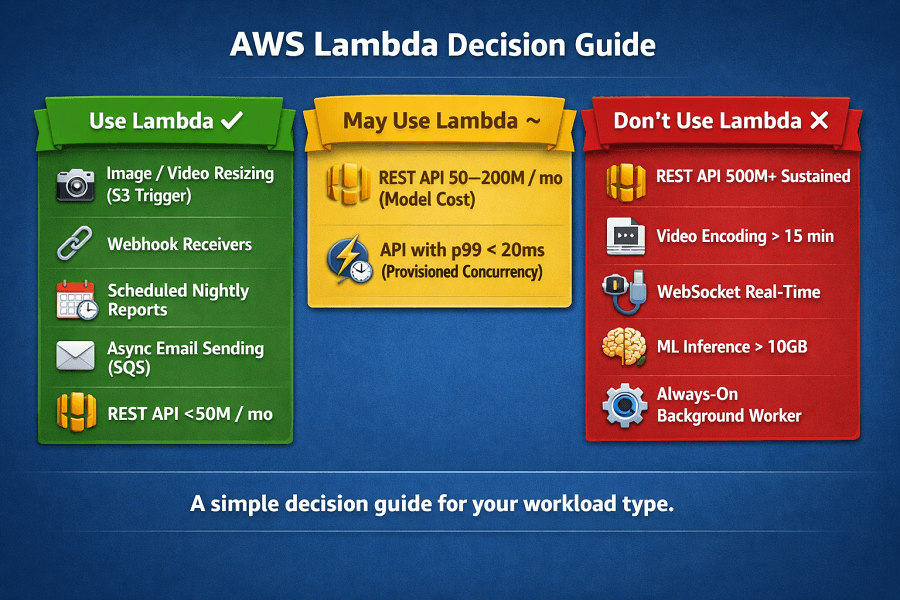
| Workload / Situation | Use Lambda? | Why |
|---|---|---|
| Image/video resizing triggered by S3 upload | ✓ YES | Classic Lambda use case. Scales with upload volume, zero idle cost. |
| Webhook receiver (Stripe, GitHub, Twilio) | ✓ YES | Variable, bursty, short-lived. Lambda is purpose-built for this. |
| Scheduled nightly report generation | ✓ YES | EventBridge Scheduler + Lambda. Zero infrastructure between runs. |
| Async email sending queue (SQS → send) | ✓ YES | SQS + Lambda decoupling is the canonical pattern. Scales to zero. |
| REST API backend, < 50M requests/month | ✓ YES | API Gateway + Lambda. Variable traffic makes Lambda cost-efficient. |
| Internal microservice, bursty/infrequent calls | ✓ YES | Pay per call. No idle cost between infrequent invocations. |
| Real-time data transformation (Kinesis stream) | ✓ YES | Per-shard Lambda consumers. Scale with stream throughput. |
| Customer-facing API, 500M+ requests/month sustained | ✗ NO | ECS Fargate + Savings Plans cheaper at this sustained volume. |
| Video encoding / large file processing (> 15 min) | ✗ NO | Exceeds Lambda's 15-minute limit. Use Fargate or AWS Batch. |
| WebSocket real-time connection (chat, live dashboard) | ✗ NO | Persistent connections don't fit Lambda's stateless model. Use ECS. |
| ML inference with large model (> 10GB) | ✗ NO | Exceeds Lambda's memory limit. Use SageMaker endpoints or Fargate. |
| Always-on long-running background worker | ✗ NO | Lambda adds complexity with no benefit for always-on workloads. Use ECS. |
| API with strict P99 < 20ms latency SLA | ~ MAYBE | Provisioned Concurrency eliminates cold starts but adds cost. Model vs. Fargate. |
| REST API backend, 50-200M requests/month | ~ MAYBE | Model Lambda vs. Fargate cost at your specific duration/memory profile. |
Conclusion
AWS Lambda is not a replacement for containers – it is a complementary tool for specific workload patterns. The winning approach is not "serverless-first" or "containers-only," but matching each workload to the right compute model. Lambda delivers transformative value for event-driven, async, and variable-traffic workloads where the scale-to-zero economics and automatic scaling are decisive advantages.
For sustained high-throughput, low-latency, or long-running workloads, Fargate or EKS remain the better choice. The decision framework is clear: analyze your workload pattern, model the cost at your scale, and choose accordingly. Most mature AWS architectures use both – Lambda for the right jobs, Fargate for the rest.
AWS Lambda FAQ
Does Lambda replace containers entirely?
No - and this is the most important clarification in the serverless conversation. Lambda and containers (ECS Fargate, EKS) are complementary tools for different workload patterns. A mature AWS architecture typically uses Lambda for event-driven, async, and scheduled workloads alongside Fargate or EKS for sustained, stateful, or latency-critical services. The question is never 'Lambda or containers?' but 'which of my workloads belong on Lambda?'
How do I handle database connections from Lambda at scale?
Lambda's concurrency model can open thousands of database connections simultaneously, overwhelming the connection limit of traditional RDS databases (typically 200-2,000 connections per instance). The solution is RDS Proxy - a fully managed connection pooler that sits between Lambda and RDS, maintains a persistent connection pool, and multiplexes Lambda's concurrent invocations across a manageable number of database connections. Enable RDS Proxy on any RDS database that receives Lambda traffic at scale.
Can Lambda functions call each other?
Yes, but direct synchronous Lambda-to-Lambda invocations are an anti-pattern in most cases. They create tight coupling, compound cold start latency, and make error handling complex. The better pattern: use SQS, SNS, or EventBridge to decouple Lambda functions asynchronously. For multi-step synchronous workflows, use Step Functions as the orchestrator rather than direct Lambda-to-Lambda calls.
What is the difference between Lambda's sync and async invocation modes?
Synchronous invocation: the caller waits for the Lambda function to complete and receives the response. Used by API Gateway, ALB, and direct SDK calls. The caller is blocked during execution. Asynchronous invocation: the caller sends the event and receives immediate acknowledgment - Lambda executes in the background. Used by S3 events, EventBridge rules, and SNS. Async invocations have built-in retry (up to 2 retries on failure) and support DLQ for failed events. Understand which mode your event source uses - it affects error handling design significantly.
Should we use Lambda for greenfield projects?
Evaluate by workload pattern, not by default. For a new API backend with unknown traffic patterns: Lambda is an excellent starting point - it scales to zero if traffic is lower than expected, and scales to handle spikes without pre-provisioning. For a new high-throughput data processing system with known sustained load: Fargate may be the better starting point. For event-driven integrations, scheduled jobs, and async processing: Lambda is almost always the right default for greenfield.
Need Help Designing Your Serverless Architecture on AWS?
EaseCloud designs and implements serverless architectures on AWS - Lambda functions, event-driven architecture pipelines, Step Functions workflows, and the observability stack to make them production-grade. We help teams decide which workloads belong on Lambda and which belong on Fargate, then build both correctly.
Start with a free architecture consultation - we'll review your current setup and identify the highest-value serverless opportunities in your AWS environment.
Summarize this post with:
