Cloud Migration from Azure or GCP to AWS: A Realistic Timeline & Checklist
The complete cross-cloud migration guide for 2026 - service equivalents for Azure and GCP, data egress cost calculation, realistic timelines by environment size, the critical differences between cloud-to-cloud and on-prem migrations, and the pre-migration checklist that prevents the common failures.
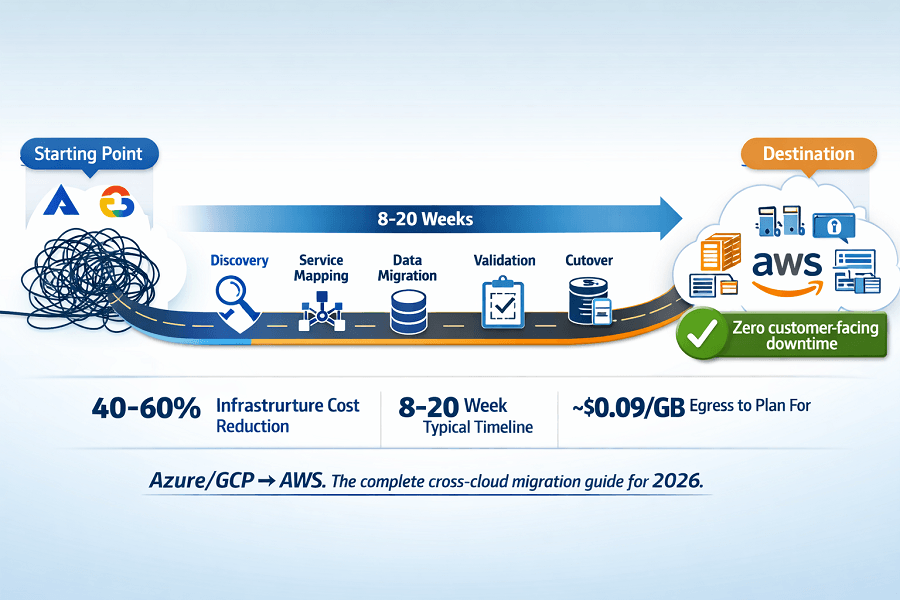
- What this guide covers: Everything specific to moving from Azure or GCP to AWS service equivalents, data transfer costs, networking differences, IAM translation, and the phase-by-phase migration timeline.
- How it differs from on-prem migration: Cloud-to-cloud migrations often have cleaner dependency maps but face distinct challenges: egress costs, networking model differences, IAM translation, and service behavioral nuances that can break applications if unaddressed.
- The bottom line: Azure to AWS and GCP to AWS migrations are well-understood patterns. With the right service mapping, cost planning, and phased execution, they deliver results in 8-20 weeks without a moment of customer-facing downtime.
1. Why Companies Move from Azure or GCP to AWS
The decision to migrate from one major cloud to another is rarely made lightly. It involves real cost, real disruption, and real risk. Companies make this move when the business case for doing so outweighs those costs - and several scenarios produce compelling cases.
| Migration Driver | Detail |
|---|---|
| AWS-first enterprise customer requirements | Enterprise customers increasingly mandate that their SaaS vendors run on AWS - for data residency, security review compatibility, and procurement consistency. Losing an enterprise deal over cloud provider is a compelling migration trigger. |
| AWS-specific service dependency | A technology decision (e.g. adopting Amazon Bedrock for AI, using AWS IoT, or integrating with AWS HealthLake) creates a dependency that makes AWS the logical primary platform. |
| Cost arbitrage at scale | At significant compute scale, AWS Savings Plans, Graviton pricing, and the breadth of instance options create meaningful cost advantages over equivalent Azure or GCP configurations - particularly for Linux workloads. |
| Team expertise and hiring pool | If your engineering team's AWS expertise is significantly deeper than their Azure or GCP knowledge - and the hiring market in your geography skews AWS - the operational cost of maintaining a less-familiar platform compounds over time. |
| Acquisition or merger | A company acquired by or merging with an AWS-primary organization is often required to consolidate to a single cloud provider. AWS is the most common consolidation target. |
| AWS credits and startup programs | AWS Activate provides significant credits to qualifying startups - sometimes $100,000-$500,000. For early-stage companies, this can fully fund the first 1-2 years of AWS infrastructure, making migration cost-neutral or cost-positive. |
2. Azure to AWS: Complete Service Equivalence Map
Service mapping is the foundation of every cross-cloud migration plan. Azure and AWS cover the same infrastructure domains but with different service names, APIs, configuration models, and behavioral nuances. This is the complete map for the services most commonly encountered in Azure to AWS migrations.
Compute
| Azure Service | AWS Equivalent | Migration Notes |
|---|---|---|
| Azure Virtual Machines | Amazon EC2 | Direct equivalent. Instance type mapping requires care - Azure D-series ≈ AWS m-series; Azure E-series ≈ AWS r-series. Check CPU/memory ratios specifically; they differ. |
| Azure VM Scale Sets | EC2 Auto Scaling Groups | Auto Scaling Groups with Launch Templates are the functional equivalent. Configuration syntax differs significantly. |
| Azure App Service | AWS Elastic Beanstalk / App Runner | Elastic Beanstalk for full control; App Runner for simpler containerized web apps. Neither is a perfect 1:1 - evaluate based on application requirements. |
| Azure Functions | AWS Lambda | Near-equivalent serverless compute. Cold start behavior and timeout limits differ. Azure Durable Functions → AWS Step Functions for stateful workflows. |
| Azure Container Instances | AWS Fargate (ECS) | Single-container serverless run → ECS Fargate. Fargate requires a Task Definition structure not present in ACI. |
| Azure Kubernetes Service (AKS) | Amazon EKS | Both run managed Kubernetes control planes. Worker node management, add-on ecosystem, and IAM model differ. Kubernetes manifests are largely portable; Helm charts should be tested carefully. |
Storage
| Azure Service | AWS Equivalent | Migration Notes |
|---|---|---|
| Azure Blob Storage | Amazon S3 | Direct equivalent for object storage. SDK differences: Azure uses Connection Strings; AWS uses IAM roles. S3 has stronger built-in replication and lifecycle policy features. Bucket policy syntax is different from Azure RBAC. |
| Azure Files | Amazon EFS | Both provide managed NFS file shares. EFS is better integrated with ECS and Lambda. Performance tier selection differs. |
| Azure Disk Storage | Amazon EBS | Block storage for VMs. Azure Premium SSD ≈ AWS gp3/io2. Snapshot and backup management syntax differs. EBS volumes are AZ-specific - plan accordingly in multi-AZ designs. |
| Azure Archive Storage | Amazon S3 Glacier | Cold archive storage. Retrieval time and pricing tiers are comparable. AWS S3 Intelligent-Tiering automates tiering in a way Azure lacks natively. |
| Azure Data Lake Storage | Amazon S3 + AWS Lake Formation | AWS Lake Formation provides the governance layer. S3 replaces ADLS Gen2 as the data store. Query via Athena (≈ Azure Synapse serverless). |
Databases
| Azure Service | AWS Equivalent | Migration Notes |
|---|---|---|
| Azure SQL Database | Amazon RDS for SQL Server / Aurora | RDS SQL Server is a lift-and-shift option. Aurora PostgreSQL is preferred for greenfield - requires schema migration using AWS Schema Conversion Tool (SCT). |
| Azure Database for PostgreSQL | Amazon RDS for PostgreSQL / Aurora PostgreSQL | Near-equivalent managed PostgreSQL. Aurora offers better read replica scaling and serverless mode. |
| Azure Cosmos DB | Amazon DynamoDB | Both are globally distributed NoSQL databases. API difference is significant - Cosmos DB supports multiple APIs (SQL, MongoDB, Cassandra); DynamoDB is its own API. Data model migration requires application-layer changes. |
| Azure SQL Data Warehouse (Synapse) | Amazon Redshift | Both are columnar MPP data warehouses. SQL syntax compatibility is good but not perfect. AWS Database Migration Service handles the data transfer. |
| Azure Cache for Redis | Amazon ElastiCache for Redis | Drop-in equivalent. Connection string format differs. Redis commands and data structures are identical - application code changes are minimal. |
Networking and Identity
| Azure Service | AWS Equivalent | Migration Notes |
|---|---|---|
| Azure Virtual Network (VNet) | Amazon VPC | Conceptually equivalent but architecturally different. Azure VNets use address spaces with subnets; AWS VPCs use CIDR ranges with subnet segregation. VNet peering ≈ VPC Peering or Transit Gateway. Plan new VPC CIDR ranges from scratch - do not attempt to replicate Azure topology directly. |
| Azure Active Directory | AWS IAM Identity Center | Azure AD handles both workforce identity (SSO) and application identity. IAM Identity Center handles workforce SSO; IAM handles application identity. The separation matters for migration planning. |
| Azure Application Gateway | AWS Application Load Balancer | Both are L7 load balancers with WAF integration. SSL certificate management and routing rule syntax differ. |
| Azure Front Door | Amazon CloudFront + AWS WAF | CloudFront with WAF provides equivalent global CDN + WAF capability. Edge location coverage is comparable. |
| Azure Key Vault | AWS Secrets Manager + AWS KMS | Split functionality: Secrets Manager for secrets, KMS for encryption key management. SDK integration differs - application code requires updates. |
| Azure Monitor | Amazon CloudWatch | Both aggregate metrics and logs. CloudWatch metric and log syntax is different from Azure Monitor. Alert rules require rewriting. |
3. GCP to AWS: Complete Service Equivalence Map
GCP-to-AWS migrations share many characteristics with Azure-to-AWS migrations but have distinct nuances - particularly around networking (GCP's global VPC model vs. AWS's regional VPC model) and Kubernetes (GKE to EKS is the smoothest migration path in the cross-cloud space).
Compute and Containers
| GCP Service | AWS Equivalent | Migration Notes |
|---|---|---|
| Google Compute Engine (GCE) | Amazon EC2 | Direct equivalent. GCE n2-standard ≈ AWS m-series; GCE c2 ≈ AWS c-series. GCE uses global resources (machine images, static IPs) while AWS resources are regional - plan regional architecture from scratch. |
| Google Kubernetes Engine (GKE) | Amazon EKS | The most natural cross-cloud migration path in containers. GKE and EKS both run standard Kubernetes. Kubernetes manifests are highly portable. Key differences: GKE Autopilot ≈ EKS Fargate; GKE Workload Identity ≈ EKS IRSA for pod IAM. |
| Google Cloud Run | AWS App Runner / Fargate | Cloud Run (serverless containers) → App Runner for simple HTTP workloads; ECS Fargate for more control. Cloud Run's built-in traffic splitting ≈ ECS with ALB weighted target groups. |
| Google Cloud Functions | AWS Lambda | Direct functional equivalent. Cold start characteristics differ. GCF 2nd gen (built on Cloud Run) → Lambda is straightforward. Event source compatibility requires remapping. |
Storage and Databases
| GCP Service | AWS Equivalent | Migration Notes |
|---|---|---|
| Google Cloud Storage (GCS) | Amazon S3 | Direct equivalent for object storage. gsutil ≈ AWS CLI s3 commands. GCS bucket policies → S3 bucket policies + IAM. Service Account keys → IAM roles with instance profiles. |
| Cloud SQL (PostgreSQL/MySQL) | Amazon RDS | Managed relational database. Direct service-level equivalent. AWS DMS handles data migration. Connection string format and SSL configuration differ. |
| Cloud Spanner | Amazon Aurora (+ DynamoDB for global writes) | No direct AWS equivalent. Aurora Global Database covers multi-region reads; DynamoDB Global Tables covers multi-region writes. Spanner's TrueTime consistency model has no AWS equivalent - application design review required. |
| BigQuery | Amazon Redshift + Athena | BigQuery serverless analytics → Redshift Serverless or Athena (S3 + query engine). BigQuery ML → SageMaker. SQL syntax is largely compatible but dialect differences require query testing. |
| Firestore / Datastore | Amazon DynamoDB | Both are NoSQL document/key-value stores. Data model migration requires application changes. Firestore's real-time listeners → DynamoDB Streams + Lambda or AppSync subscriptions. |
| Memorystore (Redis) | Amazon ElastiCache for Redis | Direct equivalent. Connection configuration differs; Redis data and commands are identical. |
Networking - The Critical Difference
GCP's networking model is fundamentally different from AWS in one important way: GCP VPCs are global. A single GCP VPC spans all regions. Subnets are regional but resources across regions share the same VPC and can communicate without peering.
AWS VPCs are regional. Each region has its own VPC. Cross-region communication requires VPC Peering, Transit Gateway, or inter-region traffic over the public internet (with encryption). This is the biggest architectural redesign in a GCP to AWS migration - do not attempt to replicate GCP's flat network topology in AWS directly.
| GCP Service | AWS Equivalent | Migration Notes |
|---|---|---|
| GCP VPC (global) | Amazon VPC (regional) | Architecture redesign required. Design your AWS VPC topology from scratch based on your actual inter-region communication requirements - do not replicate GCP topology. |
| Cloud Load Balancing (global) | CloudFront + ALB | GCP's global HTTP load balancer → CloudFront for global edge routing + ALB for regional load balancing. |
| Cloud IAM (Service Accounts) | AWS IAM Roles + IRSA | GCP Service Accounts → AWS IAM Roles with instance profiles (EC2) or IRSA (EKS pods). The key management model is different - no JSON key files in AWS; roles are assumed dynamically. |
| Cloud Armor (WAF/DDoS) | AWS WAF + AWS Shield | Direct functional equivalent. Rule syntax differs; common OWASP rules are available in both. |
| Cloud DNS | Amazon Route 53 | Direct equivalent. Zone import/export supported via standard DNS zone file format. |
4. Data Egress: The Cost You Must Plan For
Data egress is the most commonly underestimated cost in cross-cloud migrations. Moving data out of Azure or GCP to AWS is not free - you pay the source cloud's egress rate on every gigabyte that leaves.
| Cost / Option | Rate (2026) | Planning Guidance |
|---|---|---|
| Azure egress (to internet) | ~$0.087/GB for first 10TB/month | A 5TB database migration costs ~$435 in Azure egress alone. A 50TB data warehouse migration costs ~$4,350 in egress. Plan this in your migration budget before finalizing scope. |
| GCP egress (to internet) | ~$0.08-$0.12/GB depending on region | Similar to Azure. GCP's Asia-Pacific and Australia egress rates are higher (~$0.12/GB). Factor in region specifically. |
| AWS ingress | Free | AWS charges nothing to receive data. The full egress cost is on the source cloud side. |
| AWS Snowball Edge (>10TB datasets) | Hardware shipping cost only | For datasets above 10TB, AWS Snowball Edge physically ships data without network egress charges. Eliminates egress cost; adds 2-3 weeks to the timeline. Break-even vs. network transfer is approximately 10TB for most Azure/GCP regions. |
| DataSync (AWS managed transfer) | Varies - typically cheaper than egress at scale | AWS DataSync manages the transfer process, handles checksums and retries, and can use AWS Direct Connect to reduce egress cost if you have an existing connection. |
Egress cost calculator - five scenarios
| Migration Scale | Egress Cost Estimate & Approach |
|---|---|
| Small migration (500GB total data) | Azure: ~$43 | GCP: ~$40-60. Negligible - proceed with standard network transfer. |
| Medium migration (5TB total data) | Azure: ~$435 | GCP: ~$400-600. Meaningful but within migration budget. Standard network transfer, schedule during off-hours for bandwidth. |
| Large migration (50TB total data) | Azure: ~$4,350 | GCP: ~$4,000-6,000. Budget line item. Evaluate Snowball Edge - physical transfer may reduce timeline and eliminate network egress cost. |
| Data warehouse migration (500TB) | Azure/GCP: ~$43,000-60,000 in egress alone. Snowball Edge is mandatory. Multiple Snowball appliances in parallel; 2-3 weeks delivery cycle. |
| Ongoing replication (first 3 months) | If maintaining parallel environments during transition: ongoing egress for database replication and data sync. Model at actual replication volume × 90 days × egress rate. Minimize parallel runtime to control this cost. |
Azure egress: ~$0.087/GB. GCP: ~$0.08-0.12/GB. We help you plan, optimize, and execute data transfer.
A 50TB database migration costs ~$4,350 in egress. A 500TB data warehouse migration costs ~$43,000-60,000 in egress. Snowball Edge eliminates egress cost for >10TB datasets.
We help you:
- Calculate your exact egress costs – Model your data volume by service
- Choose the right transfer method – Network transfer for <10TB; Snowball Edge for >10TB
- Avoid the parallel environment trap – Minimize parallel runtime to control costs
- Plan egress costs in your migration budget – No surprises when the bill arrives
5. Realistic Migration Timelines: What to Expect
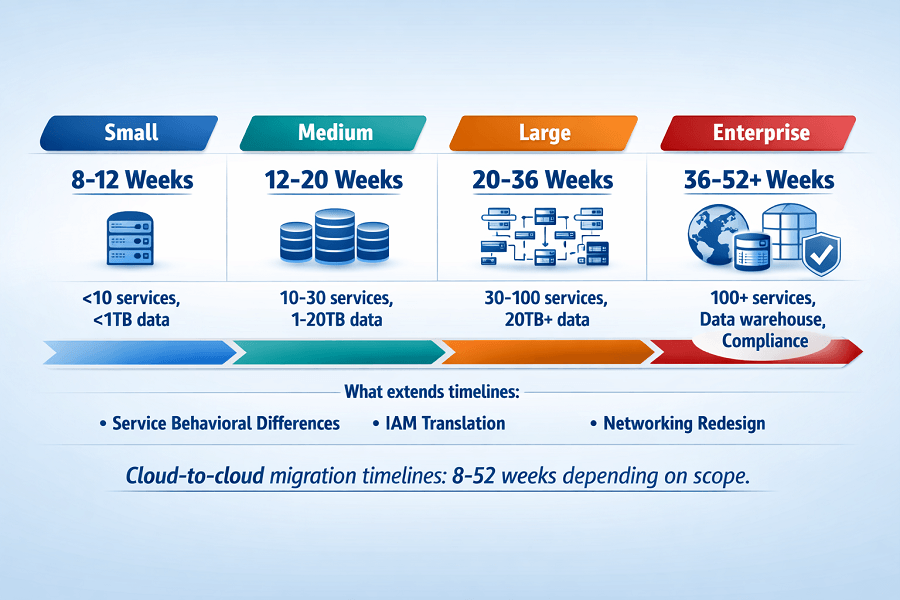
Cross-cloud migration timelines depend primarily on data volume, number of services, dependency complexity, and team availability. The ranges below reflect EaseCloud's experience across completed Azure to AWS and GCP to AWS migrations.
| Migration Scope | Typical Timeline | Key Timeline Drivers |
|---|---|---|
| Small (< 10 services, < 1TB data, clean documentation) | 8-12 weeks | Typical startup with a well-documented, containerized application. Service mapping complete in week 1; environment build in weeks 2-4; parallel validation weeks 5-8; cutover and decommission weeks 9-12. |
| Medium (10-30 services, 1-20TB data, moderate complexity) | 12-20 weeks | Growth-stage company with multiple services, a production database, and some infrastructure complexity. Discovery takes 2-3 weeks. Database migration adds 2-4 weeks for validation. |
| Large (30-100 services, 20TB+ data) | 20-36 weeks | Established SMB or complex startup with significant data, multiple databases, custom networking, and compliance requirements. Multiple workstreams run in parallel. |
| Enterprise (100+ services, data warehouse, strict compliance) | 36-52+ weeks | Large-scale migration with SOC 2/HIPAA controls, multiple account structures, and significant data volumes. Snowball Edge for data transfer adds 2-3 weeks per cycle. |
What extends cloud-to-cloud timelines vs. on-prem migrations
- Egress cost pressure: teams rush the parallel validation period to minimize ongoing egress costs - and cut it shorter than is safe. Budget for full validation time; the egress cost is worth it.
- Service behavioral differences: an Azure Cosmos DB to DynamoDB migration is not just a data move - it is a data model and application code change. These take longer than pure infrastructure migrations.
- IAM translation complexity: translating Azure AD / GCP IAM Service Accounts to AWS IAM Roles requires careful mapping and testing. Authentication failures post-cutover are the most common cross-cloud migration incident.
- Networking redesign: the GCP global VPC to AWS regional VPC redesign is the most time-consuming single item in GCP to AWS migrations when the application has multi-region routing dependencies.
- Source cloud contract timing: migration must align with Azure or GCP contract end dates to avoid paying for both clouds beyond the transition period.
6. The Cross-Cloud Migration Playbook: Phase by Phase
| Step & Time | Actions |
|---|---|
| 1 Discovery & Service Inventory (Weeks 1–2) |
- Export complete inventory from source cloud: all compute, storage, databases, networking, IAM principals, and third-party integrations - Map every source service to its AWS equivalent using the service maps in Sections 2 and 3 - Flag services with no direct equivalent (Cosmos DB, Cloud Spanner, Durable Functions), these require application changes, not just infrastructure changes - Calculate data volumes: databases, object storage, file shares, and data warehouses, input to egress cost model and Snowball Edge decision - Identify IAM principals in source cloud: service accounts, managed identities, user accounts, map to AWS IAM roles and policies - Deliverable: complete service map, data volume inventory, egress cost model, IAM translation plan |
| 2 Architecture Design & AWS Environment Build (Weeks 2–5) |
- Design AWS account structure: landing zone, multi-account if appropriate, VPC topology (don't replicate source cloud topology) - Design VPC: CIDR ranges, subnets (avoid overlapping with source cloud if VPN/peering needed during transition), AZ distribution - Write Terraform for all target infrastructure: VPCs, security groups, IAM roles, ECS/EKS clusters, RDS instances, S3 buckets, ElastiCache clusters - Configure AWS IAM Identity Center for workforce access (replacing Azure AD / GCP Identity) - Enable CloudTrail, GuardDuty, Security Hub from day one, not as an afterthought - Build CI/CD pipelines for all containerized applications targeting AWS (ECR + ECS or EKS) |
| 3 Data Migration Preparation (Weeks 3–6) |
- For databases: provision AWS DMS replication instances; configure source database as DMS source endpoint; configure target RDS/Aurora as target endpoint - Enable full-load + CDC (Change Data Capture) mode in DMS for zero-downtime database migration - For object storage: configure AWS DataSync or S3 Transfer Acceleration for blob/GCS → S3 transfer; run initial full sync - For large datasets (>10TB): order Snowball Edge devices; plan data export from source to Snowball; schedule shipping - Run database schema validation: compare source and target schemas post-migration; validate row counts and checksums on sample tables - Establish data validation baseline: record counts, checksums, and application-specific integrity checks to run post-cutover |
| 4 Application Migration & Testing (Weeks 5–14) |
- Update application configuration: replace Azure/GCP service endpoints with AWS equivalents in all config files and environment variables - Update IAM authentication: replace Azure Managed Identity / GCP Service Account key references with AWS IAM role assumption patterns - Update SDK calls: Azure SDK → AWS SDK v3; Google Cloud client libraries → AWS SDK. Pay special attention to storage, database, and secrets access patterns - Deploy applications to AWS environment (ECS Fargate or EKS); run functional test suite against AWS environment - Performance benchmark in AWS: compare response times, database query performance, and throughput against source cloud baseline - Identify and resolve performance regressions before cutover, not after |
| 5 Cutover Execution (Migration day(s)) |
- Reduce DNS TTLs to 60 seconds 48 hours before planned cutover - Final data sync: confirm DMS replication lag is under 5 seconds; run final S3 sync - Enable maintenance mode on source cloud application (or use weighted DNS for gradual traffic shift) - Switch DNS records to AWS endpoints; monitor error rates and latency in real time - Validate all critical user flows in production AWS environment before removing source cloud traffic - Keep source cloud environment live for 30 days post-cutover, do not decommission until validation period complete |
| 6 Validation & Decommission (Weeks 1–4 post-cutover) |
- Monitor application error rates, latency, and business metrics daily for first 2 weeks - Validate database integrity: run full row count and checksum comparison within 48 hours of cutover - Cost baseline review: first AWS bill should be reviewed against projections; identify any unexpected charges - Begin Reserved Instance / Savings Plan purchases after 2 weeks of stable production data - Decommission source cloud resources at end of validation period, follow cost-first order (compute first, storage last) - Cancel or modify source cloud subscription/contract, align with billing cycle to avoid paying for a full extra month |
7. Pre-Migration Checklist: What Must Be True Before Cutover
Every item below must be confirmed before the first production workload is cut over to AWS. This checklist has prevented migration failures across every engagement EaseCloud has completed.
Service Mapping & Architecture
- Every source cloud service has an identified AWS equivalent or a documented application change plan
- Services with no direct equivalent (Cosmos DB, Cloud Spanner, Durable Functions) have tested workarounds
- AWS VPC architecture designed from scratch - not copied from source cloud topology
- All VPC CIDR ranges documented and confirmed non-overlapping with source cloud if VPN needed during transition
- AWS account structure configured (Landing Zone, IAM Identity Center, multi-account if appropriate)
Data Migration
- DMS replication running with CDC enabled; replication lag confirmed < 5 seconds sustained
- Full data sync completed for all object storage (S3 sync from Blob/GCS)
- Database row counts and checksums validated in AWS target vs. source
- Snowball Edge shipment received and data loaded (if applicable)
- All backup procedures configured and tested end-to-end in AWS
Application & IAM
- All SDK references updated from Azure/GCP SDKs to AWS SDK
- All Managed Identity / Service Account references replaced with IAM role assumption
- No secrets hardcoded in application - all using AWS Secrets Manager
- Application functional test suite passing 100% against AWS environment
- Performance benchmark completed - no regressions vs. source cloud baseline
DNS, Networking & Cutover Readiness
- DNS TTLs reduced to 60 seconds (done 48 hours before cutover window)
- Rollback procedure documented and rehearsed with the team
- Cutover window confirmed: lowest-traffic period, all stakeholders notified
- AWS CloudWatch dashboards configured; alarms active for error rate and latency
- Source cloud environment confirmed stable and not in the process of any changes
8. The Most Common Cross-Cloud Migration Failures
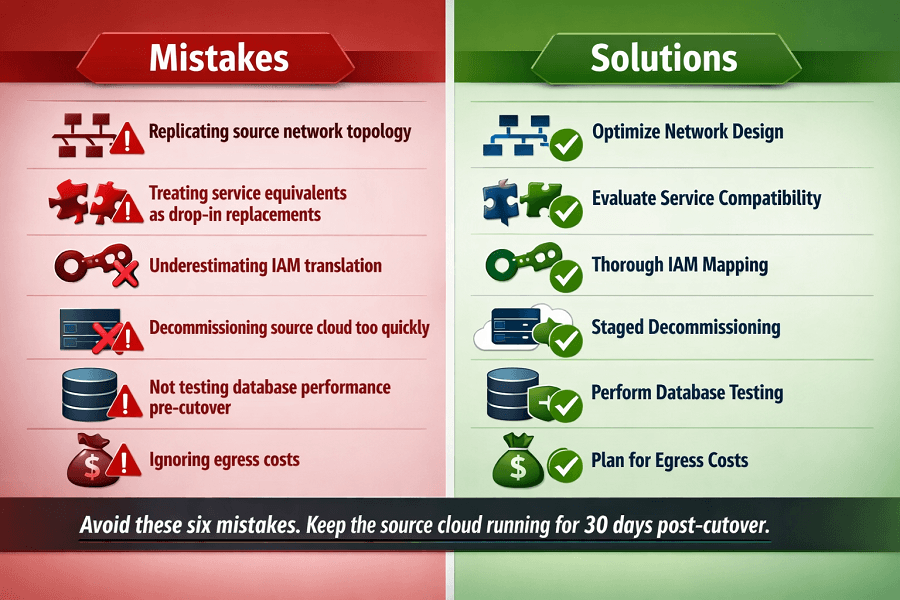
- Replicating the source cloud's network topology in AWS. Azure VNets and GCP global VPCs have different models from AWS regional VPCs. Attempting to replicate the source topology directly leads to routing problems, incorrect CIDR ranges, and missing AZ redundancy. Always design the AWS VPC from scratch based on your actual requirements.
- Treating service equivalents as drop-in replacements. Cosmos DB and DynamoDB are not interchangeable at the application layer. Azure Blob SDK and AWS S3 SDK have different authentication, error handling, and multipart upload patterns. Application code changes are required for every service with a behavioral difference - and most have at least some.
- Underestimating IAM translation complexity. Azure Managed Identities and GCP Service Accounts to AWS IAM Roles is not a configuration change - it is an authentication model change. Every application that authenticates to a cloud service must be updated. Missing one results in a post-cutover authentication failure in production.
- Decommissioning the source cloud too quickly. Egress costs during the parallel operation period are real but small compared to the cost of a failed cutover with no working source environment to fall back to. Keep the source cloud running for 30 days post-cutover. This is non-negotiable.
- Not testing database query performance in AWS before cutover. Database query performance in AWS may differ from Azure/GCP due to instance type differences, parameter group defaults, and connection pooling behavior. Run your actual query workload against the AWS database for at least 1 week before cutover. Surprises here cause the most painful post-cutover incidents.
- Ignoring egress costs in migration budget. A $500,000 AWS Snowball Edge vs. $4,350 network egress decision for a 50TB migration sounds obvious in isolation - but teams routinely choose network transfer without modeling the cost because 'we'll do it quickly.' Plan egress costs before starting, not after the bills arrive.
Conclusion
A cross-cloud migration is a strategic business pivot driven by cost arbitrage, scaling advantages, or enterprise customer demands. While cloud-to-cloud migrations offer cleaner dependency mapping than legacy on-premise transitions, they introduce unique challenges around networking architecture, proprietary SDK translations, and strict contract alignments.
By systematically mapping services, accounting for hidden egress costs early, and utilizing a phased migration playbook, engineering teams can transition smoothly to AWS without interrupting the end-user experience.
FAQ: Azure / GCP to AWS Migration
Can we run a hybrid environment (some services in Azure/GCP, some in AWS) permanently?
Technically yes - VPN or Direct Connect can bridge source cloud and AWS networks during migration, and permanently if needed. But permanent multi-cloud architectures add significant operational complexity: two IAM systems to manage, two monitoring stacks to maintain, data transfer costs between clouds, and skill requirements across multiple platforms. EaseCloud recommends minimizing the hybrid window and targeting full consolidation within 6-12 months of beginning migration.
How do we handle Azure Active Directory users and groups in AWS?
Two paths: (1) Federate Azure AD with AWS IAM Identity Center - users continue to authenticate via Azure AD SSO, and IAM Identity Center manages their AWS permissions. This is the preferred approach when Azure AD will remain in use long-term. (2) Migrate users to a new identity provider (Okta, Google Workspace) that federates with AWS IAM Identity Center. Choose based on whether Azure AD is used for other organizational purposes beyond cloud access.
What happens to our GKE or AKS clusters - can we migrate containers directly?
Kubernetes workloads are the most portable assets in a cloud-to-cloud migration. Container images built for GKE or AKS run on EKS without modification. Kubernetes manifests (Deployments, Services, ConfigMaps) work with minimal changes - primarily around storage class names, load balancer annotations, and IAM references. Helm charts are largely portable. Expect 1-2 weeks of testing and adjustment for a medium-complexity Kubernetes workload.
We're on Azure with an EA contract. How do we handle the contract transition?
Azure Enterprise Agreement contracts have specific termination terms. The migration timeline should be designed to complete before the EA renewal date - or at minimum before the next major commitment period. EaseCloud always requests contract end dates at the start of discovery and designs the migration timeline around them. Running both Azure EA and AWS simultaneously beyond the EA period means paying for both - a significant cost that should be avoided.
How long should we plan to run both environments in parallel?
30-45 days post-cutover for most migrations. During this window: all production traffic is on AWS, the source environment is in read-only or standby mode, ongoing database replication continues for rollback capability, and your team validates AWS stability. After 30-45 days of clean operation, decommission the source environment. Do not reduce this window under cost pressure - the rollback option is worth the egress cost.
Ready to Move from Azure or GCP to AWS?
EaseCloud has completed cross-cloud migrations from Azure, GCP, and legacy hosting providers - all with zero customer-facing downtime. We start with a free discovery assessment that produces an accurate timeline, egress cost model, and service mapping before any paid scope begins.
Summarize this post with:
