How to Run Qwen, DeepSeek & GLM Locally: Complete Guide
Learn how to run Qwen, DeepSeek and GLM locally with Ollama, vLLM, Docker and GPUs, including hardware, memory, quantization and setup.
Running an AI model locally has become much easier than it was a few years ago.
Developers can now download open-weight models, run them on their own computers or servers, expose local APIs, connect them to coding tools, and build private AI applications without sending every request to a managed cloud API.
For organizations evaluating Qwen, DeepSeek, and GLM, local deployment can provide several important advantages:
- Greater control over data
- Private inference
- Offline or restricted-network operation
- Reduced API dependency
- Custom model configuration
- Fine-tuning flexibility
- Predictable infrastructure
- Integration with internal systems
But local AI deployment also introduces new challenges.
A model may be downloadable but still require:
- Large amounts of RAM or VRAM
- Multiple GPUs
- Quantization
- A compatible inference framework
- Correct model templates
- CUDA or other accelerator support
- Monitoring
- Storage
- Network configuration
The right deployment method also depends heavily on the model size.
TL;DR
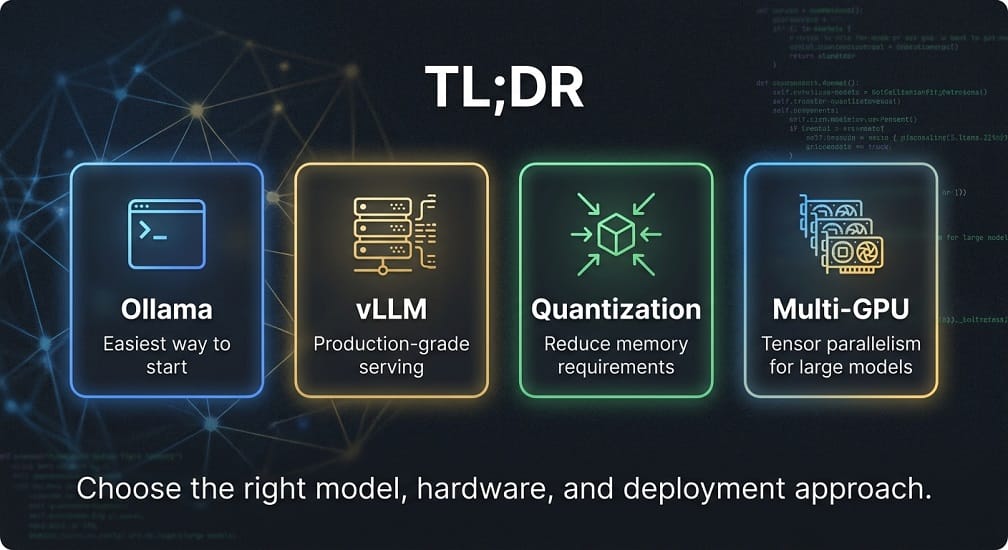
- Ollama is the easiest start –
ollama run qwen3:8bworks on a laptop. For production, use vLLM – higher throughput, continuous batching, and OpenAI-compatible APIs. - Quantization cuts memory dramatically – INT4 reduces weight memory ~75% vs FP16. But test quality on your actual tasks – quantized models can lose accuracy.
- Hardware depends on: model size × precision × context length. A 7B FP16 model needs ~14GB for weights alone, plus KV cache and overhead. Larger models (70B+) need multi-GPU or enterprise infrastructure.
- Context length matters as much as model size – 256K context consumes far more KV-cache memory than 8K. Plan hardware for your actual context needs.
- Choose local when: code is sensitive, data residency matters, or traffic is high/predictable. Choose API when: experimenting, usage is unpredictable, or GPUs aren't your core competency.
Running a smaller Qwen model on a developer workstation is very different from serving a large DeepSeek or GLM model to hundreds of users from a GPU cluster.
Qwen's current documentation explicitly supports local execution through llama.cpp, Ollama, and LM Studio, while larger-scale serving is documented through vLLM, SGLang, and TensorRT-LLM.
Qwen3-Coder is also available through Ollama, with current Ollama documentation listing 30B and 480B variants and describing 256K native context for the coding model family.
GLM's current ecosystem also supports local serving with frameworks such as vLLM and SGLang, while specialized GLM projects provide Ollama deployment options.
This guide will explain how to choose the right model, hardware, and deployment approach for local Qwen, DeepSeek, and GLM inference.
What Does “Run an AI Model Locally” Mean?
Local deployment generally means that the model inference happens on infrastructure you control rather than being performed entirely through a third-party hosted API.
A basic architecture looks like:
Developer
   ↓
Local Application
   ↓
Inference Runtime
   ↓
Model
   ↓
CPU / GPU
For a production environment, it can become:
Users
   ↓
Internal API
   ↓
Load Balancer
   ↓
Inference Server
   ↓
GPU Cluster
   ↓
Qwen / DeepSeek / GLM
The key difference is where inference runs.
With an API:
Your Application
       ↓
Internet
       ↓
Model Provider
       ↓
GPU Infrastructure
With local or private inference:
Your Application
       ↓
Your Network
       ↓
Your Inference Server
       ↓
Your GPU
That can be especially valuable for organizations handling proprietary source code, internal documents, or sensitive business data.
Qwen vs DeepSeek vs GLM: Which Models Can Run Locally?
The first rule is:
Compare specific model checkpoints, not model families as a whole.
A smaller model may run on a workstation, while a large model may require multiple enterprise GPUs.
Qwen
The Qwen ecosystem provides a broad range of model sizes and deployment options.
The official Qwen3 project documents support for:
- Ollama
- llama.cpp
- LM Studio
- vLLM
- SGLang
- TensorRT-LLM
It also documents separate paths for local inference and large-scale deployment.
This makes Qwen one of the easier ecosystems to experiment with locally.
Qwen Coder Locally
Qwen3-Coder is particularly useful for developers because it is designed for coding and agentic software engineering.
Ollama currently provides Qwen3-Coder variants including a 30B local model and a much larger 480B variant. Ollama's current listing shows 256K native context for the family, while noting that the 480B local model requires at least 250 GB of memory or unified memory.
That leads to an important practical distinction:
Developer workstation
A smaller Qwen Coder variant may be practical.
Enterprise GPU server
Larger Qwen Coder models become possible.
Multi-GPU cluster
Very large coding models can be served using tensor parallelism and production inference engines.
DeepSeek Locally
DeepSeek also has a strong open-model ecosystem suitable for private deployment.
The exact requirements depend heavily on the specific model generation and checkpoint.
For local deployment, evaluate:
- Parameter count
- Precision
- Quantization
- Context length
- KV-cache requirements
- Inference framework
- GPU memory
This is critical because a model that looks manageable by parameter count can require substantially more memory once the context window and serving overhead are included.
GLM Locally
GLM provides another broad range of deployment options.
Current Z.ai repositories show local serving through vLLM and SGLang for newer GLM families, while specialized GLM projects also provide Ollama deployment instructions.
For example, the current GLM-5 documentation provides vLLM and SGLang deployment examples and recommends multi-GPU configurations for large checkpoints.
This means GLM can be used both for local experimentation and larger private inference environments, depending on the model.
What Hardware Do You Need?
The answer depends on three major variables:
1. Model size
A larger model requires more memory.
2. Precision
FP32 consumes more memory than FP16, while quantized formats such as INT8 or INT4 reduce requirements.
3. Context length
Longer contexts increase memory requirements because the inference engine needs to maintain more KV-cache state.
A simplified estimate for model weights is:
FP16 memory ≈ Parameters × 2 bytesFor example:
7B model
≈ 14 GB weight memory
This is only an estimate for the weights.
Actual inference requires additional memory for:
- KV cache
- Runtime overhead
- CUDA memory
- Activations
- Batching
- Framework overhead
So a 14 GB model does not mean a 14 GB GPU is sufficient.
Approximate Hardware Categories
| Model Size | Typical Starting Hardware |
|---|---|
| 1B–3B | CPU / small GPU |
| 7B–8B | 16–24 GB GPU |
| 14B | 24–48 GB GPU |
| 30B | 48–96+ GB total memory |
| 70B | Multi‑GPU or very large‑memory system |
| 400B+ | Enterprise multi‑GPU infrastructure |
These are planning categories, not guaranteed requirements.
Quantization can substantially reduce memory consumption.
CPU vs GPU Inference
CPU
CPU inference is useful for:
- Small models
- Testing
- Offline experiments
- Low-volume workloads
Advantages:
- No dedicated GPU required
- Lower hardware cost
- Easy deployment
Disadvantages:
- Much slower generation
- Limited concurrency
- Poor experience for large models
GPU
GPU inference is generally preferred for:
- Coding assistants
- Interactive chat
- AI agents
- High-throughput applications
- Large models
Benefits include:
- Much faster inference
- Higher throughput
- Better concurrency
- Larger models
The trade-off is higher infrastructure cost and more complex setup.
Consumer GPUs
For local development, GPUs such as:
- RTX 4090
- RTX 5090-class systems
- RTX 6000 Ada
can be useful depending on model size and quantization.
The amount of available VRAM is often more important than raw GPU branding when selecting a model.
Enterprise GPUs
Larger models may require:
- NVIDIA A100
- NVIDIA H100
- NVIDIA H200
- NVIDIA B-series systems
GLM's current large-model deployment documentation, for example, lists multi-GPU configurations for newer GLM models. The vLLM recipe for GLM-5 specifies 8× H200/H20-class GPUs for its FP8 configuration.
This illustrates how quickly the infrastructure requirements can grow when moving from a desktop model to a large production model.
Ollama: The Easiest Way to Start
For many developers, Ollama is the simplest entry point into local LLM deployment.
The workflow is straightforward:
Install Ollama
      ↓
Pull Model
      ↓
Run Model
      ↓
Use Local API
Qwen's official documentation provides Ollama instructions, including examples such as:
ollama serve
ollama run qwen3:8b
Qwen also notes that its Ollama setup can expose an OpenAI-compatible API at:
http://localhost:11434/v1/and recommends explicitly setting context and output parameters rather than relying on unsuitable defaults.
Running Qwen with Ollama
For a supported Qwen model:
ollama run qwen3:8bFor Qwen Coder, Ollama currently documents:
ollama run qwen3-coder:30bwith the larger 480B variant also available for much more capable infrastructure.
This makes Ollama especially useful for:
- Local coding assistants
- Developer experimentation
- Proof of concepts
- Offline AI
- Internal tools
Running DeepSeek with Ollama
The same overall pattern can be used for supported DeepSeek models:
ollama pull <deepseek-model>
ollama run <deepseek-model>
The exact model name should always be verified against the current Ollama library entry before deployment.
This matters because model tags and supported variants can change.
Running GLM with Ollama
GLM also has supported Ollama workflows for selected projects and model variants.
For example, the official GLM-OCR repository provides an Ollama deployment flow and documents the local endpoint at port 11434. It also recommends vLLM or SGLang for production-scale deployment.
This illustrates a useful general rule:
Ollama is excellent for getting started; production inference often benefits from a more specialized serving stack.
vLLM: Production-Grade Inference
When moving beyond a developer laptop, vLLM becomes an important option.
vLLM is designed for:
- High throughput
- Efficient GPU use
- Concurrent requests
- Continuous batching
- OpenAI-compatible APIs
Qwen's official documentation provides vLLM deployment instructions and notes that vLLM exposes an OpenAI-compatible endpoint.
Current vLLM recipes also provide dedicated Qwen3-Coder serving configurations.
Qwen with vLLM
A basic Qwen serving architecture looks like:
Application
    ↓
OpenAI-compatible API
    ↓
vLLM
    ↓
Qwen Model
    ↓
GPU
For larger models:
Application
    ↓
API Gateway
    ↓
vLLM
    ↓
Tensor Parallelism
    ↓
Multiple GPUs
This becomes the foundation for private coding and enterprise AI infrastructure.
GLM with vLLM
Current GLM repositories document vLLM support for newer models.
For example, GLM-5 documentation provides multi-GPU vLLM commands, including tensor parallelism and model-specific tool and reasoning parsers.
That makes vLLM a strong candidate for production GLM inference.
Why vLLM Is Better Than Ollama for Many Production Systems
Ollama is optimized for simplicity.
vLLM is optimized more heavily toward serving efficiency and production workloads.
| Requirement | Ollama | vLLM |
|---|---|---|
| Easy local setup | Excellent | Good |
| Developer testing | Excellent | Good |
| Production serving | Limited use cases | Excellent |
| High concurrency | Limited | Strong |
| Large GPU clusters | Not primary focus | Strong |
| OpenAI‑compatible API | Yes | Yes |
| Enterprise inference | Possible | Strong fit |
The best tool depends on the stage of your deployment.
Step 1: Prepare the Local Environment
Before installing a model, decide whether you are using:
- CPU-only inference
- NVIDIA GPU
- Apple Silicon
- AMD GPU
- Multi-GPU server
For most interactive coding and chat workloads, a GPU provides a much better experience.
For larger models, system RAM or unified memory can become just as important as GPU VRAM.
Step 2: Choose the Model Size First
Hardware planning should begin with the model rather than the GPU.
For example:
Small model
   ↓
Developer workstation
Medium model
   ↓
Large workstation / single GPU
Large model
   ↓
Multi-GPU server
Very large model
   ↓
Enterprise GPU cluster
This prevents a common mistake: buying hardware first and discovering later that the desired model does not fit.
Step 3: Quantization Explained
Quantization reduces the numerical precision used to store and process model weights.
Common formats include:
- FP32
- FP16
- BF16
- FP8
- INT8
- INT4
- AWQ
- GPTQ
- GGUF
A simplified example:
FP16
2 bytes / parameter
INT8
1 byte / parameter
INT4
0.5 byte / parameter
So, very roughly:
30B parameters
FP16
≈ 60 GB of weight storage
INT8
≈ 30 GB
INT4
≈ 15 GB
These are weight-memory estimates only.
Real inference also needs memory for:
- KV cache
- Runtime overhead
- Activations
- CUDA allocations
- Batch size
- Context length
So don't assume a 15 GB INT4 model will automatically fit comfortably into a 16 GB GPU.
Why Quantization Matters
Quantization makes larger models accessible on smaller hardware.
For local developers, that can mean:
Large FP16 model
       ↓
Too much VRAM
       ↓
Quantized model
       ↓
Fits local hardware
The trade-off is that aggressive quantization can reduce quality or alter behavior.
For coding models, test quantized versions against your actual programming tasks before standardizing on them.
Qwen: Local Setup with Ollama
Qwen's official documentation provides Ollama support, and current Qwen documentation shows commands such as:
ollama serve
ollama run qwen3:8b
Qwen also recommends explicitly configuring the context length and output length instead of relying on small defaults.
A basic setup is:
Install Ollama
      ↓
ollama serve
      ↓
Pull Qwen model
      ↓
Run model
      ↓
Local API
Qwen with Ollama
For a suitable local Qwen model:
ollama run qwen3:8bFor larger models, use the exact current tag from the Ollama model library rather than assuming the tag remains unchanged.
Qwen's own documentation notes that Ollama naming can differ from the original model naming, so checking the current model tags is important.
Configure Qwen Context Length
This is particularly important for coding and long-document workloads.
Qwen's current guidance warns that unsuitable Ollama defaults can cause problems for Qwen3, especially because the default context may be much smaller than the model's supported context.
A local coding workflow may therefore use settings such as:
Context:
40K–128K+
Output:
Task dependent
The right value depends on your available memory.
Higher context means higher KV-cache requirements.
Qwen with vLLM
For a more production-oriented deployment, Qwen recommends vLLM.
The official Qwen deployment documentation describes vLLM as a high-throughput serving engine with features such as continuous batching and efficient KV-cache management.
A basic example is:
pip install "vllm>=0.8.5"
vllm serve Qwen/Qwen3-8B
This creates an OpenAI-compatible API.
The official Qwen documentation gives the default endpoint as:
http://localhost:8000/v1and demonstrates Chat Completions against that API.
Qwen on Multiple GPUs
For a larger model, vLLM can use tensor parallelism.
For example:
vllm serve Qwen/Qwen3-8B \
  --tensor-parallel-size 4
The exact number of GPUs should be based on:
- Model size
- Quantization
- Context
- Batch size
- Target throughput
The Qwen documentation explicitly demonstrates tensor parallel deployment and advises adjusting GPU count to workload requirements.
DeepSeek: Local Deployment
For DeepSeek, the same basic pattern applies:
Model checkpoint
      ↓
Inference runtime
      ↓
GPU / CPU
      ↓
Local API
The exact command depends on:
- Model generation
- Available weights
- Quantization
- Runtime support
This is especially important because current DeepSeek models and older DeepSeek Coder releases have very different size and infrastructure profiles.
Don't use an old DeepSeek deployment command for a newer checkpoint without checking its official documentation.
DeepSeek with a Production Inference Engine
For larger deployments, use a serving framework such as:
- vLLM
- SGLang
- TensorRT-LLM
- Other compatible runtimes
The objective is to turn the model into a stable API rather than manually interacting with a single-process local runtime.
The architecture becomes:
Application
     ↓
OpenAI-compatible API
     ↓
Inference Server
     ↓
DeepSeek
     ↓
GPU
This makes it easier to integrate DeepSeek with:
- Internal applications
- Coding assistants
- RAG platforms
- AI agents
- Developer tools
GLM: Local Deployment
GLM's current ecosystem supports several local serving paths.
The official GLM-5 repository documents vLLM, SGLang, xLLM, and KTransformers as local deployment options for the GLM-5 family.
For large GLM models, the deployment requirements can be substantial.
For example, the current GLM-5 repository lists the GLM-5.1 and GLM-5 checkpoints at 744B-A40B, with both BF16 and FP8 variants. Its example vLLM deployment uses tensor parallelism across eight GPUs.
That is a very different deployment category from running an 8B model on a developer laptop.
GLM with vLLM
The current GLM documentation provides a vLLM example using:
- Tensor parallelism
- Tool-call parser
- Reasoning parser
- Automatic tool choice
- Speculative decoding
For example, the official GLM-5.1 example uses:
vllm serve zai-org/GLM-5.1-FP8 \
  --tensor-parallel-size 8 \
  --gpu-memory-utilization 0.85 \
  --served-model-name glm-5.1-fp8
The full command also configures model-specific parsing and speculative-decoding options.
This is clearly a server-grade deployment, not a typical laptop installation.
GLM with Ollama
Ollama can also be useful for selected GLM models.
For example, the official GLM-OCR documentation provides an Ollama deployment method and uses the local endpoint:
http://localhost:11434The same guide recommends the native Ollama generation endpoint for its vision workload because of API limitations.
The important lesson is:
Different model types may require different API paths.
Don't assume every model can be served identically just because it runs through Ollama.
Docker for Local AI
Docker is useful when you want reproducible model-serving environments.
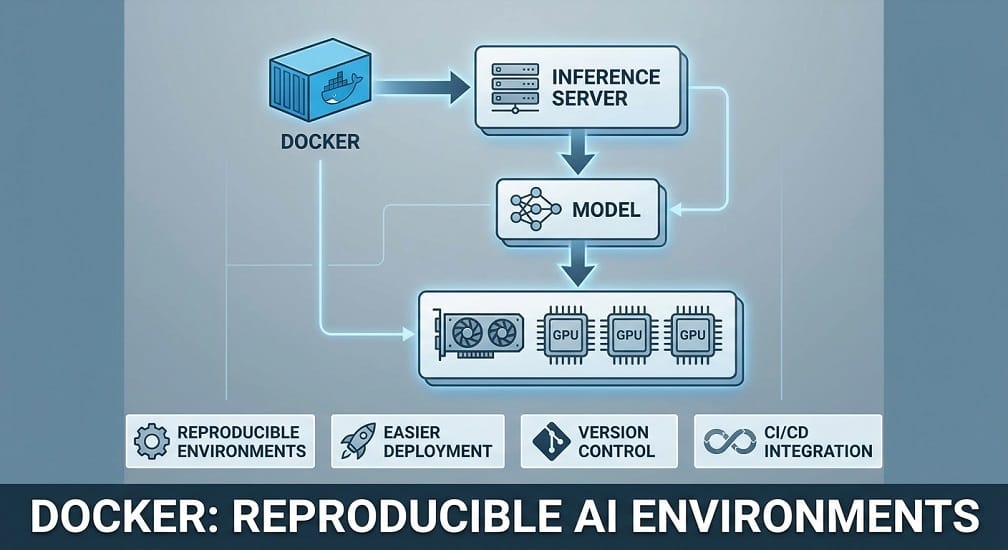
A typical stack looks like:
Docker
  ↓
Inference Server
  ↓
Model
  ↓
GPU
Benefits include:
- Reproducible environments
- Easier deployment
- Version control
- CI/CD integration
- Easier migration between machines
For enterprise teams, Docker is often the first step before moving to Kubernetes.
Why Docker Matters for AI Teams
Without containers, teams can end up with inconsistent:
- CUDA versions
- PyTorch versions
- Python environments
- Model-serving dependencies
A container allows you to standardize those dependencies.
This becomes particularly useful when different engineers need to reproduce the same inference environment.
Connecting a Local Model to an OpenAI-Compatible Client
One of the biggest advantages of vLLM and Ollama is their OpenAI-compatible API support.
Your application can look like:
Application
     ↓
OpenAI SDK
     ↓
localhost / internal endpoint
     ↓
Qwen / DeepSeek / GLM
That means you can often switch between:
- Hosted API
- Local model
- Private Kubernetes model
without rewriting your entire application.
However, model-specific differences can still exist in:
- Tool calling
- Structured output
- Reasoning fields
- Chat templates
- Tokenization
- Function-call formatting
So compatibility at the HTTP level does not mean behavior is identical.
Connect a Local Model to a Coding Assistant
A local model becomes especially useful when paired with development tools.
A common architecture is:
VS Code / Coding Agent
       ↓
OpenAI-compatible API
       ↓
Local Inference
       ↓
Qwen / DeepSeek
This can provide private coding assistance without sending source code to an external coding assistants.
Typical use cases include:
- Code completion
- Code explanation
- Debugging
- Refactoring
- Repository search
- Documentation generation
For sensitive enterprise repositories, this can significantly change the security model.
Security Considerations for Local AI
Security considerations for local inference reduces dependence on external model providers, but it does not automatically make the system secure.
You still need:
- Authentication
- Network controls
- Encryption
- Access policies
- Secret management
- Logging
- Monitoring
- Patch management
A local API such as:
http://0.0.0.0:8000
should not simply be exposed to the public internet.
For enterprise deployments, put inference behind:
Users
 ↓
Authentication
 ↓
API Gateway
 ↓
Private Network
 ↓
Inference Server
Protect the Model API
For an internal deployment:
- Require authentication.
- Restrict network access.
- Use TLS where appropriate.
- Rate-limit expensive requests.
- Log administrative actions.
- Separate development and production models.
This is especially important for GPU-backed systems because an exposed endpoint can create both a security and a cost problem.
Storage Considerations
Large models consume significant disk space.
You may need storage for:
- Model weights
- Quantized variants
- Tokenizers
- Container images
- Logs
- Caches
- Evaluation datasets
For multi-model environments:
/models
  ├── qwen/
  ├── deepseek/
  └── glm/
Use fast storage when startup and model-loading times matter.
Apple Silicon
Apple Silicon systems can be useful for local experimentation, especially with smaller and quantized models.
The main constraint is unified memory.
As model size increases, the amount of memory available to the model becomes the limiting factor.
For developers, Apple Silicon is often a good environment for:
- Small Qwen models
- Quantized models
- Local coding assistants
- Offline experimentation
It is not a practical replacement for a large multi-GPU inference server.
NVIDIA GPU Workstations
For serious local AI development, NVIDIA GPUs remain a common choice because of the mature CUDA ecosystem and broad framework support.
Typical developer configurations may use:
- 24 GB VRAM
- 48 GB VRAM
- 96 GB+ VRAM
The appropriate level depends on model size and quantization.
When a Single GPU Isn't Enough
If a model doesn't fit on one GPU, you have several options:
Quantize the model
Reduce memory requirements.
Use a smaller model
Often the simplest approach.
Use tensor parallelism
Split model computation across GPUs.
Use a distributed serving architecture
Useful for large enterprise deployments.
The GLM-5 documentation provides a concrete example of multi-GPU serving with tensor parallelism across eight GPUs.
Qwen, DeepSeek & GLM: Local Deployment Decision Guide
| Goal | Recommended Approach |
|---|---|
| First experiment | Ollama |
| Local coding assistant | Ollama |
| Reproducible dev environment | Docker |
| Production API | vLLM |
| Large model serving | vLLM / SGLang |
| Multi‑GPU model | Tensor parallel serving |
| Enterprise private inference | Kubernetes |
| Very large deployment | GPU cluster + vLLM/SGLang |
EaseCloud Perspective
For a developer, running Qwen, DeepSeek, or GLM locally can be as simple as installing Ollama.
For an enterprise, the problem is different.
You may need:
Model
 ↓
GPU Infrastructure
 ↓
Inference Server
 ↓
API Gateway
 ↓
Authentication
 ↓
Monitoring
 ↓
Autoscaling
 ↓
Cost Management
This is where EaseCloud can help organizations move from a local proof of concept to a secure private AI platform.
Typical next steps include:
- AWS GPU architecture
- Amazon EKS
- vLLM
- Kubernetes
- Private networking
- IAM
- Observability
- GPU autoscaling
- LLMOps
- AI cost optimization
Quantization: Which Format Should You Use?
Quantization is one of the easiest ways to make a model fit on smaller hardware.
The common choices are:
| Format | Typical Use |
|---|---|
| FP16 | Maximum quality / standard GPU inference |
| BF16 | Modern NVIDIA production inference |
| FP8 | Efficient large‑model inference |
| INT8 | Moderate memory reduction |
| INT4 | Aggressive memory reduction |
| AWQ | Quantized GPU inference |
| GPTQ | Quantized inference |
| GGUF | Convenient local CPU/GPU inference |
Qwen's current documentation provides pre-quantized FP8 and AWQ models and shows how to serve them through vLLM. It also notes that Qwen3 FP8 support depends on GPU capabilities, with newer NVIDIA architectures being the preferred target.
FP16 vs BF16
FP16 and BF16 are common choices for high-quality GPU inference.
FP16
Useful when:
- The hardware supports it well
- You want predictable inference
- You are running smaller models
BF16
Modern NVIDIA data-center GPUs commonly support BF16 efficiently.
Qwen's own inference documentation notes that its models use BF16 by default and that older GPUs may need FP16 instead.
For enterprise inference, BF16 can therefore be a strong default when the GPU supports it.
FP8
FP8 can significantly reduce memory and improve throughput on suitable hardware.
Qwen's official deployment documentation provides FP8 model variants and notes that its block-wise FP8 models are supported particularly well on Ada Lovelace, Hopper, and newer NVIDIA architectures. It also documents additional support for Ampere through newer vLLM implementations.
FP8 is especially attractive when serving large models on expensive GPU infrastructure.
INT4 and AWQ
4-bit quantization can dramatically reduce memory requirements.
For local development, this can turn an otherwise impractical model into one that fits on a workstation.
Qwen also provides AWQ variants and documents direct vLLM serving for AWQ models.
The trade-off is potential quality loss.
For coding models, don't assume the smallest quantized version is automatically good enough. Run your own tests involving:
- Code generation
- Debugging
- Refactoring
- Repository understanding
- Tool use
GGUF for Local Development
GGUF is commonly used for lightweight local inference with tools in the llama.cpp ecosystem and some desktop runtimes.
It is particularly useful when you want:
- CPU inference
- Consumer GPUs
- Hybrid CPU/GPU execution
- Portable model files
GGUF can be a good option for developers experimenting locally, while vLLM, SGLang, or TensorRT-LLM are often better fits for high-throughput server deployments.
How Much VRAM Do You Need?
A simple starting estimate is:
Weight memory ≈
Parameter count × bytes per parameter
Very roughly:
| Model | FP16 Weight Estimate |
|---|---|
| 7B | ~14 GB |
| 14B | ~28 GB |
| 30B | ~60 GB |
| 70B | ~140 GB |
| 100B | ~200 GB |
| 400B+ | ~800 GB+ |
These numbers are only for model weights.
Actual deployment also requires:
- KV cache
- Runtime memory
- Activations
- CUDA allocations
- Batch memory
- Context memory
So the usable hardware requirement is always higher.
Context Length Can Change the Hardware Requirement
This is particularly important for coding agents.
A model running at:
8K context
can require far less memory than the same model running at:
256K context
or:
1M context
The model weights may be identical, but the KV cache can become much larger.
Therefore:
Model size alone is not enough for GPU planning.
Qwen Hardware Planning
Qwen's current deployment documentation demonstrates both single-GPU and tensor-parallel multi-GPU inference. It also recommends adjusting context length to available GPU memory.
For smaller Qwen models:
- Single GPU inference can be practical.
- Quantization can reduce memory pressure.
- Ollama can simplify local experimentation.
For larger Qwen models:
- Multi-GPU inference becomes necessary.
- vLLM or SGLang becomes more useful.
- Tensor parallelism can distribute model execution.
DeepSeek Hardware Planning
DeepSeek hardware requirements also vary significantly by model and serving configuration.
You should account for:
- Weight precision
- Quantization
- Context length
- Concurrent users
- KV cache
- Tool-call workloads
- Batch size
For an internal coding assistant with 5–20 developers, the infrastructure requirement can be dramatically smaller than a multi-tenant API serving thousands of users.
GLM Hardware Planning
The GLM family demonstrates how quickly requirements can scale.
Current GLM-5 documentation lists the model family at approximately 744B-A40B, with BF16 and FP8 variants, and provides an eight-GPU serving example using vLLM.
That means a model such as GLM-5 belongs to a completely different deployment tier from a small local GLM checkpoint.
For local deployment planning, always separate:
desktop-scale models
from
server-scale models
and
multi-GPU enterprise models.
Kubernetes for Private AI
Once more than one application needs access to your models, Kubernetes becomes increasingly useful.
A private AI architecture may look like:
Developers
    │
    ▼
Internal AI Gateway
    │
    ▼
Kubernetes / EKS
    │
 ┌──┴───────────────┐
 ▼                  ▼
Qwen Inference   DeepSeek / GLM
 │                    │
 └─────────┬──────────┘
           ▼
       GPU Nodes
Kubernetes can provide:
- Model isolation
- Service discovery
- Autoscaling
- Rolling updates
- GPU scheduling
- Access control
- Centralized logging
Why Amazon EKS Can Be Useful
For organizations already operating AWS infrastructure, Amazon EKS can provide a natural foundation for private AI inference.
A typical architecture could include:
Users
  ↓
Application
  ↓
API Gateway / Load Balancer
  ↓
Amazon EKS
  ↓
vLLM / SGLang
  ↓
GPU Node Group
  ↓
Qwen / DeepSeek / GLM
Around the model-serving layer, you can add:
- IAM
- VPC isolation
- CloudWatch
- ECR
- Secrets Manager
- Network policies
- Autoscaling
This turns a local model into an enterprise AI platform.
GPU Autoscaling
A common mistake is running expensive GPUs 24/7 even when traffic is low.
Autoscaling can reduce that waste.
For example:
Low traffic
   ↓
2 GPU nodes
High traffic
   ↓
8 GPU nodes
The exact strategy depends on:
- Model loading time
- GPU startup time
- Request patterns
- Minimum capacity
- SLA requirements
For interactive coding systems, you may want a warm baseline.
For batch workloads, aggressive scaling can save more money.
Monitoring Local AI Models
Local deployment doesn't remove the need for observability.
Track:
Infrastructure
- GPU utilization
- GPU memory
- CPU utilization
- RAM
- Disk usage
- Network
Model
- Tokens per second
- Time to first token
- Request queue
- Context size
- Batch size
Application
- Error rate
- Retry rate
- User latency
- Cost per request
- Success rate
A useful dashboard might look like:
GPU Utilization       82%
VRAM Utilization      91%
Tokens/sec           74
TTFT                1.3s
Requests/minute      420
Error Rate          0.4%
These metrics help identify both performance and cost problems.
Security for Private Qwen, DeepSeek & GLM
Running a model locally does not make the application automatically secure.

A private AI platform should include:
- Network isolation
- Authentication
- Authorization
- TLS
- Secret management
- Audit logs
- Model access controls
- Data retention policies
Your model endpoint should not simply be exposed to the public internet.
Protecting Sensitive Source Code
For enterprise coding assistants, source-code privacy is one of the biggest reasons to consider private inference.
A safer architecture is:
Developer
   ↓
Company Network
   ↓
Private AI Gateway
   ↓
Private Inference
   ↓
Model
This can prevent proprietary repositories from being sent to external model APIs, depending on the final architecture and data flows.
Local AI vs API: Which Is Better?
There is no universal winner.
| Requirement | API | Local / Private |
|---|---|---|
| Setup speed | Excellent | Moderate |
| Infrastructure effort | Very low | High |
| Data control | Provider‑dependent | High |
| Customization | Moderate | High |
| Scalability | Provider‑managed | Self‑managed |
| Upfront cost | Low | High |
| Long‑term control | Lower | Higher |
| GPU management | None | Required |
When Local Deployment Makes Sense
Choose local/private inference when:
- Source code is sensitive
- Data residency matters
- Compliance requires private infrastructure
- Traffic is high and predictable
- You need model customization
- You need internal APIs
- You want greater infrastructure control
When an API Makes More Sense
Stay with hosted APIs when:
- You are experimenting
- Usage is unpredictable
- The team is small
- GPUs aren't your core competency
- You want the latest managed models
- Infrastructure operations would distract from product development
Common Deployment Mistakes
Running Too Large a Model
Start with the smallest model that meets your quality requirements.
Ignoring Context Memory
Large context can consume significant memory even when the model weights fit.
Using FP16 Everywhere
Quantized or FP8 deployments may provide a better cost/performance balance for suitable workloads.
Exposing the API Publicly
Protect the endpoint with authentication and network controls.
Running GPUs at Low Utilization
Measure utilization before increasing capacity.
Skipping Model Evaluation
A model that works well in a benchmark may perform differently on your actual codebase and documents.
EaseCloud: From Local Proof of Concept to Production
For a developer, running a Qwen or DeepSeek model locally can be a useful experiment.
For a company, production deployment requires a complete platform.
EaseCloud can help organizations design that transition across:
- AWS GPU architecture
- Amazon EKS
- Kubernetes
- vLLM
- SGLang
- Private AI networking
- Model serving
- GPU autoscaling
- Monitoring and observability
- LLMOps
- AI infrastructure cost optimization
The objective isn't simply to run a model.
It is to build an AI platform that is:
secure + scalable + observable + cost-efficient.
Final Recommendation
Use this progression for most projects:
Stage 1
Local Ollama
    ↓
Stage 2
Docker / vLLM
    ↓
Stage 3
Private GPU Server
    ↓
Stage 4
Kubernetes
    ↓
Stage 5
Amazon EKS / Enterprise AI Platform
For experimentation:
Ollama
For production inference:
vLLM or SGLang
For large-scale enterprise workloads:
Kubernetes + GPU infrastructure
For AWS-based organizations:
Amazon EKS + GPU node groups + production inference stack
Frequently Asked Questions
Can Qwen run locally?
Yes. Qwen's official documentation supports local execution through tools such as Ollama, llama.cpp, and LM Studio, as well as production serving through vLLM, SGLang, and TensorRT-LLM.
Can DeepSeek run locally?
Supported DeepSeek checkpoints can be deployed privately using compatible inference frameworks. Always verify the exact model's official deployment instructions.
Can GLM run locally?
Yes. Current GLM repositories document local deployment through frameworks such as vLLM and SGLang, with specific requirements depending on the model.
Is Ollama better than vLLM?
Ollama is usually easier for local experimentation and developer workflows. vLLM is generally better suited to high-throughput production serving.
How much GPU memory do I need?
It depends on model size, quantization, context length, and concurrency. Weight size alone is not enough to determine the real requirement.
Can I run these models on a laptop?
Smaller or quantized models can often run on laptops or workstations, while large models may require multiple GPUs.
Is local AI cheaper than an API?
Not always. Local deployment introduces GPU, storage, networking, maintenance, and engineering costs. Compare total cost of ownership, not only token pricing.
Final Verdict
For developers who want to experiment with Qwen, DeepSeek, or GLM locally, start with Ollama and a model that comfortably fits your hardware.
For production inference, move toward vLLM or SGLang.
For enterprise-scale workloads, use a private Kubernetes architecture, with Amazon EKS being a natural choice for AWS environments.
The key is to scale the infrastructure only when the workload justifies it.
A small team doesn't need an expensive GPU cluster just to test an open model. At the same time, an enterprise serving thousands of users shouldn't treat a developer laptop as a production architecture.
Model size, quantization, context, concurrency, latency, privacy, and workload economics should all be evaluated together.
For organizations moving from local AI experiments to private production infrastructure, EaseCloud can help design the AWS, Kubernetes, GPU, inference, security, and LLMOps layers required to run Qwen, DeepSeek, and GLM reliably at scale.
Summarize this post with:
