Open-Source LLM Cost Optimization: GPU, Quantization & vLLM
Learn how to reduce open-source LLM costs with GPU sizing, quantization, vLLM, caching, batching, autoscaling and efficient model selection.

TL;DR
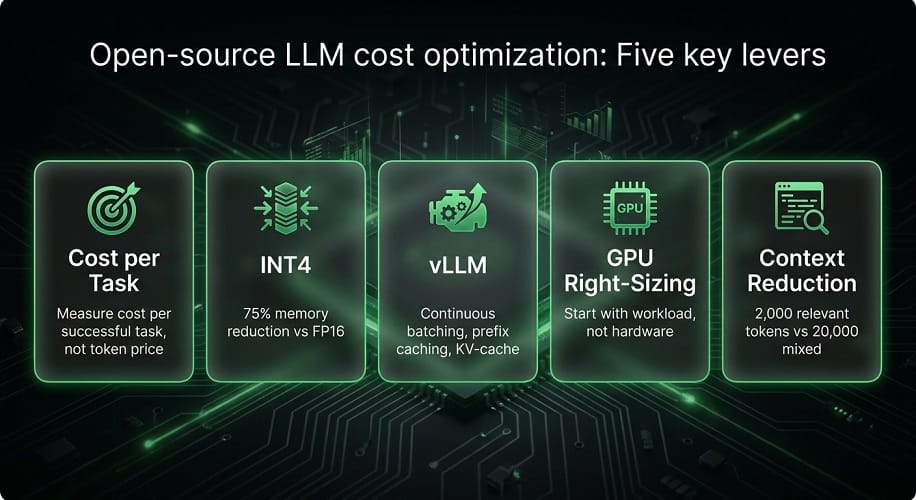
- The real cost isn't token price – it's cost per successful task. For production AI, measure total operating cost (GPU + storage + networking + retries + human review) divided by successful tasks. A cheaper model that fails often is more expensive overall.
- Quantization is the highest-impact cost lever – INT4 reduces weight memory ~75% vs FP16, but quality must be benchmarked. FP8 offers a good balance for modern GPUs. Always test quantized versions against your actual workload before deploying.
- vLLM improves serving efficiency – continuous batching, KV-cache management, prefix caching, and Prometheus metrics. Use it for production Qwen, DeepSeek, or GLM deployments. Monitor
kv_cache_usage_perc, waiting requests, and GPU utilization. - GPU right-sizing starts with workload, not hardware. Measure model size, context, concurrency, and latency targets. AWS options: G7 (32GB) for cost-conscious inference, P5/H100 (80GB) for large models, P5e/H200 (141GB) for memory-heavy, P6/Blackwell for extreme-scale. Don't buy the biggest GPU by default.
- Reduce context to reduce cost – better RAG retrieval (2,000 relevant tokens vs 20,000 mixed) cuts input tokens, KV-cache pressure, latency, and cost. Prefix caching reuses repeated prompt prefixes. Use model routing: small models for simple tasks, larger models only when needed.
Where Do Open-Source LLM Costs Actually Come From?
Running an open-source LLM can look inexpensive at first.
You download the model, start an inference server, and begin sending requests.
But production cost is much larger than the model itself.
The real cost can include:
- GPU compute
- Model storage
- Networking
- Memory
- Kubernetes
- Inference serving
- Monitoring
- Autoscaling
- Engineering
- Model updates
- Failed requests
- Retries
- Human review
For an enterprise deployment, the important question is therefore not:
How much does this model cost?
It is:
How much does it cost to successfully complete the work this model is being used for?
That distinction becomes especially important for Qwen, DeepSeek, GLM, Llama, and Mistral deployments.
Token Price Is Not Total Cost
For API-based inference, businesses often compare:
input price + output price
That is useful, but incomplete.
For example, two models might have different token prices while producing very different numbers of tokens for the same task.
One model may also require more retries or additional tool calls.
A better calculation is:
Total task cost = model usage + retries + tool calls + supporting infrastructure
For self-hosted inference, the formula changes again:
Total cost = GPU + storage + networking + platform + operations
Self-Hosted LLM Cost
A private LLM deployment can have several major cost categories.
| Cost Category | Examples |
|---|---|
| Compute | GPU instances |
| Storage | Model weights, caches, logs |
| Network | Data transfer, load balancing |
| Platform | Kubernetes, EKS |
| Inference | vLLM, SGLang |
| Monitoring | Metrics, logs, tracing |
| Engineering | Deployment and maintenance |
| Scaling | Additional GPU capacity |
The GPU usually represents the largest direct infrastructure cost, but poor utilization can be an even bigger problem.
GPU Utilization Matters
Suppose a GPU is available 24 hours a day but handles meaningful inference for only a few hours.
You are effectively paying for unused capacity.
Consider two deployments:
| Deployment | GPU Utilization | Result |
|---|---|---|
| A | 20% | Significant idle capacity |
| B | 75% | Much better utilization |
A more expensive GPU can actually provide better economics if it processes enough additional work.
That is why GPU hourly price alone is not a useful optimization metric.
The Most Important Metric: Cost Per Successful Task
For AI applications, use:
Cost per successful task = Total operating cost ÷ successful tasks
This is especially useful for:
- Coding agents
- Customer-support systems
- RAG
- Document processing
- AI automation
For example, suppose:
Model A
$100 total inference cost
1,000 successful tasks
Cost per successful task:
$0.10
Model B
$70 total inference cost
500 successful tasks
Cost per successful task:
$0.14
Model B uses less money overall, but Model A is more efficient for the actual business workload.
Cost Per Token Is Still Useful
Token-level metrics remain useful for capacity planning.
Track:
- Input tokens
- Output tokens
- Cached tokens
- Tokens per request
- Tokens per successful task
vLLM exposes prompt-token and generation-token metrics through its production metrics endpoint, allowing operators to monitor the actual token workload handled by the inference server.
But token cost should remain a supporting metric, not the only business metric.
Model Size Is One of the Biggest Cost Drivers
Larger models normally require more:
- GPU memory
- Compute
- Storage
- Serving capacity
The first cost-optimization decision should therefore be:
Do we actually need the larger model?
A smaller model that performs well enough can provide much better economics for high-volume applications.
For example, a customer-support classifier may not need the same model used for an autonomous coding agent.
Use Different Models for Different Tasks
One of the strongest cost strategies is model specialization.
Instead of:
One large model for everything
use:
A smaller model for simple work + a larger model for difficult work
Examples:
| Task | Possible Model Strategy |
|---|---|
| Classification | Small model |
| Simple extraction | Small model |
| FAQ | Small / medium model |
| Coding | Coding model |
| Complex reasoning | Larger model |
| Autonomous agent | Large reasoning/coding model |
This approach can reduce the average cost per request without sacrificing quality where it matters.
Context Length Is a Cost Driver
Long prompts can become expensive even when the model itself is reasonably priced.
Large context also increases:
- KV-cache requirements
- Memory pressure
- Prefill computation
- Latency
This is particularly important for:
- Enterprise RAG
- Coding assistants
- Long documents
- Agent memory
Sending unnecessary context is one of the easiest ways to waste inference capacity.
Better Retrieval Can Reduce LLM Cost
For RAG applications, don't automatically send an entire document collection to the model.
Instead, retrieve only the information needed for the question.
For example:
Poor approach
20,000 irrelevant tokens + 2,000 useful tokens
Better approach
2,000 highly relevant tokens
The second request can be cheaper, faster, and easier for the model to reason over.
This makes retrieval optimization part of LLM cost optimization.
KV Cache and Its Cost Impact
The KV cache stores attention information needed during generation.
It matters particularly for:
- Long conversations
- Large contexts
- High concurrency
- Repeated prompts
When KV-cache memory becomes constrained, requests may queue or require additional resources.
vLLM currently exposes KV-cache usage through its production metrics, including kv_cache_usage_perc. It also exposes running and waiting request counts, which are useful for capacity planning.
Prefix Caching Can Reduce Repeated Work
If many requests share the same prompt prefix, the inference engine can reuse previously computed KV-cache information.
This is particularly useful for:
- Long system prompts
- Enterprise RAG
- Repeated document queries
- Coding-agent sessions
- Shared instructions
vLLM's Automatic Prefix Caching reuses KV-cache blocks when subsequent requests share the same prefix, reducing redundant prompt computation.
This can improve efficiency without changing the model itself.
Continuous Batching
A production inference server should avoid treating every request as an isolated job.
Continuous batching allows incoming requests to be processed efficiently together.
This can improve:
- GPU utilization
- Throughput
- Overall cost efficiency
The exact improvement depends on the model, request pattern, context size, and hardware.
For high-volume workloads, serving efficiency can be just as important as model selection.
Why vLLM Matters for Cost Optimization
vLLM is not simply a model launcher.
Its production ecosystem includes:
- High-throughput serving
- Prefix-aware routing
- KV-cache management
- Multi-model deployment
- Prometheus metrics
- Kubernetes deployment
- Routing
- Scaling integrations
The current vLLM Production Stack provides Kubernetes deployment options through Helm, CRDs, and Gateway API-based inference extensions. It also supports container based model-aware and prefix-aware routing and KV-cache-related optimizations.
This makes the inference layer itself part of your cost-optimization strategy.
vLLM Metrics for Cost Optimization
Monitor at least:
| Metric | Why It Matters |
|---|---|
| Prompt tokens | Input workload |
| Generation tokens | Output workload |
| Running requests | Current capacity |
| Waiting requests | Queue pressure |
| KV‑cache usage | Memory pressure |
| Prefix‑cache hits | Reused computation |
| Successful requests | Effective workload |
| Latency | User experience |
| GPU utilization | Infrastructure efficiency |
vLLM exposes these metrics through its metrics endpoint, making them available for monitoring and dashboards.
GPU Selection Is a Cost Decision
The newest GPU is not automatically the cheapest GPU for your application.
You should choose based on:
- Model size
- VRAM
- Precision
- Context
- Throughput
- Latency
- Concurrency
- Utilization
AWS now provides GPU options ranging from inference-oriented G7 instances to H100/H200-based P5-family systems and newer Blackwell P6 systems. P6-B200 instances, for example, provide eight Blackwell GPUs with roughly 1.44 TB of aggregate GPU memory.
For smaller models, using the largest available GPU can be unnecessary overspending.
Quantization as a Cost-Reduction Strategy
Quantization reduces the numerical precision used by the model.
Common deployment formats include:
- FP16
- BF16
- FP8
- INT8
- INT4
- AWQ
- GPTQ
- GGUF
Lower precision can reduce:
- VRAM requirements
- Hardware requirements
- Serving cost
But there can be quality or compatibility trade-offs.
The right approach is to compare a baseline model against its optimized version using the same workload.
FP16 vs BF16 vs FP8
For many production workloads:
FP16 / BF16
can provide a strong quality baseline.
FP8
can provide a useful efficiency improvement on suitable hardware and supported models.
For example, a model that requires several GPUs in BF16 may fit into fewer GPUs using an appropriate FP8 configuration.
The cost savings come from reducing the amount of GPU memory and compute required to serve the same model.
INT4 and INT8
Aggressive quantization can reduce memory even further.
This can be particularly useful for:
- Developer workstations
- Smaller private servers
- Cost-sensitive inference
- High-density deployments
But for quality-sensitive workloads, always benchmark:
- Accuracy
- Coding quality
- Reasoning
- Structured output
- Tool use
A model that is 40% cheaper but produces substantially more failed tasks may not actually reduce total cost.
Model Routing for Cost Reduction
A multi-model environment can route requests according to complexity.
For example:
| Request Type | Model Strategy |
|---|---|
| Simple question | Small model |
| RAG lookup | Small / medium model |
| Coding | Coding model |
| Complex reasoning | Larger model |
| Long agent task | High‑end model |
The current vLLM Production Stack supports multiple model serving and routing patterns, including model-aware routing and semantic routing integrations.
This makes model routing an important part of enterprise LLM FinOps.
FP8 vs FP16: Which Is More Cost-Efficient?
FP16 is often a useful baseline because it provides strong quality and broad hardware compatibility.
FP8 can reduce memory use and improve serving efficiency on supported hardware.
For a large production model, this can mean fewer GPUs or more useful work per GPU.
A simplified example:
| Configuration | Memory | Potential Advantage |
|---|---|---|
| FP16 | Higher | Strong baseline quality |
| BF16 | Higher | Good modern GPU support |
| FP8 | Lower | Better memory efficiency |
| INT8 | Much lower | Smaller hardware footprint |
| INT4 | Very low | Local and cost‑sensitive deployment |
The correct choice should come from an evaluation of quality, throughput, latency, and total cost, not memory reduction alone.
When FP8 Makes Sense
FP8 is particularly useful when:
- The model is large
- GPU memory is the primary constraint
- Modern GPUs are available
- The inference framework supports the model well
- Throughput matters
For a production Qwen, DeepSeek, or GLM deployment, FP8 can sometimes reduce the number of GPUs needed while maintaining acceptable quality.
When FP16 or BF16 Makes More Sense
Keep FP16 or BF16 when:
- Quality is extremely sensitive
- The model is already small enough
- The hardware cost is acceptable
- You need a reliable reference configuration
- Quantized versions have not been sufficiently validated
A useful process is to establish a BF16 or FP16 baseline first, then test lower-precision versions against the same evaluation set.
INT4 vs INT8
INT4 can reduce memory substantially more than INT8.
That can be useful for local deployments, but the quality impact can be more noticeable depending on the model and workload.
Use INT4 when:
- The model otherwise won't fit
- Local deployment is important
- The application is tolerant of a small quality change
- Cost reduction is a high priority
Use INT8 when:
- You need more memory savings
- You want to stay closer to the original model behavior
- The hardware and runtime support it efficiently
Quantization Should Be Benchmark-Driven
Don't decide that INT4 is better simply because it uses less VRAM.
Run the same evaluation against:
- BF16
- FP8
- INT8
- INT4
Then compare:
| Metric | BF16 | FP8 | INT8 | INT4 |
|---|---|---|---|---|
| Quality | ||||
| VRAM | ||||
| Latency | ||||
| Throughput | ||||
| Cost |
The best configuration is the one that meets the business target at the lowest practical cost.
GPU Right-Sizing
GPU right-sizing is one of the highest-impact cost optimizations.
The mistake is simple:
Buy the biggest GPU available and hope the workload grows into it.
Instead, determine:
- Model memory
- Required context
- Expected concurrency
- Target throughput
- Target latency
- Peak traffic
Then select the smallest GPU configuration that meets those requirements with healthy headroom.
Example of GPU Right-Sizing
Suppose a model requires about 50 GB of practical memory.
An organization might choose:
One 80 GB GPU
instead of:
Two 80 GB GPUs
if the model and workload can comfortably meet the throughput target on one GPU.
But if concurrency rises and one GPU starts producing excessive queue time, adding a second replica may become better than using a single larger machine.
This is why right-sizing needs actual workload measurements.
GPU Utilization Target
There is no universal ideal GPU utilization percentage.
Very low utilization usually means you are paying for idle capacity.
Very high utilization can create:
- Queue buildup
- Higher latency
- Poor burst handling
- Out-of-memory risk
For interactive AI systems, you generally want enough headroom to handle normal traffic spikes without severe latency degradation.
Monitor:
- GPU utilization
- VRAM utilization
- Waiting requests
- Running requests
- KV-cache usage
- Time to first token
KV-Cache Optimization
For long-context and high-concurrency workloads, KV cache can become one of the largest memory consumers.
The main optimization levers are:
- Reduce unnecessary context
- Use prefix caching
- Tune maximum model length
- Reduce concurrency where necessary
- Use appropriate precision
- Use efficient batching
vLLM currently exposes KV-cache utilization metrics, making it possible to observe whether memory pressure is coming from active request state rather than model weights alone.
Prefix Caching for Repeated Workloads
Prefix caching is particularly valuable when many requests share the same beginning.
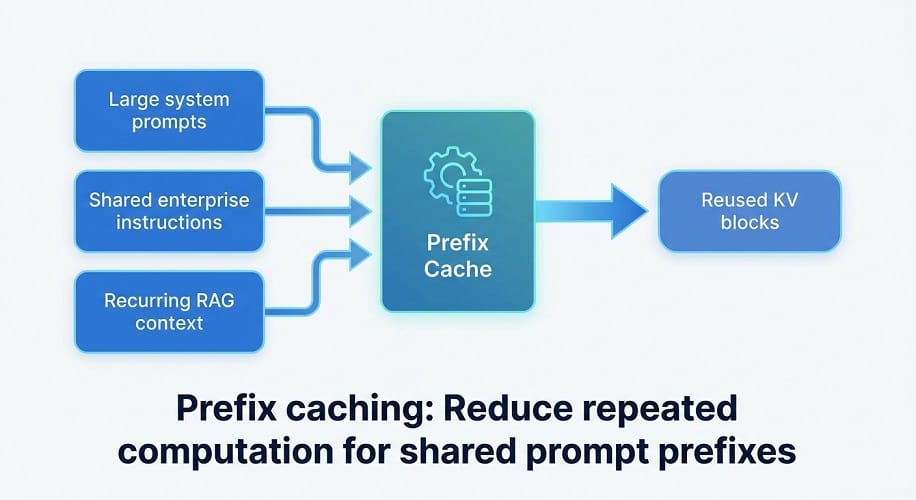
Common examples include:
- Large system prompts
- Shared enterprise instructions
- Repeated policy documents
- Long coding-agent contexts
- Recurring RAG context
Instead of repeatedly processing the same prefix, the inference engine can reuse previously computed state when conditions allow.
This can reduce repeated computation and improve throughput.
Continuous Batching
Continuous batching allows requests to enter and leave the inference process dynamically rather than forcing every request to wait for a fixed batch.
It can improve:
- GPU utilization
- Throughput
- Cost efficiency
The benefit is especially significant when there are many concurrent requests with different generation lengths.
vLLM Cost Optimization
For production Qwen, DeepSeek, GLM, Llama, or Mistral deployments, vLLM should be evaluated as part of the cost strategy.
Relevant optimization areas include:
- Efficient batching
- KV-cache management
- Prefix caching
- Quantized serving
- Multi-GPU parallelism
- Metrics
- Routing
- Autoscaling
The goal is not simply to make the model run.
It is to make the GPU spend as much of its time as possible doing useful inference.
SGLang as an Alternative
SGLang is another high-performance serving framework worth evaluating for supported models.
It can be particularly useful when:
- The model has specialized serving requirements
- Structured generation matters
- Large-scale inference is required
- The model's architecture benefits from SGLang-specific optimizations
For Qwen, DeepSeek, and GLM, choose the serving engine through benchmarking rather than assuming one framework will always be superior.
Tensor Parallelism and Cost
Tensor parallelism can allow a model to run across several GPUs.
That can be necessary for very large models.
But it does not automatically reduce costs.
More GPUs mean:
- More compute
- More memory
- More networking
- More operational complexity
Use tensor parallelism when the model cannot fit on one GPU or when the performance target requires it.
Don't use multiple GPUs simply because they are available.
Expert Parallelism
Large mixture-of-experts models can benefit from expert parallelism.
This distributes model experts across GPUs and can improve the efficiency of large MoE deployments.
It becomes particularly relevant for very large Qwen, DeepSeek, or other MoE models.
The trade-off is more complicated infrastructure and communication.
Autoscaling for Cost Control
Autoscaling can significantly reduce idle GPU expenditure.
A basic strategy is to maintain a small warm capacity and add GPUs during demand spikes.
Use signals such as:
- Waiting requests
- KV-cache usage
- GPU utilization
- Time to first token
- Requests per second
Avoid scaling only from CPU utilization.
LLM inference is dominated by GPU and memory behavior, so CPU usage can provide a misleading picture of capacity.
Karpenter for AWS GPU Scaling
On AWS, Karpenter can provision new EC2 nodes when Kubernetes workloads cannot be scheduled.
That can allow a platform to keep:
low baseline capacity
during quiet periods and provision:
additional GPU capacity
when traffic increases.
This can be particularly useful for variable workloads.
Spot GPUs
Spot instances can reduce compute costs for interruptible workloads.
Good candidates include:
- Benchmarking
- Evaluation
- Batch inference
- Offline processing
- Development
- Some fine-tuning workloads
They are less attractive for:
- Interactive coding assistants
- Customer-facing inference
- Strict latency requirements
A mixed strategy can work well:
| Workload | Capacity Strategy |
|---|---|
| Production interactive | On‑Demand |
| Batch processing | Spot |
| Evaluation | Spot |
| Development | Flexible / lower‑cost |
| Critical model | Reserved or reliable capacity |
Local GPU vs Cloud GPU
A local GPU can be economical when utilization is high and predictable.
Cloud GPUs are attractive when you need:
- Elastic capacity
- Faster hardware changes
- Multiple GPU choices
- Enterprise networking
- Centralized operations
The correct comparison is:
Total annual local ownership cost
versus:
Total annual cloud operating cost
Include hardware depreciation, power, maintenance, engineering, and downtime on the local side.
Qwen vs DeepSeek vs GLM: Cost Comparison
There is no permanent cheapest model.
A useful comparison should include:
| Metric | Qwen | DeepSeek | GLM |
|---|---|---|---|
| Model size | Check exact model | Check exact model | Check exact model |
| Input cost | Deployment dependent | Deployment dependent | Deployment dependent |
| Output cost | Deployment dependent | Deployment dependent | Deployment dependent |
| VRAM | Model dependent | Model dependent | Model dependent |
| Quantization options | Strong | Strong | Strong |
| Local serving | Strong | Strong | Strong |
| GPU cost | Workload dependent | Workload dependent | Workload dependent |
| Cost per successful task | Benchmark | Benchmark | Benchmark |
This is a better comparison than simply declaring one model cheaper.
Cost Per Million Tokens vs Cost Per Successful Task
These metrics answer different questions.
Cost per million tokens
Useful for:
- API budgeting
- Capacity planning
- Comparing raw inference economics
Cost per successful task
Useful for:
- Coding
- Agents
- Enterprise automation
- RAG
- Support
For production decisions, the second is usually more meaningful.
Example: Coding Agent Economics
Imagine two models produce:
Qwen
500,000 tokens
$10 model cost
95 successful coding tasks
DeepSeek
400,000 tokens
$8 model cost
65 successful coding tasks
The raw token cost favors DeepSeek.
But cost per successful task is:
Qwen: $0.105
DeepSeek: $0.123
Qwen is actually cheaper for the business workload.
This is why model efficiency should always be measured against business outcomes.
How to Reduce Cost Without Changing Models
You can often reduce cost without moving to a cheaper model.
Start with:
- Better chunking
- Better retrieval
- Shorter prompts
- Context pruning
- Prefix caching
- Appropriate batching
- Quantization
- Right-sized GPUs
- Autoscaling
- Removing unnecessary retries
These changes can sometimes produce larger savings than changing the model itself.
LLM FinOps
LLM FinOps means applying cloud cost-management practices specifically to AI workloads.
Track costs by:
- Model
- Team
- Application
- Environment
- User
- Request
- Token
- GPU
- Task
For example:
| Team | Model | Monthly Cost | Successful Tasks | Cost / Task |
|---|---|---|---|---|
| Engineering | Qwen | $4,200 | 38,000 | $0.11 |
| Support | DeepSeek | $2,900 | 42,000 | $0.07 |
| Research | GLM | $6,100 | 21,000 | $0.29 |
This allows management to understand where AI spending is actually producing value.
Best Cost Strategy for Qwen
Qwen offers a wide range of model sizes, which creates an important optimization opportunity.
Don't deploy a large Qwen model simply because it produces better benchmark results.
Start by matching the model to the task.
For example:
| Workload | Cost Strategy |
|---|---|
| Simple classification | Small Qwen model |
| Basic RAG | Small or medium model |
| Coding | Qwen Coder |
| Complex reasoning | Larger reasoning model |
| Coding agent | Larger Coder model when needed |
For high-volume workloads, a smaller model with a slightly lower quality score can produce much better overall economics if it completes routine tasks reliably.
Best Cost Strategy for DeepSeek
DeepSeek should also be evaluated by workload rather than model reputation.
Use smaller configurations for:
- Simple reasoning
- Classification
- Extraction
- Basic support
Reserve larger reasoning models for:
- Complex analysis
- Difficult coding tasks
- Multi-document reasoning
- Long-running agents
For production deployments, measure the number of successful tasks generated by each GPU configuration.
Best Cost Strategy for GLM
GLM can be particularly expensive when using very large models.
That makes model routing especially valuable.
Use a smaller GLM variant for routine tasks and reserve larger models for workloads that genuinely benefit from greater reasoning or context capacity.
The goal should be:
high-value tasks get expensive inference; routine tasks get efficient inference.
API vs Self-Hosting Economics
A hosted API generally shifts infrastructure management to the model provider.
You pay based on usage.
Self-hosting shifts more responsibility to your team.
You pay for infrastructure whether the GPU is fully utilized or not.
| Factor | API | Self-Hosted |
|---|---|---|
| Initial cost | Low | Higher |
| GPU management | Provider | Your team |
| Scaling | Provider | Your team |
| Idle capacity | Usually not your issue | Your cost |
| Customization | More limited | High |
| Data control | Provider‑dependent | High |
| Predictable high volume | Can become expensive | May become attractive |
| Low/unpredictable volume | Usually attractive | Often inefficient |
There is no universal break-even point.
It depends on:
- Request volume
- Token usage
- Model size
- GPU price
- Utilization
- Engineering cost
- Availability requirements
How to Calculate API vs Self-Hosted Cost
For API use:
Annual API cost = input usage + output usage + retries + tool calls
For self-hosting:
Annual infrastructure cost = GPU + storage + networking + platform + operations
Then compare both against the same workload.
Don't compare a GPU bill against an API token price without translating both into cost per successful task.
EC2 vs EKS for Cost Optimization
Amazon EC2 can be more economical for a simple single-model deployment because you avoid some Kubernetes complexity.
Amazon EKS becomes more attractive when you need:
- Multiple models
- Multiple applications
- GPU scheduling
- Autoscaling
- Model routing
- Shared infrastructure
The cheapest architecture is often the simplest architecture that meets the requirements.
Don't introduce EKS solely because the workload involves AI.
Use it when the operational benefits justify the additional platform complexity.
GPU Utilization and Cost
A GPU that spends most of its time idle represents unused capital.
Measure utilization over a meaningful period rather than looking at a single dashboard snapshot.
Track:
- Average GPU utilization
- Peak GPU utilization
- VRAM utilization
- Requests per GPU
- Tokens per GPU-hour
- Cost per successful task
For interactive workloads, leaving some capacity unused can be intentional because you need enough headroom for latency.
The target isn't maximum utilization at all times.
The target is efficient utilization while maintaining the required user experience.
Cost Optimization Through Model Routing
A multi-model architecture can significantly reduce average cost.
For example:
| Request | Model |
|---|---|
| Simple FAQ | Small model |
| Classification | Small model |
| Standard RAG | Medium model |
| Coding | Coding model |
| Complex reasoning | Large model |
| Long agent task | High‑end model |
This avoids paying high-end GPU costs for every request.
Model routing can be based on:
- Task complexity
- User tier
- Context length
- Latency requirement
- Cost budget
- Model availability
Cost Optimization Through Caching
Caching can reduce repeated inference work.
Useful caching layers include:
- Prompt-prefix caching
- RAG-result caching
- Embedding caching
- Application-level response caching
For example, if hundreds of users ask variations of the same question about a static policy document, the system should not necessarily perform the entire retrieval and generation process from scratch every time.
Caching is especially valuable when:
- Documents change infrequently
- Questions repeat
- Large prompts are reused
- Enterprise instructions are shared
Cost Optimization Through Better RAG
A weak retrieval system can increase LLM cost substantially.
Suppose your system sends 15,000 tokens to the model for every question.
After improving retrieval, you reduce that to 3,500 relevant tokens.
That can reduce:
- Input processing
- KV-cache pressure
- Latency
- GPU memory
- Inference cost
This is why RAG engineering belongs inside LLM cost optimization.
Cost Optimization Through Prompt Design
Prompt length is often ignored because it is not visible as a traditional infrastructure metric.
But large prompts consume:
- Input tokens
- Processing time
- Memory
- KV cache
Review:
- System prompts
- Tool descriptions
- Retrieved documents
- Conversation history
- Agent memory
Remove repeated or unnecessary instructions.
A shorter prompt that produces the same quality is usually a direct cost optimization.
Cost Optimization Through Agent Design
Agents can become expensive because one user request may create many model calls.
For example:
Simple task: 1 model call
Complex agent task: 15 model calls
That means agent architecture has a direct impact on cost.
Track:
- Number of model calls
- Number of tool calls
- Retry count
- Failed steps
- Context growth
- Final task success
A well-designed agent should avoid unnecessary loops.
Retry Cost
Retries are often one of the hidden costs of AI systems.
If a model frequently generates invalid JSON, fails a tool call, or produces code that doesn't pass tests, your platform pays for the correction attempt.
So measure:
retry rate
and:
cost caused by retries
A model with a slightly higher token price but a significantly lower failure rate may be cheaper overall.
Cost Per User
For enterprise platforms, calculate AI cost per user or department.
For example:
| Department | Monthly AI Cost | Active Users | Cost / User |
|---|---|---|---|
| Engineering | $7,000 | 300 | $23.33 |
| Support | $4,000 | 500 | $8.00 |
| Research | $6,500 | 100 | $65.00 |
This helps identify which workloads are expensive and whether the business value justifies them.
Cost Per 1 Million Tokens
Token-based cost is still useful for comparing models.
Use:
Total inference cost ÷ generated tokens
or separately:
Input cost / 1M tokens
Output cost / 1M tokens
But treat these as infrastructure metrics rather than final business metrics.
A model that produces 1M tokens cheaply but needs several attempts to complete a task may have poor real-world economics.
LLM FinOps Dashboard
A useful enterprise dashboard should include:
| Metric | Purpose |
|---|---|
| Monthly model cost | Overall spend |
| GPU cost | Infrastructure spend |
| Tokens | Workload size |
| GPU utilization | Capacity efficiency |
| Cost / user | Business allocation |
| Cost / task | Productivity economics |
| Retry rate | Inefficient inference |
| Model distribution | Routing efficiency |
| Cache hit rate | Reuse efficiency |
| Successful tasks | Actual value |
This turns AI infrastructure spending into something engineering and finance teams can manage together.
Common LLM Cost Mistakes
Using the largest model for every request
This is usually one of the easiest costs to reduce.
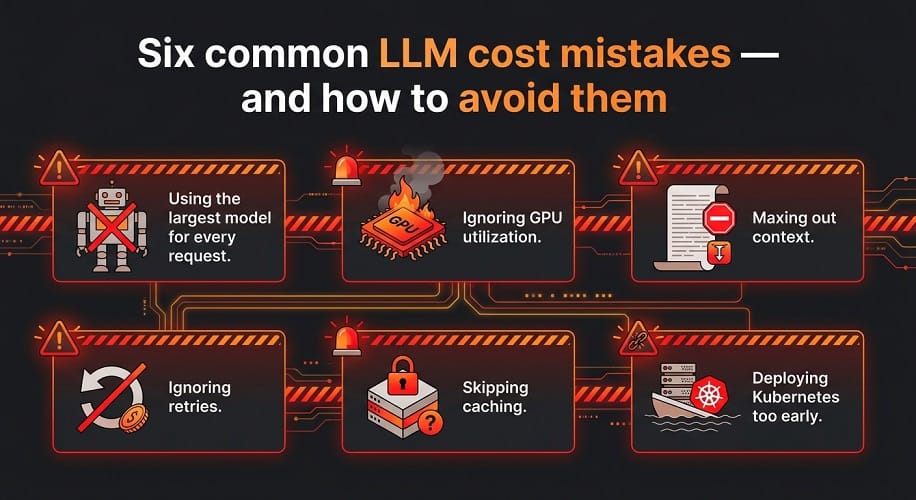
Ignoring GPU utilization
A powerful GPU at low utilization can be more expensive than a smaller, better-utilized configuration.
Maxing out context
A larger context window does not mean every request should use it.
Ignoring retries
Failed generations can become a significant portion of real inference cost.
Skipping caching
Repeated prompts and retrieval results can be unnecessarily recomputed.
Deploying Kubernetes too early
EKS is powerful, but a simple EC2 deployment may be better for a small workload.
Choosing GPU hardware before benchmarking
Start from workload requirements, then choose the hardware.
Comparing only token prices
Use cost per successful task for meaningful business decisions.
Enterprise LLM Cost Optimization Checklist
Before production, verify:
- Model size is appropriate
- Smaller model has been tested
- Quantized version has been evaluated
- Context is not unnecessarily large
- RAG retrieval is optimized
- Prefix caching is considered
- Batch size is tuned
- GPU utilization is monitored
- Autoscaling is configured where appropriate
- Model routing is considered
- Retries are measured
- Cost per task is tracked
- Cost is allocated by team or application
- API and self-hosting economics have been compared
- Model licenses have been reviewed
Qwen vs DeepSeek vs GLM: Cost Strategy
Qwen
Use its broad model range to route routine workloads to smaller models and reserve larger coding or reasoning models for harder tasks.
DeepSeek
Use reasoning-heavy models where the extra capability increases successful-task rate enough to justify the additional inference cost.
GLM
Be particularly careful with infrastructure sizing for large models and use smaller or specialized variants where appropriate.
For all three:
benchmark quality first, then optimize the serving layer.
Final Recommendations
For small workloads
Use a hosted API or a small local model.
Avoid building a large GPU platform before demand exists.
For medium workloads
Use a dedicated GPU server or a simple EC2 deployment.
Optimize:
- Quantization
- Context
- Batching
- Caching
For large workloads
Use:
- High-memory GPUs
- vLLM or SGLang
- Kubernetes where justified
- Autoscaling
- Model routing
- Central monitoring
For enterprise platforms
Add:
- LLM FinOps
- Cost allocation
- Evaluation pipelines
- Governance
- Multi-model routing
- Disaster recovery
EaseCloud Perspective
At EaseCloud, LLM cost optimization should be approached as an infrastructure and application problem together.
The biggest savings may come from:
- Choosing a smaller model
- Right-sizing the GPU
- Improving RAG retrieval
- Reducing context
- Using quantization
- Increasing GPU utilization
- Adding caching
- Routing simple tasks to cheaper models
For AWS deployments, this can extend across:
- EC2
- Amazon EKS
- GPU instance selection
- Karpenter
- vLLM
- SGLang
- Observability
- LLMOps
- Cloud cost optimization
The goal is not to minimize the GPU bill at any cost.
The goal is:
the lowest sustainable cost while maintaining the required quality, latency, reliability, and security.
Frequently Asked Questions
What is the best way to reduce LLM inference costs?
Start by choosing the smallest model that meets your quality requirement. Then optimize quantization, context, caching, batching, GPU utilization, and autoscaling.
Is self-hosting cheaper than an API?
It can be at high and predictable usage, but not always. Compare total infrastructure and engineering costs against your actual API usage.
Does quantization reduce LLM cost?
Yes. Quantization can reduce memory requirements and allow smaller or fewer GPUs, although quality and performance must be benchmarked.
Is vLLM cheaper than other inference engines?
vLLM can improve serving efficiency and GPU utilization, but the actual savings depend on the model and workload. Benchmark the complete system.
How can I reduce Qwen inference costs?
Use an appropriate model size, quantization, efficient context management, caching, batching, and model routing.
How can I reduce DeepSeek inference costs?
Match the model to task complexity, avoid unnecessary long context, optimize caching and serving, and reserve expensive reasoning models for workloads that benefit from them.
How can I reduce GLM inference costs?
Right-size the GPU configuration, consider quantization, use smaller variants for routine work, and monitor utilization closely.
What is LLM FinOps?
LLM FinOps is the practice of measuring, allocating, forecasting, and optimizing AI model and infrastructure costs.
Final Verdict
The cheapest LLM deployment isn't necessarily the one with the lowest token price or the cheapest GPU.
The best economic result comes from optimizing the entire system:
model selection + quantization + context + retrieval + caching + serving + GPU utilization + scaling
For most organizations, the best sequence is to start small, measure real usage, optimize the inference layer, and scale only when demand justifies it.
Qwen, DeepSeek, and GLM can all provide excellent economics when matched to the right workload and infrastructure configuration.
For larger deployments, EaseCloud can help optimize the AWS, GPU, Kubernetes, vLLM, SGLang, observability, and LLMOps layers so the infrastructure delivers the required AI performance without unnecessary spending.