How to Deploy Qwen, DeepSeek & GLM on AWS: Complete Enterprise Guide
Learn how to deploy Qwen, DeepSeek and GLM on AWS using EC2, EKS, vLLM and GPUs with secure, scalable and cost-efficient enterprise architectures.
Running Qwen, DeepSeek, or GLM locally is useful for development and experimentation, but enterprise AI workloads eventually introduce a different set of requirements.
A production AI platform may need to serve:
- Hundreds or thousands of users
- Multiple applications
- Large coding repositories
- Enterprise knowledge bases
- AI agents
- Customer-facing workloads
- Long-context requests
- High-concurrency inference
At that point, the question changes from:
“How can I run this model?”
to:
“How can I run this model securely, reliably, and economically at scale?”
AWS provides the infrastructure needed to build that platform through GPU-backed Amazon EC2 instances, Amazon EKS, networking, identity, storage, observability, and scaling services.
AWS currently offers multiple GPU classes for AI inference. For example, G7 instances use NVIDIA RTX PRO 4500 Blackwell Server Edition GPUs with up to eight GPUs per instance, while P5/P5e/P5en provide H100 or H200 GPUs for much larger workloads. Newer P6 systems extend this further with Blackwell-based instances offering more than 1 TB of aggregate GPU memory per instance.
For Qwen, DeepSeek, and GLM, AWS can therefore support everything from a single-GPU private inference server to a multi-node Kubernetes-based AI platform.
TL;DR
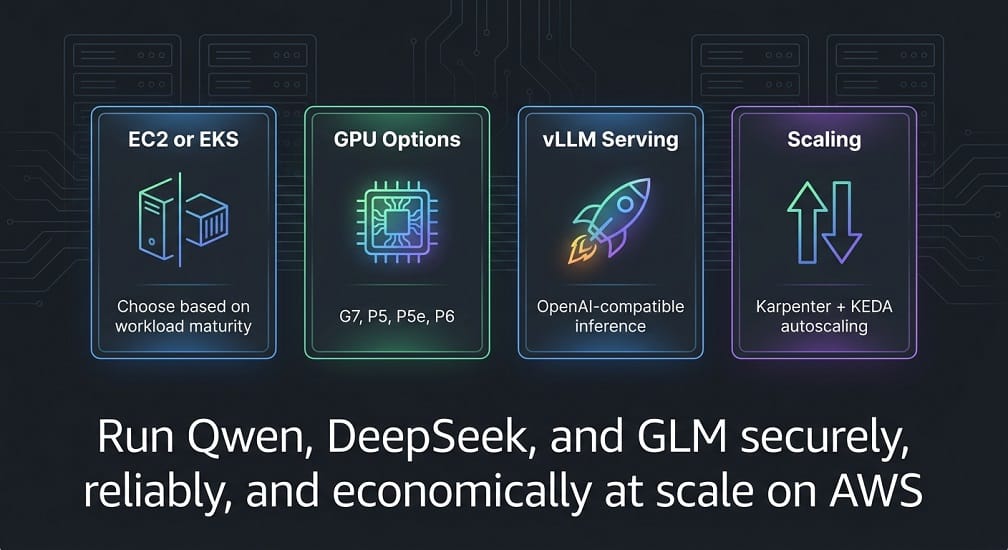
- EC2 for simpler single-model deployments; EKS for multi-model platforms – EKS gives you GPU scheduling, autoscaling, and support for multiple teams. Karpenter handles GPU node provisioning.
- GPU choice depends on: model size × precision × context × concurrency. AWS options: G7 (cost-conscious), P5/H100 (large models), P5e/H200 (memory-intensive), P6/Blackwell (extreme-scale). Model weights alone don't determine VRAM – KV cache for long contexts dominates.
- Use vLLM for production inference – OpenAI-compatible APIs, tensor parallelism, continuous batching, and Prometheus metrics. vLLM supports Qwen, DeepSeek-V4, and GLM-5.
- Store model weights in S3; autoscale on AI metrics – track waiting requests, KV-cache utilization, and TTFT (not just CPU). Scale on
num_requests_waitingwith KEDA + Karpenter. - Never expose vLLM publicly – keep inference in private subnets with authentication, IAM, TLS, and Secrets Manager. Security is your responsibility.
Why Deploy Open Models on AWS?
Using a managed API is often the fastest way to start with Qwen or DeepSeek.
However, private AWS deployment becomes attractive when organizations need more control over:
- Source-code privacy
- Data residency
- Network isolation
- Model versions
- GPU capacity
- Inference configuration
- Cost management
- Security policies
- Availability
- Internal API access
A managed API typically looks like:
Application
     │
     ▼
Internet
     │
     ▼
Model Provider
     │
     ▼
Qwen / DeepSeek / GLM
A private AWS deployment changes that architecture:
Application
     │
     ▼
Private AWS Network
     │
     ▼
Inference Gateway
     │
     ▼
Qwen / DeepSeek / GLM
     │
     ▼
GPU Infrastructure
The second architecture gives the organization substantially more control, but it also creates infrastructure responsibilities that don't exist with a hosted API.
API vs Private AWS Deployment
The right choice depends on workload maturity.
| Requirement | Hosted API | AWS Private Deployment |
|---|---|---|
| Initial setup | Very easy | More involved |
| GPU management | Provider‑managed | Customer‑managed |
| Data control | Provider‑dependent | High |
| Custom inference | Limited | High |
| Infrastructure control | Low | High |
| Scaling | Provider‑managed | Customer‑managed |
| Initial investment | Low | Higher |
| Long‑term optimization | Limited | High |
| Best for experimentation | Excellent | Good |
| Best for controlled enterprise AI | Depends | Excellent |
A practical migration path can therefore be:
API
 ↓
Proof of Concept
 ↓
Private EC2
 ↓
vLLM / SGLang
 ↓
Amazon EKS
 ↓
Multi-Model AI Platform
Not every organization needs to follow every stage, but the progression illustrates how an AI workload can mature.
Which Qwen, DeepSeek & GLM Models Should You Deploy?
The first architectural mistake to avoid is comparing entire model families as though each family has one fixed infrastructure requirement.
Qwen, DeepSeek, and GLM each contain models with very different parameter counts, context lengths, precisions, and serving requirements.
For example, current Qwen coding models range from relatively manageable checkpoints to much larger agentic models.
DeepSeek also has different generations and serving configurations.
GLM demonstrates an even more dramatic range: the current GLM-5 family is documented at 744B total parameters with 40B active parameters, and the official deployment guidance provides multi-GPU serving examples.
Therefore, the correct deployment process starts with:
Exact Model
     ↓
Parameter Count
     ↓
Precision
     ↓
Quantization
     ↓
Context Length
     ↓
Concurrency
     ↓
GPU Requirement
Qwen on AWS
Qwen provides several deployment paths suitable for AWS.
For production inference, the Qwen project recommends vLLM and documents OpenAI-compatible API serving. It also supports tensor parallelism for multi-GPU deployments.
A simple architecture can therefore be:
Application
    ↓
Internal API
    ↓
vLLM
    ↓
Qwen
    ↓
EC2 GPU
For larger workloads:
Applications
     ↓
AI Gateway
     ↓
Amazon EKS
     ↓
vLLM
     ↓
Multiple GPU Nodes
     ↓
Qwen
This makes Qwen suitable for private:
- Coding assistants
- RAG applications
- AI agents
- Internal copilots
- Enterprise automation
DeepSeek on AWS
DeepSeek can similarly be deployed on GPU-backed EC2 infrastructure or Kubernetes.
The architecture is conceptually the same:
Application
     ↓
Private API
     ↓
Inference Server
     ↓
DeepSeek
     ↓
GPU
For larger deployments, inference servers can be distributed across multiple GPUs and nodes.
The exact configuration depends on the DeepSeek checkpoint, quantization, context length, and serving framework.
GLM on AWS
GLM is particularly interesting for organizations evaluating large-scale inference because newer GLM models can require substantial multi-GPU infrastructure.
The current GLM-5 documentation lists both BF16 and FP8 checkpoints, and its vLLM deployment example uses tensor parallelism across eight GPUs.
The vLLM project currently documents GLM-5 FP8 deployment on 8× H200/H20 GPUs, with 141 GB per GPU, for a single-node configuration.
This is a useful illustration of why model selection and hardware selection must happen together.
Choosing Between EC2 and Amazon EKS
AWS provides two natural paths for private model serving:
Amazon EC2
Good for simpler deployments.
Amazon EKS
Better for a reusable AI platform with multiple workloads.
Deploying a Model Directly on EC2
A basic EC2 deployment may look like:
VPC
 │
 └── Private Subnet
       │
       └── GPU EC2
             │
             └── vLLM
                   │
                   └── Qwen / DeepSeek / GLM
This is easier to understand and operate than Kubernetes.
It can make sense for:
- A single model
- Low user counts
- Internal experimentation
- Early production
- Predictable traffic
When EC2 Is the Better Choice
Use EC2 when:
- You have one primary model.
- There are only a few applications.
- You don't need complex scheduling.
- GPU utilization is predictable.
- Your team has limited Kubernetes expertise.
A dedicated EC2 instance can provide a straightforward private inference endpoint.
When Amazon EKS Is Better
EKS becomes more attractive when you need:
- Multiple models
- Multiple applications
- GPU scheduling
- Autoscaling
- Model routing
- High availability
- Independent deployments
- Multiple development teams
A mature platform can look like:
                    Internal Users
                           │
                           ▼
                     AI Gateway
                           │
                     Model Router
                           │
             ┌─────────────┼─────────────┐
             ▼             ▼             ▼
           Qwen         DeepSeek        GLM
             │             │             │
             └─────────────┼─────────────┘
                           ▼
                     Amazon EKS
                           │
                    GPU Node Pools
This turns individual models into a reusable enterprise AI platform.
AWS GPU Options for AI Inference
GPU selection should be based on:
- Model size
- Precision
- Context length
- Concurrent users
- Target latency
- Tokens per second
- Networking requirements
- Cost
There is no single “best AWS GPU.”
G7: More Cost-Conscious GPU Inference
AWS G7 instances are powered by NVIDIA RTX PRO 4500 Blackwell Server Edition GPUs.
AWS currently lists up to 8 GPUs per instance, with 32 GB memory per GPU and up to 700 Gbps of EFA-enabled network bandwidth. AWS positions G7 for AI inference, graphics, and data analytics workloads.
This class can be interesting for:
- Smaller and medium-sized models
- AI inference
- Developer platforms
- Cost-sensitive workloads
- Lower-memory model deployments
P5: NVIDIA H100
P5 instances are designed for large-scale AI workloads.
AWS currently lists:
- P5.4xlarge: 1× H100 with 80 GB
- P5.48xlarge: 8× H100 with 640 GB total GPU memory
P5 also provides high-bandwidth networking and GPU-to-GPU communication through EFA and NVSwitch on the multi-GPU configuration.
This makes P5 relevant for:
- Large Qwen models
- Large DeepSeek workloads
- Multi-GPU inference
- Agentic workloads
- High-throughput AI services
P5e and P5en: NVIDIA H200
AWS currently lists P5e and P5en configurations with 8× NVIDIA H200 GPUs, offering 1,128 GiB total GPU memory.
P5en uses newer CPU and networking characteristics than P5e, including EFAv3 and Intel Sapphire Rapids processors.
H200-based systems can therefore be particularly useful for workloads where memory capacity is a major constraint.
P6: Blackwell-Class Infrastructure
AWS now provides P6 systems aimed at very large AI workloads.
Current AWS specifications include:
- P6-B200: 8 Blackwell GPUs and approximately 1,432 GB HBM3e
- P6-B300: 8 GPUs and approximately 2,144 GB HBM3e
- P6e-GB200: 4 Blackwell GPUs and 740 GB HBM3e
AWS also documents UltraServer configurations containing multiple Blackwell GPUs.
These systems are designed for workloads far beyond typical developer experimentation.
For very large Qwen, DeepSeek, or GLM deployments, they may become relevant when model size, context, or throughput requirements exceed previous GPU generations.
GPU Selection by Deployment Stage
A practical starting framework is:
| Deployment | Possible AWS GPU Class |
|---|---|
| Small model / experimentation | G7 or smaller suitable GPU |
| Medium inference | G7 / suitable G‑series |
| Large model | P5 / P5e / P5en |
| Very large model | P6 / multi‑node GPU infrastructure |
| Extreme‑scale inference | GPU cluster / UltraServer architecture |
This table is intentionally general.
The exact instance should be selected only after measuring model memory, context, batch size, and concurrency.
Model Memory Planning
A common mistake is calculating only model weight size.
For example:
Model weights
      +
KV cache
      +
Runtime memory
      +
Batch memory
      +
CUDA overhead
      =
Real GPU requirement
Long-context coding and agent workloads can significantly increase KV-cache consumption.
This means:
Same model + same GPU ≠ same memory requirement
if the context and concurrency change.
Quantization on AWS
Quantization can reduce GPU memory requirements.
Possible choices include:
- BF16
- FP16
- FP8
- INT8
- INT4
- AWQ
- NVFP4
For large models, lower-precision weights can allow deployment on fewer or smaller GPUs.
But quality must be tested.
A good enterprise process is:
FP16/BF16 Baseline
       ↓
Quantized Model
       ↓
Benchmark
       ↓
Quality Check
       ↓
Latency Check
       ↓
Cost Check
       ↓
Production Decision
AWS Networking for AI Inference
Large models aren't only a GPU problem.
Multi-GPU and multi-node inference also depend on high-speed communication.
AWS P5 and P5e/P5en instances support high-bandwidth EFA networking, while multi-GPU configurations use high-speed GPU-to-GPU communication through NVSwitch.
For large distributed inference, this can be critical.
A poor network design can cause expensive GPUs to spend too much time waiting for data.
VPC Architecture
For a production deployment, place inference infrastructure inside a controlled VPC.
A simple design:
AWS Region
│
├── Public Subnets
│      └── Load Balancer
│
└── Private Subnets
       ├── EKS Control/Worker Resources
       ├── GPU Nodes
       ├── Model Services
       └── Internal APIs
The GPU nodes generally don't need to be directly exposed to the internet.
IAM and Access Control
AWS IAM should control who can:
- Deploy models
- Read model artifacts
- Access inference APIs
- Modify GPU infrastructure
- View logs
- Manage secrets
Use least-privilege roles instead of broad administrator permissions.
For EKS workloads, workload identity should also be separated from human AWS credentials.
Model Storage
Large model weights can be stored centrally in Amazon S3 and loaded into inference environments as needed.
An enterprise architecture can therefore look like:
Amazon S3
   │
   ▼
Model Storage
   │
   ▼
EKS / EC2
   │
   ▼
Local Model Cache
   │
   ▼
vLLM
AWS's current EKS AI/ML guidance includes an S3 model-weights bucket and workload identity for EKS workloads.
This can simplify model distribution across environments.
AWS Security Foundation
A private AI deployment should combine:
- Amazon VPC
- IAM
- Security Groups
- AWS KMS
- AWS Secrets Manager
- CloudTrail
- CloudWatch
- Private subnets
The goal is:
Users
 ↓
Authentication
 ↓
Private AI Gateway
 ↓
Inference Service
 ↓
GPU
rather than exposing the inference server directly to the internet.
Step 1: Create the AWS Foundation
A production deployment should start with a proper network rather than launching a GPU instance directly into a default environment.
A basic architecture is:
AWS Region
│
├── Public Subnets
│      └── Load Balancer
│
└── Private Subnets
       ├── EKS Nodes
       ├── GPU Nodes
       ├── Inference Services
       └── Internal Services
Keep the GPU infrastructure in private subnets where possible.
The public entry point should normally be a load balancer or API gateway rather than the inference server itself.
Step 2: Create the EKS Cluster
For a platform that will serve multiple models, Amazon EKS provides a useful foundation.
The logical structure becomes:
EKS Cluster
│
├── System Node Group
│     └── Core Kubernetes Services
│
├── CPU Node Group
│     └── Gateways / Routers / APIs
│
└── GPU Node Group
      └── vLLM / SGLang
Keeping general Kubernetes services separate from expensive GPU nodes prevents ordinary workloads from consuming GPU capacity.
Step 3: Create GPU Node Pools
GPU workloads should have their own node pool.
For example:
GPU Node Pool
│
├── NVIDIA GPU
├── NVIDIA drivers
├── Container runtime
└── AI inference workloads
You can then use Kubernetes labels and taints so only GPU workloads are scheduled there.
A typical scheduling strategy is:
nodeSelector:
  accelerator: nvidia
combined with tolerations when the GPU nodes are tainted.
This keeps ordinary workloads away from expensive GPU capacity.
NVIDIA GPU Support on EKS
GPU workloads require Kubernetes to expose the GPU to containers.
AWS's current EKS documentation provides multiple GPU-management approaches depending on the cluster configuration and Kubernetes version, including the NVIDIA DRA driver for newer EKS setups and the NVIDIA device plugin for supported Karpenter and EKS Auto Mode scenarios.
Step 4: Use Karpenter for GPU Scaling
For production AI workloads, GPU capacity can be expensive.
Instead of keeping a large GPU pool running continuously, use workload-driven scaling.
A simplified architecture is:
Incoming Requests
       ↓
Inference Queue
       ↓
GPU Demand
       ↓
Karpenter
       ↓
GPU Node
Karpenter can provision suitable nodes when Kubernetes workloads cannot be scheduled.
For example:
Low traffic
→ 1 GPU node
High traffic
→ 4 GPU nodes
This is particularly useful for workloads where demand changes throughout the day.
Step 5: Store Model Weights in Amazon S3
Model weights can consume hundreds of gigabytes or more.
Instead of making every inference pod independently download the model from the internet, use a controlled model-storage strategy.
A common pattern is:
Amazon S3
    ↓
Model Artifact
    ↓
GPU Node
    ↓
Local Model Cache
    ↓
vLLM
This gives your organization control over:
- Model versions
- Model artifacts
- Access policies
- Storage lifecycle
- Region placement
AWS's current EKS AI/ML guidance includes S3 for model weights and workload identity for accessing AWS resources.
For very large models, also consider local NVMe or high-performance attached storage for faster startup and caching.
Step 6: Create the Inference Container
For production serving, use a dedicated inference engine.
vLLM is one of the strongest options for Qwen, DeepSeek, and GLM because it provides OpenAI-compatible serving and supports the parallelism and model-specific features needed by modern large models.
A basic deployment looks like:
Kubernetes Pod
│
├── vLLM
├── Model
└── GPU
Step 7: Deploy Qwen with vLLM
A simple Qwen deployment can use:
vllm serve Qwen/Qwen3-8BvLLM exposes an OpenAI-compatible endpoint, normally on port 8000.
For a production Qwen deployment, you would typically add:
- Authentication
- Model-name configuration
- Context limits
- GPU memory settings
- Logging
- Health checks
- Metrics
- Autoscaling
For larger Qwen models, tensor or data parallelism can be introduced depending on the model and workload.
Step 8: Deploy DeepSeek with vLLM
Current vLLM recipes explicitly support DeepSeek-V4-Flash and DeepSeek-V4-Pro.
The DeepSeek-V4-Flash recipe documents:
- 1,048,576-token context
- FP8 KV cache
- DeepSeek-specific tokenizer mode
- Tool-call parser
- Reasoning parser
- Automatic tool choice
- Speculative decoding options.
A minimal conceptual deployment is:
vllm serve deepseek-ai/DeepSeek-V4-Flash \
  --trust-remote-code \
  --tokenizer-mode deepseek_v4
The exact production command should follow the current vLLM recipe because large DeepSeek models can require specialized memory, parallelism, and networking settings.
Step 9: Deploy GLM with vLLM
GLM also has current vLLM deployment support.
For some newer GLM variants, the official deployment recipes use:
- Tensor parallelism
- Data parallelism
- Expert parallelism
- Tool-call parsing
- Reasoning parsers
Current vLLM recipes also document multi-GPU GLM deployments, including newer NVFP4 configurations that use multiple GPU nodes and separate prefill/decode infrastructure.
This becomes important when the model is too large or the traffic pattern requires disaggregated prefill and decode.
What Is Tensor Parallelism?
Tensor Parallelism (TP) splits a model across multiple GPUs.
For example:
Model
│
├── GPU 1
├── GPU 2
├── GPU 3
└── GPU 4
This is useful when a model cannot fit into one GPU.
It can also improve performance for some low-latency workloads.
vLLM supports tensor parallelism for GPU inference.
What Is Data Parallelism?
Data Parallelism (DP) replicates the model across multiple GPU groups so independent requests can be processed concurrently.
For example:
Replica 1
├── GPU 1
└── GPU 2
Replica 2
├── GPU 3
└── GPU 4
This can be useful when the model already fits inside one GPU group and the main requirement is higher throughput.
vLLM supports data-parallel deployments for both dense and Mixture-of-Experts models.
Tensor Parallelism vs Data Parallelism
| Requirement | Better Starting Point |
|---|---|
| Model does not fit on one GPU | Tensor Parallelism |
| Low‑latency large‑model inference | Tensor Parallelism |
| More independent requests | Data Parallelism |
| Higher throughput | Data Parallelism |
| Large MoE models | DP + EP often becomes relevant |
The right configuration depends on the model architecture.
Expert Parallelism for MoE Models
Qwen and DeepSeek increasingly use Mixture-of-Experts architectures.
Instead of activating every parameter for every token, an MoE model selects a subset of experts.
Instead of activating every parameter for every token, an MoE model selects a subset of experts. vLLM provides Expert Parallelism (EP) to place experts across different GPUs. Its documentation notes that EP can improve locality and throughput, and is commonly combined with Data Parallelism.
This becomes particularly important for very large models.
DeepSeek-V4 and Multi-GPU Serving
Current vLLM recipes show how large DeepSeek-V4 models can require multi-node infrastructure.
For example, the current DeepSeek-V4-Pro recipe describes:
- 1.6T total parameters
- 49B active parameters
- Multi-GPU expert/data-parallel deployment
- H200 multi-node configurations
- B300 single-node configurations
- GB200 multi-node configurations.
This is a good example of why “deploy DeepSeek on AWS” can mean very different things depending on the exact model.
Step 10: Expose the Model as an Internal API
Once vLLM is running, put it behind an internal service.
The architecture becomes:
Client Application
      ↓
Internal Load Balancer
      ↓
Kubernetes Service
      ↓
vLLM
      ↓
Qwen / DeepSeek / GLM
vLLM provides OpenAI-compatible endpoints, making it easier to integrate with applications that already support the OpenAI API format.
Add an AI Gateway
For a multi-model environment, don't expose three independent endpoints directly to every application.
Instead:
Applications
      ↓
AI Gateway
      ↓
Model Router
   ┌──┼──┐
   ↓  ↓  ↓
 Qwen DS GLM
The gateway can handle:
- Authentication
- Rate limiting
- Routing
- Usage tracking
- Model selection
- Fallback
- Cost controls
This becomes especially useful when different teams need different models.
Health Checks
Inference services should provide health checks.
A basic strategy:
Startup
 ↓
Model Loaded
 ↓
Readiness = True
 ↓
Traffic Enabled
Don't send production requests to a GPU pod while its model is still loading.
Use:
- Readiness probes
- Liveness probes
- Startup probes
when supported by your serving architecture.
Model Startup Time
Large models can take significant time to load.
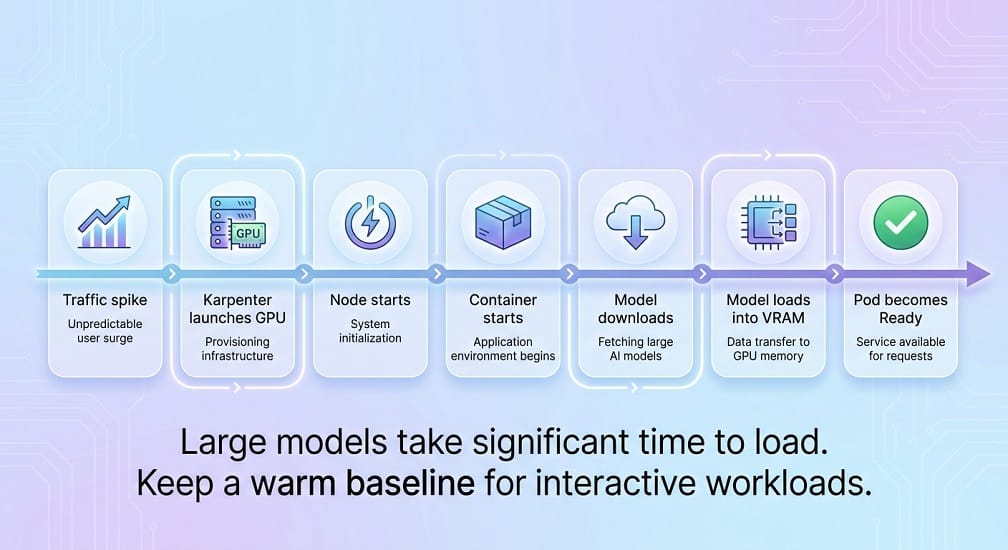
This matters when autoscaling.
Consider:
Traffic spike
     ↓
Karpenter launches GPU
     ↓
Node starts
     ↓
Container starts
     ↓
Model downloads
     ↓
Model loads into VRAM
     ↓
Pod becomes Ready
If this takes several minutes, aggressive scale-from-zero strategies may create poor user experiences.
That is why many interactive AI platforms keep a warm GPU baseline.
Model Rollouts
Don't replace a production model instantly.
Use:
Current Model
     ↓
New Model
     ↓
Canary
     ↓
5% traffic
     ↓
Metrics
     ↓
50%
     ↓
100%
Compare:
- Latency
- Error rate
- Token usage
- Quality
- User feedback
- Cost
Then promote the new model.
Blue-Green Model Deployment
A simpler strategy is:
Blue
Current Model
      +
Green
New Model
Route traffic to Green only after the new inference stack passes health and quality checks.
This is especially useful when upgrading:
- Qwen versions
- DeepSeek versions
- GLM versions
- Quantized checkpoints
- vLLM versions
Docker and vLLM Cache
For containerized deployments, cache model and compilation artifacts where possible.
For containerized deployments, cache model and compilation artifacts where possible. The current vLLM Docker documentation recommends mounting the Hugging Face cache to persist model weights and a persistent vLLM cache to avoid recompiling artifacts when a container restarts.
This can significantly improve restart behavior.
Monitoring the Inference Layer
Track at least:
Request metrics
- Requests per second
- Request failures
- Queue depth
Latency
- Time to first token
- Time per output token
- End-to-end latency
Model metrics
- Input tokens
- Output tokens
- Context length
- Cache utilization
GPU metrics
- GPU utilization
- GPU memory
- Power consumption
- Temperature
Business metrics
- Cost per request
- Cost per successful task
- User success rate
CloudWatch Integration
Amazon CloudWatch can be used to centralize infrastructure and application monitoring.
A production stack may include:
vLLM
 ↓
Prometheus Metrics
 ↓
Monitoring Layer
 ↓
CloudWatch / Dashboards
You can monitor:
- GPU utilization
- Node health
- Pod restarts
- API latency
- Error rates
- Resource usage
For advanced AI platforms, combine infrastructure metrics with model-quality evaluation rather than relying only on CPU/GPU dashboards.
Step 11: Secure the Inference Endpoint
Do not expose vLLM directly to the public internet.
Use:
Internet / Users
       ↓
Authentication
       ↓
API Gateway / Load Balancer
       ↓
Private EKS Service
       ↓
vLLM
Use:
- IAM where appropriate
- TLS
- Secrets Manager
- Security Groups
- Private subnets
- Network policies
- API authentication
Step 12: Validate the Deployment
Before production, test the model using realistic workloads.
For coding:
- Code generation
- Debugging
- Repository tasks
- Test generation
- Tool calling
For enterprise RAG:
- Retrieval quality
- Long-document reasoning
- Grounded responses
- Structured output
For agents:
- Tool success
- Retry rate
- Workflow completion
- Cost per successful task
EaseCloud Production Architecture
A production architecture that brings the pieces together can look like:
                  Users / Applications
                           │
                           ▼
                    API Gateway
                           │
                           ▼
                     AI Gateway
                           │
                     Model Router
                           │
            ┌──────────────┼──────────────┐
            ▼              ▼              ▼
          Qwen          DeepSeek         GLM
            │              │              │
            └──────────────┼──────────────┘
                           ▼
                      Amazon EKS
                           │
                 ┌─────────┴─────────┐
                 ▼                   ▼
            GPU Node Pool       CPU Node Pool
                 │
          vLLM / SGLang
                 │
                 ▼
          Model Containers
                 │
                 ▼
        Monitoring / CloudWatch
At EaseCloud, this architecture can be extended with private networking, autoscaling, model routing, GPU optimization, LLMOps, and AI cost monitoring.
GPU Autoscaling on AWS
GPU infrastructure is expensive, so keeping every possible GPU running 24/7 can waste a significant amount of money.
A production platform should scale based on actual inference demand.
A simplified architecture is:
Incoming Requests
        ↓
Inference Queue
        ↓
vLLM Metrics
        ↓
Autoscaler
        ↓
GPU Nodes
Kubernetes can scale the inference deployment based on metrics such as waiting requests, while Karpenter can provision additional GPU nodes when pods cannot be scheduled.
The current vLLM production stack includes a KEDA integration that uses the vllm:num_requests_waiting metric to scale deployments according to queue length.
This is much more useful for LLMs than blindly scaling on CPU utilization.
Scale on AI Metrics, Not Just CPU
Traditional web applications often scale using:
- CPU
- Memory
- Request count
LLM workloads need additional metrics.
Current vLLM exposes Prometheus metrics including:
- Running requests
- Waiting requests
- KV-cache utilization
- Prompt tokens
- Generated tokens
- Time to first token
- Inter-token latency
- End-to-end latency
- Queue time
These are specifically useful for production capacity planning.
For example:
GPU utilization = 75%
KV cache = 92%
Waiting requests = 18
TTFT = 2.8 sec
That tells you much more than:
CPU = 35%Autoscaling Strategy for Coding Assistants
Coding workloads are often bursty.
You may see:
09:00 → Low traffic
11:00 → High traffic
13:00 → Moderate
15:00 → High
18:00 → Low
Instead of keeping 10 GPU replicas alive all day, use:
Minimum:
2 replicas
Peak:
8 replicas
Keep a small warm capacity for interactive users and allow the cluster to grow when demand increases.
Autoscaling Strategy for Batch AI
Batch workloads behave differently.
For example:
- Overnight document processing
- Repository indexing
- Bulk summarization
- Dataset classification
You can let capacity scale aggressively during the processing window and return to a smaller baseline afterward.
This makes GPU infrastructure substantially more efficient.
Karpenter for GPU Capacity
Karpenter can provision Kubernetes nodes when existing capacity cannot satisfy pod requirements.
A useful pattern is:
Inference Pod Pending
       ↓
Karpenter detects capacity need
       ↓
Select GPU instance
       ↓
Provision EC2 node
       ↓
Schedule pod
       ↓
Load model
       ↓
Start serving
For AI workloads, node selection should consider:
- GPU type
- GPU memory
- Availability
- Instance price
- Architecture
- Region
- Capacity availability
The goal is not merely:
“Find a GPU.”
It is:
“Find the cheapest GPU that satisfies this model's performance requirements.”
On-Demand vs Spot GPU Capacity
AWS Spot capacity can reduce compute costs for interruption-tolerant workloads.
It can work particularly well for:
- Model evaluation
- Batch processing
- Offline inference
- Benchmarking
- Fine-tuning
- Development
It is more difficult for:
- Real-time coding assistants
- Customer-facing inference
- Strict latency SLAs
A practical architecture may therefore use:
Production
→ On-Demand
Batch / Evaluation
→ Spot
Development
→ Smaller / flexible instances
Never build a critical low-latency service assuming Spot interruption will not happen.
Multi-AZ Architecture
For enterprise availability, distribute supporting infrastructure across Availability Zones.
A simplified setup:
AWS Region
│
├── AZ-A
│    └── GPU / Inference
│
├── AZ-B
│    └── GPU / Inference
│
└── AZ-C
     └── Supporting Services
The exact GPU placement depends on the model.
Very large models that require all GPUs inside one tightly coupled instance may not be straightforward to distribute across multiple Availability Zones.
This is another reason to distinguish:
high availability at the application layer
from
multi-node distributed model execution.
Multi-Region AI Deployment
Multi-region deployment can improve resilience, but it also multiplies:
- GPU costs
- Model storage
- Operations
- Monitoring
- Deployment complexity
Use it when you genuinely need:
- Regional latency
- Disaster recovery
- Data residency
- Regional capacity
- Business continuity
A multi-region architecture may look like:
                   Global Application
                           │
              ┌────────────┴────────────┐
              ▼                         ▼
          AWS Region A              AWS Region B
              │                         │
          EKS + GPU                 EKS + GPU
              │                         │
           Qwen/DS/GLM              Qwen/DS/GLM
For many businesses, a strong single-region architecture plus tested disaster recovery is initially more economical.
Model Router for Qwen, DeepSeek & GLM
Running multiple models can provide better flexibility than forcing every request through the same model.
A model router can classify requests:
User Request
     ↓
Model Router
     │
 ┌───┼─────────────┐
 ↓   ↓             ↓
Qwen DeepSeek     GLM
For example:
- Simple coding task → smaller Qwen model
- Complex reasoning → DeepSeek
- Specific enterprise workflow → GLM
The routing logic can use:
- Task type
- Context size
- Latency requirement
- Cost budget
- Model availability
- Quality target
Why Multi-Model Routing Can Reduce Costs
Suppose you use a large model for every request.
That means:
Simple request → expensive model
Complex request → expensive model
Very simple request → expensive model
With routing:
Simple request
     ↓
Small model
Medium request
     ↓
Mid-size model
Complex request
     ↓
Large reasoning model
This can reduce average cost while preserving quality for difficult tasks.
AI Gateway Architecture
A production AI gateway can sit between applications and models.
Applications
      ↓
Authentication
      ↓
AI Gateway
      ↓
Model Router
      ↓
┌─────┼─────┐
Qwen DeepSeek GLM
The gateway can manage:
- Authentication
- Authorization
- Rate limits
- Model routing
- Request logging
- Usage tracking
- Cost allocation
- Failover
For larger platforms, this becomes a core part of LLMOps.
Observability: What Should You Measure?
vLLM currently exposes extensive Prometheus-compatible metrics through /metrics, including request, token, cache, and latency measurements.
At minimum, monitor:
Request metrics
- Requests running
- Requests waiting
- Success rate
- Error rate
Latency
- Time to first token
- Inter-token latency
- End-to-end latency
- Queue time
Token metrics
- Prompt tokens
- Generation tokens
Cache
- KV-cache utilization
- Prefix-cache hits
Infrastructure
- GPU utilization
- GPU memory
- Node health
- Pod restarts
These metrics allow you to answer:
Is the model slow because of the GPU, the queue, the context, or the application?
Per-Request Cost Monitoring
For enterprise FinOps, server-wide metrics aren't always enough.
vLLM currently supports per-request timing metrics that can be useful for billing, SLA monitoring, and latency analysis.
This allows an AI platform to associate:
User
 ↓
Application
 ↓
Model
 ↓
Tokens
 ↓
Cost
with a specific team, application, or business unit.
That makes chargeback and showback possible.
AI Cost Optimization
For AI cost optimization your primary objective should be:
Cost per successful inference
not:
GPU hourly price
A simple model is:
Total AI Cost
=
GPU
+
Storage
+
Networking
+
Monitoring
+
Operations
Then calculate:
Cost per Successful Task
=
Total AI Cost
÷
Successful Tasks
This is particularly useful for coding agents and enterprise RAG workloads.
Reduce GPU Waste
One of the easiest optimizations is eliminating idle capacity.
Measure:
- GPU utilization
- KV-cache utilization
- Request queue
- Tokens per second
If your GPU sits at 20% utilization for most of the day, the architecture probably needs:
- Autoscaling
- Smaller GPUs
- Model routing
- Better batching
- Consolidation
Continuous Batching
Continuous batching allows an inference server to serve multiple requests more efficiently than processing every request independently.
This can improve:
- GPU utilization
- Throughput
- Cost efficiency
vLLM is designed around efficient serving and exposes metrics that can help operators evaluate its behavior under load.
Prefix Caching
Repeated prompts are common in:
- Coding agents
- Enterprise RAG
- Customer support
- Long-running sessions
For example:
Large System Prompt
+
Company Policies
+
Developer Instructions
+
User Question
The first parts may remain unchanged across requests.
Prefix caching can reduce repeated computation.
vLLM exposes prefix-cache metrics, including cache queries and hits.
Security Architecture
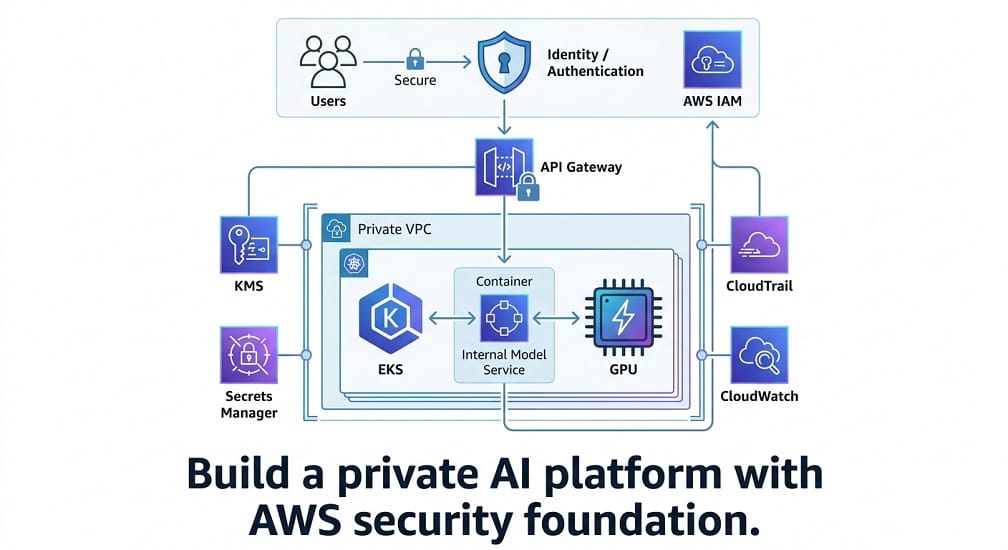
A production private AI platform should look approximately like:
Users
  ↓
Identity / Authentication
  ↓
API Gateway
  ↓
Private VPC
  ↓
EKS
  ↓
Internal Model Service
  ↓
GPU
Recommended AWS building blocks include:
- Amazon VPC
- Private subnets
- Security Groups
- IAM
- AWS KMS
- AWS Secrets Manager
- CloudTrail
- CloudWatch
The model endpoint itself should generally remain private.
Data Protection
For enterprise workloads, establish clear policies around:
- What data can be submitted
- Where data can travel
- How long logs are retained
- Who can access requests
- Whether prompts are stored
- Whether outputs are stored
This is particularly important when the model processes:
- Source code
- Customer data
- Financial information
- Internal documents
- Proprietary research
Model Licensing Still Matters on AWS
Private deployment doesn't remove the model license.
Before deploying Qwen, DeepSeek, or GLM, verify:
- Exact model
- Exact version
- License
- Commercial-use rights
- Redistribution terms
- Derivative-model terms
- Acceptable-use requirements
This connects directly with the Chinese Open-Source AI Model Licenses article in your cluster.
Disaster Recovery
A production AI platform should be able to recover from:
- GPU failure
- Node failure
- EKS failure
- Model corruption
- Deployment mistakes
- Configuration errors
Store and version:
- Model artifacts
- Kubernetes manifests
- Helm values
- Infrastructure code
- Configuration
- Secrets metadata
Keep infrastructure reproducible.
The model itself may be large, but your deployment configuration should remain lightweight and recoverable.
Model Updates
Never replace a production model blindly.
Use:
Current Version
      ↓
New Version
      ↓
Offline Evaluation
      ↓
Canary
      ↓
Production
Compare:
- Quality
- Latency
- GPU memory
- Cost
- Error rate
- Agent success rate
Then roll forward only if the new version actually improves the workload.
LLM Evaluation Pipeline
Model evaluation should become part of CI/CD.
For example:
New Model
   ↓
Benchmark Suite
   ↓
Coding Tests
   ↓
RAG Tests
   ↓
Agent Tests
   ↓
Latency Tests
   ↓
Cost Tests
   ↓
Approve / Reject
This prevents a model upgrade from silently reducing production quality.
Common AWS Deployment Mistakes
Choosing GPUs by Brand Alone
Don't automatically choose H100s because they're popular.
Calculate:
- VRAM requirement
- Context
- Throughput
- Latency
- Utilization
- Total cost
AWS now offers GPU options ranging from G7 inference-focused instances through H100/H200-based P5/P5en and newer Blackwell P6 systems.
Running Large Models Without Quantization Testing
An FP16 model may consume far more resources than necessary.
Always benchmark suitable FP8 or quantized variants when supported.
Treating Context Length as Free
Large context increases memory and processing requirements.
Only send relevant context.
Exposing vLLM Publicly
Put it behind:
- Authentication
- Private networking
- Gateway
- Rate limiting
Running GPU Nodes Permanently
Measure actual utilization and use autoscaling where possible.
Scaling on CPU
For LLM workloads, waiting requests, TTFT, KV-cache usage, and GPU utilization are often more informative than CPU usage. vLLM's current metrics are designed specifically to expose these signals.
Qwen vs DeepSeek vs GLM: Which Should You Deploy on AWS?
There is no universal winner.
Choose Qwen when:
- Coding agents are important
- You need a broad Qwen model family
- Repository-level coding matters
- You want multiple model sizes
- Your application benefits from Qwen's ecosystem
Choose DeepSeek when:
- Advanced reasoning is important
- You need very large context options
- You want strong coding + reasoning in one platform
- Tool-enabled inference is important
Choose GLM when:
- Your workflow aligns with GLM's agentic capabilities
- You need specific GLM model features
- Your workload justifies the required multi-GPU architecture
The final selection should be based on your workload benchmark, not brand preference.
EaseCloud: From AWS Deployment to Managed AI Infrastructure
At EaseCloud, the goal isn't simply to install an open model on an EC2 instance.
The bigger objective is to build a production AI platform that can support:
- Qwen
- DeepSeek
- GLM
- AI agents
- Coding assistants
- RAG
- Enterprise copilots
- Internal APIs
Our relevant architecture work can include:
- AWS GPU infrastructure
- Amazon EKS
- Kubernetes
- vLLM
- SGLang
- AI gateways
- Model routing
- LLMOps
- GPU autoscaling
- Observability
- Cost optimization
- Private networking
- Security and governance
The result is a platform where the organization controls the infrastructure while developers interact through a simple internal API.
Recommended Enterprise Architecture
For a mature organization, the target architecture can be:
                    Users / Apps
                         │
                         ▼
                  Authentication
                         │
                         ▼
                    AI Gateway
                         │
                    Model Router
                         │
          ┌──────────────┼──────────────┐
          ▼              ▼              ▼
        Qwen          DeepSeek         GLM
          │              │              │
          └──────────────┼──────────────┘
                         ▼
                     Amazon EKS
                         │
               ┌─────────┴─────────┐
               ▼                   ▼
        GPU Node Pools       CPU Services
               │
        ┌──────┴──────┐
        ▼             ▼
      vLLM          SGLang
        │
        ▼
   Model Artifacts
        │
        ▼
    Amazon S3
        │
        ▼
Prometheus / CloudWatch
This provides a strong foundation for private multi-model AI.
Frequently Asked Questions
Can Qwen, DeepSeek and GLM run on AWS?
Yes, supported model checkpoints can be deployed on AWS GPU infrastructure using inference runtimes such as vLLM or SGLang, with the exact architecture depending on the model. Qwen, DeepSeek, and GLM all have current serving documentation or recipes for modern inference stacks.
Should I use EC2 or EKS?
Use EC2 for simpler single-model deployments. Use EKS when you need multiple models, autoscaling, GPU scheduling, or an organization-wide AI platform.
Which AWS GPU should I use?
It depends on model size, precision, context, concurrency, and latency requirements. P5/P5en and newer P6 systems target large workloads, while newer G7 instances provide a different inference-oriented option.
Is H100 still the best GPU for open-source LLMs?
Not universally. H200 and Blackwell-based systems offer larger memory and newer capabilities, while lower-cost GPU classes may provide better economics for smaller models.
How do I autoscale LLM inference?
To autoscale LLM inference use inference-aware metrics such as waiting requests, TTFT, KV-cache utilization, and GPU utilization. vLLM's current production stack provides examples using Prometheus metrics and KEDA for request-driven autoscaling.
How do I monitor vLLM on EKS?
vLLM exposes Prometheus-compatible metrics through /metrics. Prometheus and Grafana can then be used for dashboards and alerting, while AWS infrastructure metrics can be integrated with CloudWatch.
Should I deploy Qwen, DeepSeek and GLM simultaneously?
Only when the workload benefits from multiple models. A model router can send different tasks to different models, but running unnecessary GPU replicas can increase infrastructure costs.
Final Verdict
Deploying Qwen, DeepSeek, or GLM on AWS is not simply a matter of choosing an EC2 instance and starting a model server.
A production system requires coordination between:
model + GPU + inference engine + Kubernetes + networking + security + observability + scaling + cost management.
For small workloads:
EC2 + vLLM can be enough.
For a multi-model enterprise platform:
Amazon EKS + GPU node pools + vLLM/SGLang + AI gateway is a stronger architecture.
For very large models, specialized GPU systems and multi-GPU or multi-node parallelism may be required.
The most important rule is:
Size the infrastructure around the workload, not the model's marketing headline.
Start with the smallest architecture that meets your quality and latency requirements. Measure it. Then scale the infrastructure when the workload proves that the additional capacity is justified.
For organizations moving from AI experimentation to production, EaseCloud can bridge that gap through AWS AI architecture, GPU infrastructure, Amazon EKS, Kubernetes, inference optimization, LLMOps, observability, security, and cost optimization.
Summarize this post with:
