Qwen vs DeepSeek GPU Requirements: VRAM, GPUs & Cost in 2026
Compare Qwen vs DeepSeek GPU requirements, VRAM, quantization, context, multi-GPU setups and AWS costs for local and production inference.
Choosing an AI model is only half of the deployment decision.
The other half is:
What hardware does the model actually require?
A model can look attractive on a benchmark and still be impractical to run if it needs a large multi-GPU server.
This is especially important when comparing Qwen and DeepSeek because both ecosystems now contain models ranging from relatively lightweight deployments to extremely large reasoning and coding systems.
The actual hardware requirement depends on much more than parameter count.
You need to account for:
- Model parameters
- Precision
- Quantization
- GPU VRAM
- Context length
- KV cache
- Batch size
- Concurrent requests
- Tensor parallelism
- Expert parallelism
- Inference framework
- Latency target
For example, a GPU such as AWS's G7 provides 32 GB of GPU memory per NVIDIA RTX PRO 4500 Blackwell Server Edition GPU, while a single P5 instance provides an H100 with 80 GB, and an 8-GPU P5en instance provides 1,128 GB of aggregate H200 memory.
That huge range illustrates the core problem:
The right GPU depends on the exact Qwen or DeepSeek model and the workload.
TL;DR
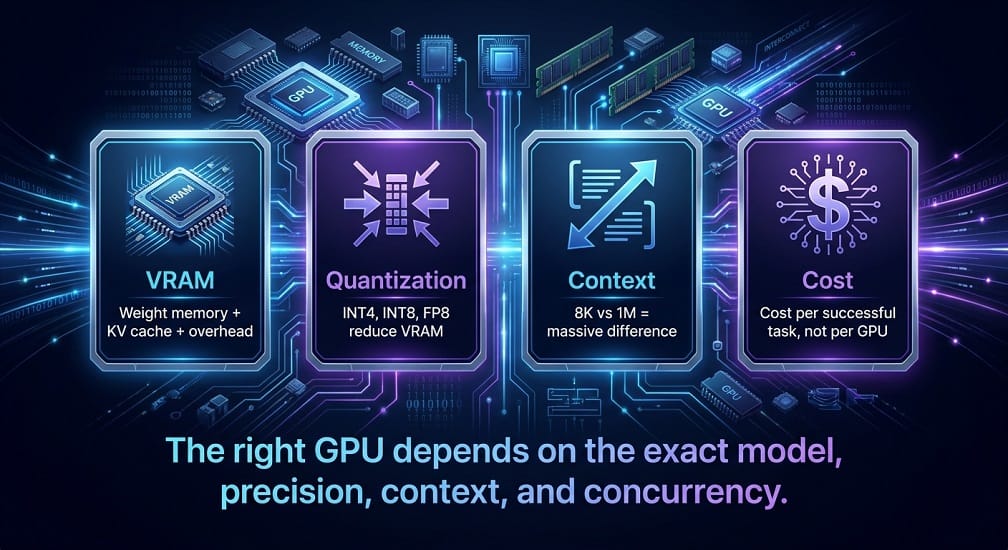
- Hardware depends on: model size × precision × context × concurrency. KV cache for long contexts dominates memory – a 30B model at 128K needs far more than at 8K.
- Quantization cuts VRAM dramatically – INT4 reduces weight memory ~75% vs FP16. Qwen offers FP8/AWQ; DeepSeek supports FP8/INT4. Always test quality after quantization.
- GPU tiers: 24GB (small quantized), 48GB (mid-size), 80GB H100 (large), 141GB H200 (memory-heavy), 1.4TB+ Blackwell (extreme-scale). AWS G7 (32GB) for cost-conscious inference; P5/H100 for large; P5e/H200 for memory-intensive.
- Qwen ranges from small local to large MoE. Qwen3-Coder 30B FP16 needs ~60GB weights alone – multi-GPU or heavy quantization required.
- DeepSeek varies widely – smaller models run on workstations; large V4/MoE need multi-GPU H100/H200.
- Start small, benchmark, then scale. Measure cost per successful task, not GPU hourly price. Use vLLM metrics (KV-cache, waiting requests, TTFT) to optimize before buying more GPUs.
Qwen vs DeepSeek GPU Requirements: The First Rule
Don't ask:
“How much VRAM does Qwen need?”
or:
“How much VRAM does DeepSeek need?”
Those questions are too broad.
Instead ask:
“How much VRAM does this exact model, at this precision, with this context and concurrency, need?”
For example:
Qwen model
+
FP16
+
128K context
+
8 concurrent users
has a very different memory requirement from:
Qwen model
+
INT4
+
8K context
+
1 user
The same applies to DeepSeek. This requires careful planning by your SRE team using specialized hardware like NVIDIA Tensor Cores.
Model Weights Are Only Part of the Memory Requirement
A common mistake is calculating:
Model parameters × bytes per parameterand assuming that is the GPU requirement for LLM inference.
That only estimates the model weights.
Real inference requires memory for:
- Model weights
- KV cache
- Activations
- Runtime overhead
- CUDA allocations
- Temporary buffers
- Batch processing
So a better conceptual formula is:
Total VRAM
≈
Model Weights
+
KV Cache
+
Runtime Overhead
+
Batch / Activation Memory
This is why a model that appears to require 60 GB of weight storage may need substantially more than 60 GB of usable GPU memory.
Basic VRAM Estimate by Precision
A useful first approximation is:
| Precision | Approx. Bytes / Parameter |
|---|---|
| FP32 | 4 |
| BF16 | 2 |
| FP16 | 2 |
| FP8 | 1 |
| INT8 | 1 |
| INT4 | 0.5 |
For example, a hypothetical 30B-parameter model would require approximately:
| Precision | Weight Memory |
|---|---|
| FP32 | ~120 GB |
| FP16/BF16 | ~60 GB |
| FP8/INT8 | ~30 GB |
| INT4 | ~15 GB |
These are weight-only estimates, not complete inference requirements.
Qwen GPU Requirements
Qwen has a very broad model range.
That means Qwen can be deployed on:
- Consumer GPUs
- Workstations
- Single data-center GPUs
- Multi-GPU servers
- Large Kubernetes GPU clusters
The right choice depends on the model.
Qwen's current documentation also provides quantized variants and deployment paths through vLLM, including FP8 and AWQ options for selected models.
Small Qwen Models
Smaller Qwen models can often be practical for local use.
Typical targets include:
- 7B–8B class models
- 14B class models
- Smaller coding or reasoning variants
A 24 GB GPU can be sufficient for some quantized models in these ranges, depending on:
- Context
- Quantization
- Runtime
- Batch size
But that does not mean every model in the same parameter range will behave the same way.
Qwen Coder GPU Requirements
Qwen Coder deserves separate treatment because developers often want to run it locally.
Qwen3-Coder includes significantly different sizes.
A smaller coding model can be practical on a workstation, while the larger models require much more memory.
For example, if a 30B-class model were served in FP16, the weights alone would be roughly:
30B × 2 bytes ≈ 60 GB
Before adding KV cache or runtime overhead.
With 4-bit quantization, the weight estimate falls to roughly:
30B × 0.5 bytes ≈ 15 GB
Again, this does not mean a 16 GB GPU will necessarily run it comfortably.
Context and serving overhead still matter.
DeepSeek GPU Requirements
DeepSeek has an even wider range because current generations vary significantly in scale.
For DeepSeek, always distinguish between:
- Smaller local checkpoints
- Coding models
- Reasoning models
- Large MoE models
- Current V4 variants
The exact model architecture can have a major effect on how efficiently the available GPUs are used.
For large-scale deep learning models, Kubernetes clusters are often required to manage the deployment efficiently.
MoE Changes the Calculation
Modern Qwen and DeepSeek models may use Mixture-of-Experts (MoE) architectures.
An MoE model can have a very large total parameter count while activating only a subset of experts for each token.
For example:
Total parameters
        ↓
Many experts
Token
  ↓
Router
  ↓
Selected experts
This means:
Total parameters ≠ active parameters ≠ GPU memory requirement
The full model weights still need to be represented across the serving infrastructure, while only selected experts participate in each token's computation.
That distinction is particularly important when comparing very large Qwen and DeepSeek models.
Qwen vs DeepSeek: Why Parameter Count Alone Fails
Imagine:
Model A
100B total parameters20B active parameters
Model B
70B dense parameters
You cannot conclude that Model A requires only the VRAM of a 20B model.
The complete model still has to be stored across the inference system.
So infrastructure planning should consider:
- Total parameters
- Active parameters
- Precision
- Expert distribution
- Context
- Parallelism
Context Length Has a Major VRAM Impact
The KV cache grows as context grows.
That means:
8K contextand:
1M contextcan have dramatically different memory requirements.
This is especially important for:
- Coding agents
- Large repositories
- Long documents
- RAG
- Multi-turn conversations
Current DeepSeek V4 API documentation lists a 1M-token context for V4-Flash and V4-Pro.
That capability is powerful, but you should not assume every request should use the maximum context.
Longer Context Means More Expensive Inference
Large context can increase:
- GPU memory
- KV cache
- Latency
- Prefill computation
- Cost
For most enterprise applications, a better strategy is to retrieve relevant information instead of sending everything.
For example, an enterprise RAG system should retrieve the top relevant documents rather than automatically inserting an entire million-token knowledge base into every request.
Quantization: The Easiest Way to Reduce VRAM
Techniques like model quantization can make a large model significantly easier to deploy.
Common approaches include:
- FP8
- INT8
- INT4
- AWQ
- GPTQ
- NVFP4
- GGUF
The trade-off is that lower precision can affect quality and performance.
For coding models, test:
- Code generation
- Debugging
- Tool use
- Long-context tasks
- Agent completion
after quantization.
Don't assume that an INT4 model will produce exactly the same results as BF16.
Qwen Quantization
The Qwen ecosystem provides several quantized model variants.
Official Qwen documentation covers:
- FP8
- AWQ
- Other quantization approaches
and provides deployment guidance for vLLM and related runtimes.
This makes Qwen relatively flexible for organizations trying to balance quality and GPU cost.
DeepSeek Quantization
DeepSeek's larger models can benefit significantly from lower-precision deployment.
For large Mixture-of-Experts models, quantization can dramatically change the hardware requirement.
The correct approach is:
- Start with the quality baseline.
- Deploy the quantized model.
- Run the same benchmark.
- Compare quality.
- Compare throughput.
- Compare VRAM.
- Compare cost.
Then choose the most efficient configuration that still meets the business requirement.
Which GPU Can Run Qwen or DeepSeek?
A simple planning guide:
| GPU Class | Typical Use |
|---|---|
| 16 GB | Small quantized models |
| 24 GB | Small‑to‑mid quantized models |
| 32 GB | Larger local inference |
| 48 GB | Mid‑size models / more context |
| 80 GB | Large single‑GPU models |
| 96 GB | Larger single‑GPU workloads |
| 141 GB | Large‑model serving |
| 640 GB+ aggregate | Multi‑GPU large models |
| 1 TB+ aggregate | Very large models |
These are capacity categories, not guarantees that every model in a category will fit.
AWS G7 for Smaller AI Inference
AWS G7 instances use NVIDIA RTX PRO 4500 Blackwell Server Edition GPUs.
AWS currently lists:
- 32 GB GPU memory per GPU
- Up to 8 GPUs
- Up to 256 GB aggregate GPU memory
- Up to 700 Gbps EFA networking
AWS positions G7 partly for AI inference workloads.
This makes G7 potentially interesting for:
- Smaller Qwen models
- Smaller DeepSeek models
- Quantized inference
- RAG workloads
- Cost-conscious private inference
AWS P5 with H100
P5 includes NVIDIA H100 GPUs.
AWS currently lists:
p5.4xlarge
- 1 × H100
- 80 GB HBM3
p5.48xlarge
- 8 × H100
- 640 GB total HBM3
The 8-GPU configuration also provides high-speed GPU-to-GPU communication through NVSwitch and EFA networking.
Managing costs effectively with FinOps is crucial for large-scale GPU deployments like these.
P5 is therefore a strong choice for larger inference workloads where GPU memory and throughput matter.
AWS P5e and P5en with H200
P5e and P5en provide:
8 × NVIDIA H200
with:
1,128 GB aggregate HBM
AWS documents 141 GB per GPU for these instances.
This makes H200 particularly useful for large models where additional memory capacity can reduce the need for more nodes.
AWS P6-B200
For extremely large models, AWS now provides Blackwell-based P6 systems.
AWS's current P6-B200 offering provides:
- 8 Blackwell GPUs
- About 1.44 TB aggregate GPU memory
- High-bandwidth GPU networking
- EFAv4 networking
AWS says P6-B200 can deliver up to twice the performance of P5en for AI training and inference workloads, adhering to the principles of the AWS Well-Architected Framework.
This is firmly in the very-large-model / enterprise-scale category.
Qwen vs DeepSeek: Single GPU or Multi-GPU?
A practical rule:
Single GPU
Use when the entire model plus runtime comfortably fits.
Tensor Parallelism
Use when the model is too large for one GPU or requires multiple GPUs for performance.
Data Parallelism
Use when one model replica fits within a GPU group and you need more concurrent throughput.
Expert Parallelism
Useful for large MoE models where experts can be distributed across GPUs.
Why H200 Can Be Better Than H100 for Some Models
The H200 provides substantially more HBM than the H100.
That matters when the main constraint is memory capacity, not raw compute.
For a large model:
H100
80 GB

H200
141 GB
That additional memory can:
- Reduce model sharding
- Support larger contexts
- Increase batch size
- Reduce the number of GPUs required
But the higher hardware cost can make a smaller GPU more economical for smaller models.
Qwen vs DeepSeek GPU Cost
Don't compare GPUs by hourly price alone.
Instead calculate:
Cost per successful inference
or:
Cost per 1M useful tokens
For a server:
GPU Cost
+
Storage
+
Networking
+
Monitoring
+
Operations
then divide by:
Useful production workload
A Better GPU Cost Metric
For an AI coding assistant:
Cost per completed coding task
=
Infrastructure cost
÷
Successful coding tasks
For a RAG system:
Cost per answered request
=
Infrastructure cost
÷
Successful grounded answers
For batch inference:
Cost per 1M generated tokens
=
Total infrastructure cost
÷
Generated tokens
Different workloads need different financial metrics.
Qwen vs DeepSeek Hardware: Practical Starting Point
| Deployment | Qwen | DeepSeek |
|---|---|---|
| Laptop | Small / quantized | Small / quantized |
| 24 GB GPU | Smaller models | Smaller models |
| 48 GB GPU | Mid‑size models | Mid‑size models |
| 80 GB GPU | Larger single‑GPU models | Larger single‑GPU models |
| 8× H100 | Large models | Large models |
| 8× H200 | Very large models | Very large models |
| Blackwell | Very large / high‑throughput | Very large / high‑throughput |
The exact model checkpoint should always determine the final hardware choice.
Qwen GPU Requirements by Model Size
The easiest way to estimate Qwen hardware is to start with the model size and then adjust for precision, context, and concurrency while keeping cloud cost optimization in mind.
A rough FP16 estimate is:
| Model Size | Approx. FP16 Weight Memory |
|---|---|
| 7B–8B | 14–16 GB |
| 14B | ~28 GB |
| 30B | ~60 GB |
| 70B | ~140 GB |
| 100B | ~200 GB |
These numbers represent model weights only.
Actual VRAM requirements will be higher once you add the KV cache, runtime overhead, batch size, and the chosen context length.
Practical Qwen Examples
For a small Qwen model, a 24 GB GPU can be practical with appropriate settings.
For a 30B-class Qwen model, you will generally want more memory, or a quantized model.
For a 70B-class model, a single 80 GB GPU is usually not enough for an unquantized FP16 deployment, so multi-GPU or aggressive quantization becomes relevant.
For very large Qwen MoE models, multi-GPU infrastructure becomes unavoidable.
Qwen3-Coder Hardware Requirements
Qwen3-Coder deserves special attention because developers often want to run it locally.
Consider a 30B-class model.
At roughly 2 bytes per parameter:
30B × 2 bytes ≈ 60 GB of weight memory
At approximately 4 bits per parameter:
30B × 0.5 bytes ≈ 15 GB of weight memory
This does not mean a 16 GB GPU is automatically suitable for the quantized version.
You still need room for:
- KV cache
- Runtime
- Context
- CUDA overhead
- Concurrent requests
A 24 GB or 48 GB GPU can therefore be a much more comfortable choice depending on the workload.
Qwen Coding Agent Hardware
Coding agents can require more memory than basic chat because they frequently use:
- Long repository context
- Multiple tool calls
- Large file contents
- Previous conversation state
- Test outputs
A developer running a coding agent may therefore want to reserve substantially more memory than the model's raw weight size suggests.
For example:
| Deployment | Practical Direction |
|---|---|
| Basic local coding | Small quantized Qwen model |
| Medium coding assistant | 24–48 GB GPU |
| Large coding agent | 80 GB+ GPU or multi‑GPU |
| Large repository agent | Multi‑GPU may become necessary |
DeepSeek GPU Requirements by Model Size
DeepSeek hardware planning is more complicated because the ecosystem includes different architecture types and generations.
For each DeepSeek model, check:
- Total parameters
- Active parameters
- Weight precision
- Quantization
- Context length
- KV-cache requirements
- Parallelism requirements
A very large DeepSeek MoE model may have fewer active parameters per token than its total parameter count suggests, but the full model still needs to be represented across the serving infrastructure.
DeepSeek V4 Hardware Planning
For current DeepSeek V4 deployments, the hardware requirement depends heavily on whether you're using a smaller or larger model variant and whether you are serving through a hosted API or running the model yourself.
For large self-hosted models, high-memory GPUs become particularly important.
An enterprise configuration may use:
- H100
- H200
- Blackwell GPUs
- Multi-GPU tensor parallelism
- Expert parallelism
- High-speed GPU networking
DeepSeek for Local Development
For local development, don't begin by trying to run the largest DeepSeek model.
A better sequence is:
small model → quantized model → benchmark → larger model only if needed
This prevents you from turning a simple coding assistant into an expensive infrastructure project.
VRAM vs System RAM
VRAM isn't the only memory that matters.
Depending on the runtime, some of the model may also use:
- System RAM
- Unified memory
- CPU offloading
This can allow a model to run on hardware that doesn't have enough dedicated GPU memory, sometimes facilitated by containerization with Docker.
The trade-off is usually lower performance.
For an interactive coding assistant, CPU offloading can make the experience much slower than keeping the model entirely on the GPU.
Apple Silicon and Unified Memory
Apple Silicon can be useful for local experimentation because CPU and GPU workloads can share unified memory.
This makes higher-memory Mac systems interesting for smaller or quantized Qwen, DeepSeek, and GLM models.
However, memory capacity still matters.
A machine with 96 GB of unified memory can run workloads that would be impossible on a 24 GB GPU, but that doesn't mean it will match the inference speed of a high-end NVIDIA data-center GPU.
Qwen vs DeepSeek: Quantization Strategy
A useful approach is to maintain two configurations:
Quality configuration
Use:
- BF16
- FP16
- FP8 where appropriate
Efficiency configuration
Use:
- INT8
- INT4
- AWQ
- GPTQ
- GGUF where appropriate
Then compare:
| Metric | Full Precision | Quantized |
|---|---|---|
| VRAM | Higher | Lower |
| Throughput | Depends | Often better |
| Quality | Baseline | May decrease |
| Cost | Higher | Lower |
| Local usability | Harder | Easier |
The best configuration is the one that retains enough quality for your workload.
Context Length vs VRAM
This is one of the most misunderstood parts of LLM deployment.
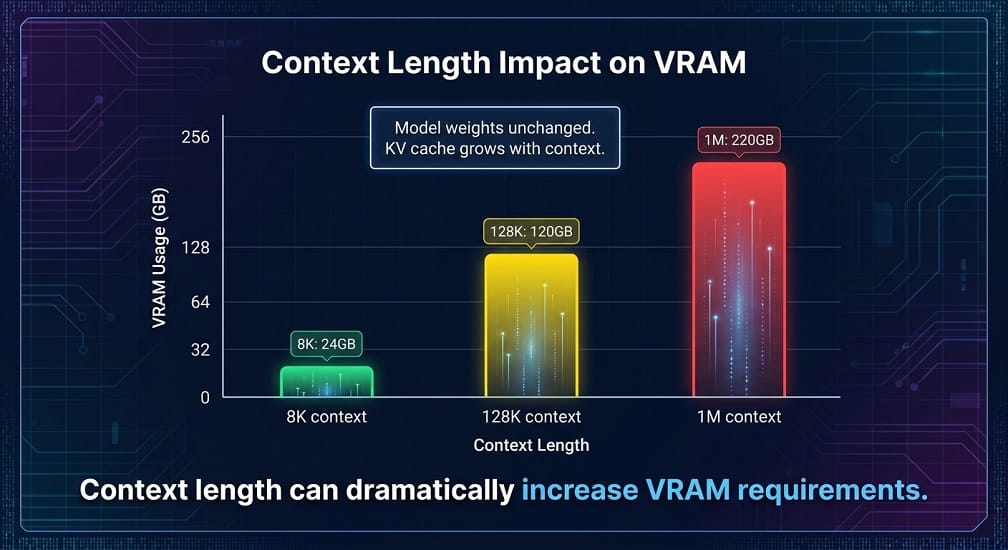
Suppose the same model is served at:
8K context
then:
128K context
then:
1M context
The model weights have not changed.
But the memory required by the KV cache can change dramatically.
That's why a model that fits comfortably on a GPU at 8K context may struggle at much larger contexts.
Don't Max Out Context by Default
If your application only needs 20K tokens of relevant information, don't configure a 1M-token context simply because the model supports it.
That can increase:
- Memory usage
- Latency
- Cost
- GPU pressure
For enterprise RAG and coding systems, better retrieval often delivers more value than maximum context.
Batch Size and VRAM
Batching improves throughput by serving multiple requests together.
But larger batch sizes consume additional memory.
A system might behave like:
| Batch | Throughput | Memory |
|---|---|---|
| 1 | Low | Low |
| 4 | Higher | Higher |
| 16 | Much higher | Much higher |
The optimal batch size depends on:
- Model
- Context
- Output length
- GPU
- Latency target
For interactive coding assistants, you may prioritize latency.
For batch document processing, throughput can be more important.
Qwen vs DeepSeek for Single-GPU Deployment
Single-GPU deployment is attractive because it is simpler and cheaper.
You avoid:
- Multi-GPU networking
- Tensor parallel configuration
- More complex scheduling
- Additional hardware
A practical single-GPU target is a model whose weights plus normal runtime requirements fit comfortably within the available memory.
For example:
24 GB GPU
Good for smaller quantized models.
48 GB GPU
More flexibility for mid-sized models and larger contexts.
80 GB GPU
Suitable for substantially larger models and more demanding inference.
Again, actual fit depends on quantization and context.
Qwen vs DeepSeek for Multi-GPU Deployment
When a model does not fit on one GPU, there are several approaches.
Tensor Parallelism
Split the model across GPUs.
Pipeline Parallelism
Split model layers across GPUs.
Data Parallelism
Replicate the model to increase throughput.
Expert Parallelism
Distribute MoE experts across GPUs.
The correct method depends on model architecture and inference framework.
Tensor Parallelism Example
A simplified four-GPU setup looks like:
Model
├── GPU 1
├── GPU 2
├── GPU 3
└── GPU 4
This can allow a model that does not fit on one GPU to run across the group.
However, communication between GPUs becomes important.
For large models, you want:
- High-bandwidth GPU interconnect
- Fast networking
- Low communication overhead
AWS G7 vs H100 vs H200
The GPU comparison becomes important once you move beyond local workstations.
| GPU Class | Memory per GPU | Typical Use |
|---|---|---|
| G7 | 32 GB | Smaller / medium inference |
| H100 | 80 GB | Large inference |
| H200 | 141 GB | Large memory‑heavy inference |
| Blackwell | Varies by instance | Very large / high‑throughput workloads |
AWS currently lists 32 GB per GPU for G7, 80 GB H100 configurations in P5, and 141 GB H200 configurations in P5e/P5en. Newer P6 systems offer substantially larger aggregate GPU memory for very large AI workloads.
When G7 Makes Sense
G7 can make sense when you need:
- Small or mid-sized models
- Cost-conscious inference
- Moderate throughput
- Private enterprise workloads
- Smaller coding assistants
A model that fits well on a 32 GB GPU can be much cheaper to operate than a large H100 or H200 cluster.
When H100 Makes Sense
H100 becomes attractive for:
- Larger models
- Higher throughput
- Low-latency inference
- Multi-GPU workloads
- Large coding agents
- Large RAG workloads
When H200 Makes Sense
H200 becomes especially attractive when GPU memory capacity is the main constraint.
The extra memory can allow:
- Larger models
- Larger contexts
- Larger batches
- Fewer GPUs for some workloads
This does not mean H200 always provides better economics.
If your model fits easily on a smaller GPU, the smaller GPU may be the better financial choice.
When Blackwell Makes Sense
Blackwell-class infrastructure is most interesting for:
- Very large models
- High-throughput inference
- Large MoE systems
- Extremely large context workloads
- Large enterprise AI platforms
For most developers, this is overkill.
For a business serving a large model to many users, it can become appropriate.
How Many GPUs Do You Actually Need?
Use this order:
Step 1
Estimate weight memory.
Step 2
Add runtime overhead.
Step 3
Estimate KV cache for the required context.
Step 4
Add concurrency.
Step 5
Apply your chosen precision.
Step 6
Select the GPU.
Step 7
Only then determine the number of GPUs.
Don't begin with:
“We want four H100s.”
Begin with:
“We need X tokens/sec at Y context and Z concurrent requests.”
Then calculate the infrastructure.
Example Planning Scenario
Suppose your application needs:
- 100 concurrent users
- 32K average context
- 2,000 output tokens
- Interactive latency
- Private inference
You might discover that a smaller model with multiple replicas gives a better experience than one massive model.
Alternatively, if you need:
- Complex reasoning
- 500K context
- Long-running agents
- Large repository analysis
the larger model and higher-memory GPUs may become justified.
Cost Optimization: Don't Buy GPU First
Before provisioning expensive GPU instances:
- Benchmark the smallest acceptable model.
- Test quantization.
- Measure context requirements.
- Measure concurrency.
- Measure actual throughput.
- Calculate cost per successful task.
- Increase hardware only when required.
This prevents over-provisioning.
Qwen vs DeepSeek: Practical Hardware Guide
| Workload | Starting Hardware |
|---|---|
| Small local assistant | 16–24 GB GPU |
| Local coding assistant | 24–48 GB GPU |
| Mid‑sized private inference | 48–80 GB GPU |
| Large model | 80–141 GB or multi‑GPU |
| Very large model | Multi‑GPU H100/H200/Blackwell |
| Large enterprise platform | Kubernetes GPU cluster |
These are planning ranges rather than fixed requirements.
Qwen vs DeepSeek GPU Cost
GPU cost should not be evaluated by hourly instance price alone.
The real question is:
How much useful work can the GPU complete for the money spent?
For an LLM deployment, the cost includes more than the GPU.
It can include:
- Compute
- Storage
- Networking
- Monitoring
- Model loading
- Kubernetes
- Inference operations
- Engineering overhead
A useful production metric is:
Cost per successful task
Total AI infrastructure cost
÷
Successfully completed tasks
For a coding assistant, this may mean cost per completed coding task.
For RAG, it may mean cost per successful grounded answer.
For batch inference, it may mean cost per million generated tokens.
GPU Price vs GPU Utilization
A cheaper GPU isn't automatically more economical.
Suppose:
| GPU | Cost | Utilization |
|---|---|---|
| GPU A | Lower | 30% |
| GPU B | Higher | 80% |
GPU B can deliver better economics if it processes substantially more useful inference.
For this reason, track:
- GPU utilization
- VRAM utilization
- Requests
- Tokens
- Queue time
- Latency
- Successful tasks
vLLM exposes production metrics such as KV-cache usage, running requests, waiting requests, prompt tokens, generation tokens, request latency, and time to first token.
Qwen vs DeepSeek: Cost per Successful Task
This is especially important for AI coding agents.
Imagine:
Qwen
Infrastructure cost = $100
Successful tasks = 1,000
Cost:
$0.10 per successful task
DeepSeek
Infrastructure cost = $80
Successful tasks = 600
Cost:
$0.13 per successful task
Even though DeepSeek used less total infrastructure spending, Qwen delivered the lower cost per successful task.
This is why quality, efficiency, and infrastructure must be measured together.
Local GPU vs AWS
There are two very different cost models.
Local workstation
You pay for:
- GPU hardware
- Power
- Storage
- Maintenance
But there is no cloud hourly charge.
AWS
You pay for:
- Compute
- Storage
- Network
- Monitoring
- Potential Kubernetes overhead
But you gain:
- Elastic capacity
- Managed infrastructure
- Easier scaling
- Multiple instance choices
- Enterprise networking
- Availability options
For a developer using a model occasionally, local hardware can make sense.
For a business with unpredictable demand, cloud infrastructure can be much easier to operate.
When a Local GPU Is Better
Local deployment can make sense when:
- Usage is predictable
- Traffic is low or moderate
- Data is sensitive
- You already own the hardware
- The model fits comfortably
- The GPU stays well utilized
A developer with a 24–48 GB GPU may be able to run a smaller quantized Qwen, DeepSeek, or GLM model at a reasonable cost.
When AWS Is Better
AWS becomes more attractive when:
- Usage changes significantly
- Multiple teams need the model
- You need high availability
- You need several models
- You need autoscaling
- You require centralized monitoring
- GPU hardware procurement is impractical
For larger deployments, Amazon EKS can also provide a reusable platform for multiple model-serving workloads.
G7 vs H100 vs H200 vs Blackwell
AWS's current GPU portfolio gives you several distinct deployment tiers.
G7
G7 uses NVIDIA RTX PRO 4500 Blackwell Server Edition GPUs with 32 GB per GPU, and instances can scale to eight GPUs and 256 GB aggregate GPU memory. AWS positions G7 for AI inference and related workloads.
This makes G7 interesting for:
- Smaller models
- Quantized models
- RAG
- Coding assistants
- Cost-sensitive inference
H100
H100 remains a strong choice for larger model serving and high-throughput inference.
It is particularly useful when you need:
- Large VRAM
- High compute
- Multi-GPU deployment
- High throughput
H200
H200 is especially attractive when memory is the limiting factor.
Its larger HBM capacity can make it easier to serve large models or larger contexts without using as many GPUs.
Blackwell
Blackwell-based systems become increasingly interesting for very large models and high-throughput workloads.
AWS P6-B200 instances provide eight Blackwell GPUs with approximately 1,440 GB of aggregate GPU memory, along with high-bandwidth EFA networking.
This belongs to a very different infrastructure category from a developer workstation.
Which GPU Should You Choose?
Use this as a starting point:
| Requirement | Starting Option |
|---|---|
| Small local model | Consumer GPU |
| Quantized medium model | 24–48 GB GPU |
| Larger single‑GPU inference | H100‑class |
| Memory‑heavy large model | H200‑class |
| Very large model | Multi‑GPU H200 / Blackwell |
| Extreme‑scale AI | P6 / advanced GPU cluster |
Always validate the exact model.
vLLM Memory Optimization
If you use vLLM, memory management becomes a key part of performance tuning.
Important factors include:
- GPU memory utilization
- KV cache
- Context length
- Batch size
- Prefix caching
- Quantization
vLLM exposes kv_cache_usage_perc, waiting requests, running requests, token metrics, and latency metrics, which can help operators determine whether a deployment is memory- or capacity-constrained.
This lets you move from guesswork to measurement.
Don't Run With 100% Memory Utilization
It can be tempting to configure a model to consume almost all available VRAM.
That can create problems when:
- Context increases
- More users arrive
- Requests become longer
- KV cache grows
- Runtime memory changes
Leave enough headroom for normal workload variation.
A system that works perfectly at one request can fail under production concurrency.
Optimize Context Before Buying More GPUs
If VRAM is consistently near capacity, don't immediately add GPUs.
First investigate:
- Are prompts unnecessarily long?
- Can RAG retrieval be improved?
- Can repeated prefixes be cached?
- Is the maximum context configured too high?
- Is the batch size appropriate?
- Can the model be quantized?
Better context management can sometimes save more money than upgrading hardware.
Prefix Caching
Repeated prompts occur frequently in:
- Coding agents
- RAG
- Customer support
- Long conversations
For example:
System Instructions
+
Company Documentation
+
Developer Instructions
+
User Question
The first sections may be identical across multiple requests.
vLLM exposes prefix-cache hit and query metrics, allowing operators to measure whether repeated context is actually being reused.
GPU Autoscaling
For variable workloads, autoscaling can reduce idle capacity.
A practical setup could maintain:
2 warm GPU replicas
during normal traffic and scale toward:
6–8 replicas
during peak demand.
The trigger should be based on inference workload rather than ordinary application metrics alone.
Useful signals include:
- Waiting requests
- KV-cache utilization
- Time to first token
- GPU utilization
Qwen vs DeepSeek for High-Concurrency Inference
When concurrency increases, you need to monitor both:
Throughput
and:
Latency
A model may process more total tokens per second but still produce an unacceptable user experience because requests spend too much time waiting.
For interactive coding assistants, prioritize:
time to first useful result
For batch workloads, prioritize:
total throughput
Qwen vs DeepSeek: Choosing the Right Quantization
A practical production strategy is to maintain a baseline and one or more optimized versions.
Baseline
BF16 or FP16
Optimized
FP8
Aggressive optimization
INT8 or INT4
Then compare:
| Metric | Baseline | Optimized |
|---|---|---|
| Quality | Baseline | Measure |
| VRAM | High | Lower |
| Latency | Measure | Measure |
| Throughput | Measure | Measure |
| Cost | Higher | Potentially lower |
Don't choose a quantized model only because it fits the GPU.
It must still deliver acceptable results.
Qwen vs DeepSeek GPU Requirements: Final Recommendations
For local developers
Start with a smaller quantized model on a 24–48 GB GPU when possible.
For a private coding assistant
Consider an 80 GB-class GPU if the model and context requirements justify it.
For larger reasoning models
Move toward H100 or H200-class infrastructure and multi-GPU serving where necessary.
For very large MoE models
Plan for:
- Tensor parallelism
- Expert parallelism
- High-speed GPU networking
- Large-memory GPU nodes
For enterprise-scale AI
Consider:
- Amazon EKS
- vLLM or SGLang
- GPU autoscaling
- Model routing
- Monitoring
- Cost controls
Qwen vs DeepSeek: The Real Hardware Winner
There is no permanent winner.
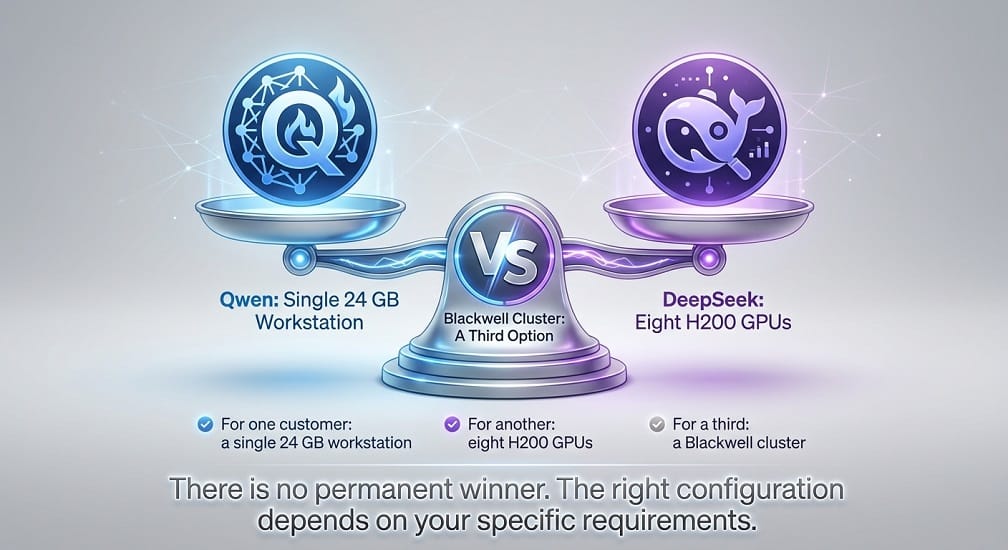
The better hardware configuration is the one that meets:
- Required quality
- Required context
- Required latency
- Required concurrency
- Required availability
at the lowest sustainable total cost.
For one customer, that might be a single 24 GB workstation.
For another, it could be eight H200 GPUs.
For a third, a Blackwell-based cluster may be justified.
EaseCloud Recommendation
At EaseCloud, GPU planning should begin with the workload rather than the GPU model.
We recommend measuring:
- Tokens per second
- Time to first token
- Average context
- Maximum context
- Concurrent requests
- KV-cache utilization
- GPU utilization
- Successful-task rate
- Cost per successful task
Then map those requirements to the most appropriate infrastructure.
For AWS workloads, this can mean selecting among G7, H100/H200, or Blackwell-based infrastructure and deciding whether EC2 or Amazon EKS provides the better operating model.
Frequently Asked Questions
How much VRAM does Qwen need?
It depends on the exact Qwen model, precision, context length, batch size, and runtime. Model weights are only part of the total memory requirement.
How much VRAM does DeepSeek need?
The requirement varies significantly by model generation and architecture. Smaller models can work on workstation GPUs, while larger current models may require multi-GPU infrastructure.
Can Qwen run on a 24 GB GPU?
Some smaller or quantized Qwen models can run within this range, but the exact context and runtime configuration determine whether the deployment is comfortable.
Can DeepSeek run on a single GPU?
Some smaller DeepSeek models can. Larger models may require multiple GPUs or aggressive quantization.
Is 24 GB enough for a 30B model?
A quantized 30B model may fit its weights within this memory range, but you also need memory for context, KV cache, and runtime overhead. A larger-memory GPU is often more practical.
Is H100 better than H200 for Qwen or DeepSeek?
Not automatically. H200's larger memory capacity can be more valuable for large models and large contexts, while H100 can provide a better fit for workloads that don't require the additional memory.
Is Blackwell better for Qwen and DeepSeek?
For very large or high-throughput workloads, newer Blackwell systems can offer significant memory and performance advantages. But smaller models may achieve better economics on less expensive GPUs.
Should I use a GPU locally or AWS?
Use local hardware when utilization is predictable and the model fits comfortably. AWS becomes more attractive when you need elasticity, centralized infrastructure, multiple models, or enterprise availability.
Final Verdict
The most important point in Qwen vs DeepSeek GPU planning is this:
Don't size infrastructure from parameter count alone.
Use:
model size + precision + context + KV cache + concurrency + latency + throughput
to determine the actual requirement.
For most developers, start small.
For enterprise teams, benchmark the workload before committing to expensive GPU infrastructure.
For very large Qwen and DeepSeek deployments, high-memory H200 or Blackwell systems may become appropriate, while smaller workloads can often achieve better economics on lower-cost GPUs.
And once the deployment becomes multi-model or production-critical, the hardware decision becomes only one part of the problem. Kubernetes, vLLM, autoscaling, observability, security, and cost management become equally important.
At EaseCloud, that is where GPU planning connects with the broader private AI infrastructure stack: AWS, Amazon EKS, Kubernetes, inference optimization, LLMOps, monitoring, and AI infrastructure cost optimization.
Summarize this post with:
