Own Your LLM Stack: On-Premise Deployment
Deploy LLMs on-premises with full data sovereignty, GDPR compliance, sub-20ms latency, and ~30% lower costs using high-performance bare metal inference for European enterprises.
TLDR;
- Save up to 84% over 3 years versus equivalent cloud deployments by owning bare metal GPU infrastructure
- Achieve full GDPR compliance through on-premises data processing with zero cross-border transfers and complete data sovereignty
- Reach sub-20ms inference latency by eliminating network round trips to remote cloud regions
- Break even against cloud costs within 3 to 8 months for workloads with utilization rates above 60%
European enterprises processing sensitive data with large language models face a direct conflict between cloud convenience and regulatory obligation.
Sending customer conversations, financial records, or health data to a US hyperscaler creates GDPR exposure that no data processing agreement fully eliminates.
On-premise LLM deployment resolves that conflict: you own the hardware, control the data path, and eliminate the per-token cost that makes cloud inference prohibitively expensive at scale.
Why European Enterprises Choose On-Premise LLMs
GDPR Article 35 requires organisations to implement technical measures ensuring data security appropriate to the risk. For LLM workloads processing personal data, that means controlling where data is processed, not just where it is stored.
Cloud LLM APIs process every prompt on infrastructure outside your direct control, in jurisdictions where US law enforcement access requests remain a live risk even after the EU-US Data Privacy Framework.
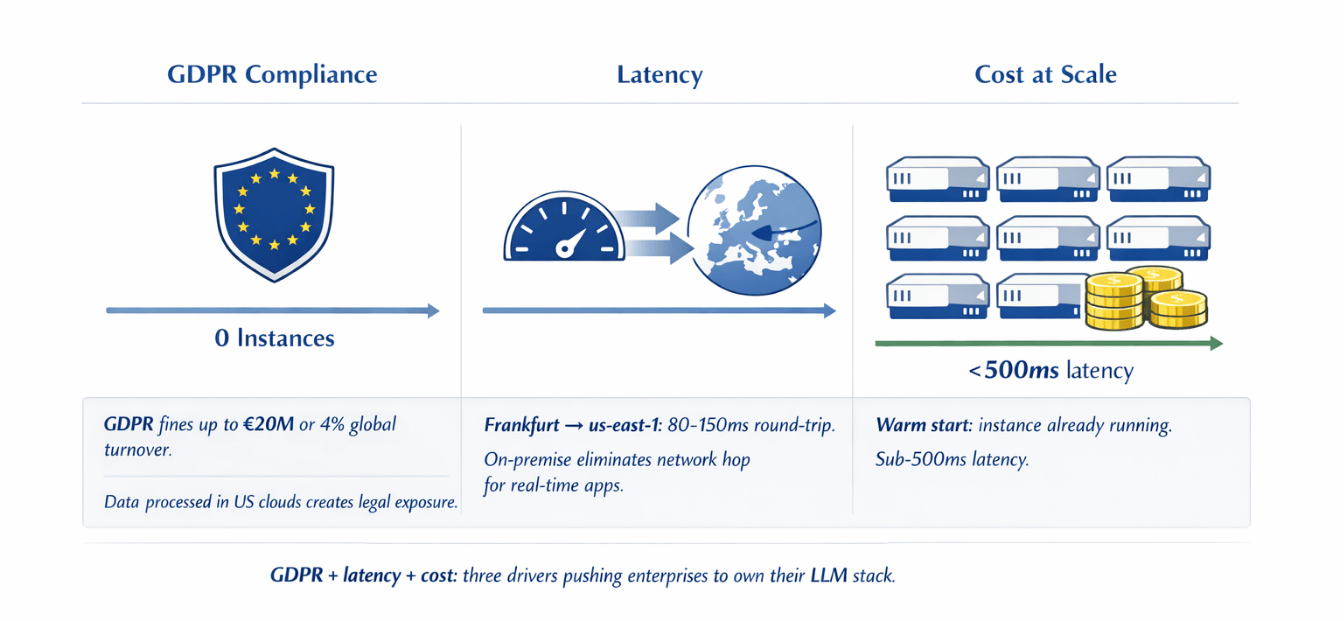
The practical cost of getting this wrong is significant. GDPR enforcement authorities have issued fines exceeding €20M or 4% of global annual turnover for violations involving inadequate technical controls.
For a mid-size enterprise with €500M turnover, that ceiling sits at €20M per incident. On-premise deployment removes the exposure entirely rather than managing it through contractual workarounds.
| Metric | Value |
|---|---|
| Maximum fine for inadequate technical controls | €20M or 4% of global annual turnover |
| Example: mid-size enterprise with €500M turnover | €20M ceiling per incident |
Beyond compliance, latency is a genuine competitive factor. A cloud inference call to an AWS us-east-1 endpoint from Frankfurt introduces 80 to 150ms of round-trip overhead before the model generates a single token.
On-premise inference eliminates that network hop. Workloads like real-time document analysis, customer-facing chatbots, and internal copilots become measurably more responsive when inference happens inside your own data centre.
| Driver | Cloud Risk | On-Premise Benefit |
|---|---|---|
| GDPR compliance | Data processed outside direct control; US law enforcement access risk | Own hardware, control data path, eliminate GDPR exposure |
| Latency | 80-150ms round-trip (Frankfurt → us-east-1) | No network hop; real-time applications measurably more responsive |
| Cost at scale | €15,000-25,000/month for 50M tokens/day | €2,000-4,000/month (power + staffing after capital amortisation) |
Hardware Selection for Production LLM Inference
The GPU you select determines which models you can run, at what throughput, and at what cost per inference.
| Configuration | VRAM Required | Minimum GPUs | Estimated Cost |
|---|---|---|---|
| Llama 3.1 70B in BF16 | ~140GB | 2 × H100 80GB (NVLink) or 4 × A100 40GB | €80k-120k (H100) / €30k-45k (A100) |
| A100 80GB PCIe (used) | — | Per unit | €8,000-12,000 |
| H100 SXM | — | Per unit | €25,000-35,000 |
Smaller models (7B-13B): RTX 4090 or RTX 6000 Ada at €1,800-4,500 per unit
A four-GPU workstation running Mistral 7B handles 200 to 400 concurrent requests at acceptable latency for internal tooling.Server configuration matters beyond the GPU itself. Use PCIe Gen 5 motherboards to avoid bandwidth bottlenecks when transferring model weights.
Allocate at minimum 512GB of DDR5 ECC RAM for a multi-GPU server to handle model loading and KV cache without spilling to disk. Fast NVMe storage, at least 4TB across RAID-capable drives, prevents model load times from becoming a bottleneck during restarts and deployments.
Software Stack for Reliable Inference
Three inference frameworks dominate production on-premise deployments, each suited to different operational profiles. vLLM is the leading choice for high-throughput production workloads.
Its PagedAttention implementation reduces GPU memory fragmentation by 30 to 40%, enabling significantly higher concurrent request handling than naive implementations. vLLM supports OpenAI-compatible APIs out of the box, making it a drop-in backend for applications already using GPT-4 endpoints.
Ollama suits teams that need rapid model switching and a simpler operational model. It manages model downloads, quantisation, and serving through a single binary with a clean REST interface. For development environments and low-concurrency internal tools, Ollama's lower operational complexity outweighs vLLM's throughput advantages.
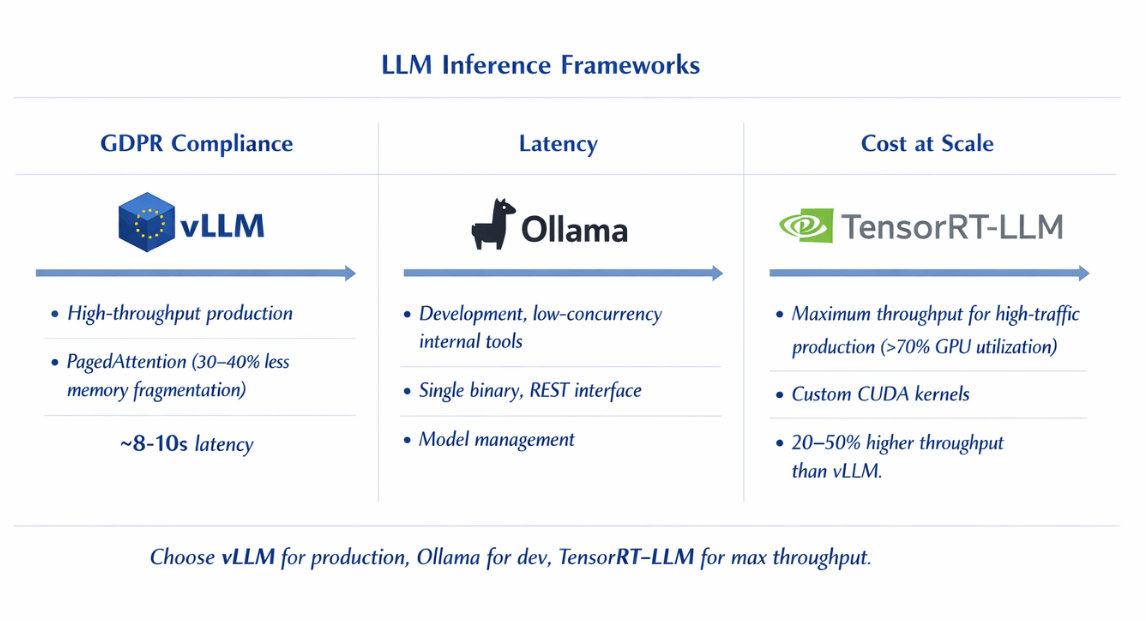
NVIDIA TensorRT-LLM delivers maximum throughput on NVIDIA hardware through custom CUDA kernels and model-specific optimisations. It requires more engineering effort to set up but achieves 20 to 50% higher throughput than vLLM on equivalent hardware for supported model architectures.
TensorRT-LLM is worth the investment for high-traffic production deployments where GPU utilisation is consistently above 70%. Kubernetes orchestrates inference workloads across your GPU fleet. Deploy inference pods with GPU resource requests using the NVIDIA device plugin for Kubernetes.
| Framework | Best For | Key Feature | Throughput vs. vLLM |
|---|---|---|---|
| vLLM | High-throughput production | PagedAttention (30-40% less memory fragmentation); OpenAI-compatible API | Baseline |
| Ollama | Dev environments, low-concurrency internal tools | Single binary, REST interface, model management | Lower (simpler ops) |
| NVIDIA TensorRT-LLM | High-traffic production (>70% GPU utilisation) | Custom CUDA kernels; model-specific optimisations | 20-50% higher |
Horizontal Pod Autoscaler with custom metrics from Prometheus enables automatic scaling based on queue depth or GPU utilisation rather than CPU metrics. Use node affinity rules to pin inference workloads to GPU nodes and prevent CPU workloads from competing for resources.
Cost Analysis and ROI for On-Premise Deployment
A concrete three-year TCO comparison makes the economics clear. Take a production deployment running a 70B model at 50 million tokens per day. On Azure OpenAI, GPT-4o pricing at approximately €0.005 per 1,000 output tokens translates to €7,500 per day or €225,000 per month.
Using an open-weight 70B model on Azure ML endpoints reduces that cost but still reaches €35,000 to €50,000 per month including compute, storage, and egress.
On-premise, a dual-H100 server handling the same workload at 80% utilisation costs €100,000 to €120,000 in hardware capital. Add power costs at €0.15 per kWh with 6kW server draw: approximately €650 per month.
Cooling and data centre costs at a co-location facility add €800 to €1,200 per month. Staff time for maintenance at 0.25 FTE of a €70,000 engineer equals €17,500 per year. Total on-premise annual cost: approximately €55,000. Cloud equivalent: €420,000 to €600,000. Three-year savings: €1.1M to €1.6M against cloud alternatives.
Break-even analysis shifts based on utilization.
| GPU Utilisation | Break-Even Timeline |
|---|---|
| 60% | 5-7 months |
| 80% | 3-4 months |
| Below 30% | Not recommended (cloud spot instances more economical) |
Factor in staffing costs honestly. Running GPU infrastructure requires someone who understands CUDA, model serving, and Kubernetes. Staffing cost considerations:
- Senior ML infrastructure engineer (CUDA, model serving, Kubernetes): €70,000-100,000/year
- If existing DevOps capacity can extend to GPU workloads → lower marginal staffing cost
- TCO calculation still favours on-premise at scale, but staffing should not be underestimated
GDPR Compliance and Security Framework
On-premise deployment provides data sovereignty, but sovereignty alone does not equal compliance. You need to implement the technical controls that GDPR Article 32 requires and be able to demonstrate them to a supervisory authority.
Data classification is the foundation. Define which data categories enter your LLM pipeline: personal identifiable information, special category data under Article 9, or pseudonymised data. Apply different controls based on classification.
Special category data, including health, biometric, and political opinion data, requires explicit consent or a lawful basis under Article 9(2) before processing, regardless of where processing occurs.
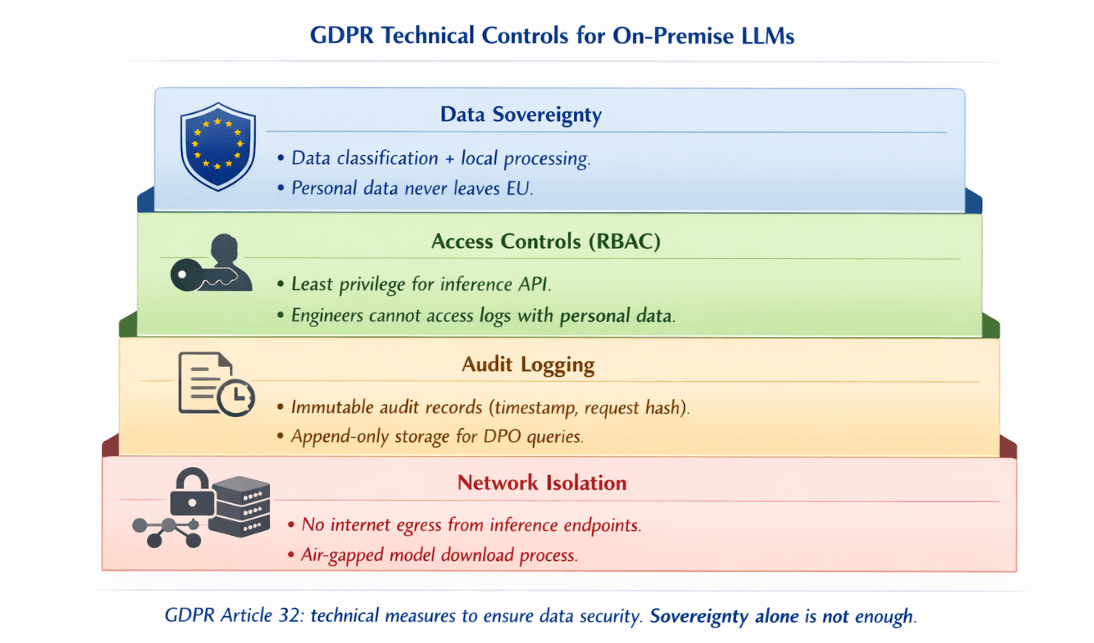
Access controls must follow the principle of least privilege. Use role-based access control for the inference API. Engineers should not have unmediated access to production inference logs that may contain personal data.
Implement a dedicated secrets management system, HashiCorp Vault works well in on-premise environments, for API keys and model access credentials.
Audit logging is mandatory. Every inference request that may contain personal data should generate an immutable audit record: timestamp, requesting system, data classification, and a hash of the request for integrity verification.
Store audit logs in append-only storage with retention policies matching your data retention obligations. Centralise logs in an ELK stack or similar system that your Data Protection Officer can query during an investigation.
Network isolation prevents data from leaving your controlled environment. Deploy inference endpoints on isolated network segments with no direct internet egress. Use internal DNS to route application traffic to inference APIs without traversing public networks.
If model downloads require internet access, use an air-gapped process: download models on a build server, verify checksums, then transfer to the inference environment via controlled internal transfer.
Incident response procedures must cover model infrastructure specifically. If a breach involves inference logs containing personal data, Article 33 requires notification to your supervisory authority within 72 hours. Have a runbook ready: how to isolate the inference cluster, how to identify affected data subjects, and who is authorised to make regulatory notifications.
GDPR compliance for LLMs requires more than on-premise. We implement the controls.
Data sovereignty is necessary but not sufficient. Article 32 requires technical measures: data classification, access controls, audit logging, and network isolation.
Our AI/ML consulting helps you:
- Implement RBAC for inference APIs – Least privilege, no engineer access to logs
- Set up immutable audit logging – Append-only storage, integrity hashes
- Configure network isolation – No internet egress from inference endpoints
- Build incident response runbooks – 72-hour notification ready
Monitoring and Observability On-Premise
GPU infrastructure requires monitoring beyond standard server metrics. The NVIDIA Data Centre GPU Manager (DCGM) exposes detailed GPU telemetry including temperature, power draw, memory utilisation, and compute utilisation per GPU. The dcgm-exporter integrates with Prometheus and provides these metrics in a Grafana-compatible format without custom instrumentation.
Key metrics to track for production inference:
| Metric | Healthy Range | Alert Condition |
|---|---|---|
| GPU utilisation | 60-85% | >90% (near limit); <40% (over-provisioned) |
| GPU memory utilisation | — | >95% (latency increases sharply) |
| GPU temperature | — | >85°C (investigate); >90°C (immediate action) |
| Tokens per second | Per GPU throughput | Degradation alert |
| Time-to-first-token (TTFT) | Application-specific | Latency-sensitive for interactive apps |
Track request queue depth to detect when inference capacity is insufficient for incoming load before users experience degradation.Set up alerting with appropriate thresholds. GPU temperature above 85°C warrants investigation; above 90°C requires immediate action to prevent throttling or hardware damage.
Memory errors, detectable through DCGM, indicate hardware faults that need replacement before they cause inference failures. Prometheus Alertmanager with PagerDuty or OpsGenie integration provides reliable on-call routing for GPU infrastructure incidents.
MLOps and CI/CD for On-Premise LLM Infrastructure
Model updates in production require the same engineering discipline as application deployments. Ad hoc manual model swaps introduce downtime risk and make rollback difficult. A structured CI/CD pipeline for model updates pays back its setup cost quickly in a production environment.
| Stage | Tool/Process | Validation Gate |
|---|---|---|
| Pull model | Internal model registry | — |
| Run inference tests | Staging cluster | Correctness, latency, memory |
| Validate output quality | Held-out evaluation dataset | Quality thresholds |
| Promote to production | GitLab CI/GitHub Actions | All gates passed |
| Rollback | Previous version kept for 24h | Latency/error rate triggers |
Model versioning requires a registry separate from your application artefact registry. MLflow Model Registry provides model lineage tracking, staging environments, and version management compatible with most inference frameworks.
Tag model versions with the dataset version they were fine-tuned on and the evaluation metrics achieved, so you can trace production behaviour back to training decisions.
Blue-green deployment for LLMs works well on Kubernetes. Maintain a blue inference deployment serving production traffic and a green deployment running the new model version. Use a Kubernetes Service selector to switch traffic between blue and green deployments atomically.
If monitoring shows quality or latency regressions after the switch, revert the selector to the blue deployment without downtime. Keep the previous model version loaded in the blue deployment for at least 24 hours after a successful promotion to preserve rollback capability.
Rollback procedures should be documented and tested. Define the conditions that trigger an automatic rollback: latency exceeding a P95 threshold, error rate above a defined ceiling, or specific output quality checks failing. An automated rollback triggered by Prometheus alerts is faster and more reliable than a manual process during an incident.
Getting Started with On-Premise LLM Infrastructure
The procurement and setup sequence matters as much as the technology choices. Starting with hardware before you have a clear model selection leads to mismatched configurations.
Start instead with your model requirements: which open-weight models serve your use case, what precision you need (BF16 for quality, INT4 quantisation for throughput), and what your target throughput is in requests per second.
Hardware procurement takes 4 to 12 weeks depending on supply availability. NVIDIA H100 and A100 cards are available from OEM partners like Dell, HPE, and Supermicro, or refurbished from specialist resellers at 30 to 50% of new pricing. Validate refurbished hardware with a 72-hour burn-in test before placing it in a production-adjacent environment.
| Component | Requirement |
|---|---|
| Dedicated VLAN | 25GbE or 100GbE uplinks to application network |
| GPU-to-GPU (multi-node) | InfiniBand HDR (maximum performance) OR RoCE v2 over 100GbE (cost-effective) |
A first deployment checklist should cover: GPU drivers and CUDA version pinned and documented; inference framework installed and tested with your chosen model; Prometheus and DCGM exporter running with dashboards configured;
Kubernetes GPU device plugin deployed and validated; network isolation confirmed with egress testing; access controls and audit logging active; and a backup and recovery procedure tested end-to-end.
| Scenario | Time to Production |
|---|---|
| Team new to GPU infrastructure (from hardware receipt) | 3-6 weeks |
| Team with existing Kubernetes expertise | 2-4 weeks |
| Hardware procurement | 4-12 weeks |
Running LLM inference on your own infrastructure is an engineering investment that returns control, predictability, and significant cost savings for organisations operating at meaningful scale.
For European enterprises where GDPR compliance is non-negotiable and token volumes are growing, on-premise deployment is not a cost-cutting measure but the operationally correct architecture. The hardware, software, and operational practices to do it reliably are mature enough that the question for most organisations is no longer whether to move on-premise, but how quickly they can make the transition.
Conclusion
On-premise LLM deployment is not a cost-cutting exercise for most European enterprises it is a compliance necessity with a compelling economic side effect. The GDPR exposure from sending customer data to US hyperscaler APIs is real, and no data processing agreement fully eliminates it. At scale (20M+ tokens daily), the cost advantage shifts decisively toward owned infrastructure, with three-year savings exceeding €1M against cloud alternatives.
The technical stack is mature: vLLM for production inference, Kubernetes for orchestration, and DCGM + Prometheus for observability. The question for most organisations is no longer whether to move on-premise, but how quickly they can make the transition.
Frequently Asked Questions
When does on-premise LLM deployment beat cloud costs?
On-premise deployment becomes more economical than cloud inference APIs
- Sustained GPU utilisation >60% → on-premise more economical
- >20 million tokens per day → break-even within 3-8 months
- Below that volume or highly variable workloads → cloud spot instances or serverless inference may be more economical on a pure cost basis, though they introduce the GDPR data sovereignty concerns that drive many European organisations to on-premise regardless of cost.
What GPU hardware do you need to run 70B models on-premise?
A 70B parameter model in BF16 precision requires approximately 140GB of GPU VRAM. The minimum viable configuration is two NVIDIA H100 SXM 80GB GPUs connected via NVLink, or four A100 40GB GPUs in a multi-GPU server.
For production throughput at meaningful concurrency,
| Configuration | Concurrent Requests (acceptable latency) | Server Budget |
|---|---|---|
| 2 × H100 80GB (well-configured) | 40-80 simultaneous | €80,000 - €120,000 |
| A100-based alternative | Lower throughput (than H100) | €30,000 - €45,000 |
How do you maintain GDPR compliance with on-premise LLMs?
GDPR compliance requires four technical controls working in combination:
| Control | Purpose | Implementation Requirement |
|---|---|---|
| Data classification | Identify which inference requests involve personal data | Must identify PII, special category data, pseudonymised data |
| Access controls | Limit who can query inference APIs and access inference logs | RBAC for API; engineers should not have unmediated log access |
| Immutable audit logging | All requests involving personal data with timestamps and integrity hashes | Append-only storage; DPO-queryable |
| Network isolation | Prevent inference traffic from traversing public networks or leaving controlled environment | No direct internet egress; dedicated VLAN |
On-premise deployment handles the data sovereignty dimension, but you must implement these controls actively. A Data Protection Impact Assessment under Article 35 is advisable before deploying LLMs that process special category data.
Which inference framework should you use for production on-premise deployment?
Inference Framework Selection:
- vLLM – Most mature production choice; OpenAI-compatible API; PagedAttention improves GPU memory efficiency by 30-40%
- TensorRT-LLM – For raw throughput on NVIDIA hardware; 20-50% higher throughput than vLLM on supported architectures; requires more engineering
- Ollama – Development environments and low-concurrency internal tools where operational simplicity > throughput
Summarize this post with:
Ready to put this into production?
Our engineers have deployed these architectures across 100+ client engagements — from AWS migrations to Kubernetes clusters to AI infrastructure. We turn complex cloud challenges into measurable outcomes.