Protecting Against DDoS Attacks Without Compromising Performance
Mitigate DDoS attacks while maintaining fast response times. Edge protection (Cloudflare/AWS Shield), rate limiting, bot detection, and auto-scaling strategies for SaaS.

TL;DR
- Edge protection absorbs attacks before origin – Cloudflare/AWS Shield add 1-5ms latency but block volumetric attacks. Never expose origin IPs. Use anycast routing to distribute attack traffic.
- Rate limiting with sliding window (Redis sorted sets) – accurate, no boundary bursts. Return
429withRetry-After. Stricter limits for expensive endpoints (login, reports). - Bot detection via JavaScript challenges, CAPTCHAs, and header checks – attack tools (curl, wget) send minimal headers. Distinguish automated from human traffic.
- Auto-scaling (HPA on CPU at 70%) provides capacity headroom. Connection limits per IP prevent state exhaustion. Queue-based architectures buffer traffic.
- Monitor baselines: alert on 2x normal traffic, error rate >5%, 4xx >20%. Automated response with stricter limits or challenge pages.
Distributed Denial of Service (DDoS) attacks threaten SaaS availability. Attackers flood infrastructure with traffic, overwhelming servers and networks. Protection is essential, but naive approaches degrade performance for legitimate users.
Effective DDoS mitigation distinguishes attack traffic from real users, blocks bad actors at the edge, and scales defenses with attack volume all while maintaining fast response times.
Understanding DDoS Attack Types
Volumetric attacks overwhelm bandwidth. Massive traffic floods network connections. Even powerful infrastructure can be saturated.
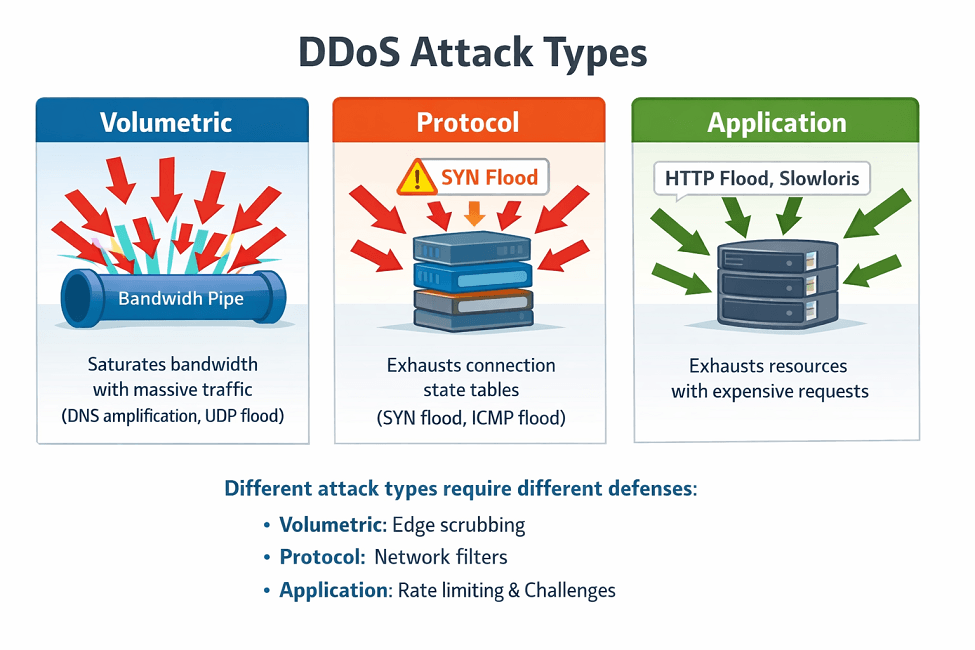
Protocol attacks exploit network protocol weaknesses. SYN floods exhaust connection state tables. ICMP floods consume processing capacity.
Application-layer attacks target specific endpoints. HTTP floods hammer expensive operations. Slowloris attacks hold connections open.
| Attack Type | Target | Impact |
|---|---|---|
| Volumetric | Bandwidth | Saturation |
| Protocol | Network stack | State exhaustion |
| Application | Application logic | Resource exhaustion |
Each type requires different defenses. Volumetric attacks need massive capacity to absorb. Protocol attacks need network-level filtering. Application attacks need intelligent traffic analysis.
Multi-vector attacks combine approaches. Attackers may use volumetric attacks to distract while application attacks probe for weaknesses.
Legitimate traffic spikes can resemble attacks. Product launches, viral content, and seasonal peaks create sudden traffic increases. Defenses must distinguish spikes from attacks.
Edge-Based Protection
DDoS protection services absorb attacks at the edge. Cloudflare, AWS Shield, and Akamai have massive global capacity. Attack traffic never reaches origin infrastructure.
Content Delivery Networks provide inherent protection. Distributed edge locations absorb volumetric attacks. Origin servers see only filtered traffic.
Attack Traffic → Edge Network → [Filtered] → Origin
                    ↓
              [Dropped at edge]
Anycast routing distributes attack traffic. Multiple edge locations share the same IP. Traffic splits across locations automatically.
Scrubbing centers filter attack traffic. Traffic routes through specialized data centers. Clean traffic continues to origin.
Edge rules block malicious patterns. IP reputation lists, geo-blocking, and rate limits apply at the edge.
# Cloudflare firewall rule example
expression: |
  (cf.threat_score > 10) or
  (ip.geoip.country in {"RU" "CN"} and not cf.bot_management.verified_bot) or
  (http.request.uri.path contains "/wp-admin")
action: block
Origin hiding prevents direct attacks. Don't expose origin IPs. Route all traffic through protection services.
Rate Limiting Strategies
Rate limiting caps requests per client. Excessive requests trigger blocks or challenges. Limits protect resources from abuse.
Sliding window algorithms provide smooth limiting. Fixed windows create burst vulnerabilities at boundaries. Sliding windows prevent gaming.
import redis
import time

def check_rate_limit(client_id, limit=100, window=60):
    r = redis.Redis()
    now = time.time()
    key = f"rate:{client_id}"

    pipe = r.pipeline()
    pipe.zremrangebyscore(key, 0, now - window)
    pipe.zadd(key, {str(now): now})
    pipe.zcard(key)
    pipe.expire(key, window)
    results = pipe.execute()

    return results[2] <= limit
Token bucket algorithms allow controlled bursting. Normal traffic flows freely. Sustained high rates trigger limits.
Different limits for different operations make sense. Login attempts need strict limits. Read operations can be more permissive.
Response headers communicate limits. Clients can self-throttle when approaching limits. 429 status codes with Retry-After headers guide behavior.
HTTP/1.1 429 Too Many Requests
Retry-After: 30
X-RateLimit-Limit: 100
X-RateLimit-Remaining: 0
X-RateLimit-Reset: 1640995200
Authenticated users can have higher limits. API keys or user accounts enable tracking. Abuse traces to specific accounts.
Traffic Analysis and Filtering
Bot detection identifies automated traffic. CAPTCHAs challenge suspicious clients. JavaScript challenges detect headless browsers.
// Simple JavaScript challenge
const start = Date.now();
let result = 0;
for (let i = 0; i < 1000000; i++) {
  result += Math.random();
}
const duration = Date.now() - start;
// Real browsers complete in reasonable time
// Headless scripts may be much faster or slower
Behavioral analysis detects unusual patterns. Real users have varied behavior. Bots often repeat identical patterns.
Machine learning identifies attack signatures. Historical data trains models. Real-time classification blocks new attacks.
IP reputation scoring filters known bad actors. Shared reputation databases identify malicious IPs. Block or challenge low-reputation clients.
Geographic anomaly detection flags unusual origins. Sudden traffic from new regions may indicate attacks. Alert on significant geographic shifts.
Header analysis detects attack tools. Missing or unusual headers indicate non-browser clients. Challenge or block suspicious requests.
def check_request_legitimacy(request):
    # Check for common browser headers
    required_headers = ['Accept', 'Accept-Language', 'Accept-Encoding']
    for header in required_headers:
        if header not in request.headers:
            return False

    # Check User-Agent for known attack tools
    ua = request.headers.get('User-Agent', '')
    attack_signatures = ['curl', 'wget', 'python-requests']
    for sig in attack_signatures:
        if sig.lower() in ua.lower():
            return False

    return True
Infrastructure Scaling
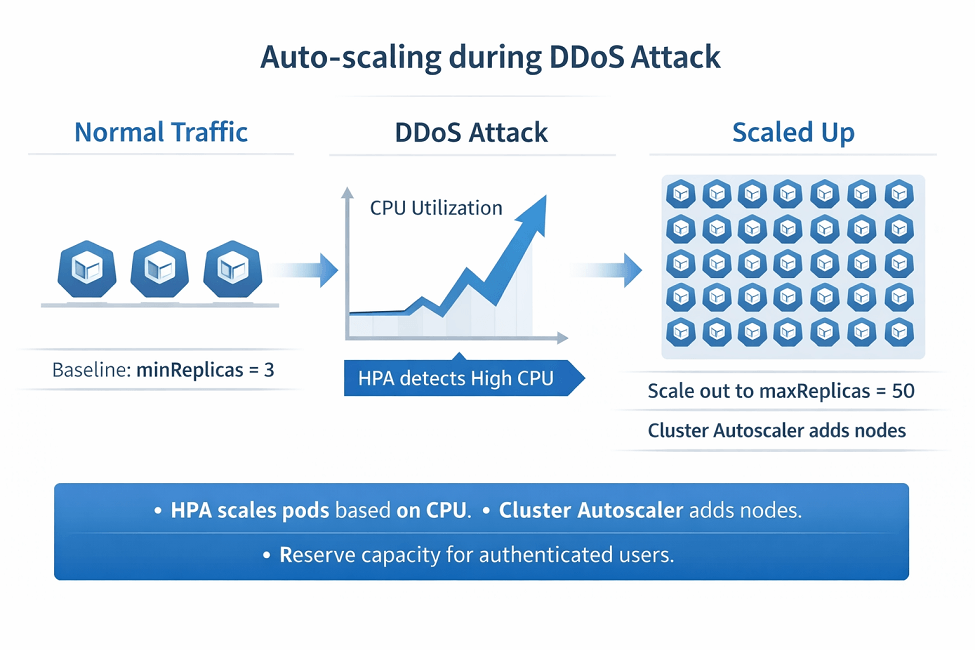
Auto-scaling increases capacity during attacks. More servers handle more traffic. Horizontal scaling absorbs some attack volume.
# Kubernetes HPA for attack resilience
apiVersion: autoscaling/v2
kind: HorizontalPodAutoscaler
spec:
  minReplicas: 3
  maxReplicas: 50
  metrics:
  - type: Resource
    resource:
      name: cpu
      target:
        type: Utilization
        averageUtilization: 70
Connection limits prevent exhaustion. Limit concurrent connections per IP. Close idle connections aggressively.
Queue-based architectures buffer traffic. Requests queue for processing. Prevents overwhelming application servers directly.
Database connection pooling prevents exhaustion. Fixed pools limit database load. Queue overflow rather than crashing databases.
Static content caching reduces dynamic load. CDN-cached content serves without origin processing. Attacks hitting cached content have less impact.
Reserve capacity for known good traffic. Prioritize authenticated users during attacks. Maintain service for paying customers.
Auto-scaling during attacks prevents availability failure. We configure HPA with attack-specific thresholds.
HPA normally scales at 70% CPU. During attacks, more aggressive scaling (50% CPU) keeps response times acceptable.
We help you:
- Configure HPA for attack resilience – Lower thresholds (50-60% CPU), faster scale-up (0s stabilization)
- Set connection limits – Per-IP concurrent connection caps, aggressive idle timeouts
- Implement request queuing – Buffer traffic, prevent direct backend overwhelm
- Reserve capacity for known good traffic – Priority queuing for authenticated users
Application-Level Defenses
Expensive operations need extra protection. Search, reports, and exports consume resources. Additional rate limiting for heavy endpoints.
from functools import wraps

def rate_limit_heavy(limit=10, window=60):
    def decorator(func):
        @wraps(func)
        def wrapper(*args, **kwargs):
            key = f"heavy:{get_client_id()}:{func.__name__}"
            if not check_rate_limit(key, limit, window):
                return Response("Rate limited", status=429)
            return func(*args, **kwargs)
        return wrapper
    return decorator

@rate_limit_heavy(limit=5, window=60)
def generate_report(request):
    # Resource-intensive operation
    pass
Request validation rejects malformed input early. Invalid requests consume minimal resources. Fail fast before expensive processing.
Pagination limits prevent data flooding. Cap page sizes and result counts. Prevent single requests from returning megabytes.
Timeouts prevent slow operations from blocking. Set aggressive timeouts during attacks. Shed load when overwhelmed.
Circuit breakers protect downstream services. When backends struggle, stop sending traffic. Graceful degradation beats cascade failures.
Monitoring and Response
Traffic monitoring detects attacks early. Baseline normal traffic patterns. Alert on significant deviations.
# Prometheus alert rule
groups:
- name: ddos
  rules:
  - alert: HighTrafficAnomaly
    expr: |
      sum(rate(http_requests_total[5m])) >
      2 * avg_over_time(sum(rate(http_requests_total[5m]))[24h:1h])
    for: 5m
    labels:
      severity: critical
    annotations:
      summary: Traffic 2x higher than 24h average
Automated response activates during attacks. Stricter rate limits, challenge pages, or geo-blocking enable automatically.
Runbooks guide manual response. When automation isn't enough, teams need clear procedures. Document escalation paths.
Post-attack analysis improves defenses. What traffic wasn't caught? What legitimate traffic was blocked? Refine rules based on data.
Logging captures attack details. Log blocked requests and their characteristics. Data informs future protection.
| Metric | Normal | Alert Threshold |
|---|---|---|
| Requests/second | 1,000 | > 5,000 |
| Error rate | 0.1% | > 5% |
| Unique IPs/minute | 500 | > 2,000 |
| 4xx responses | 2% | > 20% |
Communication plans keep stakeholders informed. Status pages show service health. Customer notifications explain impacts.
Conclusion
Effective DDoS protection is layered. Edge protection (Cloudflare, AWS Shield) absorbs volumetric attacks. Rate limiting prevents resource exhaustion. Bot detection filters automated traffic. Auto-scaling provides capacity headroom. Application-level defenses protect expensive operations.
Monitoring and automated response enable rapid reaction. The performance impact on legitimate users should be minimal well-configured edge protection adds <5ms latency, rate limiting adds O(1) Redis checks (<1ms), and bot detection is async/edge-based.
The trade-off is not security vs performance it's smart defense vs naive blocking. Implement layers from edge to application, use intelligent rate limiting (sliding window, token bucket), and rely on automation to scale and respond. Your users get both security and speed.
FAQs
1. What's the performance impact of DDoS protection?
DDoS Protection - Performance Impact:
| Protection Layer | Added Latency | Optimization Tip |
|---|---|---|
| Edge protection (Cloudflare, AWS Shield) | 1-5ms (extra network hop) | Use edge-based filtering (not origin) |
| Rate limiting | <1ms (O(1) Redis checks) | Use sliding window with Redis Lua scripts |
| Bot detection (JavaScript challenge) | Minimal edge-compute overhead | Use async/edge bot detection |
Key insight: The far larger performance impact is surviving an attack without protection which renders your service completely unavailable.
2. How do I distinguish between a legitimate traffic spike and a DDoS attack?
DDoS Attack vs. Legitimate Traffic Spike - Key Signals:
| Signal | Legitimate Traffic Spike | DDoS Attack |
|---|---|---|
| Traffic source diversity | Normally multiple diverse sources | Often single subnet or geographically distributed |
| Request patterns | Varied user behavior | Often repetitive (identical URLs, parameters, timing) |
| User-agent/headers | Missing standard browser headers present | Often minimal/script-like |
| Rate limiting effectiveness | Typically within per-IP limits | Exceeds limits |
Automated classification tools and their use cases:
| Tool | Use Case |
|---|---|
| Cloudflare Bot Management | Automated attack vs. legitimate classification |
| AWS Shield Advanced | Automated attack vs. legitimate classification |
3. When should I use challenge page vs dropping requests?
Step 1 – Suspicious traffic detected:
- Deploy challenge page (JavaScript challenge or CAPTCHA)
- Low false positive rate
- Legitimate users can solve it
- Best for: application-layer attacks, login endpoints, non-bot users.
Step 2 – Attack confirmed and overwhelming:
- Drop requests (return 403/429)
- Higher false positive risk
- Only as last resort in extreme attacks
- Best for: volumetric attacks, known attack source IPs, during active incident under capacity pressure.
Step 3 – Monitor and adjust:
- Track challenge solve rates
- If >90% solve successfully → adjust sensitivity
For production SaaS: challenge first, drop only as last resort in extreme attacks.