PHP Performance Optimization: OPcache, PHP-FPM, Caching & Profiling
Optimize PHP 8.x for SaaS with OPcache tuning, PHP-FPM process management, Redis caching, eager loading (Eloquent), and Blackfire/Xdebug profiling.

TL;DR
- Enable JIT (PHP 8.x) for CPU-bound workloads – set
opcache.jit=1255andopcache.jit_buffer_size=256M. Benefits: image processing, calculations. I/O-bound web apps see minimal improvement. - OPcache eliminates per-request parsing – configure
memory_consumption=256,max_accelerated_files=65536,validate_timestamps=0(production). Monitor hit rates withopcache_get_status(). - Prevent N+1 queries with eager loading –
Order::with('customer', 'products')loads related data in 2-3 queries instead of 1 per row. Use prepared statements (PDO::prepare) for repeated queries. - Cache aggressively with Redis – store query results, computed values, sessions. Fragment caching (expensive-to-render components). HTTP caching (CDN/browser) eliminates PHP execution entirely.
- PHP-FPM tuning: choose
pm = staticfor consistent load (fixed workers),pm = dynamicfor variable traffic,pm = ondemandfor low-traffic sites (saves memory). Calculatemax_children = (Total RAM - System RAM) / avg worker memory(e.g., 8GB server - 2GB = 6GB ÷ 50MB = ~120 workers). - Framework optimization: Laravel/Symfony – cache config, routes, views (
php artisan config:cache). Use Octane for persistent in-memory apps. Async queues for email, reports, API calls. - Profile before optimizing – Blackfire for production-safe profiling, Xdebug for dev only, SPX for lightweight built-in profiling. Monitor slow logs (
request_slowlog_timeout = 10s).
PHP powers a significant portion of the web, from WordPress sites to enterprise SaaS applications. Modern PHP (8.x) offers substantial performance improvements over earlier versions. Proper optimization of PHP applications, combined with appropriate server configuration and caching, enables excellent performance.
PHP Runtime Optimization
PHP 8.x includes the JIT (Just-In-Time) compiler. JIT can significantly improve CPU-bound workloads. Enable JIT in php.ini for production environments.
; php.ini JIT configuration
opcache.jit=1255
opcache.jit_buffer_size=256M
JIT benefits vary by workload. CPU-intensive operations like image processing or mathematical calculations benefit most. I/O-bound web applications may see minimal improvement.
Use strict typing for performance and code quality. Typed properties and return types enable optimizations and catch errors early.
<?php
declare(strict_types=1);

class User
{
    public function __construct(
        private readonly int $id,
        private readonly string $name,
        private readonly string $email
    ) {}

    public function getId(): int
    {
        return $this->id;
    }
}
Avoid repeated function calls for the same values. Store results in variables rather than calling functions multiple times.
// Inefficient
for ($i = 0; $i < count($items); $i++) {
    // count() called on every iteration
}

// Better
$count = count($items);
for ($i = 0; $i < $count; $i++) {
    // count() called once
}

// Best for arrays: use foreach
foreach ($items as $item) {
    // No counting needed
}
Use native PHP functions when available. Built-in functions implemented in C are faster than PHP implementations of the same logic.
Preload classes and functions. PHP 7.4+ preloading loads specified code at server start, making it available without per-request parsing.
OPcache Configuration
OPcache eliminates the need to parse PHP files on every request. Compiled bytecode stores in shared memory, dramatically improving performance.
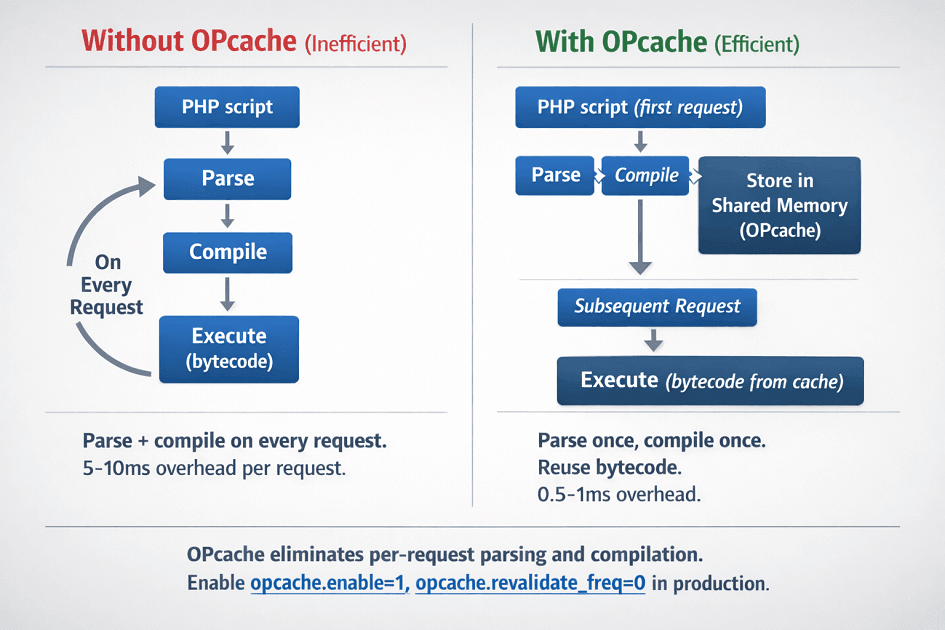
Enable OPcache in production. It's included with PHP but may not be enabled by default. See PHP documentation on OPcache.
; Essential OPcache settings
opcache.enable=1
opcache.enable_cli=1
opcache.memory_consumption=256
opcache.interned_strings_buffer=16
opcache.max_accelerated_files=65536
opcache.revalidate_freq=0
opcache.validate_timestamps=0
Disable timestamp validation in production. When validate_timestamps=0, PHP won't check if files changed, improving performance. Restart PHP-FPM to load new code after deployments.
Size memory appropriately. Monitor OPcache usage with opcache_get_status(). If the cache fills, performance degrades. Increase memory_consumption if needed.
Tune max_accelerated_files. This setting limits cached scripts. Find the right value based on your application's file count.
Monitor OPcache hit rates. High hit rates indicate proper configuration. Low hit rates suggest memory or configuration problems.
Database Query Optimization
Use prepared statements for repeated queries. Prepared statements parse once and execute multiple times with different parameters.
// Prepared statement with PDO
$stmt = $pdo->prepare('SELECT * FROM users WHERE status = ?');
$stmt->execute(['active']);
$users = $stmt->fetchAll();
Implement eager loading in ORMs to prevent N+1 queries. Load related data with the initial query.
// Eloquent eager loading
$orders = Order::with('customer', 'products')->where('status', 'pending')->get();
// One query for orders, one for customers, one for products

// Without eager loading: N+1 problem
$orders = Order::where('status', 'pending')->get();
foreach ($orders as $order) {
    $customer = $order->customer; // Query per order!
}
Use database connection pooling. Tools like ProxySQL or PgBouncer reduce connection overhead.
Index frequently queried columns. Work with your database team to ensure proper indexing for your access patterns.
Query only needed columns. SELECT * fetches unnecessary data. Explicit column lists reduce memory and network usage.
Implement pagination for large result sets. Never load unbounded result sets into memory.
Caching Strategies
Application-level caching with Redis or Memcached reduces database load. Cache query results, computed values, and expensive operations.
use Predis\Client;

$redis = new Client();

function getUser(int $id): ?array
{
    $cacheKey = "user:{$id}";
    $cached = $redis->get($cacheKey);

    if ($cached) {
        return json_decode($cached, true);
    }

    $user = fetchUserFromDatabase($id);

    if ($user) {
        $redis->setex($cacheKey, 3600, json_encode($user));
    }

    return $user;
}
HTTP caching reduces server load entirely. Proper cache headers let browsers and CDNs serve cached responses without reaching PHP.
Fragment caching stores rendered HTML sections. Expensive-to-render components cache separately from full pages.
Session storage benefits from Redis. File-based sessions don't scale across multiple servers. Redis provides fast, shared session storage.
Full-page caching suits content that doesn't change per user. Varnish or CDN edge caching can serve pages without invoking PHP.
Implement cache invalidation strategies. Time-based expiration is simplest. Event-based invalidation keeps caches fresher but requires more implementation effort.
PHP-FPM Tuning
PHP-FPM (FastCGI Process Manager) manages PHP worker processes. Proper configuration affects capacity and resource utilization.
Choose the right process manager mode. Static maintains a fixed number of workers. Dynamic scales within configured limits. Ondemand creates workers as needed.
; Static mode: consistent memory usage
pm = static
pm.max_children = 50

; Dynamic mode: adapts to load
pm = dynamic
pm.max_children = 50
pm.start_servers = 10
pm.min_spare_servers = 5
pm.max_spare_servers = 20
Calculate max_children based on available memory. Divide available memory by memory per worker to find the safe limit.
max_children = (Total RAM - System RAM) / Average PHP Worker Memory
Monitor pool status. PHP-FPM's status page reveals active workers, queue depth, and other metrics.
# Nginx configuration for FPM status
location /fpm-status {
    fastcgi_pass unix:/var/run/php-fpm.sock;
    fastcgi_param SCRIPT_FILENAME $fastcgi_script_name;
    include fastcgi_params;
}
Enable slow log to identify slow scripts. Scripts exceeding request_slowlog_timeout log for investigation.
Set appropriate request termination timeouts. Long-running requests should fail rather than consume workers indefinitely.
PHP-FPM worker mode (static/dynamic/ondemand) and max_children calculation – we get it right.
Dynamic mode for variable traffic (SaaS, e-commerce). Static for consistent load. Ondemand for dev/staging. Formula: max_children = (Total RAM - System RAM) / Average Worker Memory
We help you:
- Calculate optimal max_children – Based on your available memory and worker footprint
- Monitor pool status – Track active workers, queue depth to detect issues
- Configure slow log – Identify scripts causing request delays
- Set request termination timeouts – Fail long-running requests, don't block workers
Profiling and Debugging
Xdebug profiles code execution but significantly impacts performance. Use only in development or controlled profiling sessions.
Blackfire provides production-safe profiling. Its low overhead enables profiling in production without significantly affecting users.
Tideways offers continuous profiling for PHP applications. It identifies performance regressions across deployments.
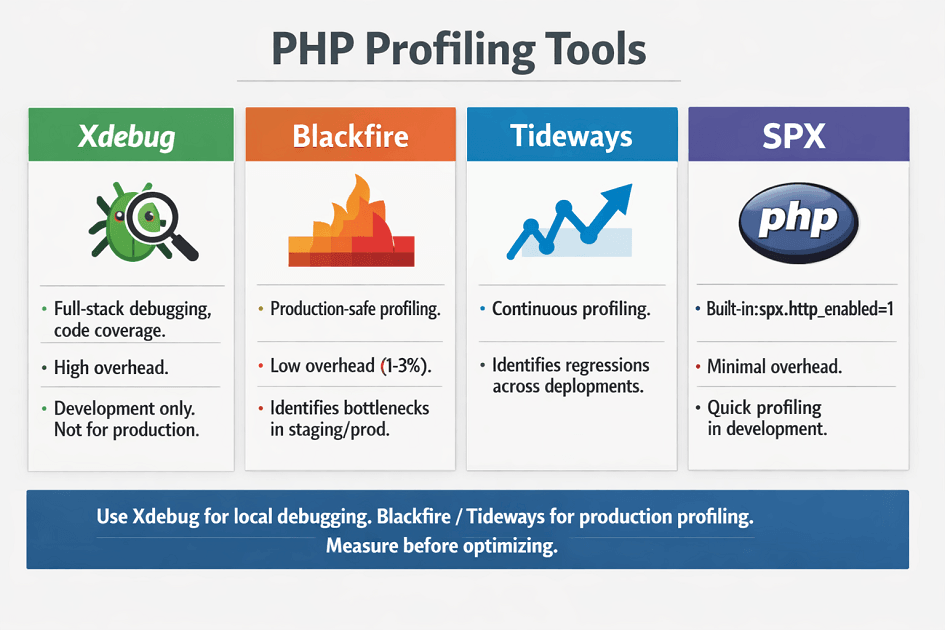
Use SPX for built-in profiling. This PHP extension provides detailed timing with minimal overhead.
// Enable SPX profiling for specific requests
if (isset($_GET['SPX_KEY']) && $_GET['SPX_KEY'] === 'your-secret-key') {
    ini_set('spx.http_enabled', '1');
}
Built-in timing provides quick insights. Simple microtime measurements identify slow sections.
$start = microtime(true);
// Code to measure
$elapsed = microtime(true) - $start;
error_log("Operation took {$elapsed}s");
APM tools like Datadog or New Relic instrument PHP applications for production monitoring.
Framework-Specific Optimizations
Laravel optimization starts with configuration caching. Cache routes, config, and views in production.
php artisan config:cache
php artisan route:cache
php artisan view:cache
Use Laravel Octane for persistent applications. Octane keeps the application in memory between requests, eliminating bootstrap overhead.
Symfony benefits from similar caching. Warm caches during deployment.
php bin/console cache:clear --env=prod
php bin/console cache:warmup --env=prod
Avoid unnecessary middleware. Each middleware adds overhead. Only include middleware that requests actually need.
Use queues for time-consuming operations. Email sending, report generation, and external API calls should process asynchronously.
Optimize autoloading. Composer's optimized classmap reduces file system operations.
composer install --optimize-autoloader --no-dev
Conclusion
Modern PHP (8.x) delivers excellent performance for SaaS applications when properly configured. OPcache eliminates parsing overhead. PHP-FPM tuning matches worker capacity to traffic patterns. Redis caching reduces database load. Eager loading eliminates N+1 queries.
JIT accelerates CPU-bound paths. Framework optimization (caching config, routes, views) and async queues keep web workers responsive. The combination of these practices handles thousands of concurrent requests on modest hardware.
Start with OPcache and PHP-FPM configuration. Add Redis caching where database queries repeat. Use eager loading systematically in ORMs. Profile to find actual bottlenecks rather than guessing. Your PHP application can be fast, efficient, and scalable.
FAQs
1. When does JIT actually improve PHP performance?
| Workload Type | JIT Benefit | Examples |
|---|---|---|
| CPU-bound workloads | Significant acceleration | Image processing (GD/Imagick), mathematical calculations, encryption/decryption, sorting large arrays, complex algorithms |
| I/O-bound web apps | Minimal (5-15%) | Database queries, HTTP calls, file reads, response rendering |
Recommendation: Enable JIT for batch processing, data transformation pipelines, and compute-heavy APIs. For standard CRUD apps, focus on OPcache and database optimization first.
2. How do I choose between dynamic and static PHP-FPM workers?
PHP-FPM Worker Management Modes
pm = static:
- Fixed worker count
- Constant memory usage
- No overhead from spawning/killing workers.
- Best for: consistent, predictable traffic
pm = dynamic:
- Scales within min/max bounds
- Memory adjusts to load
- Some overhead from scaling
- Best for: variable traffic (SaaS, e-commerce)
pm = ondemand:
- Workers created on demand
- Idle workers killed quickly
- Saves memory when idle
- Best for: low-traffic, bursty, dev/staging
Production recommendation (traffic >50 concurrent requests): Start with dynamic. Monitor pm.max_children hits and adjust.
3. How do I debug OPcache "cache full" issues?
OPcache "Cache Full" debugging steps:
| Step | Command/Action | What It Checks |
|---|---|---|
| 1 | opcache_get_status() |
Check cache_full (bool) and memory_usage.used_memory |
| 2 | Increase opcache.memory_consumption |
If cache full |
| 3 | `find . -name '*.php' | wc -l` |
| 4 | Increase max_accelerated_files |
If num_cached_scripts near limit (value > total project files) |
| 5 | opcache.validate_timestamps=0 |
Set in production (no file checks) |
| 6 | Restart PHP-FPM | After config changes |