Database Operators: CloudNativePG, MongoDB & Redis on Kubernetes
Master database operators for PostgreSQL (CloudNativePG), MongoDB, and Redis on Kubernetes. Learn automated provisioning, scaling, backup, and disaster recovery with production-ready examples.
TL;DR
- Operators encode DBA expertise into software: They extend Kubernetes with custom resources (clusters, backups, users) and automatically handle provisioning, scaling, failover, and recovery—no manual scripts.
- CloudNativePG for PostgreSQL: Production-grade. One YAML deploys a 3-instance HA cluster with replication, automatic failover (seconds), S3 backups, and PITR.
- MongoDB Community Operator: Manages replica sets declaratively—topology, users, auth, scaling, rolling upgrades.
- Redis operators: Opstree Redis Operator handles both standalone and clustered (sharded) modes with persistence and eviction policies.
- Key operations: Scaling (
kubectl patch), rolling upgrades, PITR (restore to any timestamp), cross-cluster replication. - Backup & DR: Scheduled backups to S3 with retention policies. Test restores regularly—unverified backups don't exist.
- Observability: Prometheus metrics via
podMonitorEnabled, operator logs,kubectl cnpg psql.
Running databases on Kubernetes traditionally required extensive operational knowledge and custom automation scripts. Database operators transform this experience by encoding operational expertise into software.
Operators implement the Kubernetes operator pattern, extending the API with custom resources that represent database clusters, backups, and users while automating provisioning, scaling, upgrades, and recovery.
The Operator Pattern
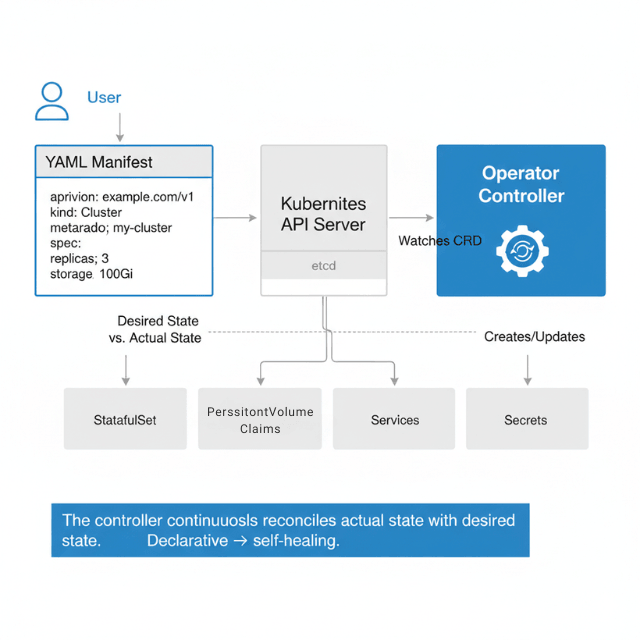
Kubernetes operators consist of Custom Resource Definitions (CRDs) that define new resource types and controllers that watch these resources and reconcile actual state with desired state. A PostgreSQL operator watches Cluster resources and ensures running PostgreSQL instances match the specification.
Reconciliation loops continuously compare desired state (YAML manifests) with actual state (running pods, volumes, services). When differences appear, the controller takes action to align reality with intent. This declarative model enables self-healing and automation.
CloudNativePG for PostgreSQL
CloudNativePG provides production-grade PostgreSQL cluster management on Kubernetes. It handles replication, failover, backup, and recovery without manual intervention.
Installation deploys the operator into your cluster.
kubectl apply -f \
  https://raw.githubusercontent.com/cloudnative-pg/cloudnative-pg/release-1.22/releases/cnpg-1.22.0.yaml
This creates the operator's deployment, CRDs, service account, and RBAC rules.
Creating a PostgreSQL cluster requires only a Cluster resource.
apiVersion: postgresql.cnpg.io/v1
kind: Cluster
metadata:
  name: production-postgres
  namespace: applications
spec:
  instances: 3
  imageName: ghcr.io/cloudnative-pg/postgresql:15.5

  storage:
    size: 100Gi
    storageClass: fast-ssd

  postgresql:
    parameters:
      max_connections: "200"
      shared_buffers: "256MB"
      effective_cache_size: "1GB"
      maintenance_work_mem: "256MB"
      checkpoint_completion_target: "0.9"
      wal_buffers: "16MB"
      default_statistics_target: "100"
      random_page_cost: "1.1"
      effective_io_concurrency: "200"

  monitoring:
    enabled: true
    podMonitorEnabled: true

  backup:
    barmanObjectStore:
      destinationPath: s3://my-backups/production-postgres
      s3Credentials:
        accessKeyId:
          name: aws-credentials
          key: access-key-id
        secretAccessKey:
          name: aws-credentials
          key: secret-access-key
      wal:
        compression: gzip
        maxParallel: 4
      data:
        compression: gzip
        jobs: 2
    retentionPolicy: "30d"

  bootstrap:
    initdb:
      database: myapp
      owner: myapp
      secret:
        name: myapp-db-secret
When you apply this manifest, the operator springs into action. It creates StatefulSet for PostgreSQL pods, PersistentVolumeClaims for storage, Services for connectivity, Secrets for credentials, and ConfigMaps for configuration. The operator configures streaming replication between instances automatically.
High availability comes built-in. CloudNativePG monitors cluster health and promotes standby instances when the primary fails. Failover typically completes within seconds.
# Configure failover behavior
apiVersion: postgresql.cnpg.io/v1
kind: Cluster
metadata:
  name: production-postgres
spec:
  instances: 3
  primaryUpdateStrategy: unsupervised
  failoverDelay: 30
  switchoverDelay: 60

  affinity:
    podAntiAffinityType: required
    topologyKey: kubernetes.io/hostname

  resources:
    requests:
      memory: "2Gi"
      cpu: "1000m"
    limits:
      memory: "4Gi"
      cpu: "2000m"
Creating databases and users happens through declarative resources.
apiVersion: postgresql.cnpg.io/v1
kind: Database
metadata:
  name: myapp
  namespace: applications
spec:
  cluster:
    name: production-postgres
  name: myapp
  owner: myappuser
---
apiVersion: postgresql.cnpg.io/v1
kind: Database
metadata:
  name: analytics
  namespace: applications
spec:
  cluster:
    name: production-postgres
  name: analytics
  owner: analyticsuser
The operator creates the database and user, handles password generation, and stores credentials in a Secret your application can mount.
Scheduled backups configure automatic backup creation.
apiVersion: postgresql.cnpg.io/v1
kind: ScheduledBackup
metadata:
  name: daily-backup
  namespace: applications
spec:
  schedule: "0 2 * * *"
  backupOwnerReference: self
  cluster:
    name: production-postgres
  method: barmanObjectStore
  target: primary
Monitoring and observability integrate with Prometheus and Grafana.
# Check cluster status
kubectl cnpg status production-postgres

# View cluster details
kubectl describe cluster production-postgres

# Connect to primary instance
kubectl cnpg psql production-postgres

# Promote a replica
kubectl cnpg promote production-postgres 2
MongoDB Community Operator
The MongoDB Community Operator manages MongoDB replica sets on Kubernetes. It automates deployment, scaling, and configuration management.
Installation uses Helm or kubectl.
# Install the operator
kubectl apply -f \
  https://raw.githubusercontent.com/mongodb/mongodb-kubernetes-operator/master/config/crd/bases/mongodbcommunity.mongodb.com_mongodbcommunity.yaml

kubectl apply -f \
  https://raw.githubusercontent.com/mongodb/mongodb-kubernetes-operator/master/config/manager/manager.yaml
Creating a MongoDB replica set defines cluster topology and configuration.
apiVersion: mongodbcommunity.mongodb.com/v1
kind: MongoDBCommunity
metadata:
  name: production-mongo
  namespace: databases
spec:
  members: 3
  type: ReplicaSet
  version: "6.0.5"

  security:
    authentication:
      modes: ["SCRAM"]

  users:
  - name: appuser
    db: admin
    passwordSecretRef:
      name: app-user-password
    roles:
    - name: readWrite
      db: myapp
    - name: clusterMonitor
      db: admin
    scramCredentialsSecretName: app-scram

  statefulSet:
    spec:
      template:
        spec:
          containers:
          - name: mongod
            resources:
              requests:
                cpu: "1"
                memory: "2Gi"
              limits:
                cpu: "2"
                memory: "4Gi"

      volumeClaimTemplates:
      - metadata:
          name: data-volume
        spec:
          accessModes: ["ReadWriteOnce"]
          storageClassName: fast-ssd
          resources:
            requests:
              storage: 100Gi

  additionalMongodConfig:
    storage.wiredTiger.engineConfig.cacheSizeGB: 1.5
    net.maxIncomingConnections: 200
Application connectivity uses connection strings generated by the operator.
apiVersion: v1
kind: Pod
metadata:
  name: app
spec:
  containers:
  - name: application
    image: myapp:latest
    env:
    - name: MONGODB_URI
      value: "mongodb://production-mongo-0.production-mongo-svc.databases.svc.cluster.local:27017,production-mongo-1.production-mongo-svc.databases.svc.cluster.local:27017,production-mongo-2.production-mongo-svc.databases.svc.cluster.local:27017/myapp?replicaSet=production-mongo"
    - name: MONGODB_USER
      valueFrom:
        secretKeyRef:
          name: app-user-password
          key: username
    - name: MONGODB_PASSWORD
      valueFrom:
        secretKeyRef:
          name: app-user-password
          key: password
Redis Operator
Redis operators manage Redis standalone instances, replicas, and clusters. Multiple operators exist, with Redis Enterprise Operator and Opstree Redis Operator being popular choices.
Opstree Redis Operator provides a lightweight solution for basic Redis deployments.
# Install Redis Operator
helm repo add ot-helm https://ot-container-kit.github.io/helm-charts/
helm install redis-operator ot-helm/redis-operator
Creating a Redis cluster enables horizontal scaling and automatic sharding.
apiVersion: redis.redis.opstreelabs.in/v1beta1
kind: RedisCluster
metadata:
  name: production-redis
spec:
  clusterSize: 6
  clusterVersion: v7

  kubernetesConfig:
    image: redis:7.0
    imagePullPolicy: IfNotPresent

  redisExporter:
    enabled: true
    image: quay.io/opstree/redis-exporter:latest

  storage:
    volumeClaimTemplate:
      spec:
        accessModes: ["ReadWriteOnce"]
        storageClassName: fast-ssd
        resources:
          requests:
            storage: 50Gi

  redisConfig:
    maxmemory: "2gb"
    maxmemory-policy: "allkeys-lru"
    appendonly: "yes"
    appendfsync: "everysec"
    save: "900 1 300 10 60 10000"

  resources:
    requests:
      cpu: "500m"
      memory: "2Gi"
    limits:
      cpu: "1000m"
      memory: "3Gi"
Standalone Redis for simpler use cases with serverless architecture building.
apiVersion: redis.redis.opstreelabs.in/v1beta1
kind: Redis
metadata:
  name: cache-redis
spec:
  kubernetesConfig:
    image: redis:7.0
    imagePullPolicy: IfNotPresent

  storage:
    volumeClaimTemplate:
      spec:
        accessModes: ["ReadWriteOnce"]
        resources:
          requests:
            storage: 10Gi

  redisConfig:
    maxmemory: "512mb"
    maxmemory-policy: "volatile-lru"

  resources:
    requests:
      cpu: "250m"
      memory: "512Mi"
    limits:
      cpu: "500m"
      memory: "1Gi"
Operator Lifecycle Management
Upgrading database versions requires careful planning. Operators typically support in-place upgrades with rolling updates.
# PostgreSQL version upgrade
apiVersion: postgresql.cnpg.io/v1
kind: Cluster
metadata:
  name: production-postgres
spec:
  instances: 3
  imageName: ghcr.io/cloudnative-pg/postgresql:16.1  # Upgraded from 15.5
  primaryUpdateStrategy: unsupervised
CloudNativePG performs a supervised upgrade, updating replicas first, then promoting a new primary, ensuring minimal downtime.
Scaling cluster kubernetes autoscaling strategies adjusts replica count dynamically.
# Scale PostgreSQL cluster
kubectl patch cluster production-postgres --type='merge' \
  -p '{"spec":{"instances":5}}'

# Scale MongoDB replica set
kubectl patch mongodbcommunity production-mongo --type='merge' \
  -p '{"spec":{"members":5}}'
Monitoring operator health ensures the control plane functions correctly.
apiVersion: v1
kind: Service
metadata:
  name: cnpg-operator-metrics
  namespace: cnpg-system
spec:
  ports:
  - port: 8080
    name: metrics
  selector:
    app.kubernetes.io/name: cloudnative-pg
---
apiVersion: monitoring.coreos.com/v1
kind: ServiceMonitor
metadata:
  name: cnpg-operator
  namespace: cnpg-system
spec:
  selector:
    matchLabels:
      app.kubernetes.io/name: cloudnative-pg
  endpoints:
  - port: metrics
    interval: 30s
Disaster Recovery with Operators
Operators simplify disaster recovery through declarative backup and restore configurations.
Point-in-time recovery restores data to specific moments.
apiVersion: postgresql.cnpg.io/v1
kind: Cluster
metadata:
  name: restored-cluster
spec:
  instances: 3

  bootstrap:
    recovery:
      source: production-postgres
      recoveryTarget:
        targetTime: "2025-11-25 14:30:00.00000+00"

  externalClusters:
  - name: production-postgres
    barmanObjectStore:
      destinationPath: s3://backups/production-postgres
      s3Credentials:
        accessKeyId:
          name: aws-credentials
          key: access-key-id
        secretAccessKey:
          name: aws-credentials
          key: secret-access-key
      wal:
        maxParallel: 8
Cross-cluster replication enables geographic distribution and disaster recovery.
# Primary cluster in us-east-1
apiVersion: postgresql.cnpg.io/v1
kind: Cluster
metadata:
  name: postgres-us-east
  namespace: production
spec:
  instances: 3
  storage:
    size: 200Gi
---
# Replica cluster in eu-west-1
apiVersion: postgresql.cnpg.io/v1
kind: Cluster
metadata:
  name: postgres-eu-west
  namespace: production
spec:
  instances: 3
  replica:
    enabled: true
    source: postgres-us-east

  externalClusters:
  - name: postgres-us-east
    connectionParameters:
      host: postgres-us-east-rw.production.svc.cluster.local
      user: streaming_replica
      dbname: postgres
    password:
      name: replica-creds
      key: password
Best Practices
| Practice | Recommendation |
|---|---|
| Resource limits | Prevent database pods from consuming excessive cluster resources |
| Storage classes | Match performance requirements: high-IOPS SSDs for transactional databases, standard disks for development |
| Monitoring and alerting | Track database health. Integrate with Prometheus, Grafana, and alerting systems |
| Backup verification | Test restore procedures regularly in non-production environments |
| Security hardening | Network policies, pod security policies, secrets encryption, regular security patches |
| Upgrade testing | Validate new operator versions in staging before production deployment |
How Does Your Setup Compare?
Run through the checklist:
- Resource limits set for all database pods?
- Storage class matched to workload (high-IOPS for OLTP, standard for dev)?
- Prometheus + Grafana monitoring integrated?
- Backup restore tested in last 30 days?
- Security hardening (network policies, secrets encryption)?
Missing even one? We can help.
We'll review your Kubernetes database setup and deliver a prioritized fix list.
Troubleshooting Common Issues
Pod fails to start often indicates storage provisioning problems or insufficient resources.
# Check cluster status
kubectl describe cluster production-postgres

# View pod events
kubectl describe pod production-postgres-1

# Check logs
kubectl logs production-postgres-1 -c postgres
Replication lag appears when standbys fall behind primary.
# Check replication status (CloudNativePG)
kubectl cnpg status production-postgres

# Query replication lag
kubectl cnpg psql production-postgres -- -c \
  "SELECT application_name, state, sync_state,
   pg_wal_lsn_diff(pg_current_wal_lsn(), replay_lsn) AS lag_bytes
   FROM pg_stat_replication;"
Backup failures require investigating storage credentials and network connectivity.
# View backup status
kubectl get backup -n applications

# Describe backup
kubectl describe backup daily-backup-20251125

# Check operator logs
kubectl logs -n cnpg-system deployment/cnpg-controller-manager
Whether you're running a few database clusters or hundreds, operators provide the automation and reliability needed for production cloud-native data management. They encode operational expertise, reduce manual toil, and enable teams to focus on application development rather than database administration.
Conclusion
Database operators transform error-prone manual operations failover, backup, scaling, upgrades into declarative, self-healing automation. CloudNativePG, MongoDB Operator, and Redis Operator each encode deep platform expertise into controllers that run alongside your databases.
The benefits:
- Reduced toil - Automate manual operations (failover, backup, scaling, upgrades)
- Consistent configuration - Declarative, repeatable setups
- Automated disaster recovery - Built-in DR capabilities
- Manage dozens of clusters like one - Scale operations without scaling headcount
But operators aren't magic. They need careful storage class, resource limit, and backup configuration plus regular upgrade testing and recovery drills. When implemented thoughtfully, operators free teams from 3 AM pages. Start with CloudNativePG (most mature), test thoroughly in staging, then expand to production.
FAQs
1. StatefulSet vs. operator?
| Capability | StatefulSet | Operator |
|---|---|---|
| Stable identities | Yes | Builds on StatefulSet |
| Ordered pods | Yes | Builds on StatefulSet |
| Persistent volumes | Yes | Builds on StatefulSet |
| Database logic | No | Yes |
| Replication setup | No | Yes |
| Failover handling | No | Yes |
| Backup management | No | Yes |
| Zero-downtime upgrades | No | Yes |
Operators encode what a human DBA knows.
2. Which Postgres operator?
- CloudNativePG – Best for Kubernetes-native workflows, Prometheus, S3 backups. CNCF sandbox. Recommended for new projects.
- Zalando – Mature (thousands of DBs at Zalando Postgres Operator), RDS-like config, team-based access.
- Crunchy – Enterprise-focused, web UI, compliance features.
3. Disaster Recovery Testing Procedure?
Run quarterly drills:
- Pick a random Point-in-Time Recovery (PITR) target from the last 30 days
- Create cluster with
bootstrap.recoverypointing to that time - Operator automatically finds full backup and replays WAL logs
- Verify data integrity
- Delete cluster
Automate with CronJob to staging if you haven't restored in 30 days, your backup strategy isn't validated.
Summarize this post with:
