Optimizing API Performance with Rate Limiting, Pagination, and Compression
Optimize SaaS APIs with rate limiting (token bucket, sliding window), cursor-based pagination, and Brotli/gzip compression. Reduce latency, protect backends, and handle large datasets efficiently.

TL;DR
- Rate limiting protects backends and ensures fair usage. Fixed window is simplest but bursty at edges. Token bucket allows controlled bursts. Return
429 Too Many RequestswithRetry-Afterheader. Use tiered limits (free vs paid). - Cursor-based pagination beats offset-based at scale. Offsets degrade with large page numbers (
OFFSET 10000scans all rows). Cursors use indexed columns (WHERE id < cursor) - O(1) at any depth. Returnnext_cursorandhas_moremetadata. - Compression reduces payload size 70-90%. Enable Brotli (best compression) with gzip fallback. Set minimum size threshold (~1KB) to avoid overhead. Use
Accept-Encodingnegotiation. Pre-compress static responses. - Additional optimizations:
Promise.all()for concurrent API calls, ETag +Cache-Controlfor conditional requests, batch endpoints (GET /users?ids=1,2,3), and connection keep-alive. - Monitor p95/p99 latency, error rates, and throughput per endpoint. Alert before users complain. Use distributed tracing for complex API chains.
APIs are the backbone of modern SaaS applications. Every user interaction, mobile app request, and third-party integration flows through your APIs. Optimizing API performance improves user experience, reduces infrastructure costs, and enables your application to scale. Rate limiting, pagination, and compression are foundational techniques every API should implement.
Why API Performance Matters
API response time directly affects user experience. Mobile and web applications feel sluggish when API calls take seconds. Users expect near-instant responses. Meeting these expectations requires deliberate optimization.
Server resources scale with API efficiency. Inefficient APIs require more servers to handle the same traffic. Optimization reduces infrastructure costs while improving capacity.
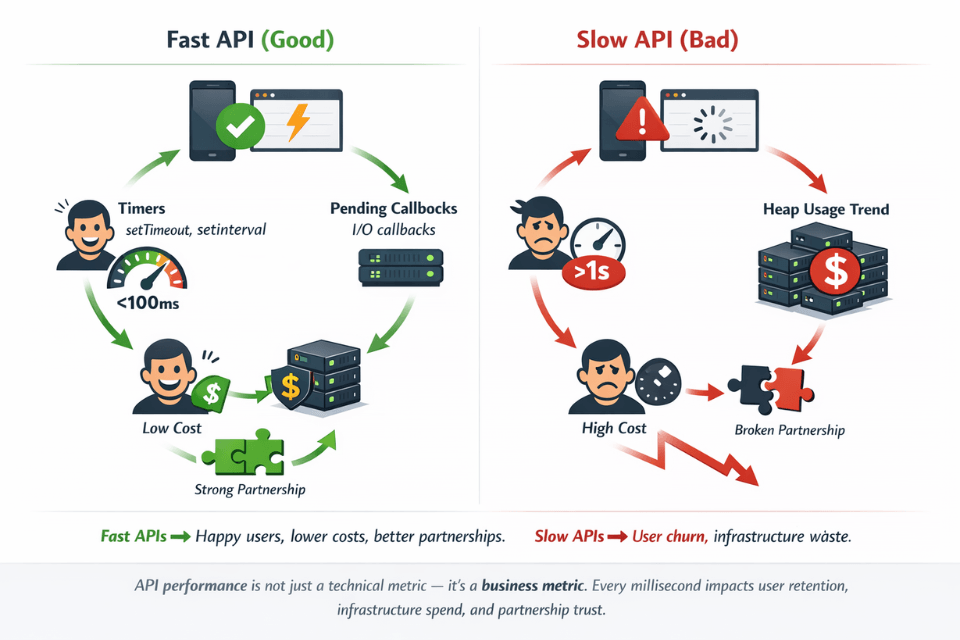
Third-party integrations depend on your API performance. Partners building on your platform experience your performance as their own. Poor API performance damages business relationships.
Mobile clients have bandwidth constraints. Large payloads consume data plans and drain batteries. Efficient APIs respect mobile users' constraints.
Rate limiting protects against abuse and ensures fair usage. Without limits, single clients can monopolize resources. Limits ensure availability for all users.
Pagination enables handling large datasets. Returning thousands of records in single responses overwhelms networks and clients. Pagination breaks data into manageable chunks.
Rate Limiting Strategies
Fixed window rate limiting counts requests per time window. When the count exceeds the limit, requests are rejected until the window resets.
# Simple fixed window rate limiting
from datetime import datetime
import redis

def is_rate_limited(client_id, limit=100, window_seconds=60):
    r = redis.Redis()
    key = f"rate_limit:{client_id}:{datetime.now().minute}"

    current = r.incr(key)
    if current == 1:
        r.expire(key, window_seconds)

    return current > limit
Sliding window algorithms provide smoother limits. They consider requests across window boundaries, preventing burst traffic at window edges.
Token bucket algorithms allow controlled bursting. Tokens accumulate over time up to a maximum. Each request consumes a token. Bursts are allowed while tokens remain.
Leaky bucket algorithms process requests at a constant rate. Excess requests queue until capacity is available. This smooths traffic to downstream systems.
Response headers communicate limits to clients. Include current usage, limits, and reset times.
HTTP/1.1 200 OK
X-RateLimit-Limit: 100
X-RateLimit-Remaining: 45
X-RateLimit-Reset: 1640995200
Handle rate limit exceeded gracefully. Return 429 Too Many Requests with Retry-After header. Clients can back off and retry appropriately.
Tiered limits differentiate user types. Free users might get 100 requests per hour; paid users get 10,000. Different endpoints might have different limits based on resource intensity.
Pagination Best Practices
Offset-based pagination is simple but has drawbacks. Skip the first N records, return the next M. However, performance degrades with large offsets, and results shift when data changes.
-- Offset pagination (simple but slow for large offsets)
SELECT * FROM products ORDER BY created_at DESC LIMIT 20 OFFSET 1000;
Cursor-based pagination scales better. Instead of skipping records, start from a specific cursor position. Typically uses indexed columns for efficient seeking.
# Cursor-based pagination
def get_products(cursor=None, limit=20):
    query = Product.query.order_by(Product.id.desc())

    if cursor:
        query = query.filter(Product.id < cursor)

    products = query.limit(limit + 1).all()

    has_more = len(products) > limit
    if has_more:
        products = products[:-1]

    next_cursor = products[-1].id if has_more and products else None

    return {
        'data': products,
        'next_cursor': next_cursor,
        'has_more': has_more
    }
Keyset pagination uses WHERE clauses instead of OFFSET. Index-friendly queries remain fast regardless of page depth.
-- Keyset pagination (efficient at any page depth)
SELECT * FROM products
WHERE created_at < '2025-01-15 10:30:00'
ORDER BY created_at DESC
LIMIT 20;
Choose appropriate page sizes. Too small means many requests. Too large means slow responses and high memory usage. 20-100 items per page suits most use cases.
Provide total counts carefully. COUNT(*) on large tables is expensive. Consider approximate counts, cached counts, or omitting totals when not essential.
Include pagination metadata in responses. Clients need to know if more data exists and how to fetch it.
{
  "data": [...],
  "pagination": {
    "next_cursor": "abc123",
    "has_more": true,
    "limit": 20
  }
}
Response Compression
Enable gzip or brotli compression for API responses. Compression reduces transfer sizes by 70-90% for JSON payloads. Modern HTTP clients handle decompression transparently.
# Nginx compression configuration
gzip on;
gzip_types application/json application/javascript text/plain;
gzip_min_length 1000;
gzip_comp_level 6;
Brotli provides better compression than gzip. Most modern browsers support Brotli. Use Brotli when available, gzip as fallback.
Honor Accept-Encoding headers. Clients indicate supported compression in request headers. Respond with matching Content-Encoding.
Small payloads may not benefit from compression. Compression overhead can exceed savings for responses under 1KB. Set minimum size thresholds.
Pre-compress static responses. For responses that don't change, compress once and serve many times. Avoid repeated compression overhead.
Consider field filtering alongside compression. Allow clients to request only needed fields. Smaller payloads before compression mean even smaller after.
GET /api/users?fields=id,name,email
Brotli + gzip + field filtering = 80-90% bandwidth savings. We configure all three.
Compression reduces JSON payloads by 70-90%. Field filtering lets clients request only needed fields. Combine them for maximum efficiency.
Our full-stack teams help you:
- Configure Brotli and gzip – Content negotiation, minimum size thresholds
- Implement field filtering –
?fields=id,name,emailpattern with GraphQL-like control - Pre-compress static responses – Serve compressed files without on-the-fly overhead
- Monitor compressed response sizes – Track savings over time
Additional Optimization Techniques
Connection keep-alive reduces connection overhead. Reusing TCP connections eliminates handshake latency for subsequent requests.
HTTP/2 multiplexing handles multiple requests over single connections. Headers compress automatically. Stream prioritization enables efficient resource loading.
Caching reduces repeated work. ETag and Last-Modified headers enable conditional requests. CDN caching serves responses from edge locations.
from flask import make_response
import hashlib

@app.route('/api/products/<int:id>')
def get_product(id):
    product = Product.query.get(id)
    data = serialize(product)

    etag = hashlib.md5(str(data).encode()).hexdigest()
    response = make_response(data)
    response.headers['ETag'] = etag
    response.headers['Cache-Control'] = 'max-age=300'

    return response
Batch endpoints reduce request count. Instead of multiple individual requests, allow single requests for multiple items.
GET /api/users?ids=1,2,3,4,5
Async processing for slow operations. Return immediately with job status. Clients poll for completion or receive webhooks.
GraphQL allows precise data fetching. Clients request exactly what they need, reducing over-fetching compared to REST endpoints.
Monitoring API Performance
Track response time percentiles. p50, p95, and p99 response times reveal distribution. Average times hide outliers.
| Metric | What It Measures | Purpose |
|---|---|---|
| Error rates (4xx vs 5xx) | Client vs server errors | Problem identification |
| Throughput (requests/second) | Usage patterns | Capacity planning |
| Slow request logs | Individual slow calls | Optimization opportunities |
| Rate limiting trigger frequency | How often limits activate | Adjust limit settings |
Use distributed tracing for complex APIs. Trace requests across services to identify bottlenecks in the request path.
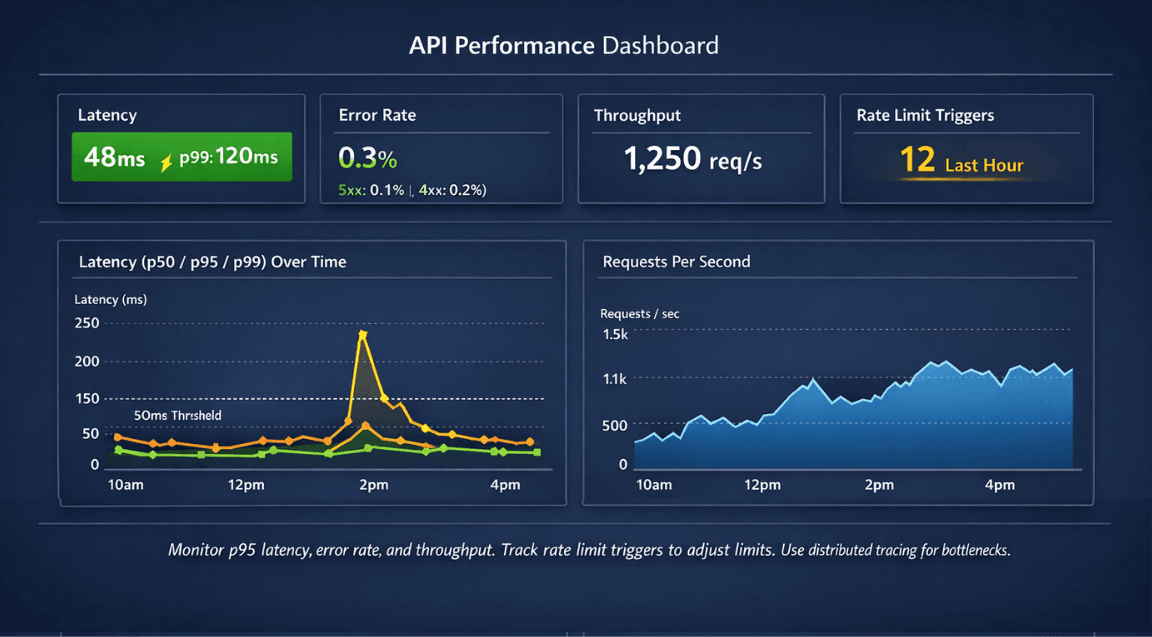
Monitor rate limiting effectiveness. Track how often limits trigger. Adjust limits based on observed patterns.
Implementation Guidelines
Start with the highest-impact optimizations. Compression and pagination provide immediate benefits with modest effort.
Implement rate limiting early. Retrofitting limits is harder than building them from the start.
Document API performance characteristics. Clients need to know rate limits, pagination behavior, and expected response times.
Version APIs to enable optimization evolution. Breaking changes for performance improvements can roll out in new API versions.
Test under realistic load. Performance under light testing differs from production traffic. Load test to verify optimization effectiveness.
| Technique | Impact | Effort |
|---|---|---|
| Response compression | High | Low |
| Pagination | High | Medium |
| Rate limiting | Medium | Medium |
| HTTP/2 | Medium | Low |
| Field filtering | Medium | Medium |
| Batch endpoints | High | Higher |
Conclusion
API performance directly impacts user experience, infrastructure costs, and third-party integration success. Rate limiting protects your backend from abuse and ensures fair resource allocation. Cursor-based pagination scales gracefully to any dataset size.
Compression slashes bandwidth costs and speeds up mobile clients. Implement these foundational patterns before building advanced features retrofitting is harder. Start with compression and pagination (high impact, low effort), then add rate limiting and caching. Your API should be fast, predictable, and resilient. These techniques make it so.
FAQs
1. How do I choose between token bucket, fixed window, and sliding window rate limiting?
| Algorithm | Characteristics | Best For | Limitation |
|---|---|---|---|
| Token bucket | Allows bursts up to capacity, smooths over time | APIs with variable traffic patterns | Slightly more complex |
| Fixed window | Simple to implement | Basic rate limiting | Allows double-limit at edges (e.g., 100 req at 59.9s + 100 at 60.1s) |
| Sliding window | Smoothest, prevents edge bursts | Precise rate limiting | Most complex implementation |
Production recommendation: Most APIs use token bucket or sliding window implemented in API gateways (Kong, Tyk) or CDNs (Cloudflare)
2. Why is cursor-based pagination faster than OFFSET?
Cursor Pagination vs. OFFSET Pagination:
| Aspect | OFFSET Pagination | Cursor Pagination |
|---|---|---|
| How it works | OFFSET 10000 LIMIT 20 scans 10,020 rows, discards 10,000 |
WHERE id > last_id ORDER BY id LIMIT 20 seeks directly to cursor |
| Rows scanned | Increases with page depth | Exactly 20 rows regardless of page depth |
| Performance (page 1) | ~Same | ~Same |
| Performance (page 10,000) | Slow (scans 10,020 rows) | Consistent sub-10ms response |
3. When should I skip compression?
| Scenario | Reason | Recommendation |
|---|---|---|
| Responses under ~1KB | Compression overhead (CPU time, dictionary setup) exceeds transfer savings | Skip compression |
| Already-compressed content | Images, videos, PDFs are already compressed | Skip compression |
| JSON APIs with 10KB+ responses | Compression net benefit | Always compress |