Python Performance Optimization: Profiling, Async, GIL & Multiprocessing
Optimize Python for SaaS with cProfile, asyncio, multiprocessing, and efficient data structures. Learn when to bypass the GIL and speed up I/O-bound and CPU-bound code.


TL;DR
- GIL only blocks CPU-bound threads – I/O-bound code (database, network) releases GIL. Use
multiprocessingfor CPU parallelism,threadingorasynciofor I/O. - Profile before optimizing –
cProfilefor function stats,line_profilerfor line-by-line,py-spyfor production. Find bottlenecks, don't guess. - Async/await (asyncio) for high-concurrency I/O (thousands of connections). Use asyncpg, aiohttp, motor. Never block event loop with sync calls.
- Use sets for O(1) lookups (not lists), generators for memory efficiency, NumPy for numerical work (10-100x faster).
- ASGI servers (Uvicorn) for async apps. Worker count: CPU-bound = match cores; I/O-bound = more workers.
Python's simplicity and expressiveness make it popular for SaaS development, but its interpreted nature and Global Interpreter Lock (GIL) create performance considerations unique to the language. Understanding these characteristics and applying appropriate optimization techniques enables high-performance Python applications.
Understanding Python's Performance Characteristics
Python is an interpreted language. Code executes through the Python interpreter rather than compiling to native machine code. This interpretation adds overhead compared to compiled languages.
Dynamic typing enables flexibility but costs performance. Type checks happen at runtime. Static type hints (typing module) don't change runtime behavior but help tools and developers.
Python's object model adds overhead. Everything in Python is an object, including integers. This uniformity costs memory and performance compared to primitive types in other languages.
| Characteristic | Impact | Mitigation |
|---|---|---|
| Interpreted language | Overhead vs. compiled languages | Profile; optimize hot paths |
| Dynamic typing | Runtime type checks | Type hints (tooling only, not runtime) |
| Object model | Everything is an object (costs memory/performance) | Acceptable for most workloads |
Despite these characteristics, Python powers many high-performance systems. Instagram, Dropbox, and numerous SaaS applications demonstrate Python's viability at scale. The key is understanding where optimization matters.
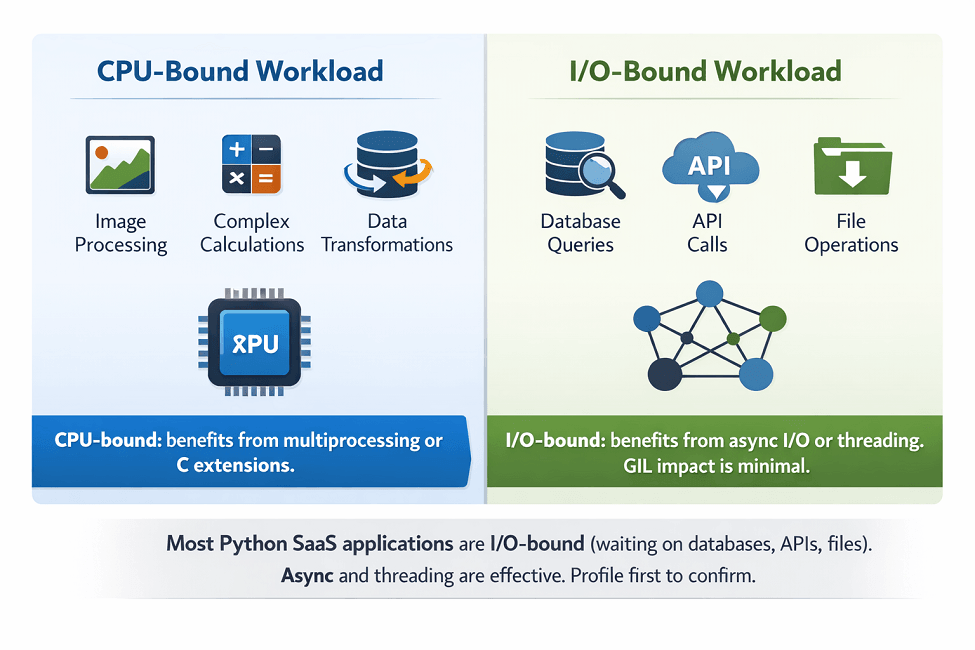
Most Python applications are I/O-bound, not CPU-bound. Database queries, network requests, and file operations dominate execution time. For I/O-bound workloads, Python's interpreted overhead is negligible.
Profile before optimizing. Premature optimization wastes effort. Measure to find actual bottlenecks before applying optimizations.
The Global Interpreter Lock Explained
The GIL is a mutex that protects access to Python objects. Only one thread can execute Python bytecode at a time. This simplifies Python's memory management but limits CPU-bound parallelism.
The GIL affects CPU-bound multi-threaded code. Threads cannot execute Python code simultaneously. Adding threads to CPU-intensive work doesn't improve throughput.
I/O-bound code largely avoids GIL limitations. When threads wait for I/O, they release the GIL. Other threads can execute during I/O waits.
import threading
import time

# This DOES benefit from threading (I/O-bound)
def fetch_url(url):
    # While waiting for network, GIL is released
    response = requests.get(url)
    return response.text

# This does NOT benefit from threading (CPU-bound)
def compute_heavy(data):
    # GIL prevents parallel execution
    return sum(x * x for x in data)
Multiprocessing bypasses the GIL. Separate processes have separate interpreters and GILs. CPU-bound work distributes across processes effectively.
from multiprocessing import Pool

def cpu_intensive(data):
    return sum(x * x for x in data)

if __name__ == '__main__':
    with Pool(4) as pool:
        results = pool.map(cpu_intensive, data_chunks)
Alternative Python implementations have different GIL characteristics. PyPy, Jython, and IronPython have different concurrency models. The upcoming Python free-threaded mode (nogil) may change CPython's behavior.
Profiling Python Applications
cProfile is Python's built-in profiler. It measures function call counts and execution times with moderate overhead.
import cProfile
import pstats

# Profile a function
cProfile.run('main()', 'output.prof')

# Analyze results
stats = pstats.Stats('output.prof')
stats.sort_stats('cumulative')
stats.print_stats(20)  # Top 20 functions
line_profiler provides line-by-line timing. Install with pip and decorate functions to profile.
# pip install line_profiler
from line_profiler import profile

@profile
def slow_function():
    # Each line gets individual timing
    result = []
    for i in range(1000):
        result.append(i * i)
    return result
memory_profiler tracks memory usage. Identify memory-intensive code and potential leaks.
# pip install memory_profiler
from memory_profiler import profile

@profile
def memory_heavy():
    data = [i for i in range(1000000)]
    return data
py-spy enables sampling without code modification. Attach to running processes for production profiling with minimal overhead.
py-spy record -o profile.svg --pid 12345
Visualization tools help interpret results. SnakeViz renders cProfile output as interactive sunburst charts. flame graphs show call hierarchies.
Track performance metrics in production. APM tools like Datadog or New Relic provide ongoing visibility.
Async Programming with asyncio
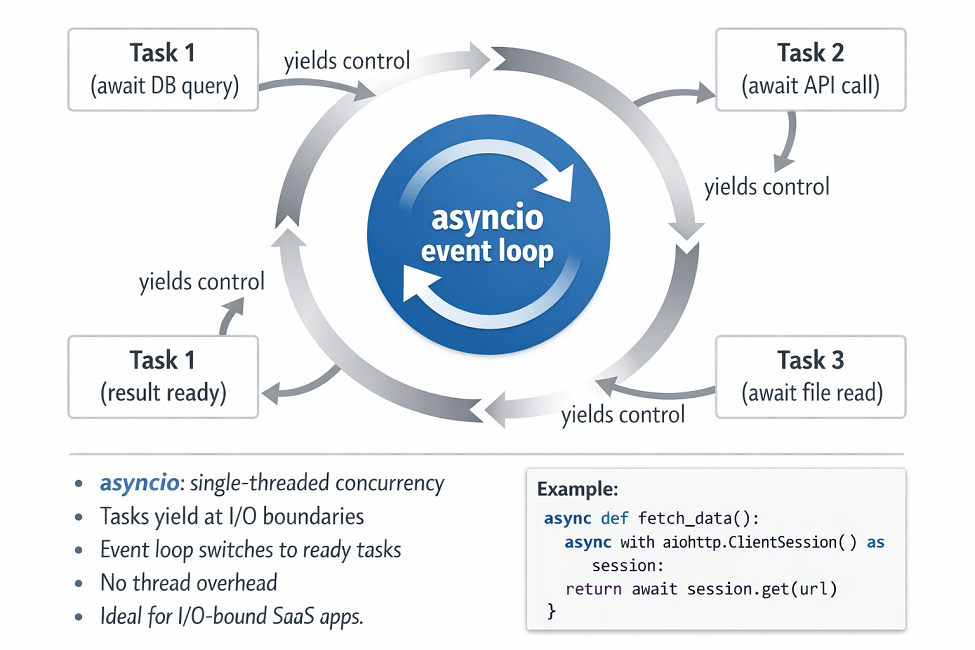
asyncio enables concurrent I/O without threading overhead. A single thread handles many concurrent operations by switching between them during I/O waits.
import asyncio
import aiohttp

async def fetch_url(session, url):
    async with session.get(url) as response:
        return await response.text()

async def fetch_all(urls):
    async with aiohttp.ClientSession() as session:
        tasks = [fetch_url(session, url) for url in urls]
        return await asyncio.gather(*tasks)

# Fetch 100 URLs concurrently
results = asyncio.run(fetch_all(urls))
asyncio excels at I/O-bound concurrency. Web requests, database queries, and file operations benefit from async patterns.
Use async database drivers. Libraries like asyncpg (PostgreSQL), aiomysql (MySQL), and motor (MongoDB) provide async database access.
import asyncpg

async def get_users():
    conn = await asyncpg.connect(DATABASE_URL)
    rows = await conn.fetch('SELECT * FROM users WHERE active = true')
    await conn.close()
    return rows
Web frameworks support async. FastAPI is built on async. Django 4.1+ supports async views. Flask with Quart provides async capabilities.
Avoid blocking calls in async code. Blocking operations freeze the event loop. Use asyncio.to_thread() to run blocking code without blocking other async operations.
# Running blocking code in async context
result = await asyncio.to_thread(blocking_function, arg1, arg2)
Optimization Techniques
Choose efficient data structures. Sets provide O(1) membership testing versus O(n) for lists. Dictionaries provide O(1) lookup by key.
# Slow: O(n) membership test
items_list = [1, 2, 3, 4, 5]
if item in items_list:  # Scans entire list
    pass

# Fast: O(1) membership test
items_set = {1, 2, 3, 4, 5}
if item in items_set:  # Hash lookup
    pass
Use generators for large sequences. Generators yield items one at a time, avoiding memory consumption of full lists.
# Memory-heavy: creates entire list
squares = [x * x for x in range(1000000)]

# Memory-efficient: generates values on demand
squares = (x * x for x in range(1000000))
Leverage built-in functions. Functions like map(), filter(), sum(), and max() are implemented in C and faster than Python equivalents.
Use NumPy for numerical operations. NumPy operations run in optimized C code, orders of magnitude faster than pure Python loops.
import numpy as np

# Slow: pure Python
result = [x * 2 for x in range(1000000)]

# Fast: NumPy
arr = np.arange(1000000)
result = arr * 2
Cache expensive computations. functools.lru_cache memoizes function results.
from functools import lru_cache

@lru_cache(maxsize=1000)
def expensive_computation(n):
    # Result cached for repeated calls
    return sum(i * i for i in range(n))
Sets for O(1) lookups. Generators for memory. NumPy for 100x speedup. We implement them all.
Data structures matter: set (O(1)) not list (O(n)) for membership. Generators save memory: (x*x for x in range(N)). NumPy vectorized operations are 10-100x faster than Python loops.
We help you:
- Choose efficient data structures – Sets, dicts, deques, Counter, defaultdict
- Implement generators and lazy evaluation – Process large datasets without memory exhaustion
- Leverage built-in functions –
map(),filter(),sum()run in C - Add caching with
@lru_cache– Memoize expensive computations
When to Use Alternative Approaches
Cython compiles Python to C. Cython code can approach C performance while maintaining Python-like syntax.
PyPy is an alternative Python interpreter with JIT compilation. Some workloads run 4-10x faster on PyPy versus CPython.
C extensions handle performance-critical code. Write hot spots in C and call from Python.
Consider other languages for CPU-intensive components. Rust, Go, or C++ handle performance-critical services. Python coordinates these components.
Evaluate your actual needs. Many applications don't need maximum performance. Developer productivity often matters more than execution speed.
Production Deployment Considerations
Use ASGI servers for async applications. Uvicorn and Hypercorn serve async Python applications efficiently.
uvicorn main:app --workers 4 --host 0.0.0.0 --port 8000
Configure appropriate worker counts. For CPU-bound work, match CPU cores. For I/O-bound work, more workers can help.
Enable garbage collection tuning for memory-intensive applications. Adjust thresholds based on allocation patterns.
Use connection pooling for databases. SQLAlchemy, asyncpg, and other libraries provide pooling capabilities.
Implement proper logging. Avoid excessive logging in hot paths. Use appropriate log levels.
Monitor memory usage. Python's garbage collector usually works well, but memory leaks can occur. Track memory trends over time.
| Command Component | Value | Purpose |
|---|---|---|
uvicorn |
ASGI server | Run async applications |
main:app |
Application path | Entry point |
--workers 4 |
Worker count | For CPU-bound: match cores; I/O-bound: more helps |
--host 0.0.0.0 |
Bind address | All interfaces |
--port 8000 |
Port | Default HTTP port |
Conclusion
Python performance is about choosing the right pattern for the problem. The GIL is not a performance death sentence, it's a constraint you work around, not a wall.
| Workload Type | Recommended Approach |
|---|---|
| I/O-bound (SaaS typical) | Asyncio or threading |
| CPU-bound | Multiprocessing, NumPy, or C extensions |
| High concurrency I/O | Asyncio (thousands of connections) |
| Batch data processing | Multiprocessing |
| Numeric/array operations | NumPy |
Profile to find actual bottlenecks (cProfile, line_profiler), then apply targeted optimizations: async for concurrency, NumPy for numerics, efficient data structures for lookups, caching for repeated expensive calls. Python powers massive production systems at Instagram, Dropbox, and countless SaaS companies. The language is not the bottleneck, inefficient patterns are.
Frequently Asked Questions
1. When should I use threading vs asyncio vs multiprocessing
Threading – I/O-bound tasks where you need shared memory and don't want async syntax. Works because threads release GIL during I/O waits.
Asyncio – I/O-bound with high concurrency (thousands of connections), single-threaded, lower overhead than threading.
Multiprocessing – CPU-bound tasks where you need true parallelism across cores. Each process has its own GIL. Choose asyncio for most I/O-heavy SaaS APIs; multiprocessing for batch data processing.
2. Why does adding more threads make CPU-bound code slower?
| Factor | Explanation |
|---|---|
| GIL contention | Only one thread executes Python bytecode at a time |
| Synchronization overhead | Multiple threads competing for CPU repeatedly acquire and release GIL |
| Result | More threads = more contention = slower performance |
Solution for CPU-bound work: Use multiprocessing instead, separate processes each have their own GIL and run on separate cores.
3. How do I profile async code effectively?
Common async bottleneck:
| Tool/Method | Purpose | When to Use |
|---|---|---|
| cProfile | Profile async functions | Works – overhead is in function calls, not event loop |
PYTHONASYNCIODEBUG=1 |
Reveal slow callbacks and unawaited coroutines | For asyncio-specific bottlenecks |
| py-spy | Sample running async apps | Works without overhead |
set_debug(True) |
Identify sync code blocking event loop | Most common bottleneck source |
Most bottlenecks in async apps are not in asyncio itself but in sync code accidentally blocking the event loop
How to identify: asyncio.get_event_loop().set_debug(True)