Oracle Cloud LLMs: 44% Better Price-Performance
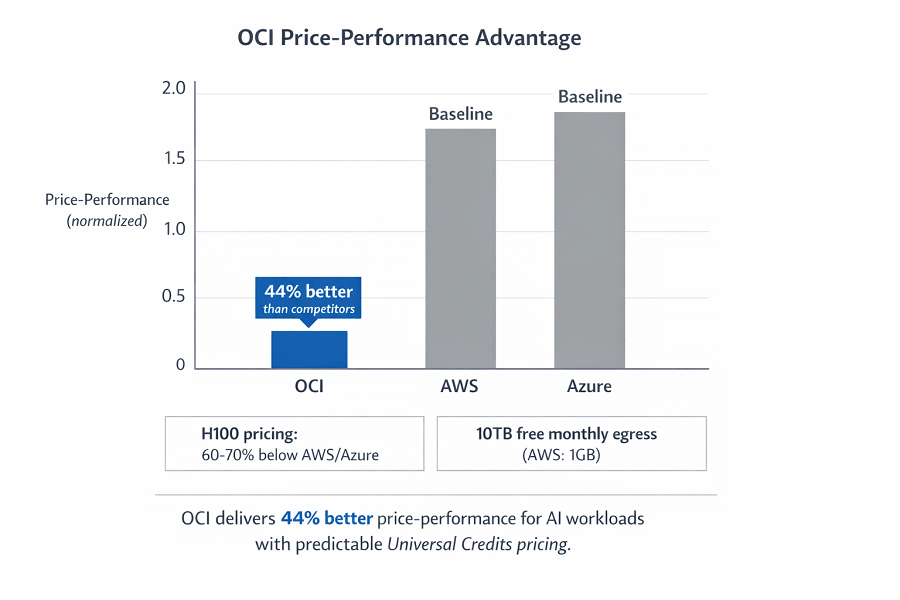
Oracle Cloud Infrastructure delivers up to 44% better price-performance for LLMs, with H100 GPUs costing 60–70% less than AWS or Azure. Integrated databases and built-in MLOps enable faster, simpler, and more cost-efficient enterprise AI deployments.

TLDR;
- H100 instances cost 60-70% less than equivalent AWS P5 or Azure ND offerings
- Universal Credits simplify budgeting with predictable costs across all OCI services
- Run ML algorithms directly in Autonomous Database without data movement
- 10TB free monthly egress versus AWS at $0.09/GB saves thousands for global deployments
Deploy LLMs on Oracle Cloud Infrastructure with superior price-performance and simplified pricing. OCI delivers up to 44% better price-performance for AI workloads with H100 GPUs, Autonomous Database integration, and predictable Universal Credits costs for enterprise ML deployments.
| Benefit | OCI Advantage |
|---|---|
| Price-performance | 44% better than major competitors |
| H100 pricing | 60-70% below AWS/Azure |
| Network egress | 10TB free monthly (AWS: 1GB) |
| Billing | Universal Credits = predictable monthly costs |
| Database integration | Direct ML in Autonomous Database |
| Model size support | Up to 200B parameters on single instance |
Why Oracle Cloud ML Makes Financial Sense
Oracle Cloud delivers up to 44% better price-performance for AI workloads than major competitors, and that gap shows up in the invoice, not the marketing deck.
GPU shapes cost less outright. An H100 instance on OCI runs cheaper than the equivalent AWS P5 or Azure ND instance, with no pricing tiers to decode and no hidden fees buried in the bill.
The platform integrates deeply with Oracle Database, so your ML models query production data directly instead of waiting on an ETL pipeline. There's no data movement and no duplicate storage costs.
The OCI Data Science platform covers end-to-end MLOps: Jupyter notebooks, automated pipelines, model deployment, and monitoring, all included without per-feature pricing.
For enterprises already running Oracle, OCI ML is the obvious next step. Existing support contracts cover ML workloads, procurement stays with a single vendor, and technical teams reuse the Oracle expertise they already have.
OCI ML Platform Overview
Oracle structures its ML services around two priorities: proximity to your data and pricing you can predict.
OCI Data Science Platform
The Data Science platform covers your complete ML lifecycle, from notebook to production endpoint.
| Component | Purpose |
|---|---|
| Managed notebooks | Pre-configured JupyterLab; TensorFlow, PyTorch pre-installed; 1-click GPU acceleration |
| Model catalog | Versioned model storage; experiment tracking; approval workflows |
| Model deployment | HTTP endpoints; auto-scaling; health checks; deploy in minutes |
| Pipeline creation | Automate data prep, training, evaluation, deployment; schedule retraining |
Integration across OCI services is native: Object Storage holds datasets, Autonomous Database serves features, Vault manages secrets, and Logging handles monitoring, all connected without extra configuration.
# Deploy model from catalog
from oracle_ads import ModelDeployment

deployment = ModelDeployment(
    model_id="ocid1.model.oc1...",
    instance_shape="VM.GPU.A10.1",
    instance_count=2,
    bandwidth_mbps=10,
    logging_enabled=True
)
deployment.create()
GPU Compute Shapes
OCI offers a range of GPU shapes built for LLM deployment.
| Instance Type | GPUs | VRAM | System RAM | Best For |
|---|---|---|---|---|
| BM.GPU.H100.8 | 8× H100 | 640GB | 2TB | Maximum performance, no virtualization overhead |
| VM.GPU.A10.1 | 1× A10 | 24GB | — | 7B-13B models, development, cost-effective |
| VM.GPU4.8 | 8× A100 40GB | 320GB | — | Models up to 200B parameters |
Every GPU instance includes NVMe local storage at no extra charge, and network bandwidth comes bundled based on the shape you pick, so your monthly bill stays predictable.
Container Engine for Kubernetes
OKE (Oracle Kubernetes Engine) runs containerized ML workloads.
The managed control plane costs nothing. You pay only for worker nodes, with no separate cluster management fee.
GPU node pools configure themselves, with NVIDIA drivers and CUDA libraries pre-installed, so you can deploy GPU workloads immediately.
OCI Container Registry stores your images with vulnerability scanning and image signing built in for supply chain security.
# OKE GPU node pool configuration
apiVersion: v1
kind: NodePool
metadata:
  name: gpu-inference
spec:
  shape: VM.GPU.A10.1
  size: 3
  image: Oracle-Linux-7.9-Gen2-GPU-2024.01
  nsgIds:
    - ocid1.networksecuritygroup.oc1...
  subnets:
    - ocid1.subnet.oc1...
Database-Integrated ML Workflows
Oracle's unique strength: ML works directly with production databases.
Autonomous Database for ML
Autonomous Database includes machine learning built in.
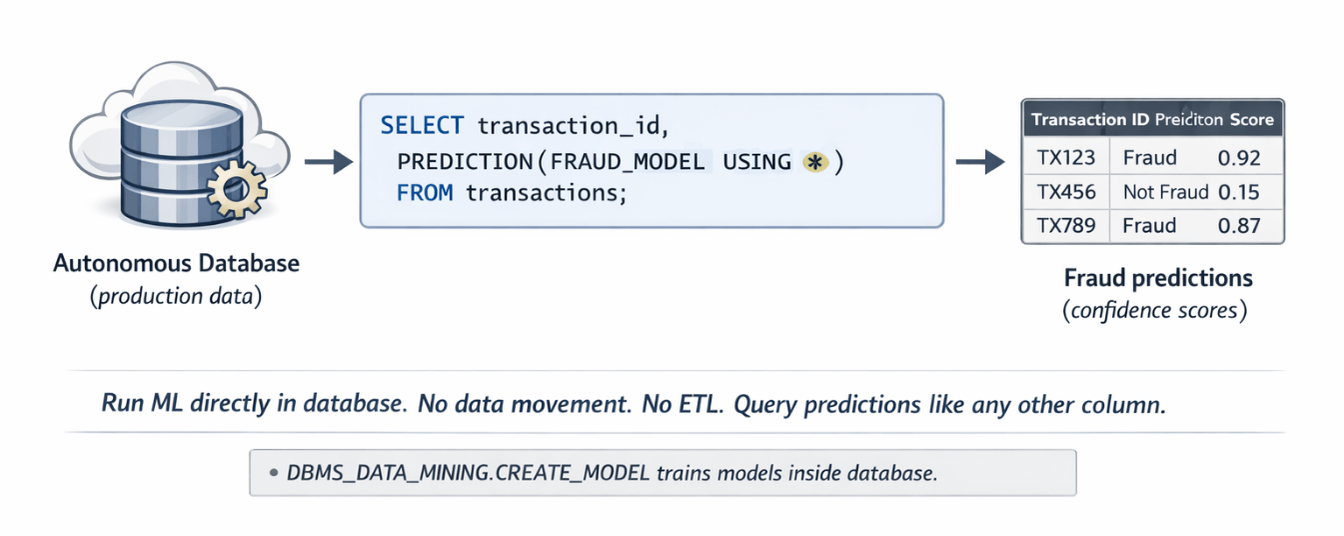
Oracle Machine Learning runs algorithms inside the database itself, so your data never leaves and you pay nothing to move it.
Build models with SQL or Python using algorithms optimized for Oracle Database, and get database parallelism automatically.
-- Train model directly in database
BEGIN
  DBMS_DATA_MINING.CREATE_MODEL(
    model_name => 'FRAUD_DETECTION_MODEL',
    mining_function => DBMS_DATA_MINING.CLASSIFICATION,
    data_table_name => 'TRANSACTIONS',
    case_id_column_name => 'TRANSACTION_ID',
    target_column_name => 'IS_FRAUD',
    settings_table_name => 'MODEL_SETTINGS'
  );
END;
AutoML selects algorithms, tunes hyperparameters, evaluates performance, and picks the best model without manual experimentation.
SQL integration lets analysts work with models using tools they already know. No Python required. Query predictions like any other table.
-- Score new data using deployed model
SELECT customer_id, transaction_id,
       PREDICTION(FRAUD_DETECTION_MODEL USING *) as fraud_prediction,
       PREDICTION_PROBABILITY(FRAUD_DETECTION_MODEL USING *) as confidence
FROM new_transactions;
Connecting External Models to Database
Deploy external LLMs (PyTorch, TensorFlow) and query from database.
OCI Data Science endpoints expose HTTP APIs, which the database calls through UTL_HTTP, so your SQL queries can invoke GPT-3, Llama, or custom models directly.
This enables hybrid queries that process structured data in the database and unstructured text in the LLM, then return combined results in a single call.
-- Call deployed LLM from database query
SELECT customer_id,
       review_text,
       ml_endpoint_predict(
         'https://modeldeployment.eu-frankfurt-1.oci.oraclecloud.com/ocid1.model...',
         JSON_OBJECT('text' value review_text)
       ) as sentiment
FROM product_reviews;
Cost Optimization Strategies
OCI pricing favors enterprise workloads.
Universal Credits and Predictable Pricing
Oracle prices everything through Universal Credits: buy a commitment, then apply the credits to any service, from GPU instances to storage to database, all from the same pool.
There's no separate Reserved Instance market to navigate and no maze of discount programs, just credit purchases with volume discounts built in.
Annual Flex locks in credits for a year, usable across any OCI service, typically at a 33% discount versus pay-as-you-go.
Monthly Flex commits to a monthly spend instead, trading some discount (around 25%) for more flexibility.
Pay as you go charges for actual usage with no commitment. It carries the highest unit cost, which makes it best suited for experimentation.
GPU Cost Comparison
Real pricing (approximate, verify current rates):
H100 8-GPU instance (BM.GPU.H100.8)
| Provider | Instance | Hourly Price | Monthly Price (approx) | Savings vs OCI |
|---|---|---|---|---|
| OCI | BM.GPU.H100.8 | $32 | ~$23,040 | Baseline |
| AWS | P5.48xlarge | $98 | ~$70,560 | 67% more expensive |
| Azure | ND96isr_H100_v5 | $90 | ~$64,800 | 64% more expensive |
OCI H100 savings: 60-70% below AWS/Azure for equivalent H100 capacity
A10 single GPU (VM.GPU.A10.1)
| Provider | Instance | Hourly Price | Monthly Price (approx) |
|---|---|---|---|
| OCI | VM.GPU.A10.1 | $1.275 | ~$917 |
| AWS | G5.xlarge | $1.006 | ~$724 |
| GCP | A2 | $1.35 | ~$972 |
Pricing runs competitive with AWS, undercuts GCP, and comes with a simpler billing structure than either.
Network Egress Optimization
| Provider | Free Tier | Additional Egress | 900GB Monthly Cost |
|---|---|---|---|
| OCI | 10TB free | $0.0085/GB | $0 |
| AWS | 1GB free | $0.09/GB | $80.91 |
Example: 1M predictions daily at 1KB each = 30GB/day = 900GB/month
Universal Credits + 10TB free egress = predictable ML costs. We help you structure the commitment.
Annual Flex provides 33% discount on credits. Monthly Flex gives 25% with more flexibility. 10TB free egress saves thousands for global inference deployments.
Our AI cost optimization helps you:
- Analyze baseline GPU usage – Right-size Universal Credits commitment
- Structure credit purchases – Annual Flex for steady workloads, pay-as-you-go for experimentation
- Optimize egress costs – 10TB free covers most inference traffic
- Compare spot/preemptible – Available on OCI for fault-tolerant batch workloads
Security and Compliance
Enterprise security is built into OCI's foundation, not bolted on.
Identity and Access Management
IAM policies define granular permissions, and dynamic groups let compute instances act without storing credentials anywhere.
Allow dynamic-group ml-compute-instances to manage objects in compartment ml-models
Allow group data-scientists to use data-science-family in compartment ml-development
Allow group ml-engineers to manage model-deployments in compartment production
Federation with enterprise identity providers works out of the box through SAML 2.0 and OAuth 2.0, so you can integrate Active Directory, Okta, or Azure AD directly.
MFA enforces strong authentication for privileged operations, using either hardware tokens or a mobile app TOTP.
Network Isolation
Virtual Cloud Networks isolate workloads behind private subnets with no internet access, and bastion hosts control administrative access into them.
Security Lists and Network Security Groups act as firewalls: you define allowed traffic explicitly, and everything else gets denied by default.
Service Gateway keeps traffic to Object Storage and Autonomous Database inside the OCI network, so it never touches the public internet.
FastConnect provides a dedicated network connection from on-premises to OCI that bypasses the public internet entirely, meeting compliance requirements for regulated data.
Data Encryption
All data encrypts at rest by default using OCI-managed keys, with zero configuration required.
Customer-managed keys through OCI Vault hand you complete control: you create and rotate the keys, OCI uses them for encryption, and you can revoke access at any time.
Hardware Security Modules store the most sensitive keys and carry FIPS 140-2 Level 3 certification, meeting the strictest compliance requirements.
Monitoring and Management
OCI provides comprehensive monitoring without extra charges.
Monitoring Service
It automatically collects metrics from every OCI resource, including GPU utilization, memory usage, and network throughput, with no agent installation required.
You can create alarms on any metric, trigger notifications through email, PagerDuty, or Slack, and run Functions for automated remediation.
Custom metrics via API extend monitoring to your application layer, so you can track model accuracy, log prediction latency, and alert on business KPIs.
# Publish custom metric
from oci.monitoring import MonitoringClient

monitoring_client = MonitoringClient(config)

metric_data = {
    "namespace": "ml_models",
    "compartmentId": "ocid1.compartment...",
    "name": "prediction_latency_ms",
    "dimensions": {"model": "fraud_detection", "version": "v2"},
    "datapoints": [{
        "timestamp": datetime.now(),
        "value": 45.2
    }]
}

monitoring_client.post_metric_data(post_metric_data_details=metric_data)
Logging Service
Centralized logging aggregates VCN flow logs, audit logs, and application logs from every service into one searchable place.
Log queries use a simple syntax to filter by time range, resource, or severity, and results export to Object Storage for long-term retention.
SIEM integration works via API or streaming, so you can send security events to Splunk, LogRhythm, or custom tools.
Getting Started: First Deployment
Deploy your first model in two weeks.
Week 1: Setup and Preparation
Create an OCI tenancy or use an existing account, then set up identity and access management with the right user groups. Create separate compartments for development, testing, and production so each environment gets its own security policies and cost tracking.
Set up a VCN with private subnets for ML workloads, and configure an internet gateway only where external access is actually needed. Create security lists that allow just the required traffic, and add a service gateway for private access to Object Storage and other OCI services without exposing anything to the internet.
Configure OCI Vault for secrets management, storing API keys, database credentials, and other sensitive information there instead of in code. Enable audit logging to track every access and change for compliance.
Launch a Data Science notebook session with the right compute shape: a GPU shape like VM.GPU.A10.1 for training locally, or a CPU shape like VM.Standard.E4.Flex for deployment and inference testing. Install the libraries you need, including transformers, torch, onnx, and scikit-learn.
Week 2: Model Deployment
Train or import your model in a supported format. OCI Data Science accepts ONNX, PyTorch, TensorFlow SavedModel, and scikit-learn pickle formats, and Hugging Face models should be exported to ONNX first for the best inference performance.
Register the model in the Model Catalog with full metadata: training date, accuracy metrics, F1 scores, input schema, output format, and version. Add tags for model type, use case, and owner so teams can find and reuse it later.
Create a model deployment and pick an instance shape based on model size and latency requirements; VM.GPU.A10.1 works well for 7B-parameter models. Enable auto-scaling starting at 1-10 instances, and configure a load balancer to distribute traffic across them.
Test the endpoint thoroughly with data that reflects real production scenarios, measuring P50, P95, and P99 latency alongside prediction accuracy against a validation dataset. If latency runs high or GPU utilization stays below 60%, adjust the instance shape.
Configure monitoring and alerts with concrete thresholds: P95 latency under 200ms, error rate under 1%, and throughput above the expected request rate. Route alarms to the operations team by email or PagerDuty.
Document the full deployment for the team: endpoint URL, authentication method (API key or instance principal), request/response format with examples, expected response times, troubleshooting steps, and escalation procedures.
Maximizing Value with Oracle Cloud ML
Oracle Cloud Infrastructure delivers real advantages for enterprise LLM deployments. Its price-performance lead reaches 44% over major competitors, with H100 GPU instances costing 60-70% less than equivalent AWS or Azure offerings, and Universal Credits keep monthly budgeting predictable.
Autonomous Database integration is the differentiator competitors can't easily match: ML algorithms run directly inside the database, and production data joins model predictions in a single SQL statement. That architecture removes a layer of complexity and eliminates data synchronization work entirely.
The OCI Data Science platform covers the complete MLOps lifecycle, from managed notebooks through automated pipelines to model deployment. Enterprise security adds 90+ compliance certifications, with data residency controls that meet GDPR and HIPAA requirements.
Get the most value by starting with your existing Oracle Database investment, deploying models with the Oracle tools your team already knows. Scale infrastructure to actual workload demand using auto-scaling and monitoring, not guesswork.
Conclusion
Oracle Cloud Infrastructure isn't a compromise. It's a superior financial choice for enterprise LLM deployments, and the H100 instance pricing alone (60-70% below AWS/Azure) makes OCI compelling for GPU-intensive workloads.
Universal Credits eliminate billing complexity, and Autonomous Database integration enables ML without data movement, a real differentiator. Add 10TB of free monthly egress, which saves thousands on global inference, and for organizations already running Oracle databases, the decision makes itself.
For new adopters, OCI deserves serious consideration on price-performance alone. Start with a single H100 instance for production inference, or Autonomous Database for embedded ML, and your cloud bill will show the difference.
Frequently Asked Questions
How does OCI ML compare to AWS SageMaker in terms of features?
OCI vs. AWS SageMaker - When to choose which:
| Factor | OCI | AWS SageMaker |
|---|---|---|
| Core MLOps | ✅ Notebooks, pipelines, deployment, monitoring | ✅ Same (plus more) |
| Specialized features | — | Clarify (bias), Neo (edge), broader algorithm marketplace |
| Database integration | ✅ Direct ML in Autonomous Database; native JSON, graph, spatial | Standard |
| Cost savings | 30-60% typical | — |
| Predictable pricing | ✅ Universal Credits | — |
| Choose when | Value cost savings, Oracle database integration, predictable pricing | Need cutting-edge features or massive ecosystem |
Can I deploy large language models (70B+ parameters) on OCI?
Yes. Use BM.GPU.H100.8 instances with 640GB total GPU memory. This handles models up to 200B parameters comfortably.
For models that exceed single-instance capacity, deploy across multiple instances using tensor parallelism with DeepSpeed or Megatron-LM. OCI's RDMA networking keeps inter-instance communication fast enough to make that practical.
4-bit quantization (GPTQ, AWQ) reduces memory requirements by 75%. A 70B model needing 140GB full precision requires only 35GB quantized. Fits easily on single VM.GPU4.8 instance.
What's the migration path from AWS or Azure to OCI?
Export models from SageMaker or Azure ML in a standard format such as ONNX, PyTorch, or TensorFlow SavedModel, and they import directly into OCI.
Data migration runs through OCI Data Transfer Service: ship drives to Oracle for petabyte-scale datasets, or use network transfer for anything smaller.
Applications calling model endpoints need minimal changes: update the endpoint URLs, adjust authentication headers for OCI signatures, and the rest of the logic stays identical.
| Phase | Duration | Activities |
|---|---|---|
| Infrastructure setup | 1 week | OCI environment provisioning |
| Model deployment & testing | 1 week | Export models from source, import to OCI |
| Pipeline recreation & validation | Additional time | Recreate workflows |
| Total typical | 2-4 weeks | — |
Does OCI support auto-scaling for model deployments?
Yes. Model deployments let you configure minimum and maximum instance counts, and OCI scales between them automatically based on request load.
Scaling triggers on CPU utilization, memory usage, or request count, against thresholds you define, and OCI maintains those targets automatically.
Scale-up takes 2-3 minutes as new instances start, warm up, and join the load balancer. Scale-down waits out a cooldown period, five minutes by default, before removing instances.
For traffic spikes, set minimum instances to cover baseline load and maximum instances to absorb peaks. That combination avoids cold-start latency while still keeping a ceiling on cost.
| Parameter | Value |
|---|---|
| Scale-up time | 2-3 minutes |
| Scale-down cooldown | 5 minutes (default) |
| Minimum instances | Set to handle baseline load |
| Maximum instances | Accommodate peaks |
| Scaling triggers | CPU utilization, memory usage, request count |
How does OCI handle regulatory compliance for ML workloads?
OCI meets major compliance frameworks, including SOC 1/2/3, ISO 27001, HIPAA, PCI DSS, GDPR, and FedRAMP; the full list is at oracle.com/cloud/compliance.
Data residency controls keep data in the regions you specify, and replication policies prevent it from crossing borders.
Audit logs track every action, including who accessed which data and when, with tamper-proof logging that meets regulatory retention requirements.
Oracle can provide a BAA for HIPAA workloads and a Data Processing Addendum for GDPR, and its compliance teams assist directly with regulated industry deployments.
How much does OCI's BM.GPU.H100.8 shape cost per hour?
The BM.GPU.H100.8 bare-metal shape (8x H100 GPUs, 640GB VRAM, 2TB system RAM) costs $32/hour on Oracle Cloud (~$23,040/month) — 67% cheaper than the equivalent AWS P5.48xlarge at $98/hour.