Azure ML: Enterprise LLM Platform Built for Scale
Deploy ML models on Azure with enterprise-grade security and Microsoft-native governance, while reducing costs up to 72% through Reserved Instances, Spot VMs, and predictive autoscaling.
TLDR;
- Save up to 72% with 3-year Reserved Instances and Spot VMs for batch workloads
- Native Microsoft Entra ID integration delivers enterprise governance out of the box
- MLOps v2 architecture separates concerns for team collaboration at scale
- 90+ compliance certifications cover GDPR, HIPAA, and regional data residency requirements
Deploy machine learning models to Azure with enterprise-grade security and governance. Azure ML holds 29% of the cloud ML platform market with native integration across the Microsoft ecosystem.
This guide covers production deployment strategies that save up to 72% while meeting the compliance requirements that regulated industries demand.
Why Azure ML Dominates Enterprise LLM Deployments
Azure ML integrates natively with Microsoft's enterprise ecosystem. Microsoft Entra ID handles authentication, Azure Policy enforces compliance, and Microsoft Purview tracks data lineage.
For organizations already running Microsoft 365 or Azure workloads, this integration eliminates the third-party governance tools that SageMaker and GCP require to match the same capability.
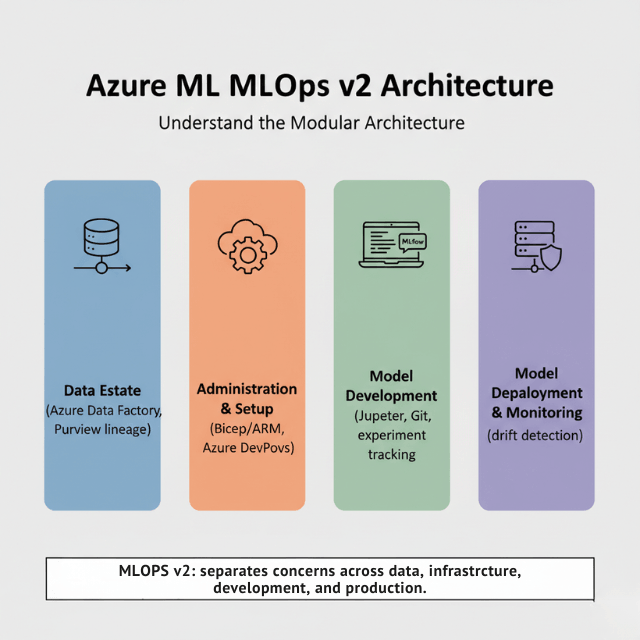
MLOps v2 architecture separates concerns cleanly across four modules: Data Estate for pipelines, Administration and Setup for infrastructure and CI/CD, Model Development for collaborative training environments, and Model Deployment and Monitoring for production operations.
Reserved Instances save up to 72% compared to on-demand pricing, while Spot VMs cut batch processing costs by 90%. Over 90 compliance certifications cover GDPR, HIPAA, SOC 2, and ISO 27001, with regional data residency guarantees that apply automatically when you select a compliant region.
| Metric | Value |
|---|---|
| Cloud ML platform market share | 29% |
| Compliance certifications | Over 90 (GDPR, HIPAA, SOC 2, ISO 27001) |
Azure ML Workspace Architecture
Azure ML builds on a workspace-centric design. The workspace connects five core Azure services automatically:
| Service | Purpose |
|---|---|
| Azure Container Registry | Stores custom Docker images with version control |
| Azure Storage Account | Holds datasets, model artifacts, experiment outputs; built-in encryption |
| Application Insights | Monitors deployed models (latency, throughput, error rates) |
| Azure Key Vault | Manages secrets and encryption keys with automatic rotation |
| Managed Virtual Network | Isolates all ML workloads; traffic never touches public internet |
The MLOps v2 pattern divides ML operations into four modules. Data Estate handles data operations through Azure Data Factory pipelines and Azure Synapse for large datasets, with Microsoft Purview tracking lineage and enforcing governance.
Administration and Setup manages infrastructure using Bicep or ARM templates with Azure DevOps or GitHub Actions automating deployments. Model Development provides data scientists with Jupyter notebooks integrated with Git and MLflow experiment tracking.
Model Deployment and Monitoring handles production operations across AKS, Container Instances, Functions, and IoT Edge, with continuous monitoring that detects drift and triggers retraining.
Production Azure ML requires separate environments for each stage.
| Environment | Configuration | Cost Optimization |
|---|---|---|
| Development | Auto-scaling compute with minimum 0 nodes | Pay nothing when idle |
| Testing | Automated validation pipelines (security scans, performance tests, bias checks) | Gated promotions |
| Production | High-availability, multi-region deployment, health checks | Reserved Instances |
ML Registries enable cross-workspace collaboration so different teams work in isolated environments while sharing approved models without compromising security boundaries.
Deployment Options for Production LLMs
Azure Kubernetes Service (AKS) is the production standard for enterprise-scale ML workloads. Configure dedicated node pools for inference, separate from management functions, to prevent noisy neighbor problems.
Standard Load Balancer with Application Gateway adds advanced traffic management: SSL termination at the gateway, Web Application Firewall blocking common attacks, and path-based routing directing requests to specific models.
Horizontal Pod Autoscaling responds to demand based on CPU, memory, or custom metrics like queue depth. GPU node pools require NVIDIA device plugins with carefully configured GPU scheduling policies.
Hybrid Deployment with Azure Arc
- Extends Azure ML to any Kubernetes cluster (on-premises, edge, competitor clouds)
- Addresses data sovereignty: process sensitive data locally, send only aggregated results to cloud
- Meets GDPR requirements without compromising ML capabilities
- AKS Edge Essentials provides lightweight Kubernetes for edge with offline operation
- Security: certificates from Azure Key Vault, encrypted communication
Event Grid integration enables sophisticated triggers: inference runs when data arrives in Blob Storage, when a message hits a queue, or when a schedule fires. Premium plans eliminate cold starts entirely.
| Option | Best For | Limitations | Pricing Model |
|---|---|---|---|
| AKS | Production enterprise-scale | Complex setup | Standard AKS + node costs |
| Azure Functions | Intermittent inference | Pay-per-execution only | ~$1/month for 10,000 runs |
| Container Instances | Testing and development | No production: single-node only, 1GB model size limit in many regions | Per-second billing |
| Azure Arc | Hybrid (on-prem, edge, competitor clouds) | Requires Kubernetes | Standard + Arc fees |
Security and Governance at Scale
Managed virtual networks provide network isolation by default. Private endpoints connect to all Azure services Storage, Key Vault, and Container Registry all use private IPs with traffic never traversing the internet.
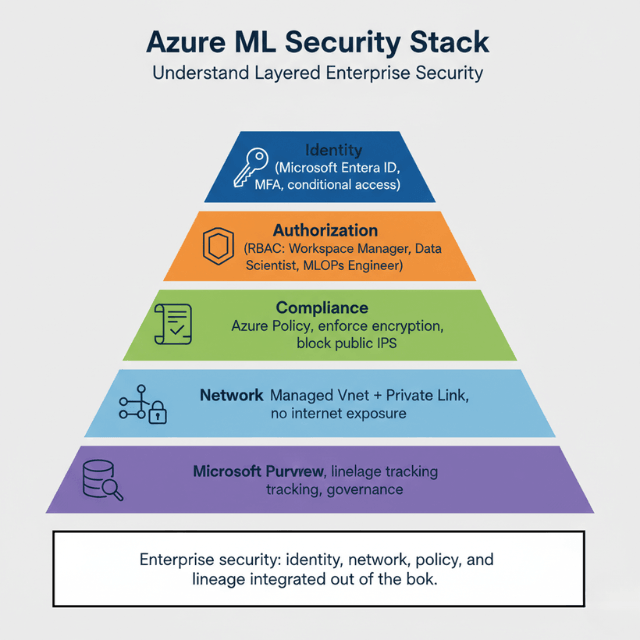
Network Security Groups act as virtual firewalls, defining allowed traffic explicitly and denying everything else by default. Azure Private Link extends private connectivity beyond your subscription for connecting to partner services securely.
Microsoft Entra ID handles authentication with multi-factor authentication as standard and conditional access policies adding context-aware security. Role-Based Access Control assigns permissions granularly.
| Role | Permissions |
|---|---|
| Workspace Manager | Controls all workspace resources |
| Data Scientist | Develops and trains models |
| MLOps Engineer | Deploys and monitors production models |
| Data Engineer | Manages datasets and pipelines |
Encryption protects data at rest and in transit, with Azure Storage encryption using 256-bit AES automatically. Customer-managed keys provide complete control: you create and rotate keys in your Key Vault, and Azure uses them for encryption.
| Component | Purpose |
|---|---|
| Network Security Groups | Virtual firewalls; deny everything by default |
| Azure Private Link | Private connectivity beyond subscription |
| Microsoft Entra ID | Authentication with MFA + conditional access |
| Role-Based Access Control | Granular permissions (Workspace Manager, Data Scientist, MLOps Engineer, Data Engineer) |
| Managed identities | Eliminate credential storage |
| Azure Policy | Enforce compliance automatically (block public IPs, require encryption) |
| Microsoft Purview | End-to-end data lineage tracking |
Managed VNets, Entra ID, Azure Policy – we implement enterprise security.
Azure ML provides the tools. Implementing them correctly requires expertise – especially for regulated industries.
We help you:
- Configure managed virtual networks – Private endpoints, no public internet exposure
- Set up Entra ID + RBAC – Least-privilege access for every role
- Enforce Azure Policy – Automatic compliance, blocking non-compliant resources
- Implement customer-managed keys – Complete encryption control for GDPR
Cost Optimization Strategies on Azure ML
Reserved Instances deliver the highest savings for steady-state workloads.
| Pricing Model | Savings vs. On-Demand | Best For |
|---|---|---|
| 1-year Reserved Instances | 42% | Steady-state workloads |
| 3-year Reserved Instances | 72% | Long-term production |
| Spot VMs | Up to 90% | Batch processing, training with checkpointing |
| Azure Hybrid Benefit | Additional 40-50% | If you have existing Windows Server/SQL Server licenses |
| AmlCompute scale to zero | 100% when idle | Development, testing |
| Combined (RIs + Spot + dev/test) | 75-85% | Full workload optimization |
Reservations apply automatically without code changes.
| Scenario | Configuration | On-Demand Monthly | With 3-Year RI | Annual Savings |
|---|---|---|---|---|
| Production deployment | 10 × D4s v3 instances | $11,680 | $3,270 | $100,920 |
Configure eviction policies carefully: "Deallocate" preserves data while "Delete" removes everything. Never use Spot VMs for real-time inference endpoints or production services without fallback capacity.
AmlCompute clusters scale to zero automatically: set minimum nodes to 0 and you pay nothing when idle. Predictive autoscaling uses ML to forecast demand, reducing scaling events by 40% compared to reactive approaches while lowering P95 latency during traffic spikes.
Right-size VMs based on actual utilization monitoring downsize underutilized instances and upsize when performance suffers. For storage, lifecycle policies move data automatically from Hot to Cool after 30 days (50% cost reduction) and to Archive after 180 days (90% cost reduction), with no manual management required.
Monitoring and MLOps for Azure LLMs
Application Insights tracks every request to deployed models. Monitor request latency at P50, P95, and P99 percentiles, throughput in requests per second, error rates for 4xx and 5xx responses, and dependency failures.
Availability tests run synthetic requests continuously from multiple regions so you catch problems before users report them. Custom metrics add business context: track prediction confidence scores, monitor feature distributions, and alert on unusual patterns.
Azure ML Model Monitor detects data drift and model drift automatically. Data drift catches input distribution changes by comparing production inputs to training data with statistical tests that quantify drift and trigger alerts when thresholds breach.
Model drift tracks prediction quality over time capture ground truth labels, calculate accuracy metrics continuously, and alert when performance degrades. Feature importance tracking shows which inputs matter most and flags when critical features become less predictive.
Audit logs capture every action, with LogAnalytics storing logs for KQL queries that extract insights for regulatory audit requirements. For MLOps, track every change in version control: training scripts, ARM templates, MLflow models with full lineage, datasets, and Docker images.
Tag container images with git commits and timestamps for perfect reproducibility. Use Azure DevOps or GitHub Actions to promote models between environments, with automated tests gating promotions and manual approval required before production deployment.
Getting Started with Azure ML
Deploy your first model in four weeks.
| Week | Activities |
|---|---|
| Week 1: Foundation | Create subscription with billing alerts, set up resource group, deploy workspace with managed VNet, create compute clusters (min 0 nodes), connect Git repo |
| Week 2: Model Development | Import pre-trained model (Hugging Face/Azure Model Catalog), create MLflow experiment, register model in Model Registry |
| Week 3: Deployment | Deploy to managed online endpoint, configure health checks, set up autoscaling, monitor metrics, run load tests |
| Week 4: Production Readiness | Set up multi-region deployment with Traffic Manager, implement model monitoring, create runbooks, deploy with 48 hours close monitoring |
Azure ML provides enterprise-grade ML infrastructure with deep Microsoft ecosystem integration, delivering the security, governance, and compliance capabilities that regulated industries require; its MLOps v2 architecture enables team collaboration while maintaining separation of concerns.
Cost optimization through Reserved Instances and Spot VMs reduces infrastructure spending by 72-90%. Start with managed online endpoints for deployment simplicity, scale to AKS when you need advanced features, and leverage Azure Arc for hybrid deployments that meet data sovereignty requirements.
Conclusion
Azure ML delivers enterprise-grade LLM deployment with native security, governance, and cost optimization built into the platform. The MLOps v2 architecture provides clear separation between data operations, infrastructure, model development, and production deployment enabling regulated industries to meet compliance requirements without sacrificing velocity.
For organizations already invested in Microsoft's ecosystem, Azure ML eliminates the third-party governance tools that competitors require. Managed virtual networks, Entra ID authentication, Azure Policy enforcement, and Purview data lineage work together out of the box. Hybrid deployments via Azure Arc address data sovereignty requirements directly.
Cost optimization delivers measurable results: 3-year Reserved Instances save 72%, Spot VMs cut batch processing by 90%, and compute clusters that scale to zero eliminate idle spending. Most organizations reduce ML infrastructure costs by 40-70% within 90 days.
Start with a single workspace, deploy your first model in four weeks, then expand across teams and regions. Azure ML transforms enterprise ML from an unmanaged experiment into a governed, cost-efficient, production platform.
Frequently Asked Questions
What makes Azure ML better than AWS SageMaker for enterprises?
Azure ML provides superior governance through native integration with Microsoft Entra ID, Azure Policy, and Microsoft Purview governance features that SageMaker requires third-party tools to match.
Azure Arc enables true hybrid deployment across any Kubernetes cluster including on-premises and edge, which helps meet data sovereignty requirements while maintaining consistent operations.
Predictive autoscaling uses ML to forecast demand, reducing scaling events by 40% compared to reactive approaches. For organizations already using Microsoft 365 or Azure, the ecosystem integration reduces complexity and licensing costs.
How much can I actually save with Reserved Instances?
For steady-state production workloads running 24/7, 3-year Reserved Instances save 72% versus pay-as-you-go.
A typical deployment running 10 D4s v3 instances costs $11,680 per month on-demand with 3-year Reserved Instances, the same capacity costs $3,270 per month, saving $100,920 annually.
Combine Reserved Instances with Spot VMs for dev/test environments and total savings often reach 75-85% compared to full pay-as-you-go pricing.
Can Azure ML handle models larger than 100B parameters?
Large Model Support (100B+ Parameters)
| Requirement | Azure ML Capability |
|---|---|
| Deployment target | AKS with NC or ND series VMs (multiple GPUs per node) |
| For models exceeding single-node capacity | Tensor parallelism (DeepSpeed, Megatron-LM, or Ray) |
| Networking | InfiniBand for low-latitude communication |
| Max single-node capacity (NC A100 v4) | 8 × NVIDIA A100 GPUs, 640GB total GPU memory |
| Models handled by single node | Most models under 200B parameters |
| Larger models | Require multi-node deployments with optimized model parallelism |
How does Azure ML ensure GDPR compliance?
| Requirement | Azure ML Feature |
|---|---|
| Data residency | Data never leaves specified regions (automatic) |
| Compliance enforcement | Azure Policy – blocks non-compliant configurations before deployment |
| Data lineage tracking | Microsoft Purview – end-to-end lineage (satisfies GDPR Article 30 record-keeping) |
| Encryption control | Customer-managed keys – Microsoft cannot access data without your keys |
| Right-to-be-forgotten | Customer-managed keys make data cryptographically inaccessible |
What's the fastest way to deploy an LLM on Azure?
Azure Kubernetes Service (AKS) is the production-standard path for enterprise-scale LLM deployment, using dedicated inference node pools and Horizontal Pod Autoscaling to handle production traffic reliably. The tradeoff is setup complexity, since AKS takes longer to configure than lighter options. Smaller teams needing faster time-to-production can start with managed online endpoints or Azure Container Instances for testing and development, or Azure Functions for intermittent inference at roughly $1 per month for 10,000 runs, then migrate to AKS once traffic volume justifies the added operational overhead.
Summarize this post with:
