Automate AWS Cost Cuts with Native Tools
Automate AWS cost optimization using Cost Explorer, Trusted Advisor, Compute Optimizer, and Cost Anomaly Detection to reduce cloud spend by 30-50% with minimal manual effort.
TL;DR
- Save 30-50% automatically using AWS native tools—no third-party software needed. Cost Explorer, Trusted Advisor, Compute Optimizer, and Cost Anomaly Detection integrate directly with your AWS environment.
- Cost Explorer visualizes spending and forecasts future costs. API access enables programmatic cost management: generate automated reports, track rightsizing opportunities (15-25% savings), and identify Reserved Instance purchase recommendations (up to 72% savings).
- Trusted Advisor scans for idle resources, underutilized instances, and unattached volumes—typically revealing 20-40% waste. Combine with Systems Manager Automation to auto-remediate low-risk findings (e.g., delete unattached EBS volumes >30 days old).
- Compute Optimizer uses ML to recommend optimal instance types and sizes, delivering 25-35% cost reduction on optimized resources. Cost Anomaly Detection catches unusual spending spikes 6-24 hours after they occur, preventing minor issues from becoming major budget hits.
- AWS Budgets with automated actions create guardrails: stop EC2 instances, restrict resource creation, or trigger Lambda functions when spending thresholds are exceeded.
AWS native cost optimization tools provide powerful automation capabilities that reduce manual effort while delivering 30-50% cost savings. Organizations managing complex AWS environments often struggle with manual cost reviews, delayed optimization actions, and reactive rather than proactive cost management.
Native AWS tools including Cost Explorer, Trusted Advisor, Compute Optimizer, and Cost Anomaly Detection offer automated recommendations, real-time alerts, and actionable insights directly integrated into your AWS environment.
These tools eliminate the need for expensive third-party platforms while providing deep integration with AWS services. Cost Explorer visualizes spending patterns and forecasts future costs. Trusted Advisor scans your infrastructure for optimization opportunities across cost, performance, security, and fault tolerance.
Compute Optimizer uses machine learning to recommend optimal instance types and sizes. AWS Cost Anomaly Detection automatically identifies unusual spending patterns before they impact budgets. This guide explores how to leverage these native tools for automated cost optimization.
AWS Cost Explorer Automation
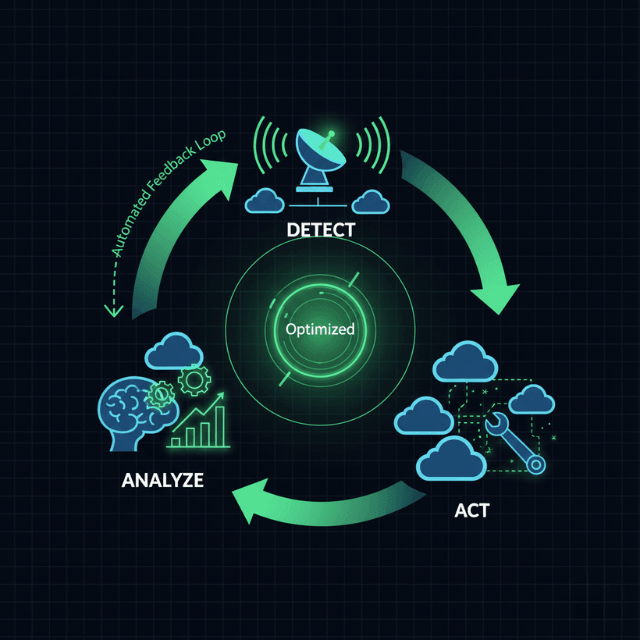
AWS Cost Explorer provides visualization and analysis of AWS spending patterns with API access enabling programmatic cost management. The service offers detailed breakdowns by service, region, account, and custom cost allocation tags.
Built-in forecasting uses machine learning to project future costs based on historical trends, helping teams plan budgets and identify cost trajectory changes.
Rightsizing recommendations analyze EC2 instance utilization and suggest downsizing opportunities. These recommendations consider CPU, memory, and network utilization patterns over the past 14 days, typically identifying 15-25% potential savings through instance optimization.
Reserved Instance and Savings Plans purchase recommendations analyze usage patterns and suggest commitment-based discounts that deliver up to 72% savings.
Automate Cost Explorer through AWS CLI or SDKs to generate regular reports, extract spending data for custom dashboards, identify cost anomalies programmatically, and trigger automated responses to spending thresholds.
Schedule daily or weekly cost reports that email stakeholders, alerting them to unusual patterns before month-end surprises.
AWS Trusted Advisor Integration
AWS Trusted Advisor performs automated checks across five categories including cost optimization, performance, security, fault tolerance, and service limits.
The cost optimization checks identify idle resources, underutilized instances, unattached EBS volumes, and outdated Reserved Instances, typically revealing 20-40% potential savings for organizations not actively managing costs.
Business and Enterprise Support plans unlock full Trusted Advisor capabilities including all cost optimization checks, automated refresh schedules, and programmatic access via API.
Basic Support provides limited checks but still offers value for smaller deployments. The Trusted Advisor API enables automated workflows that fetch recommendations, create tickets for remediation, implement approved optimizations automatically, and track savings over time.
Integration with AWS Systems Manager Automation Documents allows automatic remediation of specific findings.
For example, automatically delete unattached EBS volumes older than 30 days, stop EC2 instances with less than 5% CPU utilization for 7+ days, or convert standard EBS volumes to gp3 for cost savings.
AWS Compute Optimizer
AWS Compute Optimizer uses machine learning to analyze resource utilization and recommend optimal configurations for EC2 instances, Auto Scaling groups, EBS volumes, and Lambda functions.
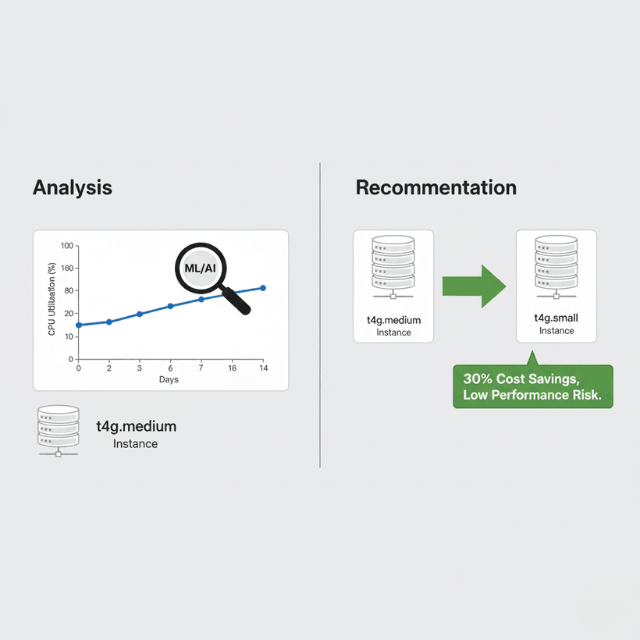
The service examines up to 14 days of CloudWatch metrics including CPU utilization, memory consumption, network throughput, and disk I/O patterns.
Recommendations span multiple dimensions including instance type changes that maintain or improve performance at lower cost, instance size adjustments for right-sizing, EBS volume type optimization from gp2 to gp3 for better price-performance, and Lambda memory configuration adjustments that balance cost and execution time.
Organizations implementing Compute Optimizer recommendations typically achieve 25-35% cost reduction on optimized resources. The service provides projected savings estimates, performance risk assessments, and migration effort guidance for each recommendation.
Export recommendations via API or console for batch processing, integration with change management workflows, and automated implementation during maintenance windows.
Cost Anomaly Detection
Cost Anomaly Detection uses machine learning to identify unusual spending patterns, alerting teams to potential issues before they significantly impact budgets.
The service analyzes spending history and establishes baseline patterns, detecting deviations that indicate configuration errors, unexpected usage spikes, or resource sprawl.
Configure monitors for specific AWS services, linked accounts, cost allocation tags, or usage types. Set alert thresholds in dollars or percentage deviation from expected spend.
Notifications integrate with SNS, allowing email, Slack, PagerDuty, or custom webhook destinations. Detection latency typically ranges from 6-24 hours after anomalous spending occurs.
Common anomalies detected include misconfigured auto-scaling that launches excessive instances, forgotten resources running in development accounts, data transfer spikes from configuration changes, and gradual cost creep from organic growth.
Early detection prevents minor issues from becoming major budget impacts, with organizations reporting 15-30% reduction in waste through proactive anomaly response.
AWS Budgets Automation
AWS Budgets creates custom cost and usage budgets with alerts when actual or forecasted spending exceeds thresholds. Configure budgets for total AWS spending, specific services, linked accounts, cost allocation tags, or Reserved Instance utilization. Alert thresholds trigger at specified percentages like 80%, 90%, or 100% of budgeted amount.
Actions associated with budgets enable automated responses including applying IAM policies that restrict resource creation, stopping EC2 instances when budgets exceed limits, triggering Lambda functions for custom remediation, and sending notifications to stakeholders. These automated actions prevent runaway costs while maintaining operational flexibility.
Budget reports provide regular spending updates via email, tracking performance against targets and highlighting areas requiring attention. Combine budgets with Cost Anomaly Detection for comprehensive cost monitoring that catches both gradual overruns and sudden spikes.
Conclusion
AWS native cost optimization tools provide automated capabilities that reduce cloud spending by 30-50% with minimal manual effort. Cost Explorer delivers spending visualization and forecasting with API access for automated reporting.
Trusted Advisor identifies optimization opportunities across cost, performance, and security with automated remediation potential. Compute Optimizer recommends right-sizing actions backed by machine learning analysis of actual utilization patterns. Cost Anomaly Detection catches unusual spending before it impacts budgets.
AWS Budgets creates guardrails with automated actions preventing cost overruns. Together, these tools enable proactive cost management without expensive third-party platforms. Implement systematic reviews of recommendations, automate low-risk optimizations, and establish governance policies that prevent cost inefficiencies from accumulating.
Frequently Asked Questions
Do I need third-party cost management tools if I use AWS native tools?
AWS native tools provide substantial capability for most organizations, especially those operating primarily on AWS.
Third-party platforms add value for multi-cloud environments, advanced allocation and chargeback requirements, or sophisticated FinOps workflows. Start with native tools and evaluate third-party solutions only if specific gaps emerge.
How often should I review Cost Explorer and Trusted Advisor recommendations?
Weekly reviews catch optimization opportunities early while balancing analysis time. Automate weekly exports of recommendations to email or dashboards.
Monthly deep reviews analyze trends and validate that implemented optimizations delivered expected savings. Quarterly reviews assess overall cost optimization strategy effectiveness.
Can I automate the implementation of rightsizing recommendations?
Yes, but implement gradually with safeguards. Start by automating low-risk changes like converting gp2 to gp3 EBS volumes or deleting unattached volumes.
For instance changes, automate during maintenance windows with automated rollback if performance degrades. Always validate recommendations through load testing before automating production instance changes.
Summarize this post with:
Ready to put this into production?
Our engineers have deployed these architectures across 100+ client engagements — from AWS migrations to Kubernetes clusters to AI infrastructure. We turn complex cloud challenges into measurable outcomes.