Accessing Services Across Namespaces in Minikube
Master Minikube's inter-namespace communication for local Kubernetes development. Practical guide for container orchestration.

TL;DR
- Kubernetes DNS automatically resolves services across namespaces using the format
<service-name>.<namespace>.svc.cluster.local. No extra configuration needed. - Short form
<service-name>.<namespace>works because Kubernetes DNS search domains are configured automatically in pods. - Use RBAC for secure cross-namespace access when applications require controlled permissions—create a service account and bind a role to it.
Why Cross-Namespace Access Matters
Minikube, the local Kubernetes development, lets you experiment with the power of container orchestration on your machine. With these techniques in your arsenal, you can conquer the inter-namespace communication challenge in Minikube.
In the world of Kubernetes, namespaces play a crucial role in organizing and isolating resources within a cluster. While this isolation can be beneficial for managing complex applications and enforcing access controls, there may be times when you need to access a service located in a different namespace.
Whether you're working with a microservices architecture, separating development and production environments, or implementing a multi-tenant setup, the ability to seamlessly access services across namespaces is essential for maintaining a well-connected and efficient Kubernetes infrastructure.
In this blog post, we'll explore the steps to access a service located in another Kubernetes namespace, using Minikube as our development environment. Minikube is a popular tool that allows you to run a single-node Kubernetes cluster on your local machine, making it an ideal choice for learning and experimentation.
Related Reading: Mastering Kubernetes: Essential Guide for Enterprises.
Setting up the Environment
Let's start by setting up our Minikube environment. If you haven't already, download and install Minikube on your machine. Once installed, you can start the Minikube cluster with the following command:
minikube startThis will create a single-node Kubernetes cluster on your local machine, ready for us to work with.
Create Namespaces
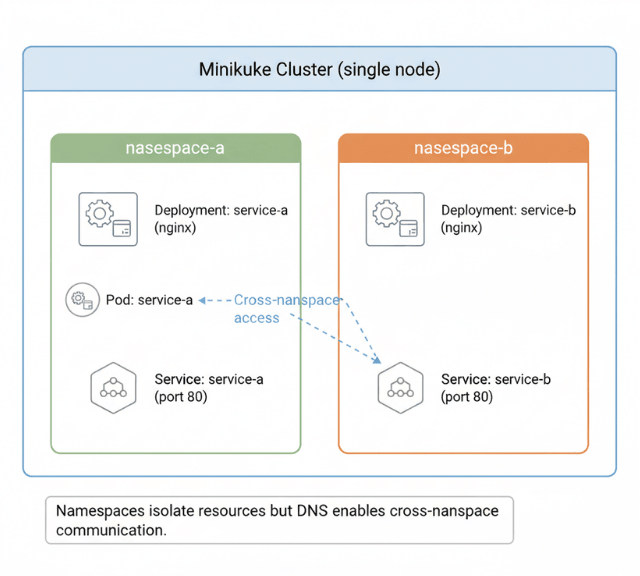
Next, we'll create two namespaces in our Minikube cluster: namespace-a and namespace-b. You can do this using the following commands:
kubectl create namespace namespace-a
kubectl create namespace namespace-b
These namespaces will serve as our isolation boundaries, where we'll deploy our services.
Deploying Services
Now, let's deploy a simple service in each namespace. In namespace-a, we'll create a service called service-a, and in namespace-b, we'll create a service called service-b.In namespace-a, run the following commands:
kubectl -n namespace-a create deployment service-a --image=nginx
kubectl -n namespace-a expose deployment service-a --port=80
In namespace-b, run the following commands:
kubectl -n namespace-b create deployment service-b --image=nginx
kubectl -n namespace-b expose deployment service-b --port=80
These commands will create the deployments and expose the services within their respective namespaces.
Accessing the Service in Another Namespace
Now, let's try to access the service-b from namespace-a. There are a few ways to achieve this:
Using the FQDN (Fully Qualified Domain Name):
You can access the service using its fully qualified domain name, which follows the format <service-name>.<namespace>.svc.cluster.local. In this case, the FQDN for service-b would be service-b.namespace-b.svc.cluster.local.
kubectl -n namespace-a run --rm -it --image=busybox:1.28 busybox -- wget -O- http://service-b.namespace-b.svc.cluster.localLeveraging Kubernetes DNS
Kubernetes provides a built-in DNS service that automatically resolves service names to their corresponding IP addresses, even across namespaces. You can simply use the service name and namespace in your application's code to access the desired service.
kubectl -n namespace-a run --rm -it --image=busybox:1.28 busybox -- wget -O- http://service-b.namespace-bDNS makes cross-namespace access easy. RBAC makes it secure.
The FQDN approach works. But production environments need controlled access, not open communication.
Our Kubernetes consultants help you:
- Design service discovery patterns – When to use DNS vs. service meshes
- Implement RBAC for cross-namespace – Least-privilege access only
- Set up network policies – Restrict which namespaces can talk to which
- Audit cross-namespace traffic – Know what's communicating where
Using a Service Account and RBAC
To ensure secure cross-namespace access, you can leverage Kubernetes' role-based access control (RBAC) system. By granting the necessary permissions to a service account, you can control which namespaces and resources your applications can access.
  # Create a service account in namespace-a
    kubectl -n namespace-a create serviceaccount cross-namespace-access

  # Grant the service account permission to access service-b in namespace-b
    kubectl -n namespace-b create rolebinding cross-namespace-access --clusterrole=view --serviceaccount=namespace-a:cross-namespace-access

  # Use the service account to access service-b
    kubectl -n namespace-a run --rm -it --serviceaccount=cross-namespace-access --image=busybox:1.28 busybox -- wget -O- http://service-b.namespace-b
By following these steps, you've learned how to access a service located in another Kubernetes namespace using Minikube. This knowledge can be applied to your production Kubernetes environments, enabling seamless communication and collaboration between your applications, regardless of their namespace boundaries.
Conclusion
Accessing services across namespaces in Minikube (and any Kubernetes cluster) is straightforward thanks to the built-in DNS service. Whether you use the fully qualified domain name (service-b.namespace-b.svc.cluster.local) or the shorter namespace-qualified name (service-b.namespace-b), Kubernetes resolves it without extra network configuration.
For production scenarios, combine DNS access with RBAC to enforce least-privilege security. This pattern enables microservices, multi-tenant isolation, and environment separation while keeping communication simple and reliable.
FAQs
1. Do I need to configure any DNS settings to access services across namespaces?
No. Kubernetes DNS is enabled by default in Minikube and most clusters. Pods automatically get a search domain list that includes <namespace>.svc.cluster.local, so you can use short names like service-b.namespace-b.
2. Can I access a service in another namespace without using the namespace suffix?
Only if the service is in the same namespace. Across namespaces, you must include the target namespace (e.g., service-b.namespace-b). The cluster DNS will not resolve service-b alone from a different namespace.
3. How do I test cross-namespace access from a pod without deploying a full app?
Use a temporary busybox container as shown in the article:kubectl -n namespace-a run -it --rm --image=busybox:1.28 – wget -O- http://service-b.namespace-b