Why Your AWS Costs Spike After Product Launch (And How Startups Regain Control)
Learn why AWS costs spike after product launch and how startups can regain control. Practical strategies for budget alerts, right-sizing, and cost optimization.
TLDR;
- Post-launch AWS spikes are predictable and fixable
- Causes: Production traffic differs from testing, auto-scaling without limits, forgotten non-prod environments
- Regain control: Set budget alerts immediately, use Cost Explorer to find top drivers, right-size after 2 weeks of real traffic data
You shipped your product. Users are signing up. Then your first AWS bill arrives and your runway just shortened by months. This scenario plays out at startups across Europe every week. The good news: post-launch cost spikes are predictable, preventable, and fixable.
This article explains why AWS costs jump after launch, which services cause the biggest surprises, and how to regain control before your cloud bill threatens your business.
Why AWS Costs Often Jump Right After Launch
Production traffic behaves nothing like your test environment. During development, you control every variable. After launch, real users create unpredictable load patterns that stress your infrastructure in ways you never anticipated.
According to AWS pricing documentation, most services use pay-as-you-go models where costs scale directly with usage. This means your bill grows with your success, sometimes faster than your revenue.
Usage-based pricing kicks in at scale. Services like Lambda, API Gateway, and data transfer charges remain nearly invisible during testing but compound quickly with thousands of active users. A Flexera 2024 State of the Cloud Report found that 28% of cloud spend is wasted, with post-launch periods representing peak inefficiency.
Early infrastructure assumptions break under real-world conditions. The instance types you selected, the database configurations you chose, and the caching strategies you implemented all face their first genuine stress test when production traffic arrives.
The Difference Between Pre-Launch and Post-Launch AWS Usage
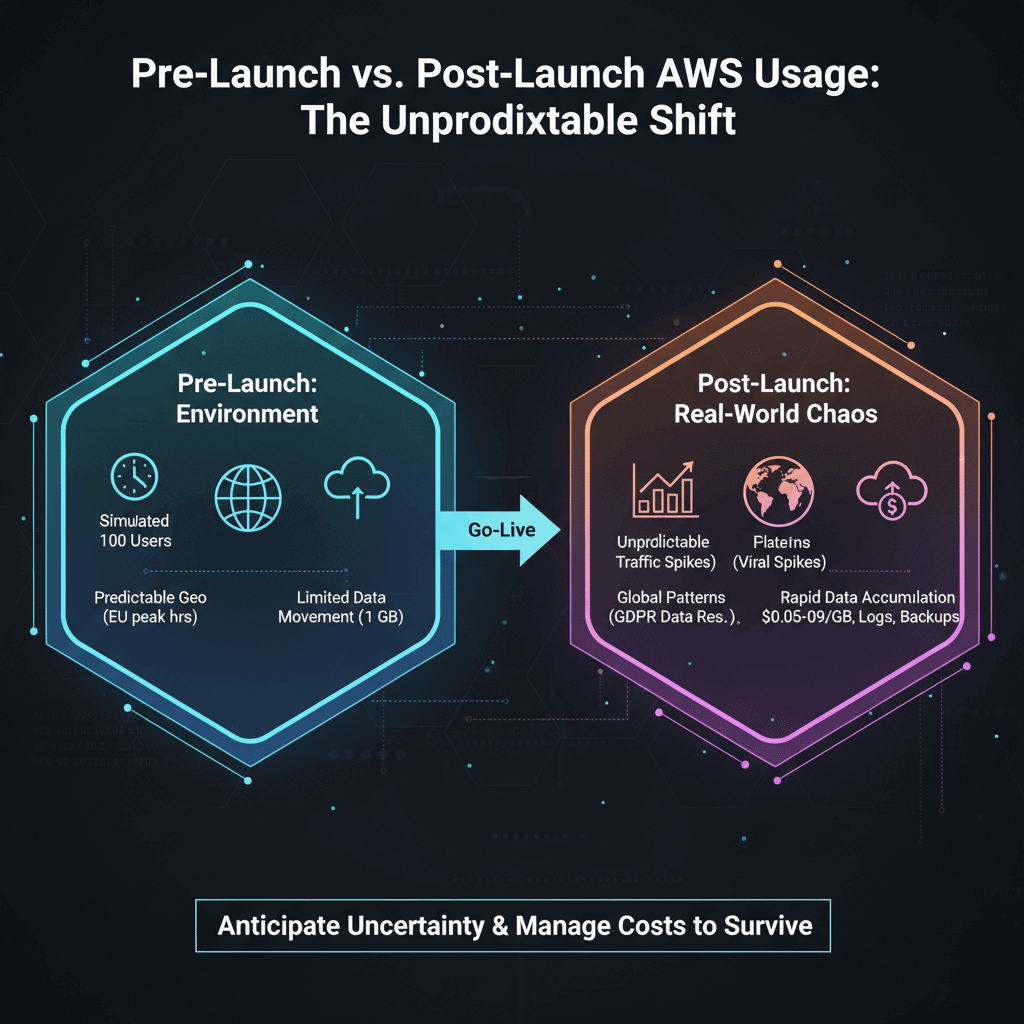
Controlled test environments operate under artificial constraints. You might simulate 100 concurrent users, but real usage patterns include peak hours, geographic distribution, and user behaviors you never anticipated. European traffic patterns alone differ significantly from North American assumptions, with distinct peak hours and data residency requirements under GDPR regulations.
Unpredictable traffic patterns emerge immediately. Marketing campaigns, press coverage, or viral social media mentions can multiply your expected traffic within hours. Without proper safeguards, AWS scales your infrastructure and your bill in response.
Increased data movement and storage accumulate faster than expected. User uploads, log files, database backups, and inter-service communication all generate costs. AWS data transfer pricing shows that outbound data to the internet costs between $0.05-$0.09 per GB after the first 100GB monthly, which adds up quickly at scale.
Common Reasons AWS Costs Spike After Launch
Sudden Traffic Growth Without Auto Scaling Limits
Auto scaling without upper bounds creates runaway costs. Your infrastructure responds correctly to traffic spikes by provisioning additional resources, but without maximum limits, a traffic surge or even a DDoS attack can spin up dozens of expensive instances.
Overreaction to traffic spikes compounds the problem. Default scaling policies often provision more capacity than needed, and cool-down periods may be too long, keeping expensive resources running after demand subsides.
Over-Provisioned Resources "For Safety"
Teams often deploy production with excess EC2 and RDS capacity as a safety margin. That m5.2xlarge instance running at 15% CPU utilization costs four times more than a properly sized m5.large that could handle the same workload.
Idle resources in production accumulate charges around the clock. Reserved capacity for expected growth, standby databases, and pre-provisioned container clusters all bill continuously regardless of utilization.
Hidden Data Transfer and API Costs
Inbound versus outbound traffic confusion catches many teams. While inbound data is generally free, outbound traffic and cross-AZ communication generate significant charges that rarely appear in pre-launch estimates.
Third-party integrations multiply costs unexpectedly. Each external API call, webhook delivery, and CDN request adds to your bill. Payment processors, analytics services, and notification systems all contribute to data transfer charges.
Non-Production Environments Left Running
Development, staging, and testing environments often mirror production configurations. According to CloudHealth by VMware research, non-production environments account for up to 30% of total cloud spend at many organizations.
Forgotten resources accumulate over time. That test database from three sprints ago, the prototype Lambda function, and the abandoned S3 buckets all continue billing quietly in the background.
Why Startups Don't Notice the Cost Spike Immediately
Delayed AWS billing visibility creates a dangerous gap. AWS bills arrive monthly in arrears, meaning you might run three weeks of expensive infrastructure before seeing the financial impact. The AWS Cost Explorer provides near-real-time data, but many startups never configure it.
Lack of budgets and alerts means surprises arrive as invoices rather than warnings. AWS offers budget alerts and anomaly detection, but these require explicit configuration that often gets deprioritized during launch sprints.
No cost ownership across teams fragments accountability. When developers, DevOps, and product managers all provision resources without consolidated visibility, nobody owns the total spend until finance raises alarms.
How to Regain AWS Cost Control After Launch
Set budgets and alerts immediately after launch. Configure AWS Budgets with thresholds at 50%, 80%, and 100% of your expected monthly spend. Enable Cost Anomaly Detection to catch unexpected increases within days rather than weeks.
Identify high-impact cost drivers using Cost Explorer's service breakdown and tag-based allocation. Focus on the top three to five services consuming the most budget. Typically, EC2, RDS, and data transfer dominate early-stage startup bills.
Right-size production resources based on actual utilization data. After two weeks of production traffic, you have enough metrics to identify over-provisioned instances. AWS Compute Optimizer provides specific recommendations, and downgrading instance types can reduce costs by 40-60% without performance impact.
Preventing Future Cost Spikes as You Scale Users
Continuous cost monitoring becomes essential as you grow. Integrate cost data into your regular sprint reviews and operational dashboards. Make cloud spend as visible as uptime metrics.
Environment-level cost tracking separates production from non-production spending. Use AWS Organizations and tagging strategies to allocate costs per environment, enabling quick identification of development waste.
Regular optimization reviews should occur monthly during rapid growth phases. Schedule recurring calendar entries to review Cost Explorer data, act on Compute Optimizer recommendations, and clean up unused resources.
The Cost of Ignoring AWS Cost Control Post-Launch
Reduced runway threatens startup survival. Every euro spent on unnecessary AWS resources is a euro not spent on product development, marketing, or hiring. For seed-stage startups, a 30% cost reduction can extend runway by months.
Emergency cost cuts that hurt performance create technical debt. When bills force sudden action, teams often make rushed decisions that sacrifice reliability or user experience. Proactive optimization avoids these painful tradeoffs.
Engineering distraction pulls focus from product work. When cost crises emerge, senior engineers get pulled into firefighting mode, analyzing bills and implementing emergency fixes instead of building features.
How EaseCloud Helps Startups Control AWS Costs After Launch
Post-launch cost audits identify immediate savings opportunities. EaseCloud's AWS-certified architects analyze your production infrastructure, identifying over-provisioned resources, unused services, and optimization opportunities that typically reduce costs by 25-40%.
Cost optimization and governance establish sustainable practices. Beyond immediate fixes, EaseCloud implements tagging strategies, budget alerts, and automated cleanup policies that prevent future cost surprises.
Ongoing startup-focused AWS support provides access to cloud expertise without hiring full-time specialists. European startups benefit from engineers who understand GDPR compliance, EU region optimization, and local business requirements.
Final Thoughts
Product launch should mark the beginning of growth, not the start of a financial crisis. Post-launch AWS cost spikes are normal but manageable. With proper monitoring, right-sizing, and optimization practices, you can scale your user base without scaling your burn rate.
The startups that thrive are those that treat cloud cost management as an ongoing practice rather than a one-time fix. Start with visibility, move to optimization, and build sustainable habits that support your growth trajectory.
Ready to regain control of your AWS costs? Contact EaseCloud for a free post-launch cost assessment and learn how European startups are reducing their cloud spend while scaling their products.
FAQs
Why do AWS costs spike after launch?
Production traffic creates unpredictable usage patterns, usage-based pricing compounds at scale, and pre-launch infrastructure assumptions often prove incorrect under real-world conditions.
How soon should startups review AWS costs post-launch?
Within the first two weeks of launch. This provides enough utilization data to identify over-provisioned resources while acting early enough to prevent significant waste.
Which AWS services cause the biggest post-launch spikes?
EC2 instances, RDS databases, and data transfer charges typically dominate early-stage startup bills. Auto-scaling without limits and cross-AZ traffic are common culprits.
Can AWS auto scaling increase costs unexpectedly?
Yes. Without maximum instance limits and proper cool-down periods, auto scaling can provision excessive capacity during traffic spikes, generating substantial unexpected charges.
Should startups hire AWS experts after launch?
Most early-stage startups benefit more from fractional or consulting AWS expertise than full-time hires. Managed services like EaseCloud provide senior-level guidance without the overhead of additional headcount.