How SSL/TLS Impacts Performance and How to Optimize It
Learn how TLS 1.3, session resumption, OCSP stapling, and certificate optimization reduce encryption overhead. Best practices for secure, fast HTTPS connections.
TL;DR
- TLS costs are real but optimizable: TLS 1.2 handshake = 2 RTTs (e.g., 100ms at 50ms latency). TLS 1.3 cuts to 1 RTT, plus 0-RTT for returning clients.
- TLS 1.3 is the biggest win: Upgrade immediately. Enables 1-RTT handshakes, 0-RTT session resumption, and simpler faster cipher suites.
- Use ECDSA certificates: 256-bit ECDSA keys are ~1/3 the size of RSA, smaller and faster handshakes.
- Session resumption avoids full handshakes: Session tickets (client-side) or session cache (server-side). TLS 1.3 + tickets = 0-RTT.
- OCSP stapling eliminates CA round trips: Attaches revocation proof to handshake instead of browsers calling CA separately.
- Hardware acceleration is automatic: AES-NI and ARM crypto extensions accelerate AES-GCM to near-memory speed. No config needed.
- Quick wins: Enable TLS 1.3, use ECDSA certs, enable OCSP stapling, turn on HSTS. Test with SSL Labs → aim for A+.
HTTPS is no longer optional. Browsers mark HTTP sites as insecure. Search engines penalize unencrypted sites. Security requires encryption. But encryption has costs CPU cycles for cryptographic operations, round trips for handshakes, and bytes for certificates. Modern optimizations reduce these costs dramatically. Properly configured TLS adds negligible overhead while providing essential security.
Understanding TLS Performance Impact
TLS handshakes establish encrypted connections. Client and server exchange messages, negotiate cipher suites, and derive session keys. This process takes time.
Full TLS 1.2 handshakes require two round trips. Client Hello, Server Hello with certificate, key exchange, and finished messages travel back and forth. At 50ms per round trip, 100ms passes before any data transfers.
CPU cost comes from asymmetric cryptography. RSA decryption for key exchange is computationally expensive. ECDHE key exchange is lighter but still significant.
Symmetric encryption after handshake is fast. AES-GCM with hardware acceleration encrypts gigabytes per second. Ongoing encryption overhead is minimal.
Connection reuse amortizes handshake cost. Keeping connections open spreads one handshake across many requests. HTTP/2 multiplexing maximizes connection reuse.
Mobile connections suffer more from handshakes. Higher latency networks magnify round-trip costs. Battery consumption from cryptographic operations matters on mobile devices.
Server load increases with TLS. More CPU for handshakes means fewer concurrent connections per server. Capacity planning must account for encryption overhead.
TLS 1.3 Improvements
TLS 1.3 reduces handshakes to one round trip. The protocol redesign eliminates the second round trip. 100ms savings on every new connection.
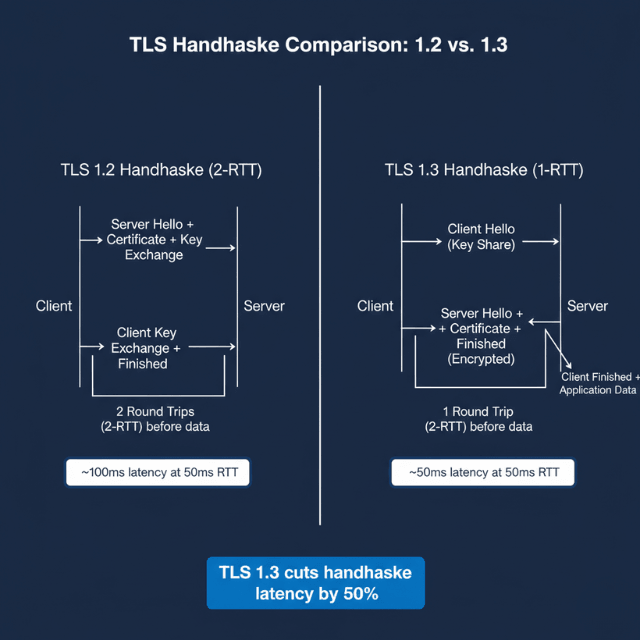
TLS 1.2: Client Hello → Server Hello → Certificate → Key Exchange → Finished (2 RTT)
TLS 1.3: Client Hello → Server Hello + Certificate + Finished (1 RTT)
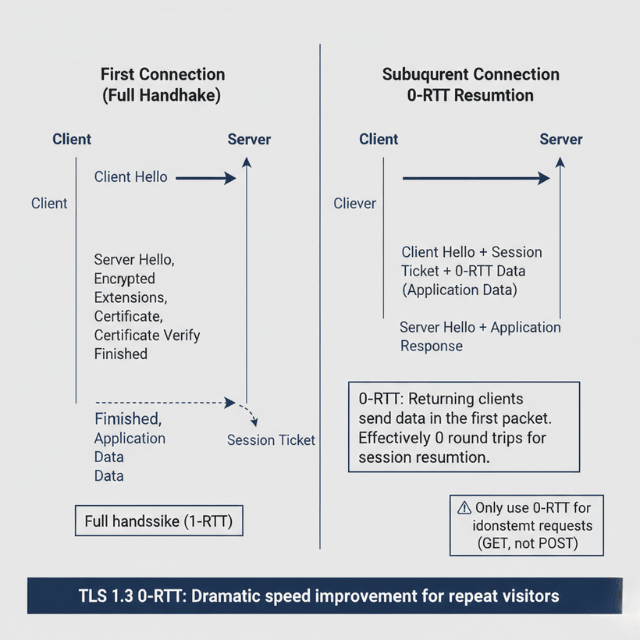
Zero Round Trip Time (0-RTT) resumption goes further. Returning clients can send data in the first message. The server responds with encrypted data immediately.
# Enable TLS 1.3 with 0-RTT
ssl_protocols TLSv1.3;
ssl_early_data on;
0-RTT has security tradeoffs. Replay attacks become possible for early data. Only use 0-RTT for idempotent requests. Don't enable for state-changing operations.
Simplified cipher suite selection in TLS 1.3 removes weak options. Only secure, fast cipher suites remain. Configuration errors become harder.
Encrypted handshake metadata in TLS 1.3 improves privacy. Server Name Indication (SNI) remains visible, but other metadata is hidden.
Browser and server support for TLS 1.3 is widespread. All modern browsers support it. Enable TLS 1.3 on servers as the preferred option.
Certificate Optimization
Certificate size affects handshake speed. Certificates travel during handshakes. Smaller certificate management reduce data transfer.
ECDSA certificates are smaller than RSA. A 256-bit ECDSA key provides equivalent security to 3072-bit RSA. Smaller key means smaller certificate.
# Generate ECDSA certificate
openssl ecparam -genkey -name prime256v1 -out key.pem
openssl req -new -key key.pem -out csr.pem
Certificate chain length matters. Include only necessary intermediate certificates. Don't include root certificates browsers have those.
Certificate compression reduces bytes on wire. TLS 1.3 supports certificate compression. Enable where supported.
# Enable certificate compression (Nginx with OpenSSL 3.2+)
ssl_certificate_compression on;
Wildcard certificates reduce certificate count. One certificate covers multiple subdomains. Simpler management and smaller total configuration.
Certificate Authority selection affects validation. Major CAs have certificates cached in browsers. Obscure CAs may require additional verification.
Session Management
Session resumption avoids full handshakes. After initial connection, subsequent connections reuse negotiated parameters. Dramatically faster reconnection.
Session tickets store state on clients. Servers encrypt session data into tickets. Clients present tickets to resume sessions.
# Enable session tickets
ssl_session_tickets on;
ssl_session_ticket_key /path/to/ticket.key;
Session ticket rotation is essential for security. Rotate ticket keys regularly. Old keys should be retained briefly for graceful transition.
Session cache stores state on servers. Server-side session storage enables resumption. Useful when session tickets aren't ideal.
# Session cache configuration
ssl_session_cache shared:SSL:50m;
ssl_session_timeout 1d;
Load balanced environments need shared sessions. All backend servers must share session state. Distributed caches or session tickets solve this.
Session resumption with 0-RTT provides maximum speed. Combine TLS 1.3 with session resumption. First packet can contain application data.
Hardware Acceleration
AES-NI instructions accelerate encryption. Modern CPUs include hardware AES support. Encryption runs at near-memory-bandwidth speeds.
Check for AES-NI support on servers. Most x86 processors since 2010 include it. ARM processors have equivalent instructions.
# Check for AES-NI
grep aes /proc/cpuinfo
OpenSSL automatically uses AES-NI. No configuration needed. Ensure OpenSSL is built with AES-NI support.
ECDSA operations benefit from hardware too. ARM and x86 have cryptographic acceleration instructions. ECDSA signs faster with hardware support.
TLS offload cards handle encryption in hardware. Dedicated hardware processes TLS operations. Frees CPU for application work.
Cloud load balancers terminate TLS efficiently. AWS ALB, Google Cloud Load Balancing, and Azure Application Gateway handle TLS termination. Backend connections can use unencrypted internal traffic.
CDN edge TLS termination reduces origin load. Edge servers handle handshakes. Origin traffic may use simpler encryption or internal networking.
OCSP Stapling
Online Certificate Status Protocol (OCSP) verifies certificate validity. Without stapling, browsers contact CA to check revocation. This adds latency.
OCSP stapling attaches validity proof to handshake. Servers periodically fetch OCSP responses from CAs. Stapled response proves certificate isn't revoked.
# Enable OCSP stapling
ssl_stapling on;
ssl_stapling_verify on;
ssl_trusted_certificate /path/to/chain.pem;
resolver 8.8.8.8 8.8.4.4 valid=300s;
Stapling eliminates CA round trip (OCSP stapling performance benefits) for clients. Browsers don't need to contact CA. Faster validation and improved privacy.
OCSP Must-Staple ensures stapling works. Certificates can require stapling. If stapled response is missing, browsers reject connection.
Stapled response caching reduces CA load. Responses are valid for hours to days. Servers cache and reuse responses.
Monitor OCSP stapling functionality. Failed stapling degrades performance silently. Verify stapling works in production.
# Verify OCSP stapling
openssl s_client -connect example.com:443 -status </dev/null 2>&1 | grep "OCSP Response Status"
Configuration Best Practices
Prioritize TLS 1.3 cipher suites. TLS 1.3 suites are fastest and most secure. Fall back to TLS 1.2 for older clients.
# Optimal cipher configuration
ssl_protocols TLSv1.2 TLSv1.3;
ssl_ciphers ECDHE-ECDSA-AES128-GCM-SHA256:ECDHE-RSA-AES128-GCM-SHA256:ECDHE-ECDSA-AES256-GCM-SHA384:ECDHE-RSA-AES256-GCM-SHA384;
ssl_prefer_server_ciphers off;
Use ECDHE for key exchange. Perfect forward secrecy protects past sessions. ECDHE is faster than DHE.
AES-GCM provides authenticated encryption. Hardware accelerated and secure. Prefer over CBC mode ciphers.
HSTS eliminates HTTP redirects. Browsers remember HTTPS requirement. First visit redirect still needed; subsequent visits are direct.
# Enable HSTS
add_header Strict-Transport-Security "max-age=31536000; includeSubDomains" always;
HTTP/2 requires HTTPS and benefits from it. Multiplexed connections maximize TLS connection reuse. Single handshake covers many requests.
Monitor TLS performance metrics. Track handshake times separately from request processing. Identify configuration or certificate issues.
Test configuration with SSL Labs. SSLTest grades configurations. Aim for A+ rating with optimal performance settings.
Conclusion
TLS encryption is not optional browsers penalize HTTP, search engines rank unencrypted sites lower, and users trust the padlock icon. But encryption doesn't have to mean slow. TLS 1.3 fundamentally redesigned the handshake, cutting latency by 50% on every new connection.
Session resumption with 0-RTT makes returning connections effectively instant. ECDSA certificates reduce handshake size. OCSP stapling eliminates external validation round trips. Hardware acceleration makes symmetric encryption negligible.
Properly configured TLS adds less than 5% overhead to most web applications a trivial cost for essential security. The worst-performing TLS is the one you don't optimize. Upgrade to TLS 1.3 today. Configure session resumption. Enable OCSP stapling. Test with SSL Labs. Your users get security and speed.
FAQs
What's the performance difference between TLS 1.2 and TLS 1.3?
Dramatic. TLS 1.3 handshake completes in 1 round trip (1-RTT) vs. 2-RTT for TLS 1.2. At 50ms network latency, that's 50ms saved on every new connection. With 0-RTT session resumption, returning clients send data in the first packet effectively 0-RTT for subsequent connections.
Additionally, TLS 1.3 removes weak, slow cipher suites and encrypts handshake metadata. Upgrade to TLS 1.3 is the highest-leverage TLS optimization available.
How do I choose between RSA and ECDSA certificates?
Use ECDSA for performance, RSA for compatibility. ECDSA certificates are smaller (256-bit ECDSA ≈ 3072-bit RSA) and faster for key exchange.
However, some older clients (Windows 7, older Android) don't support ECDSA. Best practice: use both present ECDSA certificate with TLS 1.3 clients, fall back to RSA for older clients. Major CAs (Let's Encrypt, DigiCert) support ECDSA. Generate ECDSA keys with openssl ecparam -genkey -name prime256v1.
Is OCSP stapling still necessary with TLS 1.3?
Yes. TLS 1.3 doesn't eliminate the need for revocation checking. Without stapling, browsers still contact the CA to verify certificate status, adding latency and privacy concerns. OCSP stapling works the same way in TLS 1.3 the server attaches a cached, time-stamped OCSP response during the handshake.
Must-Staple extensions can require stapling; browsers reject connections without a valid stapled response. Configure OCSP stapling regardless of TLS version. Verify it's working with openssl s_client -connect example.com:443 -status.
Summarize this post with:
Ready to put this into production?
Our engineers have deployed these architectures across 100+ client engagements — from AWS migrations to Kubernetes clusters to AI infrastructure. We turn complex cloud challenges into measurable outcomes.