Multi-Environment Deployment Strategies for Kubernetes
Configure dev, staging, and production environments with Kustomize and Helm. Learn promotion strategies, secret management, and cost optimization for multi-env Kubernetes.

TLDR;
- Kustomize and Helm are the leading tools for managing environment-specific configurations in 2026
- Automated promotion from staging to production reduces manual errors and speeds delivery
- External secret management with OIDC keeps credentials out of Git repositories
- European teams can enforce data residency per environment using namespace and cluster isolation
Most production Kubernetes applications run across at least three environments: development, staging, and production. Each environment serves a different purpose.
| Environment | Purpose |
|---|---|
| Development | Enables rapid iteration |
| Staging | Validates changes against production-like conditions |
| Production | Serves real users and revenue |
Managing configuration differences across these environments is one of the most common sources of deployment failures. According to the CNCF Annual Survey 2024, 93% of organizations use or evaluate Kubernetes, yet environment configuration drift remains a top operational challenge. The wrong database connection string in production, a missing resource limit in staging, or an outdated image tag in development can each cause outages.
This article covers proven strategies for managing multi-environment deployments with Kustomize and Helm, promotion workflows that reduce risk, and secret management patterns that satisfy European compliance requirements including GDPR data residency.
Configuration Management Strategies
[Base Config] --> [Dev Overlay] --> [Dev Cluster]
      |
      +--------> [Staging Overlay] --> [Staging Cluster]
      |
      +--------> [Prod Overlay] --> [Prod Cluster (EU-West)]
The core challenge is maintaining a single source of truth while allowing environment-specific differences. Two approaches dominate in 2026.
Kustomize uses YAML patching without templates. You define a base configuration, then overlay environment-specific patches:
# base/deployment.yaml
apiVersion: apps/v1
kind: Deployment
metadata:
  name: api
spec:
  replicas: 1
  template:
    spec:
      containers:
        - name: api
          image: registry.example.com/api:latest
          resources:
            requests:
              memory: "128Mi"
              cpu: "100m"
# overlays/prod/kustomization.yaml
bases:
  - ../../base
namePrefix: prod-
patches:
  - path: replicas-patch.yaml
According to the Kubernetes documentation, Kustomize is built into kubectl, requiring no additional tooling.
Helm uses Go templates with values files per environment:
# values-prod.yaml
replicas: 5
image:
  repository: registry.example.com/api
  tag: v1.2.3
resources:
  requests:
    memory: 256Mi
    cpu: 200m
  limits:
    memory: 512Mi
    cpu: 500m
Choose Kustomize for simple patching workflows. Choose Helm when you need conditional logic, package distribution, or leverage the existing Helm chart ecosystem. Many teams use both: Helm for third-party applications, Kustomize for internal services.
Environment Promotion Workflows
Promotion is how changes move from one environment to the next. Three patterns exist, each with different risk profiles.
Manual promotion requires a human to explicitly approve each environment transition. This provides maximum control but slows delivery and does not scale to frequent deployments.
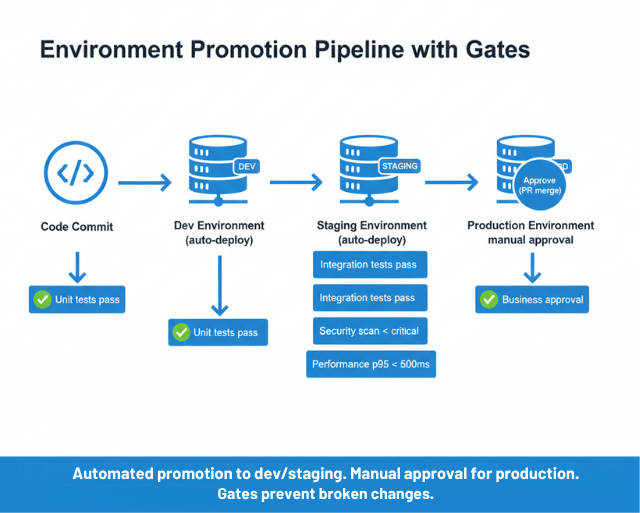
Automated promotion with gates moves changes forward after passing defined criteria:
deploy-staging:
  script: update-staging-manifest.sh

run-tests:
  needs: [deploy-staging]
  script: run-integration-tests.sh

promote-production:
  needs: [run-tests]
  when: on_success
  script: update-production-manifest.sh
Gate includes:
- Test results
- Security scan status
- Performance metrics
- Time-based checks (e.g., staging runs successfully for 2 hours before production promotion)
Hybrid promotion is the most common pattern in 2026 according to Argo Project documentation. Automate promotion to dev and staging, but require manual approval (typically a PR merge) for production. This balances speed with safety.
For GitOps-driven workflows, promotion happens through directory-based configuration:
environments/
  dev/       # Auto-deploy on any commit
  staging/   # Auto-deploy on main branch merge
  prod/      # Requires PR review and approval
Automated promotion with gates or hybrid approval? We implement both.
The right promotion workflow balances speed and safety. It depends on your risk tolerance and team structure.
We help you:
- Set up automated gates – Tests, security scans, performance metrics
- Implement hybrid promotion – Auto to dev/staging, manual approval for prod
- Configure GitOps promotion – Directory-based environments with PR workflows
- Build promotion pipelines – GitHub Actions, GitLab CI, or Jenkins
Secret Management Across Environments
Secrets are the most sensitive part of multi-environment configuration. Never commit secrets to Git, even encrypted.
Use External Secrets Operator to sync secrets from cloud provider vaults into Kubernetes:
apiVersion: external-secrets.io/v1beta1
kind: ExternalSecret
metadata:
  name: api-secrets
  namespace: prod
spec:
  secretStoreRef:
    name: aws-secrets-manager
  target:
    name: api-secrets
  data:
    - secretKey: db-password
      remoteRef:
        key: /prod/api/db-password
The same Kubernetes Secret name (api-secrets) exists in each environment, but pulls from different external paths. This keeps application configuration identical across environments while secrets differ.
Short-lived credentials via OIDC federation eliminate the need for static credentials entirely. According to GitHub's security documentation, OIDC tokens for CI/CD remove the risk of credential leaks and simplify rotation.
For European organizations:
- Store secrets in region-specific vaults (AWS Secrets Manager in eu-west-1, Azure Key Vault in westeurope)
- Maintain GDPR data residency compliance
- Production secrets should rotate frequently using cloud provider automation
Environment Parity and Cost Optimization
The more your environments differ, the more environment-specific bugs you will encounter. Maintain parity in Kubernetes versions, ingress configurations, and network policies. Document intended differences explicitly:
| Aspect | Dev | Staging | Production |
|---|---|---|---|
| Replicas | 1 | 3 | 5 |
| Resources | Minimal | 50% of prod | Full allocation |
| External services | Mocked | Dedicated staging | Production instances |
| Data | Synthetic | Anonymized production | Real |
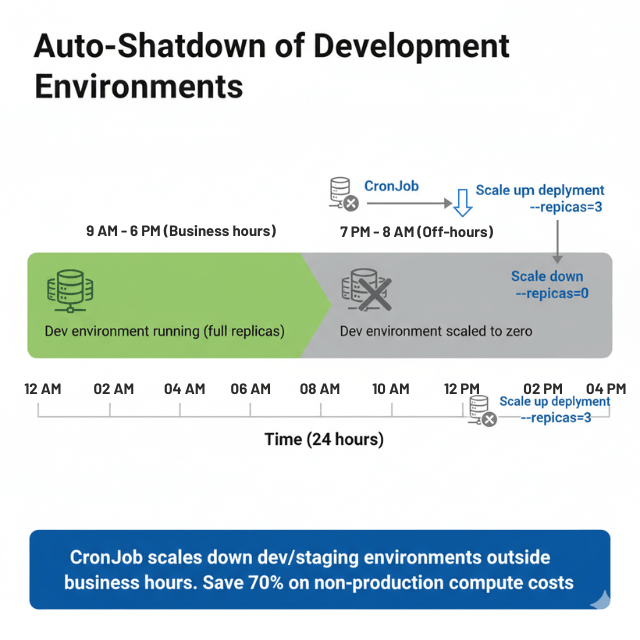
Cost optimization for non-production environments saves budget:
apiVersion: batch/v1
kind: CronJob
metadata:
  name: scale-down-dev
spec:
  schedule: "0 18 * * 1-5"
  jobTemplate:
    spec:
      template:
        spec:
          containers:
            - name: scaler
              image: bitnami/kubectl
              command:
                - kubectl
                - scale
                - deployment
                - --all
                - --replicas=0
                - -n
                - dev
Auto-shutdown development environments outside business hours. Use spot or preemptible instances for non-production workloads. According to Flexera's State of the Cloud Report 2024, organizations waste an average of 28% of cloud spend, with non-production environment sprawl as a leading cause.
Multi-Cluster Strategies
Organizations choose between namespace-per-environment (shared cluster) and cluster-per-environment (isolated clusters).
Shared cluster with namespaces costs less and simplifies management but provides weaker isolation. Separate clusters per environment provide full isolation at higher infrastructure cost.
The hybrid approach is most common: production runs in its own cluster while dev, staging, and QA share a cluster. This gives production the isolation it needs while keeping non-production costs low.
For multi-region European deployments:
- Run production clusters in each required region (eu-west-1, eu-central-1)
- Environment-specific alerting thresholds per cluster
- Pipeline security controls enforced at each cluster
Conclusion
Multi-environment deployment success depends on three principles: maintain environment parity, automate promotion workflows, and manage secrets externally. Start with Kustomize for simple overlays, add Helm when complexity demands it, and use External Secrets Operator to keep credentials out of Git.
Integrate your environment strategy with progressive delivery for safer production releases and build system automation for consistent CI/CD pipeline artifacts across all environments.
FAQs
Should I use Kustomize or Helm for multi-environment deployments?
Use Kustomize for simple patching of base configurations across environments. Use Helm when you need conditional logic, chart packaging, or access to the existing chart ecosystem. Many teams combine both: Helm for third-party dependencies and Kustomize for internal applications.
How many environments should I maintain?
Most teams use three: development, staging, and production. Add QA or UAT environments only if your workflow requires them. Each additional environment adds cost and maintenance burden. Keep non-production environments as similar to production as possible.
How do I handle database migrations across environments?
Run migrations as part of your promotion workflow, not separately. Use tools like Flyway or Liquibase that support versioned, idempotent migrations. Test migrations in staging with anonymized production data before applying to production.