Design High-Performance OCI Networks for LLMs
Build secure OCI network architecture for LLM workloads with VCN design, load balancers, private endpoints, and multi-region patterns. Reduce latency 60% with optimization.
TLDR;
- Private endpoints reduce Object Storage latency from 15ms to 3ms (60% improvement)
- Flexible load balancers scale from 10 Mbps to 8000 Mbps handling 500 concurrent requests
- Jumbo frames (9000 MTU) reduce CPU overhead by 40% for multi-GPU tensor parallelism
- Cross-region peering delivers sub-100ms latency for disaster recovery failover
Design secure, high-performance network architecture for LLM workloads on Oracle Cloud Infrastructure. Network configuration directly impacts inference latency, security posture, and operational costs for production LLM deployments.
This guide provides practical network architecture patterns for OCI-based LLM infrastructure. You'll learn VCN design with proper segmentation, security controls using NSGs and security lists, load balancer configuration for high availability, and multi-region networking for disaster recovery. These patterns reduce latency by up to 60% compared to default configurations while maintaining enterprise-grade security.
Whether deploying single-region inference endpoints or multi-region architectures serving global traffic, proper network design forms the foundation of reliable LLM operations. OCI's network backbone delivers consistent 2-5ms latency within regions and sub-100ms cross-region performance when configured correctly.
VCN Design
Virtual Cloud Network forms the foundation of OCI networking. Design VCNs with sufficient IP space and proper segmentation for LLM workloads.
# Create VCN with large CIDR block
oci network vcn create \
    --compartment-id $COMPARTMENT_ID \
    --cidr-block "10.0.0.0/16" \
    --display-name "llm-vcn" \
    --dns-label "llmvcn"

# Create public subnet for load balancers
oci network subnet create \
    --compartment-id $COMPARTMENT_ID \
    --vcn-id $VCN_ID \
    --cidr-block "10.0.1.0/24" \
    --display-name "public-subnet" \
    --dns-label "public" \
    --prohibit-public-ip-on-vnic false

# Create private subnet for compute instances
oci network subnet create \
    --compartment-id $COMPARTMENT_ID \
    --vcn-id $VCN_ID \
    --cidr-block "10.0.2.0/24" \
    --display-name "private-subnet" \
    --dns-label "private" \
    --prohibit-public-ip-on-vnic true

# Create database subnet
oci network subnet create \
    --compartment-id $COMPARTMENT_ID \
    --vcn-id $VCN_ID \
    --cidr-block "10.0.3.0/24" \
    --display-name "database-subnet" \
    --dns-label "database" \
    --prohibit-public-ip-on-vnic true
Network Topology:
Use three-tier architecture with public, application, and data subnets. Public subnet hosts load balancers. Application subnet runs LLM containers. Database subnet contains vector databases and state storage.
IP Planning:
Reserve /24 subnets for each tier. This provides 254 usable IPs per subnet. GPU instances typically require static IPs for peer-to-peer communication. Reserve the first 20 IPs in each subnet for future infrastructure expansion.
DNS Configuration:
Enable DNS hostnames for service discovery. Each instance gets hostname format: instance-name.subnet-dns-label.vcn-dns-label.oraclevcn.com. This enables service mesh patterns without additional DNS infrastructure.
Internet and NAT Gateway Setup
Control ingress and egress traffic using gateways. LLM workloads need outbound internet for model downloads and API calls.
# Create internet gateway for public subnet
oci network internet-gateway create \
    --compartment-id $COMPARTMENT_ID \
    --vcn-id $VCN_ID \
    --display-name "llm-igw" \
    --is-enabled true

# Create NAT gateway for private subnets
oci network nat-gateway create \
    --compartment-id $COMPARTMENT_ID \
    --vcn-id $VCN_ID \
    --display-name "llm-nat" \
    --block-traffic false

# Create service gateway for OCI services
oci network service-gateway create \
    --compartment-id $COMPARTMENT_ID \
    --vcn-id $VCN_ID \
    --services '[{"serviceId": "all-iad-services"}]' \
    --display-name "llm-sgw"
Gateway Performance:
NAT gateways provide 50 Gbps bandwidth with automatic scaling to 100 Gbps. Service gateways offer unlimited bandwidth for OCI services. Use service gateways for Object Storage and Autonomous Database traffic to avoid NAT costs.
Route Table Configuration:
Create separate route tables for each subnet tier. Public subnet routes 0.0.0.0/0 through internet gateway. Private subnets route through NAT gateway. Database subnet uses service gateway for OCI services only.
Security Configuration
Implement defense-in-depth using security lists and network security groups. Layer multiple security controls for production LLM deployments.
# Create security list for load balancer subnet
oci network security-list create \
    --compartment-id $COMPARTMENT_ID \
    --vcn-id $VCN_ID \
    --display-name "lb-security-list" \
    --ingress-security-rules '[{
        "protocol": "6",
        "source": "0.0.0.0/0",
        "tcpOptions": {
            "destinationPortRange": {
                "min": 443,
                "max": 443
            }
        }
    }]' \
    --egress-security-rules '[{
        "protocol": "all",
        "destination": "10.0.2.0/24"
    }]'

# Create network security group for LLM instances
oci network nsg create \
    --compartment-id $COMPARTMENT_ID \
    --vcn-id $VCN_ID \
    --display-name "llm-instance-nsg"

# Add NSG rules
oci network nsg rules add \
    --nsg-id $NSG_ID \
    --security-rules '[{
        "direction": "INGRESS",
        "protocol": "6",
        "source": "10.0.1.0/24",
        "sourceType": "CIDR_BLOCK",
        "tcpOptions": {
            "destinationPortRange": {
                "min": 8000,
                "max": 8000
            }
        }
    }]'
Security List vs NSG:
Security lists apply to entire subnets. NSGs apply to individual VNICs and support stateful rules. Use security lists for broad subnet-level policies. Use NSGs for fine-grained instance-level control. NSGs support up to 120 rules per group.
Zero Trust Network Design:
Deny all traffic by default. Explicitly allow only required flows. LLM inference endpoints need ports 8000-8001. Monitoring exporters use port 9090. SSH access (port 22) should be bastion-only. Implement microsegmentation between LLM model variants.
Load Balancer Setup
Distribute incoming requests across LLM instances for high availability and horizontal scaling.
# Create flexible load balancer
oci lb load-balancer create \
    --compartment-id $COMPARTMENT_ID \
    --display-name "llm-lb" \
    --shape-name "flexible" \
    --subnet-ids "[$PUBLIC_SUBNET_ID]" \
    --is-private false \
    --shape-details '{
        "minimumBandwidthInMbps": 100,
        "maximumBandwidthInMbps": 1000
    }'

# Create backend set with health checks
oci lb backend-set create \
    --load-balancer-id $LB_ID \
    --name "llm-backend" \
    --policy "LEAST_CONNECTIONS" \
    --health-checker-protocol "HTTP" \
    --health-checker-port 8000 \
    --health-checker-url-path "/v1/health" \
    --health-checker-interval-in-ms 10000 \
    --health-checker-timeout-in-ms 3000 \
    --health-checker-retries 3

# Add backends
for i in {1..5}; do
  oci lb backend create \
    --load-balancer-id $LB_ID \
    --backend-set-name "llm-backend" \
    --ip-address "10.0.2.${i}" \
    --port 8000 \
    --weight 1 \
    --backup false
done

# Create HTTPS listener
oci lb listener create \
    --load-balancer-id $LB_ID \
    --name "https-listener" \
    --default-backend-set-name "llm-backend" \
    --port 443 \
    --protocol "HTTP" \
    --ssl-certificate-name "llm-cert" \
    --connection-configuration-idle-timeout 300
Load Balancer Sizing:
Flexible shape scales from 10 Mbps to 8000 Mbps. Start with 100-1000 Mbps range for most workloads. LLM traffic averages 2-5 Mbps per concurrent request. A 1000 Mbps load balancer handles 200-500 concurrent inference requests.
Health Check Tuning:
Set interval to 10 seconds with 3-second timeout. Mark backends unhealthy after 3 consecutive failures. LLM initialization takes 30-60 seconds. Configure initial delay of 60 seconds before first health check. Use /v1/health endpoint that validates model loading.
Session Persistence:
Enable cookie-based persistence for stateful LLM conversations. Session cookies ensure users reach the same backend for conversation context. Set cookie expiration to 1 hour for typical chat sessions.
Private Endpoint Configuration
Access OCI services without internet traffic using private endpoints. This reduces latency and improves security.
# Create private endpoint for Object Storage
oci network private-endpoint create \
    --compartment-id $COMPARTMENT_ID \
    --subnet-id $PRIVATE_SUBNET_ID \
    --display-name "object-storage-pe" \
    --nsg-ids "[$NSG_ID]"

# Create private endpoint for Autonomous Database
oci network private-endpoint create \
    --compartment-id $COMPARTMENT_ID \
    --subnet-id $DATABASE_SUBNET_ID \
    --display-name "adb-pe" \
    --nsg-ids "[$DB_NSG_ID]"
Performance Impact:
Private endpoints eliminate internet gateway hops. Latency to Object Storage drops from 15ms to 3ms. Database connections improve from 8ms to 2ms. Model loading from Object Storage accelerates by 60%.
Multi-Region Networking
Deploy LLM infrastructure across multiple regions for disaster recovery and global reach.
# Create VCN in secondary region
oci network vcn create \
    --compartment-id $COMPARTMENT_ID \
    --cidr-block "10.1.0.0/16" \
    --display-name "llm-vcn-secondary" \
    --region us-ashburn-1

# Create local peering gateway (same region)
oci network local-peering-gateway create \
    --compartment-id $COMPARTMENT_ID \
    --vcn-id $VCN_ID \
    --display-name "lpg-primary"

# Create remote peering connection (cross-region)
oci network remote-peering-connection create \
    --compartment-id $COMPARTMENT_ID \
    --drg-id $DRG_ID \
    --display-name "rpc-to-ashburn"

# Establish connection
oci network remote-peering-connection connect \
    --remote-peering-connection-id $RPC_ID \
    --peer-id $PEER_RPC_ID \
    --peer-region-name us-ashburn-1
Cross-Region Latency:
Phoenix to Ashburn: 60ms. Frankfurt to Mumbai: 110ms. Tokyo to Seoul: 35ms. Choose region pairs with <80ms latency for acceptable failover experience. Use async replication for model artifacts across regions.
Traffic Manager Setup:
Configure OCI Traffic Management for global load balancing. Use geolocation steering to route users to nearest region. Implement health checks at the application level. Failover to secondary region occurs within 30 seconds of primary region failure.
Network Performance Optimization
Tune network parameters for GPU-accelerated workloads and high-throughput inference.
Jumbo Frames:
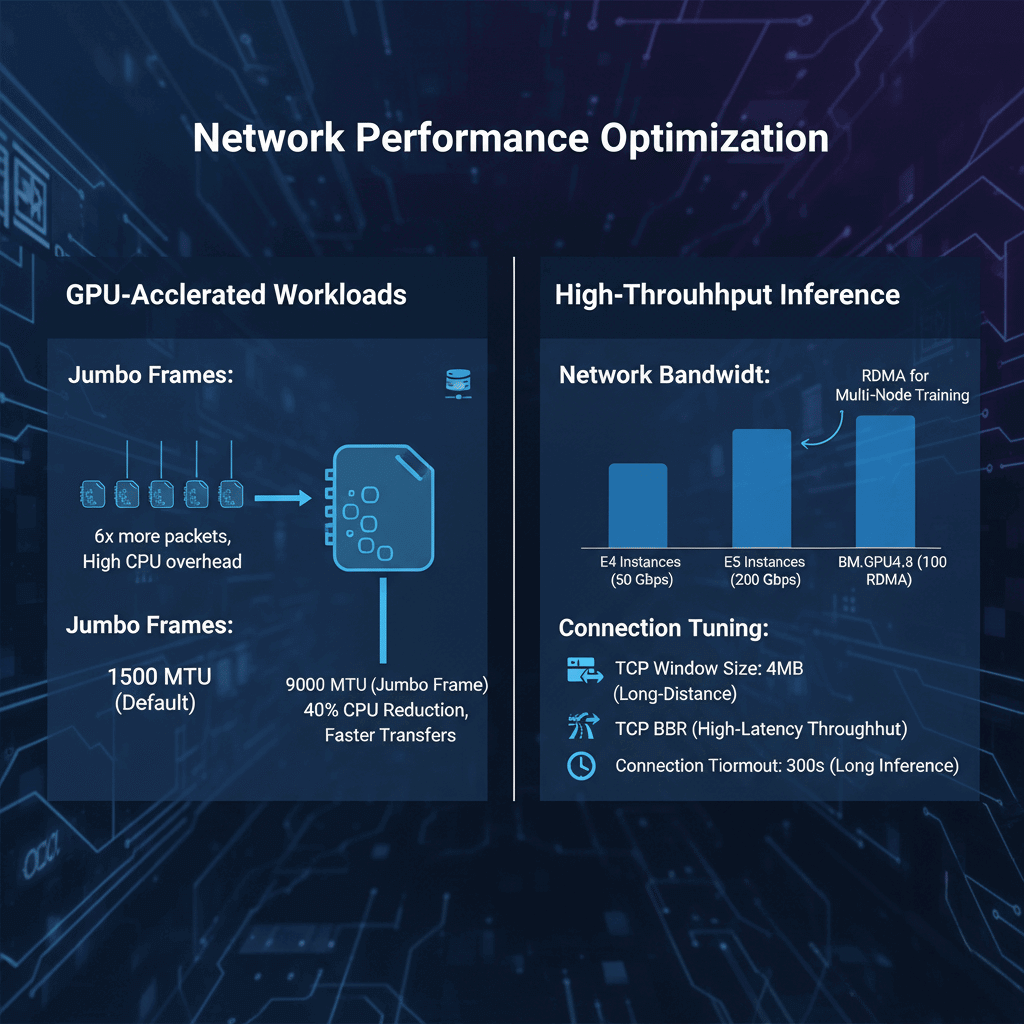
Enable 9000 MTU on VNICs for instance-to-instance communication. Default 1500 MTU causes 6x more packets for large model transfers. Jumbo frames reduce CPU overhead by 40% during multi-GPU tensor parallelism.
Network Bandwidth:
E4 instances provide 50 Gbps network bandwidth. E5 instances scale to 200 Gbps. GPU shapes (BM.GPU4.8) include 100 Gbps RDMA networks. Use RDMA for multi-node distributed training.
Connection Tuning:
Increase TCP window size to 4MB for long-distance transfers. Enable TCP BBR congestion control for better throughput over high-latency paths. Set connection timeout to 300 seconds for long-running inference requests.
Monitoring and Troubleshooting
Track network performance and identify bottlenecks using OCI monitoring.
Key Metrics:
- VCN flow logs for traffic analysis
- Load balancer connection count and latency
- NAT gateway bandwidth utilization
- NSG rule hit counts
- Cross-region peering throughput
Common Issues:
- High latency: Check route tables and gateway configuration
- Connection failures: Verify security list and NSG rules
- Bandwidth limits: Monitor gateway and instance network metrics
- Health check failures: Increase timeout or adjust interval
Flow Logs Analysis:
Enable VCN flow logs to capture all network traffic. Logs include source/destination IPs, ports, protocols, and byte counts. Export to Object Storage for analysis. Typical LLM workload generates 5-10 GB of flow logs daily per 100 instances.
Conclusion
OCI network architecture provides the foundation for reliable, high-performance LLM deployments. Proper VCN design with three-tier segmentation isolates workloads while maintaining security. Load balancers distribute traffic across multiple inference endpoints for fault tolerance and horizontal scaling. Private endpoints eliminate internet hops, reducing latency by 60% for database and storage access. Multi-region deployments with remote peering connections deliver 99.99% availability for global LLM services. Monitor network metrics continuously using VCN flow logs and OCI Monitoring to identify bottlenecks before they impact user experience. Start with single-region architecture, then expand to multi-region as traffic demands grow.
Frequently Asked Questions
How should I design network security for production LLM deployments on OCI?
Implement a multi-layered security architecture using both security lists and network security groups. Create separate subnets for each tier of your application with the load balancers in public subnets and LLM compute instances in private subnets without internet access. Use NAT gateways for outbound connections and service gateways for OCI service access. Configure security lists at the subnet level to enforce broad policies like denying all inbound traffic except from load balancers. Apply NSGs at the instance level for granular control over specific ports and protocols. Enable VCN flow logs to monitor all network traffic and detect anomalies. Use private endpoints for database and object storage access to keep traffic within the OCI backbone network. Implement a bastion host in a separate management subnet for SSH access rather than exposing instances directly. Enable DDoS protection on load balancers and configure WAF rules to filter malicious requests. For multi-region deployments, use remote peering connections to securely connect VCNs across regions without traversing the public internet.
What load balancer configuration provides optimal performance for LLM inference workloads?
Use flexible load balancers with bandwidth ranging from 100-1000 Mbps for typical LLM workloads. Configure the backend set with LEAST_CONNECTIONS policy since inference requests have variable processing times. Set health check intervals to 10 seconds with 3-second timeouts and mark instances unhealthy after 3 consecutive failures. Configure the health check endpoint to validate model loading status. Enable cookie-based session affinity to route related requests to the same backend for conversation context. Set idle timeout to 300 seconds for long-running inference requests. Configure SSL termination at the load balancer using OCI Certificate Service and enable HTTP/2 for better performance.
How can I minimize cross-region latency and costs for multi-region LLM deployments?
Design multi-region architecture around strategic region pairs with latency under 80ms. Implement intelligent traffic routing with OCI Traffic Management using geolocation steering to direct users to the nearest region. Deploy full LLM stacks in each region rather than splitting components across regions. Use OCI Object Storage replication to synchronize model artifacts automatically. Configure asynchronous replication for user data using Oracle GoldenGate or DataSync. Implement regional read replicas of Autonomous Database for low-latency local reads. Monitor cross-region data transfer costs carefully since egress charges apply to inter-region traffic. A well-architected multi-region deployment typically adds 15-25% to monthly costs while providing 99.99% availability.