Deploy Production LLMs on OKE Kubernetes
Deploy LLMs on Oracle Kubernetes Engine with GPU support. Complete guide covers OKE cluster setup, GPU nodes, vLLM deployments, auto-scaling, and monitoring patterns.

TLDR;
- Zero control plane costs versus $73/month on AWS EKS and Azure AKS
- 3x VM.GPU.A10.1 nodes handle 200-300 requests/min at $3,395/month total
- HPA scales pods on CPU/memory with 5-minute scale-down stabilization
- NVIDIA DCGM Exporter tracks GPU utilization, temperature, and power draw
Deploy large language models on Oracle Kubernetes Engine with GPU support. This guide covers OKE cluster setup from zero to production, GPU node pool configuration with A10 and A100 instances, and production-grade deployments using vLLM.
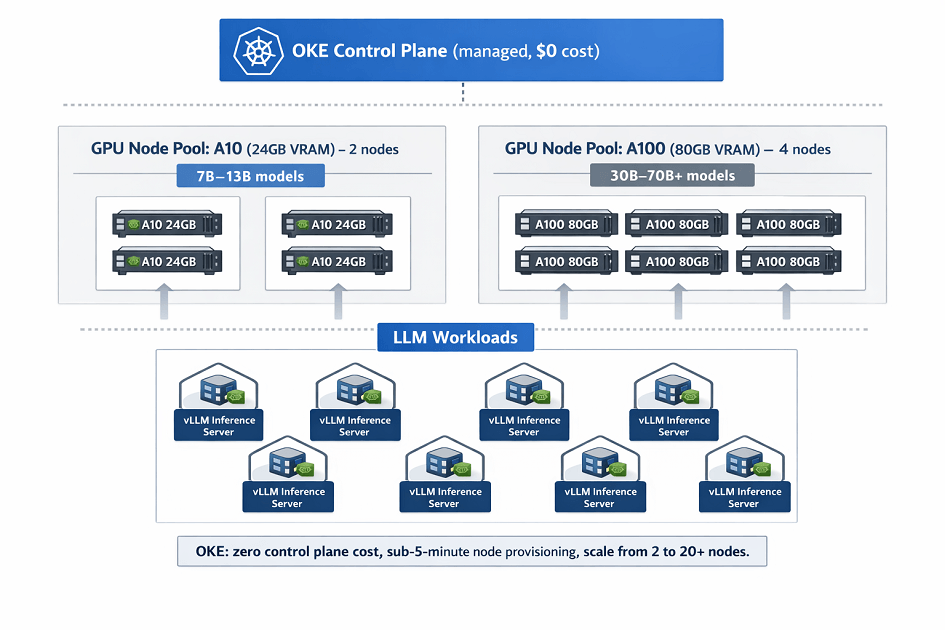
Kubernetes provides the orchestration layer needed for scalable LLM inference. OKE delivers fully managed Kubernetes clusters with zero control plane costs and native OCI service integration. Deploy containerized LLM workloads that scale from 2 to 20+ GPU nodes based on traffic demand.
Learn production patterns including:
- GPU device plugins for proper resource allocation
- Horizontal pod autoscaling based on utilization metrics
- Zero-downtime rolling deployments for model updates
- Monitoring stacks using Prometheus and Grafana
OKE clusters handle 200-300 requests per minute on small deployments and scale to thousands of requests for enterprise workloads.
OKE Architecture Overview
Oracle Kubernetes Engine provides a fully managed Kubernetes service optimized for GPU workloads. OKE integrates with OCI networking, storage, and security services for enterprise-grade deployments.
Key Components:
- Control Plane: Fully managed Kubernetes masters (free)
- Worker Nodes: GPU-enabled compute instances
- Container Registry (OCIR): Private Docker registry
- Load Balancer: Managed ingress with SSL termination
- Block Storage: Persistent volumes for model storage
- File Storage: Shared NFS for multi-pod access
Architecture Benefits:
- Zero control plane costs
- Native integration with OCI services
- Automatic OS patching and updates
- Support for mixed CPU/GPU node pools
- Regional and multi-AD deployments
- Built-in pod security policies
Create Production OKE Cluster
Set up a production-ready Kubernetes cluster with high availability.
# Create VCN for cluster
oci network vcn create \
    --compartment-id $COMPARTMENT_ID \
    --display-name llm-vcn \
    --cidr-blocks '["10.0.0.0/16"]' \
    --dns-label llmvcn

# Create subnets
oci network subnet create \
    --compartment-id $COMPARTMENT_ID \
    --vcn-id $VCN_ID \
    --display-name control-plane-subnet \
    --cidr-block 10.0.1.0/24 \
    --dns-label k8sapi

oci network subnet create \
    --compartment-id $COMPARTMENT_ID \
    --vcn-id $VCN_ID \
    --display-name worker-subnet \
    --cidr-block 10.0.10.0/24 \
    --dns-label workers

oci network subnet create \
    --compartment-id $COMPARTMENT_ID \
    --vcn-id $VCN_ID \
    --display-name loadbalancer-subnet \
    --cidr-block 10.0.20.0/24 \
    --dns-label loadbalancer

# Create OKE cluster
oci ce cluster create \
    --compartment-id $COMPARTMENT_ID \
    --name llm-production-cluster \
    --kubernetes-version v1.28.2 \
    --vcn-id $VCN_ID \
    --endpoint-subnet-id $CONTROL_PLANE_SUBNET_ID \
    --service-lb-subnet-ids "[$LB_SUBNET_ID]" \
    --cluster-pod-network-options '[{
        "cni-type": "FLANNEL_OVERLAY"
    }]' \
    --options '{
        "service-lb-config": {
            "subnet-ids": ["'$LB_SUBNET_ID'"]
        },
        "kubernetes-network-config": {
            "pods-cidr": "10.244.0.0/16",
            "services-cidr": "10.96.0.0/16"
        }
    }' \
    --wait-for-state ACTIVE

# Get kubeconfig
oci ce cluster create-kubeconfig \
    --cluster-id $CLUSTER_ID \
    --file ~/.kube/config \
    --region us-ashburn-1 \
    --token-version 2.0.0

# Verify cluster access
kubectl cluster-info
kubectl get nodes
Cluster creation time: 7-10 minutes
Configure GPU Node Pools
Add GPU-enabled worker nodes with optimized configurations.
Create GPU Node Pool:
# gpu-startup.sh - Node initialization script
cat << 'EOF' > gpu-startup.sh
#!/bin/bash
# Install NVIDIA drivers
dnf install -y kernel-devel-$(uname -r) kernel-headers-$(uname -r)
dnf config-manager --add-repo https://developer.download.nvidia.com/compute/cuda/repos/rhel8/x86_64/cuda-rhel8.repo
dnf install -y nvidia-driver-535 nvidia-utils-535

# Install NVIDIA Container Toolkit
distribution=$(. /etc/os-release;echo $ID$VERSION_ID)
curl -s -L https://nvidia.github.io/libnvidia-container/$distribution/libnvidia-container.repo | tee /etc/yum.repos.d/nvidia-container-toolkit.repo
dnf install -y nvidia-container-toolkit
systemctl restart docker

# Verify GPU
nvidia-smi
EOF

# Create node pool with A100 GPUs
oci ce node-pool create \
    --cluster-id $CLUSTER_ID \
    --compartment-id $COMPARTMENT_ID \
    --name gpu-a100-pool \
    --node-shape VM.GPU.A100.1 \
    --node-source-details '{
        "source-type": "IMAGE",
        "image-id": "'$IMAGE_ID'"
    }' \
    --size 3 \
    --placement-configs '[{
        "availability-domain": "US-ASHBURN-AD-1",
        "subnet-id": "'$WORKER_SUBNET_ID'"
    }]' \
    --node-config-details '{
        "size": 3,
        "placement-configs": [{
            "availability-domain": "US-ASHBURN-AD-1",
            "subnet-id": "'$WORKER_SUBNET_ID'"
        }],
        "node-metadata": {
            "user_data": "'$(base64 -w 0 gpu-startup.sh)'"
        }
    }' \
    --node-shape-config '{
        "ocpus": 15,
        "memory-in-gbs": 240
    }' \
    --wait-for-state ACTIVE

# Create auto-scaling node pool for A10 GPUs
oci ce node-pool create \
    --cluster-id $CLUSTER_ID \
    --compartment-id $COMPARTMENT_ID \
    --name gpu-a10-autoscale \
    --node-shape VM.GPU.A10.1 \
    --size 2 \
    --placement-configs '[{
        "availability-domain": "US-ASHBURN-AD-1",
        "subnet-id": "'$WORKER_SUBNET_ID'"
    }]' \
    --node-config-details '{
        "size": 2,
        "is-pv-encryption-in-transit-enabled": true
    }' \
    --node-shape-config '{
        "ocpus": 15,
        "memory-in-gbs": 240
    }'
Install NVIDIA Device Plugin:
# Deploy NVIDIA device plugin
kubectl create -f - <<EOF
apiVersion: apps/v1
kind: DaemonSet
metadata:
  name: nvidia-device-plugin-daemonset
  namespace: kube-system
spec:
  selector:
    matchLabels:
      name: nvidia-device-plugin-ds
  updateStrategy:
    type: RollingUpdate
  template:
    metadata:
      labels:
        name: nvidia-device-plugin-ds
    spec:
      tolerations:
      - key: nvidia.com/gpu
        operator: Exists
        effect: NoSchedule
      priorityClassName: system-node-critical
      containers:
      - image: nvcr.io/nvidia/k8s-device-plugin:v0.14.1
        name: nvidia-device-plugin-ctr
        env:
          - name: FAIL_ON_INIT_ERROR
            value: "false"
        securityContext:
          allowPrivilegeEscalation: false
          capabilities:
            drop: ["ALL"]
        volumeMounts:
        - name: device-plugin
          mountPath: /var/lib/kubelet/device-plugins
      volumes:
      - name: device-plugin
        hostPath:
          path: /var/lib/kubelet/device-plugins
EOF

# Verify GPU nodes
kubectl get nodes -l node.kubernetes.io/instance-type=GPU
kubectl describe nodes | grep -A 10 "Allocatable"
Deploy LLM Workloads with vLLM
Production deployment of Llama 2 7B using vLLM for high-throughput inference.
Build Container Image:
# Dockerfile
FROM nvidia/cuda:11.8.0-runtime-ubuntu22.04

WORKDIR /app

# Install Python and dependencies
RUN apt-get update && apt-get install -y \
    python3.10 \
    python3-pip \
    git \
    && rm -rf /var/lib/apt/lists/*

# Install vLLM and dependencies
RUN pip install --no-cache-dir \
    vllm==0.2.7 \
    transformers==4.36.0 \
    torch==2.1.0 \
    fastapi==0.109.0 \
    uvicorn==0.27.0

# Download model (or mount from storage)
RUN python3 -c "from transformers import AutoModelForCausalLM, AutoTokenizer; \
    AutoModelForCausalLM.from_pretrained('meta-llama/Llama-2-7b-chat-hf'); \
    AutoTokenizer.from_pretrained('meta-llama/Llama-2-7b-chat-hf')"

COPY serve.py /app/

EXPOSE 8000

CMD ["python3", "serve.py"]
serve.py:
from vllm import LLM, SamplingParams
from fastapi import FastAPI, HTTPException
from pydantic import BaseModel
import uvicorn
import logging

logging.basicConfig(level=logging.INFO)
logger = logging.getLogger(__name__)

app = FastAPI()

# Initialize vLLM
llm = LLM(
    model="meta-llama/Llama-2-7b-chat-hf",
    tensor_parallel_size=1,
    gpu_memory_utilization=0.95,
    max_num_batched_tokens=8192,
    max_num_seqs=256
)

class GenerateRequest(BaseModel):
    prompt: str
    max_tokens: int = 256
    temperature: float = 0.8
    top_p: float = 0.95

@app.post("/generate")
async def generate(request: GenerateRequest):
    try:
        sampling_params = SamplingParams(
            temperature=request.temperature,
            top_p=request.top_p,
            max_tokens=request.max_tokens
        )
        outputs = llm.generate([request.prompt], sampling_params)
        return {
            "text": outputs[0].outputs[0].text,
            "tokens": len(outputs[0].outputs[0].token_ids)
        }
    except Exception as e:
        logger.error(f"Generation error: {e}")
        raise HTTPException(status_code=500, detail=str(e))

@app.get("/health")
async def health():
    return {"status": "healthy"}

if __name__ == "__main__":
    uvicorn.run(app, host="0.0.0.0", port=8000)
Build and push to OCIR:
# Login to Oracle Container Registry
docker login us-ashburn-1.ocir.io -u $TENANCY_NAMESPACE/oracleidentitycloudservice/$USERNAME

# Build image
docker build -t llama-vllm:v1.0 .

# Tag and push
docker tag llama-vllm:v1.0 us-ashburn-1.ocir.io/$TENANCY_NAMESPACE/llama-vllm:v1.0
docker push us-ashburn-1.ocir.io/$TENANCY_NAMESPACE/llama-vllm:v1.0
Kubernetes Deployment:
# llama-deployment.yaml
apiVersion: v1
kind: Namespace
metadata:
  name: llm-inference
---
apiVersion: v1
kind: Secret
metadata:
  name: ocir-secret
  namespace: llm-inference
type: kubernetes.io/dockerconfigjson
data:
  .dockerconfigjson: <base64-encoded-docker-config>
---
apiVersion: apps/v1
kind: Deployment
metadata:
  name: llama-7b-inference
  namespace: llm-inference
spec:
  replicas: 3
  selector:
    matchLabels:
      app: llama-7b
      version: v1
  template:
    metadata:
      labels:
        app: llama-7b
        version: v1
    spec:
      imagePullSecrets:
      - name: ocir-secret
      nodeSelector:
        node.kubernetes.io/instance-type: GPU
      containers:
      - name: vllm
        image: us-ashburn-1.ocir.io/namespace/llama-vllm:v1.0
        resources:
          requests:
            nvidia.com/gpu: 1
            memory: 32Gi
            cpu: 8
          limits:
            nvidia.com/gpu: 1
            memory: 48Gi
            cpu: 12
        ports:
        - containerPort: 8000
          name: http
        livenessProbe:
          httpGet:
            path: /health
            port: 8000
          initialDelaySeconds: 60
          periodSeconds: 10
          timeoutSeconds: 5
          failureThreshold: 3
        readinessProbe:
          httpGet:
            path: /health
            port: 8000
          initialDelaySeconds: 30
          periodSeconds: 5
        env:
        - name: CUDA_VISIBLE_DEVICES
          value: "0"
        - name: VLLM_LOGGING_LEVEL
          value: "INFO"
---
apiVersion: v1
kind: Service
metadata:
  name: llama-7b-service
  namespace: llm-inference
spec:
  selector:
    app: llama-7b
  ports:
  - port: 80
    targetPort: 8000
    protocol: TCP
  type: ClusterIP
---
apiVersion: networking.k8s.io/v1
kind: Ingress
metadata:
  name: llama-7b-ingress
  namespace: llm-inference
  annotations:
    kubernetes.io/ingress.class: "nginx"
    cert-manager.io/cluster-issuer: "letsencrypt-prod"
spec:
  tls:
  - hosts:
    - llm.example.com
    secretName: llm-tls-cert
  rules:
  - host: llm.example.com
    http:
      paths:
      - path: /
        pathType: Prefix
        backend:
          service:
            name: llama-7b-service
            port:
              number: 80
Deploy to cluster:
# Apply configurations
kubectl apply -f llama-deployment.yaml

# Verify deployment
kubectl get pods -n llm-inference
kubectl get svc -n llm-inference
kubectl logs -n llm-inference -l app=llama-7b --tail=50

# Test inference
POD=$(kubectl get pod -n llm-inference -l app=llama-7b -o jsonpath='{.items[0].metadata.name}')
kubectl exec -n llm-inference $POD -- curl -X POST http://localhost:8000/generate \
    -H "Content-Type: application/json" \
    -d '{"prompt": "What is machine learning?", "max_tokens": 100}'
Horizontal Pod Autoscaling
Auto-scale deployments based on GPU and CPU metrics.
# hpa.yaml
apiVersion: autoscaling/v2
kind: HorizontalPodAutoscaler
metadata:
  name: llama-7b-hpa
  namespace: llm-inference
spec:
  scaleTargetRef:
    apiVersion: apps/v1
    kind: Deployment
    name: llama-7b-inference
  minReplicas: 2
  maxReplicas: 10
  metrics:
  - type: Resource
    resource:
      name: cpu
      target:
        type: Utilization
        averageUtilization: 70
  - type: Resource
    resource:
      name: memory
      target:
        type: Utilization
        averageUtilization: 80
  behavior:
    scaleDown:
      stabilizationWindowSeconds: 300
      policies:
      - type: Percent
        value: 50
        periodSeconds: 60
    scaleUp:
      stabilizationWindowSeconds: 60
      policies:
      - type: Percent
        value: 100
        periodSeconds: 30
      - type: Pods
        value: 2
        periodSeconds: 30
      selectPolicy: Max
Install Metrics Server:
# Deploy metrics server
kubectl apply -f https://github.com/kubernetes-sigs/metrics-server/releases/latest/download/components.yaml

# Apply HPA
kubectl apply -f hpa.yaml

# Monitor autoscaling
kubectl get hpa -n llm-inference -w
HPA for GPU workloads requires careful tuning. We configure it for your traffic pattern.
Scale-up: 100% every 30s (fast response). Scale-down: 50% every 60s with 300s stabilization (prevent thrashing). Custom metrics for queue depth? We implement those too.
We help you:
- Configure HPA with CPU/memory thresholds – 70% CPU, 80% memory typical for LLM inference
- Set stabilization windows – Prevent scale-down thrashing during traffic fluctuations
- Install metrics server – Required for resource-based autoscaling
- Implement custom metrics – Scale based on queue depth or request latency
Monitoring with Prometheus and Grafana
Track inference performance and GPU utilization.
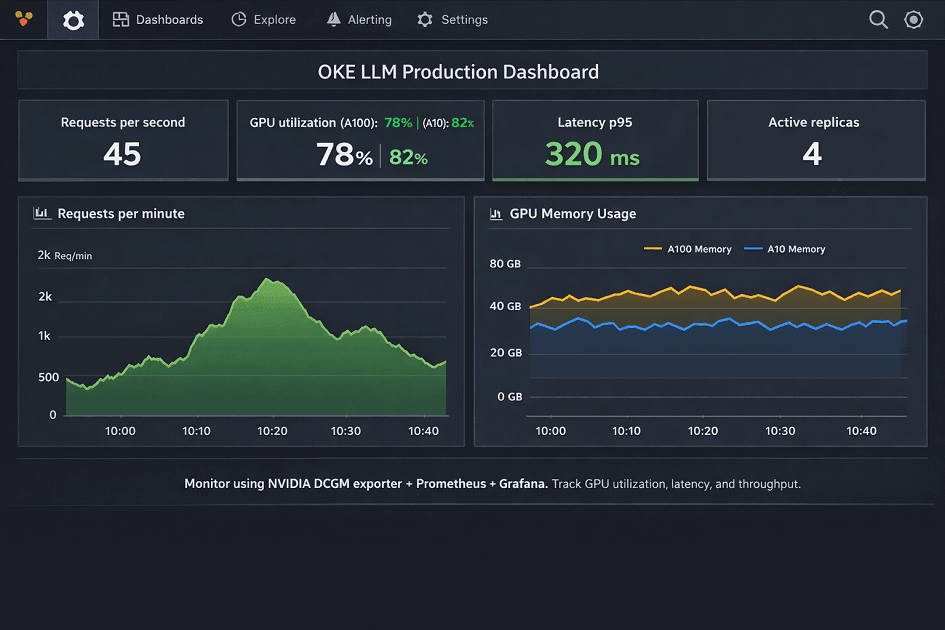
Deploy Prometheus Stack:
# Add Helm repo
helm repo add prometheus-community https://prometheus-community.github.io/helm-charts
helm repo update

# Install kube-prometheus-stack
helm install prometheus prometheus-community/kube-prometheus-stack \
    --namespace monitoring \
    --create-namespace \
    --set prometheus.prometheusSpec.serviceMonitorSelectorNilUsesHelmValues=false \
    --set grafana.adminPassword=admin123

# Install NVIDIA DCGM Exporter for GPU metrics
kubectl create -f - <<EOF
apiVersion: apps/v1
kind: DaemonSet
metadata:
  name: dcgm-exporter
  namespace: monitoring
spec:
  selector:
    matchLabels:
      app: dcgm-exporter
  template:
    metadata:
      labels:
        app: dcgm-exporter
    spec:
      nodeSelector:
        node.kubernetes.io/instance-type: GPU
      containers:
      - name: dcgm-exporter
        image: nvcr.io/nvidia/k8s/dcgm-exporter:3.1.7-3.1.4-ubuntu20.04
        ports:
        - containerPort: 9400
          name: metrics
        securityContext:
          runAsNonRoot: false
          runAsUser: 0
        volumeMounts:
        - name: pod-gpu-resources
          readOnly: true
          mountPath: /var/lib/kubelet/pod-resources
      volumes:
      - name: pod-gpu-resources
        hostPath:
          path: /var/lib/kubelet/pod-resources
EOF

# Access Grafana
kubectl port-forward -n monitoring svc/prometheus-grafana 3000:80
Cost Analysis
OKE cluster costs for LLM deployments.
| Configuration | Node Type | Nodes | Node Cost | OKE Control Plane | Load Balancer | Storage | Total Monthly | Requests/Min |
|---|---|---|---|---|---|---|---|---|
| Small Production (Llama 2 7B) | VM.GPU.A10.1 | 3 | $3,285 | $0 | $60 | $50 (1TB) | $3,395 | 200-300 |
| Medium Production (Llama 2 13B) | VM.GPU.A100.1 | 3 | $6,459 | $0 | $60 | $100 (2TB) | $6,619 | 150-200 |
| Large Production (Llama 2 70B) | BM.GPU.A100-v2.8 | 2 | $34,456 | $0 | $150 | $250 (5TB) | $34,856 | 40-80 |
Conclusion
Oracle Kubernetes Engine provides production-ready infrastructure for scalable LLM deployments. OKE eliminates control plane costs while delivering managed Kubernetes masters and automatic OS patching. GPU node pools with A10 and A100 instances support models from 7B to 70B+ parameters with horizontal scaling from 2 to 20+ nodes.
Container-based deployments enable zero-downtime updates through rolling deployment strategies and rapid scaling with sub-5-minute node provisioning. Horizontal pod autoscaling adjusts replica counts based on CPU and memory utilization automatically.
| Feature | Benefit |
|---|---|
| Control plane cost | $0 (free) |
| Node provisioning | Sub-5 minutes |
| Horizontal scaling | 2 to 20+ nodes |
| GPU support | A10 and A100 instances |
| Model support | 7B to 70B+ parameters |
| Deployment strategy | Zero-downtime rolling updates |
| Autoscaling | Horizontal Pod Autoscaler (CPU, memory metrics) |
Monitor GPU utilization and inference performance using Prometheus and Grafana dashboards. Storage options including Block Volumes and File Storage optimize for different access patterns and pod startup times. Start with small 3-node clusters for development, then scale to multi-node production configurations as traffic grows.
Frequently Asked Questions
1. OKE vs. AWS EKS vs. Azure AKS – Key Differences & Costs
| Category | OKE (OCI) | AWS EKS | Azure AKS |
|---|---|---|---|
| Control plane | $0 | $73/month | $73/month |
| A100 GPU node | $2,153/month | $2,920/month | $2,750/month |
| Network egress | $0.0085/GB | $0.09/GB | ~$0.08/GB |
| Volume attach time | 10 seconds | 45-60 seconds | 30-45 seconds |
| Container registry | Free (unlimited) | $0.10/GB storage | $0.10/GB storage |
| Load balancer | $60/month | $22/month + variable | ~$20/month |
3-node A100 cluster monthly cost:
- OKE: $6,619
- AWS: $9,133
- Azure: $8,523
Annual savings vs. AWS: $30,168
Verdict: OKE wins on cost. EKS/AKS win on ecosystem (SageMaker, Bedrock, Azure OpenAI).
2. Zero-Downtime Deployments for LLMs
| Strategy | Configuration | Best For |
|---|---|---|
| Rolling update | maxSurge: 1, maxUnavailable: 0 |
Minor version updates |
| Blue-green | Parallel v1/v2, atomic service selector switch | Major model upgrades |
| Canary | Weighted routing (10% → 50% → 100%) | Riskier changes |
Key requirements:
- Readiness probe:
initialDelaySeconds: 60(model loading time) - Init container to pre-download weights to shared PV (180s → 30s startup)
- ConfigMap + file watcher for config reloads (no restart)
- Over-provision 1 GPU node → drain old nodes with
kubectl drain --timeout=600s - Auto-rollback:
progressDeadlineSeconds: 600
Result: Zero downtime (50-100ms latency increase during rollover)
3. Storage for LLM Model Weights – Fast Pod Startup
| Scenario | Storage | Performance |
|---|---|---|
| Single node, model <50GB | Block Volume (Ultra High Performance) | 20GB in 15-20s |
| Multi-node, shared access | File Storage (NFS, ReadWriteMany) | 26GB in 8-12s (5 pods) |
| Max performance | DaemonSet pre-cache to hostPath (NVMe) | Startup in 5s |
| Model >100GB | Object Storage + File Storage cache | Hourly cache warming |
Cost comparison (100GB model):
- Block Volumes (3 nodes): $38.25/month
- File Storage (shared): $2.50/month (saves $35.75)
Implementation tips:
- Init container for model caching from OCIR to local NVMe
- CronJob to warm cache (read first 1GB of each model file hourly)
- Monitor with Prometheus:
volume_read_latency_seconds– alert if P95 > 100ms
Best practice: File Storage for multi-node + DaemonSet caching for 5-second pod startup