How to Optimize JavaScript and CSS for Faster Rendering
Optimize JavaScript and CSS for faster rendering with code splitting, lazy loading, minification, and runtime optimization. Improve Core Web Vitals and user experience.

TL;DR
- CSS blocks rendering – Inline critical CSS in
<head>, load the rest asynchronously. - JavaScript blocks parsing – Use
defer(maintains order, runs after parsing) orasync(runs when downloaded) for non-critical scripts. Never use sync<script>. - Reduce what you ship:
- Tree shaking – Use named imports, not namespace imports
- Code splitting – Route-based lazy loading (70-90% bundle reduction)
- PurgeCSS – Remove unused CSS framework styles
- Minify + compress – Minification reduces 30-50%; Brotli/Gzip reduces transfer 70-80%. Pre-compress at build time.
- Runtime performance – Avoid layout thrashing (batch DOM reads before writes), use
requestAnimationFramefor animations, debounce scroll/resize, offload heavy work to Web Workers. - Measure continuously – Lighthouse (CI), Web Vitals (LCP, FID, CLS), bundle analyzers, coverage tool (Chrome DevTools). Set performance budgets.
JavaScript and CSS determine how fast pages render and become interactive. Large bundles delay rendering. Render-blocking resources freeze the page. Inefficient code causes jank and slowness. Optimizing these assets directly improves Core Web Vitals and user experience. Modern build tools and browser features enable dramatic improvements.
Understanding the Critical Rendering Path
Browsers parse HTML to build the DOM. They parse CSS to build the CSSOM. JavaScript can modify both. Render happens after DOM and CSSOM are ready.
CSS blocks rendering by default. Browsers won't render until stylesheets load. Critical CSS must load quickly.
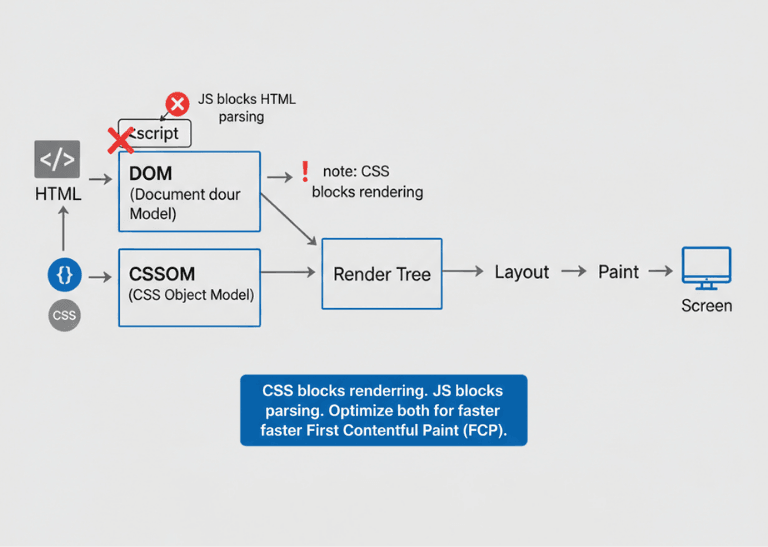
JavaScript blocks HTML parsing by default. When browsers encounter script tags, parsing stops until scripts execute. Scripts can modify the DOM, so browsers wait.
<!-- Render-blocking: delays everything -->
<script src="app.js"></script>

<!-- Non-blocking: parsing continues -->
<script src="app.js" defer></script>
<script src="analytics.js" async></script>
| Metric | Measures | Optimization Focus |
|---|---|---|
| FCP (First Contentful Paint) | When content first appears | Faster critical path = faster FCP |
| LCP (Largest Contentful Paint) | When main content renders | Optimize above-the-fold content first |
| CLS (Cumulative Layout Shift) | Visual stability | Load critical styles early to prevent shifts |
JavaScript Optimization Techniques
Bundle size directly affects load time. Every kilobyte takes time to download, parse, and compile. Smaller bundles load faster.
Tree shaking removes unused exports. Modern bundlers analyze import/export statements. Dead code never reaches the final bundle.
// Before: imports entire library
import _ from 'lodash';
_.debounce(fn, 300);

// After: imports only what's needed
import debounce from 'lodash/debounce';
debounce(fn, 300);
Dynamic imports load code on demand. Routes, features, and heavy components load when needed.
// Load component when needed
const Modal = React.lazy(() => import('./Modal'));

function App() {
  return (
    <Suspense fallback={<Loading />}>
      {showModal && <Modal />}
    </Suspense>
  );
}
Module/nomodule pattern serves modern code to modern browsers. Modern browsers get smaller, ES6+ bundles. Legacy browsers get transpiled code.
<script type="module" src="modern.js"></script>
<script nomodule src="legacy.js"></script>
Defer and async attributes prevent blocking. Defer maintains order and runs after parsing. Async runs immediately when downloaded.
Script placement matters. Scripts in head block rendering. Scripts at body end or with defer allow content to appear first.
CSS Optimization Strategies
Critical CSS inlines above-the-fold styles. Extract CSS needed for initial viewport. Inline in head for immediate availability.
<head>
  <style>
    /* Critical CSS inlined */
    header { background: #333; color: white; }
    .hero { height: 100vh; }
  </style>
  <link rel="preload" href="full.css" as="style" onload="this.rel='stylesheet'">
</head>
Preload important stylesheets. Tell browsers to fetch critical CSS early. Reduces time to render.
<link rel="preload" href="main.css" as="style">
Remove unused CSS. CSS frameworks include many unused rules. PurgeCSS and similar tools remove what's not needed.
// PostCSS with PurgeCSS
module.exports = {
  plugins: [
    require('@fullhuman/postcss-purgecss')({
      content: ['./src/**/*.html', './src/**/*.jsx'],
      defaultExtractor: content => content.match(/[\w-/:]+(?<!:)/g) || []
    })
  ]
}
CSS containment limits style recalculation. The contain property tells browsers what doesn't affect outside elements.
.card {
  contain: layout style paint;
}
Avoid expensive selectors. Deeply nested selectors and universal selectors slow style calculation. Keep selectors simple and specific.
/* Expensive */
.sidebar div ul li a { color: blue; }

/* Better */
.sidebar-link { color: blue; }
Code Splitting and Lazy Loading
Route-based splitting loads code per page. Users download only what they need for current page. Other routes load on navigation.
// React Router with code splitting
import { lazy, Suspense } from 'react';
import { Routes, Route } from 'react-router-dom';

const Dashboard = lazy(() => import('./pages/Dashboard'));
const Settings = lazy(() => import('./pages/Settings'));

function App() {
  return (
    <Suspense fallback={<Loading />}>
      <Routes>
        <Route path="/dashboard" element={<Dashboard />} />
        <Route path="/settings" element={<Settings />} />
      </Routes>
    </Suspense>
  );
}
Component-level splitting defers heavy components. Modal dialogs, charts, and editors load when activated.
Prefetching anticipates navigation. Load likely next pages during idle time. Instant navigation when users click.
// Prefetch on hover
function NavLink({ to, children }) {
  const prefetch = () => {
    import(`./pages/${to}`);
  };

  return (
    <a href={to} onMouseEnter={prefetch}>
      {children}
    </a>
  );
}
CSS code splitting loads styles per route. Each route bundle includes only its styles. Reduces initial CSS size.
Import on interaction delays non-critical libraries. Load heavy libraries when users interact.
// Load chart library when needed
async function showChart(data) {
  const Chart = await import('chart.js');
  new Chart(canvas, { data });
}
Minification and Compression
Minification removes unnecessary characters. Whitespace, comments, and long variable names shrink. Typically 30-50% size reduction.
// Before minification
function calculateTotal(items) {
  // Sum all item prices
  return items.reduce((sum, item) => sum + item.price, 0);
}

// After minification
function calculateTotal(t){return t.reduce((t,e)=>t+e.price,0)}
Build tools handle minification automatically. Terser for JavaScript, cssnano for CSS. Configure in webpack, Vite, or other bundlers.
// Vite config with minification
export default {
  build: {
    minify: 'terser',
    terserOptions: {
      compress: {
        drop_console: true
      }
    }
  }
}
Compression reduces transfer size further. Gzip provides 70-80% reduction. Brotli provides even better compression.
# Nginx Brotli configuration
brotli on;
brotli_types text/plain text/css application/javascript application/json;
brotli_comp_level 6;
Pre-compression at build time avoids runtime cost. Generate .br and .gz files during build. Servers serve pre-compressed files.
Source maps enable debugging without bloating production. Maps stay on server or separate location. Production bundles remain small.
Runtime Performance
Avoid layout thrashing. Reading layout properties forces recalculation. Batch reads before writes.
// Bad: causes layout thrashing
elements.forEach(el => {
  const height = el.offsetHeight; // Read, forces layout
  el.style.height = height + 10 + 'px'; // Write, invalidates layout
});

// Good: batch reads, then batch writes
const heights = elements.map(el => el.offsetHeight);
elements.forEach((el, i) => {
  el.style.height = heights[i] + 10 + 'px';
});
Use requestAnimationFrame for visual updates. Synchronize updates with browser paint cycles. Avoid mid-frame updates that cause jank.
function animate() {
  element.style.transform = `translateX(${position}px)`;
  position += 1;
  requestAnimationFrame(animate);
}
requestAnimationFrame(animate);
Debounce expensive handlers. Scroll and resize fire rapidly. Process only when necessary.
function debounce(fn, delay) {
  let timeoutId;
  return (...args) => {
    clearTimeout(timeoutId);
    timeoutId = setTimeout(() => fn(...args), delay);
  };
}

window.addEventListener('resize', debounce(handleResize, 100));
Web Workers offload heavy computation. JavaScript runs single-threaded. Workers run computation without blocking UI.
// Main thread
const worker = new Worker('heavy-computation.js');
worker.postMessage(data);
worker.onmessage = (e) => updateUI(e.data);

// Worker
self.onmessage = (e) => {
  const result = heavyComputation(e.data);
  self.postMessage(result);
};
Measurement and Monitoring
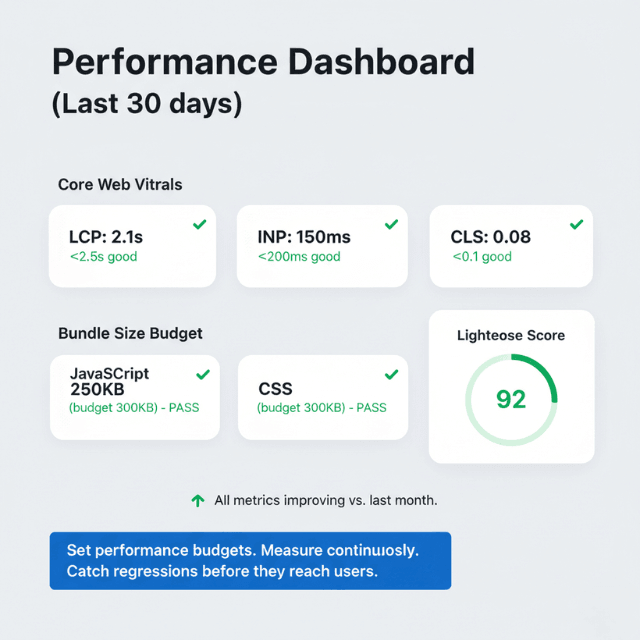
Lighthouse audits identify opportunities. Performance score reflects multiple metrics. Run regularly to catch regressions.
# Lighthouse CLI
npx lighthouse https://example.com --output=json --output-path=./report.json
Web Vitals library measures real user experience. Track LCP, FID, and CLS in production.
import { getLCP, getFID, getCLS } from 'web-vitals';

getLCP(metric => sendToAnalytics('LCP', metric.value));
getFID(metric => sendToAnalytics('FID', metric.value));
getCLS(metric => sendToAnalytics('CLS', metric.value));
Bundle analyzers reveal what's included. Identify large dependencies. Find opportunities for splitting.
Chrome DevTools Performance panel profiles runtime. Identify long tasks blocking main thread. Find functions causing jank.
Coverage tool shows unused code. See what JavaScript and CSS actually executes. Target unused code for removal or splitting.
Set performance budgets. Define acceptable bundle sizes and load times. Fail builds that exceed budgets.
Lighthouse Audits Reveal Issues. We Help You Fix Them.
You've run the audit. You see the scores. Now you need someone to implement the fixes.
Our technical leadership helps startups:
- Set performance budgets – Fail builds that exceed bundle size limits
- Implement code splitting – Route-based, component-level, import-on-interaction
- Configure build tools – Webpack, Vite, Rollup for optimal output
- Establish monitoring – Real-user metrics, continuous performance tracking
Conclusion
JavaScript and CSS optimization is not a one-time task it's a continuous discipline. The principles are clear: eliminate what users don't need (tree shaking, PurgeCSS), defer what they don't need immediately (code splitting, async), compress what remains (minify + Brotli), and monitor what you ship (bundle analyzers, Lighthouse).
The impact on Core Web Vitals LCP, FID, CLS is direct and measurable. A 500ms improvement in LCP correlates with higher conversion rates, lower bounce rates, and better user satisfaction. The tooling is mature: bundlers handle minification and splitting automatically; build-time optimizations like PurgeCSS and module/nomodule require minimal configuration.
The hardest part is maintaining discipline: keeping budgets, reviewing bundle composition, and resisting the temptation to add libraries without measuring their impact. Every kilobyte matters. Every render-blocking resource delays your user. Optimize ruthlessly, measure continuously, and your users will notice the difference.
Frequently Asked Questions
1. What's the single most impactful JavaScript optimization?
Code splitting with route-based lazy loading. A single large bundle containing all application code forces every user to download, parse, and compile everything including code for pages they never visit.
Route-based splitting delivers only the code needed for the current page. For a typical dashboard app with 10 routes, this can reduce initial bundle size by 70-90%. Combine with prefetch on link hover to load likely next routes during idle time, giving instant navigation without paying upfront cost.
2. How do I decide what CSS is "critical" and should be inlined?
| Tool | Description |
|---|---|
critical (Node.js) |
Automatically extracts critical CSS by rendering page at common viewport sizes |
penthouse |
Alternative critical CSS extractor |
Process: Render page at common viewport sizes (e.g., 1280×720, 375×667) → capture applied styles → inline in <head> → load full stylesheet asynchronously
Impact: Typically reduces render-blocking CSS by 80-90%, dramatically improving First Contentful Paint.
3. What's the difference between defer and async, and when should I use each?
Both prevent render-blocking, but behave differently:
defer: Downloads immediately, but executes after HTML parsing completes. Maintains script order (scripts execute in the order they appear). Use for scripts that depend on the DOM being fully parsed (e.g., main application code).async: Downloads immediately, executes as soon as download finishes, potentially before HTML parsing completes. Order is not guaranteed. Use for standalone scripts that don't depend on DOM or other scripts (e.g., analytics, ads, A/B testing).
Default todeferfor most scripts. Only useasyncwhen the script is completely independent. Never leave<script>without an attribute that blocks parsing.