GitOps Deployment for Kubernetes Teams
Implement GitOps with ArgoCD or Flux for automated Kubernetes deployments. Learn declarative config, Git-based workflows, and self-healing infrastructure patterns.

TLDR;
- GitOps uses Git as the single source of truth for infrastructure, enabling auditable and repeatable deployments
- ArgoCD and Flux are the two leading GitOps tools, each suited to different team needs
- Self-healing reconciliation automatically corrects configuration drift in production
- European teams gain built-in audit trails that satisfy GDPR accountability requirements
Traditional CI/CD pushes changes to production through imperative scripts and manual kubectl commands. GitOps inverts this model. Instead of pushing changes, agents running inside your cluster pull desired state from Git and continuously reconcile actual state to match.
This approach provides three benefits that matter for production teams.
| Benefit | Description |
|---|---|
| Complete audit trail | Git history records every infrastructure change, who made it, and why |
| Self-healing reconciliation | Manual changes or drift get automatically corrected |
| Simple rollback | Revert a Git commit to undo changes |
According to the CNCF Annual Survey 2024, GitOps adoption has moved from experimental to mainstream, with 93% of organizations using or evaluating Kubernetes as the platform that makes GitOps practical. For European B2B organizations, the built-in audit trail supports GDPR's accountability principle and provides evidence for regulatory compliance reviews.
This article covers GitOps principles, practical implementation with ArgoCD and Flux, security best practices, and patterns for managing configuration across environments in production Kubernetes clusters.
GitOps Principles
[Developer] --> [Git Commit] --> [Git Repository]
                                       |
                              [GitOps Agent (Pull)]
                                       |
                              [Kubernetes Cluster]
                                       |
                              [Reconciliation Loop]
Three principles define GitOps:
| Principle | Description | Example |
|---|---|---|
| Declarative configuration | Describe desired state, not steps to achieve it | Commit replicas: 3 instead of kubectl scale |
| Git as single source of truth | Everything about infrastructure lives in Git | Manifests, Helm charts, Kustomize overlays, RBAC, network policies |
| Automated reconciliation | Agents continuously compare actual to desired state | ArgoCD checks for drift every 3 minutes by default |
ArgoCD for GitOps
ArgoCD is a CNCF graduated project with a polished web UI, multi-cluster support, and active development. It is the most widely adopted GitOps tool.
Define an Application:
apiVersion: argoproj.io/v1alpha1
kind: Application
metadata:
  name: api-production
  namespace: argocd
spec:
  project: default
  source:
    repoURL: https://github.com/example/infra
    targetRevision: main
    path: apps/api
  destination:
    server: https://kubernetes.default.svc
    namespace: production
  syncPolicy:
    automated:
      prune: true
      selfHeal: true
With selfHeal: true, ArgoCD reverts any manual changes made directly to the cluster. With prune: true, resources deleted from Git get deleted from the cluster.
ApplicationSets generate multiple similar applications automatically:
apiVersion: argoproj.io/v1alpha1
kind: ApplicationSet
metadata:
  name: api-all-environments
spec:
  generators:
    - list:
        elements:
          - env: dev
          - env: staging
          - env: prod
  template:
    metadata:
      name: 'api-{{env}}'
    spec:
      source:
        path: 'apps/api/{{env}}'
      destination:
        namespace: '{{env}}'
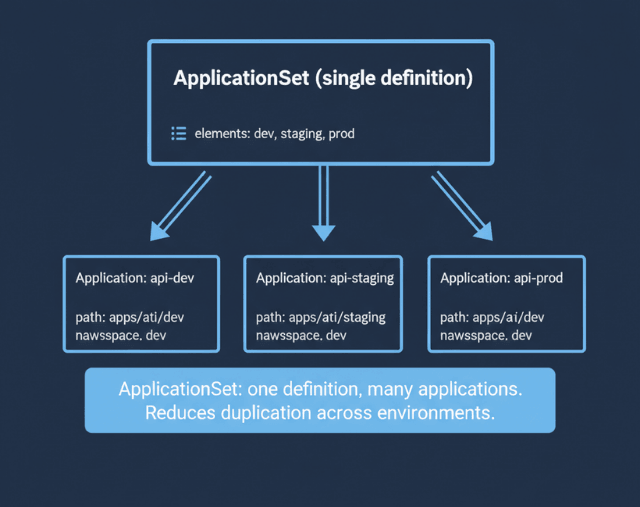
This creates three applications from a single definition, reducing configuration duplication across multiple environments.
Flux for Lightweight GitOps
Flux is a CNCF graduated project that takes a Kubernetes-native approach. It runs as a set of controllers with no separate UI or CLI beyond kubectl.
Image update automation watches your container registry and automatically commits manifest updates when new images appear:
apiVersion: image.toolkit.fluxcd.io/v1beta1
kind: ImagePolicy
metadata:
  name: api-policy
spec:
  imageRepositoryRef:
    name: api
  policy:
    semver:
      range: '>=1.0.0'
---
apiVersion: image.toolkit.fluxcd.io/v1beta1
kind: ImageUpdateAutomation
metadata:
  name: api-auto
spec:
  sourceRef:
    kind: GitRepository
    name: infra
  git:
    commit:
      author:
        name: Flux Bot
        email: flux@example.com
  update:
    path: ./apps/api
    strategy: Setters
According to Flux documentation, this closes the loop between CI building a new image and CD deploying it, without requiring manual manifest updates.
Choose ArgoCD when you want a rich UI, multi-cluster management from a single pane, and RBAC for deployment approvals. Choose Flux when you prefer Kubernetes-native controllers, lightweight operation, and namespace-scoped multi-tenancy. Both support Helm and Kustomize natively.
Managing Configuration with Helm and Kustomize
GitOps tools need structured configuration to manage. Two approaches work well.
Helm charts with environment-specific values files:
# values-prod.yaml
replicas: 5
resources:
  limits:
    memory: 1Gi
image:
  repository: registry.example.com/api
  tag: v1.2.3
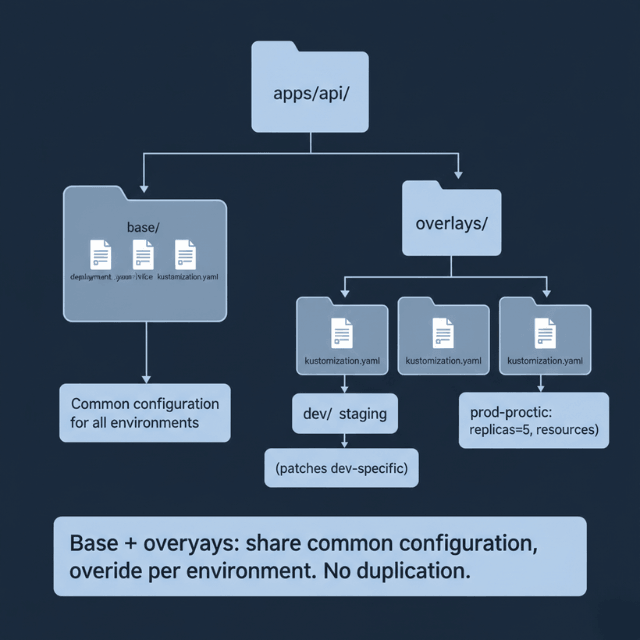
Kustomize overlays with base-plus-patch structure:
apps/
  api/
    base/
      deployment.yaml
      service.yaml
    dev/
      kustomization.yaml
    staging/
      kustomization.yaml
    prod/
      kustomization.yaml
Each environment overlays the base with environment-specific patches. According to the Kubernetes documentation, Kustomize is built into kubectl and requires no additional tooling. Use Helm for third-party charts from Artifact Hub and Kustomize for internal applications.
Helm or Kustomize? Both. We help you structure your repository.
Managing configuration across dev, staging, and prod is where GitOps gets complex.
We help you:
- Structure your GitOps repository – Base + overlays pattern
- Manage Helm charts at scale – Environment-specific values
- Reduce duplication with ApplicationSets – One definition, many environments
- Handle third-party charts – Prometheus, Ingress, Cert-Manager
Security in GitOps Workflows
GitOps improves security by default, but correct implementation matters.
Repository access control: GitOps agents need only read access to Git repositories. Write access is limited to developers through PR workflows. This separation means a compromised cluster cannot modify its own desired state.
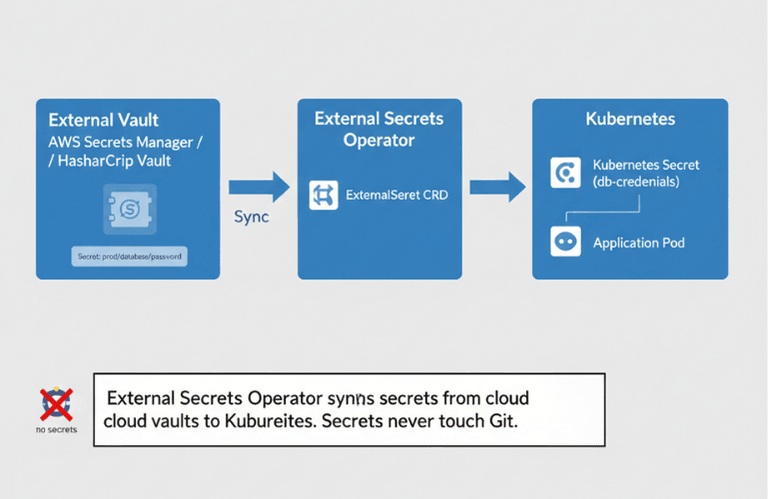
Never commit secrets to Git. Use Sealed Secrets for encrypted secrets in Git, or External Secrets Operator to sync from cloud vaults:
apiVersion: external-secrets.io/v1beta1
kind: ExternalSecret
metadata:
  name: db-credentials
spec:
  secretStoreRef:
    name: aws-secrets-manager
  target:
    name: db-credentials
  data:
    - secretKey: password
      remoteRef:
        key: prod/database/password
PR-based approval workflows provide audit trails. Every infrastructure change goes through code review before merging. For European organizations, this creates a documented approval chain that satisfies GDPR audit requirements and supports compliance frameworks like PSD2 and MiFID II.
Sync waves control deployment ordering when applications have dependencies:
metadata:
  annotations:
    argocd.argoproj.io/sync-wave: "1"  # Deploy database first
---
metadata:
  annotations:
    argocd.argoproj.io/sync-wave: "2"  # Then deploy application
Combined with pipeline security controls, GitOps provides defense-in-depth for your deployment process. Every change is traceable, reviewable, and reversible.
Conclusion
GitOps transforms infrastructure management from imperative scripts to declarative, auditable, self-healing systems. Start with ArgoCD if you want a visual dashboard and multi-cluster management. Choose Flux if you prefer lightweight, Kubernetes-native controllers.
Structure your repository with base configurations and environment overlays using Kustomize or Helm. Combine GitOps with progressive delivery for safer rollouts and build system automation for consistent artifacts. Keep secrets out of Git using External Secrets Operator, and enforce PR reviews for all changes to your CI/CD pipeline configuration.
FAQs
What is the difference between ArgoCD and Flux?
ArgoCD provides a rich web UI, multi-cluster management, and RBAC for deployment approvals. Flux runs as Kubernetes controllers with no separate UI, favoring kubectl-based workflows. ArgoCD suits teams wanting visual oversight; Flux suits teams preferring lightweight, Kubernetes-native tooling. Both are CNCF graduated projects.
How do I handle rollbacks with GitOps?
- Primary method: Revert the Git commit that introduced the change → agent detects reverted state and reconciles cluster
- Immediate action (ArgoCD):
argocd app rollback - Immediate action (Flux):
flux reconcile - Works for both ArgoCD and Flux
Can GitOps work with non-Kubernetes infrastructure?
GitOps principles apply to any declarative infrastructure. Terraform with Git-based workflows follows GitOps patterns. However, ArgoCD and Flux are Kubernetes-specific. For non-Kubernetes resources, tools like Crossplane extend the GitOps model to cloud provider resources managed through Kubernetes CRDs.