Step Functions and EventBridge Cost Optimization
Drive Step Functions EventBridge cost optimization by choosing Express workflows, tight rule patterns, SQS buffering, and EU-region deployment for GDPR alignment.

TLDR;
- Pick Express workflows for high-volume, short-duration work: up to 96 percent cheaper than Standard.
- Write tight EventBridge rule patterns so rules filter at the bus, not in downstream Lambdas you still pay to invoke.
- Replace direct Lambda fan-out with SQS buffering to smooth bursts and avoid Step Functions retry storms.
- Keep archives and replay scoped by event pattern to control GDPR log volume in eu-central-1.
Step Functions EventBridge cost optimization is the practice of matching workflow type, routing patterns, and buffering to your workload's traffic shape so you do not overpay for coordination. Both services scale invisibly, which is a blessing for reliability and a curse for budgets when misused.
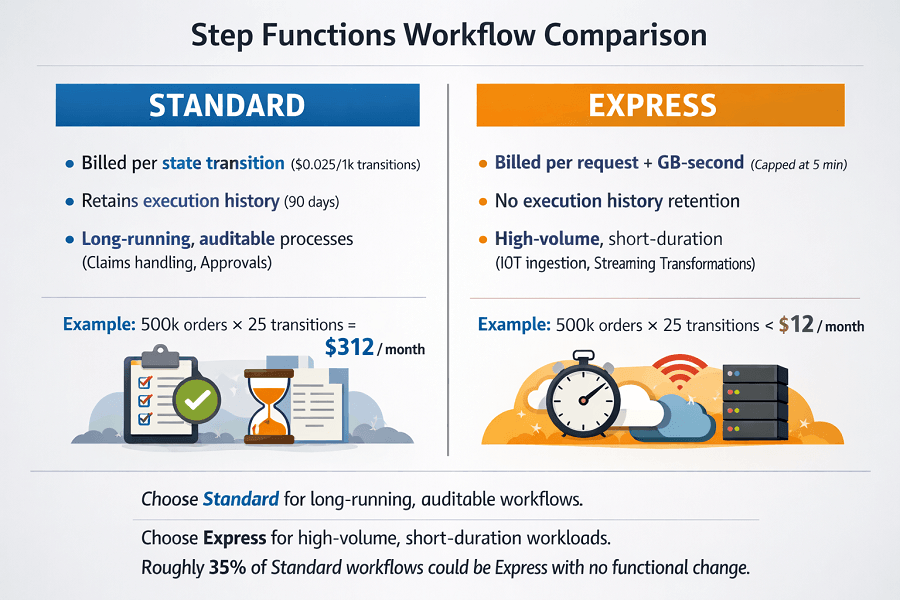
A Standard workflow logging 25 state transitions per order at 500,000 orders per month costs roughly USD 312 in eu-west-1; an Express equivalent costs around USD 12. Meanwhile, a loose EventBridge rule pattern matching every DynamoDB event in the account forces every connected Lambda to invoke, run, and bill, even when the payload is irrelevant.
According to the AWS Step Functions pricing page, Standard charges USD 0.025 per 1,000 state transitions while Express charges per request and GB-second, making type selection the single biggest lever.
How Step Functions and EventBridge Bill Workloads
Standard workflows bill per state transition and retain execution history for 90 days, ideal for long-running, auditable business processes like claims handling. Express workflows bill per request and GB-second of duration, like Lambda, and cap at five minutes of total runtime, ideal for IoT ingestion, streaming transformations, and real-time APIs.
EventBridge has two cost axes: USD 1.00 per million custom events on the default or custom buses, and separate pricing for partner event sources, archive storage, and replay. Default AWS service events, such as S3 object creation or EC2 state changes, are free to publish.
According to the EventBridge pricing documentation, archive storage costs USD 0.10 per GB-month in eu-central-1, and replay incurs standard event pricing. The AWS Well-Architected Serverless Lens recommends designing rule patterns as narrow as possible so only genuinely interesting events enter downstream compute.
500K orders/month: Standard costs $312. Express costs $12. 96% savings – same logic, different type.
Standard workflows bill per state transition and retain history for 90 days. Express workflows bill per request + GB-second, cap at 5 minutes. Most ingestion, validation, and enrichment pipelines fit Express.
We help you:
- Calculate your potential savings – Compare Standard vs Express for your workflows
- Identify conversion candidates – Workflows under 5 minutes, no need for 90-day history
- Understand GDPR implications – Express logs less by default, better for data minimisation
- Right-size archive retention – $0.10/GB-month in eu-central-1 – keep only what you need
Step-by-Step Workflow Optimization
First, classify each state machine as long-running (Standard) or high-volume short-duration (Express). For an order ingestion pipeline processing 10 million events per month with sub-second logic, the Express type is correct.
# template.yaml (SAM) - Express workflow with X-Ray + CloudWatch logs
Resources:
  OrderIngest:
    Type: AWS::Serverless::StateMachine
    Properties:
      Type: EXPRESS
      DefinitionUri: statemachines/order-ingest.asl.json
      Tracing: { Enabled: true }
      Logging:
        Level: ERROR
        IncludeExecutionData: false   # GDPR: never log payloads
        Destinations:
          - CloudWatchLogsLogGroup: { LogGroupArn: !GetAtt SfnLogs.Arn }
      Policies:
        - DynamoDBCrudPolicy: { TableName: !Ref OrdersTable }
        - LambdaInvokePolicy:  { FunctionName: !Ref EnrichFn }
Inside the Amazon States Language definition, prefer Parallel branches with task-level timeouts over long sequential chains, and call downstream services via AWS SDK integrations to avoid paying extra Lambda proxy hops.
{
  "Comment": "Express order ingest",
  "StartAt": "Validate",
  "States": {
    "Validate":  { "Type": "Task", "Resource": "arn:aws:states:::lambda:invoke", "Parameters": { "FunctionName": "validate-order" }, "Next": "PersistAndNotify" },
    "PersistAndNotify": {
      "Type": "Parallel", "End": true,
      "Branches": [
        { "StartAt": "Persist", "States": { "Persist": { "Type": "Task", "Resource": "arn:aws:states:::dynamodb:putItem", "Parameters": { "TableName": "orders-eu", "Item.$": "$.ddb" }, "End": true } } },
        { "StartAt": "Notify",  "States": { "Notify":  { "Type": "Task", "Resource": "arn:aws:states:::events:putEvents", "Parameters": { "Entries": [{ "Source": "checkout", "DetailType": "OrderAccepted", "Detail.$": "$.detail" }] }, "End": true } } }
      ]
    }
  }
}
For EventBridge, write patterns that filter aggressively. A rule that matches every aws.dynamodb event triggers downstream Lambda on noise; a tight content filter keeps the bill proportional to business events.
{
  "source": ["checkout"],
  "detail-type": ["OrderAccepted"],
  "detail": {
    "region": ["eu-west-1", "eu-central-1"],
    "totalCents": [{ "numeric": [">", 1000] }]
  }
}
According to the EventBridge content filtering documentation, numeric, prefix, and anything-but operators let you reject events at the bus without invoking any target, which is free to AWS and free to your budget. When fan-out targets have uneven processing speeds, insert an SQS queue between EventBridge and Lambda so retries do not drive Step Functions into expensive back-off loops.
Cost Optimization Best Practices
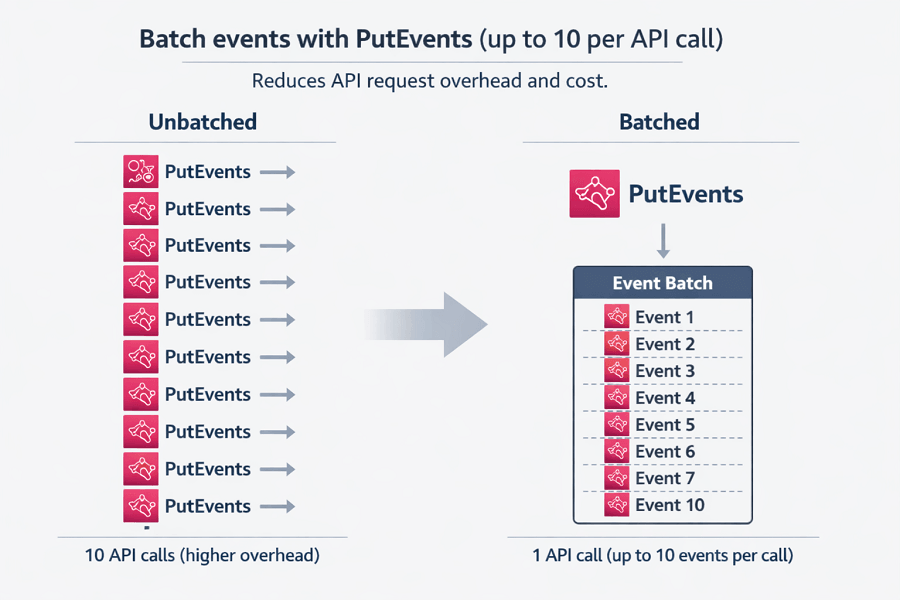
Batch events with PutEvents in groups of up to ten per API call to reduce overhead. Avoid wildcard rule patterns like "source": [{ "prefix": "" }] that match virtually every event on the bus. Put archives on 30-day retention unless you need long-term replay, and scope each archive to a narrow rule pattern so archived bytes stay proportional to what you truly want to replay.
For Step Functions, disable IncludeExecutionData in logs when payloads contain personal data, which keeps CloudWatch Logs storage low and preserves GDPR Article 5 data-minimisation compliance. According to the Lumigo serverless cost report 2024, roughly 35 percent of Step Functions spend on audited accounts came from Standard workflows that could have been Express with no functional change.
Monitoring and Troubleshooting
Track ExecutionsStarted and ExecutionTime for each workflow, and Invocations per EventBridge rule. A rule that fires millions of times with zero matched targets is burning budget; rewrite its pattern. Use CloudWatch Metrics Insights to graph cost-per-rule and cost-per-state-machine side by side. Alert when archive storage crosses a weekly delta threshold so noisy producers surface before month-end.
Instrument state machines with X-Ray so you can visualise the slowest branch in a parallel state, the most common source of Express workflow overruns. For EventBridge, dead-letter queues on every target catch silent failures that would otherwise trigger automatic retries and duplicate the bill.
Review the DLQ weekly; a flat line means rules are healthy, a rising line means a consumer or rule pattern needs repair. Pair this with per-workflow cost tags so finance reports show spend broken down by product feature rather than lumped under a single Step Functions service line.
Conclusion
Step Functions EventBridge cost optimization comes from three disciplined choices: picking Express over Standard wherever traffic allows, filtering events at the bus with tight JSON patterns, and buffering bursts with SQS before they become retry fees.
European teams gain additional control by keeping workflows in eu-west-1 or eu-central-1 to meet residency rules, and by logging metadata only so GDPR data-minimisation principles are respected by default. EaseCloud helps European SaaS companies redesign legacy Step Functions and EventBridge topologies, delivering 40 to 70 percent cost reductions while preserving auditability.
Frequently Asked Questions
When should I choose Standard over Express workflows?
Choose Standard when executions run longer than five minutes, require at-most-once semantics, or need the 90-day execution history for audit. For sub-second, high-volume automation such as ingestion, enrichment, or validation, Express is almost always cheaper and fast enough.
Do EventBridge rule patterns support complex boolean logic?
Yes. Patterns accept arrays, prefix matches, numeric comparisons, exists, and anything-but. Combine them to narrow matches without additional compute. If logic gets too complex, consider an Input Transformer plus a lightweight filter Lambda, but only when the rule engine cannot express the condition natively.
How do EU data residency rules affect archive and replay?
Archives stay in the region where you create them, so pinning to eu-west-1 or eu-central-1 keeps replay events within the EU. Tag the archive with a GDPR classification and apply bucket-like retention policies so personal-data events do not outlive their lawful basis for processing.