Serverless Architectures Performance Benefits and Challenges
Explore serverless performance trade-offs: auto-scaling, cold starts, and optimization strategies. Learn when serverless excels and when to consider alternatives.

TL;DR
- Auto-scaling from zero – but cold starts add latency (Go/Rust 50-100ms, Node.js/Python 100-300ms, Java 500ms+). Use provisioned concurrency for consistent speed.
- Faster functions cost less – billed per ms. Right-size memory (more CPU). Benchmark with AWS Lambda Power Tuning.
- Serverless excels at variable traffic, event-driven workloads, short tasks. Avoid for long-running (>15 min), ultra-low latency, or consistent high throughput (containers cheaper).
- Connection management – use RDS Proxy for databases. Initialize connections outside handler to reuse across warm invocations.
Serverless computing fundamentally changes how applications scale and perform. Functions execute on demand, scaling automatically to match traffic. No servers to provision or manage. This model offers performance benefits but introduces unique challenges. Understanding both enables successful serverless adoption.
How Serverless Affects Performance
Serverless functions execute in managed containers that start on demand. When requests arrive, the platform provisions execution environments. This model eliminates capacity planning but introduces startup latency.
Automatic scaling handles traffic spikes naturally. No manual intervention or pre-provisioning required. Functions scale from zero to thousands of concurrent executions as needed.
Per-invocation billing changes optimization economics. Faster functions cost less. Memory optimization directly reduces bills. This alignment incentivizes performance work.
Execution time limits constrain long-running operations. AWS Lambda allows 15 minutes maximum. Azure Functions and Cloud Run have similar limits. Some workloads don't fit this model.
Stateless execution affects architecture design. Functions can't maintain state between invocations (without external storage). This constraint encourages patterns that often improve scalability.
Network latency matters more than in traditional architectures. Each external call (database, cache, API) adds latency. Functions can't maintain warm connections between invocations (without provisioned concurrency).
Concurrent execution enables parallelism. Processing 1,000 items in parallel rather than sequentially transforms batch workload performance.
Cold Start Challenges
Cold starts occur when functions execute without warm containers. New containers must download code, initialize runtimes, and run initialization code. This process takes time.
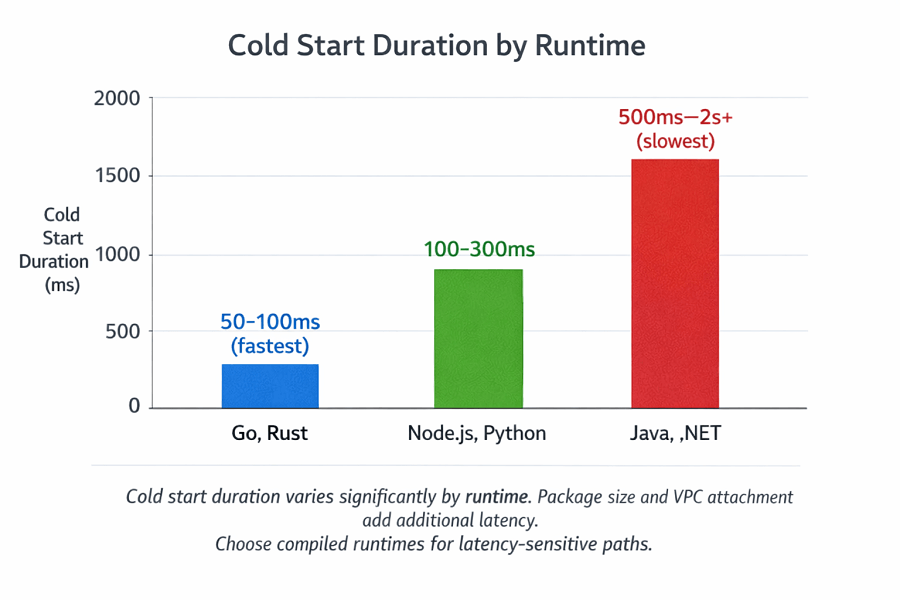
Cold start duration varies by runtime. Compiled languages like Go and Rust cold-start faster than interpreted languages. Java and .NET have longer cold starts due to runtime initialization.
| Runtime | Typical Cold Start |
|---|---|
| Go, Rust | 50-100ms |
| Node.js, Python | 100-300ms |
| Java, .NET | 500ms-2s+ |
Package size affects cold start duration. Larger deployment packages take longer to load. Minimize dependencies. Use layers for shared code.
// Avoid: importing entire AWS SDK
const AWS = require('aws-sdk');

// Better: import only what's needed
const { DynamoDB } = require('@aws-sdk/client-dynamodb');
VPC attachment adds cold start latency. Functions in VPCs require network interface creation. Use VPC only when necessary. Consider VPC-less alternatives like AWS PrivateLink.
Provisioned concurrency eliminates cold starts. Pre-initialized containers wait for requests. Consistent latency at higher cost.
Warm function reuse reduces cold start frequency. Traffic patterns matter. Consistent traffic keeps functions warm. Sporadic traffic means more cold starts.
Initialization code runs once per container. Move expensive initialization outside the handler. Subsequent invocations skip this setup.
# Initialization happens once per container (cold start)
import boto3
dynamodb = boto3.resource('dynamodb')
table = dynamodb.Table('users')

def handler(event, context):
    # Handler uses pre-initialized resources
    return table.get_item(Key={'id': event['user_id']})
Scaling Behavior
Serverless scales automatically without configuration. New requests trigger new executions. Concurrent execution handles parallel work.
Scaling happens quickly but isn't instant. Burst limits cap how fast concurrency increases. AWS Lambda's burst capacity varies by region.
Concurrency limits prevent runaway scaling. Default limits exist; request increases for production workloads. Limits protect downstream systems that might not handle sudden load.
Reserved concurrency guarantees capacity. Set aside capacity for critical functions. Prevents other functions from consuming all available concurrency.
# SAM template with reserved concurrency
MyFunction:
  Type: AWS::Serverless::Function
  Properties:
    ReservedConcurrentExecutions: 100
Scale-to-zero saves costs but creates cold starts. No traffic means no running instances. First request after idle period hits cold start.
Downstream systems must handle burst traffic. Databases, APIs, and other services receive sudden load when functions scale rapidly. Consider queuing or connection pooling.
Step Functions orchestrate complex workflows. Coordinate multiple Lambda functions. Handle long-running processes that exceed single-function limits.
Optimization Strategies
Minimize deployment package size. Remove unused dependencies. Use tree-shaking. Consider Lambda layers for shared code.
Choose appropriate memory allocation. Memory affects CPU proportionally. Some functions run faster with more memory despite not needing the RAM. Benchmark to find optimal settings.
# Use AWS Lambda Power Tuning to find optimal memory
# https://github.com/alexcasalboni/aws-lambda-power-tuning
Optimize for invocation billing. Functions bill in 1ms increments (AWS Lambda). Faster execution directly reduces costs.
Implement connection reuse. Initialize database connections outside the handler. Reuse connections across warm invocations.
Use async patterns for fan-out workloads. Process items in parallel rather than sequentially. Lambda can run thousands of concurrent executions.
import asyncio
import aiobotocore

async def process_items(items):
    tasks = [process_item(item) for item in items]
    return await asyncio.gather(*tasks)
Cache frequently accessed data. In-function caching survives across warm invocations. External caching (ElastiCache, DynamoDB) provides durability.
Consider ARM-based execution. Graviton2 processors often provide better price-performance. Test workloads on arm64 architecture.
Memory affects CPU. Graviton2 (arm64) often saves 20%. We benchmark your functions.
Higher memory = more CPU. Lambda Power Tuning finds optimal settings. ARM-based execution often provides better price-performance for compatible workloads.
We help you:
- Run Lambda Power Tuning – Find optimal memory for each function
- Benchmark arm64 vs x86_64 – Graviton2 performance and cost comparison
- Implement connection reuse – Database connections survive across warm invocations
- Add in-function caching – Reduce external calls, improve latency
Architecture Patterns
API Gateway plus Lambda handles HTTP workloads. API Gateway manages routing, authentication, and throttling. Lambda executes business logic.
Event-driven processing suits asynchronous workloads. S3 uploads, queue messages, and database changes trigger functions. No idle resources when there's no work.
Step Functions coordinate multi-step processes. State machines manage workflow logic. Built-in retry and error handling.
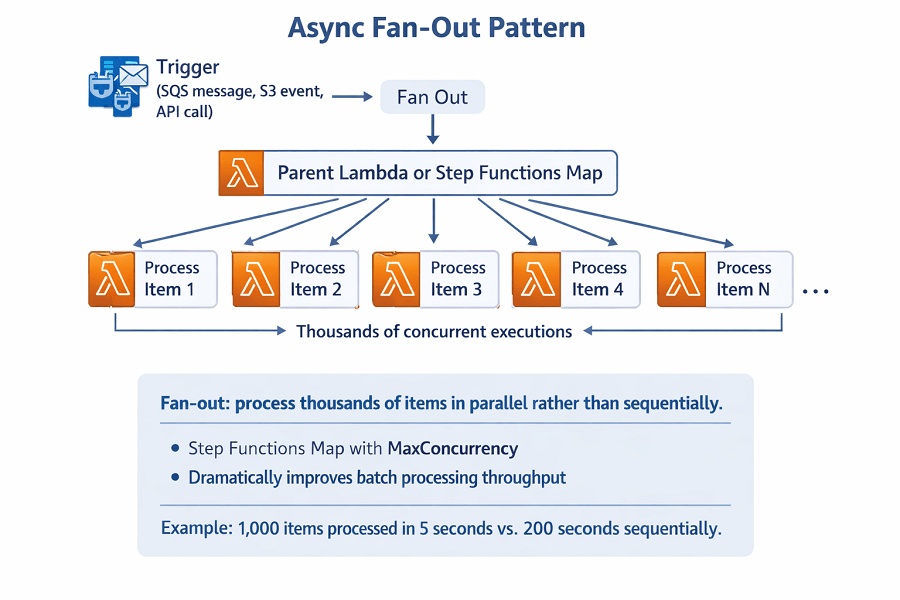
Fan-out patterns enable massive parallelism. Trigger thousands of concurrent executions. Process large datasets quickly.
# Step Functions parallel processing
ProcessItems:
  Type: Map
  Iterator:
    States:
      ProcessItem:
        Type: Task
        Resource: arn:aws:lambda:region:account:function:process-item
  MaxConcurrency: 100
Hybrid architectures combine serverless and traditional resources. Use Lambda for variable workloads, containers for consistent loads.
Edge functions run close to users. CloudFront Functions and Lambda@Edge execute at CDN edge locations. Minimal latency for simple transformations.
Database patterns adapt to serverless. DynamoDB scales naturally with Lambda. RDS requires connection pooling (RDS Proxy) for high concurrency.
When Serverless Excels
Variable traffic patterns benefit most. Scale-to-zero eliminates costs during idle periods. Automatic scaling handles peaks without over-provisioning.
Event-driven workloads align naturally. File processing, queue consumers, and webhook handlers fit the invocation model.
Short-duration tasks execute efficiently. Functions completing in seconds incur minimal overhead relative to work performed.
Rapid development benefits from managed infrastructure. No servers to patch or scale. Focus on application code.
Cost-sensitive applications with variable load. Pay only for execution time. No costs during zero traffic.
Microservices implementations where services have independent scaling needs. Each function scales independently.
When to Consider Alternatives
Long-running processes exceed function limits. Batch jobs running for hours don't fit. Consider containers or VMs.
Ultra-low latency requirements may conflict with cold starts. Even with provisioned concurrency, serverless adds overhead compared to dedicated infrastructure.
Consistent high-throughput workloads may cost more serverless. At sustained high traffic, reserved instances or containers often provide better unit economics.
Complex stateful applications require significant adaptation. State management across function invocations adds complexity.
GPU or specialized hardware needs aren't available in serverless platforms. ML inference and other specialized workloads need different approaches.
High memory or CPU requirements exceed function limits. Lambda allows up to 10GB RAM. Larger requirements need containers or VMs.
Legacy applications with specific runtime requirements may not port easily. Serverless has specific runtime support and constraints.
Conclusion
Serverless computing transforms how applications scale, but performance trade-offs require thoughtful design. Cold starts are the primary challenge, choose compiled runtimes (Go, Rust) for latency-sensitive paths, use provisioned concurrency where necessary, and optimize initialization code.
Auto-scaling eliminates capacity planning but downstream systems must handle burst traffic. The alignment of billing and performance (faster = cheaper) incentivizes optimization. For variable traffic, event-driven workloads, and rapid development, serverless is unmatched.
For consistent high-throughput, long-running processes, or ultra-low latency, traditional architectures may serve better. The most effective approach is often hybrid, serverless for spiky workloads, containers for baseline capacity.
FAQs
1. How do I reduce cold starts without paying for provisioned concurrency?
Reducing cold starts without provisioned concurrency.
| Strategy | Implementation | Impact |
|---|---|---|
| Use compiled runtimes | Go, Rust (50-100ms cold starts) | Significant reduction |
| Keep deployment packages small | Exclude SDKs, use layers | Faster loading |
| Move initialization outside handler | Connections, SDK clients | Reused across warm invocations |
| Set higher memory | More CPU = faster init | Faster cold start |
| Scheduled invocations | CloudWatch Events every 5 minutes | Keep functions warm |
Limitation: For production latency-sensitive workloads, provisioned concurrency is still the reliable solution.
2. When does serverless become more expensive than containers?
Serverless vs. containers cost threshold:
| Workload Pattern | Winner | Why |
|---|---|---|
| Sustained high throughput (predictable 24/7 load) | Containers or EC2 | Better unit economics |
| Variable or bursty load | Serverless | Pay only for execution time |
| Low utilization / intermittent | Serverless | Scale-to-zero eliminates idle costs |
Cost break-even example:
| Metric | Lambda | EC2 (t4g.small) |
|---|---|---|
| Pricing model | $0.0000167 per GB-second | ~$7/month |
| Memory | 1GB | 2GB |
| Monthly cost (100M invokes, 100ms) | ~$43/month | $7/month (always on) |
| Best for | Variable/bursty load | Predictable 24/7 load |
3. How do I handle database connections in serverless?
Database connection strategies for serverless:
| Strategy | How It Works | Best For |
|---|---|---|
| RDS Proxy | Managed connection pooling | Traditional relational databases (RDS) |
| Aurora Data API | Connection pooling managed for you | Aurora Serverless |
| DynamoDB | No connection management required | NoSQL workloads |
| Initialize outside handler | Reuse connection across warm invocations | All database types |
| Set high max connections | Account for peak concurrent Lambdas | Direct database access (without proxy) |
Without RDS Proxy, each Lambda instance creates a new connection – at 100 concurrent Lambdas, database needs 100+ max connections. RDS Proxy multiplexes connections, reducing database load.