Deploy LLMs Locally on Any Laptop with Ollama
Deploy LLMs locally with Ollama in under 60 seconds. Run 100+ models on laptops or GPUs, use OpenAI-compatible APIs, and keep data private.
TLDR;
- Start serving LLMs in under 60 seconds with single-command installation
- MacBook Pro M2 achieves 25 tokens/second, RTX 4090 reaches 180 tokens/second
- 100+ models available including Llama 2, Mistral, and Code Llama with automatic quantization
- OpenAI-compatible API enables seamless integration with existing applications
Deploy LLMs locally with Ollama and start serving models in under 60 seconds. This guide covers installation, model management, optimization, and production deployment for consumer hardware and edge environments without cloud dependencies.
Ollama makes local LLM deployment accessible to everyone. Optimize cloud costs with LLM deployment. No API keys. No data leaving your network. The tool wraps llama.cpp with a simple command-line interface and REST API, making complex model deployment trivial. Download a model with one command and run it with another. Behind the scenes, Ollama handles quantization automatically, selecting the optimal quantization format for your hardware whether Q4_0 for CPU inference or Q4_K_M for GPUs. Models are automatically downloaded and cached locally for instant subsequent access. Performance is solid for consumer hardware, with a MacBook Pro M2 serving Llama 2 7B at 25 tokens per second and an RTX 4090 reaching 180 tokens per second. While not as fast as vLLM or TensorRT-LLM, Ollama is orders of magnitude simpler to set up and configure. Use Ollama for local development, edge deployments, air-gapped environments, and privacy-sensitive applications where data cannot leave your infrastructure.
Installation and Quick Start
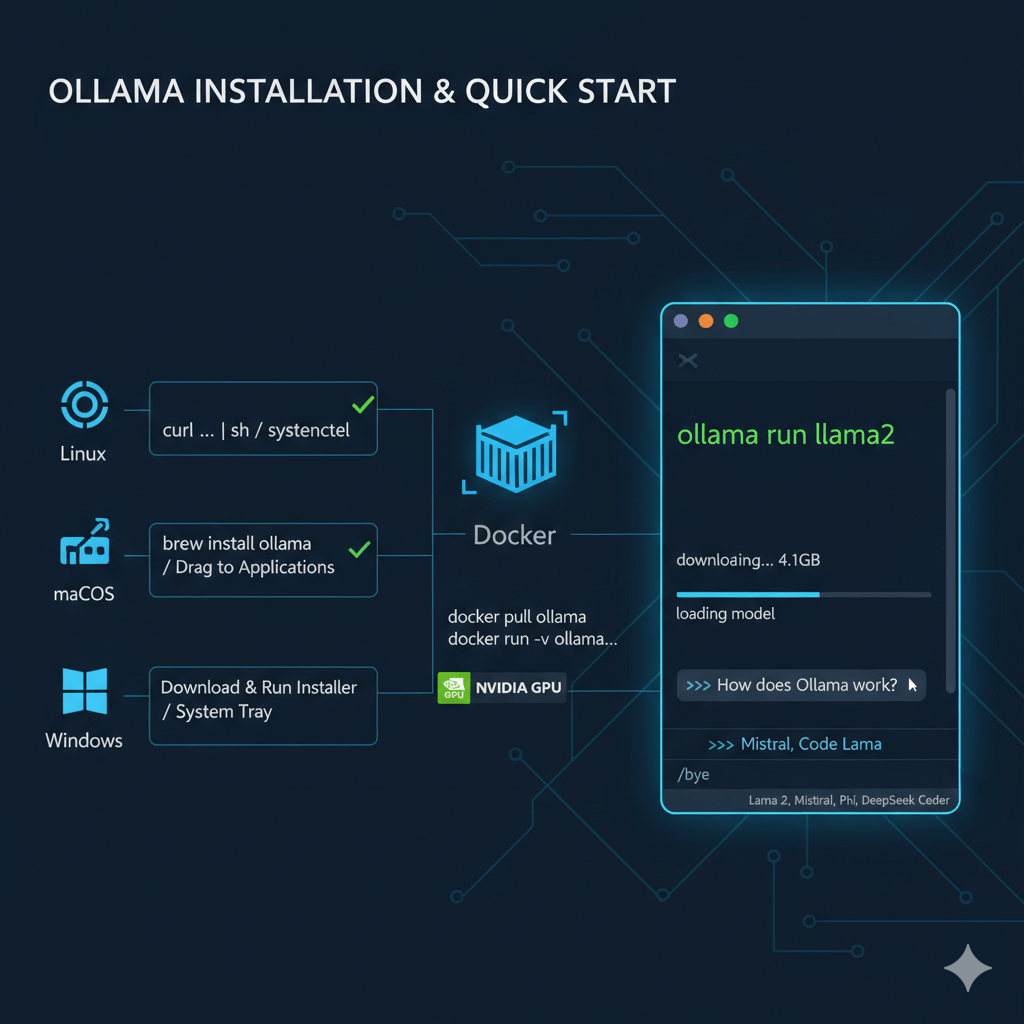
Install Ollama on Linux, macOS, or Windows with a single command. For Linux, use the official installation script which installs Ollama and sets up a systemd service that starts automatically. Verify installation by checking the version number. On macOS, install via Homebrew or download from the Ollama website and drag to Applications. Ollama runs in the menu bar on macOS where you can click the icon to manage models and settings. For Windows, download the installer from ollama.com and run it, which installs Ollama as a Windows service and adds it to the system tray.
Run Ollama in a container for portable deployments. Pull the Ollama Docker image and run the server with a volume mount to persist downloaded models across container restarts. For GPU support on NVIDIA hardware, add the --gpus all flag to expose GPUs to the container.
Download and run Llama 2 in seconds with the ollama run command. This automatically downloads the model (4.1GB), loads it into memory, and starts an interactive chat session. The first run downloads the model, while subsequent runs start instantly. Type your questions in the interactive chat and exit by typing /bye. Ollama's library includes 100+ models with automatic quantization, including Llama 2 variants, Mistral, Code Llama, Microsoft Phi, and DeepSeek Coder.
REST API and Application Integration
Integrate Ollama into your applications via REST API for programmatic access. Generate completions by posting to the /api/generate endpoint with your model name, prompt, and stream parameter. For real-time token generation with better user experience, enable streaming responses that return tokens as they are generated rather than waiting for the complete response.
Use the chat API to maintain conversation context across multiple turns. Post to the /api/chat endpoint with your model and messages array, and Ollama handles context management automatically. For compatibility with existing tools and libraries, Ollama provides an OpenAI-compatible API. Use the OpenAI client library with a custom base URL pointing to your Ollama server, and any tool or library built for OpenAI's API works seamlessly with your local models.
Create custom models with Modelfiles that define model parameters and system prompts. A basic Modelfile starts from a base model like llama2 or mistral, sets parameters such as temperature and top-p, and defines a system prompt to customize behavior. Save as a Modelfile, build with ollama create, then run your custom model. Advanced Modelfiles can include context window size, max token generation limits, custom system prompts, and few-shot example conversations for specialized assistants. Import any GGUF model into Ollama's ecosystem by referencing the local path in your Modelfile.
Production Deployment and Configuration
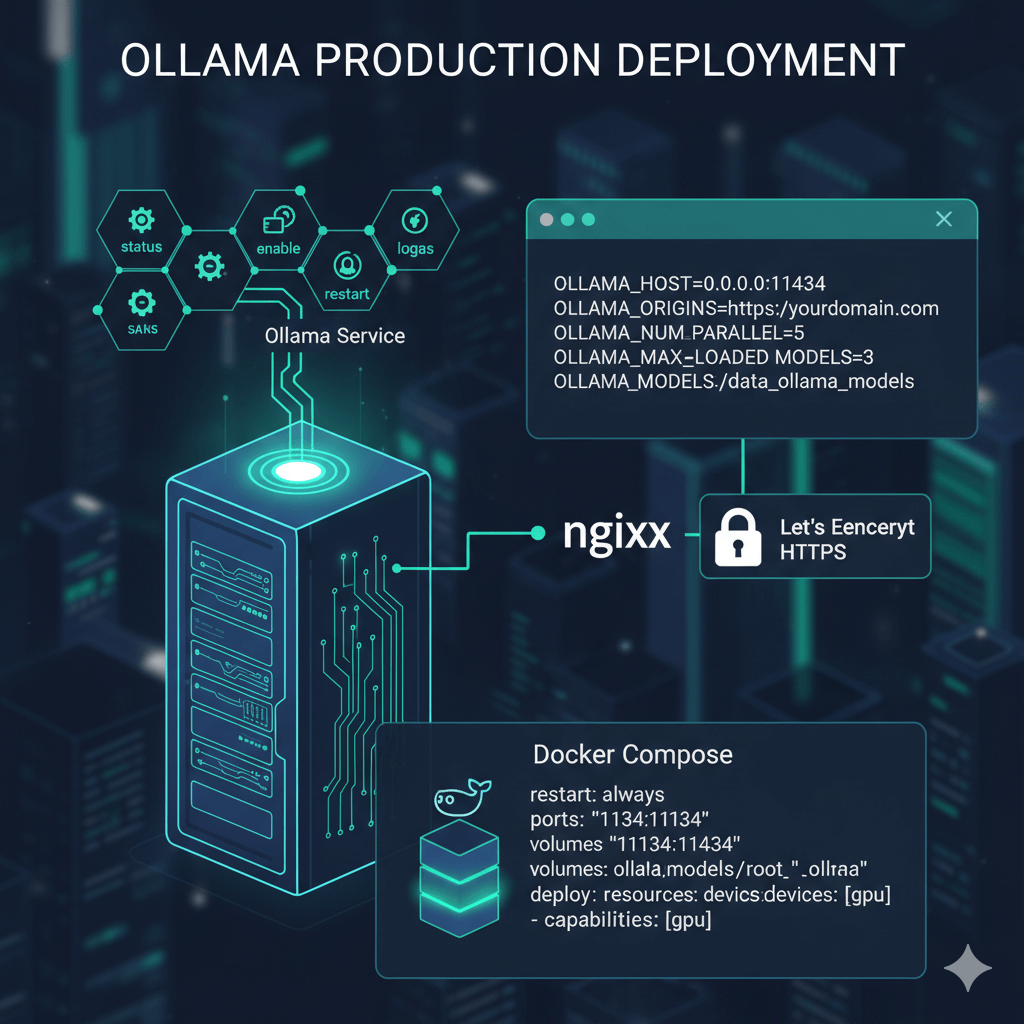
Deploy Ollama as a production service on Linux using the systemd service that installs automatically. Check status, enable auto-start, restart the service, and view logs using standard systemctl and journalctl commands. Configure Ollama via environment variables to control binding address, CORS origins, concurrent request handling, models kept in memory, and model storage directory.
Set OLLAMA_HOST to bind to a specific address and port (default is 127.0.0.1:11434). Configure OLLAMA_ORIGINS for CORS to control which domains can access the API. Set OLLAMA_NUM_PARALLEL to define how many concurrent requests Ollama handles (default is 1). Use OLLAMA_MAX_LOADED_MODELS to control how many models stay in memory simultaneously. Change OLLAMA_MODELS to specify a custom model storage directory. After configuration changes, reload the systemd daemon and restart the service.
Expose Ollama behind an nginx reverse proxy for production deployments. Configure nginx to proxy requests to the Ollama backend, disable buffering and caching for streaming support, and set appropriate timeouts for long-running inference requests. Add HTTPS with Let's Encrypt certificates for secure production access.
For containerized production deployments, use Docker Compose to define the Ollama service with automatic restarts, port mapping, volume persistence for models, environment variables for configuration, and GPU resource allocation for NVIDIA GPUs. This provides a reliable production setup that handles failures and resource constraints appropriately.
Performance Optimization and Model Management
Ollama automatically uses NVIDIA GPUs when available for acceleration. Verify GPU detection with nvidia-smi and run models normally, as Ollama automatically leverages GPU resources. Performance on RTX 4090 reaches approximately 180 tokens per second for Llama 2 7B and 90 tokens per second for Llama 2 13B.
For CPU-only deployments, set the thread count using the OLLAMA_NUM_THREAD environment variable to match your CPU cores. Use high-performance CPUs such as AMD EPYC or Intel Xeon for best CPU inference results.
Choose quantization based on your hardware constraints and quality requirements. Q4_0 provides the smallest size and fastest inference with 4-bit precision. Q4_K_M offers balanced performance with 4-bit precision but better quality. Q5_K_M delivers higher quality with 5-bit precision when you have extra memory. Q8_0 provides best quality with 8-bit precision approaching FP16 quality. Lower quantization means faster inference but lower output quality, so select based on your application needs.
Enable parallel request handling by setting OLLAMA_NUM_PARALLEL to allow multiple concurrent inference requests. Adjust based on available memory, as each concurrent request consumes additional memory for model state and context.
Manage downloaded models with simple commands. List all downloaded models to see their sizes and modification dates. Remove specific models or all versions of a model to free disk space. Pull the latest version of models to get updates, or pull specific versions with version tags. Copy models to create custom named variants useful for maintaining multiple customized versions of the same base model.
Conclusion
Ollama simplifies local LLM deployment to a single command while providing production-ready features including REST API, OpenAI compatibility, and automatic GPU acceleration. Install in seconds, download models instantly, and integrate with existing applications through standard API endpoints. For development environments, edge deployments, air-gapped systems, or privacy-focused applications, Ollama delivers the simplest path to running LLMs locally. Start with recommended Q4_K_M quantization for balanced performance, enable GPU acceleration for 5-10x speedup, and deploy with Docker or systemd for production reliability. While not matching the throughput of GPU-optimized frameworks like vLLM, Ollama excels at making LLM deployment accessible on any hardware from laptops to servers.