GPU Guide for LLM Deployment - RTX 4090 Benchmarks (2026)
RTX 4090 token throughput benchmarks for Llama, DeepSeek, and Qwen. VRAM requirements, power consumption, and on-premises hardware guide. Updated 2026.
TLDR;
- RTX 4090 at $1,600 delivers 180 tokens/second for 7B models with best price-performance
- Each billion parameters needs ~2GB VRAM in FP16 precision (quantization halves this)
- A100 80GB achieves 1.9TB/s memory bandwidth versus 1TB/s for RTX 4090
- Bare metal pays for itself in 4-8 months compared to cloud GPU costs
Select the right hardware for your LLM deployment and cut costs by 60% compared to cloud solutions. This guide compares GPUs, CPUs, and system configurations for cost-effective, high-performance inference on bare metal infrastructure.
Your hardware choice determines three critical factors affecting your LLM deployment: inference speed, model capacity, and total cost of ownership. The wrong GPU wastes money. A $1,600 consumer GPU can handle 7B parameter models at 180 tokens per second, but trying to run a 70B model results in out-of-memory errors.
Meanwhile, a $10,000 enterprise GPU sits idle if you only serve 7B models. VRAM is your primary constraint. Each billion parameters needs roughly 2GB of VRAM in FP16 precision, meaning a 7B model requires 14GB minimum while a 70B model needs 140GB. You can use quantization to cut these requirements in half, though that impacts accuracy.
Performance scales with memory bandwidth, not just VRAM capacity. An RTX 4090 delivers 1TB/s memory bandwidth while an A100 reaches 1.9TB/s. This gap matters for batched inference where you serve multiple requests concurrently, as higher bandwidth enables better throughput under load.
GPU Options for LLM Workloads
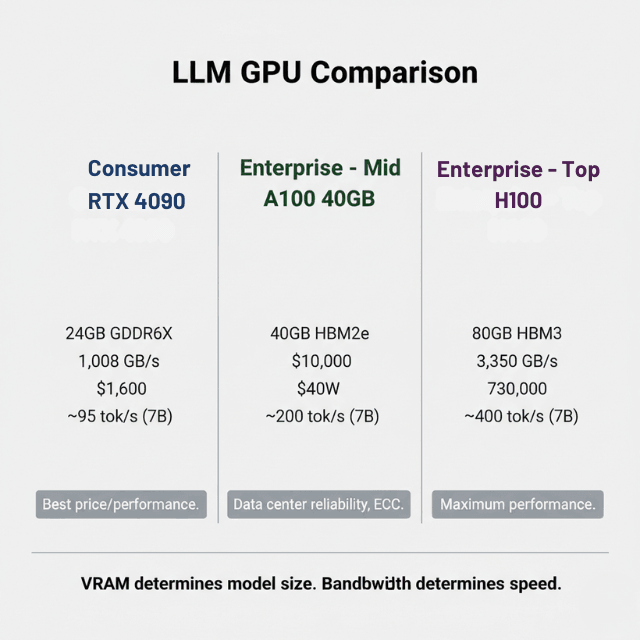
Compare current GPU options for different deployment scenarios and budgets. The RTX 4090 offers the best price-performance ratio for single-server deployments with 24GB GDDR6X, 1,008 GB/s memory bandwidth, $1,599 price, and 450W power consumption. Performance reaches approximately 180 tokens per second for Llama 2 7B and 45 tokens per second for Llama 2 13B.
Use RTX 4090 for development, small production deployments, and 7B-13B models with quantization. You can run Llama 2 70B with 4-bit quantization at about 15 tokens per second. If you're evaluating open-source Chinese models, see our guide on which Chinese model to run on this hardware. Limitations include no ECC memory, limited driver support compared to enterprise GPUs, and consumer warranty not covering 24/7 operation.
The A5000 bridges consumer and data center GPUs with 24GB GDDR6 with ECC, 768 GB/s memory bandwidth, $2,995 price, and 230W power consumption. Performance reaches approximately 150 tokens per second for Llama 2 7B and 40 tokens per second for Llama 2 13B.
Deploy A5000 for production workloads requiring ECC memory, regulated industries, and server deployments with power constraints. The ECC memory matters for long-running inference servers where bit flips from cosmic rays are rare but real, and one corrupted weight can generate garbage outputs for hours before detection.
The A6000 offers maximum single-GPU VRAM in a professional package with 48GB GDDR6 with ECC, 768 GB/s memory bandwidth, $4,650 price, and 300W power consumption. Performance reaches approximately 155 tokens per second for Llama 2 7B, 50 tokens per second for Llama 2 13B, and 12 tokens per second for Llama 2 70B with quantization.
Use A6000 for 30B-70B models, production deployments requiring single-GPU inference, and research workloads with large batch sizes. The A100 40GB provides data center reliability with moderate capacity featuring 40GB HBM2e with ECC, 1,555 GB/s memory bandwidth, approximately $10,000 price, and 400W power consumption.
Performance reaches approximately 200 tokens per second for Llama 2 7B, 65 tokens per second for Llama 2 13B, and 18 tokens per second for Llama 2 70B with quantization. Deploy A100 40GB for production data center deployments, multi-GPU scaling, and 13B-70B models with quantization. The high memory bandwidth makes a difference for batched inference, allowing you to serve 32 concurrent requests at lower latency compared to RTX 4090.
The A100 80GB doubles VRAM for the largest models with 80GB HBM2e with ECC, 1,935 GB/s memory bandwidth, approximately $15,000 price, and 400W power consumption. Performance matches the 40GB version in tokens per second but supports larger models and batch sizes.
Use A100 80GB for 70B models without quantization, large batch processing, and fine-tuning workloads. The 80GB version lets you run Llama 2 70B in FP16 precision and serve smaller models with much larger batch sizes, improving throughput for high-traffic deployments.
The H100 represents current top-end performance with 80GB HBM3 with ECC, 3,350 GB/s memory bandwidth, approximately $30,000 price, and 700W power consumption.
Performance reaches approximately 400 tokens per second for Llama 2 7B, 130 tokens per second for Llama 2 13B, and 35 tokens per second for Llama 2 70B. Deploy H100 for maximum performance requirements, ultra-low latency serving, and large-scale production deployments. The H100 costs 2-3x more than an A100 but delivers roughly 2x the inference performance. The ROI depends on your latency requirements and request volume.
System Configuration and Multi-GPU Scaling
Beyond GPU selection, other components impact performance and reliability. LLMs are GPU-bound rather than CPU-bound, but your CPU handles request orchestration, preprocessing, and model loading. Use a minimum 16-core CPU such as AMD EPYC 7003 or Intel Xeon 3rd Gen, with 32-core recommended for multi-GPU setups. Plan for 64GB system RAM minimum with 128GB recommended per GPU.
The CPU manages batching, tokenization, and post-processing, which can consume significant resources under high load with vLLM and continuous batching. Model loading speed impacts cold start latency, making storage configuration important. Require NVMe SSD as models load 10-20x faster than SATA SSDs.
Plan for 2TB minimum capacity as models can be 50-200GB each. RAID is optional, with RAID 0 for loading speed and RAID 1 for reliability. A 70B model in FP16 is about 140GB, loading from NVMe in 5-10 seconds, from SATA SSD in 30-60 seconds, and from spinning disk in several minutes.
Bare metal deployments need fast networking for multi-node setups. Use 10 GbE for single servers, 25 GbE or higher recommended for multi-GPU nodes, and NVLink for same-server GPU-to-GPU communication or InfiniBand for multi-server.
If you run tensor parallelism across multiple GPUs on different nodes, network bandwidth becomes critical. InfiniBand HDR (200 Gbps) is standard for data center deployments.
LLM servers consume significant power requiring proper planning. A single RTX 4090 system needs 600W total system power. A 4x A100 server requires 2,500W total system power. Enterprise rack cooling is required for multi-GPU deployments.
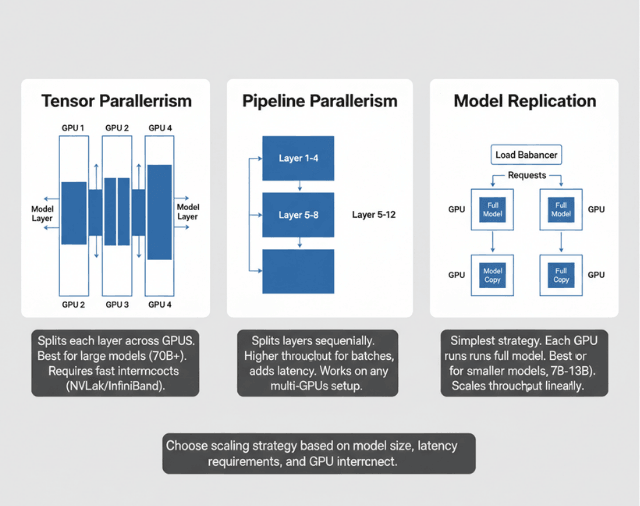
Budget for power and cooling in your TCO calculations. A 4-GPU A100 server costs about $800 per month in power at $0.10/kWh running 24/7. For single GPUs with VRAM limits, multi-GPU setups break through these constraints. Tensor parallelism splits model layers across GPUs where each GPU computes part of each layer, requiring high-bandwidth GPU interconnects such as NVLink or InfiniBand.
Use tensor parallelism for running models larger than single-GPU VRAM (70B+ models in FP16) with GPUs in same server with NVLink or InfiniBand for multi-server. Frameworks supporting this include DeepSpeed, Megatron-LM, and vLLM with tensor parallel support.
Pipeline parallelism splits model layers sequentially with early layers on GPU 1, middle layers on GPU 2, and final layers on GPU 3. Use pipeline parallelism for maximum throughput with batched requests on any multi-GPU setup. Latency increases slightly per request due to sequential processing, but throughput scales linearly with pipeline depth for batch processing.
Model replication loads the same model on multiple GPUs where each GPU serves requests independently. Use model replication for high-throughput serving with smaller models where each GPU must fit the entire model. This is the simplest scaling strategy, loading Llama 2 7B on 4x RTX 4090s to serve 4x the requests.
Deploying Multi-GPU or Multi-Node?
Tensor parallelism, pipeline parallelism, and InfiniBand networking require expertise most teams don't have in-house. We've deployed 100+ production LLM clusters with:
- vLLM + Tensor Parallel for 70B+ models
- NVLink/InfiniBand configuration for minimal communication overhead
- Auto-scaling that maintains sub-100ms latency under variable load
Cost Analysis and Deployment Recommendations
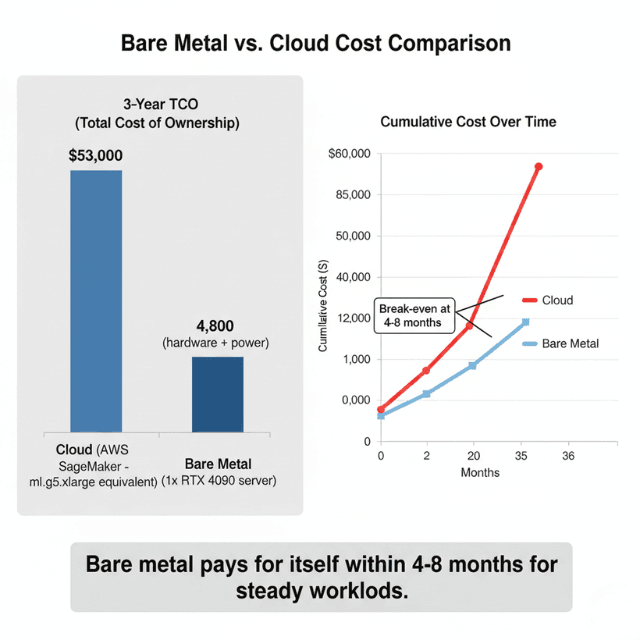
Total cost of ownership comparison for common configurations shows bare metal advantages. A single RTX 4090 configuration costs $3,500 for hardware (GPU plus server) and $1,300 for power over 3 years, totaling $4,800 with cost per million tokens of $0.12 at 50% utilization.
A 4x A100 40GB configuration costs $65,000 for hardware (GPUs plus server) and $21,000 for power over 3 years, totaling $86,000 with cost per million tokens of $0.18 at 50% utilization. Cloud comparison shows AWS SageMaker costs $2.03 per hour for ml.g5.xlarge (RTX 4090 equivalent), which is $53,000 over 3 years at 50% utilization. Bare metal pays for itself in 4-8 months for steady workloads.
Follow these steps for successful hardware procurement and deployment.
- Development & Testing: 1x RTX 4090, 64GB RAM, 1TB NVMe → ~$3,500
- Small Production (up to 1M requests/day): 2x RTX 4090 or 1x A5000, 128GB RAM, 2TB NVMe RAID → $6,000–8,000
- Medium Production (up to 10M requests/day): 4x A100 40GB, 256GB RAM, 4TB NVMe RAID, 25 GbE networking → ~$65,000
- Large Production (10M+ requests/day): 8x A100 80GB or 4x H100, 512GB RAM, 8TB NVMe RAID, InfiniBand → $150,000–200,000
Measure current load by profiling your expected request rate and model size requirements. Calculate VRAM needs by adding 20% buffer to theoretical requirements. Benchmark options by renting cloud GPUs temporarily to test performance with your models.
Plan for growth by considering 2x traffic growth in next 12 months. Check compatibility by verifying CUDA version support, driver availability, and framework compatibility. Plan power and cooling by confirming your facility can handle requirements. Buy with flexibility by choosing configurations that allow GPU upgrades without replacing entire servers.
RTX 4090 LLM Benchmark Table
Tokens per second measured with 4-bit quantization (GPTQ) on a single RTX 4090 (24GB VRAM):
| Model | Size | Tokens/sec (RTX 4090) | VRAM Used |
|---|---|---|---|
| Llama 2 | 7B | ~95 tok/s | 6GB |
| Llama 2 | 13B | ~52 tok/s | 10GB |
| Llama 3 | 30B | ~28 tok/s | 20GB |
| DeepSeek V3 | 7B | ~88 tok/s | 6GB |
| Qwen 2.5 | 7B | ~90 tok/s | 6GB |
Need Help Selecting GPUs for Your LLM Deployment?
The benchmark above shows what's possible, but real-world performance depends on your specific model, quantization strategy, and throughput requirements. Our GPU engineers help you:
- Right-size GPU clusters – No more over-provisioning or OOM errors
- Benchmark your models – On RTX 4090, A100, or H100 before purchasing
- Compare cloud vs bare metal – Exact TCO for your workload
"EaseCloud eliminated our GPU procurement guesswork. We saved 40% on hardware costs." — An ML Engineer
RTX 3090 vs RTX 4090 for LLM Inference
Both GPUs ship with 24GB GDDR6X VRAM, making them the most VRAM you can get from a single consumer card. That shared ceiling means either card fits the same model sizes — but the RTX 4090 is around 35% faster per token, thanks to a higher-clocked Ada Lovelace architecture and marginally more memory bandwidth (1,008 GB/s vs 936 GB/s).
| GPU | VRAM | Bandwidth | 7B tok/s | 13B tok/s | 30B tok/s | TDP | Price |
|---|---|---|---|---|---|---|---|
| RTX 3090 | 24GB GDDR6X | 936 GB/s | ~70 | ~38 | ~18 | 350W | ~$700 used |
| RTX 4090 | 24GB GDDR6X | 1,008 GB/s | ~95 | ~52 | ~28 | 450W | ~$1,600 |
All figures use 4-bit GPTQ quantization on a single GPU running llama.cpp or vLLM. The RTX 3090 remains a strong choice for budget deployments — at ~$700 used, it cuts hardware spend by more than half while still handling 13B models comfortably. The RTX 4090 is worth the premium if you need faster response times in production or plan to push 30B models regularly.
RTX 4090 Power Consumption During LLM Inference
The RTX 4090 draws 350W TDP at peak. During LLM inference, expect 250–320W sustained. For on-premises deployments, budget 400W per GPU slot (including system overhead). A 2x RTX 4090 server requires a 1000W PSU minimum.
On-Premises LLM Hardware Requirements
| Model Size | Minimum GPU | VRAM Required | Recommended Setup |
|---|---|---|---|
| 7B (FP16) | RTX 4090 | 14GB | Single RTX 4090 |
| 13B (FP16) | RTX 4090 | 26GB | 2x RTX 4090 or A100 40GB |
| 30B (4-bit) | RTX 4090 | 20GB | Single RTX 4090 with GPTQ |
| 70B (4-bit) | A100 80GB | 40GB | Single A100 80GB |
Frequently Asked Questions
Can I run a 13B model on an RTX 4090?
Yes. A 13B model in FP16 requires ~26GB VRAM, which exceeds the RTX 4090's 24GB. Use 4-bit quantization (GPTQ or AWQ) to fit it into 10–12GB, achieving ~52 tokens/sec.
How many tokens per second does RTX 4090 get with Llama 2 7B?
Approximately 95 tokens/sec with 4-bit GPTQ quantization. FP16 runs at ~60 tokens/sec. Results vary with batch size and context length.
Can I run a 13B model on a 24GB GPU?
Yes. A 13B model in FP16 needs ~26GB VRAM, slightly over the 24GB limit. Three quantization formats bring it well within range:
- GGUF (Q4_K_M) — ~10GB, runs in llama.cpp, easiest setup, ~38–52 tok/s
- GPTQ (4-bit) — ~10–12GB, GPU-native, best for vLLM and TGI, ~40–52 tok/s
- AWQ (4-bit) — ~10GB, slightly better accuracy than GPTQ, supported by vLLM 0.3+, ~45–52 tok/s
AWQ generally preserves more accuracy than GPTQ at the same 4-bit width, making it the default choice for production 13B deployments on RTX 3090 or RTX 4090. For quick local testing, GGUF with llama.cpp requires no CUDA setup.
Conclusion
Hardware selection for LLM deployment balances performance, capacity, and cost across GPU, CPU, storage, and networking components. Choose RTX 4090 for development and small production deployments serving 7B-13B models with excellent price-performance.
Select A100 GPUs for production deployments requiring ECC memory, multi-GPU scaling, and 13B-70B models. Use H100 for maximum performance when latency and throughput directly impact business value. Calculate VRAM requirements as parameters in billions times 2 times precision in bytes, plus KV cache and activation memory, adding 20% buffer for safety.
Consider quantization to reduce memory requirements by 2-4x. Plan for 4-8 month payback period for bare metal compared to cloud when running steady workloads. Start with conservative configurations matching current load, then scale hardware as traffic grows to maintain optimal utilization and cost efficiency. Once hardware is selected, maximize GPU throughput with vLLM to extract peak performance from your investment.
Summarize this post with:
Ready to put this into production?
Our engineers have deployed these architectures across 100+ client engagements — from AWS migrations to Kubernetes clusters to AI infrastructure. We turn complex cloud challenges into measurable outcomes.