Why Small Dev Teams Struggle With AWS DevOps
Discover why small dev teams struggle with AWS DevOps and practical solutions. Learn to simplify CI/CD, reduce tool sprawl, and scale operations effectively.
TLDR;
- Small teams struggle because limited bandwidth + 200+ AWS services = overwhelming
- Common problems: Tool sprawl, no in-house expertise, manual deployments, poor CI/CD, alert fatigue
- Simplify: Standardize workflows, automate deployments, choose managed services strategically
Your three-person engineering team ships product features daily. But deployments still involve SSH sessions, manual configuration, and crossed fingers. AWS offers hundreds of services promising DevOps automation, yet somehow operations consume more time than development. You are not alone.
This article examines why AWS DevOps overwhelms small teams, identifies the most common problems, and provides practical paths toward sustainable operations that scale with your growth.
Why AWS DevOps Feels Overwhelming for Small Teams
Limited time and headcount force difficult tradeoffs. When the same engineers building features must also manage infrastructure, deployments, and monitoring, something suffers. The 2024 State of DevOps Report by DORA confirms that elite-performing teams invest heavily in automation, but small teams rarely have bandwidth to make those investments.
Fast product delivery pressure prioritizes features over infrastructure. Stakeholders want new capabilities, not CI/CD improvements that users never see directly. This creates technical debt that compounds as the product grows.
The complex AWS ecosystem presents paradox of choice. With over 200 services, AWS offers multiple solutions for every problem. AWS documentation spans millions of pages, and determining the right tool for a specific use case requires expertise that small teams typically lack.
What AWS DevOps Looks Like for Small Development Teams

What teams expect versus reality differs dramatically. Marketing materials promise seamless automation, but implementation requires deep expertise in networking, security, IAM policies, and service-specific configurations. The gap between tutorials and production environments catches many teams off guard.
Tool sprawl and learning curve multiply complexity. CodePipeline, CodeBuild, CodeDeploy, CloudWatch, X-Ray, Systems Manager. Each service solves specific problems but introduces its own concepts, pricing models, and operational overhead. According to Puppet's State of DevOps research, teams using too many tools without integration experience worse outcomes than those with focused, well-integrated toolchains.
Balancing speed and stability becomes a daily struggle. Moving fast risks production incidents. Moving carefully risks missing market windows. Small teams often oscillate between these extremes rather than finding sustainable middle ground.
Common AWS DevOps Problems Small Teams Face
Too Many AWS Services to Manage
Fragmented tooling forces context-switching. Engineers move between EC2 console, RDS dashboard, Lambda functions, and S3 buckets dozens of times daily. Each service has different interfaces, concepts, and operational patterns.
Decision fatigue slows progress. Should you use ECS or EKS? Fargate or EC2 launch type? Application Load Balancer or API Gateway? Each decision requires research, experimentation, and eventual commitment, consuming hours that could build product features.
Lack of DevOps Expertise In-House
DevOps as a secondary role creates knowledge gaps. When backend developers handle infrastructure "on the side," neither discipline receives adequate attention. The Linux Foundation's 2024 Jobs Report shows DevOps and cloud expertise among the most difficult skills to hire, with demand outpacing supply across Europe.
Knowledge silos emerge when one team member becomes the infrastructure expert. If that person leaves or goes on holiday, deployments stall and incidents drag on longer than necessary.
Manual Deployments and Fragile Processes
Human error risks increase with deployment frequency. Forgetting an environment variable, missing a security group rule, or deploying to the wrong environment happens when processes depend on individual memory rather than automated verification.
Slow release cycles result from fear of manual processes. When deployments require extensive checklists and careful coordination, teams naturally reduce deployment frequency, which increases batch sizes and risk per deployment.
Poor CI/CD Pipelines
Inconsistent builds undermine confidence. When the same code produces different artifacts depending on who builds it or when, debugging becomes archaeology rather than engineering. Reproducibility requires automation that many small teams never fully implement.
Deployment failures without clear rollback paths create extended outages. Teams discover gaps in their processes during production incidents when stress runs highest and thinking clearest is hardest.
Monitoring, Logging, and Alert Fatigue
Too many alerts desensitize teams. When CloudWatch alarms fire constantly for non-critical issues, engineers begin ignoring all notifications. The signal-to-noise ratio deteriorates until critical alerts receive the same dismissive response as routine ones.
Missing critical issues happens when monitoring covers infrastructure metrics but misses application-level problems. Users report outages before internal systems detect them, damaging trust and extending mean time to resolution.
Why These AWS DevOps Problems Get Worse as You Scale
Increased deployment frequency amplifies existing problems. What works for weekly deployments fails at daily releases. Manual steps that take ten minutes per deployment consume hours when deployments happen multiple times daily.
More environments to manage multiply operational burden. Production, staging, development, and feature-branch environments each require configuration, monitoring, and maintenance. Environment drift introduces bugs that appear only in production.
Higher downtime risk threatens business outcomes. As user bases grow, even brief outages affect more customers and generate more support tickets. The AWS Well-Architected Framework emphasizes operational excellence, but implementing its recommendations requires dedicated effort.
The Hidden Costs of Poor AWS DevOps Practices
| Cost Area | Impact |
|---|---|
| Slower feature delivery | When engineers spend 30% of their time on operational tasks, feature velocity drops proportionally. Competitors with better operations ship faster and capture market share |
| Increased cloud spend | Over-provisioned resources, forgotten test environments, and inefficient architectures all increase costs when nobody has time to optimize |
| Burnout and retention | The 2024 Developer Survey by Stack Overflow found that operational burden ranks among top causes of developer dissatisfaction. Talented engineers leave for organizations with better infrastructure practices |
Calculate What Poor DevOps Is Costing Your Team
Engineers spending 30% of time on operations = 1 day per week lost per engineer.
For a 5-person team, that's 5 days of engineering capacity wasted weekly.
We recover that time through:
- Automated deployments that eliminate manual work
- Infrastructure-as-Code that prevents environment drift
- Smart monitoring that surfaces only what matters
Free 30-min consultation: We'll analyze your current workflow and show exactly how much time we can recover.
How Small Teams Can Simplify AWS DevOps
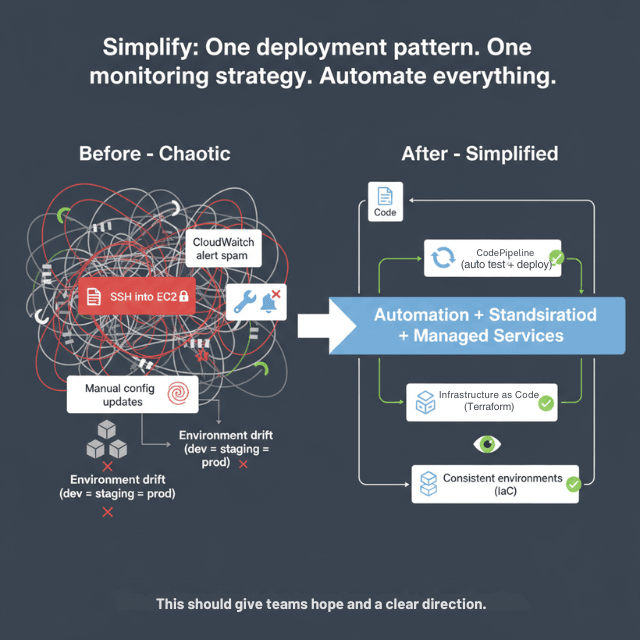
Standardizing workflows reduces cognitive load. Define one deployment pattern, one logging approach, and one monitoring strategy. Consistency trumps optimization at early stages. Even imperfect standards beat having no standards.
Automating deployments eliminates human error. Start with basic CI/CD pipelines that runs tests and deploys on merge to main branch. AWS CodePipeline integrates with GitHub and provides reasonable defaults for common patterns.
Reducing operational overhead means choosing managed services strategically. RDS over self-managed databases. Fargate over EC2 clusters requiring manual scaling. Pay slightly more in service costs to save significantly in engineering time.
When Small Teams Need AWS DevOps Support
Clear warning signs indicate when current approaches no longer suffice:
- Deployment fear
- Frequent production incidents
- Mounting technical debt
- Engineer burnout
Build versus buy decision: Hiring a dedicated DevOps engineer requires finding scarce talent, paying competitive salaries, and accepting that one person creates a single point of failure. Managed DevOps support provides senior-level expertise without those constraints.
How EaseCloud Helps Solve AWS DevOps Problems for Small Teams
- Startup-focused DevOps setups: Design infrastructure appropriate for current scale while planning for growth. No over-engineering, no enterprise complexity
- CI/CD pipeline implementation: Automated testing, consistent deployments, clear rollback procedures reduce incident frequency and duration
- Ongoing DevOps support: European startups access AWS-certified engineers who understand GDPR compliance, EU region requirements
Final Thoughts
DevOps should enable growth, not block it. When operational tasks consume engineering bandwidth, product development suffers and competitive position erodes. Small teams can break this cycle through focused automation, strategic tooling choices, and selective use of external expertise.
The most successful startups treat DevOps as a continuous investment rather than a one-time project. Start with basic automation, expand as needs grow, and recognize when external support accelerates progress more than internal effort.
Struggling with AWS DevOps? Contact EaseCloud to learn how European startups are simplifying their operations and shipping faster with expert AWS support.
Frequently Asked Questions
Why is AWS DevOps hard for small teams?
Limited bandwidth, the complexity of AWS services, and competing priorities for feature development create a challenging environment where DevOps expertise rarely develops organically.
Can small teams manage AWS DevOps without dedicated engineers?
Yes, with appropriate automation and managed services. However, establishing those foundations often benefits from external expertise to avoid common pitfalls and accelerate implementation.
What is the biggest DevOps mistake startups make on AWS?
Postponing automation until "later" while manual processes become increasingly entrenched. The longer teams rely on manual operations, the more difficult and risky the transition to automation becomes.
When should startups invest in DevOps?
Before pain becomes acute. Ideally, basic CI/CD and infrastructure automation should exist before the first production launch. Retrofitting automation to existing systems requires more effort than building it from the start.
Is managed DevOps support worth it for small teams?
For most startups, yes. The cost of fractional DevOps expertise typically delivers better ROI than either ignoring operations or hiring full-time specialists before scale justifies the expense.
Summarize this post with:
Ready to put this into production?
Our engineers have deployed these architectures across 100+ client engagements — from AWS migrations to Kubernetes clusters to AI infrastructure. We turn complex cloud challenges into measurable outcomes.