Slash ML Costs by 70% with AWS Inferentia
Reduce ML inference costs by 70% using AWS Inferentia. Learn model optimization, instance selection, batch processing, and deployment strategies for cost-effective ML at scale.
TL;DR
- Cut inference costs 50-90% with AWS Inferentia—purpose-built chips delivering superior price-performance over GPUs. Real-world savings: Amazon Search reduced costs 85%, Condé Nast saved 72%, Actuate achieved up to 91% reduction.
- Two generations of Inferentia: Inf1 instances offer up to 70% lower cost per inference. Inf2 (second-gen) delivers 3x higher compute, supports models up to 175B parameters (GPT-3 scale), and provides 4.5x better latency than NVIDIA A10G GPUs.
- Optimize with Neuron SDK: Compile models from PyTorch, TensorFlow, and MXNet using AWS Neuron. Critical optimizations include batch size tuning and fixed input shapes for maximum hardware utilization.
- Maximize savings with multi-model serving: Run multiple models on a single instance by allocating different NeuronCores to different models. Example: 3,000 models served on EKS with Inferentia for under $50/hour.
Machine learning inference costs can quickly spiral out of control, especially when deploying models at scale.
While GPUs have long been the default choice for ML workloads, AWS Inferentia offers a compelling alternative that can slash your inference expenses by up to 70% without sacrificing performance.
As organizations increasingly deploy AI-powered applications, the economics of ML inference have become a critical factor in project viability and scalability.
AWS Inferentia represents a fundamental shift in how we approach ML inference optimization.
These purpose-built chips are specifically designed for inference workloads, delivering superior price-performance compared to general-purpose GPUs.
With real-world case studies demonstrating cost reductions from 56% to 91%, understanding how to leverage Inferentia effectively has become essential knowledge for ML engineers and AI architects.
Understanding AWS Inferentia Architecture
AWS Inferentia is Amazon's custom-designed machine learning inference chip, purpose-built to deliver high-performance inference at the lowest cost in the cloud.
The first-generation Inferentia chip powers EC2 Inf1 instances, while the second-generation Inferentia2 chip drives Inf2 instances with 3x higher compute performance, 4x larger total accelerator memory, and up to 10x lower latency.
Each Inferentia2 chip contains 32 GB of high-bandwidth memory (HBM), enabling the largest Inf2.48xlarge instance to support models with up to 175 billion parameters, including models like GPT-3 and BLOOM.
The architecture includes NeuronCores as fundamental compute units that independently execute compiled models, allowing parallel processing of multiple inference requests or different models simultaneously.
AWS Inferentia integrates seamlessly with popular deep learning frameworks including TensorFlow, PyTorch, and MXNet through the AWS Neuron SDK. This SDK provides the compilation tools, runtime libraries, and optimization features necessary to transform standard ML models into Inferentia-optimized executables.
Cost Comparison with GPU Instances
The cost advantages of AWS Inferentia become clear when examining real-world comparisons. Inf1 instances deliver up to 2.3x higher throughput and up to 70% lower cost per inference than comparable EC2 instances.
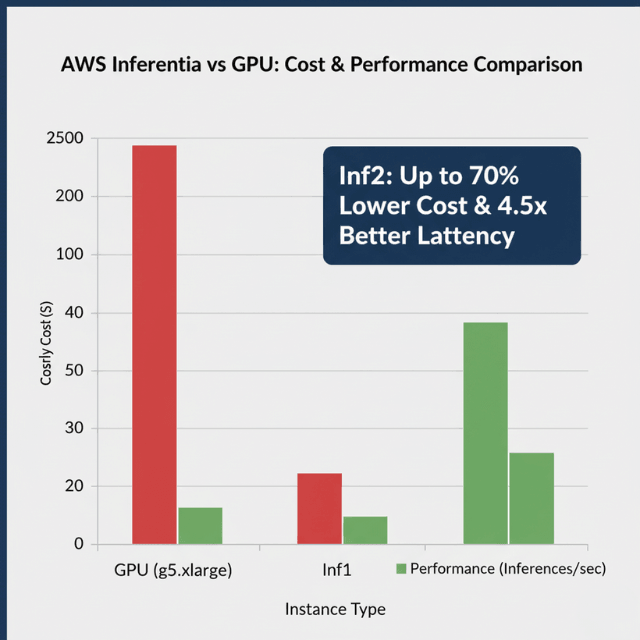
For newer Inf2 instances, the improvements are even more dramatic, with up to 2.6x better throughput, 8.1x lower latency, and 50% better performance per watt.
An inf2.xlarge instance costs approximately $0.76 per hour compared to $1.006 per hour for a g5.xlarge with a single NVIDIA A10G GPU.
The real cost advantage emerges when examining performance per dollar, where AWS Inferentia2 delivers 4.5x better latency than NVIDIA A10G GPUs.
Real-world implementations demonstrate these cost savings at scale. Amazon Search reduced ML inference costs by 85% using AWS Inferentia-based Inf1 instances.
Condé Nast observed a 72% reduction in cost compared to previously deployed GPU instances. Actuate achieved up to 70% cost savings out-of-the-box, with further optimization reducing inference costs by 91%.
Optimizing Models for Inferentia
Optimizing models for Inferentia is essential for realizing maximum cost savings. The AWS Neuron SDK provides comprehensive tools for model compilation and optimization.
The Neuron Compiler transforms models from frameworks like TensorFlow, PyTorch, and MXNet into optimized executables through operator fusion, memory layout optimization, and computation scheduling.
When compiling models, consider batch size carefully. Inferentia performs optimally with specific batch sizes depending on your model architecture.
Start with batch size 1 and increment gradually, testing performance at each step to find the optimal balance between throughput and latency. Input shape optimization is also critical, as Neuron requires fixed input shapes at compile time.
Operator compatibility is essential for successful deployment. While Neuron supports a wide range of common deep learning operators, some custom or rarely-used operators may not be natively supported.
Review the Neuron Model Architecture Fit Guidelines to understand which operations map efficiently to Inferentia hardware.
Choosing the Right Inferentia Instance
Selecting the appropriate Inferentia instance type is fundamental to achieving optimal cost savings. Inf1 instances come in four sizes: inf1.xlarge, inf1.2xlarge, inf1.6xlarge, and inf1.24xlarge.
The xlarge variant contains a single Inferentia chip with 4 NeuronCores, while the largest 24xlarge instance includes 16 Inferentia chips with 64 NeuronCores total.
Inf2 instances offer superior performance and come in multiple configurations: inf2.xlarge, inf2.8xlarge, inf2.24xlarge, and inf2.48xlarge.
An inf2.xlarge provides a single Inferentia2 chip, while the massive inf2.48xlarge includes 12 Inferentia2 chips with enough memory to load 175-billion parameter models.
Right-sizing your instance requires understanding workload characteristics. For low-to-moderate throughput applications with small models, start with inf1.xlarge or inf2.xlarge instances.
For higher throughput applications, larger instances allow you to consolidate multiple models or serve higher request volumes on fewer instances, potentially reducing total cost.
Multi-Model Serving Strategies
Multi-model serving is a powerful strategy for improving cost savings by consolidating multiple ML models onto shared Inferentia instances.
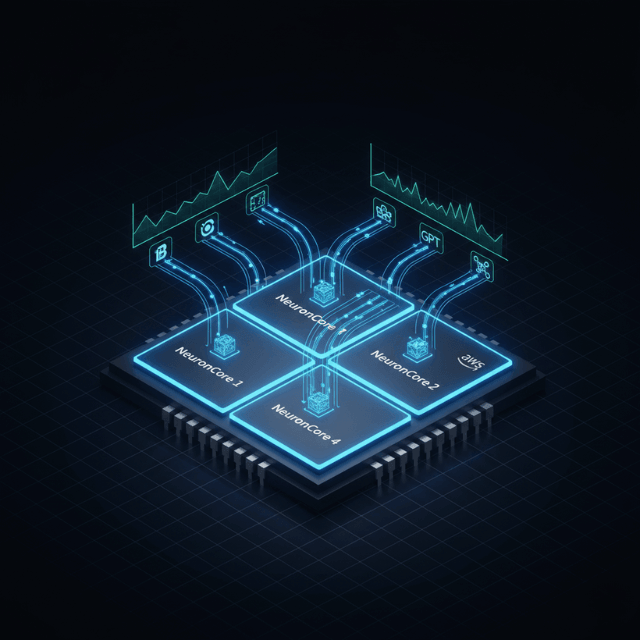
Since Inferentia instances contain multiple NeuronCores (4 to 64 depending on instance size), you can run different models on different cores, processing inference requests concurrently without performance interference.
Implementation begins with model compilation for multi-model deployment. Compile each model independently using Neuron SDK, specifying the target NeuronCore count for each model.
Plan your NeuronCore allocation to match expected request volumes for each model. Dynamic model loading and unloading further enhances cost efficiency.
Amazon SageMaker multi-model endpoints support loading models on-demand based on incoming traffic, automatically unloading less frequently used models to free resources.
A remarkable example demonstrated serving 3,000 deep learning models on Amazon EKS with AWS Inferentia for under $50 per hour.
Conclusion
AWS Inferentia cost savings represent a transformative opportunity for organizations deploying machine learning models at scale. With documented cost reductions ranging from 56% to 91%, Inferentia has proven itself as a viable alternative to traditional GPU-based inference infrastructure.
Success depends on proper model optimization using the Neuron SDK, right-sizing Inferentia instances for workload characteristics, and leveraging techniques like batch processing and multi-model serving to maximize resource utilization.
As ML inference continues to grow as a percentage of total AI infrastructure costs, AWS Inferentia provides a powerful tool for controlling costs while maintaining performance.
Frequently Asked Questions
What types of models work best with AWS Inferentia?
AWS Inferentia performs exceptionally well with computer vision models (CNNs, object detection, image classification), natural language processing models (BERT, transformers, LSTM), and recommendation systems.
The newer Inferentia2 instances support large language models up to 175 billion parameters including GPT-3 and BLOOM. Models using standard operators from popular frameworks like TensorFlow, PyTorch, and MXNet generally compile successfully for Inferentia.
How long does it take to migrate from GPU to Inferentia?
Migration timelines vary based on model complexity and team familiarity with Neuron SDK. Simple models with straightforward architectures can be compiled and deployed in days.
More complex migrations involving custom operators or requiring significant optimization may take weeks. Most organizations see accelerating migration velocity as they gain experience.
Can I use Inferentia for model training?
No, AWS Inferentia is designed specifically for inference workloads, not training. For training, AWS offers Trainium chips powering Trn1 instances.
However, you can use GPU instances for training and Inferentia for inference, optimizing costs by using the most appropriate hardware for each phase of the ML lifecycle.
Summarize this post with:
Ready to put this into production?
Our engineers have deployed these architectures across 100+ client engagements — from AWS migrations to Kubernetes clusters to AI infrastructure. We turn complex cloud challenges into measurable outcomes.